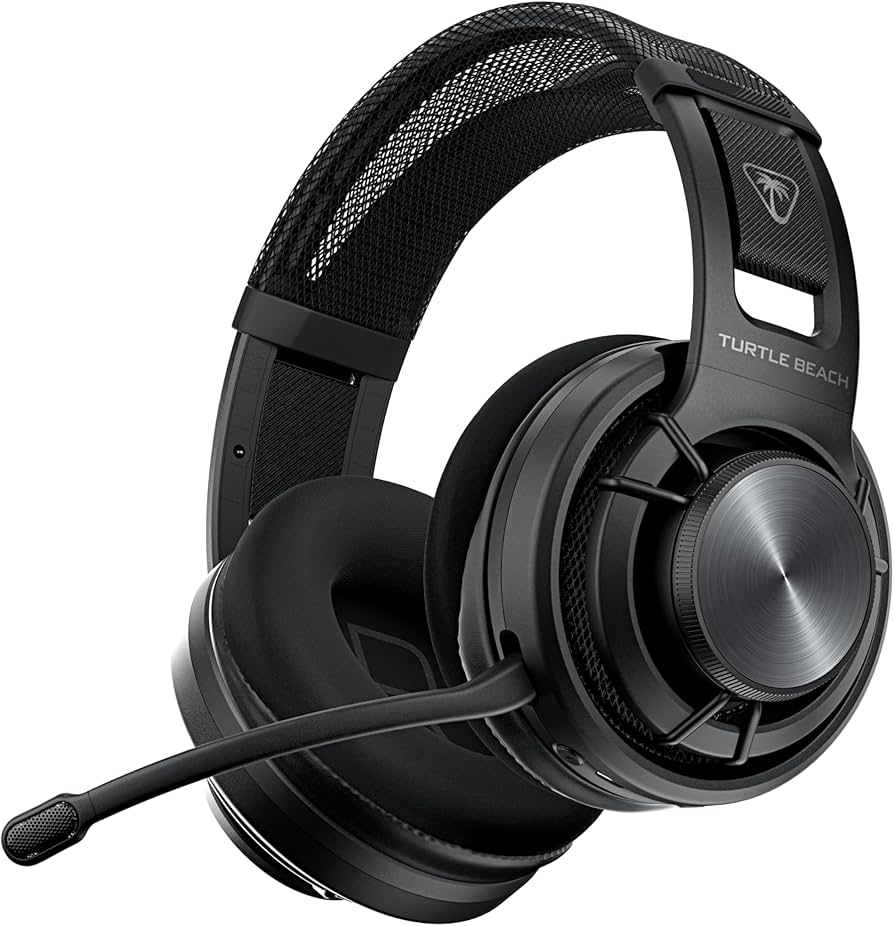
Turtle Beach Atlas Air Wireless Gaming Headset (Black)
Discover the Turtle Beach Atlas Air, a headset designed to elevate your audio experience across all your devices. With its athletic weave fabric and memory foam earpads, it delivers comfort for endless hours of gaming or music enjoyment. The Atlas Air is engineered for sound quality. Experience the full spectrum of audio with a frequency response of 20 - 40000 Hz and Hi-Fi stereo sound, bringing your games and media to life. Flexibility is key, and the Atlas Air offers both wired and wireless connectivity, including Bluetooth 5.2 and a 3.5 mm jack, making it the perfect companion for your computer, game console, or portable electronics. It's equipped with features like Superhuman Hearing sound effects, a detachable microphone, and QuickSwitch technology, allowing you to adapt to any audio environment. Plus, with a long-lasting 800 mAh rechargeable battery, the Atlas Air is ready to go whenever you are, ensuring you stay connected to your games and music wherever you are.
Discover the Turtle Beach Atlas Air, a headset designed to elevate your audio experience across all your devices. With its athletic weave fabric and memory foam earpads, it delivers comfort for endless hours of gaming or music enjoyment. The Atlas Air is engineered for sound quality. Experience the full spectrum of audio with a frequency response of 20 - 40000 Hz and Hi-Fi stereo sound, bringing your games and media to life. Flexibility is key, and the Atlas Air offers both wired and wireless connectivity, including Bluetooth 5.2 and a 3.5 mm jack, making it the perfect companion for your computer, game console, or portable electronics. It's equipped with features like Superhuman Hearing sound effects, a detachable microphone, and QuickSwitch technology, allowing you to adapt to any audio environment. Plus, with a long-lasting 800 mAh rechargeable battery, the Atlas Air is ready to go whenever you are, ensuring you stay connected to your games and music wherever you are.
Discover the Turtle Beach Atlas Air, a headset designed to elevate your audio experience across all your devices. With its athletic weave fabric and memory foam earpads, it delivers comfort for endless hours of gaming or music enjoyment. The Atlas Air is engineered for sound quality. Experience the full spectrum of audio with a frequency response of 20 - 40000 Hz and Hi-Fi stereo sound, bringing your games and media to life. Flexibility is key, and the Atlas Air offers both wired and wireless connectivity, including Bluetooth 5.2 and a 3.5 mm jack, making it the perfect companion for your computer, game console, or portable electronics. It's equipped with features like Superhuman Hearing sound effects, a detachable microphone, and QuickSwitch technology, allowing you to adapt to any audio environment. Plus, with a long-lasting 800 mAh rechargeable battery, the Atlas Air is ready to go whenever you are, ensuring you stay connected to your games and music wherever you are.
Discover the Turtle Beach Atlas Air, a headset designed to elevate your audio experience across all your devices. With its athletic weave fabric and memory foam earpads, it delivers comfort for endless hours of gaming or music enjoyment. The Atlas Air is engineered for sound quality. Experience the full spectrum of audio with a frequency response of 20 - 40000 Hz and Hi-Fi stereo sound, bringing your games and media to life. Flexibility is key, and the Atlas Air offers both wired and wireless connectivity, including Bluetooth 5.2 and a 3.5 mm jack, making it the perfect companion for your computer, game console, or portable electronics. It's equipped with features like Superhuman Hearing sound effects, a detachable microphone, and QuickSwitch technology, allowing you to adapt to any audio environment. Plus, with a long-lasting 800 mAh rechargeable battery, the Atlas Air is ready to go whenever you are, ensuring you stay connected to your games and music wherever you are.
in 31 offers
The lowest price for Turtle Beach Atlas Air Wireless Gaming Headset (Black) right now is $199.00 at Cash Converters, compared across 20 retailers.
The all-time low was $77.26 on 15 Mar 2026 — today's price is 158% above the lowest ever. It has been notably cheaper before — worth setting a price alert.
Prices last updated 7 Oct 2026.
Last updated at 07/10/2026 07:56:54
Turtle Beach Atlas Air Wireless Gaming Headset for PC, PlayStation, Xbox and Mobile - Black
Free delivery
Affiliate Disclosure: We may receive a small commission for purchases made through this link at no extra cost to you. This helps support our site. Thank you!
Turtle Beach Atlas Air Black Gaming Headset
Delivery $36.45
Turtle Beach TBS-5101-05 ATLAS AIR PC
7-day returns
Premium Turtle Beach Atlas Air Wireless Gaming Headset (free Ship)
Free delivery
Affiliate Disclosure: We may receive a small commission for purchases made through this link at no extra cost to you. This helps support our site. Thank you!
Turtle Beach Atlas Air Wireless Bluetooth USB-A Gaming Headset
Free delivery
Turtle Beach Headset Atlas Air Black
Free delivery between 13–21 Oct
Turtle Beach Atlas Air Wireless Bluetooth USB-A Gaming Headset
Free delivery
Turtle Beach Atlas Air Wireless Bluetooth USB-A Gaming Headset
Delivery between 10–18 Oct $10
Turtle Beach Atlas Air Wireless Bluetooth USB-A Gaming Headset
Free delivery between 10–14 Oct
Turtle Beach Atlas Air Wireless Gaming Headset (Black)
Free delivery
originally posted on bestbuy.com
I struggle to find headsets that offer high fidelity audio and all day comfort, so I was excited to pick up the Turtle Beach Atlas Air headset.In the box is the headset, wireless dongle, USB-A to USB-C charging cable, 3.5mm audio cable, and carry bag. Setup is easy, I recommend installing the Swarm II app for eq, firmware update, and setting adjustment, however not required, the rest of the setup is plug and play.Upon setup, the first thing you will notice is the build. The headset is big but extremely light weight at 302g compared to headsets of this size. The outer band is formed from two flexible supports and wrapped in a mesh fabric, this provides the utmost comfort for pressure against the side of the head. Under the outer band is the fabric floating band, ... MoreI struggle to find headsets that offer high fidelity audio and all day comfort, so I was excited to pick up the Turtle Beach Atlas Air headset.In the box is the headset, wireless dongle, USB-A to USB-C charging cable, 3.5mm audio cable, and carry bag. Setup is easy, I recommend installing the Swarm II app for eq, firmware update, and setting adjustment, however not required, the rest of the setup is plug and play.Upon setup, the first thing you will notice is the build. The headset is big but extremely light weight at 302g compared to headsets of this size. The outer band is formed from two flexible supports and wrapped in a mesh fabric, this provides the utmost comfort for pressure against the side of the head. Under the outer band is the fabric floating band, which is adjustable via velcro tighteners on both sites. This setup allows for fit customization versus having preset floating band attachment points. Next is the ear cuffs which are made of a light weight foam covered in fabric. Sitting on my desk they feel cooler than the ambient air temperature, and zero heat build up even after hours of wearing. On the left cuff is the removable mic which disconnects such that the hinge will fully tuck inside the cuff for a smooth profile, see photo. From front to back on the left cuff is flip to mute mic, Bluetooth pairing, USB-C charging port, audio in port, quick switch to swap between 2.4GHz wireless and Bluetooth, and the power button. The volume control is the outermost ring on the side of the ear cuff, which is nice, no accidental bumps or fumbling around trying to get the right control. There are no controls on the right cuff.I've used this headset with a work laptop, gaming desktop and a few different Android devices. The comfort of fit means that this can go with me from the office (great for long conference calls) and easily transition straight into post work game mode. The Swarm II app is standard, it has all the basics such as default presets (signature sound, bass boost, bass and treble boost, and vocal boost), eq adjustments, as well as battery status, connection type, mic sensitivity, noise gate and mic monitoring volume.As far as audio quality, with wired, Bluetooth, and 2.4GHz wireless connection, there is no lag for low bandwidth items such as video conferencing or streaming. I did see a barely noticeable lag on Bluetooth with my work laptop, but that is likely impacted by external factors and interference. With the 10 point EQ and the ability to save custom presets, I found that the headset could perform well in all arenas from music to gaming. The audio fidelity is at the level I expect of a high end headset. Nuances and game immersion are there, sounds don't seem flat or over driven, and the mic boasts a 16-bit, 32 kHz sampling rate, so no one will miss your strategy plan or pleas for help.Overall, I think this headset is a win. Make sure you update your firmware, and leverage either the Swarm II or something like WAVE 3D audio software to adjust eq and settings to your preference. With the complete comfort of this headset, you can wear them all day as you experiment with the settings to find your perfect profile.
originally posted on bestbuy.com
This is a genuinely nice, light weight wireless headset. It's comfortable and easy to wear even with glasses, which is a number one factor for me. I can easily wear these all-day gaming, consuming content on them. You get dual connectivity for the wireless 2.4ghz dongle and Bluetooth. I used this with the dongle for the best gaming audio performance and limited/no lag audio.Setup with the dongle was easy, insert dongle, wait for my gaming PC to update drivers and I was able to use it with no issues. The Mic was perfectly serviceable for discord/in-game chat with friends and no complaints about my voice quality, my gameplay is a different matter. The Mic flips up easily to mute which is a nice feature as you know quickly if on mute or not.My favorite feature that ... MoreThis is a genuinely nice, light weight wireless headset. It's comfortable and easy to wear even with glasses, which is a number one factor for me. I can easily wear these all-day gaming, consuming content on them. You get dual connectivity for the wireless 2.4ghz dongle and Bluetooth. I used this with the dongle for the best gaming audio performance and limited/no lag audio.Setup with the dongle was easy, insert dongle, wait for my gaming PC to update drivers and I was able to use it with no issues. The Mic was perfectly serviceable for discord/in-game chat with friends and no complaints about my voice quality, my gameplay is a different matter. The Mic flips up easily to mute which is a nice feature as you know quickly if on mute or not.My favorite feature that I wish more wireless headsets had been the volume control. Instead of being buttons you have to feel around for on the side or just use hot keys on your PC, the dial is the earcup. It is easy to find and rotates freely, meaning it was easy for me to adjust the sound levels without having to fumble, hand up to ear and away you go, this is something I wish more headsets would consider as it's a simple but amazingly effective way to adjust your volume on your headset that I approve.Overall, this is a great gaming headset with excellent sound and some QoL features not found on other headsets, which sit very comfortably on your head. and it comes with a nice little cloth bag to carry the headphones and accessories so you if you gaming on the go everything is contained easily for transport.
originally posted on bestbuy.com
Turtle Beach makes some of my favorite headsets and the Atlas continues that trend. This is the supposedly first “open back” wireless gaming headset. I found it to be extremely comfortable to wear. It provides exceptional audio quality, although it does let in ambient sound (it’s open back). It’s versatile and can connect to any PC or console, via Bluetooth, USB cable, or the USB-A dongle.IN THE BOXI was pleasantly surprised to see all the included accessories. Albeit it isn’t much, but in an age where you no longer get charging bricks for your phones, I was pleased. Obviously you get the headset, a removable boom microphone, a USB dongle, a 3.5 MM cable (for Xbox controllers), a USB cable to connect, and a soft carrying case. The latter won’t give you much ... MoreTurtle Beach makes some of my favorite headsets and the Atlas continues that trend. This is the supposedly first “open back” wireless gaming headset. I found it to be extremely comfortable to wear. It provides exceptional audio quality, although it does let in ambient sound (it’s open back). It’s versatile and can connect to any PC or console, via Bluetooth, USB cable, or the USB-A dongle.IN THE BOXI was pleasantly surprised to see all the included accessories. Albeit it isn’t much, but in an age where you no longer get charging bricks for your phones, I was pleased. Obviously you get the headset, a removable boom microphone, a USB dongle, a 3.5 MM cable (for Xbox controllers), a USB cable to connect, and a soft carrying case. The latter won’t give you much protection per se, but I appreciate it being included.DESIGNThe headphones are made of mostly plastic with an elastic headband underneath the ear band. The ear cups feel like memory foam with slick feeling fabric covering it. They’re very plush. THe volume is controlled by “dial” on the left ear cup. I love this placement. There’s only three other buttons, all placed on the left side, with two inputs (one is USB-C for charging, the other is 3.5 MM port). The only buttons are power, switching between wireless mode and Bluetooth mode, and the Bluetooth button (I used it to put the headphones into pairing mode). I’m always for the fewer buttons the better.There’s also a microphone that can be detached. I’m not sure why you would ever take it off, unless you never plan on chatting through your headset, but the option is there. And when it’s attached, you can still swivel it upwards which mutes the microphone. And the entire boom mike is flexible (it looks like stiff plastic) which gives you flexibility on microphone placement in front of your mouth to get the best sound.The headphones have a floating ear cup design. It’s tough to describe, but imagine your standard over the ear headphones that have an extended headband, and swiveling ear cups (swiveling left to right). Hare, the ear band doesn’t extend - it’s large and uses the elastic band underneath - and rather than having ear cups that swivel to fit your head, the ear cups inside the headband are attached by rubber strings under tension, so the earcup portion swivels all around. I like the design choice because it looks good and it does seem more comfortable. There’s not a great deal of tension, just a little flexibility for the earcup to fit around your head.The one downside to the design is that these are some big headphones. I hesitate to say bulky because that implies that they’re heavy, which they’re not - they’re extremely light - but if you were to look at yourself in the mirror with these on, you’ll notice some big ear cups on the side of your head. I’m assuming this was an attempt to keep moving parts down and keeping the weight down. It’s as if it was designed to fit the biggest head - without extending the ear band - while having elastic underneath that fits smaller heads. And I’ll add that the elastic band is good enough to keep the headphones in place, but does put any noticeable pressure on your head. In other words, these headphones are big, but light and very comfortable to wear.GETTING STARTEDIs pretty easy, like most other gaming headsets and/or Bluetooth headphones. You can plug the USB dongle into your PS5 or PC and get going immediately. Or plug the 3.5 MM cable into your Xbox controller. Pairing it to your phone is dead simple, just put it in Bluetooth mode and then hit the Bluetooth pairing button to put it in pairing mode.But you’ll want to consider downloading the Turtle Beach Swarm II app, either on your phone or PC. I believe both will accomplish the same thing, although I only downloaded it on my phone. When paired to your phone, you’ll open the app and the first thing you’ll be prompted to do is to download a firmware update. But, even if you skip this part, it should still work (it did for me before I downloaded any firmware).AUDIO PERFORMANCEI’m no audiophile, but I was pleasantly surprised by the rich and realistic audio produced by the headphones. They’re open, however, meaning ambient noise will be let in. When I’m playing video games in my basement, this is no issue, but when I wear them while working (with a fan on behind me) I can hear the fan running. Basically, there’s no “seal” to your ears, and certainly no noise cancellation. For most, I only see this as a problem if you’re wanting to listen to music at your desk and want to block out outside noise. But there’s also the convenience of being able to hear someone talking to you (letting you know they’re there) while wearing them and listening to music/playing games. This is obviously all personal preference. But just know that the open design does not diminish the audio quality, in some respects, I think it gives more realistic audio because of its openness. Of course, this means the bass isn’t quite as punchy as other enclosed headphones, but punchy bass isn’t always realistic.When listening to music at my desk, I was impressed by the dynamic sound. It’s very clear and rich. When gaming, they worked great at surround sound, allowing me to hear enemy footsteps from all around me. In short, I found the audio quality to be fantastic.SWARM IIThe app is great, as it’s easy to use and navigate and isn’t overwhelming. THere are a number of preset EQ settings, but you can also create your own. You can also adjust the microphone settings, increasing/decreasing sensitivity, noise gate, and monitoring volume (or sidetone). The monitoring volume was default to off (I like to hear feedback when I talk with headphones on so I don’t end up yelling). I was pleasantly surprised to see this feature and to me, increases its value. I could have lived without it, but it was a big plus to me. Notably, I haven’t downloaded the app on my PC, but the settings made on the phone seem to be saved to the headset, so the microphone and EQ settings seem to work no matter which program you adjust them on.CONCLUSIONIn a crowded field of gaming headsets, you are getting a large headset, but extremely light and comfortable to wear with terrific sound. The biggest thing to remember about the sound is ambient noise around you. It shouldn’t matter for gaming and may be a plus to some, but if you’re looking to be fully enclosed in whatever you’re listening to, and blocking out the rest of the world, this won’t do it. It’s also extremely flexible and the app is easy to use.
| Headphone Cup Type | Over-ear |
| Body Part Use | Head |
| Noise Cancellation Type | Active |
| Max Battery Life | 50 hours |
| Battery Highlights | Rechargeable, Quick Charge |

Turtle Beach Atlas Air Wireless Gaming Headset for PC, PlayStation, Xbox and Mobile - Black
Free delivery
Affiliate Disclosure: We may receive a small commission for purchases made through this link at no extra cost to you. This helps support our site. Thank you!
Turtle Beach Atlas Air Black Gaming Headset
Delivery $36.45
Turtle Beach TBS-5101-05 ATLAS AIR PC
7-day returns
Premium Turtle Beach Atlas Air Wireless Gaming Headset (free Ship)
Free delivery
Affiliate Disclosure: We may receive a small commission for purchases made through this link at no extra cost to you. This helps support our site. Thank you!
Turtle Beach Atlas Air Wireless Bluetooth USB-A Gaming Headset
Free delivery
I struggle to find headsets that offer high fidelity audio and all day comfort, so I was excited to pick up the Turtle Beach Atlas Air headset.In the box is the headset, wireless dongle, USB-A to USB-C charging cable, 3.5mm audio cable, and carry bag. Setup is easy, I recommend installing the Swarm II app for eq, firmware update, and setting adjustment, however not required, the rest of the setup is plug and play.Upon setup, the first thing you will notice is the build. The headset is big but extremely light weight at 302g compared to headsets of this size. The outer band is formed from two flexible supports and wrapped in a mesh fabric, this provides the utmost comfort for pressure against the side of the head. Under the outer band is the fabric floating band, ... MoreI struggle to find headsets that offer high fidelity audio and all day comfort, so I was excited to pick up the Turtle Beach Atlas Air headset.In the box is the headset, wireless dongle, USB-A to USB-C charging cable, 3.5mm audio cable, and carry bag. Setup is easy, I recommend installing the Swarm II app for eq, firmware update, and setting adjustment, however not required, the rest of the setup is plug and play.Upon setup, the first thing you will notice is the build. The headset is big but extremely light weight at 302g compared to headsets of this size. The outer band is formed from two flexible supports and wrapped in a mesh fabric, this provides the utmost comfort for pressure against the side of the head. Under the outer band is the fabric floating band, which is adjustable via velcro tighteners on both sites. This setup allows for fit customization versus having preset floating band attachment points. Next is the ear cuffs which are made of a light weight foam covered in fabric. Sitting on my desk they feel cooler than the ambient air temperature, and zero heat build up even after hours of wearing. On the left cuff is the removable mic which disconnects such that the hinge will fully tuck inside the cuff for a smooth profile, see photo. From front to back on the left cuff is flip to mute mic, Bluetooth pairing, USB-C charging port, audio in port, quick switch to swap between 2.4GHz wireless and Bluetooth, and the power button. The volume control is the outermost ring on the side of the ear cuff, which is nice, no accidental bumps or fumbling around trying to get the right control. There are no controls on the right cuff.I've used this headset with a work laptop, gaming desktop and a few different Android devices. The comfort of fit means that this can go with me from the office (great for long conference calls) and easily transition straight into post work game mode. The Swarm II app is standard, it has all the basics such as default presets (signature sound, bass boost, bass and treble boost, and vocal boost), eq adjustments, as well as battery status, connection type, mic sensitivity, noise gate and mic monitoring volume.As far as audio quality, with wired, Bluetooth, and 2.4GHz wireless connection, there is no lag for low bandwidth items such as video conferencing or streaming. I did see a barely noticeable lag on Bluetooth with my work laptop, but that is likely impacted by external factors and interference. With the 10 point EQ and the ability to save custom presets, I found that the headset could perform well in all arenas from music to gaming. The audio fidelity is at the level I expect of a high end headset. Nuances and game immersion are there, sounds don't seem flat or over driven, and the mic boasts a 16-bit, 32 kHz sampling rate, so no one will miss your strategy plan or pleas for help.Overall, I think this headset is a win. Make sure you update your firmware, and leverage either the Swarm II or something like WAVE 3D audio software to adjust eq and settings to your preference. With the complete comfort of this headset, you can wear them all day as you experiment with the settings to find your perfect profile.
This is a genuinely nice, light weight wireless headset. It's comfortable and easy to wear even with glasses, which is a number one factor for me. I can easily wear these all-day gaming, consuming content on them. You get dual connectivity for the wireless 2.4ghz dongle and Bluetooth. I used this with the dongle for the best gaming audio performance and limited/no lag audio.Setup with the dongle was easy, insert dongle, wait for my gaming PC to update drivers and I was able to use it with no issues. The Mic was perfectly serviceable for discord/in-game chat with friends and no complaints about my voice quality, my gameplay is a different matter. The Mic flips up easily to mute which is a nice feature as you know quickly if on mute or not.My favorite feature that ... MoreThis is a genuinely nice, light weight wireless headset. It's comfortable and easy to wear even with glasses, which is a number one factor for me. I can easily wear these all-day gaming, consuming content on them. You get dual connectivity for the wireless 2.4ghz dongle and Bluetooth. I used this with the dongle for the best gaming audio performance and limited/no lag audio.Setup with the dongle was easy, insert dongle, wait for my gaming PC to update drivers and I was able to use it with no issues. The Mic was perfectly serviceable for discord/in-game chat with friends and no complaints about my voice quality, my gameplay is a different matter. The Mic flips up easily to mute which is a nice feature as you know quickly if on mute or not.My favorite feature that I wish more wireless headsets had been the volume control. Instead of being buttons you have to feel around for on the side or just use hot keys on your PC, the dial is the earcup. It is easy to find and rotates freely, meaning it was easy for me to adjust the sound levels without having to fumble, hand up to ear and away you go, this is something I wish more headsets would consider as it's a simple but amazingly effective way to adjust your volume on your headset that I approve.Overall, this is a great gaming headset with excellent sound and some QoL features not found on other headsets, which sit very comfortably on your head. and it comes with a nice little cloth bag to carry the headphones and accessories so you if you gaming on the go everything is contained easily for transport.
Turtle Beach makes some of my favorite headsets and the Atlas continues that trend. This is the supposedly first “open back” wireless gaming headset. I found it to be extremely comfortable to wear. It provides exceptional audio quality, although it does let in ambient sound (it’s open back). It’s versatile and can connect to any PC or console, via Bluetooth, USB cable, or the USB-A dongle.IN THE BOXI was pleasantly surprised to see all the included accessories. Albeit it isn’t much, but in an age where you no longer get charging bricks for your phones, I was pleased. Obviously you get the headset, a removable boom microphone, a USB dongle, a 3.5 MM cable (for Xbox controllers), a USB cable to connect, and a soft carrying case. The latter won’t give you much ... MoreTurtle Beach makes some of my favorite headsets and the Atlas continues that trend. This is the supposedly first “open back” wireless gaming headset. I found it to be extremely comfortable to wear. It provides exceptional audio quality, although it does let in ambient sound (it’s open back). It’s versatile and can connect to any PC or console, via Bluetooth, USB cable, or the USB-A dongle.IN THE BOXI was pleasantly surprised to see all the included accessories. Albeit it isn’t much, but in an age where you no longer get charging bricks for your phones, I was pleased. Obviously you get the headset, a removable boom microphone, a USB dongle, a 3.5 MM cable (for Xbox controllers), a USB cable to connect, and a soft carrying case. The latter won’t give you much protection per se, but I appreciate it being included.DESIGNThe headphones are made of mostly plastic with an elastic headband underneath the ear band. The ear cups feel like memory foam with slick feeling fabric covering it. They’re very plush. THe volume is controlled by “dial” on the left ear cup. I love this placement. There’s only three other buttons, all placed on the left side, with two inputs (one is USB-C for charging, the other is 3.5 MM port). The only buttons are power, switching between wireless mode and Bluetooth mode, and the Bluetooth button (I used it to put the headphones into pairing mode). I’m always for the fewer buttons the better.There’s also a microphone that can be detached. I’m not sure why you would ever take it off, unless you never plan on chatting through your headset, but the option is there. And when it’s attached, you can still swivel it upwards which mutes the microphone. And the entire boom mike is flexible (it looks like stiff plastic) which gives you flexibility on microphone placement in front of your mouth to get the best sound.The headphones have a floating ear cup design. It’s tough to describe, but imagine your standard over the ear headphones that have an extended headband, and swiveling ear cups (swiveling left to right). Hare, the ear band doesn’t extend - it’s large and uses the elastic band underneath - and rather than having ear cups that swivel to fit your head, the ear cups inside the headband are attached by rubber strings under tension, so the earcup portion swivels all around. I like the design choice because it looks good and it does seem more comfortable. There’s not a great deal of tension, just a little flexibility for the earcup to fit around your head.The one downside to the design is that these are some big headphones. I hesitate to say bulky because that implies that they’re heavy, which they’re not - they’re extremely light - but if you were to look at yourself in the mirror with these on, you’ll notice some big ear cups on the side of your head. I’m assuming this was an attempt to keep moving parts down and keeping the weight down. It’s as if it was designed to fit the biggest head - without extending the ear band - while having elastic underneath that fits smaller heads. And I’ll add that the elastic band is good enough to keep the headphones in place, but does put any noticeable pressure on your head. In other words, these headphones are big, but light and very comfortable to wear.GETTING STARTEDIs pretty easy, like most other gaming headsets and/or Bluetooth headphones. You can plug the USB dongle into your PS5 or PC and get going immediately. Or plug the 3.5 MM cable into your Xbox controller. Pairing it to your phone is dead simple, just put it in Bluetooth mode and then hit the Bluetooth pairing button to put it in pairing mode.But you’ll want to consider downloading the Turtle Beach Swarm II app, either on your phone or PC. I believe both will accomplish the same thing, although I only downloaded it on my phone. When paired to your phone, you’ll open the app and the first thing you’ll be prompted to do is to download a firmware update. But, even if you skip this part, it should still work (it did for me before I downloaded any firmware).AUDIO PERFORMANCEI’m no audiophile, but I was pleasantly surprised by the rich and realistic audio produced by the headphones. They’re open, however, meaning ambient noise will be let in. When I’m playing video games in my basement, this is no issue, but when I wear them while working (with a fan on behind me) I can hear the fan running. Basically, there’s no “seal” to your ears, and certainly no noise cancellation. For most, I only see this as a problem if you’re wanting to listen to music at your desk and want to block out outside noise. But there’s also the convenience of being able to hear someone talking to you (letting you know they’re there) while wearing them and listening to music/playing games. This is obviously all personal preference. But just know that the open design does not diminish the audio quality, in some respects, I think it gives more realistic audio because of its openness. Of course, this means the bass isn’t quite as punchy as other enclosed headphones, but punchy bass isn’t always realistic.When listening to music at my desk, I was impressed by the dynamic sound. It’s very clear and rich. When gaming, they worked great at surround sound, allowing me to hear enemy footsteps from all around me. In short, I found the audio quality to be fantastic.SWARM IIThe app is great, as it’s easy to use and navigate and isn’t overwhelming. THere are a number of preset EQ settings, but you can also create your own. You can also adjust the microphone settings, increasing/decreasing sensitivity, noise gate, and monitoring volume (or sidetone). The monitoring volume was default to off (I like to hear feedback when I talk with headphones on so I don’t end up yelling). I was pleasantly surprised to see this feature and to me, increases its value. I could have lived without it, but it was a big plus to me. Notably, I haven’t downloaded the app on my PC, but the settings made on the phone seem to be saved to the headset, so the microphone and EQ settings seem to work no matter which program you adjust them on.CONCLUSIONIn a crowded field of gaming headsets, you are getting a large headset, but extremely light and comfortable to wear with terrific sound. The biggest thing to remember about the sound is ambient noise around you. It shouldn’t matter for gaming and may be a plus to some, but if you’re looking to be fully enclosed in whatever you’re listening to, and blocking out the rest of the world, this won’t do it. It’s also extremely flexible and the app is easy to use.
I have about 5-6 different gaming headsets that I have picked up over the years; everything from super high end surround sound capable gaming headsets to simple 2 channel headsets as well as expensive earbuds which I have sometimes used for gaming. None, and I mean absolutely none of them have ever felt as comfortable as this headset.The meshed floating headband makes the headset simply just rest on the top of my head. It doesn't push down or left up or anything. It is incredibly comfortable.The floating earcup design too is game changing. It allows the headset to fit tight without being too tight or causing ear fatigue or headaches or any type of pressure on my head. It is truly revolutionary & as I said before, game changing. I wish every on-ear headphones ... MoreI have about 5-6 different gaming headsets that I have picked up over the years; everything from super high end surround sound capable gaming headsets to simple 2 channel headsets as well as expensive earbuds which I have sometimes used for gaming. None, and I mean absolutely none of them have ever felt as comfortable as this headset.The meshed floating headband makes the headset simply just rest on the top of my head. It doesn't push down or left up or anything. It is incredibly comfortable.The floating earcup design too is game changing. It allows the headset to fit tight without being too tight or causing ear fatigue or headaches or any type of pressure on my head. It is truly revolutionary & as I said before, game changing. I wish every on-ear headphones would have/license this from Turtle Beach because that is how insanely comfortable this headset is.Now, what about the sound quality? It is really good but it is not great. What do I mean by that? Well, for a sub-$200 headset it is perfectly acceptable and has done well for me when gaming, during video calls for work and even during normal phone calls for work. The tilting microphone with auto-mute when flicked up into the folded pointing upward position (standard with most headsets with a mic) isn't a bad design although I really do like the microphones that detract back into the headset. However, it does allow you to remove the microphone entirely by detaching it from the headset. However, knowing myself, and my family, if I did this I would lose it within the same day. So I just flip it upright to mute. Anywho, back to the sound quality, so the microphone is crystal clear, the speakers in the headphone are really good but like I said not overly great but I did like them a lot. I wish there was a built-in voice changer for the microphone or even specific game equalizers for the headphones (built-in to the app that we could select I mean of course) but there isn't. Would have been a great feature to have but it isn't a deal breaker because the speakers, microphone, etc are more than acceptable.I cannot say enough how comfortable these headphones are. I wish they were 7.1 (or higher) surround sound but for the price & with the comfort I really, really enjoy this gaming headset.
I have always been a fan of turtle beach so was very excited to try this headset out. The out of box experience went great, easy to remove the tape and unpackage. I was really impressed how things were packaged and the pouch it comes with. The cords are made very well and had great lengths, very snug connections. It comes partially charged so strongly recommend fully charging before proceeding with the setup.Setup was a pain, the QR code on the phone brought software that didn’t properly work on my android note 20 ultra as it would never detect the headset. So instead went through the PC setup for the software. The PC setup software updates the dongle and the headset however it randomly turned of the headset without noticed to where had to reconnect. Thankfully it ... MoreI have always been a fan of turtle beach so was very excited to try this headset out. The out of box experience went great, easy to remove the tape and unpackage. I was really impressed how things were packaged and the pouch it comes with. The cords are made very well and had great lengths, very snug connections. It comes partially charged so strongly recommend fully charging before proceeding with the setup.Setup was a pain, the QR code on the phone brought software that didn’t properly work on my android note 20 ultra as it would never detect the headset. So instead went through the PC setup for the software. The PC setup software updates the dongle and the headset however it randomly turned of the headset without noticed to where had to reconnect. Thankfully it appears it did not mess up the firmware update and seems to be part of the update. Just wished there would be prompted added that "headset may turn off during/after update". It also requires a reboot of the PC which is very inconvenience for just a headset firmware update.Sound quality was impressive, I really like how it comes with pre-setups of popular game titles. The physical large wheel to increase / decrease the sound is a great plus so you are not having to find / locate the volume wheel. The sound was crystal clear and able to block out all other external sounds. I do wish it would get louder, either I am starting to loose my hearing or there seems to be an issue with trying to hear the faint sounds in this headset.Mic quality was impressive, I love the extra touch of a mic cover on the microphone. It is flexible to a point, and picks up my voice without having to place it close to my mouth. If anything I have to move it away from my mouth as my friends says its too loud.Headset Comfort is amazing, I love how much padding there is for the ears and how its made for large ears like mine. It fits perfectly over my entire large ears and rests so comfortably I was able to use the headset for house without any discomfort. I also love how it rests on the top of my head. The extra band makes this headset extremely lightweight and I have never felt it was heavy / falling off my head.Battery life is very impressive, I would use this headset for multiple hours, multiple days, without having to worry about the headset dying.Overall I have been very impressed with this headset. I like the audibles when you switch from Bluetooth to dongle along with the power on/off, battery low. Overall I would recommend this product to try out for anyone looking for a good headset.
The Atlas Air is the 3rd Turtle Beach headset I’ve caught & released over the past few years. Specifically, I found the Recon & Stealth headsets to have fitment/comfort & usability issues--which was a shame because they SOUNDED great. When the Atlas Air came along w/a new design & interesting tricks up its sleeve, I really hoped this headset would land closer to the bullseye. In the end, however, the same kinds of problems w/comfort & ergonomics/usability cropped up, one of which turned out to be a deal-breaker.On the positive side, the open-back design really does add some spaciousness to the soundstage, especially with well-mastered music--some of that “in your head” feeling associated w/many closed-back headphones is appreciably opened up here. And for those of ... MoreThe Atlas Air is the 3rd Turtle Beach headset I’ve caught & released over the past few years. Specifically, I found the Recon & Stealth headsets to have fitment/comfort & usability issues--which was a shame because they SOUNDED great. When the Atlas Air came along w/a new design & interesting tricks up its sleeve, I really hoped this headset would land closer to the bullseye. In the end, however, the same kinds of problems w/comfort & ergonomics/usability cropped up, one of which turned out to be a deal-breaker.On the positive side, the open-back design really does add some spaciousness to the soundstage, especially with well-mastered music--some of that “in your head” feeling associated w/many closed-back headphones is appreciably opened up here. And for those of you who want to be mindful of the environment, the Airs do pass through most ambient noises so you can attend to both your game and the rest of the world.Construction is all plastic which makes the Airs reasonably light. Sizing is via lengthening/shortening an elastic suspension headband by securing its Velcro tabs higher or lower on the inside of the headband. The headband & strap is also wrapped in a fishnet-style material that helps keep air flowing.The earcups are fairly large & helpfully labeled L & R inside. The memory foam earpads are covered w/a spandex-type fabric rather than PU leather or mesh. The texture is comfortable against the skin & breathes well enough help reduce overheating. The Airs also feature a unique earcup support system using what looks like rubber O-rings. The rubber supports radiate from earcups like wheel spokes so that the tension/pull against the circular frame cutouts suspend the earcups in the middle. The elasticity of the support bands help reposition the earcups according to your anatomy as they are donned. It’s a neat idea & separates the Atlas Airs from the crowd.The lift-to-mute mic is detachable & thankfully retains shape/bends over several hours’ use; there is also a foam windscreen in the box. Mic audio quality was outstanding on both game chat & BT calls with teammates & callers reporting incredibly clear speech on their end. Other pack-ins include a wireless dongle, braided USB-A to USB-C charging cable, braided 3.5mm cable w/inline volume control, & a drawstring fabric bag for the headset w/an internal pocket large enough to hold all accessories.Controls & ports are on the left earcup: 3.5mm jack, USB-C power/update port, & buttons for power, BT pairing/multi-function (play/pause & call answer/end), & input switching between wireless & BT. The outer ring of the left earcup is conveniently a rotary volume control as well. A voice prompt indicates BT or wireless mode while all other status messages (power, EQ preset, mic mute, etc.) are collections of beeps/tones. The dongle's LED also changes colors indicating operating mode (BT, wireless, connecting/updating, etc.) & mic mute status.Other features are accessed w/Turtle Beach’s Swarm II app. It’s fairly straightforward w/many common headset features so most gamers will likely need little instruction. Adjustments include "superhuman hearing” settings; game/chat mix; chat volume/vocal boost; Waves 3D audio enhancements; mic sensitivity, sidetone volume, & noise gate; 10-band/9dB cut/boost EQ w/presets & custom settings for game & mic audio; as well as auto-off timing, dongle LED brightness, & readouts for drivers, firmware, charge level, etc. You will also be prompted to download/install the Turtle Beach Waves audio driver though thankfully there is no additional Waves app to worry about.So where did things start taking a turn? As a playback device, the Atlas Air supports audio resolution up to 24-bit/96kHz, enough for many high/ultrahigh-definition files/streams. I spun up some of reference tracks to see if the Airs could hold their own w/complex, multi-layered, & detailed musical passages as well as reproduce vocals without stridency or strain. The results were--fine, maybe even really good--just kind of boring.Don’t get me wrong, the Airs sounded VERY nice & provided a great deal of clarity & detail in the mid & higher registers without any hints of sibilance, screechiness, or exaggerated high-end sparkle, but the lower end just didn’t have much visceral oomph or impact without major EQ tweaks to fill out the sound. This is one potential shortcoming of open-backed drivers simply because there is no enclosure to naturally reinforce/enhance bass frequencies. And while I don’t consider myself a bass-head, I DO appreciate snappy, accurate, & responsive bass that also hits w/palpable heft when appropriate.I find such balance more critical in gaming headsets given that many games I play have very kinetic/bombastic soundfields (explosions, weapons, engine/rocket noise, busy ambient environments & musical accompaniment, etc.). With the Airs, game audio just felt a bit flat & unexciting. The Waves 3D “Game” setting did a little better at creating a lively & convincing sense of space/ambience, but sound source localization was not as precise as it was w/something more advanced like Dolby Atmos. All together, the best way I can describe the Atlas Air's sound is “polite.” If that is your jam given your gaming/listening preferences, these headphones will undoubtedly serve you well; for me, the sound wasn't wrong or bad, but it wasn’t very compelling, either.Speaking of polite, you'll have to remember to be so when gaming in public. Given the open backs, everyone within earshot will hear what you're hearing. But that goes the other way as well--when I tried gaming during a long flight layover, the surrounding din was so intrusive it was hard to concentrate on the game at all.Usability also took a few knocks. For example, when I downloaded the Swarm II installer, McAfee quarantined the file for a Cache! virus. I suspect this was a false-positive, but it wasn’t a very reassuring start. Upon first opening Swarm II, a message said the client I had *just* downloaded needed a version update. Once installed, I was prompted for headset & dongle firmware updates. After those, the headset wasn’t recognized until I unplugged & reinserted the dongle. At that point, another message indicated I had to download/install a Turtle Beach audio driver which required a full system reboot. It wasn't the worst installation I've dealt with, but I can see where it could get confusing/intimidating to someone setting up their first gaming rig.Infuriatingly, the onboard controls are the same size, shape, & placed closely together. Blind operation became unnecessarily irritating due to constant confusion of the power & input-switch buttons. The input switch is also at the bottom of the earcup where I naturally grasped when removing the headset, so I was CONSTANTLY changing from wireless to Bluetooth when doffing the Airs. Some controls or even additional functions could easily have been migrated to the other earcup to reduce confusion, maybe w/another rotary dial like the volume control to do things like change the EQ or Waves 3D setting on the fly (presently, you can only change those options from the Swarm II client).Long-term durability is also concerning. The headset [mostly] offers a robust build, especially the beefy earcups & sturdy headband that can be twisted/bent without any plasticy creaks or obvious signs of materials fatigue. However, the fishnet over the headband feels about as durable as a spider web & hangs like sheer gossamer just begging to get snagged on something sitting on your desk, couch, tabletop, etc. before holes/tears start to appear. Similarly, the suspension bands for the floating earcups better be made of some industrial-grade rubber as breakage from repetitive stretching or cracking from dry rot arent' unreasonable expectations.But the deal-breaker for me was [dis]comfort. Despite the lightweight build, the Atlas Air exerted a wholly unacceptable amount of clamping force on my ears that grew uncomfortable after only 15-20 minutes. After an hour, the pain was so great I was shifting the headphones several times a minute just to keep them on at all.There may be several factors at work. One is likely my anatomy. My hat size is 7 5/8"--not huge, but I usually wear an XL or XXL hat/helmet. Perhaps larger adult head sizes are not what Turtle Beach primarily designed the Airs to chiefly accommodate given the last-minute inward curve of the earcup mounts or the sharp headband arc that seemed to fight against its sustained expansion on my head.The floating earcup design may also be responsible how hot, fatigued, & sore my ears became. Specifically, while the elasticity of the supports means the Airs will naturally be repositioned to match your physiology in terms of inward/outward tilt & pivot, the range of tilt & pivot is not that great because the bands themselves are pulled taught & are not all that stretchy. As such, once they settle into place on your head, the support bands are constantly pulling/exerting tension & fighting against your anatomy to return to their neutral lengths & positions.Worse is that despite their large exterior, the earpad openings were not wide enough to fully enclose my ears. Thus, the headband's substantial inward clamping force & the return-to-neutral pull on the earcups yielded considerable & constant pressure on the skin & folds of my outer ear to the point that the headset became too painful to use. My daughter (w/a smaller noggin) found them quite comfortable; but for me, this was another Turtle Beach misfire despite by hopes to the contrary. Given my experience, even IF the Atlas Air's sound signature appeals to you, I cannot recommend them on a blind-buy--at the very least, try on a pair for yourself before committing these headphones to your collection or you might regret a potentially painful mistake!
When I first got my hands on the Turtle Beach Atlas Air Wireless Open Back Gaming Headset, I was pretty excited. I have had good experience with TB over the years, so I had high expectations. Unfortunately, my experience with this headset was a mixed bag, to say the least.Let’s start with the sound. Being an open-back headset, I expected a broad soundstage that would immerse me in my games. And while the soundstage was indeed wider than what you’d get with a closed-back headset, the execution fell flat. The bass response was underwhelming, lacking the punch and depth I’m used to from other good headsets. This really took away from the intensity of action-packed games. Plus, the sound leakage was quite noticeable. If you’re gaming in a shared space, be prepared for ... MoreWhen I first got my hands on the Turtle Beach Atlas Air Wireless Open Back Gaming Headset, I was pretty excited. I have had good experience with TB over the years, so I had high expectations. Unfortunately, my experience with this headset was a mixed bag, to say the least.Let’s start with the sound. Being an open-back headset, I expected a broad soundstage that would immerse me in my games. And while the soundstage was indeed wider than what you’d get with a closed-back headset, the execution fell flat. The bass response was underwhelming, lacking the punch and depth I’m used to from other good headsets. This really took away from the intensity of action-packed games. Plus, the sound leakage was quite noticeable. If you’re gaming in a shared space, be prepared for others to hear your game audio, which can be a bit annoying and I mean it. This is perhaps the most distracting aspect of this headset for which I just cannot give it a great review.Moving on to comfort and build quality – the headset felt surprisingly flimsy but light. The plastic build didn’t inspire much confidence in its durability. Wearing it for non-extended periods was comfortable for me but if you have longer ears, it might be a snug fit. I found the clamping force to be a little tedious after the first hour. I think that a marathon gaming session might just be too uncomfortable. I am unsure whether the Velcro model is a hit or bust.Battery life was decent, but not great. I found myself needing to recharge once during gameplay that was not expected, especially during a couple of extended gaming sessions. Latency was an issue only a couple of times where I felt a slight delay, which, while minor, can be a dealbreaker in fast-paced games where every millisecond counts but I am unsure whether that was because of the connection or not.The software update took an inordinate amount of time to complete. I couldn’t help but feel frustrated, as these updates are crucial for maintaining the headset’s performance and adding new features, yet the software made it feel like a daunting task. Also Swarm II fails to detect the headset from time to time and this performance needs to be more seamless.Given all these issues, the price point felt steep. I couldn’t help but feel that I wasn’t getting good value for my money. There are plenty of other headsets in the same price range that offer better performance and more reliable features. If I had to do it over again, I’d definitely explore other options before settling on this one.In conclusion, the Turtle Beach Atlas Air Wireless Open Back Gaming Headset has its merits, but for me, the drawbacks overshadowed the positives.
Before you do anything especially if you’re using these on a PS5, is to UPDATE! If you just plug them in and try to use them on a PS5 you’ll want to return them as they’ll continue to disconnect. With that said, even updating them can be somewhat of a pain. I downloaded the app, connected the headphones and tried to update and every time it would error out. Initially I had the transmitter plugged into the PS5 and after about the 8th time of it failing to update, I plugged the transmitter into my iPad Pro via a hub and was able to update. As long as Turtle Beach has been in the headphone game this is disappointing that this wasn’t done before they shipped these out.Now that I got that out of the way, the headset itself is not that bad. The ear muffs are ... MoreBefore you do anything especially if you’re using these on a PS5, is to UPDATE! If you just plug them in and try to use them on a PS5 you’ll want to return them as they’ll continue to disconnect. With that said, even updating them can be somewhat of a pain. I downloaded the app, connected the headphones and tried to update and every time it would error out. Initially I had the transmitter plugged into the PS5 and after about the 8th time of it failing to update, I plugged the transmitter into my iPad Pro via a hub and was able to update. As long as Turtle Beach has been in the headphone game this is disappointing that this wasn’t done before they shipped these out.Now that I got that out of the way, the headset itself is not that bad. The ear muffs are comfortable, though if you have an XL head these probably won’t be for you as there’s no up and down adjustment. The headband is one solid piece with a mess band that’s adjustable but you can’t move the ear pieces up and down. I like the flip up mic that is also detachable. Adjusting the volume is done thru the left ear piece with the circle part, it’s like a scroll wheel. The only problem with this is there’s nothing that indicates this is the volume control (maybe in the directions that most don’t read) at least on the headset. The app functions well and is easy to adjust settings on the fly when using the headset, but there’s not a lot of sound settings. I’ve got another pair of Turtle Beach headphones and this uses a completely different app than that one, not sure why they did that! The headset also has a dedicated button that allows you to switch from WiFi mode when gaming to Bluetooth to take a call on your phone.In some aspects these feel kinda half baked, but once you update them it’s a different story. I just feel for as long as Turtle Beach has been doing this, this shouldn’t be the case. If you have an XL head I’d steer clear of these, but if you don’t they’re a solid headset with good sound.
The Turtle Beach Atlas Air headset redefines comfort, audio quality, and versatility, setting a new standard for gamers who demand the best but don't want to be weighed down or have spicy materials for the build. These are my new favorite for long gaming sessions and my GO-TO headset for PC simply because of the comfort. Everything is easy to use and plug and play once you plug in the USB dongle.In the Box, You Get:Turtle Beach Atlas Air Wireless Open-Back Gaming HeadsetUSB-A Wireless TransmitterRemovable Microphone & Windscreen1.8m / 5.9ft Charging Cable (USB-A to USB-C)1.8m / 5.9ft 3.5mm Audio CableCarrying PouchQuick Start GuideDesign and Comfort:The Atlas Air boasts a sleek, modern, lightweight design yet durable build. You can twist and turn the ... MoreThe Turtle Beach Atlas Air headset redefines comfort, audio quality, and versatility, setting a new standard for gamers who demand the best but don't want to be weighed down or have spicy materials for the build. These are my new favorite for long gaming sessions and my GO-TO headset for PC simply because of the comfort. Everything is easy to use and plug and play once you plug in the USB dongle.In the Box, You Get:Turtle Beach Atlas Air Wireless Open-Back Gaming HeadsetUSB-A Wireless TransmitterRemovable Microphone & Windscreen1.8m / 5.9ft Charging Cable (USB-A to USB-C)1.8m / 5.9ft 3.5mm Audio CableCarrying PouchQuick Start GuideDesign and Comfort:The Atlas Air boasts a sleek, modern, lightweight design yet durable build. You can twist and turn the earcups to flex the headband without issue, and it returns to its original shape. The open-back ear cups are floating, suspended by rubber, and generously padded with memory foam, ensuring exceptional comfort during extended gaming sessions. The adjustable suspension headband wrapped in mesh floats yet provides a snug, personalized fit for all head sizes.Sound Quality:If you are a PC gamer, the sound has been upgraded to a 24-bit 96kHz sampling rate, providing a more accurate reproduction of the original signal for optimal sound quality. Equipped with large, open-back, high-quality 40mm Nanoclear speakers, the Atlas Air open-back floating design delivers rich, immersive sound with crystal-clear highs and powerful, deep lows with an extensive 20Hz – 40kHz frequency range. The soundstage is large and airy, allowing you to hear your surroundings in-game and reality. Whether exploring a detailed soundscape or coordinating with your party chat, the audio clarity and depth enhance every aspect of your gaming experience.Features and Connectivity:Standout features include wireless connectivity via a USB dongle, offering 24-bit 96kHz sound (on PC) on a reliable, lag-free connection. This wireless freedom without compromise is perfect for serious gamers. The glasses-friendly design relieves pressure on eyeglass frames to almost nonexistent during extended wear. The open-back ear cups offer "hear-through" by just lowering the volume to hear through the ear cups without removing your headset. There is a flip-to-mute mic to stop you looking for a button or switch. The included 3.5mm headphone jack is a feature also that is disappearing on wireless headsets. It is good to see it isn't gone yet.Microphone and Controls:The high-sensitivity, detachable boom microphone is high-bandwidth 16-bit, 32kHz sampling rate ensures clear communication without background noise, guaranteeing that your voice comes through loud and clear whether you are streaming or playing in a party. On-ear controls on the left ear allow easy volume and mic muting adjustment, ensuring seamless gameplay. The volume wheel feels cheap, and steps in a LARGE adjustment per click. I ask them to reduce the number of steps per click when adjusting in the future to dial in sound better. The removable, flip-to-mute microphone allows for broadcast chat clarity, unprecedented in a wireless headset. The uni-directional design and an included windscreen ensures minimal background noise and distortion for the clearest comms possible. Further, refine your microphone settings with the Swarm II software.=Pros=Lightweight and flexible.Virtually no clamp pressure.Both 2.4GHz and Bluetooth 5.2, however, are not simultaneous.Stay cool with light mess earcups and headbands.HQ wireless audio on PC… IT SOUNDS GOOD! 24-bit 96kHz sampling rateLong battery life - up to 50 hours out of 800mAh.Flip-to-mute flexible high-bandwidth boom mic with 16-bit, 32kHz sampling rate.Widely compatible with PC - Windows 10 & up, USB 2.0 or higher, PS5™, PS4™, Nintendo Switch™, Bluetooth® mobile devices, Xbox Series X|S - Wired Only, and Xbox One - Wired Only.-Room for ImprovementOverall, the volume is low compared to other headsets.The Swarm II app is VERY BASIC. To fully unlock and enjoy the benefits of the Atlas Air, the Swarm II app must make adjustments. It is less feature-rich than some other apps out there.There is only one physical way on Atlas Air to interact with EQs besides the app. Instead of using the app only, there should be an EQ option for the button.Due to the open-back design, the ear cups are enormous—I estimate they are the size of a softball.The Swarm II app needs much work. EQs need numbers to replicate sound profiles more easily.Make the Bluetooth play simultaneously.Rubber floating mounts may dry rot and break, leaving your earcups to float TRULY.Conclusion:The Turtle Beach Atlas Air headset is the ultimate choice for gamers seeking comfort, superior sound quality, and wireless convenience. With its robust build, exceptional audio performance, and thoughtful design features, this headset is the perfect investment for casual and competitive gamers. The open-back design keeps you cool and aware of your surroundings.
These Turtle Beach - Atlas Air headphones truly are open back. You can hear pretty much everything as if you weren’t wearing headphones yet once the sound is going you can barely notice unless it is a loud background noise. These easily connect to a device that can use the USB dongle or to any device that uses Bluetooth. However, you can only switch between them and not use both at the same time like some higher end headsets. The build is all plastic with round earcups and an elastic band inside some fishnet material. The only real adjustment is by adjusting the velcro straps for the elastic band. The volume is controlled by the outside of the left earcup and the detachable microphone is flip-up to mute. You get an audible sound when muted as well as voice prompts ... MoreThese Turtle Beach - Atlas Air headphones truly are open back. You can hear pretty much everything as if you weren’t wearing headphones yet once the sound is going you can barely notice unless it is a loud background noise. These easily connect to a device that can use the USB dongle or to any device that uses Bluetooth. However, you can only switch between them and not use both at the same time like some higher end headsets. The build is all plastic with round earcups and an elastic band inside some fishnet material. The only real adjustment is by adjusting the velcro straps for the elastic band. The volume is controlled by the outside of the left earcup and the detachable microphone is flip-up to mute. You get an audible sound when muted as well as voice prompts when switching between wireless and bluetooth.Everything about them seems pretty basic but effective by default. Noise gate on the microphone was noticeable from the other side, but not too bad. Until I installed the Swarm 2 software which installed its own audio driver and from there it seemed like everything went downhill. The “default” settings in the Swarm 2 software are not the default of what the headset came with. The noise gate became really noticeable, cutting off some voice chat and the audio functions were hit or miss. Sometimes you could get the sound you thought you were looking for, other times it just wouldn’t change anything. I used the software to update the firmware then removed it and the driver it installed and everything is back to normal.Overall, they are not bad, but they are not great, they just feel basic. The details on the box are spot on with the lightweight build and long battery life, but don’t even really mention the Swarm software. But, if you want to make sure the headphones are updated, you need it, but I would avoid it.
| Headphone Cup Type | Over-ear |
| Body Part Use | Head |
| Noise Cancellation Type | Active |
| Max Battery Life | 50 hours |
| Battery Highlights | Rechargeable, Quick Charge |



