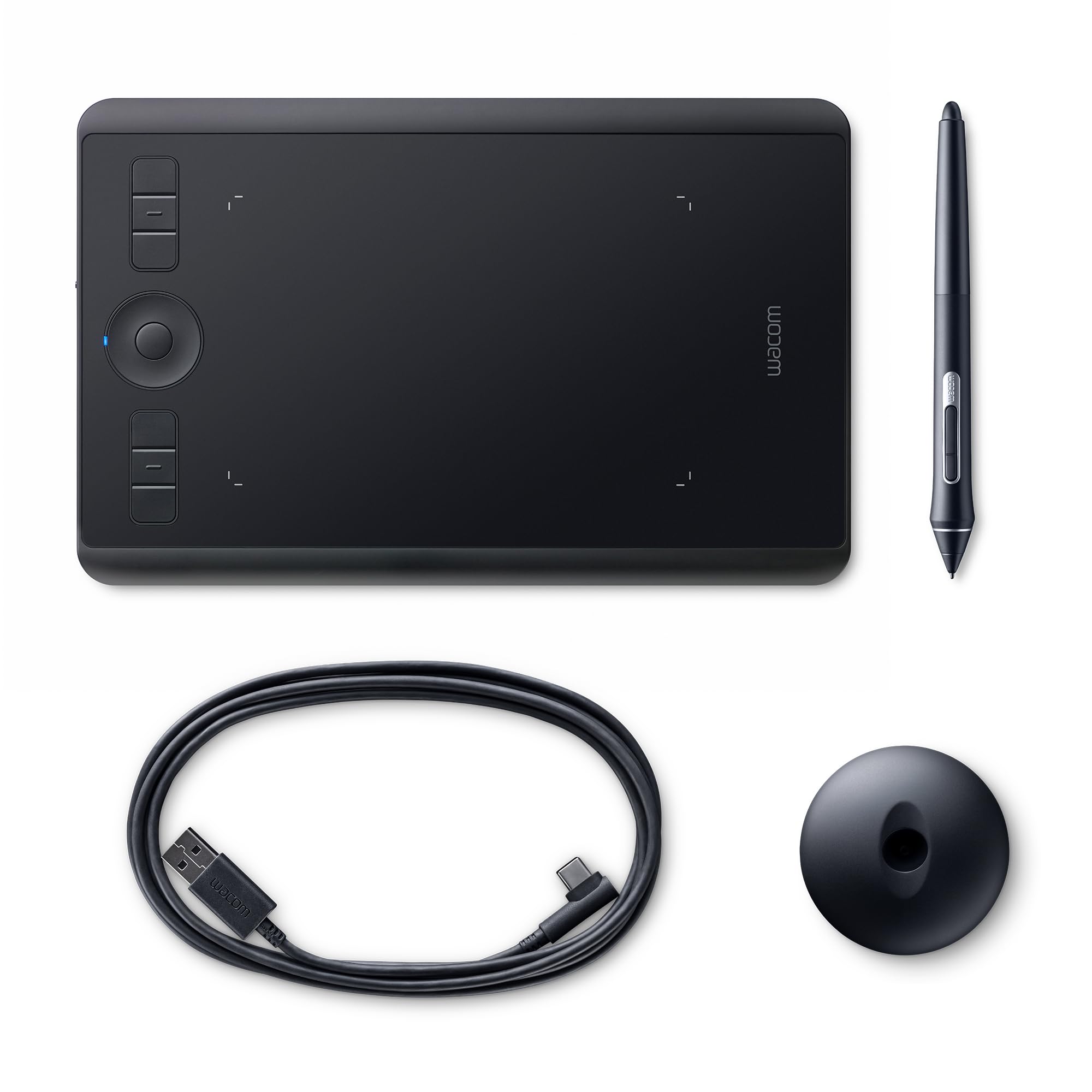
Your first sketch worth framing. You’re only an Intuos away. Ignite your imagination with the new Intuos Draw. It includes Wacom’s leading pen tablet technology free downloadable creative software and online training. So whether your dream is crafting amazing sketches sharing your work with friends or starting a portfolio Intuos Draw has everything you need to start creating right away. Spark your imagination With an Intuos Draw pen tablet you’ll find everything you need to bring your ideas to life. Complete with software services and training you’ll be drawing sketching and sharing in no time. You’re closer than you think. Your art made amazing Making the move to digital art couldn’t be easier with an Intuos pen tablet. The comfortable pressure-sensitive pen makes drawing and painting feel natural just like pen on paper. Everything an artist needs The Intuos Draw comes with ArtRage Lite software* to give you exactly what you need to draw sketch and paint. Just plug in your tablet register and download the free industry-leading software. *Registration required to redeem software and other offersA natural just like you With an Intuos pressure-sensitive pen and a tablet designed for both right-and-left-handed use drawing is as natural as pen on paper. Work faster with Wacom ExpressKeys put shortcuts at the press of a button Easy to set up easy to use Go online plug the USB into your Mac or PC install driver from the web download register your Intuos and download the creative software.Go cordless with a Wacom Wireless Accessory Kit (sold separately) and enjoy the freedom of working unattached from your computer. Fun-sized for your lifestyle. Compact and lightweight Intuos Draw is perfect for limited desktop areas and easy to transport.
Your first sketch worth framing. You’re only an Intuos away. Ignite your imagination with the new Intuos Draw. It includes Wacom’s leading pen tablet technology free downloadable creative software and online training. So whether your dream is crafting amazing sketches sharing your work with friends or starting a portfolio Intuos Draw has everything you need to start creating right away. Spark your imagination With an Intuos Draw pen tablet you’ll find everything you need to bring your ideas to life. Complete with software services and training you’ll be drawing sketching and sharing in no time. You’re closer than you think. Your art made amazing Making the move to digital art couldn’t be easier with an Intuos pen tablet. The comfortable pressure-sensitive pen makes drawing and painting feel natural just like pen on paper. Everything an artist needs The Intuos Draw comes with ArtRage Lite software* to give you exactly what you need to draw sketch and paint. Just plug in your tablet register and download the free industry-leading software. *Registration required to redeem software and other offersA natural just like you With an Intuos pressure-sensitive pen and a tablet designed for both right-and-left-handed use drawing is as natural as pen on paper. Work faster with Wacom ExpressKeys put shortcuts at the press of a button Easy to set up easy to use Go online plug the USB into your Mac or PC install driver from the web download register your Intuos and download the creative software.Go cordless with a Wacom Wireless Accessory Kit (sold separately) and enjoy the freedom of working unattached from your computer. Fun-sized for your lifestyle. Compact and lightweight Intuos Draw is perfect for limited desktop areas and easy to transport.
in 1 offers
Wacom CTL-490DW-S Intuos Draw Graphics Pen Tablet - Small, White
Your first sketch worth framing. You’re only an Intuos away. Ignite your imagination with the new Intuos Draw. It includes Wacom’s leading pen tablet technology free downloadable creative software and online training. So whether your dream is crafting amazing sketches sharing your work with friends or starting a portfolio Intuos Draw has everything you need to start creating right away. Spark your imagination With an Intuos Draw pen tablet you’ll find everything you need to bring your ideas to life. Complete with software services and training you’ll be drawing sketching and sharing in no time. You’re closer than you think. Your art made amazing Making the move to digital art couldn’t be easier with an Intuos pen tablet. The comfortable pressure-sensitive pen makes drawing and painting feel natural just like pen on paper. Everything an artist needs The Intuos Draw comes with ArtRage Lite software* to give you exactly what you need to draw sketch and paint. Just plug in your tablet register and download the free industry-leading software. *Registration required to redeem software and other offersA natural just like you With an Intuos pressure-sensitive pen and a tablet designed for both right-and-left-handed use drawing is as natural as pen on paper. Work faster with Wacom ExpressKeys put shortcuts at the press of a button Easy to set up easy to use Go online plug the USB into your Mac or PC install driver from the web download register your Intuos and download the creative software.Go cordless with a Wacom Wireless Accessory Kit (sold separately) and enjoy the freedom of working unattached from your computer. Fun-sized for your lifestyle. Compact and lightweight Intuos Draw is perfect for limited desktop areas and easy to transport.
Your first sketch worth framing. You’re only an Intuos away. Ignite your imagination with the new Intuos Draw. It includes Wacom’s leading pen tablet technology free downloadable creative software and online training. So whether your dream is crafting amazing sketches sharing your work with friends or starting a portfolio Intuos Draw has everything you need to start creating right away. Spark your imagination With an Intuos Draw pen tablet you’ll find everything you need to bring your ideas to life. Complete with software services and training you’ll be drawing sketching and sharing in no time. You’re closer than you think. Your art made amazing Making the move to digital art couldn’t be easier with an Intuos pen tablet. The comfortable pressure-sensitive pen makes drawing and painting feel natural just like pen on paper. Everything an artist needs The Intuos Draw comes with ArtRage Lite software* to give you exactly what you need to draw sketch and paint. Just plug in your tablet register and download the free industry-leading software. *Registration required to redeem software and other offersA natural just like you With an Intuos pressure-sensitive pen and a tablet designed for both right-and-left-handed use drawing is as natural as pen on paper. Work faster with Wacom ExpressKeys put shortcuts at the press of a button Easy to set up easy to use Go online plug the USB into your Mac or PC install driver from the web download register your Intuos and download the creative software.Go cordless with a Wacom Wireless Accessory Kit (sold separately) and enjoy the freedom of working unattached from your computer. Fun-sized for your lifestyle. Compact and lightweight Intuos Draw is perfect for limited desktop areas and easy to transport.
The lowest price for Wacom CTL-490DW-S Intuos Draw Graphics Pen Tablet - Small, White right now is $356.88.
The all-time low was $347.33 on 1 Jan 2024 — today's price is 3% above the lowest ever. This is at or near its all-time low — a good time to buy.
Prices last updated 15 Mar 2024.
Last updated at 15/03/2024 05:58:21
originally posted on influenster.com
This was my very first tablet I bought a few years back and I still have it. It's still working and the only thing I've had to replace is the nibs, but that's not too bad. The pen feels great to hold, the sensitivity is nice enough for a beginner. If you want something better then I suggest getting a larger sized one. I have the small and it's not a whole lot of room when you draw big things. Huion is a great alternative if you want a tablet with more features since they are cheaper and are reliable as well. The one I have was roughly around 70 or so dollars and I've got my money's worth with it. I do digital art (illustrations) and graphic design and this tablet is a huge help and a wrist saver when trying to do things quickly. If you want bigger space try the ... MoreThis was my very first tablet I bought a few years back and I still have it. It's still working and the only thing I've had to replace is the nibs, but that's not too bad. The pen feels great to hold, the sensitivity is nice enough for a beginner. If you want something better then I suggest getting a larger sized one. I have the small and it's not a whole lot of room when you draw big things. Huion is a great alternative if you want a tablet with more features since they are cheaper and are reliable as well. The one I have was roughly around 70 or so dollars and I've got my money's worth with it. I do digital art (illustrations) and graphic design and this tablet is a huge help and a wrist saver when trying to do things quickly. If you want bigger space try the medium sized version but a wacom will last you years. It's a great investment. Other than the size the other downside is that it only has four buttons. Which can be a lot for some but for me my keyboard is a bit out of reach due to having a tiny desk so it's a tad difficult to use both. But I make it work. If you're just starting out I suggest giving his one a try.
originally posted on ebay.com
I've been using tablets for about a decade, most of which have been manufactured by Wacom. I've liked most of their offerings. And their build quality is usually excellent and their tablets last a long time, even their pens and tips I've used for years without issues. And this little guy is no different. I recently purchased a Intuos Draw to create animated short films, and it's all I'll be needing for the foreseeable future. I learned to draw using a tabletop tablet at university and though a Cintiq or other display tablets like it are very cool and super sleek, they are way out of my price range. The Draw is all I need for animating and background work. Sure it doesn't have pen tilt functionality but I don't notice the difference to be frank. The drawing surface ... MoreI've been using tablets for about a decade, most of which have been manufactured by Wacom. I've liked most of their offerings. And their build quality is usually excellent and their tablets last a long time, even their pens and tips I've used for years without issues. And this little guy is no different. I recently purchased a Intuos Draw to create animated short films, and it's all I'll be needing for the foreseeable future. I learned to draw using a tabletop tablet at university and though a Cintiq or other display tablets like it are very cool and super sleek, they are way out of my price range. The Draw is all I need for animating and background work. Sure it doesn't have pen tilt functionality but I don't notice the difference to be frank. The drawing surface is textured and makes a sound when you draw, really giving you a more tactile experience than I'm sure even the pricey Cintiqs miss out on. It's no-bogus-simple design is pretty sturdy, though the function buttons I never use, and they are in an impractical spot on the tablet, for my drawing style anyway. The pen is light, but I got used to it in under a minute, and I don't mind, feels more like a pencil than other heftier Wacom pens. And the pen is lacking an eraser, but I never used my erasers on my old tablets anyway. Flipping the pen upside down to erase something never seemed impractical to me, when you can just push a hotkey on your keyboard to switch between the pen and eraser. But for the price, and the size (might be a drawback for some, but I work on a Macbook), it's a steal. Highly recommended to those who aren't so precious about their drawing tablets and just want to make cool art.
originally posted on newegg.com
The Wacom CTL490DW Intuos Draw is an amazing device, simple, durable and easy to use. With patience during the learning period, the capabilities can exceed traditional media. Drawing "off screen" takes a lot of practice and does not replace a mouse and for extra fine detail and touch up I still prefer a mouse. A "pen display" where you draw on the screen would be preferable if you have deep pockets or are a serious creator but for most the Wacom Intuos Draw pen tablet is a great tool and excellent value. TIP: Correct positioning of the tablet is important, the natural sweep of your arm needs to be aligned with the position of the tablet. With a grid background and with your arm in a comfortable position, without looking at the screen or the tablet, draw long ... MoreThe Wacom CTL490DW Intuos Draw is an amazing device, simple, durable and easy to use. With patience during the learning period, the capabilities can exceed traditional media. Drawing "off screen" takes a lot of practice and does not replace a mouse and for extra fine detail and touch up I still prefer a mouse. A "pen display" where you draw on the screen would be preferable if you have deep pockets or are a serious creator but for most the Wacom Intuos Draw pen tablet is a great tool and excellent value. TIP: Correct positioning of the tablet is important, the natural sweep of your arm needs to be aligned with the position of the tablet. With a grid background and with your arm in a comfortable position, without looking at the screen or the tablet, draw long horizontal lines and adjust the position of the tablet so the lines drawn on the screen are aligned with the grid lines. LINUX NOT SO GOOD. I have 3 Linux machines, Mint 17.2 on a laptop was plug and play, XFCE on a desktop took 2 days of channeling Rain Man using arcane terminal commands to eventually get the tablet to be recognized and operate and I have yet been able to get the third machine to work, it depends on the distro and the full capabilities of the tablet are not available. "My Paint" is the only Linux application that is usable. There are no pressure capabilities available in GIMP on my installations.
This was my very first tablet I bought a few years back and I still have it. It's still working and the only thing I've had to replace is the nibs, but that's not too bad. The pen feels great to hold, the sensitivity is nice enough for a beginner. If you want something better then I suggest getting a larger sized one. I have the small and it's not a whole lot of room when you draw big things. Huion is a great alternative if you want a tablet with more features since they are cheaper and are reliable as well. The one I have was roughly around 70 or so dollars and I've got my money's worth with it. I do digital art (illustrations) and graphic design and this tablet is a huge help and a wrist saver when trying to do things quickly. If you want bigger space try the ... MoreThis was my very first tablet I bought a few years back and I still have it. It's still working and the only thing I've had to replace is the nibs, but that's not too bad. The pen feels great to hold, the sensitivity is nice enough for a beginner. If you want something better then I suggest getting a larger sized one. I have the small and it's not a whole lot of room when you draw big things. Huion is a great alternative if you want a tablet with more features since they are cheaper and are reliable as well. The one I have was roughly around 70 or so dollars and I've got my money's worth with it. I do digital art (illustrations) and graphic design and this tablet is a huge help and a wrist saver when trying to do things quickly. If you want bigger space try the medium sized version but a wacom will last you years. It's a great investment. Other than the size the other downside is that it only has four buttons. Which can be a lot for some but for me my keyboard is a bit out of reach due to having a tiny desk so it's a tad difficult to use both. But I make it work. If you're just starting out I suggest giving his one a try.
I've been using tablets for about a decade, most of which have been manufactured by Wacom. I've liked most of their offerings. And their build quality is usually excellent and their tablets last a long time, even their pens and tips I've used for years without issues. And this little guy is no different. I recently purchased a Intuos Draw to create animated short films, and it's all I'll be needing for the foreseeable future. I learned to draw using a tabletop tablet at university and though a Cintiq or other display tablets like it are very cool and super sleek, they are way out of my price range. The Draw is all I need for animating and background work. Sure it doesn't have pen tilt functionality but I don't notice the difference to be frank. The drawing surface ... MoreI've been using tablets for about a decade, most of which have been manufactured by Wacom. I've liked most of their offerings. And their build quality is usually excellent and their tablets last a long time, even their pens and tips I've used for years without issues. And this little guy is no different. I recently purchased a Intuos Draw to create animated short films, and it's all I'll be needing for the foreseeable future. I learned to draw using a tabletop tablet at university and though a Cintiq or other display tablets like it are very cool and super sleek, they are way out of my price range. The Draw is all I need for animating and background work. Sure it doesn't have pen tilt functionality but I don't notice the difference to be frank. The drawing surface is textured and makes a sound when you draw, really giving you a more tactile experience than I'm sure even the pricey Cintiqs miss out on. It's no-bogus-simple design is pretty sturdy, though the function buttons I never use, and they are in an impractical spot on the tablet, for my drawing style anyway. The pen is light, but I got used to it in under a minute, and I don't mind, feels more like a pencil than other heftier Wacom pens. And the pen is lacking an eraser, but I never used my erasers on my old tablets anyway. Flipping the pen upside down to erase something never seemed impractical to me, when you can just push a hotkey on your keyboard to switch between the pen and eraser. But for the price, and the size (might be a drawback for some, but I work on a Macbook), it's a steal. Highly recommended to those who aren't so precious about their drawing tablets and just want to make cool art.
The Wacom CTL490DW Intuos Draw is an amazing device, simple, durable and easy to use. With patience during the learning period, the capabilities can exceed traditional media. Drawing "off screen" takes a lot of practice and does not replace a mouse and for extra fine detail and touch up I still prefer a mouse. A "pen display" where you draw on the screen would be preferable if you have deep pockets or are a serious creator but for most the Wacom Intuos Draw pen tablet is a great tool and excellent value. TIP: Correct positioning of the tablet is important, the natural sweep of your arm needs to be aligned with the position of the tablet. With a grid background and with your arm in a comfortable position, without looking at the screen or the tablet, draw long ... MoreThe Wacom CTL490DW Intuos Draw is an amazing device, simple, durable and easy to use. With patience during the learning period, the capabilities can exceed traditional media. Drawing "off screen" takes a lot of practice and does not replace a mouse and for extra fine detail and touch up I still prefer a mouse. A "pen display" where you draw on the screen would be preferable if you have deep pockets or are a serious creator but for most the Wacom Intuos Draw pen tablet is a great tool and excellent value. TIP: Correct positioning of the tablet is important, the natural sweep of your arm needs to be aligned with the position of the tablet. With a grid background and with your arm in a comfortable position, without looking at the screen or the tablet, draw long horizontal lines and adjust the position of the tablet so the lines drawn on the screen are aligned with the grid lines. LINUX NOT SO GOOD. I have 3 Linux machines, Mint 17.2 on a laptop was plug and play, XFCE on a desktop took 2 days of channeling Rain Man using arcane terminal commands to eventually get the tablet to be recognized and operate and I have yet been able to get the third machine to work, it depends on the distro and the full capabilities of the tablet are not available. "My Paint" is the only Linux application that is usable. There are no pressure capabilities available in GIMP on my installations.
I consider myself rather tech savvy. The box seems to imply that you can "plug and play." I had to contact customer service to find out why my computer (Mac) was not letting the "free"ish program that comes with it download. It was a simple fix, but if there was some kind of document that goes in a little more detail for installing that would have saved some irritation. The program that comes with it is ok, and was great for learning the basics. Just a heads up, with the program that comes with it, printing is not the easiest of tasks. In fact, the manufacturer (which is not Wacom) even admits it is confusing. My recommend is that you use the free program to learn how to use it, then find a different program for the stuff you really want to do with the tablet. I ... MoreI consider myself rather tech savvy. The box seems to imply that you can "plug and play." I had to contact customer service to find out why my computer (Mac) was not letting the "free"ish program that comes with it download. It was a simple fix, but if there was some kind of document that goes in a little more detail for installing that would have saved some irritation. The program that comes with it is ok, and was great for learning the basics. Just a heads up, with the program that comes with it, printing is not the easiest of tasks. In fact, the manufacturer (which is not Wacom) even admits it is confusing. My recommend is that you use the free program to learn how to use it, then find a different program for the stuff you really want to do with the tablet. I found a better app in the Mac App Store that works much "more better" (inside joke with myself). By "free"ish what I mean is there is no cost, and you get some basic tools. which was sufficient for learning how to work with the tablet. Anyways once everything was set up, and I found a program that I like, it works great. It's a lot of fun, and a nice change from traditional art. I do plan to upgrade with Wacom for a tablet that does a little more, but not anytime soon. So far I really enjoy the Draw tablet. I'm working on a sketch off a photograph of Mount Rainier that I took a few years ago. The mountain is reflected almost perfectly mirrored with a lake. I would include sample of my work so far, but it's no where near ready for rough draft showing. The only thing I wish I kenw before I purchased the tablet, would be in regards to the program that comes with it, you are not restricted to just that program. You can find, buy, other programs form a wide verity of places.
I use the tablet to take handwritten notes in college classes (mostly in OneNote). I used the college provided stylus on a tablet PC but found that it was far too unreliable. I bought this Wacom product hoping to find improved reliability and functionality. I'm happy to say that I've gotten both! The tablet is extremely responsive and since it doesn't use batteries, it never loses connection. I've found that my writing looks significantly better than before and I am also able to press one of the two buttons on the Wacom stylus to quickly scroll or use the eraser. Setup was quick and painless. Installed the driver and was off to the races. The tablet settings allows a good amount of customization of both the buttons on the tablet and the buttons on the stylus. You ... MoreI use the tablet to take handwritten notes in college classes (mostly in OneNote). I used the college provided stylus on a tablet PC but found that it was far too unreliable. I bought this Wacom product hoping to find improved reliability and functionality. I'm happy to say that I've gotten both! The tablet is extremely responsive and since it doesn't use batteries, it never loses connection. I've found that my writing looks significantly better than before and I am also able to press one of the two buttons on the Wacom stylus to quickly scroll or use the eraser. Setup was quick and painless. Installed the driver and was off to the races. The tablet settings allows a good amount of customization of both the buttons on the tablet and the buttons on the stylus. You are even able to assign macros to the buttons! I found it extremely useful to assign ctrl{z} to one of the tablet buttons. A few other things worth noting: At first I found it very difficult to get used to the tablet, it is a strange sensation of writing somewhere other than where the 'ink' appears. This lasted probably about a week but now it feels the same as writing on paper. I still find it somewhat difficult to draw straight lines though for some reason. Another aspect of these sort of tablets that was strange for me was how differently it operates when compared to a mouse; the tablet's 'active area' corresponds to the actual screen and this took a bit of time to get used to as well, but now I find it fairly second nature. An aspect of this tablet that I am particularly fond of is how the stylus feels on the tablet when writing (or drawing I presume). There is a resistance very similar to a standard pencil on paper which is very refreshing coming from that tablet PC which was a hard plastic stylus tip on a glass screen, very slippery and hard to write neatly. The last thing I'll note is that I've noticed the tablet surface has developed 'scratch' marks from the stylus. I can't feel them and they don't affect performance at all but thought I'd mention them at any rate. Overall, a great product that gets a solid recommendation from me! If I had to buy it again though I might spring for the model that also has touch capability, I feel like that would be useful.
The thing I like best about the Wacom tablet is the feeling of friction between the pen and surface. It makes the process of drawing feel very natural. The size isn't a problem: I tend to work within the space the curve of the wrist anyhow, so this too feels natural. It's easy to use and the keys on the pen and pad are simple to configure. It has the wireless option, and the kit is available separately for about 40 quid. What this model misses - and this is purely price related - is tilt control, which is important for some Photoshop brushes. If you don't particularly care about that, the tablet is about as good as you can get. You can upgrade to a btter model as your skills improve, or grab a cheap Huion as a transitional tool.
Just want to share my one experience from my one situation. So I am currently a medical student, and bought this tablet to take notes in class. I ended up using OneNote along with my macbook pro to take notes. Everything installed flawlessly right away, and it really is rather plug-n-play, so no complaints there. I just personally found that I could NOT get used to this thing. I find that the pen is far too small, the drawing area is insufficient, and that often there were either delays or the writing would not make it on screen. Honestly, I would just recommend getting an iPad Pro with iPen or Surface Pro for anyone considering a similar situation to mine. Or, one of those larger Intuos drawing pads. I cannot say how this is for drawing, but I presume it would be ... MoreJust want to share my one experience from my one situation. So I am currently a medical student, and bought this tablet to take notes in class. I ended up using OneNote along with my macbook pro to take notes. Everything installed flawlessly right away, and it really is rather plug-n-play, so no complaints there. I just personally found that I could NOT get used to this thing. I find that the pen is far too small, the drawing area is insufficient, and that often there were either delays or the writing would not make it on screen. Honestly, I would just recommend getting an iPad Pro with iPen or Surface Pro for anyone considering a similar situation to mine. Or, one of those larger Intuos drawing pads. I cannot say how this is for drawing, but I presume it would be much better. #sweepstakes
The tablet itself is a comfortable size and feels nice in the hand even after long drawing sessions. The fabric loop to hold the stylus when not in use is awkward and not as useful as the older built-in 'cradles' of previous models. The buttons sound like a good idea, but resetting them to be useful with the programs you actually use is awkward (I'm still trying to configure this, but I will suggest you disable the 'undo' button as it's a bit too easy to reach and can get one in trouble). The screen has a mild texture which makes me feel as if I'm dragging the stylus over a chalkboard, but perhaps I'll just become used to this in time. These are all fairly minor points, and for the most part this is a fun, useful device. The only real problem I had with this device ... MoreThe tablet itself is a comfortable size and feels nice in the hand even after long drawing sessions. The fabric loop to hold the stylus when not in use is awkward and not as useful as the older built-in 'cradles' of previous models. The buttons sound like a good idea, but resetting them to be useful with the programs you actually use is awkward (I'm still trying to configure this, but I will suggest you disable the 'undo' button as it's a bit too easy to reach and can get one in trouble). The screen has a mild texture which makes me feel as if I'm dragging the stylus over a chalkboard, but perhaps I'll just become used to this in time. These are all fairly minor points, and for the most part this is a fun, useful device. The only real problem I had with this device was in the setup. When installing the device it recommends using the enclosed installation disk rather than going online and downloading the drivers yourself. When you use the disk it takes you to the website so that you can download the drivers yourself, then gives you other options to choose, but every option you choose on the slick menu takes you to the website to -you guessed it, download things yourself. The disk was designed to look as if it is being helpful, but as far as I can see is useless. Had I not used it at all my tablet would have been installed almost instantly and I would have known when it was working rather than waiting for the disk to do something, but this kind of customer interaction is fairly typical of Wacom. Fun and useful tablet with a few wonky details.
The design is what got me raving about this graphic tablet. It's not a Cintiq nor an Intuos Pro but the pressure sensitivity specs on this model make it ideal for most creatives that want a handy tablet for sketching and developing ideas or for use as back-up tablet. I'm running it on a MacBook with OS X 10.10.5 and it works beautifully with Painter 2015, Adobe Creative Suite 5.5/Creative Cloud, and AutoDesk Sketchbook Pro. As for Windows 10, both daughters report that it works on their graphics software as well (Painter and GIMP).Back to the design: Its best feature is the secure enclosure for the mini usb port which is recessed into the upper left corner of the tablet such that the male end on the connecting cable fits snugly in—this insures that the tablet's ... MoreThe design is what got me raving about this graphic tablet. It's not a Cintiq nor an Intuos Pro but the pressure sensitivity specs on this model make it ideal for most creatives that want a handy tablet for sketching and developing ideas or for use as back-up tablet. I'm running it on a MacBook with OS X 10.10.5 and it works beautifully with Painter 2015, Adobe Creative Suite 5.5/Creative Cloud, and AutoDesk Sketchbook Pro. As for Windows 10, both daughters report that it works on their graphics software as well (Painter and GIMP).Back to the design: Its best feature is the secure enclosure for the mini usb port which is recessed into the upper left corner of the tablet such that the male end on the connecting cable fits snugly in—this insures that the tablet's connection at that point is secure and not prone to wear or damage. If you don't want to hassle with the cable, you can buy an expansion kit (battery and wireless card) for a reasonable price. The 3 nibs that came with it are hidden in the battery compartment along with the nib removal tool (you never have to look for those missing nibs or tool). The pen is stored in a fabric loop on the top edge. My favorite thing about the CTL490DW (and all Wacom tablets): the pens don't need batteries. Thank Wacom for developing their electromagnetic resonance technology which makes batteries and recharging unnecessary.
I unpacked my small Intuos Draw today. First, I couldn't figure out how to connect the USB cable. When I attempted to plug it into the machine as indicated on the diagram in the manual, the plug kept falling out. After like 6 attempts, I got the cable to stay connected to the machine. Woo Whooo!Next, I followed the instructions and turned off all aps on my computer and plugged the Intuos USB cable into my computer. This was supposed to download the driver, but it did not. 3 more attempts to plug/unplug, and the driver finally downloaded.Then I went online to download my free drawing software using the link provided in the manual. First I was directed to a bunch of tutorials, but I couldn't figure out where the link was for the software download. I finally found ... MoreI unpacked my small Intuos Draw today. First, I couldn't figure out how to connect the USB cable. When I attempted to plug it into the machine as indicated on the diagram in the manual, the plug kept falling out. After like 6 attempts, I got the cable to stay connected to the machine. Woo Whooo!Next, I followed the instructions and turned off all aps on my computer and plugged the Intuos USB cable into my computer. This was supposed to download the driver, but it did not. 3 more attempts to plug/unplug, and the driver finally downloaded.Then I went online to download my free drawing software using the link provided in the manual. First I was directed to a bunch of tutorials, but I couldn't figure out where the link was for the software download. I finally found the page (note, scroll down on the product page on the linked page).From the product page, I was offered 2 drawing options - Anime and ArtRage Lite, plus 4 free trials for other software/services. The download page warned that I needed to select everything I wanted before submitting because there would be no changes after submitting my request. Problem was, there was absolutely no description for any of the options. I Google searched the 2 drawing programs and after reading about them, decided to download both. Both these products came with 2 free downloads.Next problem - After making my selections and writing down the license # for each product, I attempted to download Lite using Windows 10 explorer, save file option. This failed 3x. Each attempt downloaded an empty folder, therefore, I couldn't install the software from the downloaded folder. I finally deleted the corrupt folder and did another download using the Win10 "Open File" option instead of the save file option. OK fine, the file finally downloaded and installed.Yet another problem - I went back to the product page and attempted to download my Anime software. I clicked on the download link (which showed that I had 2 remaining downloads for that program). This time, instead of opening the Windows Explorer dialogue box, it opened a new blank tab on my internet browser. I closed the tab and clicked the download button again, and again, and again (because I'm obviously a stupid rat and expected the same behavior to yield different results). It didn't.OK, so this time I went back to the product page and refreshed it. Now it showed 0 remaining downloads for Lite and -3 remaining downloads for Anime. Humm, I must be missing something here - If I'm allowed 2 downloads for each product, I assume this means SUCCESSFUL downloads, and doesn't count failed attempts as downloads. Obviously, Wacom counts failed attempts as a downloads.I did submit my problem to Wacom using the chat button on the product screen. Interestingly, the Wacom Draw device isn't listed among the serviced products, so I selected a similar product and included specific product info in my description, along with a message describing the problems I've outlined here. After pressing the submit button, I got a message saying that someone would be in touch with me in 1-2 business days. Again, I must be missing something - isn't chat where you get to talk via text messages with someone who can actually help you and answer your questions?I can't wait to actually try out my new device once I get some software that it might work with. I'm sure it will be REALLY fun to discover all the other things that don't work and to waste more of my time trying to figure out how to make them work.BTW - I'm a former analyst for software development (tested software and wrote manuals). I'm usually pretty good at figuring stuff out, but Wacom presents unusual and interesting problems that have certainly engaged my analytical mind in new ways. I would only recommend this product to someone (maybe a teenager), who's more technically savvy than I am. Well, maybe that's not fair. This might be a great product if you are lucky enough to avoid the issues I've had with it.