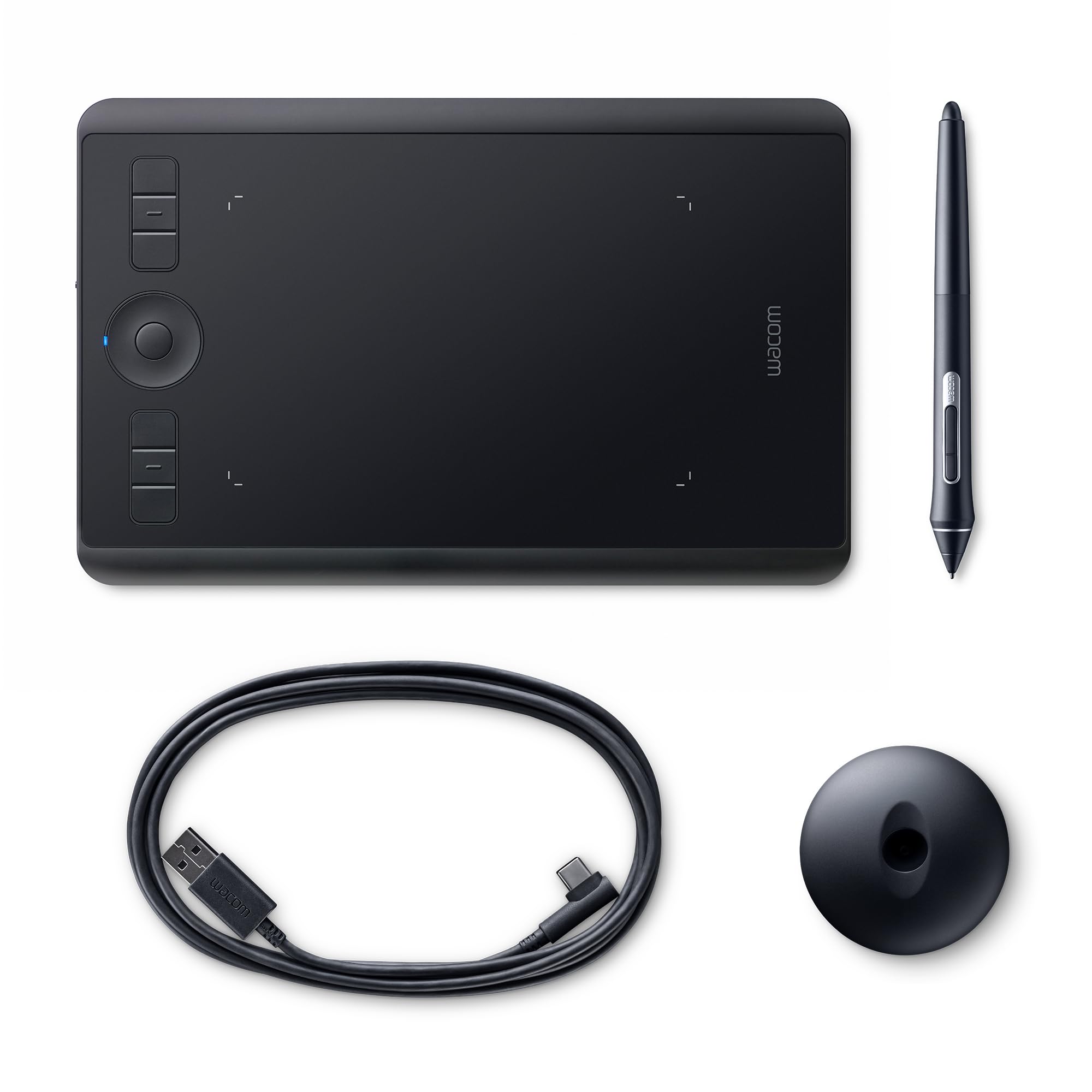
Wacom Intuos Photo Pen and Touch (Old Version)
Intuos Photo makes photo projects fun and easy. Use it to create memorable images, beautiful photo books, and incredible cards and crafts. Intuos Photo brings your photos to life in so many different ways. Youll be amazed at what you can create.Whatever your artistic ambitions, Intuos Photo can take you there. Find everything you need to get started in one package. Each Wacom quality pen tablet comes with a free creative package that includes downloadable creative software, services, and online tutorials too. And the simple setup means youll be creating in no time.The pressure sensitive pen, responsive tablet, intuitive multi-touch gestures, and customizable ExpressKeys put a whole new digital toolbox at your fingertips. No matter how you share them, your pictures tell a story. Make your story beautiful with Intuos Photo.
Intuos Photo makes photo projects fun and easy. Use it to create memorable images, beautiful photo books, and incredible cards and crafts. Intuos Photo brings your photos to life in so many different ways. Youll be amazed at what you can create.Whatever your artistic ambitions, Intuos Photo can take you there. Find everything you need to get started in one package. Each Wacom quality pen tablet comes with a free creative package that includes downloadable creative software, services, and online tutorials too. And the simple setup means youll be creating in no time.The pressure sensitive pen, responsive tablet, intuitive multi-touch gestures, and customizable ExpressKeys put a whole new digital toolbox at your fingertips. No matter how you share them, your pictures tell a story. Make your story beautiful with Intuos Photo.
Intuos Photo makes photo projects fun and easy. Use it to create memorable images, beautiful photo books, and incredible cards and crafts. Intuos Photo brings your photos to life in so many different ways. Youll be amazed at what you can create.Whatever your artistic ambitions, Intuos Photo can take you there. Find everything you need to get started in one package. Each Wacom quality pen tablet comes with a free creative package that includes downloadable creative software, services, and online tutorials too. And the simple setup means youll be creating in no time.The pressure sensitive pen, responsive tablet, intuitive multi-touch gestures, and customizable ExpressKeys put a whole new digital toolbox at your fingertips. No matter how you share them, your pictures tell a story. Make your story beautiful with Intuos Photo.
Intuos Photo makes photo projects fun and easy. Use it to create memorable images, beautiful photo books, and incredible cards and crafts. Intuos Photo brings your photos to life in so many different ways. Youll be amazed at what you can create.Whatever your artistic ambitions, Intuos Photo can take you there. Find everything you need to get started in one package. Each Wacom quality pen tablet comes with a free creative package that includes downloadable creative software, services, and online tutorials too. And the simple setup means youll be creating in no time.The pressure sensitive pen, responsive tablet, intuitive multi-touch gestures, and customizable ExpressKeys put a whole new digital toolbox at your fingertips. No matter how you share them, your pictures tell a story. Make your story beautiful with Intuos Photo.
in 4 offers
The lowest price for Wacom Intuos Photo Pen and Touch (Old Version) right now is $189.34 at ShaShinKi.com, compared across 4 retailers.
The all-time low was $16.30 on 12 Oct 2024 — today's price is 1062% above the lowest ever. It has been notably cheaper before — worth setting a price alert.
Prices last updated 21 Sept 2026.
Last updated at 21/09/2026 07:10:04
Wacom Intuos Photo Pen and Touch Digital Photo Editing Tablet (CTH490PK)
Affiliate Disclosure: We may receive a small commission for purchases made through this link at no extra cost to you. This helps support our site. Thank you!
Wacom Intuos Photo Pen & Touch Small Tablet (Black)
Wacom Intuos Photo Pen and Touch Old Version
Delivery $49.20
Wacom Intuos Photo Pen and Touch (Old Version)
Delivery between 27–30 Sept $29
originally posted on bestbuy.com
Where can I start.. The Intuos photo tablet is probably the most helpful piece of editing hardware that I've ever used. It has multitouch control, allowing you to ditch the pen and have an external touchpad, but it also allows for easier zooming while using the pen as well. The pen is super responsive and the pressure-sensitive nib is a great addition for those looking to either edit soft or hard with the different apps that can use this technology. It also comes with a great alternative to lightroom, made by Corel that is definitely a great addition to the bundle, as well as a few other photo editing softwares such as Tonality Pro, and Snapheal Pro. And lastly, you can download vector software and use this tablet like a graphic design tablet, as it can use other ... MoreWhere can I start.. The Intuos photo tablet is probably the most helpful piece of editing hardware that I've ever used. It has multitouch control, allowing you to ditch the pen and have an external touchpad, but it also allows for easier zooming while using the pen as well. The pen is super responsive and the pressure-sensitive nib is a great addition for those looking to either edit soft or hard with the different apps that can use this technology. It also comes with a great alternative to lightroom, made by Corel that is definitely a great addition to the bundle, as well as a few other photo editing softwares such as Tonality Pro, and Snapheal Pro. And lastly, you can download vector software and use this tablet like a graphic design tablet, as it can use other software that allows you to draw and create works of art with only the cost of the various software to set you back a few extra dollars.
originally posted on ebay.com
This Wacom Intuos tablet has a nice appearance, feel/texture, and sensitivity. They did away with the eraser feature of the last model, but I didnt use it that much. I love that it has touchpad capabilities. I favor it over the newer version because of this. (Wacom strangely seems to be doing away with features with each new model.) Highly recommend this model. We have two in use in my household.
originally posted on bhphotovideo.com
There is a big learning curve, for me at least, using this product. I do think it will come in time but it would have been a lot easier if they had included a manual for the pen and touch. None of the on-line manuals are for this particular tablet. As a side note, the free Corel software that is offered with the product is not compatible with Sierra 10.12. The free canvas print is a print on metal. Intuos customer care said this was not their problem, Corel offered me a 15% discount on any of their compatible products. All in all, I do believe the tablet will be a useful tool when I have mastered it and I would recommend it to a friend with the caveat of not wanted or needing the freebies.

Wacom Intuos Photo Pen and Touch Digital Photo Editing Tablet (CTH490PK)
Affiliate Disclosure: We may receive a small commission for purchases made through this link at no extra cost to you. This helps support our site. Thank you!
Wacom Intuos Photo Pen & Touch Small Tablet (Black)
Wacom Intuos Photo Pen and Touch Old Version
Delivery $49.20
Wacom Intuos Photo Pen and Touch (Old Version)
Delivery between 27–30 Sept $29
Where can I start.. The Intuos photo tablet is probably the most helpful piece of editing hardware that I've ever used. It has multitouch control, allowing you to ditch the pen and have an external touchpad, but it also allows for easier zooming while using the pen as well. The pen is super responsive and the pressure-sensitive nib is a great addition for those looking to either edit soft or hard with the different apps that can use this technology. It also comes with a great alternative to lightroom, made by Corel that is definitely a great addition to the bundle, as well as a few other photo editing softwares such as Tonality Pro, and Snapheal Pro. And lastly, you can download vector software and use this tablet like a graphic design tablet, as it can use other ... MoreWhere can I start.. The Intuos photo tablet is probably the most helpful piece of editing hardware that I've ever used. It has multitouch control, allowing you to ditch the pen and have an external touchpad, but it also allows for easier zooming while using the pen as well. The pen is super responsive and the pressure-sensitive nib is a great addition for those looking to either edit soft or hard with the different apps that can use this technology. It also comes with a great alternative to lightroom, made by Corel that is definitely a great addition to the bundle, as well as a few other photo editing softwares such as Tonality Pro, and Snapheal Pro. And lastly, you can download vector software and use this tablet like a graphic design tablet, as it can use other software that allows you to draw and create works of art with only the cost of the various software to set you back a few extra dollars.
This Wacom Intuos tablet has a nice appearance, feel/texture, and sensitivity. They did away with the eraser feature of the last model, but I didnt use it that much. I love that it has touchpad capabilities. I favor it over the newer version because of this. (Wacom strangely seems to be doing away with features with each new model.) Highly recommend this model. We have two in use in my household.
There is a big learning curve, for me at least, using this product. I do think it will come in time but it would have been a lot easier if they had included a manual for the pen and touch. None of the on-line manuals are for this particular tablet. As a side note, the free Corel software that is offered with the product is not compatible with Sierra 10.12. The free canvas print is a print on metal. Intuos customer care said this was not their problem, Corel offered me a 15% discount on any of their compatible products. All in all, I do believe the tablet will be a useful tool when I have mastered it and I would recommend it to a friend with the caveat of not wanted or needing the freebies.
This little Wacom Photo tablet is just right for getting creative with your photos. Bundle with some great software, and its compact size, lets your creativity follow you on the go. The pen is responsive and feels great in your hand. Its not wrapped in that awful rubber that just degenerates into a sticky icky feeling over a long period of time. The tablet allows touch gestures, much like may of the touch-pads, which makes it even easier to navigate and use with your laptop. Almost like having a very large touch-pad. If you add the wireless kit, you might not even use the touchpad on your laptop again.
The graphics processor on my work computer (Dell) is not great so makes using this a little frustrating at times. However, I used it on a new iMac for a class and it worked seamlessly -- no lag or accuracy issues. It's mostly just sort of jumpy and awkward on the Dell, but usable with patience. Sometimes I wish I had bought the larger (more expensive) Wacom because the space feels too small for what I'm doing (Adobe). I work with two monitors, so there's a lot of space to cover. It's annoying when I'm at the edge of the screen (on the tablet face) and my hand is no longer resting on the tablet itself. I also wish it were possible to rotate the tablet to rotate the canvas/artboard, thus change the direction of shading (as you would if drawing on a piece of paper). ... MoreThe graphics processor on my work computer (Dell) is not great so makes using this a little frustrating at times. However, I used it on a new iMac for a class and it worked seamlessly -- no lag or accuracy issues. It's mostly just sort of jumpy and awkward on the Dell, but usable with patience. Sometimes I wish I had bought the larger (more expensive) Wacom because the space feels too small for what I'm doing (Adobe). I work with two monitors, so there's a lot of space to cover. It's annoying when I'm at the edge of the screen (on the tablet face) and my hand is no longer resting on the tablet itself. I also wish it were possible to rotate the tablet to rotate the canvas/artboard, thus change the direction of shading (as you would if drawing on a piece of paper). Maybe that's something you can enable but anyhow I wish it were a built-in feature.
I've been using WACOM for many years. They are the standard. This is a nice little tablet for just about everything. I use it in Photoshop and Lightroom. Extremely accurate and it has a good tactile surface feel. This is one time where "smaller-IS-better".FYI - I just ordered the wireless kit option for travel.That is another good feature of a smaller tablet and wireless will make traveling with it even easier.
This tablet worked great. Problem was me I couldn't get used to the pen lifting it up and then dropping it then drawing. I used it in Linux Manjaro with GIMP and it found and installed the software all automatically. I ended up giving this to the church down the street for some kid that is more talented and patient than myself. I would buy this for someone with talent and that is OK using a tablet of any kind since I really don't like tablets, my problem.
I use my Intuos Small for photo editing in Lightroom and mainly on portraits. It makes very easy to use tools such as spot healing and adjustment brushes on skin. It's a little bit more painful to scroll trough the menus and the sliders for general edits, but you get used to it pretty fast. It gives quite a deep level of hardware customization that is pivotal in making your life easier. I suggest to use it as much as possible trying to tweak the settings until you find yours. I am not giving 5 starts because one flaw is the pen button design/position. I use this function to increase and decrease the size of the brushes. One of the two is easily reachable while holding the pen, for the second one I have to change the way I am holding it interrupting the flaw of the ... MoreI use my Intuos Small for photo editing in Lightroom and mainly on portraits. It makes very easy to use tools such as spot healing and adjustment brushes on skin. It's a little bit more painful to scroll trough the menus and the sliders for general edits, but you get used to it pretty fast. It gives quite a deep level of hardware customization that is pivotal in making your life easier. I suggest to use it as much as possible trying to tweak the settings until you find yours. I am not giving 5 starts because one flaw is the pen button design/position. I use this function to increase and decrease the size of the brushes. One of the two is easily reachable while holding the pen, for the second one I have to change the way I am holding it interrupting the flaw of the editing. This makes the keyboard shortcut still faster.
I've been using Wacom products for more than 15 years. I think I bought my first pen tablet tool in 1998 when I was a kid. I simply can't use a mouse. I use the pen for everything, and I had 'upgraded' this from an Intuous 4. Two reasons that I was excited about this product are: touch controls and portability. The good: It's ultra portable. Finally. It seemed that the tablets kept getting wider and wider over the years (in spite of still having an identical sized work surface). I like to have my tablet beside the keyboard so I can use like a mouse. Most photos of people using it show they have it on their desk above their keyboard, closer to the monitor. That's not really ergonomic. Placing the tablet beside the keyboard is much more natural and ergonomic. Luckily ... MoreI've been using Wacom products for more than 15 years. I think I bought my first pen tablet tool in 1998 when I was a kid. I simply can't use a mouse. I use the pen for everything, and I had 'upgraded' this from an Intuous 4. Two reasons that I was excited about this product are: touch controls and portability. The good: It's ultra portable. Finally. It seemed that the tablets kept getting wider and wider over the years (in spite of still having an identical sized work surface). I like to have my tablet beside the keyboard so I can use like a mouse. Most photos of people using it show they have it on their desk above their keyboard, closer to the monitor. That's not really ergonomic. Placing the tablet beside the keyboard is much more natural and ergonomic. Luckily this thing is tiny and I have no problem fitting it in my slide out keyboard tray, unlike previous iterations that were not only wider, but had the usb cable coming out of the side, making it have an even wider footprint. The smaller version is going to be much, much better for travel. On my last big trip, I had to pack the tablet into the checked luggage because it was too big. This one is (thankfully) much smaller. The bad (but could be worse): Gestures are quite bad and overall touch input are not very smooth or seamless like what you would expect from a macbook pro trackpad, or an ipad for example. In fact, I had to turn off the zoom and rotate which appeared to be horrible. I would often accidentally rotate things, and not even be able to get them back to being perfectly horizontal as they should be. That was bizarre. Also, the zoom is stepless, meaning, if you zoom a bit, it will zoom into 114.36%, or something like that. Zooming in steps of 25% would be ideal. The biggest advantage of the touch controls is the ability to scroll webpages while reading. Just drag two fingers and you can scroll up and down webpages quite easily and it feels quite responsive, similar to the Apple trackpad. The ugly: The pen is a lot smaller than the Intuous 4 pen, which is nice and beefy, with a rubber grip, instead of cheap plastic. This pen is smaller and feels very cheap. It doesn't feel balanced in the hand as the Intuous 4 pen did. I'd be happy to pay extra for a good pen, and I was hoping that the older pens could work with the newer tablet, but that would probably be asking too much. Right clicking with the new pen is very difficult, and often results in ghost clicking. That is really frustrating if you are trying to move files. The rockered click buttons on my pen are also very loose and appear to 'float'. I honestly thought I received a defective unit when I first tried to 'right-click'. I've worked out a few workarounds to some of the above problems, and will hopefully, eventually get used to the unrefined quality of this device. I'm certainly not an Apple fanboy, but I'm VERY excited by their new pencil tool, and hope that tech trickles down to their trackpad, which offers a very refined user experience. If that happens, I'm certain that Wacom will lose a lot of marketshare if they don't pick up the slack and design their products better. I only recommend this product if you want something small and portable.
I am really happy with this. The options to go fancier are basically either an iPad Pro with Apple Pen ($700+) or a larger tablet for more drawing surface area but those are essentially tablet computers with a big LCD screen and also run you the price of a good laptop computer ($700+) or a bigger version of this product for 5x the price! This item is basically $100 and you get 2048 levels of pressure sensitivity and a smaller drawing surface. Really can't compare the two but when you can get 80% of the functionality for 1/5 to 1/7 the price... how do you complain? tablets very responsive (if you remember to turn it on! it has an on/off switch which confounded me initially). .