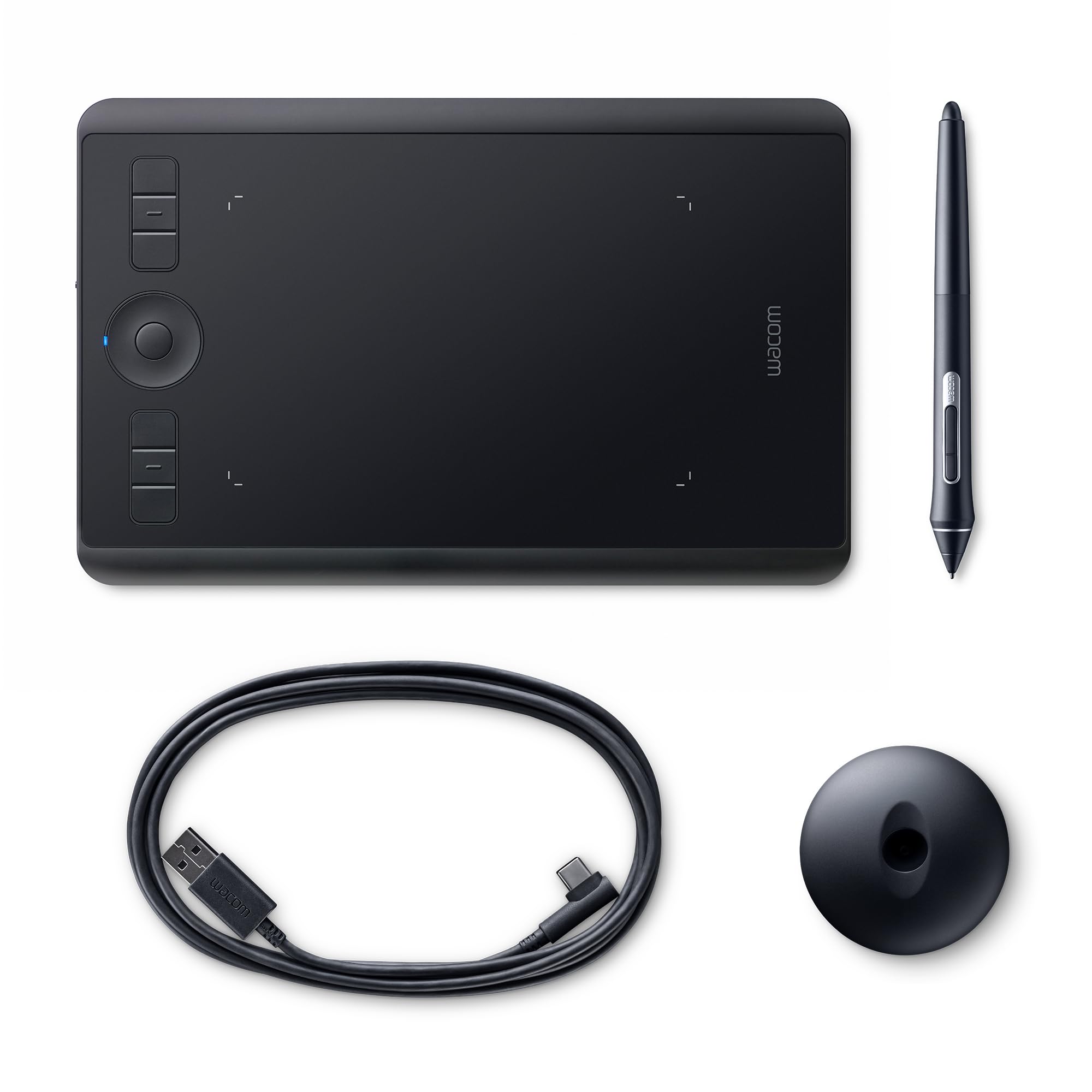
Wacom Intuos Pro Medium Paper Edition With Pro Pen 2
The Wacom Intuos Pro Medium Paper Edition combines the latest Wacom technologies with the drawing paper of your choice to offer a new, but familiar way of working. USB interface Stores up to 200 multi-layered or 1000 one-layered drawings Includes Wacom Pro Pen 2 Easy setup Comes with an accessory soft case and Pen Stand Enjoy the feel of drawing with the Finetip Pen on paper while the Wacom Intuos Pro Medium Paper Edition captures every stroke, ready for further work in your favourite software. Or you can simply connect your Wacom Intuos Pro to your computer via USB and work directly into any application you choose with the Wacom Pro Pen 2. Wacom Pro Pen 2: natural and precise Wacom Pro Pen 2 is designed to quickly become a natural extension of your hand. Its exceptional sensitivity and responsiveness gives you the control you need to take your work to the next level. Included with every Wacom Intuos Pro Paper Edition, the new steel based Pen Stand stores your spare nibs and has a built-in tool to make replacing them easy. An age-old way to be creative Clip your favourite drawing paper on the surface of the Wacom Intuos Pro Paper Edition and sketch with that familiar feel. As you draw with the Finetip Pen, it captures every stroke as an editable file that can be opened in your favourite creative software. The best part is you don’t need to be connected to a computer or the internet; Wacom Intuos Pro Paper Edition will store up to 200 multi-layered or 1000 one-layered drawings, ready for you to access on other devices.
The Wacom Intuos Pro Medium Paper Edition combines the latest Wacom technologies with the drawing paper of your choice to offer a new, but familiar way of working. USB interface Stores up to 200 multi-layered or 1000 one-layered drawings Includes Wacom Pro Pen 2 Easy setup Comes with an accessory soft case and Pen Stand Enjoy the feel of drawing with the Finetip Pen on paper while the Wacom Intuos Pro Medium Paper Edition captures every stroke, ready for further work in your favourite software. Or you can simply connect your Wacom Intuos Pro to your computer via USB and work directly into any application you choose with the Wacom Pro Pen 2. Wacom Pro Pen 2: natural and precise Wacom Pro Pen 2 is designed to quickly become a natural extension of your hand. Its exceptional sensitivity and responsiveness gives you the control you need to take your work to the next level. Included with every Wacom Intuos Pro Paper Edition, the new steel based Pen Stand stores your spare nibs and has a built-in tool to make replacing them easy. An age-old way to be creative Clip your favourite drawing paper on the surface of the Wacom Intuos Pro Paper Edition and sketch with that familiar feel. As you draw with the Finetip Pen, it captures every stroke as an editable file that can be opened in your favourite creative software. The best part is you don’t need to be connected to a computer or the internet; Wacom Intuos Pro Paper Edition will store up to 200 multi-layered or 1000 one-layered drawings, ready for you to access on other devices.
The Wacom Intuos Pro Medium Paper Edition combines the latest Wacom technologies with the drawing paper of your choice to offer a new, but familiar way of working. USB interface Stores up to 200 multi-layered or 1000 one-layered drawings Includes Wacom Pro Pen 2 Easy setup Comes with an accessory soft case and Pen Stand Enjoy the feel of drawing with the Finetip Pen on paper while the Wacom Intuos Pro Medium Paper Edition captures every stroke, ready for further work in your favourite software. Or you can simply connect your Wacom Intuos Pro to your computer via USB and work directly into any application you choose with the Wacom Pro Pen 2. Wacom Pro Pen 2: natural and precise Wacom Pro Pen 2 is designed to quickly become a natural extension of your hand. Its exceptional sensitivity and responsiveness gives you the control you need to take your work to the next level. Included with every Wacom Intuos Pro Paper Edition, the new steel based Pen Stand stores your spare nibs and has a built-in tool to make replacing them easy. An age-old way to be creative Clip your favourite drawing paper on the surface of the Wacom Intuos Pro Paper Edition and sketch with that familiar feel. As you draw with the Finetip Pen, it captures every stroke as an editable file that can be opened in your favourite creative software. The best part is you don’t need to be connected to a computer or the internet; Wacom Intuos Pro Paper Edition will store up to 200 multi-layered or 1000 one-layered drawings, ready for you to access on other devices.
The Wacom Intuos Pro Medium Paper Edition combines the latest Wacom technologies with the drawing paper of your choice to offer a new, but familiar way of working. USB interface Stores up to 200 multi-layered or 1000 one-layered drawings Includes Wacom Pro Pen 2 Easy setup Comes with an accessory soft case and Pen Stand Enjoy the feel of drawing with the Finetip Pen on paper while the Wacom Intuos Pro Medium Paper Edition captures every stroke, ready for further work in your favourite software. Or you can simply connect your Wacom Intuos Pro to your computer via USB and work directly into any application you choose with the Wacom Pro Pen 2. Wacom Pro Pen 2: natural and precise Wacom Pro Pen 2 is designed to quickly become a natural extension of your hand. Its exceptional sensitivity and responsiveness gives you the control you need to take your work to the next level. Included with every Wacom Intuos Pro Paper Edition, the new steel based Pen Stand stores your spare nibs and has a built-in tool to make replacing them easy. An age-old way to be creative Clip your favourite drawing paper on the surface of the Wacom Intuos Pro Paper Edition and sketch with that familiar feel. As you draw with the Finetip Pen, it captures every stroke as an editable file that can be opened in your favourite creative software. The best part is you don’t need to be connected to a computer or the internet; Wacom Intuos Pro Paper Edition will store up to 200 multi-layered or 1000 one-layered drawings, ready for you to access on other devices.
in 5 offers
The lowest price for Wacom Intuos Pro Medium Paper Edition With Pro Pen 2 right now is $429.00 at Computers & Parts Land, compared across 5 retailers.
The all-time low was $199.00 on 10 Apr 2024 — today's price is 116% above the lowest ever. It has been notably cheaper before — worth setting a price alert.
Prices last updated 19 Oct 2026.
Last updated at 19/10/2026 01:21:19
WACOM PTH-660/K1-C Intuos Pro Medium with PRO PEN 2 TECH+PAPER
Delivery between 21–26 Oct $14.50
Wacom Intuos Pro Medium W Pro Pen 2 Tech+Paper
Free delivery between Wed – Sat
Wacom Intuos Pro Paper Edition M Drawing Graphic Tablet with Pro Pen 2 PTH-660/K1-CX
Free delivery
Wacom Intuos Pro Paper Edition Creative Pen Tablet, Medium
Free delivery between 22–30 Oct
WACOM INTUOS PRO MEDIUM W PRO PEN 2 TECH+PAPER
Free delivery between 21–27 Oct
originally posted on pbtech.co.nz
Have been using this now for a few weeks, it really is a nice drawing tablet. I had a hard time choosing between this medium size and the larger one, but I am very glad I chose the medium, it's definitely big enough (and still portable). I love the addition of the paper option, and being able to save my sketches on paper in layers.Figuring out the set-up was a bit tricky at times, there are not really any instructions that come with it. However now I have it figured out it's fine. I do have a problem where I have to remove the tablet from my bluetooth device list after everytime I use it, in order to be able to connect it again - but I think that problem is due more to my computer than the tablet.Overall highly recommended.
originally posted on bestbuy.com
Or anything at all. I bought a Wacom Intuos Pro Medium tablet last year from Best Buy, hoping I could use it to learn how to illustrate and animate. I have not used it more than 10 times since I started school and yesterday it died on me for no apparent reason. I tried reinstalling the software, buying a new cable and even resetting, but nothing works. I contacted Best Buy but they refuse to return or exchange because I didn't buy insurance, which would be understandable if I had thrown my tablet on the floor or spilled water on it...not if the product is DEFECTIVE such as this. I didn't buy insurance because I take very good care of my tablets and I didn't expect Wacom, which is supposed to be the best brand out there, to die after barely being used. I'm basically ... MoreOr anything at all. I bought a Wacom Intuos Pro Medium tablet last year from Best Buy, hoping I could use it to learn how to illustrate and animate. I have not used it more than 10 times since I started school and yesterday it died on me for no apparent reason. I tried reinstalling the software, buying a new cable and even resetting, but nothing works. I contacted Best Buy but they refuse to return or exchange because I didn't buy insurance, which would be understandable if I had thrown my tablet on the floor or spilled water on it...not if the product is DEFECTIVE such as this. I didn't buy insurance because I take very good care of my tablets and I didn't expect Wacom, which is supposed to be the best brand out there, to die after barely being used. I'm basically stuck with a $380 tablet that doesn't work, and now that I began using it for work I can't even get my work done. Now I'm trying to get Wacom to help exchange/fix the tablet but they need a receipt that Best Buy is now unable to provide and/or print for me, which is funny because I bought this tablet with a Best Buy Credit Card. So basically they're able to take your money very easily, just not come through when a product is defective, or even help you obtain a receipt so that the manufacturer of the damaged product can exchange and/or fixed the product.TL;DR: Best Buy's disappointing customer service is NOT worth the hassle, especially with a product like Wacom, which is known to have serious problems with the drive in recent versions. Just buy from Wacom directly. I'm cancelling my Best Buy credit card right now.
originally posted on mightyape.com.au
TL;DR A solid pen tablet that anyone can become great at. The tablet itself is good and the software simply enhances this. However with only one pen option (Pro Pen 2), expensive surface texture replacements and with the new nibs being worn down faster than ever, this tablet as whole, has a lot to be desired.After using the Intuos Pro PTH660 (Medium) for over a week now, I can say that this tablet is one of finest pen tablets money can buy in terms of aesthetics. The build quality is superb and screams premium. And being considered a beginner, becoming efficient with the tablet has taken less than a few days of practice. The buttons are good with some tactile feel but a longer and more satisfying click would have been a nice addition considering the available ... MoreTL;DR A solid pen tablet that anyone can become great at. The tablet itself is good and the software simply enhances this. However with only one pen option (Pro Pen 2), expensive surface texture replacements and with the new nibs being worn down faster than ever, this tablet as whole, has a lot to be desired.After using the Intuos Pro PTH660 (Medium) for over a week now, I can say that this tablet is one of finest pen tablets money can buy in terms of aesthetics. The build quality is superb and screams premium. And being considered a beginner, becoming efficient with the tablet has taken less than a few days of practice. The buttons are good with some tactile feel but a longer and more satisfying click would have been a nice addition considering the available space beneath said buttons. The Standard textured surface that comes with each model feels great. But there's a con to this. It eats the nibs really fast! Devours them in-fact.With just under 3 hours of use on the first attempt of using the tablet, the nib was already close to being completely worn out. I learnt that increasing pen pressure sensitivity helped with this a lot, but it is still something to consider - second nib took about 14 hours with these new settings. The pro pen 2 is not too bad either. But lacks any real sense of rigidity. The buttons are also ordinary feeling.The biggest drawback to the new Intous pro line however is the lack of Pens. Buying this tablet means you are stuck with the Pro Pen 2 and its not so robust nibs. The surface textures can be replaced.Though promising, the prices for these different textures, either Rough, Standard (on the tablet) and Smooth, will set you back a pretty penny. Adding this on top to the cost of 5 nibs for the pro pen 2, and it doesn't look pretty in the long run. Disappointing to say the least.The software side, at least on PC, is good. You have the ability to create custom keybindings using the included programs and it's rather endless. The UI is simple and intuitive, making it easy for even the newest of newbies to get their head around. The accompanying Inkspace app on PC also does as it serves. The cloud holds your layers as drawn when using the tablets paper functionality. There are however a few issues with Inkspace in terms of lost layers and sync issues here and there, so be mindful of that.Overall, The New Generation Wacom Intous Pro Paper Edition is a great all round pen tablet for those new into the art/illustration game, or for those already sprouted pros. With it's versatile use and endless customisation options, there are theoretically no limits to its uses. However with expensive nibs that wear down quickly, textured surface that are again expensive and with the fact that it is only usable with the Pro Pen 2; Given the price, this Wacom Pen Tablet becomes a harder pill to swallow in the long run.
| General | |
| Device Type | Digitiser |
| Width | 33.8 cm |
| Depth | 21.9 cm |
| Height | 0.8 cm |
WACOM PTH-660/K1-C Intuos Pro Medium with PRO PEN 2 TECH+PAPER
Delivery between 21–26 Oct $14.50
Wacom Intuos Pro Medium W Pro Pen 2 Tech+Paper
Free delivery between Wed – Sat
Wacom Intuos Pro Paper Edition M Drawing Graphic Tablet with Pro Pen 2 PTH-660/K1-CX
Free delivery
Wacom Intuos Pro Paper Edition Creative Pen Tablet, Medium
Free delivery between 22–30 Oct
WACOM INTUOS PRO MEDIUM W PRO PEN 2 TECH+PAPER
Free delivery between 21–27 Oct
Have been using this now for a few weeks, it really is a nice drawing tablet. I had a hard time choosing between this medium size and the larger one, but I am very glad I chose the medium, it's definitely big enough (and still portable). I love the addition of the paper option, and being able to save my sketches on paper in layers.Figuring out the set-up was a bit tricky at times, there are not really any instructions that come with it. However now I have it figured out it's fine. I do have a problem where I have to remove the tablet from my bluetooth device list after everytime I use it, in order to be able to connect it again - but I think that problem is due more to my computer than the tablet.Overall highly recommended.
Or anything at all. I bought a Wacom Intuos Pro Medium tablet last year from Best Buy, hoping I could use it to learn how to illustrate and animate. I have not used it more than 10 times since I started school and yesterday it died on me for no apparent reason. I tried reinstalling the software, buying a new cable and even resetting, but nothing works. I contacted Best Buy but they refuse to return or exchange because I didn't buy insurance, which would be understandable if I had thrown my tablet on the floor or spilled water on it...not if the product is DEFECTIVE such as this. I didn't buy insurance because I take very good care of my tablets and I didn't expect Wacom, which is supposed to be the best brand out there, to die after barely being used. I'm basically ... MoreOr anything at all. I bought a Wacom Intuos Pro Medium tablet last year from Best Buy, hoping I could use it to learn how to illustrate and animate. I have not used it more than 10 times since I started school and yesterday it died on me for no apparent reason. I tried reinstalling the software, buying a new cable and even resetting, but nothing works. I contacted Best Buy but they refuse to return or exchange because I didn't buy insurance, which would be understandable if I had thrown my tablet on the floor or spilled water on it...not if the product is DEFECTIVE such as this. I didn't buy insurance because I take very good care of my tablets and I didn't expect Wacom, which is supposed to be the best brand out there, to die after barely being used. I'm basically stuck with a $380 tablet that doesn't work, and now that I began using it for work I can't even get my work done. Now I'm trying to get Wacom to help exchange/fix the tablet but they need a receipt that Best Buy is now unable to provide and/or print for me, which is funny because I bought this tablet with a Best Buy Credit Card. So basically they're able to take your money very easily, just not come through when a product is defective, or even help you obtain a receipt so that the manufacturer of the damaged product can exchange and/or fixed the product.TL;DR: Best Buy's disappointing customer service is NOT worth the hassle, especially with a product like Wacom, which is known to have serious problems with the drive in recent versions. Just buy from Wacom directly. I'm cancelling my Best Buy credit card right now.
TL;DR A solid pen tablet that anyone can become great at. The tablet itself is good and the software simply enhances this. However with only one pen option (Pro Pen 2), expensive surface texture replacements and with the new nibs being worn down faster than ever, this tablet as whole, has a lot to be desired.After using the Intuos Pro PTH660 (Medium) for over a week now, I can say that this tablet is one of finest pen tablets money can buy in terms of aesthetics. The build quality is superb and screams premium. And being considered a beginner, becoming efficient with the tablet has taken less than a few days of practice. The buttons are good with some tactile feel but a longer and more satisfying click would have been a nice addition considering the available ... MoreTL;DR A solid pen tablet that anyone can become great at. The tablet itself is good and the software simply enhances this. However with only one pen option (Pro Pen 2), expensive surface texture replacements and with the new nibs being worn down faster than ever, this tablet as whole, has a lot to be desired.After using the Intuos Pro PTH660 (Medium) for over a week now, I can say that this tablet is one of finest pen tablets money can buy in terms of aesthetics. The build quality is superb and screams premium. And being considered a beginner, becoming efficient with the tablet has taken less than a few days of practice. The buttons are good with some tactile feel but a longer and more satisfying click would have been a nice addition considering the available space beneath said buttons. The Standard textured surface that comes with each model feels great. But there's a con to this. It eats the nibs really fast! Devours them in-fact.With just under 3 hours of use on the first attempt of using the tablet, the nib was already close to being completely worn out. I learnt that increasing pen pressure sensitivity helped with this a lot, but it is still something to consider - second nib took about 14 hours with these new settings. The pro pen 2 is not too bad either. But lacks any real sense of rigidity. The buttons are also ordinary feeling.The biggest drawback to the new Intous pro line however is the lack of Pens. Buying this tablet means you are stuck with the Pro Pen 2 and its not so robust nibs. The surface textures can be replaced.Though promising, the prices for these different textures, either Rough, Standard (on the tablet) and Smooth, will set you back a pretty penny. Adding this on top to the cost of 5 nibs for the pro pen 2, and it doesn't look pretty in the long run. Disappointing to say the least.The software side, at least on PC, is good. You have the ability to create custom keybindings using the included programs and it's rather endless. The UI is simple and intuitive, making it easy for even the newest of newbies to get their head around. The accompanying Inkspace app on PC also does as it serves. The cloud holds your layers as drawn when using the tablets paper functionality. There are however a few issues with Inkspace in terms of lost layers and sync issues here and there, so be mindful of that.Overall, The New Generation Wacom Intous Pro Paper Edition is a great all round pen tablet for those new into the art/illustration game, or for those already sprouted pros. With it's versatile use and endless customisation options, there are theoretically no limits to its uses. However with expensive nibs that wear down quickly, textured surface that are again expensive and with the fact that it is only usable with the Pro Pen 2; Given the price, this Wacom Pen Tablet becomes a harder pill to swallow in the long run.
Got this as a Christmas present for my teen who is extremely artistic. Give her any drawing medium, and she could create things that won awards at local contests. (She drew pirate ships with sails and waves and fish in the sea the first time someone gave her a mini-etcha-sketch). Had a little extra Christmas $, plan was to give her a tool that would give her something better than a small mouse pad to draw digitally. Looked at all the tablets/touch screens, but the Wacom was custom designed for this sort of thing. Came down to Pro or Touch, and what size. Seemed like for $100 more, we could get something that would let her grow up to a professional level, and medium seemed the right size for most everybody with normal size monitor screens. When we got it set up, she ... MoreGot this as a Christmas present for my teen who is extremely artistic. Give her any drawing medium, and she could create things that won awards at local contests. (She drew pirate ships with sails and waves and fish in the sea the first time someone gave her a mini-etcha-sketch). Had a little extra Christmas $, plan was to give her a tool that would give her something better than a small mouse pad to draw digitally. Looked at all the tablets/touch screens, but the Wacom was custom designed for this sort of thing. Came down to Pro or Touch, and what size. Seemed like for $100 more, we could get something that would let her grow up to a professional level, and medium seemed the right size for most everybody with normal size monitor screens. When we got it set up, she drew for 6 hours straight, totally intrigued by all of the features that allowed her to express things she couldn't reproduce before with a mouse, and she still has only covered a fraction of what it seems capable of. From all the reviews, this is a professional's tool, and I see why after what she has created. It doubles as a huge mouse pad, comes with a whole bunch of tips for the stylus, operates wireless which has been very useful, or by USB, and only charges via USB, which makes it very portable. She doesn't do any photo retouching (yet), but reviews seem to suggest it is great for that. For some odd reason some of the trial software wouldn't install on her computer (but would on another with same Windows 7, but less RAM, go figure), which didn't seem to matter, because all the software it "comes" with is just 30 day free trial. She downloaded some drawing freeware and is in 7th heaven. Even windows paint/draw she loves, the tablet just makes it that much easier. Setup was simple enough, but if you aren't tech savy, you could get hung up, not the most intuitive plug and play device, even opening the battery slot was a bit odd. My wife and daughter and other kids had trouble figuring it out, I got it running in 10 minutes, but I totally see where they got hung up, directions are sparse. Overall, very glad we went with the pro model, the medium size and the Wacom vs. all the other tablets.
I was very disappointed. It's too glitchy for me and it doesn't work on every click. The palm rejection isn't that good due to the fact that it clicks and drags from time to time.To avoid this I just turn the touch feature off, but then this is part of the reason why I bought this tablet. I wanted to use the pen with the touch feature to speed up my workflow. When using the touch feature online not every site will let you left click by tapping or double tapping the pad. This was confusing to me. I find myself reaching for my mouse many times as it's a coin toss if my tablet will function properly or act like it has a mind of its own. All this with the tablet plugged in my pc... I dare not to use it via Bluetooth. Your product is too glitchy Wacom! I was even ... MoreI was very disappointed. It's too glitchy for me and it doesn't work on every click. The palm rejection isn't that good due to the fact that it clicks and drags from time to time.To avoid this I just turn the touch feature off, but then this is part of the reason why I bought this tablet. I wanted to use the pen with the touch feature to speed up my workflow. When using the touch feature online not every site will let you left click by tapping or double tapping the pad. This was confusing to me. I find myself reaching for my mouse many times as it's a coin toss if my tablet will function properly or act like it has a mind of its own. All this with the tablet plugged in my pc... I dare not to use it via Bluetooth. Your product is too glitchy Wacom! I was even considering getting the new Cintiq Pro 24 or mobile studio pro, but I'll wait for now.
I have been using Photoshop for approximately 15 years. It has been a continuous learning curve due to the power that PS has.However, as I learned and used it more, using a mouse was not as precise as a pen and tablet.Initially I used a Wacom Bamboo and then a Pen and Touch (small). Although this was a step in the right direction, these products were still limited in their performance or options.Finally decided it was time to go with the Intuos. I did some online research and thought the medium size was correct for me (computer is 27").Learning curve? Yes. If you are going to jump into this be prepared it is hard to adapt to coming from a mouse. If you are patient and practice with it, you will develop the skill that will allow you to use it comfortably.I ... MoreI have been using Photoshop for approximately 15 years. It has been a continuous learning curve due to the power that PS has.However, as I learned and used it more, using a mouse was not as precise as a pen and tablet.Initially I used a Wacom Bamboo and then a Pen and Touch (small). Although this was a step in the right direction, these products were still limited in their performance or options.Finally decided it was time to go with the Intuos. I did some online research and thought the medium size was correct for me (computer is 27").Learning curve? Yes. If you are going to jump into this be prepared it is hard to adapt to coming from a mouse. If you are patient and practice with it, you will develop the skill that will allow you to use it comfortably.I like the hotkeys (configurable) on the tablet. Wireless is a nice feature (no lag) but I have it on my desktop with direct wired connection.If I had the option of doing it over, I would buy the small size. I don't do graphic design only small areas of photos at a time.This product will keep me happy although I would love to have a Cintiq. Just a dream though since I can't afford nor justify the price.It's a great tool if you are serious about retouching/graphics.
Started using a Wacom PTH651because of tendon pain in my arm and shoulder from too much mouse use. Being a graphics professional I spend hours on end in Photoshop eating photos. This Wacom has changed my life, seriously. Learning curve is about two days more or less, but worth the initial unfamiliar awkwardness. There's turning going back now. I don't know how I lasted for so many years with just a mouse. Do yourself a favor, if you do a lot of editing then the Intuos Pro Graphic is for you. I recommend the medium size, it's a very natural size for movement (maybe if I had learned to use the smaller one I'd say the same thing about it, but I can't imagine a different size, mediums feels perfect).
This Wacom Intuos Pro Small Graphics Tablet is great! How a tablet is used makes a big difference to how easy and intuitive it feels. I have this tablet propped up at an angle and just to the right of centre (because I'm right-handed) of the external monitor screen that it is used with. My laptop sits to the left of the screen and tablet for when that keyboard is used. I don't have any difficulties at all in drawing on one surface while looking at another. The tablet is obviously lined up (not at an angle to) the screen I'm looking at and along with it being propped up at an angle (about 45 degrees for me) that makes a big difference to how easy and enjoyable it is to use. This tablet is great as an everyday-replacement for a mouse or laptop tracker pad, but I ... MoreThis Wacom Intuos Pro Small Graphics Tablet is great! How a tablet is used makes a big difference to how easy and intuitive it feels. I have this tablet propped up at an angle and just to the right of centre (because I'm right-handed) of the external monitor screen that it is used with. My laptop sits to the left of the screen and tablet for when that keyboard is used. I don't have any difficulties at all in drawing on one surface while looking at another. The tablet is obviously lined up (not at an angle to) the screen I'm looking at and along with it being propped up at an angle (about 45 degrees for me) that makes a big difference to how easy and enjoyable it is to use. This tablet is great as an everyday-replacement for a mouse or laptop tracker pad, but I actually bought it as a replacement to an old Wacom Bamboo tablet, so have been used to using a tablet anyway. I use it with drawing / animation software (TVPaint) and find that its size is fine for drawing. I know that there are also two sizes that are larger for this particular tablet, but I think that even without budget considerations that this might the ideal size out of the three. It is large enough to draw with shoulder movements is that is how you usually draw, and it is not too great a travel distance to move from one side of a screen to the other by moving the pen on the tablet. By my calculations, the effective resolution of the tablet would be 30480px x 17780px which is many multiples of the sheet size I draw on and of the external screen's resolution, so there are no issues of a small tablet meaning that detail cannot be shown. (And this is before considering that zooming in using the drawing software gives even more detail if that is needed.) The other alternative product would have been something like a Wacom Cintiq where you actually see the image you are drawing on the tablet as you are drawing on the tablet. One argument for a Cintiq is that some people have written that they find drawing on one surface while viewing another is difficult (as one does with the Intuos), but I think that is probably a very small minority of people who have that issue - given how many tablets are in use there aren't that many threads bemoaning how difficult they are to use. (Arguments against Cintiqs include that your hand obscures what you are drawing, and if the Cintiq is not positioned well, you are likely to get neck ache. But really, I'm sure that the Cintiq is also a great product is that is within your budget range - though I have no actual experience of using one...) With the Intuos it iseasy to set the proportions of the drawing tablet in use to match the screen being used by clicking the second-down of the tablet's express keys which brings up the driver software, then settings > grip pen (under tool) > mapping > 'force proportions' box ticked. This means drawing a circle on the tablet results in a circle on the screen (and not an ellipse), and handwriting comes up undistorted. This is worth doing. I've written a lengthy review because I did a lot of reading up on this tablet before getting it, and have seen a lot of caution about all tablet offerings. But in my view, the Wacom Intuos Pro Small is a great tablet at a great price, and completely adequate for drawing and animation use.
If you are required to teach online, you have got to get a tablet to effectively lecture interactively and the WACOM Pro is a very quality piece for that purpose. The look and feel of the WACOM is first-rate. As an engineer, I appreciate a well-constructed device and this tablet certainly meets that requirement. Although these tablets are typically used by artists for editing, they also serve well as a problem-solving platform for engineering problems sets. As well, you can annotate virtually any document, application page, or visual design. In light of the new reality of teaching synchronously online, a tablet was a must to replace the Smartboard and that device needed to be both reliable and highly flexible. The WACOM Pro has met those requirements to date. There ... MoreIf you are required to teach online, you have got to get a tablet to effectively lecture interactively and the WACOM Pro is a very quality piece for that purpose. The look and feel of the WACOM is first-rate. As an engineer, I appreciate a well-constructed device and this tablet certainly meets that requirement. Although these tablets are typically used by artists for editing, they also serve well as a problem-solving platform for engineering problems sets. As well, you can annotate virtually any document, application page, or visual design. In light of the new reality of teaching synchronously online, a tablet was a must to replace the Smartboard and that device needed to be both reliable and highly flexible. The WACOM Pro has met those requirements to date. There are less expensive tablets available, but for my purposes, the extra cost was worth it.
If you do a fair amount of photo editing this gadget is particularly useful. It's a breeze to get working on Windows 10, and the learning curve (eye screen/hand pen coordination) is minimal. This model comes with a cord for computer usb connect. When you do, it connects the tablet to the computer and charges the tablet's internal battery at the same time. If you unplug the usb cord the tablet will operate as wireless with your computer (via a small usb wireless accessory). Running solely on wireless is not nearly as fluid as with the physical cord connected to the tablet (and generally speaking the cord is plenty long enough for lap use of the tablet.)The Tablet/Pen is very sensitive and very accurate so if you are into really precise "masking" you won't be ... MoreIf you do a fair amount of photo editing this gadget is particularly useful. It's a breeze to get working on Windows 10, and the learning curve (eye screen/hand pen coordination) is minimal. This model comes with a cord for computer usb connect. When you do, it connects the tablet to the computer and charges the tablet's internal battery at the same time. If you unplug the usb cord the tablet will operate as wireless with your computer (via a small usb wireless accessory). Running solely on wireless is not nearly as fluid as with the physical cord connected to the tablet (and generally speaking the cord is plenty long enough for lap use of the tablet.)The Tablet/Pen is very sensitive and very accurate so if you are into really precise "masking" you won't be disappointed and is a huge time-saver compared to using a mouse or computer's touchpad. The Tablet/Pen can be used simultaneously with your computer's mouse or built in touchpad (it's not an either/or scenario). The price is quite reasonable for what you get. The only reason I did not give it 5 stars is the inability of the wireless to perform as flawlessly as when using the usb cord. I'd still highly recommend this product if you are looking for an addition to your photo editing workflow.
| General | |
| Device Type | Digitiser |
| Width | 33.8 cm |
| Depth | 21.9 cm |
| Height | 0.8 cm |

