Wacom Intuos Pro Small - Creative Pen Tablet
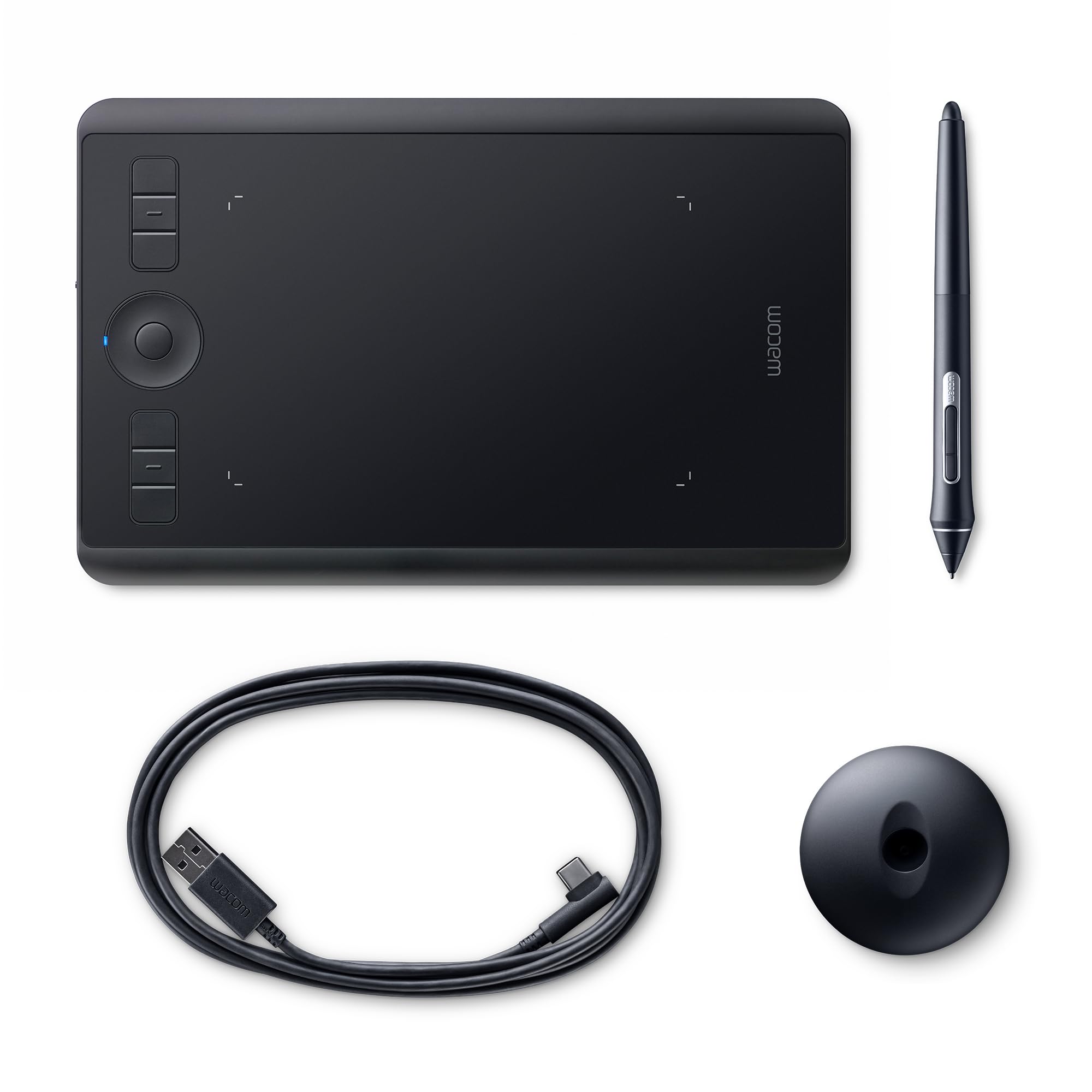
For creatives seeking a high-quality graphic tablet, Wacom Intuos Pro small helps you illustrate, edit images or design with natural creative control, yet boasts a compact footprint for those lacking space or seeking portability. Featuring 8192 levels of pressure sensitivity, unmatched precision accuracy, tilt support and no lag, Intuos Pro small contains Wacoms finest pen technology in this compact pro-quality tablet.With the multi-touch surface, you can zoom, scroll and navigate around your work as simply as using your smartphone. And Intuos Pro small has six application-specific. ExpressKeys and two pen side-switches that you can program for your favorite keyboard shortcuts. The Touch Ring on the tablet makes quick work of canvas rotation, brush size, cycling through layers, and other functions. Wacom Intuos Pro is light and slim yet made of premium materials such as black anodized aluminum and fiberglass composite resin for durability and strength. You will never need to change batteries or charge your pen because it charges off the tablet while in use, thanks to Wacoms EMR technology. The tablet itself connects to your Mac or PC through the included USB and Bluetooth connection. While the Pro Pen 2 is ergonomically designed and comfortable for long hours of use, you can further customize your drawing tablet experience with the Pro Pen Slim and Pro Pen 3D (sold separately).
For creatives seeking a high-quality graphic tablet, Wacom Intuos Pro small helps you illustrate, edit images or design with natural creative control, yet boasts a compact footprint for those lacking space or seeking portability. Featuring 8192 levels of pressure sensitivity, unmatched precision accuracy, tilt support and no lag, Intuos Pro small contains Wacoms finest pen technology in this compact pro-quality tablet.With the multi-touch surface, you can zoom, scroll and navigate around your work as simply as using your smartphone. And Intuos Pro small has six application-specific. ExpressKeys and two pen side-switches that you can program for your favorite keyboard shortcuts. The Touch Ring on the tablet makes quick work of canvas rotation, brush size, cycling through layers, and other functions. Wacom Intuos Pro is light and slim yet made of premium materials such as black anodized aluminum and fiberglass composite resin for durability and strength. You will never need to change batteries or charge your pen because it charges off the tablet while in use, thanks to Wacoms EMR technology. The tablet itself connects to your Mac or PC through the included USB and Bluetooth connection. While the Pro Pen 2 is ergonomically designed and comfortable for long hours of use, you can further customize your drawing tablet experience with the Pro Pen Slim and Pro Pen 3D (sold separately).
For creatives seeking a high-quality graphic tablet, Wacom Intuos Pro small helps you illustrate, edit images or design with natural creative control, yet boasts a compact footprint for those lacking space or seeking portability. Featuring 8192 levels of pressure sensitivity, unmatched precision accuracy, tilt support and no lag, Intuos Pro small contains Wacoms finest pen technology in this compact pro-quality tablet.With the multi-touch surface, you can zoom, scroll and navigate around your work as simply as using your smartphone. And Intuos Pro small has six application-specific. ExpressKeys and two pen side-switches that you can program for your favorite keyboard shortcuts. The Touch Ring on the tablet makes quick work of canvas rotation, brush size, cycling through layers, and other functions. Wacom Intuos Pro is light and slim yet made of premium materials such as black anodized aluminum and fiberglass composite resin for durability and strength. You will never need to change batteries or charge your pen because it charges off the tablet while in use, thanks to Wacoms EMR technology. The tablet itself connects to your Mac or PC through the included USB and Bluetooth connection. While the Pro Pen 2 is ergonomically designed and comfortable for long hours of use, you can further customize your drawing tablet experience with the Pro Pen Slim and Pro Pen 3D (sold separately).
For creatives seeking a high-quality graphic tablet, Wacom Intuos Pro small helps you illustrate, edit images or design with natural creative control, yet boasts a compact footprint for those lacking space or seeking portability. Featuring 8192 levels of pressure sensitivity, unmatched precision accuracy, tilt support and no lag, Intuos Pro small contains Wacoms finest pen technology in this compact pro-quality tablet.With the multi-touch surface, you can zoom, scroll and navigate around your work as simply as using your smartphone. And Intuos Pro small has six application-specific. ExpressKeys and two pen side-switches that you can program for your favorite keyboard shortcuts. The Touch Ring on the tablet makes quick work of canvas rotation, brush size, cycling through layers, and other functions. Wacom Intuos Pro is light and slim yet made of premium materials such as black anodized aluminum and fiberglass composite resin for durability and strength. You will never need to change batteries or charge your pen because it charges off the tablet while in use, thanks to Wacoms EMR technology. The tablet itself connects to your Mac or PC through the included USB and Bluetooth connection. While the Pro Pen 2 is ergonomically designed and comfortable for long hours of use, you can further customize your drawing tablet experience with the Pro Pen Slim and Pro Pen 3D (sold separately).
in 6 offers
The lowest price for Wacom Intuos Pro Small - Creative Pen Tablet right now is $359.00 at EdTechs, compared across 5 retailers.
The all-time low was $45.00 on 29 May 2026 — today's price is 698% above the lowest ever. It has been notably cheaper before — worth setting a price alert.
Prices last updated 26 Oct 2026.
Last updated at 26/10/2026 07:57:31
Wacom Intuos Pro Small
Wacom Intuos Pro Creative Pen Tablet Small
Delivery $10
Wacom PTH460K0D Wacom Intuos Pro Small
Delivery between 30 Oct – 3 Nov $41
Wacom Intuos Pro Digital Graphic Drawing Tablet for Mac or PC, Small (PTH460K0A) New Model
Free delivery between 4–6 Nov
Wacom Intuos Pro Digital Graphic Drawing Tablet for Mac or PC, Small (PTH460K0A) New Model
Delivery between 1–4 Nov $29
originally posted on bhphotovideo.com
I use a Large Wacom Intuos Pro Creative Pen Tablet for digitizing illustrations and Photo editing, and find it to be an indispensable tool. It's smooth, accurate, and reasonably comfortable to use.Recent world events have forced me (like many) to work from home and use video teleconferencing as a primary means of corporate communication. While annotating a virtual white board I quickly realized how useful it was to be able to draw with the stylus, as opposed to using the mouse and keyboard. The drawback with the Large version of the tablet is that it takes up a lot of real estate on the desk.I recently purchased the Wacom Intuos Pro Creative Pen Tablet (Small) and now use it all of the time. It takes a little practice to write legibly, but once you get the hang ... MoreI use a Large Wacom Intuos Pro Creative Pen Tablet for digitizing illustrations and Photo editing, and find it to be an indispensable tool. It's smooth, accurate, and reasonably comfortable to use.Recent world events have forced me (like many) to work from home and use video teleconferencing as a primary means of corporate communication. While annotating a virtual white board I quickly realized how useful it was to be able to draw with the stylus, as opposed to using the mouse and keyboard. The drawback with the Large version of the tablet is that it takes up a lot of real estate on the desk.I recently purchased the Wacom Intuos Pro Creative Pen Tablet (Small) and now use it all of the time. It takes a little practice to write legibly, but once you get the hang of it people who think that you are using a mouse will be astounded! The small size also allows you to slip it into a laptop bag and carry it with you to presentations.Although it wont replace its Big Brother, there are times that I do prefer it to the Large Tablet. Especially while performing touch-ups in photo editing software.
originally posted on bhphotovideo.com
Getting it to work on MacOS Catalina was an absolute pain. (Solve: Install ColorSnapper 2, which properly asks for Input Monitoring permissions. Then only can you add com.wacom.IOManager.app to the Input Monitoring list.)I do experience lag here and there but nothing major.I upgraded to this from a tiny 4x6 Wacom tablet that I got 10 years ago and I actually miss that small footprint. (i.e. I'm glad I didn't go for the medium size... there'd be no point!) I'm mainly using this in lieu of a trackpad and to do more precise silhouetting in Photoshop, not for any larger digital drawings/paintings, so I've actually mapped it so the the active portion of the tablet is about half of what's available so I don't have to move my arm so much.I haven't experienced any ... MoreGetting it to work on MacOS Catalina was an absolute pain. (Solve: Install ColorSnapper 2, which properly asks for Input Monitoring permissions. Then only can you add com.wacom.IOManager.app to the Input Monitoring list.)I do experience lag here and there but nothing major.I upgraded to this from a tiny 4x6 Wacom tablet that I got 10 years ago and I actually miss that small footprint. (i.e. I'm glad I didn't go for the medium size... there'd be no point!) I'm mainly using this in lieu of a trackpad and to do more precise silhouetting in Photoshop, not for any larger digital drawings/paintings, so I've actually mapped it so the the active portion of the tablet is about half of what's available so I don't have to move my arm so much.I haven't experienced any surface tablet issues with the nibs wearing down that other reviewers online have mentioned (it's been about 6 weeks of regular daily use as a mouse/touchpad for design-related work).The touch feature has some gestures, but doesn't map onto MacOS's gestures perfectly. So if you rely on very specific gestures, this won't be a replacement. But you can do things like pinch to zoom, two-finger scrolls, 4-finger swipe to view all open windows, etc.
originally posted on bestbuy.com
Got this to use with multiple programs. Sadly the program I use mostly is not compatible with this tablet, and while it isn't their fault, it did weigh heavily into my returning of this. The only other issue I noticed since I didn't get a lot of time using it before I returned it was the pad itself seemed a bit too oversensitive. I tend to draw or write with the side of my hand on the paper/desk, not floating in the air. This was way too sensitive in how it responded to even my hand or anything touching it, which made it very difficult to actually use without constantly undoing mistakes. Hopefully in the future this will be fixed as well as the compatibility issues.
| General | |
| Device Type | Digitiser |
| Orientation | Right and left-handed |
| Width | 26.9 cm |
| Depth | 17 cm |
Wacom Intuos Pro Small
Wacom Intuos Pro Creative Pen Tablet Small
Delivery $10
Wacom PTH460K0D Wacom Intuos Pro Small
Delivery between 30 Oct – 3 Nov $41
Wacom Intuos Pro Digital Graphic Drawing Tablet for Mac or PC, Small (PTH460K0A) New Model
Free delivery between 4–6 Nov
Wacom Intuos Pro Digital Graphic Drawing Tablet for Mac or PC, Small (PTH460K0A) New Model
Delivery between 1–4 Nov $29
I use a Large Wacom Intuos Pro Creative Pen Tablet for digitizing illustrations and Photo editing, and find it to be an indispensable tool. It's smooth, accurate, and reasonably comfortable to use.Recent world events have forced me (like many) to work from home and use video teleconferencing as a primary means of corporate communication. While annotating a virtual white board I quickly realized how useful it was to be able to draw with the stylus, as opposed to using the mouse and keyboard. The drawback with the Large version of the tablet is that it takes up a lot of real estate on the desk.I recently purchased the Wacom Intuos Pro Creative Pen Tablet (Small) and now use it all of the time. It takes a little practice to write legibly, but once you get the hang ... MoreI use a Large Wacom Intuos Pro Creative Pen Tablet for digitizing illustrations and Photo editing, and find it to be an indispensable tool. It's smooth, accurate, and reasonably comfortable to use.Recent world events have forced me (like many) to work from home and use video teleconferencing as a primary means of corporate communication. While annotating a virtual white board I quickly realized how useful it was to be able to draw with the stylus, as opposed to using the mouse and keyboard. The drawback with the Large version of the tablet is that it takes up a lot of real estate on the desk.I recently purchased the Wacom Intuos Pro Creative Pen Tablet (Small) and now use it all of the time. It takes a little practice to write legibly, but once you get the hang of it people who think that you are using a mouse will be astounded! The small size also allows you to slip it into a laptop bag and carry it with you to presentations.Although it wont replace its Big Brother, there are times that I do prefer it to the Large Tablet. Especially while performing touch-ups in photo editing software.
Getting it to work on MacOS Catalina was an absolute pain. (Solve: Install ColorSnapper 2, which properly asks for Input Monitoring permissions. Then only can you add com.wacom.IOManager.app to the Input Monitoring list.)I do experience lag here and there but nothing major.I upgraded to this from a tiny 4x6 Wacom tablet that I got 10 years ago and I actually miss that small footprint. (i.e. I'm glad I didn't go for the medium size... there'd be no point!) I'm mainly using this in lieu of a trackpad and to do more precise silhouetting in Photoshop, not for any larger digital drawings/paintings, so I've actually mapped it so the the active portion of the tablet is about half of what's available so I don't have to move my arm so much.I haven't experienced any ... MoreGetting it to work on MacOS Catalina was an absolute pain. (Solve: Install ColorSnapper 2, which properly asks for Input Monitoring permissions. Then only can you add com.wacom.IOManager.app to the Input Monitoring list.)I do experience lag here and there but nothing major.I upgraded to this from a tiny 4x6 Wacom tablet that I got 10 years ago and I actually miss that small footprint. (i.e. I'm glad I didn't go for the medium size... there'd be no point!) I'm mainly using this in lieu of a trackpad and to do more precise silhouetting in Photoshop, not for any larger digital drawings/paintings, so I've actually mapped it so the the active portion of the tablet is about half of what's available so I don't have to move my arm so much.I haven't experienced any surface tablet issues with the nibs wearing down that other reviewers online have mentioned (it's been about 6 weeks of regular daily use as a mouse/touchpad for design-related work).The touch feature has some gestures, but doesn't map onto MacOS's gestures perfectly. So if you rely on very specific gestures, this won't be a replacement. But you can do things like pinch to zoom, two-finger scrolls, 4-finger swipe to view all open windows, etc.
Got this to use with multiple programs. Sadly the program I use mostly is not compatible with this tablet, and while it isn't their fault, it did weigh heavily into my returning of this. The only other issue I noticed since I didn't get a lot of time using it before I returned it was the pad itself seemed a bit too oversensitive. I tend to draw or write with the side of my hand on the paper/desk, not floating in the air. This was way too sensitive in how it responded to even my hand or anything touching it, which made it very difficult to actually use without constantly undoing mistakes. Hopefully in the future this will be fixed as well as the compatibility issues.
Fantastic digitizer. Works brilliantly with Photoshop. Needs to be adjusted based on your style of holding a pen and applying pressure. The small size is perfect. I use a 40in 5k monitor and I have mapped the screen to the digitizer. My brush strokes are small for Photoshop retouching and the small size is perfect. I have an older Wacom intuos 3 large and it is just not usable for me as it needs really long strokes to do the same compressed to the Small size. I believe if you are an artist you will need a medium/large tablet. But for Photoshop retouching work with a single large monitor, the small size is perfect. If you have two screens and would like to map both screens on the digitizer a medium size would be the right one. This digitizer needs the Wacom software ... MoreFantastic digitizer. Works brilliantly with Photoshop. Needs to be adjusted based on your style of holding a pen and applying pressure. The small size is perfect. I use a 40in 5k monitor and I have mapped the screen to the digitizer. My brush strokes are small for Photoshop retouching and the small size is perfect. I have an older Wacom intuos 3 large and it is just not usable for me as it needs really long strokes to do the same compressed to the Small size. I believe if you are an artist you will need a medium/large tablet. But for Photoshop retouching work with a single large monitor, the small size is perfect. If you have two screens and would like to map both screens on the digitizer a medium size would be the right one. This digitizer needs the Wacom software to work, even as a basic touch interface/digitizer. The older Wacom works without needing any software. The 6 hotkey's are great for customization. I wish I could customize the center ring button. Overall a great product, size depends on what your needs are and how your screen setup is.
Sensitive, flexible and easy to configure. My new Intuos Pro Creative Pen Tablet (Small) easily fits on my desk by my new HP Windows 10 laptop. Once I got everything configured, it acts as pen tablet and mouse, with one button to bring up the configuration if I choose to change anything. One handy feature my old Intuos Pro lacked is a Touch On/Off switch on the side. As I tend to drag my hand across the tablet, this is a wonderful feature. Deserves 5 stars. LOVE IT.
Was deciding between the iPad Pro + Pencil or this to update my current retouching process. Before, was still using a prior Intuos Pro. Spent some time at the Apple Store trying to figure out if its better to just direct the money towards a new iPad + Pencil or stick with my current Intuos set up.I ended up going with this because if you are seriously retouching a high volume of photos or drawing designs at a fixed set up with a monitor, this is the best tool to add. The iPad Pro + Pencil sounded good at the beginning but as I used it over and over it just seemed to suit a different work flow than what I needed, i.e., high volume retouching on my external BenQ. The material does make a huge difference in terms of how you experience the brushes/tools while ... MoreWas deciding between the iPad Pro + Pencil or this to update my current retouching process. Before, was still using a prior Intuos Pro. Spent some time at the Apple Store trying to figure out if its better to just direct the money towards a new iPad + Pencil or stick with my current Intuos set up.I ended up going with this because if you are seriously retouching a high volume of photos or drawing designs at a fixed set up with a monitor, this is the best tool to add. The iPad Pro + Pencil sounded good at the beginning but as I used it over and over it just seemed to suit a different work flow than what I needed, i.e., high volume retouching on my external BenQ. The material does make a huge difference in terms of how you experience the brushes/tools while retouching compared to the screen of an iPad.Overall, if you are a retoucher or graphic designer who does a high volume of work, I think this is the best tool for that. If you're more mobile, I'd check the other options and see if the cons outweigh the benefits.
The build quality is an improvement over past generation Intous graphics tablets. It's very responsive and has a nice feel. Being wireless isn't a benefit it a tablet loses feel, but this one doesn't. I'm not sure Wacom will have to redesign their Intuos for a very long time. Side note... I find the medium size to be ideal. It doesn't crowd the workspace.
I'm on my third Wacom tablet in about 10 years. Great for photo editing, and general use. Never use a mouse again. This latest updated purchase had me doing some research. When I assigned keys to the pen for Photoshop 2023, the assignment didn't take. I'm using mine on IOS Big Sur and the latest tablet driver put out by wacom is not compatible. I had to drop down to the 6.4.0-6 driver and all was good. (10/12/22 release date) If your still editing with a mouse, it's time to upgrade.
I bought this in March 2022 to replace my very old Intuous Pro. I was hoping for reliable wireless connectivity and better response time. The wireless connection is much more reliable than with the older model, but the the pen and touch responsiveness has become worse and worse until it's practically unusable. I cannot adjust the touch sensitivity and when i am using the one and my hand grazes the pad, my screen starts zooming in and out and I get other unpredictable behaviors. When trying to tap or scroll with my fingers, it often will get stuck and become noon-responsive. I'm extremely disappointed with this product and doubtful will ever purchase Wacom again.
I got this about 2 years ago for my birthday and used it every time i wanted to draw. After i moved from Windows to Linux Ubuntu on my laptop for my everyday use OS, This tablet works out of the box (unlike windows where you have to go to their website for the drivers and additional stuff). The buttons are re-programmable either through the Terminal or through GUI (in settings) though the only real complaints I have for this product as a Ubuntu user are:1: you have to reapply the settings every time you disconnect and reconnect it2: programming the buttons through the GUI doesn't always work (at least in Ubuntu 22.04 LTS) but they are pretty minor issues to me but it is a thing to consider if your a Linux user who isn't to comfortable with the terminal yet (I ... MoreI got this about 2 years ago for my birthday and used it every time i wanted to draw. After i moved from Windows to Linux Ubuntu on my laptop for my everyday use OS, This tablet works out of the box (unlike windows where you have to go to their website for the drivers and additional stuff). The buttons are re-programmable either through the Terminal or through GUI (in settings) though the only real complaints I have for this product as a Ubuntu user are:1: you have to reapply the settings every time you disconnect and reconnect it2: programming the buttons through the GUI doesn't always work (at least in Ubuntu 22.04 LTS) but they are pretty minor issues to me but it is a thing to consider if your a Linux user who isn't to comfortable with the terminal yet (I haven't tested this product in other distros yet but it definitely works in Ubuntu and similar distributions)
| General | |
| Device Type | Digitiser |
| Orientation | Right and left-handed |
| Width | 26.9 cm |
| Depth | 17 cm |

