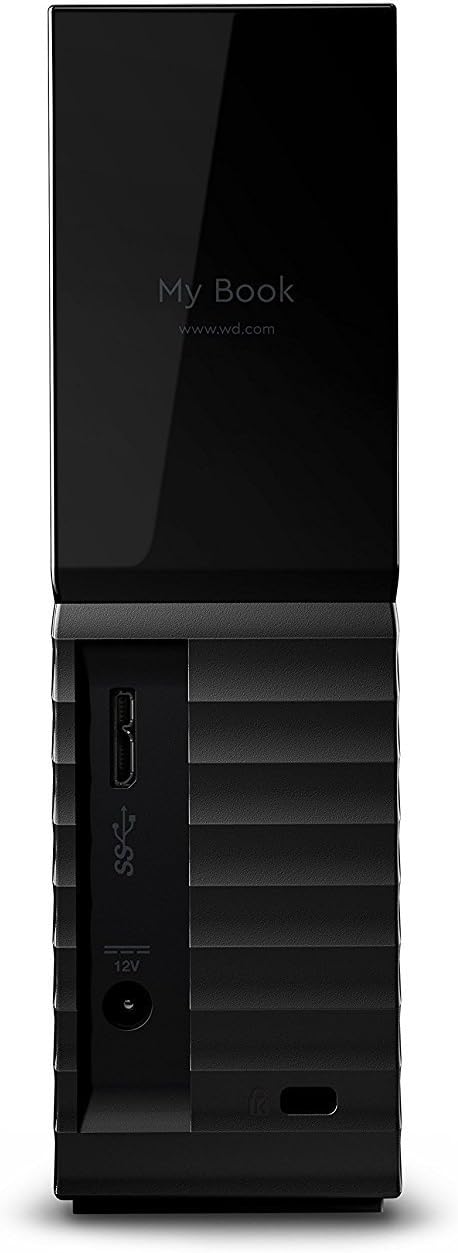
Put your digital life on the sleek, high capacity My Book Essentials external hard drive. With WD quality and USB 3.0 and USB 2.0 connectivity, this drive is designed for today with tomorrow in mind. Visual backup software and password protection with hardware encryption ensure your data is protected. Lightweight and easy to carry, this drive is ideal for fast storage to go.
Put your digital life on the sleek, high capacity My Book Essentials external hard drive. With WD quality and USB 3.0 and USB 2.0 connectivity, this drive is designed for today with tomorrow in mind. Visual backup software and password protection with hardware encryption ensure your data is protected. Lightweight and easy to carry, this drive is ideal for fast storage to go.
in 1 offers
The lowest price for WD My Book 3TB External Hard Drive Storage USB 3.0 File Backup and Storage right now is $89.99.
The all-time low was $93.47 on 21 June 2025. That's the lowest price we've ever tracked — a great time to buy.
Prices last updated 13 Jan 2026.
WD My Book 3TB External Hard Drive Storage USB 3.0 File Backup and Storage
Put your digital life on the sleek, high capacity My Book Essentials external hard drive. With WD quality and USB 3.0 and USB 2.0 connectivity, this drive is designed for today with tomorrow in mind. Visual backup software and password protection with hardware encryption ensure your data is protected. Lightweight and easy to carry, this drive is ideal for fast storage to go.
Put your digital life on the sleek, high capacity My Book Essentials external hard drive. With WD quality and USB 3.0 and USB 2.0 connectivity, this drive is designed for today with tomorrow in mind. Visual backup software and password protection with hardware encryption ensure your data is protected. Lightweight and easy to carry, this drive is ideal for fast storage to go.
Last updated at 13/01/2026 07:21:38
originally posted on influenster.com
I have two of these. I'm a photographer, artist and writer so I have tons of raw images, SVG files and manuscripts that need to be kept securely and safely. This is perfect without overloading my laptops with files. Plugs right in, keep everything safe and secure and easy to organize large amounts of files and data. I would highly reccomend this to anyone, laptops crash and get viruses, this stores your important things off the computer so in the event of a crash you don't lose everything. Especially important if you are doing work for a client. What a lifesaver.
originally posted on influenster.com
My name is Mohamed Creator of MohamedVlogs, a blog evaluation website that focuses on mobile technology and related accessories. I would like to inform you that I have satisfied the requirements of your options. I will promote your website and review your product to 45,700 followers on my Youtube channel as well as I will promote this on my Facebook page contains nearly 7,000 users. Good news !!!! I will post your website and review the product on my Facebook page for FREE! YES for free What are you waiting for? Strike me now and enjoy the promotion with me. Best regards, if you need any additional information, I would be happy to provide my mailing address and contact me. . Thank you for your time Mohamed Abrache my email address:
originally posted on neweggbusiness.com
I have owned a number of different internal and external hard drives over the years across multiple computers, some of which I built myself. Right now I own two MyBook external hard drives- a 1TB and a 3TB- which I use to store everything except apps that need to be installed on the operating drive (C:\). I bought my 3TB MyBook about a year and a half ago (I've had my 1TB for longer), and from day 1 I had the freedom to store just about an endless amount of videos, photos, documents, and other stuff. At night, I put my computer to sleep and when I move the mouse to wake it up, the hard drive turns on with the computer. The only complaint I have with this hard drive is the auto-sleep feature. After ten minutes of no use, the MyBook will "sleep". When you open it in ... MoreI have owned a number of different internal and external hard drives over the years across multiple computers, some of which I built myself. Right now I own two MyBook external hard drives- a 1TB and a 3TB- which I use to store everything except apps that need to be installed on the operating drive (C:\). I bought my 3TB MyBook about a year and a half ago (I've had my 1TB for longer), and from day 1 I had the freedom to store just about an endless amount of videos, photos, documents, and other stuff. At night, I put my computer to sleep and when I move the mouse to wake it up, the hard drive turns on with the computer. The only complaint I have with this hard drive is the auto-sleep feature. After ten minutes of no use, the MyBook will "sleep". When you open it in Windows to access a file, the computer will appear to lock up for about 15 to 20 seconds as the hard drive wakes up. This is intended to extend the lifespan of the drive, and once the hard drive is awake, the computer will unfreeze and you will have access to the blazing speeds of USB 3.0 (assuming you have 3.0 ports), and the hard drive won't sleep until another 10-minute period of non-use. If you do not have USB 3.0 on your computer, you can still plug the drive into USB 2.0 or 1.1 ports. It won't run as fast, but for most people, the speed of USB 2.0 is sufficient. Any computer with Windows XP or a newer operating system will automatically detect and install the drivers, and your hard drive will be ready to go. Be aware that while the hard drive comes with its own software, you do not need to install it to use the hard drive. I always access it directly in Windows. I recommend this hard drive to anyone, especially those with large amounts of data that they want stored in one central location.
I have two of these. I'm a photographer, artist and writer so I have tons of raw images, SVG files and manuscripts that need to be kept securely and safely. This is perfect without overloading my laptops with files. Plugs right in, keep everything safe and secure and easy to organize large amounts of files and data. I would highly reccomend this to anyone, laptops crash and get viruses, this stores your important things off the computer so in the event of a crash you don't lose everything. Especially important if you are doing work for a client. What a lifesaver.
My name is Mohamed Creator of MohamedVlogs, a blog evaluation website that focuses on mobile technology and related accessories. I would like to inform you that I have satisfied the requirements of your options. I will promote your website and review your product to 45,700 followers on my Youtube channel as well as I will promote this on my Facebook page contains nearly 7,000 users. Good news !!!! I will post your website and review the product on my Facebook page for FREE! YES for free What are you waiting for? Strike me now and enjoy the promotion with me. Best regards, if you need any additional information, I would be happy to provide my mailing address and contact me. . Thank you for your time Mohamed Abrache my email address:
I have owned a number of different internal and external hard drives over the years across multiple computers, some of which I built myself. Right now I own two MyBook external hard drives- a 1TB and a 3TB- which I use to store everything except apps that need to be installed on the operating drive (C:\). I bought my 3TB MyBook about a year and a half ago (I've had my 1TB for longer), and from day 1 I had the freedom to store just about an endless amount of videos, photos, documents, and other stuff. At night, I put my computer to sleep and when I move the mouse to wake it up, the hard drive turns on with the computer. The only complaint I have with this hard drive is the auto-sleep feature. After ten minutes of no use, the MyBook will "sleep". When you open it in ... MoreI have owned a number of different internal and external hard drives over the years across multiple computers, some of which I built myself. Right now I own two MyBook external hard drives- a 1TB and a 3TB- which I use to store everything except apps that need to be installed on the operating drive (C:\). I bought my 3TB MyBook about a year and a half ago (I've had my 1TB for longer), and from day 1 I had the freedom to store just about an endless amount of videos, photos, documents, and other stuff. At night, I put my computer to sleep and when I move the mouse to wake it up, the hard drive turns on with the computer. The only complaint I have with this hard drive is the auto-sleep feature. After ten minutes of no use, the MyBook will "sleep". When you open it in Windows to access a file, the computer will appear to lock up for about 15 to 20 seconds as the hard drive wakes up. This is intended to extend the lifespan of the drive, and once the hard drive is awake, the computer will unfreeze and you will have access to the blazing speeds of USB 3.0 (assuming you have 3.0 ports), and the hard drive won't sleep until another 10-minute period of non-use. If you do not have USB 3.0 on your computer, you can still plug the drive into USB 2.0 or 1.1 ports. It won't run as fast, but for most people, the speed of USB 2.0 is sufficient. Any computer with Windows XP or a newer operating system will automatically detect and install the drivers, and your hard drive will be ready to go. Be aware that while the hard drive comes with its own software, you do not need to install it to use the hard drive. I always access it directly in Windows. I recommend this hard drive to anyone, especially those with large amounts of data that they want stored in one central location.
Arrived in great condition as always from CEX. As I am a Mac user had too reformat and download many files before I got to use it. Some of the software was a total waste of time and effort but got there in the end. One drive set for general use and then other set up as a Time Machine. So far working seamless and very fast transfers speeds.
IN THE BOX: Simple picture installation sheet, warranty and tech support guide, power cable, USB 3.0 cable, and My Book Essentials drive. The 32 bit and 64 bit drivers, a detailed manual (written in 23 languages in .pdf format), and the WD SmartWare program for PC and Mac are on the NTFS formatted drive ready for installation. WD SmartWare is a data backup and restoration program that comes installed on Western Digital external hard drives. The program runs as a virtual CD-ROM drive on your system. The WD SmartWare software allows you to perform a selective backup of the data on your primary hard drive, and then restore the backup from the external drive when necessary. It also comes with a formatting utility, and a drive lock utility that allows you to password ... MoreIN THE BOX: Simple picture installation sheet, warranty and tech support guide, power cable, USB 3.0 cable, and My Book Essentials drive. The 32 bit and 64 bit drivers, a detailed manual (written in 23 languages in .pdf format), and the WD SmartWare program for PC and Mac are on the NTFS formatted drive ready for installation. WD SmartWare is a data backup and restoration program that comes installed on Western Digital external hard drives. The program runs as a virtual CD-ROM drive on your system. The WD SmartWare software allows you to perform a selective backup of the data on your primary hard drive, and then restore the backup from the external drive when necessary. It also comes with a formatting utility, and a drive lock utility that allows you to password protect your external drive so it can’t be used by those without it. I was pleased with the overall looks of the drive, which is shiny piano black with rounded corners and edges keeping it from looking too boxy. There are cooling vents in the top back side and top edge of the casing but no active cooling fans. This should be sufficient cooling for the WD green drive inside as long as you don’t seal off the venting somehow. In the front of the drive unit, there is a pinhole with a white LED light behind it that blinks when accessing the drive, and is solid ‘on’ otherwise. Total capacity is 1,000,169,533,440 bytes (931GB). Approximately 930 GB of actual storage space is typical for an advertised 1TB drive, and it is a common misconception between Binary and Decimal drive capacity, and will be witnessed for any storage device. Information regarding specifications for the differentiation between Binary and Decimal drive capacities can be found by viewing the information provided by this link on WD’s website. http://wdc.custhelp.com/app/answers/detail/a_id/615 Here is a link to the online user manual on WD’s website. http://www.wdc.com/wdproducts/library/UM/ENG/4779-705019.pdf
OS compatability & provided software: I tried this on XP, Win7, Mac laptop, Linux, FreeBSD, and a couple network appliances. The drive comes formatted as NTFS (the older models came as fat32) with an MBR partition scheme. If you plan on storing files greater than 4 Gb in size, keep it as NTFS on Win. The driver automatically installed for me on Win 7. If you are using mac you’ll want to reformat with HFS+. To do this you’ll either need to use the provided software or to do it manually you need to go to Partition Map, hit the Options button and change the boot record scheme to GUID from MBR (if you don’t, Disk Utility may give you an error message that says there was an unknown error with the partition map). I’ve also tested formatting this drive on Linux as XFS and ... MoreOS compatability & provided software: I tried this on XP, Win7, Mac laptop, Linux, FreeBSD, and a couple network appliances. The drive comes formatted as NTFS (the older models came as fat32) with an MBR partition scheme. If you plan on storing files greater than 4 Gb in size, keep it as NTFS on Win. The driver automatically installed for me on Win 7. If you are using mac you’ll want to reformat with HFS+. To do this you’ll either need to use the provided software or to do it manually you need to go to Partition Map, hit the Options button and change the boot record scheme to GUID from MBR (if you don’t, Disk Utility may give you an error message that says there was an unknown error with the partition map). I’ve also tested formatting this drive on Linux as XFS and EXT3. I’ve tested that it can be used as a backup disk with a Buffalo Linkstation RAID1 NAS on the USB port. I’ve tested that this disk mounts on FreeNAS 8.3.0-RC1 with two different ASUS AMD mbs with USB2. This gives you a fast option to move data in/out of a redundant FreeNAS server without using network bandwidth. I’ve also tried the drive on a Netgear 3500L router flashed with Tomato as an inexpensive pseudo-NAS/BitTorrent storage. The optional software experience is similar in look and feel on both Windows and Mac. There is a “WD Quick Formatter” with Win/Mac versions. There is a suite of management/diagnostics/computer backup/driver software called “Smartware” that lets you install only the parts you need. For Mac there is an optional “WD + turbo” driver that improves the file transfer speeds (about 10%) and a backup option that is more granular than Time Machine. If you plan on using the drive as a “usually-connected and on” drive it will keep your data automatically backed up with file versioning with a reversion count of up to 25. There is an interesting display that graphically categorizes the files by type and shows you what has been backed up. The software allows you to set Drive Sleep/Password Protection/Run SMART tests. I have had five of the older 1 Tb USB2 drives for a long time and they are still working fine. I use two of them for nightly automatic backup images of a couple of RAID1 NAS devices in always-connected mode. I use the other two to store laptop backups, rotating one unit off-site. The fifth is my general purpose portable utility drive that goes in the suitcase when I travel. I’ve used it to offload my parent’s data when upgrading their computer; I’ve used it to carry around a portable version of my LightRoom catalog. I’ve had good luck with the 1 Tb Green drives as internal disks for data storage (not system drives) in desktops. Backup and redundancy are not optional if you value your data. Drives fail. A high-capacity portable drive with a separate power supply is often a good component in a comprehensive backup strategy.
At the start of the year my laptop computer corrupted. I lost everything. I was determined to avoid this happening ever again. Only I wanted more than an external USB hard drive. I wanted to have a backup happen effortlessly and consistently. With my background in Linux and using a Linux desktop "Rsync" effortlessly performs the backup. What is helpful to me is MyBookLive runs Linux. I was able to tweak it to erase old backups automatically. This isn't to say you must be a 'Geek' to buy this. With it's user interface once it is configured it will serve your entire family well. Photos and videos of special memories need to be preserved. Cell phones break. You'll regret not having a system for backing up your data.
My OPPO BD player requires a 2TB max external USB drive (MBR) and I've had one of these that I purchased new in March 2012. It finally died and was looking for another NEW one...and found this! It works perfectly for my needs, integrated seamlessly on my network, and all network/drive settings remained from the one that died. Simple setup and working like a charm!
This external drive is fast and works fine. I use it for image back up of every SSD I have on every desktop that I have. I switch these drives among all 3 desktops to create a total of 9 images for 3 machines. This assures that every SDD will boot up and work on each machine, something that is not guaranteed, even on the same desktop models. The SSD's average 100GB of data each. Total image storage is therefore 900GB for me on this 1TB ext drive. Image back up is the ultimate protection against ransomware attacks, which are expected to get worse in the coming years. Restoring an image restores all programs and files without paying any ransom. No re-installation of programs necessary.
Item came quickly and nicely packaged, as you would expect from CEX. The external hard drive came with a power adapter and a SATA to USB cable. I haven't scanned the sectors, but it works well so far. I'm only using it to back up work and game files so it won't be used often.