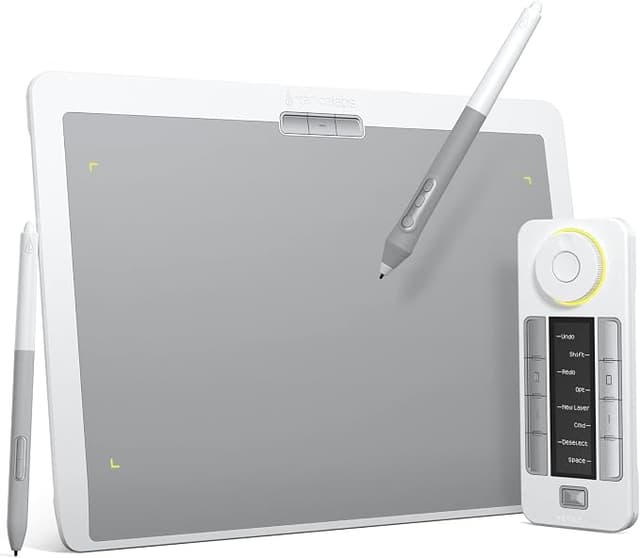
Xencelabs Pen Tablet Medium Bundle SE - White
The special edition of the Xencelabs Pen Tablet Medium Bundle is mist white. The light aesthetic appeals especially to creatives at their workplace. Now artists have the choice of which colour they want to integrate into their personal workflow. Xencelab's graphics tablet was developed with input from dozens of creative professionals. The active area (26.2 x 14.7 cm) has a 16: 9 aspect ratio to match common displays. The surface of the drawing tablet has an ultrafine matte texture that is wearresistant and nonslip. This results in a natural feel, like using a pen on paper. The graphics tablet comes with two pens. The pens have different diameters and different numbers of buttons to suit any requirement. Both pens offer 8192 pressure levels, tilt detection and transmit all inputs without delay. With high pen accuracy and pressure sensitivity, the input pens provide you with excellent precision and the most advanced performance. The shortcut remote control for the drawing tablet offers 5 sets of 8 keys each, allowing 40 programmable functions per application. An OLED display on Quick Keys shows you the assignment of each key at a glance. This allows you to create logical groups of keys for specific steps in the workflow.
The special edition of the Xencelabs Pen Tablet Medium Bundle is mist white. The light aesthetic appeals especially to creatives at their workplace. Now artists have the choice of which colour they want to integrate into their personal workflow. Xencelab's graphics tablet was developed with input from dozens of creative professionals. The active area (26.2 x 14.7 cm) has a 16: 9 aspect ratio to match common displays. The surface of the drawing tablet has an ultrafine matte texture that is wearresistant and nonslip. This results in a natural feel, like using a pen on paper. The graphics tablet comes with two pens. The pens have different diameters and different numbers of buttons to suit any requirement. Both pens offer 8192 pressure levels, tilt detection and transmit all inputs without delay. With high pen accuracy and pressure sensitivity, the input pens provide you with excellent precision and the most advanced performance. The shortcut remote control for the drawing tablet offers 5 sets of 8 keys each, allowing 40 programmable functions per application. An OLED display on Quick Keys shows you the assignment of each key at a glance. This allows you to create logical groups of keys for specific steps in the workflow.
The special edition of the Xencelabs Pen Tablet Medium Bundle is mist white. The light aesthetic appeals especially to creatives at their workplace. Now artists have the choice of which colour they want to integrate into their personal workflow. Xencelab's graphics tablet was developed with input from dozens of creative professionals. The active area (26.2 x 14.7 cm) has a 16: 9 aspect ratio to match common displays. The surface of the drawing tablet has an ultrafine matte texture that is wearresistant and nonslip. This results in a natural feel, like using a pen on paper. The graphics tablet comes with two pens. The pens have different diameters and different numbers of buttons to suit any requirement. Both pens offer 8192 pressure levels, tilt detection and transmit all inputs without delay. With high pen accuracy and pressure sensitivity, the input pens provide you with excellent precision and the most advanced performance. The shortcut remote control for the drawing tablet offers 5 sets of 8 keys each, allowing 40 programmable functions per application. An OLED display on Quick Keys shows you the assignment of each key at a glance. This allows you to create logical groups of keys for specific steps in the workflow.
The special edition of the Xencelabs Pen Tablet Medium Bundle is mist white. The light aesthetic appeals especially to creatives at their workplace. Now artists have the choice of which colour they want to integrate into their personal workflow. Xencelab's graphics tablet was developed with input from dozens of creative professionals. The active area (26.2 x 14.7 cm) has a 16: 9 aspect ratio to match common displays. The surface of the drawing tablet has an ultrafine matte texture that is wearresistant and nonslip. This results in a natural feel, like using a pen on paper. The graphics tablet comes with two pens. The pens have different diameters and different numbers of buttons to suit any requirement. Both pens offer 8192 pressure levels, tilt detection and transmit all inputs without delay. With high pen accuracy and pressure sensitivity, the input pens provide you with excellent precision and the most advanced performance. The shortcut remote control for the drawing tablet offers 5 sets of 8 keys each, allowing 40 programmable functions per application. An OLED display on Quick Keys shows you the assignment of each key at a glance. This allows you to create logical groups of keys for specific steps in the workflow.
in 3 offers
The lowest price for Xencelabs Pen Tablet Medium Bundle SE - White right now is $379.02 at Amazon.com.au, compared across 3 retailers.
The all-time low was $196.14 on 26 Sept 2024 — today's price is 93% above the lowest ever. It has been notably cheaper before — worth setting a price alert.
Prices last updated 22 Sept 2026.
Last updated at 22/09/2026 23:57:32
XENCELABS Graphics Drawing Tablet, Pen Tablet Medium Bundle SE with 2 Battery-Free Stylus, 8192 Pressure, Wireless Graphic Tablet with Shortcut Keys,
Affiliate Disclosure: We may receive a small commission for purchases made through this link at no extra cost to you. This helps support our site. Thank you!
Xencelabs Pen Tablet Medium Bundle White
Free delivery between 28–30 Sept
Xencelabs 32cm Creative Pen Tablet Medium Bundle SE w/ Quick Keys For PC White
Free delivery between Fri – Tue
originally posted on bhphotovideo.com
I have been using another leading brand of pen tablets for upward of 8 years. I have always had to use it wired because I could never get the wireless dongle to stay connected. Not to mentioned the constant driver issues. I had been reading a lot about these tablets, but hesitated because I already had a small and a medium of the other brand. However, I finally took the plunge and I couldn't be happier. The setup was a breeze and I have not lost wireless connectivity once since I hooked it up a couple of weeks ago. Some people mentioned that they didn't like the feel of the larger pen, but personally, I like it better. It has a smoother feel in the hand. The surface of the tablet feels a bit smoother, (less drag), as well. I tried the felt tips that come with it, ... MoreI have been using another leading brand of pen tablets for upward of 8 years. I have always had to use it wired because I could never get the wireless dongle to stay connected. Not to mentioned the constant driver issues. I had been reading a lot about these tablets, but hesitated because I already had a small and a medium of the other brand. However, I finally took the plunge and I couldn't be happier. The setup was a breeze and I have not lost wireless connectivity once since I hooked it up a couple of weeks ago. Some people mentioned that they didn't like the feel of the larger pen, but personally, I like it better. It has a smoother feel in the hand. The surface of the tablet feels a bit smoother, (less drag), as well. I tried the felt tips that come with it, but prefer the black plastic ones myself. I don't use the quick keys to their fullest capability and I probably wouldn't have purchased them if there was a medium tablet in white, without them. But, with that said, I have found myself using them on occasion. So, at some point I may find myself using them more. In the two weeks that I have had this tablet, (and I use it everyday), I have experienced zero problems. I am truly enjoying using it!! There is one con to the product, it doesn't have finger touch capabilities, (at least not what I have discovered), but I overcame that habit quickly with my trackpad. So, if you are in the market for a new pen tablet, or a first time buyer, I would without hesitation recommend this tablet!!
originally posted on bhphotovideo.com
The Xencelabs tablet is terrific. I had a Wacom Intuous Pro and the Xencelabs is a much improved experience. Some of my problem with the Wacom was I had the small size which made precise movements difficult. I have the Xencelabs medium and it is much easier to make precise adjustments in Lightroom and Photoshop. Note in order to have scrolling capability with the Xencelabs you have to get the bundle with the Quick Keys Remote. I highly recommend this product.
originally posted on bhphotovideo.com
I've tried a bunch of tablets over the years, each time being disappointed, usually by lag times (even when wired to computer) and/or driver problems. I was about to give up on them when I read about and reviewed comments regarding the Xencelab.I decided to give it a try and wow, it really works. The drivers are stable, i.e. no need to restart. There is no lag time, even when going wireless. Pen pressure application really works. And most importantly, it was no hassle to set up and get drawing and editing.I did have to contact tech support one time. I called, left my question on their voice mail and about 10 minutes later, received a friendly call from a real person who provided spot-on answers. I'm no techie but the rep's explanations and directions were easy ... MoreI've tried a bunch of tablets over the years, each time being disappointed, usually by lag times (even when wired to computer) and/or driver problems. I was about to give up on them when I read about and reviewed comments regarding the Xencelab.I decided to give it a try and wow, it really works. The drivers are stable, i.e. no need to restart. There is no lag time, even when going wireless. Pen pressure application really works. And most importantly, it was no hassle to set up and get drawing and editing.I did have to contact tech support one time. I called, left my question on their voice mail and about 10 minutes later, received a friendly call from a real person who provided spot-on answers. I'm no techie but the rep's explanations and directions were easy to follow.If you're interested in working with a tablet, I would recommend giving the Xencelab bundle kit a go. While everyone is different, I would submit that you'd be very satisfied with its reliability and ease of operation.
| Cable | 2 x USB-A to USB-C cable (L) |
| Dimensions | 320.5 x 232.5 x 8 mm (W x H x D) |
| Active area size | 262.4 x 147.4 mm |
| Active area aspect ratio | 16:9 |
| Hours per charge | 16 hours (2.5 hours charging time) |

XENCELABS Graphics Drawing Tablet, Pen Tablet Medium Bundle SE with 2 Battery-Free Stylus, 8192 Pressure, Wireless Graphic Tablet with Shortcut Keys,
Affiliate Disclosure: We may receive a small commission for purchases made through this link at no extra cost to you. This helps support our site. Thank you!
Xencelabs Pen Tablet Medium Bundle White
Free delivery between 28–30 Sept
Xencelabs 32cm Creative Pen Tablet Medium Bundle SE w/ Quick Keys For PC White
Free delivery between Fri – Tue
I have been using another leading brand of pen tablets for upward of 8 years. I have always had to use it wired because I could never get the wireless dongle to stay connected. Not to mentioned the constant driver issues. I had been reading a lot about these tablets, but hesitated because I already had a small and a medium of the other brand. However, I finally took the plunge and I couldn't be happier. The setup was a breeze and I have not lost wireless connectivity once since I hooked it up a couple of weeks ago. Some people mentioned that they didn't like the feel of the larger pen, but personally, I like it better. It has a smoother feel in the hand. The surface of the tablet feels a bit smoother, (less drag), as well. I tried the felt tips that come with it, ... MoreI have been using another leading brand of pen tablets for upward of 8 years. I have always had to use it wired because I could never get the wireless dongle to stay connected. Not to mentioned the constant driver issues. I had been reading a lot about these tablets, but hesitated because I already had a small and a medium of the other brand. However, I finally took the plunge and I couldn't be happier. The setup was a breeze and I have not lost wireless connectivity once since I hooked it up a couple of weeks ago. Some people mentioned that they didn't like the feel of the larger pen, but personally, I like it better. It has a smoother feel in the hand. The surface of the tablet feels a bit smoother, (less drag), as well. I tried the felt tips that come with it, but prefer the black plastic ones myself. I don't use the quick keys to their fullest capability and I probably wouldn't have purchased them if there was a medium tablet in white, without them. But, with that said, I have found myself using them on occasion. So, at some point I may find myself using them more. In the two weeks that I have had this tablet, (and I use it everyday), I have experienced zero problems. I am truly enjoying using it!! There is one con to the product, it doesn't have finger touch capabilities, (at least not what I have discovered), but I overcame that habit quickly with my trackpad. So, if you are in the market for a new pen tablet, or a first time buyer, I would without hesitation recommend this tablet!!
The Xencelabs tablet is terrific. I had a Wacom Intuous Pro and the Xencelabs is a much improved experience. Some of my problem with the Wacom was I had the small size which made precise movements difficult. I have the Xencelabs medium and it is much easier to make precise adjustments in Lightroom and Photoshop. Note in order to have scrolling capability with the Xencelabs you have to get the bundle with the Quick Keys Remote. I highly recommend this product.
I've tried a bunch of tablets over the years, each time being disappointed, usually by lag times (even when wired to computer) and/or driver problems. I was about to give up on them when I read about and reviewed comments regarding the Xencelab.I decided to give it a try and wow, it really works. The drivers are stable, i.e. no need to restart. There is no lag time, even when going wireless. Pen pressure application really works. And most importantly, it was no hassle to set up and get drawing and editing.I did have to contact tech support one time. I called, left my question on their voice mail and about 10 minutes later, received a friendly call from a real person who provided spot-on answers. I'm no techie but the rep's explanations and directions were easy ... MoreI've tried a bunch of tablets over the years, each time being disappointed, usually by lag times (even when wired to computer) and/or driver problems. I was about to give up on them when I read about and reviewed comments regarding the Xencelab.I decided to give it a try and wow, it really works. The drivers are stable, i.e. no need to restart. There is no lag time, even when going wireless. Pen pressure application really works. And most importantly, it was no hassle to set up and get drawing and editing.I did have to contact tech support one time. I called, left my question on their voice mail and about 10 minutes later, received a friendly call from a real person who provided spot-on answers. I'm no techie but the rep's explanations and directions were easy to follow.If you're interested in working with a tablet, I would recommend giving the Xencelab bundle kit a go. While everyone is different, I would submit that you'd be very satisfied with its reliability and ease of operation.
| Cable | 2 x USB-A to USB-C cable (L) |
| Dimensions | 320.5 x 232.5 x 8 mm (W x H x D) |
| Active area size | 262.4 x 147.4 mm |
| Active area aspect ratio | 16:9 |
| Hours per charge | 16 hours (2.5 hours charging time) |


