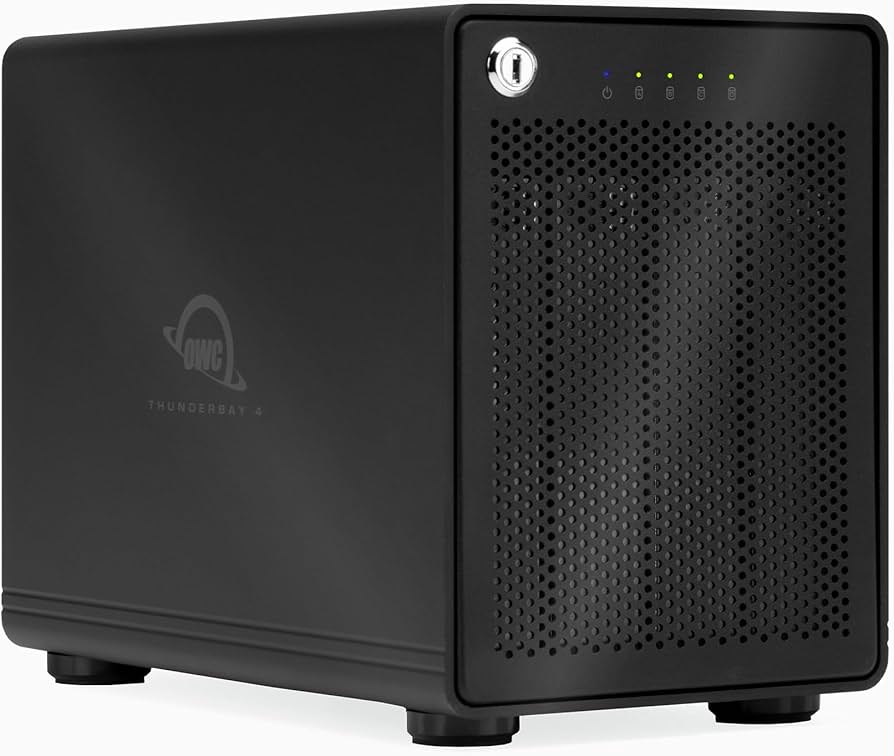
24TB OWC Mercury Elite Pro Quad RAID 5 4-Drive HDD Storage Solution
The Mercury Elite Pro Quad's powerful USB-C interface delivers USB 3.2 (10Gb/s) bandwidth and works with any USB-C or Thunderbolt 3 equipped Mac or Windows PC. Simply connect the Mercury Elite Pro Quad via the included USB-C cable to experience next-level performance. If your computer doesn't feature USB-C connectivity, the included USB-C to USB-A cable brings backward compatibility for machines with legacy USB ports. Compatible with 2.5' and 3.5' drives, the Mercury Elite Pro Quad's four universal drive bays provide users massive storage possibilities. With this level of capacity and drive flexibility, you will not have to compromise when it comes to your storage. Multiple RAID options let you select the RAID level that fits you or your project’s needs best. If you need maximum volume capacity, optimum drive performance, data protection, or a combination of attributes, SoftRAID has you covered. Packed with features like drive validation, verification and failure prediction—SoftRAID includes features you simply don’t get with hardware RAID. It’s like having a datacenter on your desktop! From home users looking to protect photos and documents to professionals needing to protect and quickly access projects, SoftRAID is the perfect solution.
The Mercury Elite Pro Quad's powerful USB-C interface delivers USB 3.2 (10Gb/s) bandwidth and works with any USB-C or Thunderbolt 3 equipped Mac or Windows PC. Simply connect the Mercury Elite Pro Quad via the included USB-C cable to experience next-level performance. If your computer doesn't feature USB-C connectivity, the included USB-C to USB-A cable brings backward compatibility for machines with legacy USB ports. Compatible with 2.5' and 3.5' drives, the Mercury Elite Pro Quad's four universal drive bays provide users massive storage possibilities. With this level of capacity and drive flexibility, you will not have to compromise when it comes to your storage. Multiple RAID options let you select the RAID level that fits you or your project’s needs best. If you need maximum volume capacity, optimum drive performance, data protection, or a combination of attributes, SoftRAID has you covered. Packed with features like drive validation, verification and failure prediction—SoftRAID includes features you simply don’t get with hardware RAID. It’s like having a datacenter on your desktop! From home users looking to protect photos and documents to professionals needing to protect and quickly access projects, SoftRAID is the perfect solution.
The Mercury Elite Pro Quad's powerful USB-C interface delivers USB 3.2 (10Gb/s) bandwidth and works with any USB-C or Thunderbolt 3 equipped Mac or Windows PC. Simply connect the Mercury Elite Pro Quad via the included USB-C cable to experience next-level performance. If your computer doesn't feature USB-C connectivity, the included USB-C to USB-A cable brings backward compatibility for machines with legacy USB ports. Compatible with 2.5' and 3.5' drives, the Mercury Elite Pro Quad's four universal drive bays provide users massive storage possibilities. With this level of capacity and drive flexibility, you will not have to compromise when it comes to your storage. Multiple RAID options let you select the RAID level that fits you or your project’s needs best. If you need maximum volume capacity, optimum drive performance, data protection, or a combination of attributes, SoftRAID has you covered. Packed with features like drive validation, verification and failure prediction—SoftRAID includes features you simply don’t get with hardware RAID. It’s like having a datacenter on your desktop! From home users looking to protect photos and documents to professionals needing to protect and quickly access projects, SoftRAID is the perfect solution.
The Mercury Elite Pro Quad's powerful USB-C interface delivers USB 3.2 (10Gb/s) bandwidth and works with any USB-C or Thunderbolt 3 equipped Mac or Windows PC. Simply connect the Mercury Elite Pro Quad via the included USB-C cable to experience next-level performance. If your computer doesn't feature USB-C connectivity, the included USB-C to USB-A cable brings backward compatibility for machines with legacy USB ports. Compatible with 2.5' and 3.5' drives, the Mercury Elite Pro Quad's four universal drive bays provide users massive storage possibilities. With this level of capacity and drive flexibility, you will not have to compromise when it comes to your storage. Multiple RAID options let you select the RAID level that fits you or your project’s needs best. If you need maximum volume capacity, optimum drive performance, data protection, or a combination of attributes, SoftRAID has you covered. Packed with features like drive validation, verification and failure prediction—SoftRAID includes features you simply don’t get with hardware RAID. It’s like having a datacenter on your desktop! From home users looking to protect photos and documents to professionals needing to protect and quickly access projects, SoftRAID is the perfect solution.
in 2 offers
The lowest price for 24TB OWC Mercury Elite Pro Quad RAID 5 4-Drive HDD Storage Solution right now is $3,484.00 at MegaMac, compared across 2 retailers.
The all-time low was $1,316.69 on 14 July 2025 — today's price is 165% above the lowest ever. It has been notably cheaper before — worth setting a price alert.
Prices last updated 22 Aug 2026.
Last updated at 22/08/2026 21:29:53
24TB HDD OWC Mercury Elite Pro Quad 4-Drive Storage Solution with USB3.1 Gen2 Chipset with USB-C Port and SoftRaid XT - Discontinued - 24TB
24TB OWC Mercury Elite Pro Quad RAID 5 4-Drive HDD Storage Solution
Delivery between 26 Aug – 1 Sept $12
originally posted on macsales.com
Having previously purchased the Mercury Elite Pro Dual Mini, I needed something to accommodate several 2.5" SATA SSDs I had previously installed in an old Intel tower Mac. This is very high quality, all-metal construction, with easy connection over USB-C and a built-in power supply. If I were to suggest an improvement, it would be to use snap-in drive mounting rails instead of 16 fiddly small screws, and use some sort of teflon or similar slides to prevent the drive mounts from scraping on the interior metal. Since it's more of a "set it and forget it" type of box where you're not likely to be pulling drives very often, the mounting system is OK, it's not a hot-swap RAID unit. I actually ended up exchanging this for the smaller ThunderBay 4 Mini as I needed ... MoreHaving previously purchased the Mercury Elite Pro Dual Mini, I needed something to accommodate several 2.5" SATA SSDs I had previously installed in an old Intel tower Mac. This is very high quality, all-metal construction, with easy connection over USB-C and a built-in power supply. If I were to suggest an improvement, it would be to use snap-in drive mounting rails instead of 16 fiddly small screws, and use some sort of teflon or similar slides to prevent the drive mounts from scraping on the interior metal. Since it's more of a "set it and forget it" type of box where you're not likely to be pulling drives very often, the mounting system is OK, it's not a hot-swap RAID unit. I actually ended up exchanging this for the smaller ThunderBay 4 Mini as I needed something that would take up a little less desktop space and fit under a monitor stand - I haven't used 3.5" drives in over a decade so the TB 4 Mini is more compact for my needs, though it too could use snap-in mounts and glides.
originally posted on macsales.com
I got this model for 4 HDDs I have from another system. 10Gbps is plenty fast for what I use for. I use them as individual drives so I don't need the SoftRAID software which is extra. Now I can move the item to any macOS devices I have unencumbered by any software license. macOS comes with RAID 0 should I feel adventurous and speedy later on. The 7200rpm hdd I have only have r/w for about 160MB/s which would never saturate the 10Gbps connection. The unit does not provide additional connections for display and whatnot. It's just a pure direct attached storage. It provides sleep and stable connection no problem. Since I run 4 HDDs in it so there is some noise but not really because of the enclosure per se more like from the HDDs, if I were to run SATA SSD I believe ... MoreI got this model for 4 HDDs I have from another system. 10Gbps is plenty fast for what I use for. I use them as individual drives so I don't need the SoftRAID software which is extra. Now I can move the item to any macOS devices I have unencumbered by any software license. macOS comes with RAID 0 should I feel adventurous and speedy later on. The 7200rpm hdd I have only have r/w for about 160MB/s which would never saturate the 10Gbps connection. The unit does not provide additional connections for display and whatnot. It's just a pure direct attached storage. It provides sleep and stable connection no problem. Since I run 4 HDDs in it so there is some noise but not really because of the enclosure per se more like from the HDDs, if I were to run SATA SSD I believe the whole setup would be quieter as fan noise is minimum from what I can hear. Not the latest greatest in 2023 but it got the job done.
originally posted on macsales.com
This enclosure is exactly what I needed when migrating from my old MacPro with 4 HD bays to a Mac Studio. It is compact, so it can be placed on your desk, or under /in your desk. And it uses the USB-C connections for really quick service.This was an "open Box" purchase at a very reasonable price. I have only 2 tiny negatives...very tiny.1. This open box device did not have any "manual" or set up instructions included. OWC's videos saved the day in that respect.2. Although I did not have an SSD drive to install, I can see that the tiny screws included for attaching one would be a real problem for someone like myself with old, stiff fingers. But I admit that OWC has no control over the standards used by drive manufacturers for attachment holes.I have done business ... MoreThis enclosure is exactly what I needed when migrating from my old MacPro with 4 HD bays to a Mac Studio. It is compact, so it can be placed on your desk, or under /in your desk. And it uses the USB-C connections for really quick service.This was an "open Box" purchase at a very reasonable price. I have only 2 tiny negatives...very tiny.1. This open box device did not have any "manual" or set up instructions included. OWC's videos saved the day in that respect.2. Although I did not have an SSD drive to install, I can see that the tiny screws included for attaching one would be a real problem for someone like myself with old, stiff fingers. But I admit that OWC has no control over the standards used by drive manufacturers for attachment holes.I have done business with OWC for many, many years. I have never had anything but great experiences. HIGHLY RECOMMENDED PRODUCT!
| Connection Interface | 1 x USB 3.2 / USB 3.1 Gen 2 (USB Type-C) |
| Internal Interface | SATA III |
| Rotational Speed | 7200 rpm |
| Form Factor | 3.5" |
| Cache Memory | 128 MB |
24TB HDD OWC Mercury Elite Pro Quad 4-Drive Storage Solution with USB3.1 Gen2 Chipset with USB-C Port and SoftRaid XT - Discontinued - 24TB
24TB OWC Mercury Elite Pro Quad RAID 5 4-Drive HDD Storage Solution
Delivery between 26 Aug – 1 Sept $12
Having previously purchased the Mercury Elite Pro Dual Mini, I needed something to accommodate several 2.5" SATA SSDs I had previously installed in an old Intel tower Mac. This is very high quality, all-metal construction, with easy connection over USB-C and a built-in power supply. If I were to suggest an improvement, it would be to use snap-in drive mounting rails instead of 16 fiddly small screws, and use some sort of teflon or similar slides to prevent the drive mounts from scraping on the interior metal. Since it's more of a "set it and forget it" type of box where you're not likely to be pulling drives very often, the mounting system is OK, it's not a hot-swap RAID unit. I actually ended up exchanging this for the smaller ThunderBay 4 Mini as I needed ... MoreHaving previously purchased the Mercury Elite Pro Dual Mini, I needed something to accommodate several 2.5" SATA SSDs I had previously installed in an old Intel tower Mac. This is very high quality, all-metal construction, with easy connection over USB-C and a built-in power supply. If I were to suggest an improvement, it would be to use snap-in drive mounting rails instead of 16 fiddly small screws, and use some sort of teflon or similar slides to prevent the drive mounts from scraping on the interior metal. Since it's more of a "set it and forget it" type of box where you're not likely to be pulling drives very often, the mounting system is OK, it's not a hot-swap RAID unit. I actually ended up exchanging this for the smaller ThunderBay 4 Mini as I needed something that would take up a little less desktop space and fit under a monitor stand - I haven't used 3.5" drives in over a decade so the TB 4 Mini is more compact for my needs, though it too could use snap-in mounts and glides.
I got this model for 4 HDDs I have from another system. 10Gbps is plenty fast for what I use for. I use them as individual drives so I don't need the SoftRAID software which is extra. Now I can move the item to any macOS devices I have unencumbered by any software license. macOS comes with RAID 0 should I feel adventurous and speedy later on. The 7200rpm hdd I have only have r/w for about 160MB/s which would never saturate the 10Gbps connection. The unit does not provide additional connections for display and whatnot. It's just a pure direct attached storage. It provides sleep and stable connection no problem. Since I run 4 HDDs in it so there is some noise but not really because of the enclosure per se more like from the HDDs, if I were to run SATA SSD I believe ... MoreI got this model for 4 HDDs I have from another system. 10Gbps is plenty fast for what I use for. I use them as individual drives so I don't need the SoftRAID software which is extra. Now I can move the item to any macOS devices I have unencumbered by any software license. macOS comes with RAID 0 should I feel adventurous and speedy later on. The 7200rpm hdd I have only have r/w for about 160MB/s which would never saturate the 10Gbps connection. The unit does not provide additional connections for display and whatnot. It's just a pure direct attached storage. It provides sleep and stable connection no problem. Since I run 4 HDDs in it so there is some noise but not really because of the enclosure per se more like from the HDDs, if I were to run SATA SSD I believe the whole setup would be quieter as fan noise is minimum from what I can hear. Not the latest greatest in 2023 but it got the job done.
This enclosure is exactly what I needed when migrating from my old MacPro with 4 HD bays to a Mac Studio. It is compact, so it can be placed on your desk, or under /in your desk. And it uses the USB-C connections for really quick service.This was an "open Box" purchase at a very reasonable price. I have only 2 tiny negatives...very tiny.1. This open box device did not have any "manual" or set up instructions included. OWC's videos saved the day in that respect.2. Although I did not have an SSD drive to install, I can see that the tiny screws included for attaching one would be a real problem for someone like myself with old, stiff fingers. But I admit that OWC has no control over the standards used by drive manufacturers for attachment holes.I have done business ... MoreThis enclosure is exactly what I needed when migrating from my old MacPro with 4 HD bays to a Mac Studio. It is compact, so it can be placed on your desk, or under /in your desk. And it uses the USB-C connections for really quick service.This was an "open Box" purchase at a very reasonable price. I have only 2 tiny negatives...very tiny.1. This open box device did not have any "manual" or set up instructions included. OWC's videos saved the day in that respect.2. Although I did not have an SSD drive to install, I can see that the tiny screws included for attaching one would be a real problem for someone like myself with old, stiff fingers. But I admit that OWC has no control over the standards used by drive manufacturers for attachment holes.I have done business with OWC for many, many years. I have never had anything but great experiences. HIGHLY RECOMMENDED PRODUCT!
This is a sleek, well-built case that comes ready to load with 3.5-inch drives. I'm marking it down because there is a QNAP unit that offers hardware RAID including RAID 5/6, where this unit pushes new users (those not interested in custom software setups) into purchasing OWC's SoftRAID software for a huge additional cost (including eventual necessary upgrades).tl;dr: It's a bad value. Just buy the QNAP.
I have been looking long and hard for years for a larger external RAID than my current Lacie 4Big Quadra 16TB. Ive heard horror stories about Drobo, and another Lacie was too expensive. So I settled on the Mercury Elite Pro Quad.It is NOT the same as the Lacie or a Drobo. Rather alarmingly, the very little included documentation said, This enclosure does not have any built-in RAID capabilities. It does include a page about SoftRAID, a OWC company software raid program which you can download. Sounds great at first until you realize it is only made for MAC. Their support forums note in February 2019 they are working an a RAID 1 and 0 version for PC, but are in beta, and other RAID levels will come later. That does me no good running a PC. I seriously debated sending ... MoreI have been looking long and hard for years for a larger external RAID than my current Lacie 4Big Quadra 16TB. Ive heard horror stories about Drobo, and another Lacie was too expensive. So I settled on the Mercury Elite Pro Quad.It is NOT the same as the Lacie or a Drobo. Rather alarmingly, the very little included documentation said, This enclosure does not have any built-in RAID capabilities. It does include a page about SoftRAID, a OWC company software raid program which you can download. Sounds great at first until you realize it is only made for MAC. Their support forums note in February 2019 they are working an a RAID 1 and 0 version for PC, but are in beta, and other RAID levels will come later. That does me no good running a PC. I seriously debated sending it back, but I couldnt find any other offerings at a similar price point which gave what I was looking for, and not having the time or money to get a much more pricey one, I looked into doing it as a PC.The documentation tells you to go to www.owcdigital.com/format to instruct you how to format it. So I followed its instructions. Each of the four 10 TB WD Gold drives I put in showed up as not being initialized. At this point, right click offered a RAID option. But I followed the OWC instructions, initialized all four disks, and my RAID options in Disk Management disappeared. Now what? The OWC page, nor does the documentation, provide any clue where to go from that point.Eventually I found out on Toms Hardware you have to look up Storage Spaces in your Win10 searchbar. This opens up a Win10 software RAID which I warily set up. The hesitation came from the fact that as a software RAID, this is going to be a drain on system resources. But I went ahead. And my four 10 TB drives only give me 24.2 usable terrabytes. I thought I should be getting at least 27, but nope, another 3TB are used up somewhere. So I had been hoping for a usage 30 TB, but only have a usable 24.2 in parity, which is Storage Spaces version of RAID 5.Thus, in Canadian dollars, Ive now spent 4x$600+tax for the drives, and $400 for this enclosure, to only have 24 usable TB.Also, Storage Spaces only allows NTFS, not exFAT. When you think about it, it makes sense, since this is a software RAID from Windows 10. But you can forget about plugging this into a Mac. I dont even know if it will work on another PCRight now I am transferring my large photo directories and it is quite noisy. The drives almost sound like they came from 10+ years ago. Not sure if thats a drive thing or something to do with the enclosure. The fan is not too loud. So even with a USB-C, it will take the better part of a week to transfer the roughly 18 TB I am moving to it.Transfer speed tests done so far dont show much USB-C advantage when pulling from older memory cards or other external drives. However, transferring from the internal SSD to this Mercury was very quick.Intended uses: photo and video production in a professional capacity.I just hope this thing works.
I bought the 48TB version of this system in Jan of 2024.Product arrived quickly and easy setup. Typical speeds were write 508 MB/s, and write 508 MB/s.Using on Davinci Resolve editing software, iMac I9 48gb ram.The drive is noisy, hums intermittently till i lightly tap the top of the box. also clicks loudly when accessing the files. Not sure if it is just the drives or the system by design.
I moved from a QNAP TR-04 to this since to get higher speed. This drive is very fast with USB 3.1 gen 2. However, it is very difficult to use due to USB C to USB C 3.1 gen 2 cables. I have tried multiple cables, lengths, and placement. it seems the cables are even sensitive to placement and if they run next to other cables. I have this connected to an Alienware R11 with a usb 3.1 port. When used with some USB cables, drives wont even mount, with other cables, drives will mount but drop often or get data loss. When using the included OWC cable it works fine as long as you do not run along with ethernet or other cables. So in summary, great enclosure if you can stick with a 3Ft cable and can be very careful with cable placement.
The hardware is ok, the fans are not as loud as with the dual unit. The specs, hardware pros and cons have been covered but there is one very serious consideration if you chose to use the included SoftRaid software. If so, there is an annual fee that will make this much more expensive than its competition. They state you can always download the version that was installed at the time of purchase but they do not fix bugs in older version, forcing paid upgrades, even if the bug was discovered during time a license was active. In my case, a bug caused them to remove the ability to resize a volume. They stated that an update should be out shortly (my license was still active) but it took them many months to fix it. At this point, my license is expired, and they stated ... MoreThe hardware is ok, the fans are not as loud as with the dual unit. The specs, hardware pros and cons have been covered but there is one very serious consideration if you chose to use the included SoftRaid software. If so, there is an annual fee that will make this much more expensive than its competition. They state you can always download the version that was installed at the time of purchase but they do not fix bugs in older version, forcing paid upgrades, even if the bug was discovered during time a license was active. In my case, a bug caused them to remove the ability to resize a volume. They stated that an update should be out shortly (my license was still active) but it took them many months to fix it. At this point, my license is expired, and they stated the bug will not be fixed in any previous version. I must pay to upgrade to get the fix although they have it documented that I reported the bug and was waiting a very long time for the fix and again, during the time my license was active. Sinology, WD, all the others will not charge you for firmware or software bug fixes to keep their products running for a reasonable lifespan. OWC does. I generally like the company but beware of the additional fee that is $80-150 a year to keep SoftRaid updated and working. It sounds like they need to rethink their strategy if they want to build trust that they will support their products. On the other hand, there may be little advantage to even using SoftRaid vs. Apple's and other software no-cost RAID options.
I bought two of these to replace Drobos that we had been using for our photo storage. I've been very pleased with the experience. The OWC units are solidly built, and installing four 4TB Seagate IronWolf drives was easy. I also bought the OWC SoftRaid software, which made it very simple to set them up as Raid 5 DAS units with a capacity of 12TB each. They've been running for a month now with no issues. My only nitpick is that the AC cord and USB cables are rather short. I had to buy a six-foot USB C to USB C cable to accommodate where I wanted to place the units.
Great, solid and heavy build. Have to be careful if moving things around to not break the little USB-C off.Almost missed the thin plastic covers in front of the drive slots. Easy to get to the fan, it's got plenty of space for a thick one, 3 pin connector and it's basically never going fast with helium drives that aren't being run at max speeds.Great to have an option that doesn't have hardware raid, you get more solid construction in its place. ZFS setup with caching of metadata on an SSD for fast directory listings and file size counts.Can't see it in the photos, 2.5 inch drives are mounted through the bottom and there's a cross beam in the middle of the brackets.S.M.A.R.T. data shows up fine.
| Connection Interface | 1 x USB 3.2 / USB 3.1 Gen 2 (USB Type-C) |
| Internal Interface | SATA III |
| Rotational Speed | 7200 rpm |
| Form Factor | 3.5" |
| Cache Memory | 128 MB |