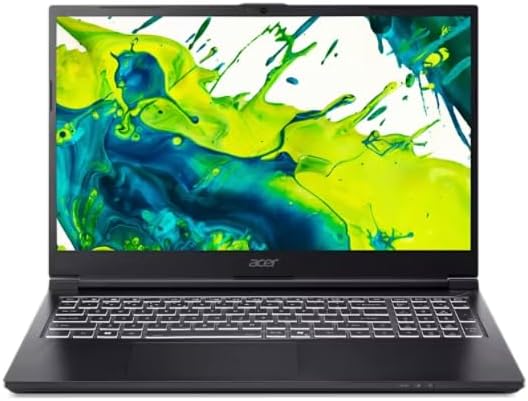
Powered by a 13th Gen Intel Core Processor and Intel Iris Xe graphics, the Acer Aspire 3 15.6-inch i3-N305/16GB/512GB provides you with a smooth performance, making it a suitable companion for your work and play demands.
Powered by a 13th Gen Intel Core Processor and Intel Iris Xe graphics, the Acer Aspire 3 15.6-inch i3-N305/16GB/512GB provides you with a smooth performance, making it a suitable companion for your work and play demands.
in 2 offers
The lowest price for Acer Aspire 3 15.6-inch i3-N305/16GB/512GB - Blue right now is $999.00 at Harvey Norman, compared across 2 retailers.
The all-time low was $399.00 on 24 Mar 2026 — today's price is 150% above the lowest ever. It has been notably cheaper before — worth setting a price alert.
Prices last updated 10 July 2026.
Acer Aspire 3 15.6-inch i3-N305/16GB/512GB - Blue
Powered by a 13th Gen Intel Core Processor and Intel Iris Xe graphics, the Acer Aspire 3 15.6-inch i3-N305/16GB/512GB provides you with a smooth performance, making it a suitable companion for your work and play demands.
Powered by a 13th Gen Intel Core Processor and Intel Iris Xe graphics, the Acer Aspire 3 15.6-inch i3-N305/16GB/512GB provides you with a smooth performance, making it a suitable companion for your work and play demands.
Last updated at 10/07/2026 14:39:46
Acer Aspire 3 15.6-inch i3-N305/16GB/512GB Laptop - Blue
Acer Aspire 3 15.6-inch i3-N305/16GB/512GB Laptop - Blue
originally posted on influenster.com
I was given this product to review from the influenster app. Acer Aspire 3 with a 15.6" Full HD Display, Intel Core i3-N305, Intel UHD Graphics, 8GB LPDDR5 Onboard Memory, 128GB Universal Flash Onboard Storage, and pre-installed with Windows 11 Home in S mode. Here's my take on this budget-friendly laptop: Performance: The Intel Core i3-N305 and 8GB LPDDR5 memory provide a solid performance for everyday tasks. Whether it's web browsing, document editing, or multimedia consumption, the Acer Aspire 3 handles them efficiently. The inclusion of Intel UHD Graphics is suitable for casual gaming and ensures smooth video playback. Display: The 15.6" Full HD display delivers crisp and vibrant visuals, making it enjoyable for both work and entertainment. The size is ideal for ... MoreI was given this product to review from the influenster app. Acer Aspire 3 with a 15.6" Full HD Display, Intel Core i3-N305, Intel UHD Graphics, 8GB LPDDR5 Onboard Memory, 128GB Universal Flash Onboard Storage, and pre-installed with Windows 11 Home in S mode. Here's my take on this budget-friendly laptop: Performance: The Intel Core i3-N305 and 8GB LPDDR5 memory provide a solid performance for everyday tasks. Whether it's web browsing, document editing, or multimedia consumption, the Acer Aspire 3 handles them efficiently. The inclusion of Intel UHD Graphics is suitable for casual gaming and ensures smooth video playback. Display: The 15.6" Full HD display delivers crisp and vibrant visuals, making it enjoyable for both work and entertainment. The size is ideal for productivity, and the clarity enhances the overall user experience. Storage: With 128GB Universal Flash Onboard Storage, the Aspire 3 offers decent space for essential files and applications. While it might be a bit limited for users with extensive storage needs, the laptop supports external storage options for expansion. Operating System: Windows 11 Home in S mode provides a secure and streamlined experience. However, it's worth noting that S mode limits app installations to the Microsoft Store. Users seeking more flexibility may choose to switch out of S mode for broader application compatibility. Design and Build: The Acer Aspire 3 boasts a sleek design and a sturdy build, making it a reliable companion for on-the-go use. The keyboard is comfortable for typing, and the overall build quality gives the impression of a laptop that can withstand daily use. Battery Life: The battery life on the Aspire 3 is decent, providing enough power for several hours of usage on a single charge. However, actual performance may vary based on usage patterns.Overall, the Acer Aspire 3 offers a balanced package for users on a budget. It's a reliable choice for everyday computing tasks, and the inclusion of Windows 11 Home in S mode adds a modern touch to the user experience.
originally posted on bestbuy.com
The Acer Aspire 3 is a solid choice for anyone in need of a reliable and responsive device that can handle various tasks without breaking the bank.The laptop has a highly responsive touchscreen, which makes navigating and accessing files a breeze. I found this feature to be useful when working on presentations and projects that required a more interactive approach.The laptop's USB-C port allows for quick and easy connections to various devices. I personally connected this laptop to my monitor via USB-C-to-C cable which allowed me to extend my display to a much larger screen while also charging the laptop simultaneously through the same cable. This helped free up some cable clutter on my desk. The 2x USB-A ports are nice to have and give flexibility to add ... MoreThe Acer Aspire 3 is a solid choice for anyone in need of a reliable and responsive device that can handle various tasks without breaking the bank.The laptop has a highly responsive touchscreen, which makes navigating and accessing files a breeze. I found this feature to be useful when working on presentations and projects that required a more interactive approach.The laptop's USB-C port allows for quick and easy connections to various devices. I personally connected this laptop to my monitor via USB-C-to-C cable which allowed me to extend my display to a much larger screen while also charging the laptop simultaneously through the same cable. This helped free up some cable clutter on my desk. The 2x USB-A ports are nice to have and give flexibility to add additional peripherals as well. Having these available for an external mouse and keyboard was very welcomed.Another great feature of the Acer Aspire 3 is its lightweight design which makes it highly portable. I was able to travel with the laptop to work on my online programming class remotely without feeling weighed down. In addition to work, this laptop was also good for play as well. At 8GB of RAM, it was powerful enough to run Pro Tools with various plugins for recording music without maxing out, which I was pleasantly surprised about.The included soft case is well-padded and has a zippered side-pocket for accessories.The only slight downside to this laptop is the clicking touchpad, which requires a decent amount of force to use. However, this is more of a personal preference that can be easily circumvented by utilizing a mouse.Overall, I was impressed at how much was packed into a laptop at this price point and would recommend it to people looking for a laptop that can function as an everyday workhorse.
originally posted on bestbuy.com
I recently purchased the Aspire 3 Laptop, and I couldn't be happier with my decision. This laptop has truly surpassed my expectations and has become an essential part of my daily life. Allow me to share my enthusiastic review of the Aspire 3.First and foremost, the performance of this laptop is outstanding. Equipped with a powerful processor and ample RAM, it effortlessly handles my multitasking needs. Whether I'm working on multiple applications, streaming videos, or engaging in intensive tasks, the Aspire 3 delivers smooth and responsive performance without any lag or slowdown. It has significantly boosted my productivity and made my computing experience a breeze.The display quality of the Aspire 3 is fantastic. The 15.6-inch screen offers vibrant colors, ... MoreI recently purchased the Aspire 3 Laptop, and I couldn't be happier with my decision. This laptop has truly surpassed my expectations and has become an essential part of my daily life. Allow me to share my enthusiastic review of the Aspire 3.First and foremost, the performance of this laptop is outstanding. Equipped with a powerful processor and ample RAM, it effortlessly handles my multitasking needs. Whether I'm working on multiple applications, streaming videos, or engaging in intensive tasks, the Aspire 3 delivers smooth and responsive performance without any lag or slowdown. It has significantly boosted my productivity and made my computing experience a breeze.The display quality of the Aspire 3 is fantastic. The 15.6-inch screen offers vibrant colors, sharp details, and excellent brightness. Whether I'm editing photos, watching movies, or simply browsing the web, the visuals are clear, crisp, and enjoyable. The wider viewing angles ensure that I can comfortably view the screen from different positions, providing a truly immersive experience.The build quality of the Aspire 3 is impressive. It features a sleek and modern design that exudes elegance. The laptop feels solid and durable, with a well-constructed keyboard that offers comfortable typing and a responsive touchpad for smooth navigation. It's also lightweight and slim, making it easy to carry around for work or travel. The overall design aesthetic is pleasing, and the laptop's durability ensures it can withstand the rigors of daily use.Battery life is another highlight of the Aspire 3. I am amazed at how long it can last on a single charge. With its efficient power management, it easily provides me with several hours of usage, allowing me to work, browse, and stream without constantly worrying about finding a power outlet. This extended battery life has been a game-changer for me, especially during long flights or when working from locations with limited access to power.In terms of connectivity, the Aspire 3 offers a range of options to suit my needs. It features multiple USB ports, an HDMI port, and an SD card slot, allowing me to connect various peripherals and devices effortlessly. The Wi-Fi and Bluetooth connectivity are reliable and fast, ensuring seamless wireless communication and hassle-free connectivity with other devices.In conclusion, the Aspire 3 Laptop is a fantastic device that delivers exceptional performance, stunning display quality, solid build, impressive battery life, and versatile connectivity options. It is a reliable workhorse that meets the demands of both personal and professional use. Whether you're a student, a professional, or a casual user, the Aspire 3 is an excellent choice. I wholeheartedly recommend It.
| Processor Brand | Intel |
| Processor Type | 13th Gen Intel Core i3 |
| Processor Model | N305 |
| Processor Speed (GHz) | 1.80 |
| Processor Max Speed (GHz) | 3.8 |
Acer Aspire 3 15.6-inch i3-N305/16GB/512GB Laptop - Blue
Acer Aspire 3 15.6-inch i3-N305/16GB/512GB Laptop - Blue
I was given this product to review from the influenster app. Acer Aspire 3 with a 15.6" Full HD Display, Intel Core i3-N305, Intel UHD Graphics, 8GB LPDDR5 Onboard Memory, 128GB Universal Flash Onboard Storage, and pre-installed with Windows 11 Home in S mode. Here's my take on this budget-friendly laptop: Performance: The Intel Core i3-N305 and 8GB LPDDR5 memory provide a solid performance for everyday tasks. Whether it's web browsing, document editing, or multimedia consumption, the Acer Aspire 3 handles them efficiently. The inclusion of Intel UHD Graphics is suitable for casual gaming and ensures smooth video playback. Display: The 15.6" Full HD display delivers crisp and vibrant visuals, making it enjoyable for both work and entertainment. The size is ideal for ... MoreI was given this product to review from the influenster app. Acer Aspire 3 with a 15.6" Full HD Display, Intel Core i3-N305, Intel UHD Graphics, 8GB LPDDR5 Onboard Memory, 128GB Universal Flash Onboard Storage, and pre-installed with Windows 11 Home in S mode. Here's my take on this budget-friendly laptop: Performance: The Intel Core i3-N305 and 8GB LPDDR5 memory provide a solid performance for everyday tasks. Whether it's web browsing, document editing, or multimedia consumption, the Acer Aspire 3 handles them efficiently. The inclusion of Intel UHD Graphics is suitable for casual gaming and ensures smooth video playback. Display: The 15.6" Full HD display delivers crisp and vibrant visuals, making it enjoyable for both work and entertainment. The size is ideal for productivity, and the clarity enhances the overall user experience. Storage: With 128GB Universal Flash Onboard Storage, the Aspire 3 offers decent space for essential files and applications. While it might be a bit limited for users with extensive storage needs, the laptop supports external storage options for expansion. Operating System: Windows 11 Home in S mode provides a secure and streamlined experience. However, it's worth noting that S mode limits app installations to the Microsoft Store. Users seeking more flexibility may choose to switch out of S mode for broader application compatibility. Design and Build: The Acer Aspire 3 boasts a sleek design and a sturdy build, making it a reliable companion for on-the-go use. The keyboard is comfortable for typing, and the overall build quality gives the impression of a laptop that can withstand daily use. Battery Life: The battery life on the Aspire 3 is decent, providing enough power for several hours of usage on a single charge. However, actual performance may vary based on usage patterns.Overall, the Acer Aspire 3 offers a balanced package for users on a budget. It's a reliable choice for everyday computing tasks, and the inclusion of Windows 11 Home in S mode adds a modern touch to the user experience.
The Acer Aspire 3 is a solid choice for anyone in need of a reliable and responsive device that can handle various tasks without breaking the bank.The laptop has a highly responsive touchscreen, which makes navigating and accessing files a breeze. I found this feature to be useful when working on presentations and projects that required a more interactive approach.The laptop's USB-C port allows for quick and easy connections to various devices. I personally connected this laptop to my monitor via USB-C-to-C cable which allowed me to extend my display to a much larger screen while also charging the laptop simultaneously through the same cable. This helped free up some cable clutter on my desk. The 2x USB-A ports are nice to have and give flexibility to add ... MoreThe Acer Aspire 3 is a solid choice for anyone in need of a reliable and responsive device that can handle various tasks without breaking the bank.The laptop has a highly responsive touchscreen, which makes navigating and accessing files a breeze. I found this feature to be useful when working on presentations and projects that required a more interactive approach.The laptop's USB-C port allows for quick and easy connections to various devices. I personally connected this laptop to my monitor via USB-C-to-C cable which allowed me to extend my display to a much larger screen while also charging the laptop simultaneously through the same cable. This helped free up some cable clutter on my desk. The 2x USB-A ports are nice to have and give flexibility to add additional peripherals as well. Having these available for an external mouse and keyboard was very welcomed.Another great feature of the Acer Aspire 3 is its lightweight design which makes it highly portable. I was able to travel with the laptop to work on my online programming class remotely without feeling weighed down. In addition to work, this laptop was also good for play as well. At 8GB of RAM, it was powerful enough to run Pro Tools with various plugins for recording music without maxing out, which I was pleasantly surprised about.The included soft case is well-padded and has a zippered side-pocket for accessories.The only slight downside to this laptop is the clicking touchpad, which requires a decent amount of force to use. However, this is more of a personal preference that can be easily circumvented by utilizing a mouse.Overall, I was impressed at how much was packed into a laptop at this price point and would recommend it to people looking for a laptop that can function as an everyday workhorse.
I recently purchased the Aspire 3 Laptop, and I couldn't be happier with my decision. This laptop has truly surpassed my expectations and has become an essential part of my daily life. Allow me to share my enthusiastic review of the Aspire 3.First and foremost, the performance of this laptop is outstanding. Equipped with a powerful processor and ample RAM, it effortlessly handles my multitasking needs. Whether I'm working on multiple applications, streaming videos, or engaging in intensive tasks, the Aspire 3 delivers smooth and responsive performance without any lag or slowdown. It has significantly boosted my productivity and made my computing experience a breeze.The display quality of the Aspire 3 is fantastic. The 15.6-inch screen offers vibrant colors, ... MoreI recently purchased the Aspire 3 Laptop, and I couldn't be happier with my decision. This laptop has truly surpassed my expectations and has become an essential part of my daily life. Allow me to share my enthusiastic review of the Aspire 3.First and foremost, the performance of this laptop is outstanding. Equipped with a powerful processor and ample RAM, it effortlessly handles my multitasking needs. Whether I'm working on multiple applications, streaming videos, or engaging in intensive tasks, the Aspire 3 delivers smooth and responsive performance without any lag or slowdown. It has significantly boosted my productivity and made my computing experience a breeze.The display quality of the Aspire 3 is fantastic. The 15.6-inch screen offers vibrant colors, sharp details, and excellent brightness. Whether I'm editing photos, watching movies, or simply browsing the web, the visuals are clear, crisp, and enjoyable. The wider viewing angles ensure that I can comfortably view the screen from different positions, providing a truly immersive experience.The build quality of the Aspire 3 is impressive. It features a sleek and modern design that exudes elegance. The laptop feels solid and durable, with a well-constructed keyboard that offers comfortable typing and a responsive touchpad for smooth navigation. It's also lightweight and slim, making it easy to carry around for work or travel. The overall design aesthetic is pleasing, and the laptop's durability ensures it can withstand the rigors of daily use.Battery life is another highlight of the Aspire 3. I am amazed at how long it can last on a single charge. With its efficient power management, it easily provides me with several hours of usage, allowing me to work, browse, and stream without constantly worrying about finding a power outlet. This extended battery life has been a game-changer for me, especially during long flights or when working from locations with limited access to power.In terms of connectivity, the Aspire 3 offers a range of options to suit my needs. It features multiple USB ports, an HDMI port, and an SD card slot, allowing me to connect various peripherals and devices effortlessly. The Wi-Fi and Bluetooth connectivity are reliable and fast, ensuring seamless wireless communication and hassle-free connectivity with other devices.In conclusion, the Aspire 3 Laptop is a fantastic device that delivers exceptional performance, stunning display quality, solid build, impressive battery life, and versatile connectivity options. It is a reliable workhorse that meets the demands of both personal and professional use. Whether you're a student, a professional, or a casual user, the Aspire 3 is an excellent choice. I wholeheartedly recommend It.
This Acer Aspire 3 is an excellent choice for anyone that needs an affordable and capable Windows 11 Laptop. It has enough system memory and processing power to support most productivity needs. If you are a power user or a serious gamer, then this laptop is of course not the right choice. But in the middle range price tier, where it comfortably sits, it more than meets expectations.My significant other was eager to try this laptop out as she has a hybrid work schedule which consists of working from home and office and frequent travel. One feature that she especially liked is that there is a dedicated HDMI out, as she prefers the native HDMI aspect ratio for her primary monitor as opposed to the video output from a USB-C Hub..As just mentioned, we are using this ... MoreThis Acer Aspire 3 is an excellent choice for anyone that needs an affordable and capable Windows 11 Laptop. It has enough system memory and processing power to support most productivity needs. If you are a power user or a serious gamer, then this laptop is of course not the right choice. But in the middle range price tier, where it comfortably sits, it more than meets expectations.My significant other was eager to try this laptop out as she has a hybrid work schedule which consists of working from home and office and frequent travel. One feature that she especially liked is that there is a dedicated HDMI out, as she prefers the native HDMI aspect ratio for her primary monitor as opposed to the video output from a USB-C Hub..As just mentioned, we are using this device with a portable USB-C Hub. The function of the USB-C port is flawless, which allows us to connect and disconnect our laptops on the fly without having to reconnect accessories. The USB-C port accepts [power and since we are using a Hub with power delivery, using the included power adapter is not necessary as the laptop is fully powered by the Hub. The laptop has enough ports to be used without a Hub with the exception of a SD card slot. Most Hubs have a SD card port, so this will not be a problem unless you are not planning on using a Hub, which I strongly recommend for all laptops with USB-C capability.We are using it as part of a dual monitor setup, but on its own the 15 inch 1080P internal display is suitable for watching videos or for use as a second or third display, which is how we are using it.The internal speakers sound typical for a laptop, so I strongly recommend headphones or an external speaker. The keyboard has a nice feel to it with a medium amount of travel. The keyboard is not backlit, but that is not to be expected at this price point. We will be using an external keyboard at home and when working away from home, but the laptop keyboard and touchpad are completely serviceable without an external mouse or keyboard. I like that it has a 10 key number pad which many laptops omit to save space.Battery life is excellent. Expect 10 to 12 hours of typical use per charge. It took about 2 hours to fully charge from zero. A proprietary charger is included but as I indicated earlier, the USB-C port can be used to charge the laptop, so I will likely never use the included charger..At this price range you can’t go wrong with Acer Aspire 3. Acer makes fabulous products, and this laptop lives up to that expectation. It is attractive, lightweight, and an absolute pleasure to use. A nice added feature is that Acer has included a matching branded laptop sleeve. This is a very nice touch that I wish would become more standard..
The Acer Chromebook 315 is my second Chromebook device but first from this manufacturer. It has a traditional clamshell laptop/notebook design, and the 15.6” diagonal 1080P IPS touchscreen display opens a full 180° and can be laid flat. The device weighs a little over 3.5 lbs, and comes with a padded, zippered storage sleeve with slim front pouch for accessories like the 45W charger.Its construction consists of a lightweight matte plastic housing with four rubber feet on the bottom corners for stabilization. It has a Kensington lock slot and two USB-C and two USB-A ports for peripherals, one set on either side; either USB-C port can be used for charging, but a charging status LED is adjacent only to the port on the left side. The keyboard is not backlit so can be ... MoreThe Acer Chromebook 315 is my second Chromebook device but first from this manufacturer. It has a traditional clamshell laptop/notebook design, and the 15.6” diagonal 1080P IPS touchscreen display opens a full 180° and can be laid flat. The device weighs a little over 3.5 lbs, and comes with a padded, zippered storage sleeve with slim front pouch for accessories like the 45W charger.Its construction consists of a lightweight matte plastic housing with four rubber feet on the bottom corners for stabilization. It has a Kensington lock slot and two USB-C and two USB-A ports for peripherals, one set on either side; either USB-C port can be used for charging, but a charging status LED is adjacent only to the port on the left side. The keyboard is not backlit so can be difficult to see in the dark but does include a 10-key number pad on the right-hand side. The top row has dedicated action keys e.g. volume, brightness, and browser navigation. The trackpad in front of the keyboard is located left-of-center and is generously sized with a 4”W x 3”L footprint, multi-touch, and gesture support. You can also tap, pinch, and swipe on the screen and control the device like a mobile phone or tablet, though its matte screen tends to pick up fingerprints fairly easily.As for specifications, this model has an Intel Celeron N4020 2.8GHZ Dual-core processor with 4 GB of RAM and 64 GB of eMMC internal storage (about 20 GB is used by the OS and apps out-of-the-box). There are no upgradable internal components or memory card slots, so the only way to add more storage is to use an external USB drive or utilize cloud storage. Under heavy loads, for example when running multiple apps at once, the performance of the device is somewhat laggy, and the specs won’t meet the minimum requirements for some resource-intensive mobile games either, resulting in sluggish gameplay, crashing, or prevent you from installing it altogether. That isn’t surprising though as this device is mainly built for lightweight computing tasks like web browsing and word processing.As for connectivity, this device supports WiFi 5 802.11AC and Bluetooth v5. During internet speed tests, download speeds were reasonably fast (on my WiFi 6 network) while upload speeds tended to trail some of my other devices. It can also be paired to an Android smartphone to access its data hotspot on your mobile service plan, if available.The 15.6” diagonal 60Hz display has decent saturation, brightness, and color. It’s perfectly suitable for watching video with its full HD 1920 x 1080 resolution at 160dpi, however, it doesn’t support a wide color gamut if you need precise and accurate colors for creative work like digital art or photography. The stereo speakers are located on the bottom, and the volume output by these is surprisingly strong, though the quality tends to sound constrained and boxy. While certainly not an audiophile experience, they are fine for listening to podcasts and participating in virtual meetings; if you want better sound, you can use high-quality headphones or external speakers via the 3.5mm headphone/mic combo jack.A front facing 720p 0.9MP webcam and pinhole mic are centered above the screen though the camera provides a fairly grainy image that suffers greatly in low-light settings. There is also no built-in flash or lens cover for this camera, however, an adjacent green LED illuminates when the camera is in use. The audio captured by the microphone is decently clear for livestreaming or vlogging.The device runs Chrome OS and there is a taskbar along the bottom of the screen as well as notifications, date/time, and status icons in the bottom-right corner. Chromebooks use Google apps by default like Gmail, Chrome, and Google Drive etc. and to access all its features, you are required to log into the device using a Google account. You can set up PIN number or paired phone unlocking (Smart Lock) of the device as well. This machine does not have any biometric security features like a fingerprint scanner or facial recognition. If you choose not to log in you may use the device as a guest user, however, this mode is primarily limited to using the web browser.Since this is a cloud computing device, many apps and services are launched within the Chrome web-browser rather than from standalone apps. If you choose to install apps from the Play Store, remember that this will use up internal storage space, so when possible, I recommend accessing most services like Amazon or Netflix through the browser. Mobile device apps typically launch in a smaller window to mimic the look and feel of a smartphone or tablet. Note that strictly desktop computer programs cannot be installed on this device.The “everything button,” which has a magnifying glass on it, is on the keyboard where the Caps lock key is usually located. This button functions just like clicking the search toggle in the lower left-hand corner of the screen, displaying a drawer of installed apps and enabling you to search the device and internet for files, answers to questions, and settings. You can also use Google’s AI assistant by voice by saying the wake words, “Hey Google” (if enabled). This feature lets you ask questions and control networked smart devices connected by Google Home. To save battery, you can have it only listen and respond when the device is plugged in and charging, rather than ‘always on.’ Depending on your settings, you’ll get up to 10-12 hours of continuous use on a full charge.Overall, I found this Chromebook to be quite suitable for web browsing, light computing, and the occasional casual game. It is decently lightweight at this form factor, has ample battery life and a large HD screen, acceptable for viewing media, word processing, and using web-based productivity apps. I don’t love the webcam quality, but it is serviceable in a pinch. While it doesn’t replace all the functions of a traditional laptop in terms of power and versatility, it is a more budget-friendly alternative that travels and functions well, as long as you can connect to the internet.
In this day and age I can accomplish 99% of everything computer related that I need to accomplish with my tablet and my phone. The 1% that needs to be on a PC doesn’t come up often but when it does I have no choice. Prior to getting the Acer I did have a desktop and and a laptop but both are approaching twelve or thirteen years old and just powering them on is akin to pull starting a lawnmower that’s been sitting outside for five years with old gas in it. Just watching them go through startup is emotionally draining and painful. Hence the need for something new. I’m not a gamer or a YouTuber and I don’t make a living with my PC. I simply needed a reliable mid spec computer that does what I need it to do, when I need it and in a timely fashion. The Aspire 3 seemed to ... MoreIn this day and age I can accomplish 99% of everything computer related that I need to accomplish with my tablet and my phone. The 1% that needs to be on a PC doesn’t come up often but when it does I have no choice. Prior to getting the Acer I did have a desktop and and a laptop but both are approaching twelve or thirteen years old and just powering them on is akin to pull starting a lawnmower that’s been sitting outside for five years with old gas in it. Just watching them go through startup is emotionally draining and painful. Hence the need for something new. I’m not a gamer or a YouTuber and I don’t make a living with my PC. I simply needed a reliable mid spec computer that does what I need it to do, when I need it and in a timely fashion. The Aspire 3 seemed to fit the bill and cover all bases at a wallet friendly price. I’ve had it for a week and couldn’t be more pleased. The SSD loads everything at light speed compared to what I’m used to. On top of that you get Windows 11 and a 1080P touchscreen. I will say the resolution seems a bit soft but for the price it’s barely worth mentioning. If you’re looking for a solid and reliable mid spec machine at a reasonable price you can’t go wrong. I wouldn’t get this machine and depend on it for heavy gaming or video editing but per the specs it should have no trouble performing those functions given reasonable expectations. Ascetically, the blue color is nice (not my first choice but it could be worse) and the ergonomics are comfortable and usable. The touchscreen is responsive and a very nice option to have at this price point. It also comes with a nicely padded laptop sleeve in a blue denim fabric which is included in the box. The sound quality of the onboard speakers won’t blow you away but is perfectly adequate given that they are laptop speakers. It has bluetooth anyway, so add your favorite ear gear and the onboard speakers become irrelevant. The weight and balance seem fantastic compared to the 12 year old laptop I’m used to, but I suspect anyone would find it completely acceptable. In summary, I really think you are getting plenty of bang for the buck with the Aspire 3. It will perform just about any function you would expect from a modern laptop with ease. It works well, loads quickly, looks nice, and given the price it’s a great value in a sea of laptop specs and prices. I would recommend it without hesitation.
If you are looking for a laptop that can do general every day tasks with snap in its step, this Acer Aspire 3 fits the bill. This is a capable laptop with AMD Ryzen 5 7520U, Radeon Graphics, 8GB RAM, 512GB NVMe SSD and 10 point touchscreen. I have never had a need to put all 10 fingers on the screen, but it registers them individually.With two USB 3.2 Type A and one USB Type C with DP, HDMI 2.1, Bluetooth 5.2, 3.5mm headphone/mic port and 802.11ax wireless you can be connected to pretty much anything. Compact keyboard layout with 17 key numpad that takes a little adjusting to get used to the compact format with no backlight.The display is sharp and crisp, but not very bright and has a very small sweet spot as far as viewing angle. Even though it is touchscreen, ... MoreIf you are looking for a laptop that can do general every day tasks with snap in its step, this Acer Aspire 3 fits the bill. This is a capable laptop with AMD Ryzen 5 7520U, Radeon Graphics, 8GB RAM, 512GB NVMe SSD and 10 point touchscreen. I have never had a need to put all 10 fingers on the screen, but it registers them individually.With two USB 3.2 Type A and one USB Type C with DP, HDMI 2.1, Bluetooth 5.2, 3.5mm headphone/mic port and 802.11ax wireless you can be connected to pretty much anything. Compact keyboard layout with 17 key numpad that takes a little adjusting to get used to the compact format with no backlight.The display is sharp and crisp, but not very bright and has a very small sweet spot as far as viewing angle. Even though it is touchscreen, it does not fold all the way around to be treated like a tablet. Sound from the speakers is really tiny, my phone sounds louder. Speaking of tiny, the power adapter is worryingly tiny. I have had many laptops over the years and the power port is usually the first thing to cause issues. This one is so small that it feels like it will be quicker than others.This is the type of laptop that is perfect for someone that just needs something that can access the internet and do common productivity application type work. Not really powerful enough to do anything like major video editing or gaming but still snappy enough to maintain multiple tabs while browsing. It even comes with its own padded storage bag.Overall, not a bad laptop for someone just starting out with needing one for something like classwork or video conference meetings. Slightly annoying with the Acer and Mcafee ads popping up from time to time but easily removed.
The Acer Aspire 3 is a very solid option for anyone looking for an easy to use laptop for school, work, etc. It's nice to see a return to decent spec'd products for reasonable prices instead of more of the craziness that we got to see with tech prices during the pandemic.This laptop will be more than capable to any students, teachers, office workers, etc. that are looking for a nice simple Windows 11 based laptop to do their work on. It comes with a 4 core, 8 thread Ryzen 5 processor running at 2.8 (up to 4.3) Ghz, which also has integrated Radeon graphics. Along with a 512gb SSD, and 8 GB of LPDDR5, it should be more than enough to handle light to medium workloads. It has 2 usb 3 ports(type a), 1 HDMI 2.1 slot, 1 usb 3.2(type-c) port, and the elusive headphone ... MoreThe Acer Aspire 3 is a very solid option for anyone looking for an easy to use laptop for school, work, etc. It's nice to see a return to decent spec'd products for reasonable prices instead of more of the craziness that we got to see with tech prices during the pandemic.This laptop will be more than capable to any students, teachers, office workers, etc. that are looking for a nice simple Windows 11 based laptop to do their work on. It comes with a 4 core, 8 thread Ryzen 5 processor running at 2.8 (up to 4.3) Ghz, which also has integrated Radeon graphics. Along with a 512gb SSD, and 8 GB of LPDDR5, it should be more than enough to handle light to medium workloads. It has 2 usb 3 ports(type a), 1 HDMI 2.1 slot, 1 usb 3.2(type-c) port, and the elusive headphone jack. It also has a nice 1080p display which also doubles as a touchscreen, which is a great feature to have for many situations, for example, if you need to e-sign a document then you can use your finger instead of worrying about how bad your signature will come out using the trackpad or a mouse. I love the simple design and the blue color. The included travel case is very nice and was an unexpected addition.I would not buy this laptop expecting to be able to game on it, if there is anyone looking for potentially one system for both work and play. Although this has a Ryzen 7000 series cpu and radeon graphics, I would look towards more gaming oriented options that would have the hardware capable of handling more intense games. This laptop would work for browser games and less intense games like indie games and may even be able to handle a large variety of titles as it has a decent amount of ram and processing power, but in most scenarios, I would not use this to play games on.All that being said, This Acer Aspire 3 is a very good laptop. It has decent battery life, decent storage, memory, and processing power. For the price range that it's in, I think it will do very well and could maybe become a go to option. For anyone using Windows 10, or older, that wants to give Windows 11 a try, something like this could be a good option. Windows 11 set-up does take a decent bit of time to get through and I did spent some extra time deleting a lot of the unnecessary apps that come on the laptop, but once you get through all of that, you will have a nice experience using this laptop.
I recently had the opportunity to use the Acer Aspire 3 A315-24PT-R90Z, and overall, I found it to be a fantastic laptop for everyday use. With its sleek design, vibrant display, and impressive specifications, it excelled in many areas. However, if gaming is your primary concern, this laptop falls short of expectations.First and foremost, the Acer Aspire 3 boasts a stunning 15.6" Full HD IPS touch screen display. The colors were vibrant, and the images appeared crisp and detailed. The touch screen functionality added an extra layer of convenience and interactivity, making it enjoyable for both work and entertainment purposes.The laptop's performance was commendable for day-to-day tasks. Powered by the AMD Ryzen 5 7520U processor and 8GB of soldered memory, it ... MoreI recently had the opportunity to use the Acer Aspire 3 A315-24PT-R90Z, and overall, I found it to be a fantastic laptop for everyday use. With its sleek design, vibrant display, and impressive specifications, it excelled in many areas. However, if gaming is your primary concern, this laptop falls short of expectations.First and foremost, the Acer Aspire 3 boasts a stunning 15.6" Full HD IPS touch screen display. The colors were vibrant, and the images appeared crisp and detailed. The touch screen functionality added an extra layer of convenience and interactivity, making it enjoyable for both work and entertainment purposes.The laptop's performance was commendable for day-to-day tasks. Powered by the AMD Ryzen 5 7520U processor and 8GB of soldered memory, it delivered smooth multitasking capabilities and handled demanding applications with ease. Whether it was web browsing, document editing, or media consumption, the laptop rarely showed any signs of lag or slowdown.The inclusion of a spacious 512GB SSD was a welcome addition. It provided ample storage space for my files and significantly improved the laptop's overall responsiveness. Boot times were lightning fast, and file transfers were a breeze. It's worth noting that the SSD greatly enhanced the laptop's overall performance.However, when it comes to gaming, the Acer Aspire 3 A315-24PT-R90Z falls short. The AMD Ryzen 5 7520U, while a capable processor for everyday tasks, struggled to keep up with graphically intensive games. The integrated graphics simply couldn't deliver the smooth frame rates and visual quality that dedicated gaming laptops or desktops can provide. Casual games and older titles might run reasonably well, but for more demanding games, this laptop's performance may disappoint. (Example: it ran Fallout 3 at 60 FPS but couldnt even load Fallout 4 at minimum settings)In terms of design, the Acer Aspire 3 boasts a sleek and modern aesthetic with its steam blue color scheme. The laptop feels solid and well-built, with a comfortable keyboard and a responsive touchpad. The battery life was decent, providing me with several hours of usage on a single charge, which was satisfactory for my needs.It's important to note that the RAM on this laptop is soldered to the motherboard, which means that it cannot be easily upgraded. This limitation may impact the laptop's long-term usability if you require more memory for specific tasks or applications in the future.Overall, the Acer Aspire 3 A315-24PT-R90Z is an excellent all-rounder, excelling in everyday tasks and offering a vibrant display, impressive performance, and ample storage. However, if gaming is a significant factor in your purchasing decision, it's worth considering a laptop with dedicated graphics capabilities. Additionally, the inability to upgrade the soldered RAM should be taken into account when considering long-term usability.
As we have learned over the last few years Chromebooks, they are a great portable option for lighter to medium use (email, web browsing, even movie watching) for usually a more reasonable price. Our highschoolers have used Chromebooks for school for the past 6-7 years. And we also have a 4.5-year-old Acer Spin 15, but that one is fairly bulky for a 15.6" screen and wasn't really useful in tablet mode (at least for my wife who used it) and even though there were some design shortcomings, it has served its purpose. With moving on to the new Acer Chromebook 315, the design has really come a long way. The overall design, down to the full keyboard with the keypad (that was missing on the other one), has a similar feel to a low to mid-range Windows laptop. It does only ... MoreAs we have learned over the last few years Chromebooks, they are a great portable option for lighter to medium use (email, web browsing, even movie watching) for usually a more reasonable price. Our highschoolers have used Chromebooks for school for the past 6-7 years. And we also have a 4.5-year-old Acer Spin 15, but that one is fairly bulky for a 15.6" screen and wasn't really useful in tablet mode (at least for my wife who used it) and even though there were some design shortcomings, it has served its purpose. With moving on to the new Acer Chromebook 315, the design has really come a long way. The overall design, down to the full keyboard with the keypad (that was missing on the other one), has a similar feel to a low to mid-range Windows laptop. It does only have a 2-core Intel Celeron N4020 CPU (compared the 4-core Intel Pentium N4200), but it actually seems to run as quick or even quicker! It will definitely handle what it will be used for (the mentioned email, web browsing and movie watching), plus the document editing that my wife will be doing as she has gone back to teaching. Since it us users ChromeOS, it's nice that all the bookmarks sync across all devices since use Chrome on our Windows systems and android phones. The display is Full HD (1920x1080), which is not always an option on most lower to mid-range laptops (ChromeOS or Windows), but is more than it has been in the past. The touchscreen works great! It has 64GB eMMC internal storage, but surprisingly not a microSD slot (which seems to be the case even with most of the new phones). I'm a little iffy with the style of keyboard keys (not as smooth feeling as I'd prefer), but at least it does have the keypad. The touchpad isn't as smooth as I'd prefer (so it is fairly audible when using it) but it still works great. You do have access to the Google Play store for Android apps, but as with most Chromebooks, you won't get everything an Android phone gets. It does star back up very quickly when opening the lid, almost feeling like it wasn't even in sleep mode. There are 4 USB ports, two USB 3.1 Type-A and two USB 3.1 Type-C. Either Type-C ports can be used to plug in the charger. The battery can run up to 12.5 hours, depending on use. And, luckily, it still has a 3.5mm headphone jack (those seem to be disappearing from everything as well nowadays). The Wi-Fi has been upgraded to be able to connect to Wireless-AC.One thing that was really nice is that it came with its own travel sleeve! There is a zippered outside pocket for storing items, including charging adapter.So far, this is a very nice Chromebook, and will handle what a Chromebook is mainly designed to handle with no issues.
| Processor Brand | Intel |
| Processor Type | 13th Gen Intel Core i3 |
| Processor Model | N305 |
| Processor Speed (GHz) | 1.80 |
| Processor Max Speed (GHz) | 3.8 |