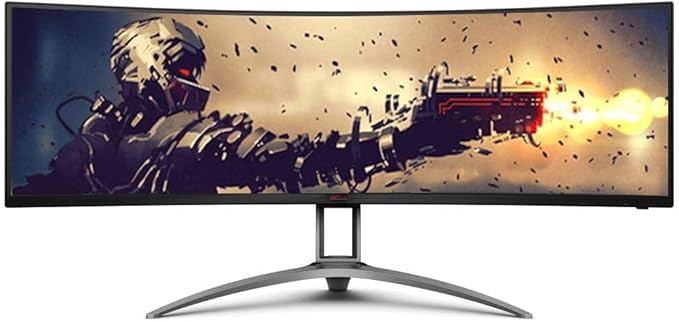
Curved 49” ultra-wide screen monitor (32:9) with DisplayHDR 400, Shadow Control and 120 Hz frame rate. The excellent image quality allows for more details, clear graphics and gaming-action wherever you look. The PbP feature lets you display and control the contents from two different PC systems.
Curved 49” ultra-wide screen monitor (32:9) with DisplayHDR 400, Shadow Control and 120 Hz frame rate. The excellent image quality allows for more details, clear graphics and gaming-action wherever you look. The PbP feature lets you display and control the contents from two different PC systems.
in 3 offers
The lowest price for AOC AGON AG493UCX 49inch Curved 120Hz 5K VA-LED Gaming Monitor right now is $1,299.00 at Umart, compared across 3 retailers.
The all-time low was $903.03 on 4 July 2026 — today's price is 44% above the lowest ever. It has been notably cheaper before — worth setting a price alert.
Prices last updated 11 July 2026.
AOC AGON AG493UCX 49inch Curved 120Hz 5K VA-LED Gaming Monitor
Curved 49” ultra-wide screen monitor (32:9) with DisplayHDR 400, Shadow Control and 120 Hz frame rate. The excellent image quality allows for more details, clear graphics and gaming-action wherever you look. The PbP feature lets you display and control the contents from two different PC systems.
Curved 49” ultra-wide screen monitor (32:9) with DisplayHDR 400, Shadow Control and 120 Hz frame rate. The excellent image quality allows for more details, clear graphics and gaming-action wherever you look. The PbP feature lets you display and control the contents from two different PC systems.
Last updated at 11/07/2026 20:48:14
AOC 49in 5K VA 120Hz Adaptive Sync Curved Gaming Monitor (AG493UCX)
30-day returns
AOC AG493UCX2 49" AGON 5K Gaming Monitor (AG493UCX2)
Delivery between Wed – Fri $9.99
AOC AGON AG493UCX 49" 120Hz UWQHD FreeSync Premium Pro HDR Curved Gaming Monitor
Delivery $23.16
originally posted on cclonline.com
If you have a top end graphics card you need to get this screen, if you're a gamer or into productivity then once you use this screen you will never go back, you won't be able to go back. The quality of this screen is amazing and so is the price, the colours, the sharpness, the refresh rate in games. I use to run a triple screen setup for many years but the bezels did get in the way whilst gaming, no such issues with this screen. You can use microsofts fancy zones to divide up the screen as you wish, I have it set to 3 zones. The remote is very handy to access the control panel and the monitor has a plethora of inputs. The stand is very sturdy, made of metal and the whole monitor feels well made. I did alot of research on 49inch monitors, unless you've got really ... MoreIf you have a top end graphics card you need to get this screen, if you're a gamer or into productivity then once you use this screen you will never go back, you won't be able to go back. The quality of this screen is amazing and so is the price, the colours, the sharpness, the refresh rate in games. I use to run a triple screen setup for many years but the bezels did get in the way whilst gaming, no such issues with this screen. You can use microsofts fancy zones to divide up the screen as you wish, I have it set to 3 zones. The remote is very handy to access the control panel and the monitor has a plethora of inputs. The stand is very sturdy, made of metal and the whole monitor feels well made. I did alot of research on 49inch monitors, unless you've got really deep pockets you won't find a better comparative monitor. Oh and it's packaging is super protective, so no worries there.
originally posted on microcenter.com
After living with this for several weeks I have absolutely no remorse in buying this. Amazing brightness, 120Hz and more screen real estate than I know what to do with coming from two 25" monitors. I do a mixture of gaming and productivity and it handles both with ease.I/O is great, though it doesn't have HDMI 2.1 for you people looking to future-proof. The USB hub works great and I use it for all the wireless dongles for my peripherals to free up ports. The USB-C is a nice touch as well for those with laptops wanting to have a clean single cable solution for video and peripherals.The only criticism I have for this monitor at this time is a color issue that seems to be decently well-known based on some research. When using PBP (picture beside picture) mode with ... MoreAfter living with this for several weeks I have absolutely no remorse in buying this. Amazing brightness, 120Hz and more screen real estate than I know what to do with coming from two 25" monitors. I do a mixture of gaming and productivity and it handles both with ease.I/O is great, though it doesn't have HDMI 2.1 for you people looking to future-proof. The USB hub works great and I use it for all the wireless dongles for my peripherals to free up ports. The USB-C is a nice touch as well for those with laptops wanting to have a clean single cable solution for video and peripherals.The only criticism I have for this monitor at this time is a color issue that seems to be decently well-known based on some research. When using PBP (picture beside picture) mode with dual DP connections, one 'monitor' will have a different color temperature than the other. Kind of a bummer since that's the only way to run the monitor at its native 1440p resolution AND get 120Hz. If not for this issue it would get 5 stars, no doubt about it. I hardly notice this 90% of the time as I use it with one window fullscreen on one side or the other pretty much all the time. Even when gaming the full width of the monitor I'm hard pressed to notice it unless the screen is a solid color.All in all, you can't beat this for the price, and you won't regret it.
originally posted on homeessentialsdirect.com
Can confirm: 5120x1440p, 120Hz, G-Sync compatible (tested w/ 1660 Ti), great brightness and color, PBP, 60W PD and DP over Type-C, KVM-Switch Can confirm does not have: GbE port, 65W PD Seems some things were lost in the Chinese to English translation. Oh well - kind of ridiculous to have an Ethernet port built into a monitor anyway. Doesn't break my heart not to have it. This thing is already insane without it. Won't even drop a star because of it. The KVM-switching is automatic, and switches the 3 Downstream USB ports (one of which is on/off charge BTW) between the Upstream USB connection and the Type-C connection when switching display inputs. There is a way to manually choose too (in the case of PBP, for instance) but is buried in the OSD settings of the OSD ... MoreCan confirm: 5120x1440p, 120Hz, G-Sync compatible (tested w/ 1660 Ti), great brightness and color, PBP, 60W PD and DP over Type-C, KVM-Switch Can confirm does not have: GbE port, 65W PD Seems some things were lost in the Chinese to English translation. Oh well - kind of ridiculous to have an Ethernet port built into a monitor anyway. Doesn't break my heart not to have it. This thing is already insane without it. Won't even drop a star because of it. The KVM-switching is automatic, and switches the 3 Downstream USB ports (one of which is on/off charge BTW) between the Upstream USB connection and the Type-C connection when switching display inputs. There is a way to manually choose too (in the case of PBP, for instance) but is buried in the OSD settings of the OSD menu. No quick swapping here. Also -when using Type-C, the display is limited to 3850x1080-60Hz on my 4K Dell. Not sure 100%, but I think this is just a protocol limit issue and not something unique to this display. BTW - my picture does not do this thing any kind of justice. Kinda need to see it for yourself to be truly WOW'd. Makes Destiny 2 almost kind of worth actually playing. Almost...
| Number of Speakers | 2 |
| Speakers | Yes |
| Built-in Devices | USB Hub |
| Interfaces/Ports | ParentDiv |
| DisplayPort | Yes |
AOC 49in 5K VA 120Hz Adaptive Sync Curved Gaming Monitor (AG493UCX)
30-day returns
AOC AG493UCX2 49" AGON 5K Gaming Monitor (AG493UCX2)
Delivery between Wed – Fri $9.99
AOC AGON AG493UCX 49" 120Hz UWQHD FreeSync Premium Pro HDR Curved Gaming Monitor
Delivery $23.16
If you have a top end graphics card you need to get this screen, if you're a gamer or into productivity then once you use this screen you will never go back, you won't be able to go back. The quality of this screen is amazing and so is the price, the colours, the sharpness, the refresh rate in games. I use to run a triple screen setup for many years but the bezels did get in the way whilst gaming, no such issues with this screen. You can use microsofts fancy zones to divide up the screen as you wish, I have it set to 3 zones. The remote is very handy to access the control panel and the monitor has a plethora of inputs. The stand is very sturdy, made of metal and the whole monitor feels well made. I did alot of research on 49inch monitors, unless you've got really ... MoreIf you have a top end graphics card you need to get this screen, if you're a gamer or into productivity then once you use this screen you will never go back, you won't be able to go back. The quality of this screen is amazing and so is the price, the colours, the sharpness, the refresh rate in games. I use to run a triple screen setup for many years but the bezels did get in the way whilst gaming, no such issues with this screen. You can use microsofts fancy zones to divide up the screen as you wish, I have it set to 3 zones. The remote is very handy to access the control panel and the monitor has a plethora of inputs. The stand is very sturdy, made of metal and the whole monitor feels well made. I did alot of research on 49inch monitors, unless you've got really deep pockets you won't find a better comparative monitor. Oh and it's packaging is super protective, so no worries there.
After living with this for several weeks I have absolutely no remorse in buying this. Amazing brightness, 120Hz and more screen real estate than I know what to do with coming from two 25" monitors. I do a mixture of gaming and productivity and it handles both with ease.I/O is great, though it doesn't have HDMI 2.1 for you people looking to future-proof. The USB hub works great and I use it for all the wireless dongles for my peripherals to free up ports. The USB-C is a nice touch as well for those with laptops wanting to have a clean single cable solution for video and peripherals.The only criticism I have for this monitor at this time is a color issue that seems to be decently well-known based on some research. When using PBP (picture beside picture) mode with ... MoreAfter living with this for several weeks I have absolutely no remorse in buying this. Amazing brightness, 120Hz and more screen real estate than I know what to do with coming from two 25" monitors. I do a mixture of gaming and productivity and it handles both with ease.I/O is great, though it doesn't have HDMI 2.1 for you people looking to future-proof. The USB hub works great and I use it for all the wireless dongles for my peripherals to free up ports. The USB-C is a nice touch as well for those with laptops wanting to have a clean single cable solution for video and peripherals.The only criticism I have for this monitor at this time is a color issue that seems to be decently well-known based on some research. When using PBP (picture beside picture) mode with dual DP connections, one 'monitor' will have a different color temperature than the other. Kind of a bummer since that's the only way to run the monitor at its native 1440p resolution AND get 120Hz. If not for this issue it would get 5 stars, no doubt about it. I hardly notice this 90% of the time as I use it with one window fullscreen on one side or the other pretty much all the time. Even when gaming the full width of the monitor I'm hard pressed to notice it unless the screen is a solid color.All in all, you can't beat this for the price, and you won't regret it.
Can confirm: 5120x1440p, 120Hz, G-Sync compatible (tested w/ 1660 Ti), great brightness and color, PBP, 60W PD and DP over Type-C, KVM-Switch Can confirm does not have: GbE port, 65W PD Seems some things were lost in the Chinese to English translation. Oh well - kind of ridiculous to have an Ethernet port built into a monitor anyway. Doesn't break my heart not to have it. This thing is already insane without it. Won't even drop a star because of it. The KVM-switching is automatic, and switches the 3 Downstream USB ports (one of which is on/off charge BTW) between the Upstream USB connection and the Type-C connection when switching display inputs. There is a way to manually choose too (in the case of PBP, for instance) but is buried in the OSD settings of the OSD ... MoreCan confirm: 5120x1440p, 120Hz, G-Sync compatible (tested w/ 1660 Ti), great brightness and color, PBP, 60W PD and DP over Type-C, KVM-Switch Can confirm does not have: GbE port, 65W PD Seems some things were lost in the Chinese to English translation. Oh well - kind of ridiculous to have an Ethernet port built into a monitor anyway. Doesn't break my heart not to have it. This thing is already insane without it. Won't even drop a star because of it. The KVM-switching is automatic, and switches the 3 Downstream USB ports (one of which is on/off charge BTW) between the Upstream USB connection and the Type-C connection when switching display inputs. There is a way to manually choose too (in the case of PBP, for instance) but is buried in the OSD settings of the OSD menu. No quick swapping here. Also -when using Type-C, the display is limited to 3850x1080-60Hz on my 4K Dell. Not sure 100%, but I think this is just a protocol limit issue and not something unique to this display. BTW - my picture does not do this thing any kind of justice. Kinda need to see it for yourself to be truly WOW'd. Makes Destiny 2 almost kind of worth actually playing. Almost...
This monitor makes me feel like a little kid again playing games too close to the TV back in the early 90s. It's so much fun. In games it fills your peripherals which has added a new level of immersion second only to VR and backed by as 2080ti it unleashes a beauty like nothing else, that is, when your games support the 5120x1440 res.Be aware not all games do and you'll either need to do some fiddling, or deal with a weird stretched aspect ratio or black borders but on a whole those games are the exception rather than the rule.This monitor also has a KVM built in which I'm not sure is advertised as a selling point but it's a game changer when working from home and needing to switch from my gaming rig to my work laptop, no more having to mess around switching which ... MoreThis monitor makes me feel like a little kid again playing games too close to the TV back in the early 90s. It's so much fun. In games it fills your peripherals which has added a new level of immersion second only to VR and backed by as 2080ti it unleashes a beauty like nothing else, that is, when your games support the 5120x1440 res.Be aware not all games do and you'll either need to do some fiddling, or deal with a weird stretched aspect ratio or black borders but on a whole those games are the exception rather than the rule.This monitor also has a KVM built in which I'm not sure is advertised as a selling point but it's a game changer when working from home and needing to switch from my gaming rig to my work laptop, no more having to mess around switching which machine my keyboard and mouse has been plugged in to has alleviated a daily frustration. Productivity wise you can comfortably have two full instances of visual studio running side by side, or whatever tools you personally use day to day.I couldn't more highly recommend this screen despite the price tag.It's my favourite purchase in the past couple of years.
In the quest for a newer setup I first bought the Samsung M8, but it was so much taller than my previous dual 27” 1080 monitors. There was too much vertical real estate causing my head to constantly swim looking for the mouse. Fast forward to the 49” super ultra wide… I can’t express how much easier working on one wide monitor is. Word of advice, go on Amazon and buy the correct cable to get the full resolution. Other than that, it has been a huge upgrade in every way.
So happy I bought it for $999 from micro center because when the G9 recall fiasco hit this monitor was on amazon brand new being sold for $1600... really had to hold myself from taking the profit... happy I kept it it performs and looks amazing. The UI is not as bad as reviews make it out to.PBP works flawlessly with both sides looking excellent and workingDevices checkedMacBook Pro(2017) - download app that lets go change screen size and it will work perfectly in super ultrawide or PBPAmazon 4k fire stick- works excellent ultrawide or pbpPs4 Pro- don’t panic and be afraid if color looks washed go to setting and turn off HDR and it will look amazing. PBP works flawless it doesn’t support being stretched to ultrawideGaming PC- works excellent on ultrawide ... MoreSo happy I bought it for $999 from micro center because when the G9 recall fiasco hit this monitor was on amazon brand new being sold for $1600... really had to hold myself from taking the profit... happy I kept it it performs and looks amazing. The UI is not as bad as reviews make it out to.PBP works flawlessly with both sides looking excellent and workingDevices checkedMacBook Pro(2017) - download app that lets go change screen size and it will work perfectly in super ultrawide or PBPAmazon 4k fire stick- works excellent ultrawide or pbpPs4 Pro- don’t panic and be afraid if color looks washed go to setting and turn off HDR and it will look amazing. PBP works flawless it doesn’t support being stretched to ultrawideGaming PC- works excellent on ultrawide looks so nice....windows has black bars at home when on PBP but when in game you can change size and it will work perfectly and not have any barsExcellent monitor amazing for price be happy if you get it for $999 and not $1699 on amazon after the G9 owners realize
Without spending over double, you can't do better than this for 32:9 gaming monitors. When you get everything set up and your routine established, this monitor is well worth the upgrade over a regular dual monitor setup. Gaming is incredible at this aspect ratio. There's actually not that many games that don't support 32:9 resolutions either, surprisingly. Yeah they might have some weirdness, like menus being pillarboxed, but the gameplay itself works great in the majority of games I've tried. The ones that won't work are fighting games, most 2D games wont (surprisingly some do still), Overwatch and From Software games. That's about it from what I've experienced. If you can run borderless windowed in those games though you can make it look pretty clean by running it ... MoreWithout spending over double, you can't do better than this for 32:9 gaming monitors. When you get everything set up and your routine established, this monitor is well worth the upgrade over a regular dual monitor setup. Gaming is incredible at this aspect ratio. There's actually not that many games that don't support 32:9 resolutions either, surprisingly. Yeah they might have some weirdness, like menus being pillarboxed, but the gameplay itself works great in the majority of games I've tried. The ones that won't work are fighting games, most 2D games wont (surprisingly some do still), Overwatch and From Software games. That's about it from what I've experienced. If you can run borderless windowed in those games though you can make it look pretty clean by running it on half the screen in 16:9 without using PBP. There's programs to position the window wherever you want.The speakers are usable if you want to take off your headphones, not good, but I've definitely heard worse. The stand is very stable, which is good because the monitor is actually pretty heavy. I'd suggest having 2 people set it up but it is doable alone if you're very careful and follow the directions. I used the stand as a handle of sorts to help me lift it solo.Are there cons? Yes, but those same cons exist on every 32:9 monitor up to $1300. The colors aren't going to blow you away, HDR isn't usable, refresh rate could be higher, it takes a bit of fiddling to minimize ghosting and looking good. This resolution is also extremely demanding in new games if you want to never drop below 60fps. Minimum for that is probably a 3080.If you want to game at a high resolution, with an extreme FOV, and not concerned about a FPS number you wont be able to drive at this resolution anyway, then look no further.
Home Essentials Direct needs to fix the review groupings. The AGOG 49 released on 7 JAN and you have 5 different models mixed into this from the past 4 years. Im a casual gamer and use this 50/50 productivity/play. I went from 2008 setup of dual 22 monitors on VESA arms to this. I had to upgrade my old ATI 6950 to a 980 ti to run at 5120x1440 100hz. I never saw any tearing and tested with Diablo 3, Witcher 3, Resident Evil7, and PUBG. ATI 6950 3840 x 1080p 60hz EVGA 980 ti 5120 x 1440p 100hz 3840 x 1080p 120hz 3440 x 1440p 120hz My 980 ti can push 1080p 120hz but not 1440p 120hz unless I drop my horizontal resolution down and cut to a 22:9 aspect ratios. The pip/kvm settting can be useful. You can split the scree you run from two different inputs. Remote makes ... MoreHome Essentials Direct needs to fix the review groupings. The AGOG 49 released on 7 JAN and you have 5 different models mixed into this from the past 4 years. Im a casual gamer and use this 50/50 productivity/play. I went from 2008 setup of dual 22 monitors on VESA arms to this. I had to upgrade my old ATI 6950 to a 980 ti to run at 5120x1440 100hz. I never saw any tearing and tested with Diablo 3, Witcher 3, Resident Evil7, and PUBG. ATI 6950 3840 x 1080p 60hz EVGA 980 ti 5120 x 1440p 100hz 3840 x 1080p 120hz 3440 x 1440p 120hz My 980 ti can push 1080p 120hz but not 1440p 120hz unless I drop my horizontal resolution down and cut to a 22:9 aspect ratios. The pip/kvm settting can be useful. You can split the scree you run from two different inputs. Remote makes adjustments easy and has a one to jump the monitor to set gaming modes. Stand is excellent. Wide stable base with tilt, height and swivel. It doesnt struggle under the weight of the monitor. I dont plan on swapping to a VESA mount. I do plan on completing my corner desk as it will make more efficient use of the space with the curved monitor. This monitor only has 2 other competitors, in the 1440p Super Ultra Wide space, Samsung and LG. The LG is not built for gaming and the Samsung shares the same panel but is priced slightly higher. I wouldnt doubt you will get a better finish and and internal board with the Samsung. I paid $200 more to get a model that is 1440p. Happy with my purchase.
I got this monitor, and while it was ok, I decided to return it for a couple reasons.First - when I first plugged it in, I had some flickering on the right side of the display. I was worried it was a hardware issue, but it did seem to go way after I used a displayport connector, and then back to other cable types.The main reason I decided to return was because the USB C + KVM was a big reason I wanted this monitor. The KVM works fine but, you can't run the display at native resolution over USB-C!!! This seemed crazy to me, but sure enough, in the manual details, this is spelled out. Seems like an absurd oversight, as plenty of 4k monitors operate with fewer pixels using usb-c.The image quality is ok, but I ended up going with the lg 34gk950f-b, which is a ... MoreI got this monitor, and while it was ok, I decided to return it for a couple reasons.First - when I first plugged it in, I had some flickering on the right side of the display. I was worried it was a hardware issue, but it did seem to go way after I used a displayport connector, and then back to other cable types.The main reason I decided to return was because the USB C + KVM was a big reason I wanted this monitor. The KVM works fine but, you can't run the display at native resolution over USB-C!!! This seemed crazy to me, but sure enough, in the manual details, this is spelled out. Seems like an absurd oversight, as plenty of 4k monitors operate with fewer pixels using usb-c.The image quality is ok, but I ended up going with the lg 34gk950f-b, which is a 10-bit ips panel, and it is quite a step up in terms of color accuracy and being enjoyable to use.If you want a 49" super-ultrawide, this one seems to be a good value - especially with the warranty included - but since the USB-C/KVM usefulness is very limited, and it is only a couple hundred more to get an IPS 60hz panel or the high end samsung VA panel, I would generally not recommend this specific product.As a side note relating to this size monitor in general - many games, like Civ 6, make a panel this wide awkward. A regular ultrawide may be the ideal middleground, and is what I would recommend (not that my opinion matters :)).Happy shopping!
This has got to be my most favorite tech purchase in years. Here's the cliff notes, 49" 5120x1440 ultrawide = 2x 27" 2560x1440 widescreens. I came from 2x 27's and this is infinitely better. Also, 120hz. Need I say more? The stand is actually REALLY good! High quality, height adjustable, however it is quite large as well(footprint). As such, I switched to an arm (just make sure you get one rated to hold this much weight).Important note, make sure whatever you are going to drive this thing with is powerful enough. I am running off of a laptop with a Quadro RTX 3000 and while this has the power I've had some difficulties getting everything happy with my Thunderbolt dock. I ended up using a Thunderbolt to DisplayPort adapter. Even though the display has type-c I ... MoreThis has got to be my most favorite tech purchase in years. Here's the cliff notes, 49" 5120x1440 ultrawide = 2x 27" 2560x1440 widescreens. I came from 2x 27's and this is infinitely better. Also, 120hz. Need I say more? The stand is actually REALLY good! High quality, height adjustable, however it is quite large as well(footprint). As such, I switched to an arm (just make sure you get one rated to hold this much weight).Important note, make sure whatever you are going to drive this thing with is powerful enough. I am running off of a laptop with a Quadro RTX 3000 and while this has the power I've had some difficulties getting everything happy with my Thunderbolt dock. I ended up using a Thunderbolt to DisplayPort adapter. Even though the display has type-c I could not getting it above 75hz however this appears to have been a limitation of my docking station. Using my Type-c to DP adapter I am now running at full res @ 120hz.The cost made this a hard pill to swallow but I couldn't imagine not having it now!Lastly! The box this comes in is HUGE, I couldn't get it in the trunk opening in my car, it ended up taking my ENTIRE back seat area, take a big car to pick this up!
| Number of Speakers | 2 |
| Speakers | Yes |
| Built-in Devices | USB Hub |
| Interfaces/Ports | ParentDiv |
| DisplayPort | Yes |