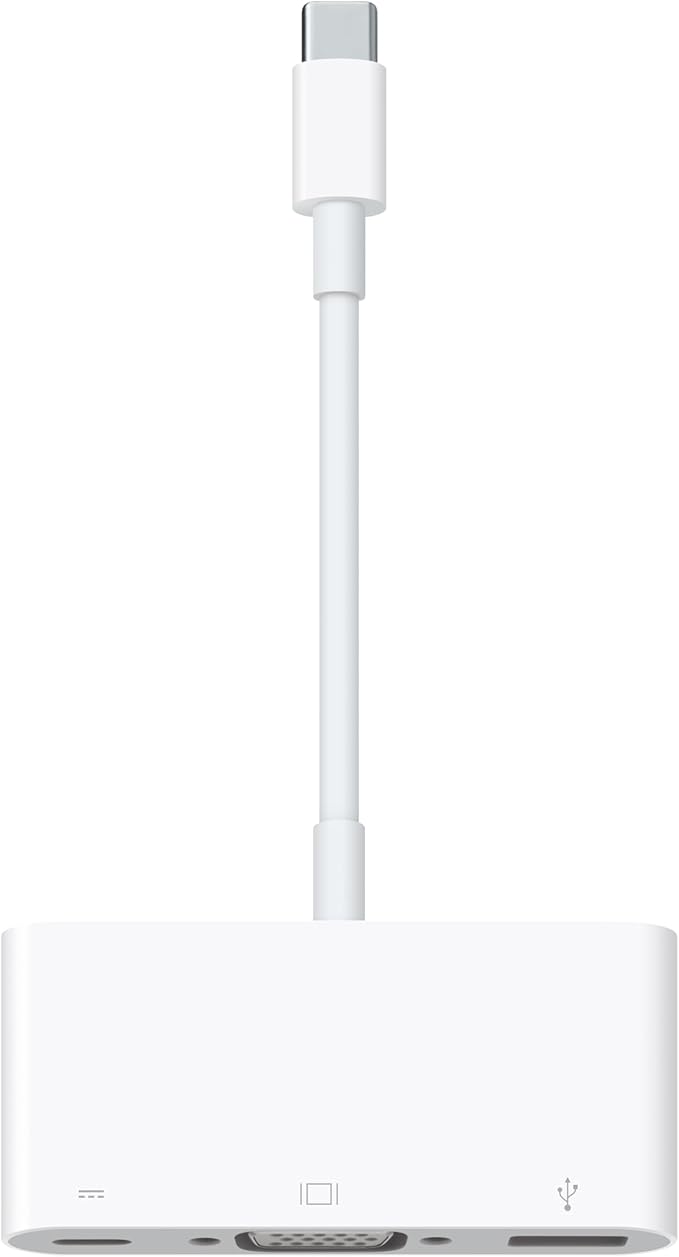
Apple MJ1L2AM/A USB-C VGA Multiport Adapter
The USB-C VGA Multiport Adapter lets you connect your USB-C or Thunderbolt 3 (USB-C)enabled Mac and iPad Pro to a VGA display, while also connecting a standard USB device and a USB-C charging cable. The USB-C VGA Multiport Adapter allows you to mirror your Mac or iPad Pro display to your VGA-enabled TV or display in up to 1080p HD. It also outputs video content like movies and captured video. Simply connect the adapter to a USB-C or Thunderbolt 3 (USB-C) port on your Mac or iPad and then to your TV or projector via a VGA cable (sold separately). Use the standard USB port to connect devices such as your flash drive or camera or a USB cable for syncing and charging your iPhone, iPad, or iPod. You can also connect a charging cable to the USB-C port to charge your Mac or iPad Pro. Requires a VGA cable (sold separately) for connection to your TV or projector. The USB-C VGA Multiport Adapter lets you connect your USB-C or Thunderbolt 3 (USB-C) enabled Mac, iPad, or iPhone to a VGA display, while also connecting a standard USB device and a USB-C charging cable. The USB-C VGA Multiport Adapter allows you to mirror your USB-C enabled Mac, iPad, or iPhone display to your VGA-enabled TV or display in up to 1080p HD. It also outputs video content like movies and captured video. Simply connect the adapter to a USB-C or Thunderbolt 3 (USB-C) port on your Mac, iPad, or iPhone and then to your TV or projector via a VGA cable (sold separately). Use the standard USB port to connect devices such as your flash drive or camera or a USB cable for syncing and charging your iPhone, iPad, or iPod. You can also connect a charging cable to the USB-C port to charge your Mac, iPad, or iPhone.
The USB-C VGA Multiport Adapter lets you connect your USB-C or Thunderbolt 3 (USB-C)enabled Mac and iPad Pro to a VGA display, while also connecting a standard USB device and a USB-C charging cable. The USB-C VGA Multiport Adapter allows you to mirror your Mac or iPad Pro display to your VGA-enabled TV or display in up to 1080p HD. It also outputs video content like movies and captured video. Simply connect the adapter to a USB-C or Thunderbolt 3 (USB-C) port on your Mac or iPad and then to your TV or projector via a VGA cable (sold separately). Use the standard USB port to connect devices such as your flash drive or camera or a USB cable for syncing and charging your iPhone, iPad, or iPod. You can also connect a charging cable to the USB-C port to charge your Mac or iPad Pro. Requires a VGA cable (sold separately) for connection to your TV or projector. The USB-C VGA Multiport Adapter lets you connect your USB-C or Thunderbolt 3 (USB-C) enabled Mac, iPad, or iPhone to a VGA display, while also connecting a standard USB device and a USB-C charging cable. The USB-C VGA Multiport Adapter allows you to mirror your USB-C enabled Mac, iPad, or iPhone display to your VGA-enabled TV or display in up to 1080p HD. It also outputs video content like movies and captured video. Simply connect the adapter to a USB-C or Thunderbolt 3 (USB-C) port on your Mac, iPad, or iPhone and then to your TV or projector via a VGA cable (sold separately). Use the standard USB port to connect devices such as your flash drive or camera or a USB cable for syncing and charging your iPhone, iPad, or iPod. You can also connect a charging cable to the USB-C port to charge your Mac, iPad, or iPhone.
The USB-C VGA Multiport Adapter lets you connect your USB-C or Thunderbolt 3 (USB-C)enabled Mac and iPad Pro to a VGA display, while also connecting a standard USB device and a USB-C charging cable. The USB-C VGA Multiport Adapter allows you to mirror your Mac or iPad Pro display to your VGA-enabled TV or display in up to 1080p HD. It also outputs video content like movies and captured video. Simply connect the adapter to a USB-C or Thunderbolt 3 (USB-C) port on your Mac or iPad and then to your TV or projector via a VGA cable (sold separately). Use the standard USB port to connect devices such as your flash drive or camera or a USB cable for syncing and charging your iPhone, iPad, or iPod. You can also connect a charging cable to the USB-C port to charge your Mac or iPad Pro. Requires a VGA cable (sold separately) for connection to your TV or projector. The USB-C VGA Multiport Adapter lets you connect your USB-C or Thunderbolt 3 (USB-C) enabled Mac, iPad, or iPhone to a VGA display, while also connecting a standard USB device and a USB-C charging cable. The USB-C VGA Multiport Adapter allows you to mirror your USB-C enabled Mac, iPad, or iPhone display to your VGA-enabled TV or display in up to 1080p HD. It also outputs video content like movies and captured video. Simply connect the adapter to a USB-C or Thunderbolt 3 (USB-C) port on your Mac, iPad, or iPhone and then to your TV or projector via a VGA cable (sold separately). Use the standard USB port to connect devices such as your flash drive or camera or a USB cable for syncing and charging your iPhone, iPad, or iPod. You can also connect a charging cable to the USB-C port to charge your Mac, iPad, or iPhone.
The USB-C VGA Multiport Adapter lets you connect your USB-C or Thunderbolt 3 (USB-C)enabled Mac and iPad Pro to a VGA display, while also connecting a standard USB device and a USB-C charging cable. The USB-C VGA Multiport Adapter allows you to mirror your Mac or iPad Pro display to your VGA-enabled TV or display in up to 1080p HD. It also outputs video content like movies and captured video. Simply connect the adapter to a USB-C or Thunderbolt 3 (USB-C) port on your Mac or iPad and then to your TV or projector via a VGA cable (sold separately). Use the standard USB port to connect devices such as your flash drive or camera or a USB cable for syncing and charging your iPhone, iPad, or iPod. You can also connect a charging cable to the USB-C port to charge your Mac or iPad Pro. Requires a VGA cable (sold separately) for connection to your TV or projector. The USB-C VGA Multiport Adapter lets you connect your USB-C or Thunderbolt 3 (USB-C) enabled Mac, iPad, or iPhone to a VGA display, while also connecting a standard USB device and a USB-C charging cable. The USB-C VGA Multiport Adapter allows you to mirror your USB-C enabled Mac, iPad, or iPhone display to your VGA-enabled TV or display in up to 1080p HD. It also outputs video content like movies and captured video. Simply connect the adapter to a USB-C or Thunderbolt 3 (USB-C) port on your Mac, iPad, or iPhone and then to your TV or projector via a VGA cable (sold separately). Use the standard USB port to connect devices such as your flash drive or camera or a USB cable for syncing and charging your iPhone, iPad, or iPod. You can also connect a charging cable to the USB-C port to charge your Mac, iPad, or iPhone.
in 25 offers
The lowest price for Apple MJ1L2AM/A USB-C VGA Multiport Adapter right now is $12.00 at CeX, compared across 20 retailers.
The all-time low was $12.00 on 21 July 2026. That's the lowest price we've ever tracked — a great time to buy.
Prices last updated 10 Oct 2026.
Last updated at 10/10/2026 09:28:15
Apple USB-C VGA Multiport Adapter
Affiliate Disclosure: We may receive a small commission for purchases made through this link at no extra cost to you. This helps support our site. Thank you!
Apple USB-C VGA Multiport Adapter (A1620)
Delivery $4
Original Apple Usb-c To Vga Multiport Adapter For Iphone 15 Ipad Pro
Delivery $25.39
Affiliate Disclosure: We may receive a small commission for purchases made through this link at no extra cost to you. This helps support our site. Thank you!
Apple USB-C VGA Multiport Adapter REFURBISHED
Apple USB-C VGA Multiport Adapter MJ1L2M/A - White
Free delivery between Mon – Tue
Apple USB-C VGA Multiport Adapter MJ1L2M/A - White
Delivery between 15–23 Oct $7.80
Apple USB-C VGA Multiport Adapter MJ1L2M/A - White
Delivery between 15–23 Oct $7.80
Apple USB-C VGA Multiport Adapter
Delivery between 15–19 Oct $66.78
Apple USB-C VGA Multiport Adapter
Delivery between 14–22 Oct $10.90
Apple USB-C VGA MULTIPORT ADAPTER
Delivery between 20–23 Oct $11.16
originally posted on bestbuy.com
Loved this multiport adapter. It helps improve connectivity especially if one has multiple devices. It’s affordable and dependable. It also enables zoom meets to run seamlessly with little to zero lagging and delivery of meeting
originally posted on bestbuy.com
This product is very good and essential to use when using a Macbook Air or even a Macbook Pro. This product has several ports for different things in your computer and is very helpful on anything to do with download or transferring something to a USB. As well as it is very useful for a projector and it is very smart to be able to use this product. You can even use this product on the tv connected to the computer.
originally posted on bestbuy.com
Dongles, dongles, how do I count thy number?The problem with the 2019 MBP I have is the video can glitch thru some after-market USB-C to video adapters. I train with this laptop, so the glitching is a non-starter. The only adapters that I can 100% rely upon are the original Apple, which is too bad, as they are pricey, and don't really match Space Gray, not to mention that I need at least two of them to do any useful work. (I bought the MBP despite the USB-C/T-bolt ports, not because of them).If you are having glitching issues, or in the case of some, charging issues via the dongle, try the OEM Apple...chances are it will work.One nice thing: these are more slender then most other dongle or dock solutions, so while you may need more of them, they fit into the ... MoreDongles, dongles, how do I count thy number?The problem with the 2019 MBP I have is the video can glitch thru some after-market USB-C to video adapters. I train with this laptop, so the glitching is a non-starter. The only adapters that I can 100% rely upon are the original Apple, which is too bad, as they are pricey, and don't really match Space Gray, not to mention that I need at least two of them to do any useful work. (I bought the MBP despite the USB-C/T-bolt ports, not because of them).If you are having glitching issues, or in the case of some, charging issues via the dongle, try the OEM Apple...chances are it will work.One nice thing: these are more slender then most other dongle or dock solutions, so while you may need more of them, they fit into the laptop sleeve without too much buldging. The cords are a bit short when using the laptop on an adjustable stand though.
| Adapter Type | Multiport Adapter |
| Connector Type | USB-C, VGA |
| Cable Type | USB |
| Supported Devices | VGA display, iPad, Projector |
| Number Of Connectors | 3 |

Apple USB-C VGA Multiport Adapter
Affiliate Disclosure: We may receive a small commission for purchases made through this link at no extra cost to you. This helps support our site. Thank you!
Apple USB-C VGA Multiport Adapter (A1620)
Delivery $4
Original Apple Usb-c To Vga Multiport Adapter For Iphone 15 Ipad Pro
Delivery $25.39
Affiliate Disclosure: We may receive a small commission for purchases made through this link at no extra cost to you. This helps support our site. Thank you!
Apple USB-C VGA Multiport Adapter REFURBISHED
Apple USB-C VGA Multiport Adapter MJ1L2M/A - White
Free delivery between Mon – Tue
Loved this multiport adapter. It helps improve connectivity especially if one has multiple devices. It’s affordable and dependable. It also enables zoom meets to run seamlessly with little to zero lagging and delivery of meeting
This product is very good and essential to use when using a Macbook Air or even a Macbook Pro. This product has several ports for different things in your computer and is very helpful on anything to do with download or transferring something to a USB. As well as it is very useful for a projector and it is very smart to be able to use this product. You can even use this product on the tv connected to the computer.
Dongles, dongles, how do I count thy number?The problem with the 2019 MBP I have is the video can glitch thru some after-market USB-C to video adapters. I train with this laptop, so the glitching is a non-starter. The only adapters that I can 100% rely upon are the original Apple, which is too bad, as they are pricey, and don't really match Space Gray, not to mention that I need at least two of them to do any useful work. (I bought the MBP despite the USB-C/T-bolt ports, not because of them).If you are having glitching issues, or in the case of some, charging issues via the dongle, try the OEM Apple...chances are it will work.One nice thing: these are more slender then most other dongle or dock solutions, so while you may need more of them, they fit into the ... MoreDongles, dongles, how do I count thy number?The problem with the 2019 MBP I have is the video can glitch thru some after-market USB-C to video adapters. I train with this laptop, so the glitching is a non-starter. The only adapters that I can 100% rely upon are the original Apple, which is too bad, as they are pricey, and don't really match Space Gray, not to mention that I need at least two of them to do any useful work. (I bought the MBP despite the USB-C/T-bolt ports, not because of them).If you are having glitching issues, or in the case of some, charging issues via the dongle, try the OEM Apple...chances are it will work.One nice thing: these are more slender then most other dongle or dock solutions, so while you may need more of them, they fit into the laptop sleeve without too much buldging. The cords are a bit short when using the laptop on an adjustable stand though.
I bought this dongle so that I could hook my M1 Macbook Air to a projector for when I teach courses at a University. I also like the fact that it offers a traditional USB port, which the Macbook Air doesn't have. The additional USB-C port on the dongle allows you to charge the MacBook. However, I couldn't get it to work with my external HD. I guess the external HD needs to be directly connected to one of the Macbook Air's built-in USB-C ports. Lastly, the price was significantly less than the HDMI version but it works well for my purposes. I've had better experience using VGA than HDMI on large projectors anyway. Sometimes the HDMI ones look distorted or strangely pixelated on larger screens. To me the VGA one looks a lot more natural. I highly recommend this product.
I've had a monitor for several years that still works and looks great. Wanted to use it with a new iMac. This works great; however, when I got it home I realized it was used. The inserts were all wrinkled up and the adapter had fingerprints all over it. Not happy at all with the store I bought it from - they should have sold the item at an "open-box" price, not at full retail. What a shady way to do business! This kind of thing makes want to avoid these stores - it's like everybody wants to get over on somebody one way or another. Ewww!
Many people have a second monitor. With a MacBook we need USB-C and the adapters are just getting to be more flexible. This is a 3 port adapter and the monitor required a VGA port. Now with the benefit of having three ports, I can expand my connections even more. VGA was a plug and play. Easy to apply and the second monitor is working great.
Apple priorities since the introduction of the iMac have been to minimize clutter from wires; to make computing devices as easy to use and carry as possible. Part of that process is to reduce the bulk if the computers and promote wireless connectivity. The bulk reduction required fewer and smaller ports. But since Macs do not live entirely in their own walled garden, Apple throws a bone to the dog in the form of these USB-C adapters. Apple adapters are better in quality (if not function) than the after market options. In this adapter you get USB3 type A and VGA and a USB-C in (for charging). You get this one if you have an older monitor or projector you need to use and maybe a keyboard or an older printer or external hard drive. Leave those attached to the adapter ... MoreApple priorities since the introduction of the iMac have been to minimize clutter from wires; to make computing devices as easy to use and carry as possible. Part of that process is to reduce the bulk if the computers and promote wireless connectivity. The bulk reduction required fewer and smaller ports. But since Macs do not live entirely in their own walled garden, Apple throws a bone to the dog in the form of these USB-C adapters. Apple adapters are better in quality (if not function) than the after market options. In this adapter you get USB3 type A and VGA and a USB-C in (for charging). You get this one if you have an older monitor or projector you need to use and maybe a keyboard or an older printer or external hard drive. Leave those attached to the adapter and you can sit down at your desk and get connected with one adapter/cable to plug in.
When my 'new' 2018 MBP arrived from MacSales I saw NO old usb ports, just Thunderbolt 3 ports. So I needed at least one usb-A and this adapter provided the answer.It gives me the one access point for Mickey, my old Logitech mouse. I can aso connect a VGA display I now use for an old PC. It works just fine.
After multiple attempts to procure the correct adapter for my spare PC (non apple) monitor, this item ended up being what worked for my VGA adapter. Before, I was buying multiple pieces to build a "bridge" and it was not only chaotic but not working appropriately. I don't need any other adapters; this is the only middleman that I require at this point. It doesn't overheat in the port, and it is a lot sturdier than some of the other pieces of bridging equipment I first purchased. Going from MAC to PC is hard, so make sure you work with Apple first to understand what you need for your pieces (even the folks at Best Buy may not offer the best advice).
My brother accidentally left my house with my Apple USB port adapter. I only realized this when I needed to transfer information from a memory thumb drive. I found a multi-port adapter at this site at a very good price and now will be able to use it when the occasion arises. I also was able to replace my charging cable that had exposed wire that was dangerous. The pricesd are much better than retail!
| Adapter Type | Multiport Adapter |
| Connector Type | USB-C, VGA |
| Cable Type | USB |
| Supported Devices | VGA display, iPad, Projector |
| Number Of Connectors | 3 |


