Last updated at 05/09/2026 03:00:57
ASUS ROG Ally X Z1 Extreme 1TB – Excellent Condition – with Case & Box
Affiliate Disclosure: We may receive a small commission for purchases made through this link at no extra cost to you. This helps support our site. Thank you!
ASUS ROG Ally X 7" (2024) 24GB RAM 1TB SSD Gaming Console - Brand New
Free delivery
ASUS ROG Ally X 7" (2024) 24GB RAM 1TB SSD Gaming Console - Brand New
Free delivery
originally posted on bestbuy.com
Handheld PCs have exploded in popularity in the last couple years, and much hype was given to the original ASUS ROG Ally. While the final product’s execution was good, there was still plenty of room for improvement for future models. The ROG Ally X represents the next revision of the popular handheld, addressing nearly every major shortcoming of the original.- Unboxing and SetupLike the original ROG Ally models before it, the Ally X ships with just the essentials: a 65W power cable and a cleverly-packaged stand made out of its recyclable cardboard box. Compared to the first-generation Ally, the Ally X is a couple ounces heavier due largely in part to doubling the size of the internal battery, and the console’s contours are much more prominent for improved comfort ... MoreHandheld PCs have exploded in popularity in the last couple years, and much hype was given to the original ASUS ROG Ally. While the final product’s execution was good, there was still plenty of room for improvement for future models. The ROG Ally X represents the next revision of the popular handheld, addressing nearly every major shortcoming of the original.- Unboxing and SetupLike the original ROG Ally models before it, the Ally X ships with just the essentials: a 65W power cable and a cleverly-packaged stand made out of its recyclable cardboard box. Compared to the first-generation Ally, the Ally X is a couple ounces heavier due largely in part to doubling the size of the internal battery, and the console’s contours are much more prominent for improved comfort in the hand. Some changes were made to the controller buttons and joysticks for this mid-generation refresh, which now feel much more in line with Xbox Series controllers instead of third-party ones.Plug in the Ally X, power it on, and you’re greeted with the familiar Windows 11 setup sequence, which just like with the Ally before it, is the biggest shortcoming of the whole device - Windows is still a desktop-first OS. Entering text with the on-screen keyboard is cumbersome and slow, and tapping the touchscreen to register mouse clicks can become infuriating. Connecting a keyboard and mouse to the Ally X makes the process of setting the device up and installing games much easier.Since it’s running Windows 11 natively, the Ally family of consoles support nearly every game and software application made for Windows PCs since the 90s, as well as every modern game that has anti-cheat software or DRM that other handhelds can’t overcome. However, this does not mean that any given game will work out of the box. This is still a gaming PC, and you’ll need to take some time to configure most titles to run and look their best.- Ally X System ChangesThe Ally X shares the same AMD Z1 Extreme APU as its predecessor, packing 8 Zen4 CPU cores and 12 RDNA3 GPU cores comprising what would be labeled a Radeon 780M in any other guise (indeed, specs of the Z1 Extreme are nearly identical to AMD’s last-generation low voltage 7840u). The major hardware change the Ally X brings is in its memory configuration - faster LPDDR5X is used to bring memory speed up to 7500Mhz (from 6400), and RAM capacity has increased from 16GB to 24GB total.The upgrade makes a significant difference with the Ally X. Graphics performance of the Z1 Extreme is improved about 10% overall, but the extended memory capacity alleviates virtually all bottlenecking seen on the 16GB models. In short, the AMD Z1 Extreme uses a portion of the system memory as graphics card memory, so on 16GB models it was not difficult to max out the memory while gaming. When this occurs, the system swaps data in and out from the SSD, which causes stutter and micro-freezes as the system catches up with game demands. By default, the Ally X configures the 24GB system memory such that 16GB is treated as RAM, and 8GB is treated as dedicated VRAM. This allows virtually every game available today to run stutter-free, though memory allocation can be tuned in the BIOS.- Performance & Power ProfilesBeyond the hardware changes, ASUS has taken advantage of the upgraded battery to tweak the power profiles of the Ally X, which now default to a 17-watt “Performance” profile (which was 15W previously). Two extra watts make a big difference in power, as framerates in the Performance profile land within single-digit percentages of the Turbo (25W) profile in direct comparions. I had no trouble hitting 60FPS in most of the games I own with High details (Wreckfest, Mortal Kombat 11, Halo: Master Chief Collection), with only a few needing to drop to Medium (Forza Horizon 5, Control) while retaining High textures for a consistent, high fidelity gaming experience.Like previous models, ASUS opts for user-switchable performance modes that change the power target of the Z1 Extreme. User-configurable as low as 7 watts, default modes are Turbo (25W battery, 30W on AC), Performance (17W), and Silent (13W). Performance mainly pulls back GPU performance, while Silent pulls both CPU and GPU power down to maximize battery life. I found Performance to be the best balance of power consumption to graphics muscle - performance gains at Turbo were minimal compared to the hit in battery life.- Noise & ThermalsASUS notes a redesigned cooling solution for the Ally X, featuring fans with thinner blades, a rearranged heatpipe system, and relocated ports to avoid excess heat from reaching the SD card slot. All told, the cooling performance of the Ally X is a marked improvement as fan noise is so minimal as to be unnoticeable when using the Performance preset with a heavy gaming load. At full bore, the fans are still reasonably quiet, getting no louder than a thin and light office laptop might under the same level of duress.Thermal performance varies based on the power mode in use, but with the Performance preset the Z1 Extreme is kept well within operating limits. I saw a peak of 76C at 17W power, which is nearly 25C below the chip’s throttle point. Since the APU is located centrally with heat pipes and fans located away from where your hands sit, the Ally never feels hot to the touch.- Screen & BatteryThe Ally X shares the same 120Hz, IPS, 100% sRGB panel as the original Ally, and is still gorgeous to behold. Its FreeSync implementation is not the best I’ve used, but it definitely helps keep noticeable framerate dips to a minimum. The panel can be manually toggled to 60Hz mode for better battery life.The Ally X’s battery is an enormous improvement for the device overall. With double the capacity (80WHr) of the previous model, runtime is greatly improved to the point that even with the Performance power profile, I achieved over 3 hours of graphically intense gameplay before the system threw a low battery (<10%) notification. Though perhaps not as impressive as some other handhelds in the segment, this is still proper PC gaming on the go without much, if any compromise. Manually configuring a 9W power profile and dimming the screen slightly, I was able to eke out 7 hours of mixed video streaming and indie gaming.Note that these battery results are from the latest BIOS available as of July 26, 2024. Extra life may be gained through future BIOS updates.- ASUS Control Center & Armoury Crate SEThese two programs ship with the ROG Ally’s Windows installation, and both are immediately accessible via shortcut buttons next to the screen. Control Center is an overlay that allows quick toggles of the most common system settings, and can be configured to display any combination of them. The overlay worked reliably in my testing, letting me change power modes and control schemes on the fly - including the ability to toggle the controller buttons to a “Desktop” mode, where the right stick controls the mouse and shoulder buttons click. Each of the controller buttons can be configured to custom bindings or macros and saved to individual app profiles.Armoury Crate SE is a handy launcher and control profiler that consolidates game shortcuts automatically - unifying multiple storefronts and local installations into a single launcher that can be called at any time. Though not a flashy launcher, once games have been installed and configured for play it’s nearly seamless to boot the Ally, play games, and shut the system down without seeing the Windows desktop. For the launch of the Ally X, Armoury Crate SE saw an update to version 1.5 for all Ally models. The updated launcher is noticeably more responsive and better laid out.- Upgradeability, Quality ControlWith a redesigned system board, the Ally X now uses the common M.2 2280 size SSD instead of the rarer, and usually more expensive 2230 size. This is user-upgradeable by removing the rear casing, and the disk is immediately visible and easy to change out. Similarly, major components of the Ally X’s integrated controller such as joysticks and shoulder triggers are on modular daughterboards, which should make future repair, replacement, or even upgrades possible. The core system (CPU, GPU, memory) is not upgradeable, as to be expected with an APU.I would be remiss not to mention ASUS’ current track record for both quality control and customer service. My unit has no QC flaws I can find, though my first Ally did (see my Best Buy review titled “The Italian Sports Car of PC Gaming” on the Z1 Extreme Ally model).I have no firsthand experience with ASUS customer service, but as with any company I highly recommend keeping records of all communication for warranty matters, as well as taking pictures of the device immediately before sending for return, and making copies of any provided documents or shipping information. Remember that warranty repairs are separate matters from the cosmetic condition of a unit, but major damage can be grounds to invalidate a warranty claim.- Bottom LineA flawed but popular device is usually worth waiting for the next revision, and with the ASUS ROG Ally X, the refinement for what’s just short of a second generation device is substantial. Most of the major flaws of the original Ally are resolved, and what’s left is a capable, portable, and compatible handheld that makes full power PC gaming on the go much more palatable.That all being said, the revised device comes with a revised price. Had this matched the Ally’s original $649 MSRP it would have been an easy recommendation, but $799 is a harder sell. If you’re looking for a plug-and-play solution to play your PC games on the go, there are many options below this price point worth researching. But if you must have the most powerful PC gaming handheld on the market today, you won’t find a more powerful device in this form factor, and the Ally X comes recommended.
originally posted on bestbuy.com
UNBOXING:Inside the box, you’ll find the ROG Ally X, a couple of paper stands for the Ally X, and a 65W USB-C wall adapter. And just like the 2023 Ally, there is no case or screen cloth included. Other than that, you’ll have your warranty card, manual, and safety info.BUILD:The Ally X uses a sturdy plastic build. Compared to the 2023 Ally, it’s thicker because of its much larger battery. And while this makes it heavier, ASUS also improved the ergonomics by making the corners more rounded, so they don’t dig into my palms as much as the 2023 Ally did.PORTS, EXPANSION & UPGRADES:When it comes to expandability, the Ally X improves upon the 2023 Ally in a couple significant ways.ASUS decided to forego the ROG XG Mobile external GPU dock in favor of a new ... MoreUNBOXING:Inside the box, you’ll find the ROG Ally X, a couple of paper stands for the Ally X, and a 65W USB-C wall adapter. And just like the 2023 Ally, there is no case or screen cloth included. Other than that, you’ll have your warranty card, manual, and safety info.BUILD:The Ally X uses a sturdy plastic build. Compared to the 2023 Ally, it’s thicker because of its much larger battery. And while this makes it heavier, ASUS also improved the ergonomics by making the corners more rounded, so they don’t dig into my palms as much as the 2023 Ally did.PORTS, EXPANSION & UPGRADES:When it comes to expandability, the Ally X improves upon the 2023 Ally in a couple significant ways.ASUS decided to forego the ROG XG Mobile external GPU dock in favor of a new Thunderbolt 4 Type C port which can support Thunderbolt eGPU enclosures, Thunderbolt docking stations, and much more. But they also kept the original USB 3.2 gen 2 Type C port, so now you have access to 2 Type C ports that also support both DisplayPort & Power Delivery. This also opens up more opportunity to use USB-C peripherals like headsets while also charging using the included USB-C wall adapter. Given how expensive the XG Mobile graphics were, I think this was a smart move by ASUS.In addition to that, ASUS has seemingly revised a design flaw from the original Ally with Micro SD cards being destroyed from thermal stress. On the Ally X, the SD Card slot has been moved to the right on the top side. Only time will tell if this has truly fixed the issue. Other than that, you have a 3.5mm combo audio jack on top, as wellAs far as hardware upgrades are concerned, ASUS managed to fit a standard 2280 size m.2 PCIe 4.0 NVMe SSD. This is an improvement over the original Ally which used a 2230 size m.2 which is significantly more expensive to buy. Overall, I’m very happy with the improvements made over the 2023 Ally.CONTROLS:Compared to the 2023 Ally, the face buttons feel a bit more tactile, but I don’t feel it’s a drastic departure for me—I’d be happy with either. The D-Pad has also been revised with a matte texture instead of glossy. For some reason, my unit sometimes squeaks when pressing the left side of the D-Pad, and I didn’t have that problem on the original Ally X. The shoulder buttons seem to be using more tactile switches, so they are a bit louder, but they also feel less mushy and are easier to click. The triggers are also noticeably louder. Both the shoulder buttons and triggers appear to be a bit larger compared to the original Ally, so they’re more comfortable for bigger hands.The thumbsticks have also been improved from the original Ally, as they now seem to have a bit more of an indentation like the Xbox Series controller, so your thumbs will never slip.Additionally, the rear macro buttons have been slimmed down and relocated to prevent false triggers. Personally, I think this was a good decision because there were times where I unintentionally triggered a hotkey, and most people probably won’t use these macro buttons, so it’s better to keep them out of the way until they’re occasionally needed.The Command Center button on the left of the display gives quick access to various performance settings like power profiles, an FPS limiter, a real-time performance monitor, a 60Hz/120Hz refresh rate toggle, and 720p/900p/1080p resolution toggle. Having this quick button is super helpful so you can dial in your performance needs for different types of games.And on the right of the display you have the Armoury Crate button which will give you access to your game content and settings, letting you skip the need for interfacing with Windows most of the time.And also on the top, you have the volume buttons and power button that also functions as a fingerprint reader.DISPLAY:The Ally X leverages the same display as the 2023 Ally. It uses a 7” 1080p IPS touch screen display that can operate at 60Hz or 120Hz and with FreeSync Premium support.The display is sufficiently sized for handheld PC gaming, and the display gets plenty bright for daytime usage, and reasonably dim for darker environments, as well. I also really appreciate that it supports FreeSync since there are plenty of performance-demanding PC games that can’t run at a locked 60fps or higher, and having FreeSync can reduce screen tearing and stuttering.MICROPHONES:The onboard dual array microphones are positioned just above the view and menu buttons. In my testing, they are very clear and do a great job at isolating speech. I played online games and used Discord for voice chat, and I got compliments about the microphone quality, but I did have to lower the game volume so it wouldn’t bleed into the microphones.In the Realtek Audio Console or in the Armoury Crate Audio settings, I used the Directional Recording Mode, but using the Conference AI Noise Canceling mode will yield even better noise cancellation, but may impact battery life.SPEAKERS & HEADPHONE:Audio continues to be well-implemented on the Ally X. The two front-firing speakers deliver clarity while also being plenty loud. Compared to the original Ally, the X delivers better treble performance along with better bass while also being louder , but the original Ally sounded great, so this is just icing on the cake.Headphone performance is also sufficient for most consumer grade headphones and IEMS. I’m still glad to see ASUS still offering a headphone combo output since it’s conceivable some folks may play the Ally in environments where speakers aren’t appropriate, so having the ability to use some IEMs is a good way to game without disturbing others.PERFORMANCE & BATTERY:Performance on the Ally X will be more akin to the original Ally Z1 Extreme since they both share the same Ryzen Z1 Extreme processor, but the Ally X increases the memory to 24GB and uses faster memory clocked at 7500 MT/s. This means that the Ally defaults to 8GB of memory dedicated to the GPU, whereas the original Ally defaulted to 4GB—which isn’t always enough for many modern games. In my testing, more games were able to run at 60fps with appropriate settings. And if you’re coming from the Z1 non-extreme, the jump in performance can be significant for modern 3D titles. The Z1 Extreme uses 8 cores and 16 threads and 12 RDNA3 compute units. 2D titles will be a breeze on the Ally X, and 3D games will yield a more stable experience compared to the original Ally.I spent a lot of time playing Enshrouded—which is a quite demanding 3D title. And it plays reasonably well on the Ally X. When plugged in on the 30W turbo profile, I am able to achieve 60fps without having to dial everything to low, and when on battery, I can opt to make some graphical concessions and still achieve 30fps so that I can play unplugged for a couple hours.I also played another title Lost Castle 2 which appears 2D, but is actually built in Unity 3D. This game is much less demanding than Enshrouded, but still demands quite a bit of performance to achieve 60fps. A game like this looks great even at lower resolutions. At 720p under the 17W Performance profile, I’m able to achieve around 60fps on highest settings, and even at the 13W Silent profile, I’m able to achieve 40-60fps. And thanks to FreeSync, those framerate drops are not as impactful to the experience. Under the 13W setting over a 74 minute play session with Discord voice chat, I went from 100% battery down to 77%—estimating over 5 hours of gameplay on battery using these settings.Frankly, most of my gaming library is much less visually demanding than either of these two games. But there’s no doubt that I could not play these games unplugged nearly as long if it weren’t for the bigger 80 Whr battery in the Ally X.CONCLUSION:Ignoring price, the ROG Ally X is a great handheld gaming console. In my experience, it improves upon all of the major things that I complained about with the original ROG Ally. While it isn’t impenetrable to the performance demands of many modern 3D titles, it takes a great product and makes it even better. The Ally X brings improved comfort, stability, controls, battery life, performance, sound, and expandability.However, there’s no doubt that the ROG Ally X is expensive, and while it absolutely has competition, I feel that ASUS has one of the best implementations for a premium handheld console at this time. So if you’re willing to pay the premium price tag, I do think you’ll be getting a good product that delivers on its mission.
originally posted on bestbuy.com
Looking at the specs sheets, the Ally X offers a little more than the original that came out a year or so ago. After spending a week with it, I found that Asus has addressed all the shortfalls of the original Ally, especially the major one: battery life. For most, this might be the biggest reason for upgrading or choosing it over the Ally.To improve battery life, Asus doubled the capacity from 40Whr to 80WHr. On games like Modern Warfare 3 that played best under the performance profile, I’ve gone from 1.2 hours to almost 3 hours of gameplay before needing to plug the charger in. On some games that are not graphically intense, like 2D games, expect up to 6-8 hours of gameplay.Storage also saw significant upgrades, such as doubling the storage from 512GB to 1TB, ... MoreLooking at the specs sheets, the Ally X offers a little more than the original that came out a year or so ago. After spending a week with it, I found that Asus has addressed all the shortfalls of the original Ally, especially the major one: battery life. For most, this might be the biggest reason for upgrading or choosing it over the Ally.To improve battery life, Asus doubled the capacity from 40Whr to 80WHr. On games like Modern Warfare 3 that played best under the performance profile, I’ve gone from 1.2 hours to almost 3 hours of gameplay before needing to plug the charger in. On some games that are not graphically intense, like 2D games, expect up to 6-8 hours of gameplay.Storage also saw significant upgrades, such as doubling the storage from 512GB to 1TB, and the form factor is now a standard size 2280. Going from 2230 to 2280 is a good change since now you can go up to 4TB of SSD storage and cheaper options than 2230 NVME drives. You also still have the option to add storage via the UHS-II microSD slot.The RAM was also upgraded from 16GB-6400 to 24GB LPPDR-7500 (16% faster). In some games, you may see an increase of 5-10% in additional fps.One feature that did not make it over from the ROG Ally was the proprietary port for connecting to external GPUs; instead, the Ally X sports a USB-4 (40 Gbps) Type C port. You now have more options available for external GPUs. With 2 USB C ports, you can connect to an external monitor and charge simultaneously with charging speeds up to 100w compared to 65w.Thermal was also improved with quieter fans. This is great since the speakers were excellent in the original Ally and are even better now with the Ally X.The joysticks are slightly different now. They feel less loose when moving, and overall durability was increased to 5mil cycles compared to 2mil. The face buttons have more feedback due to the more extended travel. The triggers are slightly chunkier now.The design looks very similar to the Ally, but Asus made minor tweaks to improve comfort when holding it. The corners are much more rounded.The display is still the same as the 7-inch IPS VRR 120hz 1080p from the ROG Ally. I would have loved to see an OLED panel, but the IPS panel is still a good one and the only display that supports VRR in the mobile PC gaming handheld market.I wanted to focus on the upgrades since the performance will be similar to that of the ROG Ally. The chipset is the same Z1 Extreme, which has proven to provide a good gaming experience at 1080p low-medium quality settings on most games. Upgrading from the ROG Ally is tricky since the only noticeable change you will see is battery life, especially if you often carry your device when traveling. I recommend going with the Ally X for those purchasing one for the first time. The added battery life and the additional RAM and storage are well worth it. 512GB can quickly get filled with 3-4 triple AAA titles. Even though micoSD is a good alternative, it’s not the best since speeds are way slower than those of an internal NVMe drive.
| Storage Capacity | 1000GB |
| Screen Size | 7.0 |
ASUS ROG Ally X Z1 Extreme 1TB – Excellent Condition – with Case & Box
Affiliate Disclosure: We may receive a small commission for purchases made through this link at no extra cost to you. This helps support our site. Thank you!
ASUS ROG Ally X 7" (2024) 24GB RAM 1TB SSD Gaming Console - Brand New
Free delivery
ASUS ROG Ally X 7" (2024) 24GB RAM 1TB SSD Gaming Console - Brand New
Free delivery
Handheld PCs have exploded in popularity in the last couple years, and much hype was given to the original ASUS ROG Ally. While the final product’s execution was good, there was still plenty of room for improvement for future models. The ROG Ally X represents the next revision of the popular handheld, addressing nearly every major shortcoming of the original.- Unboxing and SetupLike the original ROG Ally models before it, the Ally X ships with just the essentials: a 65W power cable and a cleverly-packaged stand made out of its recyclable cardboard box. Compared to the first-generation Ally, the Ally X is a couple ounces heavier due largely in part to doubling the size of the internal battery, and the console’s contours are much more prominent for improved comfort ... MoreHandheld PCs have exploded in popularity in the last couple years, and much hype was given to the original ASUS ROG Ally. While the final product’s execution was good, there was still plenty of room for improvement for future models. The ROG Ally X represents the next revision of the popular handheld, addressing nearly every major shortcoming of the original.- Unboxing and SetupLike the original ROG Ally models before it, the Ally X ships with just the essentials: a 65W power cable and a cleverly-packaged stand made out of its recyclable cardboard box. Compared to the first-generation Ally, the Ally X is a couple ounces heavier due largely in part to doubling the size of the internal battery, and the console’s contours are much more prominent for improved comfort in the hand. Some changes were made to the controller buttons and joysticks for this mid-generation refresh, which now feel much more in line with Xbox Series controllers instead of third-party ones.Plug in the Ally X, power it on, and you’re greeted with the familiar Windows 11 setup sequence, which just like with the Ally before it, is the biggest shortcoming of the whole device - Windows is still a desktop-first OS. Entering text with the on-screen keyboard is cumbersome and slow, and tapping the touchscreen to register mouse clicks can become infuriating. Connecting a keyboard and mouse to the Ally X makes the process of setting the device up and installing games much easier.Since it’s running Windows 11 natively, the Ally family of consoles support nearly every game and software application made for Windows PCs since the 90s, as well as every modern game that has anti-cheat software or DRM that other handhelds can’t overcome. However, this does not mean that any given game will work out of the box. This is still a gaming PC, and you’ll need to take some time to configure most titles to run and look their best.- Ally X System ChangesThe Ally X shares the same AMD Z1 Extreme APU as its predecessor, packing 8 Zen4 CPU cores and 12 RDNA3 GPU cores comprising what would be labeled a Radeon 780M in any other guise (indeed, specs of the Z1 Extreme are nearly identical to AMD’s last-generation low voltage 7840u). The major hardware change the Ally X brings is in its memory configuration - faster LPDDR5X is used to bring memory speed up to 7500Mhz (from 6400), and RAM capacity has increased from 16GB to 24GB total.The upgrade makes a significant difference with the Ally X. Graphics performance of the Z1 Extreme is improved about 10% overall, but the extended memory capacity alleviates virtually all bottlenecking seen on the 16GB models. In short, the AMD Z1 Extreme uses a portion of the system memory as graphics card memory, so on 16GB models it was not difficult to max out the memory while gaming. When this occurs, the system swaps data in and out from the SSD, which causes stutter and micro-freezes as the system catches up with game demands. By default, the Ally X configures the 24GB system memory such that 16GB is treated as RAM, and 8GB is treated as dedicated VRAM. This allows virtually every game available today to run stutter-free, though memory allocation can be tuned in the BIOS.- Performance & Power ProfilesBeyond the hardware changes, ASUS has taken advantage of the upgraded battery to tweak the power profiles of the Ally X, which now default to a 17-watt “Performance” profile (which was 15W previously). Two extra watts make a big difference in power, as framerates in the Performance profile land within single-digit percentages of the Turbo (25W) profile in direct comparions. I had no trouble hitting 60FPS in most of the games I own with High details (Wreckfest, Mortal Kombat 11, Halo: Master Chief Collection), with only a few needing to drop to Medium (Forza Horizon 5, Control) while retaining High textures for a consistent, high fidelity gaming experience.Like previous models, ASUS opts for user-switchable performance modes that change the power target of the Z1 Extreme. User-configurable as low as 7 watts, default modes are Turbo (25W battery, 30W on AC), Performance (17W), and Silent (13W). Performance mainly pulls back GPU performance, while Silent pulls both CPU and GPU power down to maximize battery life. I found Performance to be the best balance of power consumption to graphics muscle - performance gains at Turbo were minimal compared to the hit in battery life.- Noise & ThermalsASUS notes a redesigned cooling solution for the Ally X, featuring fans with thinner blades, a rearranged heatpipe system, and relocated ports to avoid excess heat from reaching the SD card slot. All told, the cooling performance of the Ally X is a marked improvement as fan noise is so minimal as to be unnoticeable when using the Performance preset with a heavy gaming load. At full bore, the fans are still reasonably quiet, getting no louder than a thin and light office laptop might under the same level of duress.Thermal performance varies based on the power mode in use, but with the Performance preset the Z1 Extreme is kept well within operating limits. I saw a peak of 76C at 17W power, which is nearly 25C below the chip’s throttle point. Since the APU is located centrally with heat pipes and fans located away from where your hands sit, the Ally never feels hot to the touch.- Screen & BatteryThe Ally X shares the same 120Hz, IPS, 100% sRGB panel as the original Ally, and is still gorgeous to behold. Its FreeSync implementation is not the best I’ve used, but it definitely helps keep noticeable framerate dips to a minimum. The panel can be manually toggled to 60Hz mode for better battery life.The Ally X’s battery is an enormous improvement for the device overall. With double the capacity (80WHr) of the previous model, runtime is greatly improved to the point that even with the Performance power profile, I achieved over 3 hours of graphically intense gameplay before the system threw a low battery (<10%) notification. Though perhaps not as impressive as some other handhelds in the segment, this is still proper PC gaming on the go without much, if any compromise. Manually configuring a 9W power profile and dimming the screen slightly, I was able to eke out 7 hours of mixed video streaming and indie gaming.Note that these battery results are from the latest BIOS available as of July 26, 2024. Extra life may be gained through future BIOS updates.- ASUS Control Center & Armoury Crate SEThese two programs ship with the ROG Ally’s Windows installation, and both are immediately accessible via shortcut buttons next to the screen. Control Center is an overlay that allows quick toggles of the most common system settings, and can be configured to display any combination of them. The overlay worked reliably in my testing, letting me change power modes and control schemes on the fly - including the ability to toggle the controller buttons to a “Desktop” mode, where the right stick controls the mouse and shoulder buttons click. Each of the controller buttons can be configured to custom bindings or macros and saved to individual app profiles.Armoury Crate SE is a handy launcher and control profiler that consolidates game shortcuts automatically - unifying multiple storefronts and local installations into a single launcher that can be called at any time. Though not a flashy launcher, once games have been installed and configured for play it’s nearly seamless to boot the Ally, play games, and shut the system down without seeing the Windows desktop. For the launch of the Ally X, Armoury Crate SE saw an update to version 1.5 for all Ally models. The updated launcher is noticeably more responsive and better laid out.- Upgradeability, Quality ControlWith a redesigned system board, the Ally X now uses the common M.2 2280 size SSD instead of the rarer, and usually more expensive 2230 size. This is user-upgradeable by removing the rear casing, and the disk is immediately visible and easy to change out. Similarly, major components of the Ally X’s integrated controller such as joysticks and shoulder triggers are on modular daughterboards, which should make future repair, replacement, or even upgrades possible. The core system (CPU, GPU, memory) is not upgradeable, as to be expected with an APU.I would be remiss not to mention ASUS’ current track record for both quality control and customer service. My unit has no QC flaws I can find, though my first Ally did (see my Best Buy review titled “The Italian Sports Car of PC Gaming” on the Z1 Extreme Ally model).I have no firsthand experience with ASUS customer service, but as with any company I highly recommend keeping records of all communication for warranty matters, as well as taking pictures of the device immediately before sending for return, and making copies of any provided documents or shipping information. Remember that warranty repairs are separate matters from the cosmetic condition of a unit, but major damage can be grounds to invalidate a warranty claim.- Bottom LineA flawed but popular device is usually worth waiting for the next revision, and with the ASUS ROG Ally X, the refinement for what’s just short of a second generation device is substantial. Most of the major flaws of the original Ally are resolved, and what’s left is a capable, portable, and compatible handheld that makes full power PC gaming on the go much more palatable.That all being said, the revised device comes with a revised price. Had this matched the Ally’s original $649 MSRP it would have been an easy recommendation, but $799 is a harder sell. If you’re looking for a plug-and-play solution to play your PC games on the go, there are many options below this price point worth researching. But if you must have the most powerful PC gaming handheld on the market today, you won’t find a more powerful device in this form factor, and the Ally X comes recommended.
UNBOXING:Inside the box, you’ll find the ROG Ally X, a couple of paper stands for the Ally X, and a 65W USB-C wall adapter. And just like the 2023 Ally, there is no case or screen cloth included. Other than that, you’ll have your warranty card, manual, and safety info.BUILD:The Ally X uses a sturdy plastic build. Compared to the 2023 Ally, it’s thicker because of its much larger battery. And while this makes it heavier, ASUS also improved the ergonomics by making the corners more rounded, so they don’t dig into my palms as much as the 2023 Ally did.PORTS, EXPANSION & UPGRADES:When it comes to expandability, the Ally X improves upon the 2023 Ally in a couple significant ways.ASUS decided to forego the ROG XG Mobile external GPU dock in favor of a new ... MoreUNBOXING:Inside the box, you’ll find the ROG Ally X, a couple of paper stands for the Ally X, and a 65W USB-C wall adapter. And just like the 2023 Ally, there is no case or screen cloth included. Other than that, you’ll have your warranty card, manual, and safety info.BUILD:The Ally X uses a sturdy plastic build. Compared to the 2023 Ally, it’s thicker because of its much larger battery. And while this makes it heavier, ASUS also improved the ergonomics by making the corners more rounded, so they don’t dig into my palms as much as the 2023 Ally did.PORTS, EXPANSION & UPGRADES:When it comes to expandability, the Ally X improves upon the 2023 Ally in a couple significant ways.ASUS decided to forego the ROG XG Mobile external GPU dock in favor of a new Thunderbolt 4 Type C port which can support Thunderbolt eGPU enclosures, Thunderbolt docking stations, and much more. But they also kept the original USB 3.2 gen 2 Type C port, so now you have access to 2 Type C ports that also support both DisplayPort & Power Delivery. This also opens up more opportunity to use USB-C peripherals like headsets while also charging using the included USB-C wall adapter. Given how expensive the XG Mobile graphics were, I think this was a smart move by ASUS.In addition to that, ASUS has seemingly revised a design flaw from the original Ally with Micro SD cards being destroyed from thermal stress. On the Ally X, the SD Card slot has been moved to the right on the top side. Only time will tell if this has truly fixed the issue. Other than that, you have a 3.5mm combo audio jack on top, as wellAs far as hardware upgrades are concerned, ASUS managed to fit a standard 2280 size m.2 PCIe 4.0 NVMe SSD. This is an improvement over the original Ally which used a 2230 size m.2 which is significantly more expensive to buy. Overall, I’m very happy with the improvements made over the 2023 Ally.CONTROLS:Compared to the 2023 Ally, the face buttons feel a bit more tactile, but I don’t feel it’s a drastic departure for me—I’d be happy with either. The D-Pad has also been revised with a matte texture instead of glossy. For some reason, my unit sometimes squeaks when pressing the left side of the D-Pad, and I didn’t have that problem on the original Ally X. The shoulder buttons seem to be using more tactile switches, so they are a bit louder, but they also feel less mushy and are easier to click. The triggers are also noticeably louder. Both the shoulder buttons and triggers appear to be a bit larger compared to the original Ally, so they’re more comfortable for bigger hands.The thumbsticks have also been improved from the original Ally, as they now seem to have a bit more of an indentation like the Xbox Series controller, so your thumbs will never slip.Additionally, the rear macro buttons have been slimmed down and relocated to prevent false triggers. Personally, I think this was a good decision because there were times where I unintentionally triggered a hotkey, and most people probably won’t use these macro buttons, so it’s better to keep them out of the way until they’re occasionally needed.The Command Center button on the left of the display gives quick access to various performance settings like power profiles, an FPS limiter, a real-time performance monitor, a 60Hz/120Hz refresh rate toggle, and 720p/900p/1080p resolution toggle. Having this quick button is super helpful so you can dial in your performance needs for different types of games.And on the right of the display you have the Armoury Crate button which will give you access to your game content and settings, letting you skip the need for interfacing with Windows most of the time.And also on the top, you have the volume buttons and power button that also functions as a fingerprint reader.DISPLAY:The Ally X leverages the same display as the 2023 Ally. It uses a 7” 1080p IPS touch screen display that can operate at 60Hz or 120Hz and with FreeSync Premium support.The display is sufficiently sized for handheld PC gaming, and the display gets plenty bright for daytime usage, and reasonably dim for darker environments, as well. I also really appreciate that it supports FreeSync since there are plenty of performance-demanding PC games that can’t run at a locked 60fps or higher, and having FreeSync can reduce screen tearing and stuttering.MICROPHONES:The onboard dual array microphones are positioned just above the view and menu buttons. In my testing, they are very clear and do a great job at isolating speech. I played online games and used Discord for voice chat, and I got compliments about the microphone quality, but I did have to lower the game volume so it wouldn’t bleed into the microphones.In the Realtek Audio Console or in the Armoury Crate Audio settings, I used the Directional Recording Mode, but using the Conference AI Noise Canceling mode will yield even better noise cancellation, but may impact battery life.SPEAKERS & HEADPHONE:Audio continues to be well-implemented on the Ally X. The two front-firing speakers deliver clarity while also being plenty loud. Compared to the original Ally, the X delivers better treble performance along with better bass while also being louder , but the original Ally sounded great, so this is just icing on the cake.Headphone performance is also sufficient for most consumer grade headphones and IEMS. I’m still glad to see ASUS still offering a headphone combo output since it’s conceivable some folks may play the Ally in environments where speakers aren’t appropriate, so having the ability to use some IEMs is a good way to game without disturbing others.PERFORMANCE & BATTERY:Performance on the Ally X will be more akin to the original Ally Z1 Extreme since they both share the same Ryzen Z1 Extreme processor, but the Ally X increases the memory to 24GB and uses faster memory clocked at 7500 MT/s. This means that the Ally defaults to 8GB of memory dedicated to the GPU, whereas the original Ally defaulted to 4GB—which isn’t always enough for many modern games. In my testing, more games were able to run at 60fps with appropriate settings. And if you’re coming from the Z1 non-extreme, the jump in performance can be significant for modern 3D titles. The Z1 Extreme uses 8 cores and 16 threads and 12 RDNA3 compute units. 2D titles will be a breeze on the Ally X, and 3D games will yield a more stable experience compared to the original Ally.I spent a lot of time playing Enshrouded—which is a quite demanding 3D title. And it plays reasonably well on the Ally X. When plugged in on the 30W turbo profile, I am able to achieve 60fps without having to dial everything to low, and when on battery, I can opt to make some graphical concessions and still achieve 30fps so that I can play unplugged for a couple hours.I also played another title Lost Castle 2 which appears 2D, but is actually built in Unity 3D. This game is much less demanding than Enshrouded, but still demands quite a bit of performance to achieve 60fps. A game like this looks great even at lower resolutions. At 720p under the 17W Performance profile, I’m able to achieve around 60fps on highest settings, and even at the 13W Silent profile, I’m able to achieve 40-60fps. And thanks to FreeSync, those framerate drops are not as impactful to the experience. Under the 13W setting over a 74 minute play session with Discord voice chat, I went from 100% battery down to 77%—estimating over 5 hours of gameplay on battery using these settings.Frankly, most of my gaming library is much less visually demanding than either of these two games. But there’s no doubt that I could not play these games unplugged nearly as long if it weren’t for the bigger 80 Whr battery in the Ally X.CONCLUSION:Ignoring price, the ROG Ally X is a great handheld gaming console. In my experience, it improves upon all of the major things that I complained about with the original ROG Ally. While it isn’t impenetrable to the performance demands of many modern 3D titles, it takes a great product and makes it even better. The Ally X brings improved comfort, stability, controls, battery life, performance, sound, and expandability.However, there’s no doubt that the ROG Ally X is expensive, and while it absolutely has competition, I feel that ASUS has one of the best implementations for a premium handheld console at this time. So if you’re willing to pay the premium price tag, I do think you’ll be getting a good product that delivers on its mission.
Looking at the specs sheets, the Ally X offers a little more than the original that came out a year or so ago. After spending a week with it, I found that Asus has addressed all the shortfalls of the original Ally, especially the major one: battery life. For most, this might be the biggest reason for upgrading or choosing it over the Ally.To improve battery life, Asus doubled the capacity from 40Whr to 80WHr. On games like Modern Warfare 3 that played best under the performance profile, I’ve gone from 1.2 hours to almost 3 hours of gameplay before needing to plug the charger in. On some games that are not graphically intense, like 2D games, expect up to 6-8 hours of gameplay.Storage also saw significant upgrades, such as doubling the storage from 512GB to 1TB, ... MoreLooking at the specs sheets, the Ally X offers a little more than the original that came out a year or so ago. After spending a week with it, I found that Asus has addressed all the shortfalls of the original Ally, especially the major one: battery life. For most, this might be the biggest reason for upgrading or choosing it over the Ally.To improve battery life, Asus doubled the capacity from 40Whr to 80WHr. On games like Modern Warfare 3 that played best under the performance profile, I’ve gone from 1.2 hours to almost 3 hours of gameplay before needing to plug the charger in. On some games that are not graphically intense, like 2D games, expect up to 6-8 hours of gameplay.Storage also saw significant upgrades, such as doubling the storage from 512GB to 1TB, and the form factor is now a standard size 2280. Going from 2230 to 2280 is a good change since now you can go up to 4TB of SSD storage and cheaper options than 2230 NVME drives. You also still have the option to add storage via the UHS-II microSD slot.The RAM was also upgraded from 16GB-6400 to 24GB LPPDR-7500 (16% faster). In some games, you may see an increase of 5-10% in additional fps.One feature that did not make it over from the ROG Ally was the proprietary port for connecting to external GPUs; instead, the Ally X sports a USB-4 (40 Gbps) Type C port. You now have more options available for external GPUs. With 2 USB C ports, you can connect to an external monitor and charge simultaneously with charging speeds up to 100w compared to 65w.Thermal was also improved with quieter fans. This is great since the speakers were excellent in the original Ally and are even better now with the Ally X.The joysticks are slightly different now. They feel less loose when moving, and overall durability was increased to 5mil cycles compared to 2mil. The face buttons have more feedback due to the more extended travel. The triggers are slightly chunkier now.The design looks very similar to the Ally, but Asus made minor tweaks to improve comfort when holding it. The corners are much more rounded.The display is still the same as the 7-inch IPS VRR 120hz 1080p from the ROG Ally. I would have loved to see an OLED panel, but the IPS panel is still a good one and the only display that supports VRR in the mobile PC gaming handheld market.I wanted to focus on the upgrades since the performance will be similar to that of the ROG Ally. The chipset is the same Z1 Extreme, which has proven to provide a good gaming experience at 1080p low-medium quality settings on most games. Upgrading from the ROG Ally is tricky since the only noticeable change you will see is battery life, especially if you often carry your device when traveling. I recommend going with the Ally X for those purchasing one for the first time. The added battery life and the additional RAM and storage are well worth it. 512GB can quickly get filled with 3-4 triple AAA titles. Even though micoSD is a good alternative, it’s not the best since speeds are way slower than those of an internal NVMe drive.
This is my first PC-based gaming handheld and I am super happy with it. I had considered competitors but wasn't fond of the operating system others used or control layout - ASUS got it right.The Ally X is certainly an upgrade from the first edition ROG - Now sporting a AMD Ryzen Z1 Extreme Processor, 24GB of RAM (Yes 24 GB of RAM - not many desktops or laptops come with anything over 16 GB unless you build it that way. And a 1TB SSD - which while common, is awesome to see on such a small device.The native resolution is 1080p with a 120 Hz refresh rate - and anything more would be a waste - the 7 inch touch screen is small (It's a handheld, anything bigger would defeat the purpose) - and there's some games I would avoid playing on this - Star Citizen being one of ... MoreThis is my first PC-based gaming handheld and I am super happy with it. I had considered competitors but wasn't fond of the operating system others used or control layout - ASUS got it right.The Ally X is certainly an upgrade from the first edition ROG - Now sporting a AMD Ryzen Z1 Extreme Processor, 24GB of RAM (Yes 24 GB of RAM - not many desktops or laptops come with anything over 16 GB unless you build it that way. And a 1TB SSD - which while common, is awesome to see on such a small device.The native resolution is 1080p with a 120 Hz refresh rate - and anything more would be a waste - the 7 inch touch screen is small (It's a handheld, anything bigger would defeat the purpose) - and there's some games I would avoid playing on this - Star Citizen being one of them (But that 24 GB of ram allowed me to load in just fine) or anything that needs a higher resolution. Did I mention it's touch screen?With all this power, you'd think it would get hot, and fast - wrong, Asus knocked it out of the park with their cooling system on this thing. My game of choice is Elderscrolls Online and it runs GREAT. FPS is fine, and with graphics on high, the unit warms up in the back a little bit, and it's felt more a the top of the device, but I can play HOURS without having to let things cool down, which is nice. A certain out of this world computer manufacturer should take notes on Asus's cooling methods. And for having a 80w battery - don't worry about losing power fast, but if your settings aren't set right, it will throttle performance.Sound is pretty darn good for a handheld - the speakers are crisp and loud, but lacking bass (again to be expected). It has two USB 2 ports (either port can power) and a micro SD slot for additional storage which I find awesome!. Ergonomically speaking the device is a little on the chunky and heavy side compared to a certain, more colorful handheld gaming device, but I also can't really compare to anything else in its class. That being said, I have to take a break every hour or so as my wrists get tired out. The joysticks, ABXY buttons and directional pad are pretty well placed, with offset joysticks, which tend to aggravate my wrists a bit more, but the buttons are responsive for the most part (some misfires with A button if my thumb isn't on it properly) The led lighting on the joysticks are cool, and this might be dumb but I would have liked to see the ABXY and directional arrows to light up, not just around the joy sticks. Lastly the power and volume buttons - the volume is on the left, power on the right - and surprise! It has a fingerprint reader built in - basically press the power button, wait for it to boot and it will have captured your ID and log you in.Armory Crate SE - If any one runs a ROG rig, you know what Armory Crate is then Armory Crate SE will be about just as user friendly as it's big brother. For those of you who don't know, Armory Crate SE is Asus' solution for a centralized gaming platform - you can customize control layouts, tweak performance, customize lighting, and access your library of games - I use Steam/Epic/Battle Net and it's nice having everything under one roof. The base operating system is Windows 11, so if a game isn't launcher friendly, you still have access to Windows- basically just a super small laptop at this rate, can do everything you would do on a laptop.Overall, if you are new to the handheld segment and want something super versatile? The Ally X is the way to go.
ROG Ally X is an upgraded version of the original ROG Ally gaming handheld from Asus. The new refresh includes double the storage, improved battery life, higher RAM, and upgraded ergonomics. The device is still sleek and now comes in beautiful black chassis. The refreshed specs include 1TB NVMe PCIe 4 M.2 2280 SSD, which is upgradable, 24GB of LPDDR5X RAM, 80Wh battery, two USB C ports, upgraded ergonomic design with comfortable grip. The packing box includes a 65W power adapter, instruction manual, and a plastic stand for hands-free use.Ally X also runs on Windows 11 like the original Ally. Just like any PC laptop, you will follow the same PC setup process when you turn on Ally X for the first time. Make sure you run all the available Windows and BIOS updates ... MoreROG Ally X is an upgraded version of the original ROG Ally gaming handheld from Asus. The new refresh includes double the storage, improved battery life, higher RAM, and upgraded ergonomics. The device is still sleek and now comes in beautiful black chassis. The refreshed specs include 1TB NVMe PCIe 4 M.2 2280 SSD, which is upgradable, 24GB of LPDDR5X RAM, 80Wh battery, two USB C ports, upgraded ergonomic design with comfortable grip. The packing box includes a 65W power adapter, instruction manual, and a plastic stand for hands-free use.Ally X also runs on Windows 11 like the original Ally. Just like any PC laptop, you will follow the same PC setup process when you turn on Ally X for the first time. Make sure you run all the available Windows and BIOS updates before you start using the device. The best aspect of the Ally X is that it is fully compatible with Xbox Game Pass, GOG, Steam, Epic game stores. The included Armoury Crate lets you manage all games and customize the settings, controls, buttons, etc. with ease. The improved ROG Intelligent Cooling feature keeps Ally X cool and quiet as you game.The network connectivity is handled by the newest Wi-Fi 6E and provides lower latency for all video streaming and cloud gaming services. It is also equipped with Bluetooth adapter to connect to other accessories. Although the included charger is only 65W adapter, the new Ally X supports 100W speed charging. The immersive stereo speakers are loud and support Dolby Atmos. I was comfortable with the volume being at 50% and there was no distortion. The Ally X uses two-way AI noise cancellation filters to remove any background noises for all your voice chats.The improved battery does extend overall usage time. The Ally X did last little over 2 hours for my heavy gaming use. With just video playback, I was able to use it for over six hours. Fast charging does come in handy as it changes from 0% to 50% in just 30 minutes. There is also a MicroSD slot on the handheld that you can store your games on. Though the load times are slightly more, it might not be significant for different use cases. Also, if you use Windows Hello, the fingerprint sensor on the power button will instantly and securely log you in for quick resumes.I really like the Ally X and enjoy using it for my various portable use cases. If you are looking for a reliable, powerful gaming handheld, you can't go wrong with ROG Ally X.
I’ve been using the original Ally since it came out last year. Overall I’ve been happy with it and it’s gotten better over time with Asus’ continued support, but it hasn’t been a perfect experience. My microSD reader ended up failing like it did on many other units and one of my thumbsticks also failed. As time has gone on I’ve also become more and more aware of the limited battery life of the original Ally. The Ally X improves on all of these issues and more and I think it’s a lot of small changes that add up to a big improvement. The battery is a night and day difference over the original and while performance doesn’t take much of a leap, if you’re looking for a gaming handheld that’s not the Steam Deck this is the peak.In the box is the ROG Ally X, a 65W ... MoreI’ve been using the original Ally since it came out last year. Overall I’ve been happy with it and it’s gotten better over time with Asus’ continued support, but it hasn’t been a perfect experience. My microSD reader ended up failing like it did on many other units and one of my thumbsticks also failed. As time has gone on I’ve also become more and more aware of the limited battery life of the original Ally. The Ally X improves on all of these issues and more and I think it’s a lot of small changes that add up to a big improvement. The battery is a night and day difference over the original and while performance doesn’t take much of a leap, if you’re looking for a gaming handheld that’s not the Steam Deck this is the peak.In the box is the ROG Ally X, a 65W charger, 2 cardboard stands, and some documentation. The ROG Ally X is black instead of white this time around and I do think it looks good, but it takes away from the aesthetic that differentiated the Ally from other handhelds a little bit. The extra weight from the bigger battery is noticeable, but it feels right for the size and the updated contours make it comfortable to hold. The buttons, D-pad, and thumbsticks have all been updated for the new model and I think they’re an improvement. The thumbsticks have more resistance to them and the face and shoulder buttons have a nicer feel and sound to them. The triggers are also larger as well. The D-pad is a big improvement over the original Ally and feels like it’s got a lot more segmentation compared to the old one where I would often accidentally trigger the wrong input. The customizable rear buttons are much smaller this time around, but still easy to reach, which is good for me since I rarely used them on the original Ally and would press them more accidentally than not. Overall it's a nice-feeling and very refined device.There are 2 USB-C ports, one USB 4 at 40 Gbps and one USB 3.2 Gen2 at 10 Gbps. They can both charge the Ally X at up to 100W and output DisplayPort 1.4. Having the extra USB-C port is really nice and I don’t miss the proprietary XG Mobile port at all since the USB4 connection allows for a more traditional eGPU connection. There’s also a headphone jack, microSD card slot, and the power button has a built-in fingerprint reader. Opening up the Ally X is pretty easy and just requires loosening 6 phillips-head screws. I would recommend having some plastic pry tools on hand though so you don’t accidentally scratch the case. There is a small ribbon cable attached to the rear casing that goes between the mainboard and the rear buttons to watch out for. The SSD is now a full size M.2 2280, which opens up a lot more options for upgrading.The screen is the same 7 inch 1080p 120Hz touch display as last year, and it supports variable refresh rate. I still think it looks great and it gets very bright, but it would have been cool to seen an OLED upgrade.The Ally X still uses the Z1 Extreme processor from last year, but the built-in RAM is now 24GB instead of 16GB and it’s faster too. The 24GB setup allows 8GB to be dedicated to VRAM and 16GB to system memory, which is the kind of thing you’d see on a lot of gaming laptops and does help out in some of the most demanding games.The Ally X is still running Windows 11 and I’ve never had any major issues getting things done. The right thumbstick works the cursor and the right shoulder button and trigger works as left click/right click. The touchscreen keyboard automatically when needed most of the time, though it does take up a good portion of the screen, so much that sometimes you aren’t able to see what you are typing. It seems like Microsoft has an interest in making this experience better, but not much has changed since last year. After the initial Windows configuration and logging into various services though this stuff mostly disappears into the background and Armor Crate can take care of the rest. Armory Crate SE 1.5 is new for the ROG Ally X and is mostly a layout change, but does add a few new features here and there. It’s an overall decent way to interact with the Ally X and you can change almost everything you need to about your settings and your game profiles within the app. There is also a customizable quick settings menu that can be brought up from anywhere that lets you do things like adjust your power profiles, resolution, FPS, etc. on the fly.Gaming performance is excellent for such a small device. Indie games and older titles are not a problem and can often run at full 1080p/120fps. Xbox One/PS4-era run great with the right tweaks. And even the most demanding games like Alan Wake 2 and Cyberpunk can run on the Ally X, albeit at the lower settings and highest performance modes. Running each game requires a little bit of experimentation with the performance modes and individual settings, but with the extra 8GB of RAM I no longer have to tinker with VRAM allocation for most games. The default performance modes are a 13W Silent, 17W Performance, and 25W Turbo (30W when plugged in). The Silent mode works well for indie games, though I noticed some hitching in higher-end games when using this even if the average frame rate was high, so the Performance mode was a better fit there and in general the sweet spot for most games balancing performance and battery lifeSpeaking of battery life, it’s SO much better on the ROG Ally X. Even on the Turbo performance mode I’m still getting at least 2 hours on a single charge, where I was getting maybe 50 minutes on the original Ally at the same performance. It adds so much flexibility in that I can now play most games for almost twice long and I can push up settings and game on Turbo for the same amount of time I might have played that same game at 15W on the original Ally. It’s such a game changer and it takes away a lot of anxiety I had about using the old one and constantly making sure I had it charged up and ready to go.The only thing that gives me pause about the Ally X is the cost. $799 is a lot to ask for a handheld PC even with all the upgrades. I would have hoped to see it at the same cost as the original Ally or maybe $50 more with the original getting some kind of price cut. The old Ally was regularly on sale for $100 off, so maybe we’ll see something similar for the Ally X. As far as the reliability issues go, only time will tell on that. Asus seems to have addressed or upgraded most of the parts that failed before in the Ally X, even if it took them a long time to acknowledge there was a problem.If you have the original Ally I don’t necessarily think you need to run out and upgrade to the Ally X, but I’m really happy with everything Asus has done here. If you’re looking for a handheld PC with a little bit more oomph than the Steam Deck I think the Ally X is where it’s at. I’m excited to still see Asus actively supporting the Ally and I’m excited to see where they go from here.
ROG Ally X - great handheld - hampered by windows OS - this is only for those that are already windows gamers.First thing is first. If you already have a ROG Ally, or even a Legion Go, or a Steam Deck, this is not worth getting right now as a replacement. While the ROG Ally X is a great piece of hardware over-all, it is currently very expensive compared to relatively recently released gaming handhelds. AMD is the company that makes the Z1 Extreme CPU and they are releasing a more powerful version in the future that will likely make it into all the new Windows based gaming handhelds. In the case of last year’s ROG Ally itself, gaming performance across most games was only slightly faster and would likely not be very noticeable to most users of the original ROG ... MoreROG Ally X - great handheld - hampered by windows OS - this is only for those that are already windows gamers.First thing is first. If you already have a ROG Ally, or even a Legion Go, or a Steam Deck, this is not worth getting right now as a replacement. While the ROG Ally X is a great piece of hardware over-all, it is currently very expensive compared to relatively recently released gaming handhelds. AMD is the company that makes the Z1 Extreme CPU and they are releasing a more powerful version in the future that will likely make it into all the new Windows based gaming handhelds. In the case of last year’s ROG Ally itself, gaming performance across most games was only slightly faster and would likely not be very noticeable to most users of the original ROG Ally. What will be VERY noticeable is the biggest ROG Ally X’s biggest upgrade, it’s 80 kwh battery, double last year’s ROG Ally battery capacity, what was probably the single biggest gripe had with that launch unit, where more demanding games would require you to be plugged in with a charger with very short battery life for some of the more recent AAA games.The Ally X is essentially a mid generation upgrade, where everything the original ROG Ally did well has been made better across the hardware, with exception of the actual CPU/GPU which has remained the same. Asus has thankfully redesigned the internals with a better cooling configuration and most importantly fixed the dreaded microSD card slot that plagued the first generation hardware destroying users' microSD cards.Hardware:Great battery life compared to previous ROG Ally, effectively doubling physical battery capacity. Some lower end indie games will run for over 6 hours if you take the power profile down to lower settings. The controller is great, including fantastic analogue control sticks, a really good d-pad, and nice buttons. I would say this is close to being the most comfortable handheld mobile controller, but still not quite as good as either model of the Steam Deck which is near perfection. However, if you purchase the Ally X, I would advise only purchasing from somewhere with a good return policy in event you get a unit that has hardware defects such as dead pixels on the screen, sticky triggers or buttons that feel crunchy.Because the ROG Ally X has such a large battery, you can now use up to a 100 watt charger, but unfortunately Asus decided to only include the same 65 watt charger they included with the original ROG Ally. Given the high asking price of the ROG Ally X, they should have at least thrown in the 100 watt charger, as effectively you will take twice as long as you used to take if you are used to charging the original Ally X. Also to note, if you plan to game thru a dock connected to a PC monitor, or to a TV, the 65 watt charger will not let you play in turbo 30 watt turbo mode while running thru a dock. You will need a 100 watt charger, and a dock that can support 100 watts or more. Running in Turbo 30 watt mode allows you to run the ROG Ally X at its highest possible performance mode with things like AAA games. Keep in mind you probably don’t want to do this all the time, and not every game will even get much out of it. You wouldn’t want to do this for example with a low powered indie platformer /metroidvania game.There are now 2 USB-C ports on the ROG Ally X which is great. Now you can charge and also have another USB-C device plugged in at once. One of the USB-C ports is even USB 4 and thunderbolt compatible, and also will let you connect to a DisplayPort monitor if you have one. There is a microSD port so you can have extra storage. As mentioned earlier, Asus has moved the placement of the port away from the heatpipes that were the possible culprit for destroying the original ROG Ally’s microSD cards for so many users.Asus did not include a system case with the Ally X, which is also very disappointing given this is a very fragile device, meant to be used as a portable on the go device. The steam decks in comparison, all come with a very decent hard case, and every configuration of their steam decks come in at a much lower price than the Ally X.Operating system:The fact that it is based on windows is both its greatest asset and its greatest detriment. Windows opens up the world of letting you play games from not only just about every PC gaming storefront which is great, but it is terrible to use on a handheld, and unfortunately it is a pain to use if you aren’t plugged into a bigger screen with a mouse/keyboard.The ROG Ally X, as powerful as it may be for a gaming handheld, is NOT for someone who doesn’t tinker in Windows. Even though Asus has their own ROG Armory crate front end, you will still need to go back into windows now and then to set things up or figure out weird bugs to get games working. My biggest gripe here, is that even in 2024, you cannot just easily and reliably put the device to sleep in a game as you can on something like a Nintendo Switch or Steam Deck which both do this perfectly!! I have had a Steam Deck for over a year and love that I can play anything I want and not need to worry about getting to save point in any game, as I can just hit the power button and it will go to sleep and I can wake it back up in seconds, exactly in the game in the exact state it was in. You cannot reliably do this on the ROG Ally X. I don’t blame Asus for this, but it is really just Windows. Windows is a very good OS on laptops and computers, but it was never designed to be a handheld gaming OS. While if you are good or at least ok with laptop or desktop PC gaming, if you are someone that doesn’t want to have to figure out why a game will not launch, or randomly just stop working with the controller, you will not want this handheld. You really need a solid grasp of Windows. I really wish at times that Asus would directly work with Microsoft on making a specific customized version of Windows and get rid of all the bloat to really make the ROG Ally X shine.Gaming:And so here we are, time to talk about gaming. And thankfully, gaming on this handheld is really great, frankly fantastic even though the Ally X is still using the same CPU as the launch Ally. Because the screen has Variable Refresh Rate (VRR) any dips or swings in frame rate are not noticeable, they appear steady as you play. This is possibly the best hand held screen of all, even the OLED steam deck in my opinion which does not have VRR.The controllers are also great. However, in one of the games I tested, the controls would just lose their pairing with the game. I managed to tab back into armory crate and it would go back to working again, only to happen again minutes later. I found that switching the control setting in the ROG software from automatic to controller. After I did that, it behaved fine. I think this is likely just a ROG Armory Crate software issue that hopefully will get fixed in future updates.I played Halo Infinte from my Xbox Game Pass subscription, and even on the middle profile power mode, I was able to maintain about 60fps at 1080p resolution, while running off the battery which I thought was really good. All the controls felt great with this first person shooter, and the handful of other games I tried out. Other less demanding games I could get similar to higher frame rates, even with that middle of the road power setting. The less demanding the game is, the longer battery life you will get too.Verdict:The Ally X is a great system for sure, and by far, the BEST WINDOWS handheld, but keep in mind it is very expensive compared to the much lower priced handhelds that offer similar performance and MUCH easier to setup and go. Even setting the Ally X up out of the box, it will take you about an hour or more, with windows updates, asus software updates, bios updates, etc. You need to be comfortable with working in windows with this handheld.With the Ally X you do however get a very well designed piece of hardware, great feeling controls, a great screen with Variable Refresh Rate, the BEST SCREEN for handheld gaming, and the longest battery life of any gaming handheld to date, that can on top of that play a HUGE amount of games from virtually every available windows gaming storefront, including the Microsoft / Xbox Store!! (You cannot do that on a Steam Deck.) If you are already a Xbox Game Pass user, the ROG Ally X is fantastic. Even if you happen to have an Xbox Series console, because the Ally X is a windows handheld, you can “remote play” into your home console, and get seemingly better performance if you have a good internet connection to both your Xbox home console, and your ROG Ally X. And, because all the “hard” work is being done on your remote console, you are mostly getting much better battery life as you are pretty much just streaming video to your Ally X and not pushing the system much at all! I was shocked how good this was. Microsoft really needs to partner with Asus to make a custom Windows handheld OS, and catch up to the experience you can get out of the Steam Deck OS experience which is so much easier to use out of the box. If you are a comfortable windows gamer however, this is still a great system, but it is not worth upgrading from a gaming handheld in the last 2 years regardless of manufacturer.Cannot wait to see what the future holds from Asus with their gaming handhelds. And all this competition is only good for consumers in the end. Asus has really upped the bar for battery life in a powerful package here. I think this is the single best improvement with the ROG Ally X, because if you don’t have battery life, you can’t play, and luckily, you can now play about twice as long if you are coming from the launch Ally and even the Steam Deck.
When handheld PCs first started coming out I was a bit skeptical about them, at that point there was another company who had switched to his form factor and they were by far the most advanced and well set up, but there was one issue battery life and power. Those were also the big issues with the windows PC's. ASUS first go around with the ROG Ally did solve the problem with power and that machine was great.The first Ally did a lot of good things, it had a really good screen good speakers and good power to run the games you wanted to play. It did have several downsides thought battery life was not good to put it lightly, ergonomics were ok but it did fatigue over time and you can def feel the heat if you used for a good chunk of time. Software was ok but that has ... MoreWhen handheld PCs first started coming out I was a bit skeptical about them, at that point there was another company who had switched to his form factor and they were by far the most advanced and well set up, but there was one issue battery life and power. Those were also the big issues with the windows PC's. ASUS first go around with the ROG Ally did solve the problem with power and that machine was great.The first Ally did a lot of good things, it had a really good screen good speakers and good power to run the games you wanted to play. It did have several downsides thought battery life was not good to put it lightly, ergonomics were ok but it did fatigue over time and you can def feel the heat if you used for a good chunk of time. Software was ok but that has more to do with Windows as a whole than the Ally in particular.The Ally X is a good step up and sometimes feels like what the original Ally should have been. Battery life is greatly improved ergonomics and heat dissipation is much better and though it is slightly heavier it was much more comfortable for me to use for long periods of times. The biggest upgrade for me though was adding a second usb c port to the system. I know this seems like a small thing but it became so much easier to plug my system in and be able to use a hub to connect like a keyboard and mouse and even a monitor to the system with the second port.I had a blast using the system and be able to take my gaming sessions to other rooms whether playing Diablo 4 or Destiny it was great to have this system on the go with me.Now there are a couple of knocks that keep it from getting 5 stars the first is software. Asus has done a great job with Armory Crate to try and put a good UX/UI but at the end of the day it is a pc and you have to deal with all of the PC issues, this can be frustrating for someone especially if they do not have a lot of experience playing games on a PC. The second is the battery life, do not get me wrong it is greatly improved but it is still not long enough to take on a cross country flight or very long car ride without having to charge it up.But these issues aside, I am having a blast and would recommend anyone that wants to play their games on the go to get a ROG Ally X as it is the best by far I have used.The future and present is bright with these handhelds.
PROS+ Improved in almost all ways from the original ROG Ally+ Performance is still amazing for a handheld - most modern games playable with settings tuning and older games running incredibly well out of the box+ Massive 80Wh battery but still very portable and comfortable for a handheld+ Much improved ergonomics with better back grips and smaller back buttons+ 1TB internal storage and faster RAM now at 24GB+ Asus Armory Crate software works well for centralizing gaming platforms and games, as well as quick access to settings+ Running Windows 11 means high customizability+ Runs cool and quiet in the silent and performance modes+ Touchscreen is nice for navigating WindowsCONS- Windows is still a pain to use in handheld mode unless you know what you are ... MorePROS+ Improved in almost all ways from the original ROG Ally+ Performance is still amazing for a handheld - most modern games playable with settings tuning and older games running incredibly well out of the box+ Massive 80Wh battery but still very portable and comfortable for a handheld+ Much improved ergonomics with better back grips and smaller back buttons+ 1TB internal storage and faster RAM now at 24GB+ Asus Armory Crate software works well for centralizing gaming platforms and games, as well as quick access to settings+ Running Windows 11 means high customizability+ Runs cool and quiet in the silent and performance modes+ Touchscreen is nice for navigating WindowsCONS- Windows is still a pain to use in handheld mode unless you know what you are doing- To get the most out of the device you need to do a good amount of research surrounding things like settings- Between Windows, Armory Crate, and the Asus app, you will be updating this device a lotSO-SO* 1080p LCD screen is still great, but an OLED screen would have been a killer feature* Asus dropped the XG Mobile Port, so eGPU solutions will need to rely on USB4 connector with lower bandwidth* Thicker body vs original Ally means some accessories like docks may not fit as well if you are upgrading from the original AllyTHE LONG AND SHORT OF ITI have been using the original Asus ROG Ally for over a year now, and I have had a great experience with it overall. It has had its quirks and rough edges, but it has performed very well for me with what it is designed to do, playing games on the go. I haven’t had any hardware issues, and so I have not had to deal with the infamous Asus RMA issues that have spread around forums and effected other users, so I cannot speak to the customer service process, but I can speak to the hardware and software usage of both the original Ally, and now the Ally X having had used the Ally X for the last week.The ROG Ally X is an improvement over the original in pretty much every way possible. In most cases they are relatively minor improvements, and in a few cases they are rather substantial improvements, but in every way it is a step forward. Asus clearly looked at every piece of the Ally, and examined how it could be made better. You still get the same 1080p 7” 120hz screen, but apart from that, almost everything else has changed in some way.To start, the ROG Ally X is both thicker and heavier, to accommodate the move from a 40Wh to 80Wh battery, but despite doubling the battery size, it is only a bit thicker and a bit heavier than the original Ally, both of which still feel well within the comfortable bounds of a handheld. Comparing them side-by-side I could notice the size differences, but if I wasn’t, I don’t think the size difference would really be that appreciable to most folks. The hardshell casing still feels very solid, with no rattle, flex, or cheap feeling plastic anywhere on the device. The thumbsticks feel very similar, but a bit more solid, the d-pad is much better for fighters with a flatter profile, the face buttons are all clicker, along with the shoulder bumpers and rear bumpers, while the triggers are larger and more comfortable to use. In terms of improvements with the physical body of the device, my favorites by far are both the better ergonomics, and the smaller back buttons. The ergonomics are much more comfortable, as the rear grips are both better textured, and feel more like a controller as they go up the back of the device, instead of being angled like the old Ally. With the old Ally, I needed to adapt the way I held it for it to be comfortable, compared with how I am used to holding controllers. With the Ally X, it feels much more natural to hold, and this is also helped by much smaller back buttons, which on the old Ally I always used to accidentally press, so much so that I had to disable them, and now I have yet to accidentally hit even once. Even the fingerprint reader is better, as the power button is recessed more into the device, and the built-in fingerprint reader is far more responsive and accurate than the original Ally.Armory Crate, the software which Asus uses to centralize all of your settings, games, & platforms into one program, has also been improved with version 1.5. It is quicker to navigate, better laid out, and less glitchy. It still is a FAR cry from a native OS that is built for gaming (this is still Windows 11 afterall), but as a program built to take away some of the PC hassle when using this as a handheld, it works well. This being said, while the touchscreen does help with setting up the Ally X, I would highly recommend that if you can, you plug it into a keyboard, mouse, and monitor to set it up like you would a desktop. It will make the process feel a lot smoother, especially as you do all of the updates you need to do for things like Windows and the Bios.Once all of this is set-up and ready to go, the device becomes significantly easier to use with the help of Armory Crate. I was able to sign into all of my gaming platforms, and as I installed games, they appeared in Armory Crate. The ROG Ally X has a few face buttons that provide shortcuts to Armory Crate, as well as settings that are quick access and customizable, like setting the resolution, fps limiter, system monitor, power profile, and much more. It all works surprisingly well, and while it could always be improved, I find it very easy to use the device 95% of the time without any other hardware needed.But gaming is where it counts, and this is also where the ROG Ally X is at its best. I tended to use the device in the 17w performance mode (up from the 15w performance mode on the original Ally), and it could handle most of my favorite games at low-medium settings without issue. This is very much a PC gamer device at its core, and you have to be comfortable with playing with settings and tinkering to have the best experience. Most modern AAA games requires playing with settings to get them running smoothly, but older games, emulated games, or lower graphical requirements games all sing. I have been playing Sifu, Limbo, TMNT Shredder’s Revenge, Cuphead, Lego Star Wars, all at high frame rates at 1080p without issue. For heavier games, like Spider-Man or Cyberpunk 2077, I needed to use lower settings and FPS caps, but even then the experience was still very playable. Games like Alien Isolation are some of my favorite, as they balance graphical fidelity with lower requirements very well, making them ideal for the ROG Ally X. The 80Wh battery is where the biggest improvement is by far though, as it almost doubles the battery life you get from the Ally X. I was regularly getting 3-4 hours of gaming while setting the ROG Ally X at an 80% max charge to preserve the overall battery health. So with higher wattage performance modes and a bigger battery, you are getting more gaming performance, and longer battery, all at once.One of my favorite uses of the ROG Ally and now the Ally X is GeforceNow, connected via ethernet and a USB-C dock with HDMI to my TV. It is surreal being able to play modern AAA games at max settings off of a handheld by streaming via GeforceNow, and it works flawlessly, so long as you have fast enough internet. And I think this sums up why the ROG Ally, and now the ROG Ally X is my favorite gaming device. It is really a jack of all trades, and does it so well. I can game at very high settings with AAA games on GeforceNow, play emulated games docked and on the go, play games on the go, use the Ally X as a mini desktop when connected to a monitor, as a streaming device, and more.As much as I have loved the Ally X in my time using it so far, there are still several things that can be improved on with the experience. The screen itself is still pretty great, with bright colors and good motion handling, but it really feels like a missed opportunity to not upgrade the screen with an OLED to really seal the deal. Also, while it is a bit of a niche feature, getting rid of the XG Mobile port also feels like a miss, as using eGPUs now relies on USB4, which gives you more flexibility, but also lower performance due to bandwidth limitations with USB4. It would have been nice to have the option to use both XG Mobile, as well as USB4, but it feels like Asus has now abandoned XG Mobile and eGPU solutions. I also still wish there was an easy alternative to Windows. Windows just doesn’t feel built for a handheld, and is by far the worst part of the Ally X experience. It is not something Asus can control, and Armory Crate does a good job of numbing the pain, but everything about using Windows on a handheld feels subpar. Finally, like I mentioned earlier, while I have not had any RMA issues, it is important to be aware of these, as your mileage may vary.Overall, I really do love the Ally X, and I would highly recommend it to anyone who is looking for a handheld, PC gaming experience. It does require a bit of patience, research, and tinkering, but if you are willing to do those, you will get a lot of bang for your buck with the Ally X. It is definitely a PC first, so go in with that expectation, and treat it like a PC that you can take with you on the go. For me, as a tech lover and a PC gamer, it really is one of my favorite pieces of tech I have used. Very well built, designed, and extremely fun to use.
Just got mine a few days ago, swapped out the SSD for a 4 TB one and added a 1 TB SD Card to it, it works like a dream. I'm someone who bought the original Rog Ally a year ago and regretted it, I am not a fan of the orignal model at all. A year later I can confidently say this is an improvement in every way, it's battery is significantly better, it has stronger modes (13 W silent mode instead of 10W and 17W performance instead of 15W) it also charges quicker if you have a faster charger, the Ally X can charge up to 100W though it only comes with a 65W charger out of the box.So far I've tested it for several days, it has some flaws which are to be expected with a Windows gaming machine in general. As a comparison however to the original from a year ago it is leaps ... MoreJust got mine a few days ago, swapped out the SSD for a 4 TB one and added a 1 TB SD Card to it, it works like a dream. I'm someone who bought the original Rog Ally a year ago and regretted it, I am not a fan of the orignal model at all. A year later I can confidently say this is an improvement in every way, it's battery is significantly better, it has stronger modes (13 W silent mode instead of 10W and 17W performance instead of 15W) it also charges quicker if you have a faster charger, the Ally X can charge up to 100W though it only comes with a 65W charger out of the box.So far I've tested it for several days, it has some flaws which are to be expected with a Windows gaming machine in general. As a comparison however to the original from a year ago it is leaps and bounds ahead in everything including in game performance, modes, charging. The Ally X even has a customizable side panel which now has a function you can add which closes the running game which is very much appreciated since the orignal didn't h ave that. (Not sure if it was added later but was absent for a long time at the very least from the original model).The improvements to Armory Crate are actually pretty good too, it doesn't crash anywhere near as much as it did a year ago (though they have improved it over the past year meaning it works a bit better on the original one too now). Additionally Armory Crate even has a favorites option now which can even bypass the launchers for games that have them. This is particularly when you don't want to keep dealing with those popups from said games every time that you launch them. The favorites page also allows you to tie in multiple launchers and games from said launchers all in one interface such as Steam, Epic, Gog, the Windows Store, etc.It's main negative points are that it is (in my humble opinion) $1-200 over priced, additionally you get a barebones package which doesn't include either a carrying case or a stronger charger which is really cheap in my opinion. Additionally a 1 TB for storage on a device like this is nowhere near enough either (again in my opinion some might think it's fine). Additionally as stated above the general Windows errors are still present such as some games not working with it despite working on the steam deck like the Kingdom Hearts collections which crash constantly on both the Ally and the Ally X whether using the Epic or Steam versions, additionally other games that have known Windows audio issues like Persona 3 Reload for example sound very quiet on the Ally X when not using headphones even at full volume. (SteamDeck doesn't have the same problem in this regard).Benefits wise however it is MUCH lighter (at least it feels that way to me) over the SteamDeck. Also having the ability to run (mostly) all of your games in one little device is really nice, since these support bigger hard drives (though you'll have to buy them and install them yourself which is not a fun process honestly) you can basically keep everything on them at once, and since you can change the power output modes you can conserve or utilize more power based on the needs of the game you're playing. The power button which turns it on now sticks out more which makes it easier to reach, and you no longer have to hold it down for several seconds which is really nice, it's also great that the fingerprint reader actually works on this one because it did not on the original Rog Ally I constantly had issues with it not responding at all on the original. The buttons and control sticks are also vast improvements, the original ones felt loose and flimsy and I was often afraid they were going to break especially in games which required you shake the sticks around like Dead Rising or God of War, I have no such concerns in the Ally X as everything feels tighter now.In my opinion the good outweighs the bad but it'll be ultimately up to you to decide if its worth it to upgrade from the original or swap out your Steam Deck for it. In my opinion it is very much worth it to sell the original Ally and get this one instead however from a personal stand point I still find myself gravitating more towards the SteamDeck Oled's ease of use and Oled screen. Personally if you have an Oled SteamDeck I'd probably just recommend sticking to that unless you play a lot of online multiplayer games or games involving anticheat as those have mixed results with the SteamDeck. The SteamDeck Oled is also cheaper and includes a premium case, though it has it's own problems such as not being able to play games from other launchers (at least not easily) and you can't upgrade it's SDD beyond 2TB at the current moment.In the end the Ally X is great, however it is very pricey and does have its fair share of both good and bad. Ultimately whether or not its worth the upgrade is a personal decision but I'm very happy with it myself.
| Storage Capacity | 1000GB |
| Screen Size | 7.0 |
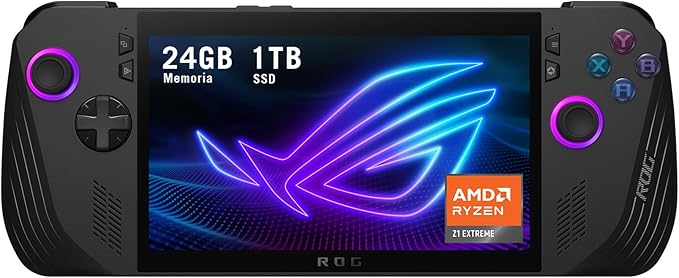
Elevate your gaming experience with the Asus ROG Ally X (2024) RC72LA. Powered by an AMD Ryzen Z1 Extreme processor and equipped with a stunning 7" FHD 120Hz touchscreen, this handheld gaming system features 24GB DDR5 RAM and a lightning-fast 1TB NVMe SSD for seamless performance. Enjoy up to 80WH battery life and the latest Windows 11 Home.
Elevate your gaming experience with the Asus ROG Ally X (2024) RC72LA. Powered by an AMD Ryzen Z1 Extreme processor and equipped with a stunning 7" FHD 120Hz touchscreen, this handheld gaming system features 24GB DDR5 RAM and a lightning-fast 1TB NVMe SSD for seamless performance. Enjoy up to 80WH battery life and the latest Windows 11 Home.
in 3 offers
The lowest price for Asus ROG Ally x 7" 120Hz FHD Gaming Handheld - AMD Ryzen Z1 Extreme (RC72LA-ALLYX.Z1X) right now is $1,149.73 at eBay.com.au, compared across 3 retailers.
The all-time low was $600.56 on 3 Sept 2026 — today's price is 91% above the lowest ever. It has been notably cheaper before — worth setting a price alert.
Prices last updated 5 Sept 2026.
Asus ROG Ally x 7" 120Hz FHD Gaming Handheld - AMD Ryzen Z1 Extreme (RC72LA-ALLYX.Z1X)
Elevate your gaming experience with the Asus ROG Ally X (2024) RC72LA. Powered by an AMD Ryzen Z1 Extreme processor and equipped with a stunning 7" FHD 120Hz touchscreen, this handheld gaming system features 24GB DDR5 RAM and a lightning-fast 1TB NVMe SSD for seamless performance. Enjoy up to 80WH battery life and the latest Windows 11 Home.
Elevate your gaming experience with the Asus ROG Ally X (2024) RC72LA. Powered by an AMD Ryzen Z1 Extreme processor and equipped with a stunning 7" FHD 120Hz touchscreen, this handheld gaming system features 24GB DDR5 RAM and a lightning-fast 1TB NVMe SSD for seamless performance. Enjoy up to 80WH battery life and the latest Windows 11 Home.

