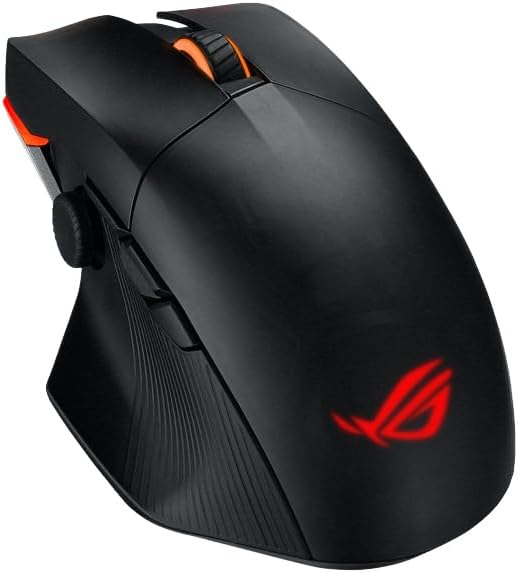
Asus ROG Chakram Core RGB Optical Gaming Mouse
Game-Changing Versatility And Control ROG Chakram Core is a 16,000 dpi, 1000 Hz wired gaming mouse with a programmable, removable joystick to put superior control right under your thumb. Featuring exclusive push-fit switch sockets, adjustable weight, and the unique DPI On-The-Scroll feature for sensitivity adjustment, Chakram Core puts everything you need right in your hand. Measure. Analyze. Win. PC performance for competitive gaming is about responsiveness-how quickly your display updates after mouse click. NVIDIA Reflex Latency Analyzer captures end-to-end system latency and delivers a precise measure of your PC's performance. Step confidently into battle knowing your PC is performing at peak level with Chakram Core, GeForce RTX GPUs and 360Hz PG259QNR monitor. Ultra Performance ROG Chakram Core is equipped with a high-end optical sensor to give you the speed and accuracy you need. Its 100 to 16,000 dpi sensor tracks movements up to an astounding 400 inches per second (IPS) at up to 40 g acceleration. Its 1,000 Hz polling rate ensures lag-free responsiveness so the onscreen action reacts instantly. Programmable Joystick Take advantage of the built-in joystick for unmatched levels of control with ROG Chakram Core and your gaming keyboard. The joystick can be set to Digital or Analog modes to fit your play style. Choose between the long or the short joystick, or do away with it completely. Screw-Less, Modular Design ROG Chakram Core has a screw-less modular design, with a magnetic cover and buttons, and exclusive push-fit switch sockets and adjustable weight providing loads of customization options to make Chakram Core your own. Aura Lighting Take style to the next level with ASUS Aura Sync RGB lighting. Fully customize ROG Chakram Core with an endless spectrum of colors and a range of dynamic lighting effects. All illuminations can be synced with an ever-growing portfolio of Aura Sync- capable hardware to create a truly personalized gaming den.
Game-Changing Versatility And Control ROG Chakram Core is a 16,000 dpi, 1000 Hz wired gaming mouse with a programmable, removable joystick to put superior control right under your thumb. Featuring exclusive push-fit switch sockets, adjustable weight, and the unique DPI On-The-Scroll feature for sensitivity adjustment, Chakram Core puts everything you need right in your hand. Measure. Analyze. Win. PC performance for competitive gaming is about responsiveness-how quickly your display updates after mouse click. NVIDIA Reflex Latency Analyzer captures end-to-end system latency and delivers a precise measure of your PC's performance. Step confidently into battle knowing your PC is performing at peak level with Chakram Core, GeForce RTX GPUs and 360Hz PG259QNR monitor. Ultra Performance ROG Chakram Core is equipped with a high-end optical sensor to give you the speed and accuracy you need. Its 100 to 16,000 dpi sensor tracks movements up to an astounding 400 inches per second (IPS) at up to 40 g acceleration. Its 1,000 Hz polling rate ensures lag-free responsiveness so the onscreen action reacts instantly. Programmable Joystick Take advantage of the built-in joystick for unmatched levels of control with ROG Chakram Core and your gaming keyboard. The joystick can be set to Digital or Analog modes to fit your play style. Choose between the long or the short joystick, or do away with it completely. Screw-Less, Modular Design ROG Chakram Core has a screw-less modular design, with a magnetic cover and buttons, and exclusive push-fit switch sockets and adjustable weight providing loads of customization options to make Chakram Core your own. Aura Lighting Take style to the next level with ASUS Aura Sync RGB lighting. Fully customize ROG Chakram Core with an endless spectrum of colors and a range of dynamic lighting effects. All illuminations can be synced with an ever-growing portfolio of Aura Sync- capable hardware to create a truly personalized gaming den.
Game-Changing Versatility And Control ROG Chakram Core is a 16,000 dpi, 1000 Hz wired gaming mouse with a programmable, removable joystick to put superior control right under your thumb. Featuring exclusive push-fit switch sockets, adjustable weight, and the unique DPI On-The-Scroll feature for sensitivity adjustment, Chakram Core puts everything you need right in your hand. Measure. Analyze. Win. PC performance for competitive gaming is about responsiveness-how quickly your display updates after mouse click. NVIDIA Reflex Latency Analyzer captures end-to-end system latency and delivers a precise measure of your PC's performance. Step confidently into battle knowing your PC is performing at peak level with Chakram Core, GeForce RTX GPUs and 360Hz PG259QNR monitor. Ultra Performance ROG Chakram Core is equipped with a high-end optical sensor to give you the speed and accuracy you need. Its 100 to 16,000 dpi sensor tracks movements up to an astounding 400 inches per second (IPS) at up to 40 g acceleration. Its 1,000 Hz polling rate ensures lag-free responsiveness so the onscreen action reacts instantly. Programmable Joystick Take advantage of the built-in joystick for unmatched levels of control with ROG Chakram Core and your gaming keyboard. The joystick can be set to Digital or Analog modes to fit your play style. Choose between the long or the short joystick, or do away with it completely. Screw-Less, Modular Design ROG Chakram Core has a screw-less modular design, with a magnetic cover and buttons, and exclusive push-fit switch sockets and adjustable weight providing loads of customization options to make Chakram Core your own. Aura Lighting Take style to the next level with ASUS Aura Sync RGB lighting. Fully customize ROG Chakram Core with an endless spectrum of colors and a range of dynamic lighting effects. All illuminations can be synced with an ever-growing portfolio of Aura Sync- capable hardware to create a truly personalized gaming den.
Game-Changing Versatility And Control ROG Chakram Core is a 16,000 dpi, 1000 Hz wired gaming mouse with a programmable, removable joystick to put superior control right under your thumb. Featuring exclusive push-fit switch sockets, adjustable weight, and the unique DPI On-The-Scroll feature for sensitivity adjustment, Chakram Core puts everything you need right in your hand. Measure. Analyze. Win. PC performance for competitive gaming is about responsiveness-how quickly your display updates after mouse click. NVIDIA Reflex Latency Analyzer captures end-to-end system latency and delivers a precise measure of your PC's performance. Step confidently into battle knowing your PC is performing at peak level with Chakram Core, GeForce RTX GPUs and 360Hz PG259QNR monitor. Ultra Performance ROG Chakram Core is equipped with a high-end optical sensor to give you the speed and accuracy you need. Its 100 to 16,000 dpi sensor tracks movements up to an astounding 400 inches per second (IPS) at up to 40 g acceleration. Its 1,000 Hz polling rate ensures lag-free responsiveness so the onscreen action reacts instantly. Programmable Joystick Take advantage of the built-in joystick for unmatched levels of control with ROG Chakram Core and your gaming keyboard. The joystick can be set to Digital or Analog modes to fit your play style. Choose between the long or the short joystick, or do away with it completely. Screw-Less, Modular Design ROG Chakram Core has a screw-less modular design, with a magnetic cover and buttons, and exclusive push-fit switch sockets and adjustable weight providing loads of customization options to make Chakram Core your own. Aura Lighting Take style to the next level with ASUS Aura Sync RGB lighting. Fully customize ROG Chakram Core with an endless spectrum of colors and a range of dynamic lighting effects. All illuminations can be synced with an ever-growing portfolio of Aura Sync- capable hardware to create a truly personalized gaming den.
in 1 offers
The lowest price for Asus ROG Chakram Core RGB Optical Gaming Mouse right now is $72.71 at PC House BD.
The all-time low was $72.71 on 17 Mar 2026. That's the lowest price we've ever tracked — a great time to buy.
Prices last updated 17 Mar 2026.
Last updated at 17/03/2026 09:35:27
ASUS ROG CHAKRAM Core Wired Gaming Mouse
originally posted on influenster.com
This mouse is so confortable with a light weight for long heavy work days in the office or long gaming hours it is nothing short from awesome, worth every penny for a beautiful design and awesome build quality there is never a comparison with ASUS ROG.
originally posted on neweggbusiness.com
Getting this mouse was because I had a razer mouse. The razer naga hex v2 specifically which disconnected randomly enough that my keyboard with a usb passthrough was required to be dedicated to the thing. Honestly I got drunk and when I had to unplug and replug the thing three times in a 20 minute span of gaming...after putting up with it being less often over the last couple years. Wasn't so common. But when your fancy mouse for gamers fails that. I smashed the thing. I got this because I expect it to work without fail. However more or less for an actual review since I went into why I got this. Size: Now this is a personal problem. I got small hands. (using a standard keyboard wrist at edge of caps lock key and middle finger resting center of the letter "j" This ... MoreGetting this mouse was because I had a razer mouse. The razer naga hex v2 specifically which disconnected randomly enough that my keyboard with a usb passthrough was required to be dedicated to the thing. Honestly I got drunk and when I had to unplug and replug the thing three times in a 20 minute span of gaming...after putting up with it being less often over the last couple years. Wasn't so common. But when your fancy mouse for gamers fails that. I smashed the thing. I got this because I expect it to work without fail. However more or less for an actual review since I went into why I got this. Size: Now this is a personal problem. I got small hands. (using a standard keyboard wrist at edge of caps lock key and middle finger resting center of the letter "j" This mouse is comfortable to hold. HOWEVER and having to caps lock that because the little directional on the side I cannot reach with my thumb at a normal resting position. If my hand were able to say crest over the letter "L" or I had a longer thumb, it would be usable. The two side buttons and everything else is easily usable. Keep this in mind for it. if you need that feature. DPI changing: it has a button on the bottom of the mouse. To use it, you cycle through four 1,2,3,4, 1. So if you play games where you swap often for some reason. This won't work for you in the slightest. But if you play games where you want to shift it depending on game or character. works well. Not the most convenient, but you won't be shifting it about if it worries you. Software: Takes some getting used to, but it is pretty easy to change the DPI numbers. For custom lighting, that app I feel can use some simplification as I guessed about that. Comfort: It is a comfy mouse. If I were to add anything, I would add a spot for my pinky to rest along since some grips I find it sliding over my mousepad. Not too bad, but I can imagine being an idiot and getting a paper cut or something which would make it very less than ideal to use. Clicky noise: It makes a slightly quieter click as opposed to a mini mouse I got. Standard I guess, but it isn't silent, so keep in mind your mic sensitivity. Overall I give it the rating I do because if you have larger hands, it would be really comfortable to use. If you got smaller hands, it is quite meh. So far I am enjoying casual use of it.
originally posted on asus.com
I actually have the tri mode version of this mouse, not the core version. aside from the connectivity, i believe all other features are the same.The joystick on the side of the mouse was the selling point for me. id take that over programmable buttons like most other mice feature any day! additionally, the hot swappable switches are another feature you dont find in other mice.the look and feel of this mouse is perfect. it fits perfectly in my hand and allows long term use without causing fatigue in the wrist.
| Sensor Type | Optical |
| dpi | 100 to 16,000 |
| Scroll Type | Scroll Wheel |
| Polling Rate | 1000 Hz |
| Acceleration | 40 g / 400 ips |
ASUS ROG CHAKRAM Core Wired Gaming Mouse
This mouse is so confortable with a light weight for long heavy work days in the office or long gaming hours it is nothing short from awesome, worth every penny for a beautiful design and awesome build quality there is never a comparison with ASUS ROG.
Getting this mouse was because I had a razer mouse. The razer naga hex v2 specifically which disconnected randomly enough that my keyboard with a usb passthrough was required to be dedicated to the thing. Honestly I got drunk and when I had to unplug and replug the thing three times in a 20 minute span of gaming...after putting up with it being less often over the last couple years. Wasn't so common. But when your fancy mouse for gamers fails that. I smashed the thing. I got this because I expect it to work without fail. However more or less for an actual review since I went into why I got this. Size: Now this is a personal problem. I got small hands. (using a standard keyboard wrist at edge of caps lock key and middle finger resting center of the letter "j" This ... MoreGetting this mouse was because I had a razer mouse. The razer naga hex v2 specifically which disconnected randomly enough that my keyboard with a usb passthrough was required to be dedicated to the thing. Honestly I got drunk and when I had to unplug and replug the thing three times in a 20 minute span of gaming...after putting up with it being less often over the last couple years. Wasn't so common. But when your fancy mouse for gamers fails that. I smashed the thing. I got this because I expect it to work without fail. However more or less for an actual review since I went into why I got this. Size: Now this is a personal problem. I got small hands. (using a standard keyboard wrist at edge of caps lock key and middle finger resting center of the letter "j" This mouse is comfortable to hold. HOWEVER and having to caps lock that because the little directional on the side I cannot reach with my thumb at a normal resting position. If my hand were able to say crest over the letter "L" or I had a longer thumb, it would be usable. The two side buttons and everything else is easily usable. Keep this in mind for it. if you need that feature. DPI changing: it has a button on the bottom of the mouse. To use it, you cycle through four 1,2,3,4, 1. So if you play games where you swap often for some reason. This won't work for you in the slightest. But if you play games where you want to shift it depending on game or character. works well. Not the most convenient, but you won't be shifting it about if it worries you. Software: Takes some getting used to, but it is pretty easy to change the DPI numbers. For custom lighting, that app I feel can use some simplification as I guessed about that. Comfort: It is a comfy mouse. If I were to add anything, I would add a spot for my pinky to rest along since some grips I find it sliding over my mousepad. Not too bad, but I can imagine being an idiot and getting a paper cut or something which would make it very less than ideal to use. Clicky noise: It makes a slightly quieter click as opposed to a mini mouse I got. Standard I guess, but it isn't silent, so keep in mind your mic sensitivity. Overall I give it the rating I do because if you have larger hands, it would be really comfortable to use. If you got smaller hands, it is quite meh. So far I am enjoying casual use of it.
I actually have the tri mode version of this mouse, not the core version. aside from the connectivity, i believe all other features are the same.The joystick on the side of the mouse was the selling point for me. id take that over programmable buttons like most other mice feature any day! additionally, the hot swappable switches are another feature you dont find in other mice.the look and feel of this mouse is perfect. it fits perfectly in my hand and allows long term use without causing fatigue in the wrist.
This is a great mouse if you have bigger hands. Programmable joystick is awesome if you're into using something like that. The easy switch of the dpi is nice with the button on the bottom and the scroll wheel. I love my Chakram core you'll love it too...
The Good:-Comfortable to use, though the side joystick might be tough to reach if you have shorter fingers-Very responsive, had no issues with connectivity-The weight adjustment is easy to install and makes a noticable differenceThe Not-So-Good:-The side joystick is a gimmick I really want to love, but I unfortunately couldn't find a good use for it other than using the digital mode as four hotkeys-The lighting is good, but I've had a few issues between the mouse lighting and ROG's Aura Sync (sometimes the lighting on the mouse wheel falls out of sync momentarily with the other lights. Also, Armory Crate doesn't detect the mouse on startup half the time I power on my PC)-$80 is a little steep compared to other mice with similar specsOverall, I don't ... MoreThe Good:-Comfortable to use, though the side joystick might be tough to reach if you have shorter fingers-Very responsive, had no issues with connectivity-The weight adjustment is easy to install and makes a noticable differenceThe Not-So-Good:-The side joystick is a gimmick I really want to love, but I unfortunately couldn't find a good use for it other than using the digital mode as four hotkeys-The lighting is good, but I've had a few issues between the mouse lighting and ROG's Aura Sync (sometimes the lighting on the mouse wheel falls out of sync momentarily with the other lights. Also, Armory Crate doesn't detect the mouse on startup half the time I power on my PC)-$80 is a little steep compared to other mice with similar specsOverall, I don't regret my purchase, and I do still think the joystick is kinda neat. I just hope I can eventually find a game that can fully utilize it. All on all, I'd weigh your options before purchasing this mouse.
Bought this for a new gaming computer build for my 22 year old son. Lots of features available with the Armoury Crate software from ASUS. Very poor directions though. OK no problem just have to figure it out. Right off the bat I find the scroll wheel does not work, assumed it was a setting needing changed. Researched the problem and found others have fixed this by changing the profile or pressing the DPI button together with the back button. Didn't work for me. I had messaged ASUS about the problem figuring they would tell me a simple fix. They finally messaged back and suggested to switch to a different USB port and/or uninstall the drivers and reboot. If those 2 don't work, to try a BIOS update, if all that fails then send it in for repair. Was really hoping for a ... MoreBought this for a new gaming computer build for my 22 year old son. Lots of features available with the Armoury Crate software from ASUS. Very poor directions though. OK no problem just have to figure it out. Right off the bat I find the scroll wheel does not work, assumed it was a setting needing changed. Researched the problem and found others have fixed this by changing the profile or pressing the DPI button together with the back button. Didn't work for me. I had messaged ASUS about the problem figuring they would tell me a simple fix. They finally messaged back and suggested to switch to a different USB port and/or uninstall the drivers and reboot. If those 2 don't work, to try a BIOS update, if all that fails then send it in for repair. Was really hoping for a simple profile or setting change that I was missing. Too much money for mouse that only partially works.
I have an incredibly light mouse touch, and mouse buttons appear to just hate that. They expect to be beaten on. I'm tired of throwing away expensive mice every year, so I'm giving this a go so I can just replace the switch. If only Corsair would make a mouse with replaceable switches.... sigh...
I really wanted to like this mouse. I liked the idea of having a thumbstick, and the possibilities for gaming. However, the very feature I bought it for ended up being the reason I'm retiring it and buying a new mouse. The thumbstick is neat, but unfortunately Windows (and therefore games) see the mouse as FOUR (4) separate joystick inputs. For many games, that means I can't even USE my actual joysticks, because they typically only read the first few joysticks attached. vJoy, Joystick Gremlin, and devreorder was one solution, but anti-cheat programs don't like devreorder. At the end of the day, it was just more frustration than it's worth. I shouldn't need 3 separate programs to use a mouse with games.Overall, A+ concept, D- execution. There's no reason it needs ... MoreI really wanted to like this mouse. I liked the idea of having a thumbstick, and the possibilities for gaming. However, the very feature I bought it for ended up being the reason I'm retiring it and buying a new mouse. The thumbstick is neat, but unfortunately Windows (and therefore games) see the mouse as FOUR (4) separate joystick inputs. For many games, that means I can't even USE my actual joysticks, because they typically only read the first few joysticks attached. vJoy, Joystick Gremlin, and devreorder was one solution, but anti-cheat programs don't like devreorder. At the end of the day, it was just more frustration than it's worth. I shouldn't need 3 separate programs to use a mouse with games.Overall, A+ concept, D- execution. There's no reason it needs to report itself as four joysticks. In fact, there's no reason it needs to report itself as ANY joysticks if you're not using the thumbstick as axes.Once again, ASUS proves that whoever writes drivers has no clue how their product is actually used.
First off, the thumb stick: It's neat, and surprisingly useful outside of gaming for stuff that you would usually reach for the arrow keys to do. In particular I've found myself using it to fast forward and rewind videos on YouTube when I need to skip around. My one gripe is that it's too far towards the front of the mouse and it's not very comfortable for me to reach for - I have to turn my hand partly diagonal to the mouse or move my grip too far forward to use the scroll wheel to get a useful grip on it. It's also an analog stick instead of a hat switch, so I've found myself making bad inputs when I try to use it as a foursome of keybinds for video games. It's very fiddly for this specific use. Might be useful for scenarios where you want analog and mouse input ... MoreFirst off, the thumb stick: It's neat, and surprisingly useful outside of gaming for stuff that you would usually reach for the arrow keys to do. In particular I've found myself using it to fast forward and rewind videos on YouTube when I need to skip around. My one gripe is that it's too far towards the front of the mouse and it's not very comfortable for me to reach for - I have to turn my hand partly diagonal to the mouse or move my grip too far forward to use the scroll wheel to get a useful grip on it. It's also an analog stick instead of a hat switch, so I've found myself making bad inputs when I try to use it as a foursome of keybinds for video games. It's very fiddly for this specific use. Might be useful for scenarios where you want analog and mouse input like aiming the arms and torso of a mech separately in MechWarrior, or emulating console games where an analog stick greatly enhances the experience. Otherwise, I almost feel like I lost a few buttons compared to my last mouse.The two conventional side buttons are comfortably positioned over the thumb rest and are a lot easier to reach than the stick. Even harder to reach is the DPI button. Why did they put it on the bottom?! There's plenty of space in front of the scroll wheel! That seems arbitrarily inconvenient. And speaking of the scroll wheel, it doesn't tilt side to side, which is a minor disappointment.It is REFRESHINGLY easy to disassemble compared to the mouse I used it to replace. I couldn't even figure out how to open that one for repair, but this one slides right open. Likely good for longevity but I'm not sure I'll have it for that long.Overall: good, but the fiddly nature of the thumbstick in digital mode and the unnatural placement of some of the controls have me on the fence about returning/selling this and getting something with six normal buttons on the side instead of two and a thumbstick. Probably one of the best mice you can buy... for some very niche use cases.
Nothing is cooler than having a Joystick on the side or your mouse. I don't actually play video games with the mouse I use it for work with CAD and PDF editor programs so sometimes its nice to use the joystick to search around a zoomed in page or to scroll around a little different than the top wheel. I wanted a mouse that my hand could sit on all day and I found it. I added some grip tape to really make it perfect. I love this thing. I also enjoy being able to switch the DPI under the mouse, which keep from accidental pushes, but can simply be changed with minimal effort. The buttons have the perfect click to them, and are changeable. I might look into a heavier button for personal reasons but this has been my favorite mouse I've had and the other 5 cordless ... MoreNothing is cooler than having a Joystick on the side or your mouse. I don't actually play video games with the mouse I use it for work with CAD and PDF editor programs so sometimes its nice to use the joystick to search around a zoomed in page or to scroll around a little different than the top wheel. I wanted a mouse that my hand could sit on all day and I found it. I added some grip tape to really make it perfect. I love this thing. I also enjoy being able to switch the DPI under the mouse, which keep from accidental pushes, but can simply be changed with minimal effort. The buttons have the perfect click to them, and are changeable. I might look into a heavier button for personal reasons but this has been my favorite mouse I've had and the other 5 cordless mouse's I have are sitting in the bag on the side of my desk because this corded mouse is king.
| Sensor Type | Optical |
| dpi | 100 to 16,000 |
| Scroll Type | Scroll Wheel |
| Polling Rate | 1000 Hz |
| Acceleration | 40 g / 400 ips |