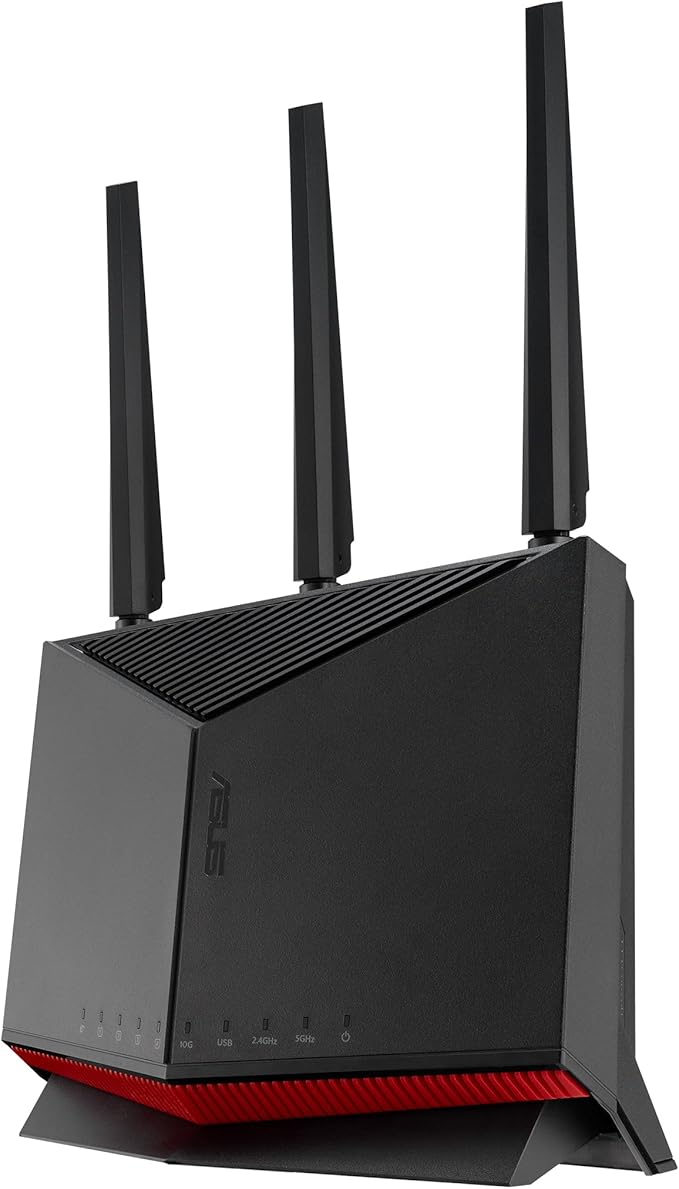
Massively Expanded Device Capacity WiFi 6E gives you up to 7 extra high-speed 160MHz channels, for multi-gigabit speeds with stable and consistent connections. It dramatically increases network capacity while reducing bandwidth congestion, delivering higher performance for every WiFi 6E device. Space-Age Networking for Space-Age Devices To achieve its magic, WiFi 6E takes advantage of the newly-available unlicensed radio spectrum in the 6GHz band, a band that will be dedicated purely to WiFi 6E-capable devices. This means that older devices won't interfere with WiFi 6E performance at all. Built for Multi-Device Environments WiFi 6 uses OFDMA and MU-MIMO technology to provide up to 4X more network capacity that WiFi 5, with higher efficiency in multi-device environments. OFDMA allows signals from multiple devices to be bundled together and transmitted simultaneously, reducing latency for a smoother, more responsive WiFi experience. Improved Device Battery Life Target Wake Time (TWT) allows GT-AXE11000 to schedule designated intervals for devices to transmit data. This allows them to sleep when there's no need to wait for a router signal, reducing power consumption by up to 7X for significantly improved battery life. 6GHz Power Amplifier and 1.8GHz Quad-core CPU GT-AXE11000's new 6GHz power amplifier boosts both signal strength and quality. The 1.8GHz 64-bit Quad-core CPU with 1GB RAM allows parallel processing for increased speed when handling data from multiple devices, so it can easily handle even the busiest WiFi 6E network.
Massively Expanded Device Capacity WiFi 6E gives you up to 7 extra high-speed 160MHz channels, for multi-gigabit speeds with stable and consistent connections. It dramatically increases network capacity while reducing bandwidth congestion, delivering higher performance for every WiFi 6E device. Space-Age Networking for Space-Age Devices To achieve its magic, WiFi 6E takes advantage of the newly-available unlicensed radio spectrum in the 6GHz band, a band that will be dedicated purely to WiFi 6E-capable devices. This means that older devices won't interfere with WiFi 6E performance at all. Built for Multi-Device Environments WiFi 6 uses OFDMA and MU-MIMO technology to provide up to 4X more network capacity that WiFi 5, with higher efficiency in multi-device environments. OFDMA allows signals from multiple devices to be bundled together and transmitted simultaneously, reducing latency for a smoother, more responsive WiFi experience. Improved Device Battery Life Target Wake Time (TWT) allows GT-AXE11000 to schedule designated intervals for devices to transmit data. This allows them to sleep when there's no need to wait for a router signal, reducing power consumption by up to 7X for significantly improved battery life. 6GHz Power Amplifier and 1.8GHz Quad-core CPU GT-AXE11000's new 6GHz power amplifier boosts both signal strength and quality. The 1.8GHz 64-bit Quad-core CPU with 1GB RAM allows parallel processing for increased speed when handling data from multiple devices, so it can easily handle even the busiest WiFi 6E network.
in 5 offers
last seen 16 Oct 2026
The lowest price we last saw for was , compared across 4 retailers (last seen 16 Oct 2026). Prices may have changed since.
Asus ROG Rapture Wireless 6E Gaming Router GT-AXE11000
Massively Expanded Device Capacity WiFi 6E gives you up to 7 extra high-speed 160MHz channels, for multi-gigabit speeds with stable and consistent connections. It dramatically increases network capacity while reducing bandwidth congestion, delivering higher performance for every WiFi 6E device. Space-Age Networking for Space-Age Devices To achieve its magic, WiFi 6E takes advantage of the newly-available unlicensed radio spectrum in the 6GHz band, a band that will be dedicated purely to WiFi 6E-capable devices. This means that older devices won't interfere with WiFi 6E performance at all. Built for Multi-Device Environments WiFi 6 uses OFDMA and MU-MIMO technology to provide up to 4X more network capacity that WiFi 5, with higher efficiency in multi-device environments. OFDMA allows signals from multiple devices to be bundled together and transmitted simultaneously, reducing latency for a smoother, more responsive WiFi experience. Improved Device Battery Life Target Wake Time (TWT) allows GT-AXE11000 to schedule designated intervals for devices to transmit data. This allows them to sleep when there's no need to wait for a router signal, reducing power consumption by up to 7X for significantly improved battery life. 6GHz Power Amplifier and 1.8GHz Quad-core CPU GT-AXE11000's new 6GHz power amplifier boosts both signal strength and quality. The 1.8GHz 64-bit Quad-core CPU with 1GB RAM allows parallel processing for increased speed when handling data from multiple devices, so it can easily handle even the busiest WiFi 6E network.
Massively Expanded Device Capacity WiFi 6E gives you up to 7 extra high-speed 160MHz channels, for multi-gigabit speeds with stable and consistent connections. It dramatically increases network capacity while reducing bandwidth congestion, delivering higher performance for every WiFi 6E device. Space-Age Networking for Space-Age Devices To achieve its magic, WiFi 6E takes advantage of the newly-available unlicensed radio spectrum in the 6GHz band, a band that will be dedicated purely to WiFi 6E-capable devices. This means that older devices won't interfere with WiFi 6E performance at all. Built for Multi-Device Environments WiFi 6 uses OFDMA and MU-MIMO technology to provide up to 4X more network capacity that WiFi 5, with higher efficiency in multi-device environments. OFDMA allows signals from multiple devices to be bundled together and transmitted simultaneously, reducing latency for a smoother, more responsive WiFi experience. Improved Device Battery Life Target Wake Time (TWT) allows GT-AXE11000 to schedule designated intervals for devices to transmit data. This allows them to sleep when there's no need to wait for a router signal, reducing power consumption by up to 7X for significantly improved battery life. 6GHz Power Amplifier and 1.8GHz Quad-core CPU GT-AXE11000's new 6GHz power amplifier boosts both signal strength and quality. The 1.8GHz 64-bit Quad-core CPU with 1GB RAM allows parallel processing for increased speed when handling data from multiple devices, so it can easily handle even the busiest WiFi 6E network.
The all-time low we recorded was $372.22 on 27 Feb 2026.
Prices last updated 16 Oct 2026.
Last updated at 16/10/2026 12:34:25
Asus ROG Rapture GT-AXE11000 Tri-Band Wi-Fi 6E Gaming Router, 11Gbps Speed, 6GHz Band, 2.5G WAN/LAN Port, Quad-Core Processor, Gray | 90IG06E0-MA1R1T
Delivery between 21–27 Oct $62.43
ROG Rapture GT-AXE11000 Tri-band WiFi 6E Extendable Gaming Router, 6GHz Band, 2.5G Port, Triple-level Game Acceleration, VPN Fusion, Subscription-fre
Free delivery between 27–30 Oct
WiFi 6E Tri-band Wireless Router GT-AXE11000 80%new
Free delivery
Rog Rapture Gt Axe11000
Delivery between 22–25 Oct $29
originally posted on asus.com
I upgraded from the AC5300 which is a great router in it's own right and immediately saw an improvement in my network performance. Particularly in my wireless connections (I have both wired and wireless connections). This router has features that are not often found in a consumer level router. Further, I was able to export my AC5300 configuration to a USB stick and import it into my GT-AXE11000. AMAZING! This router works great out of the box but has PLENTY of deeper level configuration options available to you if you like to tinker a bit. I would recommend this router to a seasoned pro as well as a non technical first time buyer just looking for great performance out of the box.
originally posted on neweggbusiness.com
Overall, I really love this router, like LOVE LOVE LOVE. I had a Netgear Nighthawk RAX50 that started off decently but no matter what, the 5GHz band would lose internet connectivity throughout the day and rebooting only worked so many times. Usually, I had to reboot my TiVo or Phone to keep the connection going and that was troublesome. With this router, I haven't had that issue and I can connect my TiVo Stream either 2 out of the 3 bands (doesn't support AX yet and doubtful it will without a hardware refresh when the spec matures). Port forwarding is straightforward once you work out where it is located. I like the presets that are offered but I am use to it being in either Firewall Settings or advanced - port forwarding/triggering but it isn't a killer issue. The ... MoreOverall, I really love this router, like LOVE LOVE LOVE. I had a Netgear Nighthawk RAX50 that started off decently but no matter what, the 5GHz band would lose internet connectivity throughout the day and rebooting only worked so many times. Usually, I had to reboot my TiVo or Phone to keep the connection going and that was troublesome. With this router, I haven't had that issue and I can connect my TiVo Stream either 2 out of the 3 bands (doesn't support AX yet and doubtful it will without a hardware refresh when the spec matures). Port forwarding is straightforward once you work out where it is located. I like the presets that are offered but I am use to it being in either Firewall Settings or advanced - port forwarding/triggering but it isn't a killer issue. The Aura Sync works well with my motherboard and I am happy about that. I didn't think I would ever become an RGB guy but I must admit, I am starting to like it (EVGA Mechanic RGC Keyboard, Logitech G903 and wireless charging mousepad with RGB, this router, plus Corsair Cappellix 240 Rad and block with ARGB fans). This works well with my aesthetics. The price is a bit high, got mine on sale, but it is new tech so it is expected. I have no qualms about it and so far it is living up to the billing. One thing I am disappointed in is the limited options of LAN ports and only 1 2.5G port which can be used for WAN or LAN connectivity. With my Spectrum modem, I can use a 2.5G connection for Internet and with my Motherboard having the option, direct modem connection offers me 1,036 MB/s down and 47 MB/s up. With the router, using Spectrum's speedtest site: I am pulling 800+ and 35+. Not a huge drop off. You won't go wrong with this purchase but it may be best to wait for the spec to mature a bit more and see if they do a hardware refresh with more LAN ports and a second 2.5G port for motherboards that can take advantage of them. The Merlin UI is fantastic but if you are used to using 3rd Party Firmware, the new AX/E routers aren't supported and may not anytime soon. DD-WRT and other sites are having a hard time not only securing newer model routers but also getting the Broadcom and Qualcom chips to be readable. Make of it what you will but thought I would offer a heads up. ENJOY! ASUS ROCKS!
originally posted on neweggbusiness.com
I bought this product along with ZenWiFi ET8 to replace my Google Nest WiFi. I wanted to take advantage of WiFi 6E for backhaul connections between AiMesh nodes. I also wanted to setup whole house ad blockers, and some other things like that not possible with Nest WiFi. I disconnected the Nest WiFi and setup the AiMesh using the same WiFi network as I had before. (I have about 40 devices so didn't want to reset all their WiFi connections.) My Windows, Mac, Linux, and Google Home devices connected without issue, as well as most of my TP-Link smart home devices, but some of the TP-Link devices I had to reboot for them to connect - not a big deal. But then I couldn't cast to my Chromecasts using any app (Netflix, Prime, etc.) I factory reset them, followed the setup ... MoreI bought this product along with ZenWiFi ET8 to replace my Google Nest WiFi. I wanted to take advantage of WiFi 6E for backhaul connections between AiMesh nodes. I also wanted to setup whole house ad blockers, and some other things like that not possible with Nest WiFi. I disconnected the Nest WiFi and setup the AiMesh using the same WiFi network as I had before. (I have about 40 devices so didn't want to reset all their WiFi connections.) My Windows, Mac, Linux, and Google Home devices connected without issue, as well as most of my TP-Link smart home devices, but some of the TP-Link devices I had to reboot for them to connect - not a big deal. But then I couldn't cast to my Chromecasts using any app (Netflix, Prime, etc.) I factory reset them, followed the setup through my phone, but they still couldn't find the network (and my phone always worked without issue.) I also started noticing my Google Home devices were acting strange, like they weren't communicating properly. Simply put, before I installed this router all worked as expected with no issues. After installing, it's like poltergeists or gremlins in my network - can't quite describe or predict the issues. I suspected the problems may be related to the Chromecast and my phone being connected to different AiMesh nodes, so I kept the router, but disconnected the ZenWiFi ET8 AiMesh nodes and the same problems continued. Reset the Chromecasts again, with the same negative results. For another test, I removed the router and kept the ZenWiFi ET8 nodes, and everything worked nicely! And another test, I disconnected the Asus products and setup my Nest WiFi again. Everything worked as it did before. So one last try, I setup the Asus products again from factory reset and experienced the same issues. I work from home, like a lot of us, so I had to stop using the Asus products and setup the Nest WiFi mesh again, because it was very reliable in the past . Throughout this process (over a month now) I have been in contact with Asus Tech Support, and they have been very friendly, but not the least bit helpful. They keep telling me they are working on it, "escalating it." They have asked for a ton of information, which I have provided, but they have not given me a single suggestion of how to fix my issues. After a month of working with them via email, I would expect at least, "sir, can you try this ...", or a phone call to work through the issues ... but nothing except more emails saying, "thank you for your patience." I really want to keep this product, and I'll have to now because it's past the Newegg return period, but also there are some good things. The first feature I used was traffic monitoring. I used that to realize my son's Windows laptop was constantly trying to download updates, using up all my bandwidth. Another thing that's super easy is setting up DDNS using LetsEncrypt certs. I was able to quickly setup a secure access to my router. As well as port forwarding, DDoS prevention, etc. This is my first Asus router, and the potential is very high for this router. But I can't use a router that has these bugs.
| General | |
| Device Type | Wireless router - 4-port switch (integrated) |
| Enclosure Type | Desktop |
| Connectivity Technology | Wireless, wired |
| Data Link Protocol | Ethernet, Fast Ethernet, Gigabit Ethernet, IEEE 802.11b, IEEE 802.11a, IEEE 802.11g, IEEE 802.11n, IEEE 802.11ac, 2.5 Gigabit Ethernet, 802.11ax |
Asus ROG Rapture GT-AXE11000 Tri-Band Wi-Fi 6E Gaming Router, 11Gbps Speed, 6GHz Band, 2.5G WAN/LAN Port, Quad-Core Processor, Gray | 90IG06E0-MA1R1T
Delivery between 21–27 Oct $62.43
ROG Rapture GT-AXE11000 Tri-band WiFi 6E Extendable Gaming Router, 6GHz Band, 2.5G Port, Triple-level Game Acceleration, VPN Fusion, Subscription-fre
Free delivery between 27–30 Oct
WiFi 6E Tri-band Wireless Router GT-AXE11000 80%new
Free delivery
Rog Rapture Gt Axe11000
Delivery between 22–25 Oct $29
I upgraded from the AC5300 which is a great router in it's own right and immediately saw an improvement in my network performance. Particularly in my wireless connections (I have both wired and wireless connections). This router has features that are not often found in a consumer level router. Further, I was able to export my AC5300 configuration to a USB stick and import it into my GT-AXE11000. AMAZING! This router works great out of the box but has PLENTY of deeper level configuration options available to you if you like to tinker a bit. I would recommend this router to a seasoned pro as well as a non technical first time buyer just looking for great performance out of the box.
Overall, I really love this router, like LOVE LOVE LOVE. I had a Netgear Nighthawk RAX50 that started off decently but no matter what, the 5GHz band would lose internet connectivity throughout the day and rebooting only worked so many times. Usually, I had to reboot my TiVo or Phone to keep the connection going and that was troublesome. With this router, I haven't had that issue and I can connect my TiVo Stream either 2 out of the 3 bands (doesn't support AX yet and doubtful it will without a hardware refresh when the spec matures). Port forwarding is straightforward once you work out where it is located. I like the presets that are offered but I am use to it being in either Firewall Settings or advanced - port forwarding/triggering but it isn't a killer issue. The ... MoreOverall, I really love this router, like LOVE LOVE LOVE. I had a Netgear Nighthawk RAX50 that started off decently but no matter what, the 5GHz band would lose internet connectivity throughout the day and rebooting only worked so many times. Usually, I had to reboot my TiVo or Phone to keep the connection going and that was troublesome. With this router, I haven't had that issue and I can connect my TiVo Stream either 2 out of the 3 bands (doesn't support AX yet and doubtful it will without a hardware refresh when the spec matures). Port forwarding is straightforward once you work out where it is located. I like the presets that are offered but I am use to it being in either Firewall Settings or advanced - port forwarding/triggering but it isn't a killer issue. The Aura Sync works well with my motherboard and I am happy about that. I didn't think I would ever become an RGB guy but I must admit, I am starting to like it (EVGA Mechanic RGC Keyboard, Logitech G903 and wireless charging mousepad with RGB, this router, plus Corsair Cappellix 240 Rad and block with ARGB fans). This works well with my aesthetics. The price is a bit high, got mine on sale, but it is new tech so it is expected. I have no qualms about it and so far it is living up to the billing. One thing I am disappointed in is the limited options of LAN ports and only 1 2.5G port which can be used for WAN or LAN connectivity. With my Spectrum modem, I can use a 2.5G connection for Internet and with my Motherboard having the option, direct modem connection offers me 1,036 MB/s down and 47 MB/s up. With the router, using Spectrum's speedtest site: I am pulling 800+ and 35+. Not a huge drop off. You won't go wrong with this purchase but it may be best to wait for the spec to mature a bit more and see if they do a hardware refresh with more LAN ports and a second 2.5G port for motherboards that can take advantage of them. The Merlin UI is fantastic but if you are used to using 3rd Party Firmware, the new AX/E routers aren't supported and may not anytime soon. DD-WRT and other sites are having a hard time not only securing newer model routers but also getting the Broadcom and Qualcom chips to be readable. Make of it what you will but thought I would offer a heads up. ENJOY! ASUS ROCKS!
I bought this product along with ZenWiFi ET8 to replace my Google Nest WiFi. I wanted to take advantage of WiFi 6E for backhaul connections between AiMesh nodes. I also wanted to setup whole house ad blockers, and some other things like that not possible with Nest WiFi. I disconnected the Nest WiFi and setup the AiMesh using the same WiFi network as I had before. (I have about 40 devices so didn't want to reset all their WiFi connections.) My Windows, Mac, Linux, and Google Home devices connected without issue, as well as most of my TP-Link smart home devices, but some of the TP-Link devices I had to reboot for them to connect - not a big deal. But then I couldn't cast to my Chromecasts using any app (Netflix, Prime, etc.) I factory reset them, followed the setup ... MoreI bought this product along with ZenWiFi ET8 to replace my Google Nest WiFi. I wanted to take advantage of WiFi 6E for backhaul connections between AiMesh nodes. I also wanted to setup whole house ad blockers, and some other things like that not possible with Nest WiFi. I disconnected the Nest WiFi and setup the AiMesh using the same WiFi network as I had before. (I have about 40 devices so didn't want to reset all their WiFi connections.) My Windows, Mac, Linux, and Google Home devices connected without issue, as well as most of my TP-Link smart home devices, but some of the TP-Link devices I had to reboot for them to connect - not a big deal. But then I couldn't cast to my Chromecasts using any app (Netflix, Prime, etc.) I factory reset them, followed the setup through my phone, but they still couldn't find the network (and my phone always worked without issue.) I also started noticing my Google Home devices were acting strange, like they weren't communicating properly. Simply put, before I installed this router all worked as expected with no issues. After installing, it's like poltergeists or gremlins in my network - can't quite describe or predict the issues. I suspected the problems may be related to the Chromecast and my phone being connected to different AiMesh nodes, so I kept the router, but disconnected the ZenWiFi ET8 AiMesh nodes and the same problems continued. Reset the Chromecasts again, with the same negative results. For another test, I removed the router and kept the ZenWiFi ET8 nodes, and everything worked nicely! And another test, I disconnected the Asus products and setup my Nest WiFi again. Everything worked as it did before. So one last try, I setup the Asus products again from factory reset and experienced the same issues. I work from home, like a lot of us, so I had to stop using the Asus products and setup the Nest WiFi mesh again, because it was very reliable in the past . Throughout this process (over a month now) I have been in contact with Asus Tech Support, and they have been very friendly, but not the least bit helpful. They keep telling me they are working on it, "escalating it." They have asked for a ton of information, which I have provided, but they have not given me a single suggestion of how to fix my issues. After a month of working with them via email, I would expect at least, "sir, can you try this ...", or a phone call to work through the issues ... but nothing except more emails saying, "thank you for your patience." I really want to keep this product, and I'll have to now because it's past the Newegg return period, but also there are some good things. The first feature I used was traffic monitoring. I used that to realize my son's Windows laptop was constantly trying to download updates, using up all my bandwidth. Another thing that's super easy is setting up DDNS using LetsEncrypt certs. I was able to quickly setup a secure access to my router. As well as port forwarding, DDoS prevention, etc. This is my first Asus router, and the potential is very high for this router. But I can't use a router that has these bugs.
The GT-AXE11000 is an excellent upgrade over an aging Netgear router. It extended the WiFi range significantly and the router itself has been rock solid after upgrading to the newest firmware. The range is so good, I don't have any current need to extend it with AiMesh.Other reviews do a good job speaking to the functionality, so I'll just add that the accompanying android app is a pleasure to use opposed to some competitors products. You really don't appreciate that simple quality of life upgrade until you've tried to configure/maintain other routers with subpar software.Overall, even though this router is priced at the higher end of the consumer spectrum, you're paying for the latest and greatest in performance.Pros: Great range and solid connection6e WiFi ... MoreThe GT-AXE11000 is an excellent upgrade over an aging Netgear router. It extended the WiFi range significantly and the router itself has been rock solid after upgrading to the newest firmware. The range is so good, I don't have any current need to extend it with AiMesh.Other reviews do a good job speaking to the functionality, so I'll just add that the accompanying android app is a pleasure to use opposed to some competitors products. You really don't appreciate that simple quality of life upgrade until you've tried to configure/maintain other routers with subpar software.Overall, even though this router is priced at the higher end of the consumer spectrum, you're paying for the latest and greatest in performance.Pros: Great range and solid connection6e WiFi band and a 2.5G portEnterprise level routing configurationsExcellent built in networking tools and consistent firmware updates (so far)Cons: Subjective visual aesthetics (Not a huge fan of the colored lights, but they can beturned off.)Only LAN 4 ports(Full disclosure, this review is left based on a 90 day added extension to product warranty. This in no way biased my final opinion of this product or the accompanying rating.)Enjoy the router and piece of mind that probably won't need to upgrade for quite some time.
Pros - 2.5 Gbps port, 4 1 Gbps ports, easy to use interface, fast, powerful Wi-Fi. Faster speeds on my older/existing N and AC devices, Guest networks.I don't like apps on my phone and managing the router from a browser has been nice and easy.Did not work with my Asus notebook Wi-Fi other than in the 2.4 GHz band. Asus noted there was a problem with a long list of Intel wireless adapters (mine was one of them) and only said to update to a newer driver than 20.70.0; I already had 22.40.0.7 so I did not think this would be the problem, but it was, even though it was the newest driver. Installing it again as a download from Intel changes something even though is had the same version listed.I liked this so much, I bought a second so I could set up the mesh Wi-Fi, ... MorePros - 2.5 Gbps port, 4 1 Gbps ports, easy to use interface, fast, powerful Wi-Fi. Faster speeds on my older/existing N and AC devices, Guest networks.I don't like apps on my phone and managing the router from a browser has been nice and easy.Did not work with my Asus notebook Wi-Fi other than in the 2.4 GHz band. Asus noted there was a problem with a long list of Intel wireless adapters (mine was one of them) and only said to update to a newer driver than 20.70.0; I already had 22.40.0.7 so I did not think this would be the problem, but it was, even though it was the newest driver. Installing it again as a download from Intel changes something even though is had the same version listed.I liked this so much, I bought a second so I could set up the mesh Wi-Fi, unfortunately, it won't work; I can log on to my Wi-Fi when I am at the main router, but when I get close to the node, I get an authorization error. I have spent about 2 hours on the phone and worked with 4 people by e-mail (good communication) to provide network diagrams and various config and log files, but at the 2 week mark, the Mesh mode is still not working yet. Asus has not given up and neither have I. I guess this is part of a new products growing pains. I am very hopeful that Asus can get the Ai Mesh to work soon.
This is my first ASUS router. I wish I had started with it! I had always used TP-Link. I started with a refurbished TP-Link-AX11000 (2.4GHz dropped out at random). Returned that and bought a NEW TP-Link AX10000. Experienced the same exact problem. Long story.The ASUS GT-AX11000 will not disappoint. I've had it for 6 weeks without a single issue. Super easy to setup. Love the ability to add custom pictures for the clients. Top notch equipment. My computer's MB is an ASUS, so no big surprise. Like I said...I wish I had started with it!My network has wired computers, wired TV\firesticks, wireless smart switches, and wireless camera. My camera frame rate is maxed out now without loss of quality. Thank You ASUS!
Pros: I've had the router for over a week. Unfortunately, it appears I don't have any Wifi 6E devices. However, I have future proofed my setup by buying this router. It looks really cool with the ROG lighting on top. Although I have it turned off most of the time. The router also appears to provide good coverage in my home. Having said that, I intend to buy another ASUS ROG router to create an AI Mesh network to improve the signal further.Cons: I noticed that my work laptop (when using MS Teams) was having issues with lag/freezing. At first I thought it coincided with the global MS Teams issue. However, a week later and I was experiencing the same issue. I never had this issue before with the ISP router (which was strange). In any case, I have since switched to the ... MorePros: I've had the router for over a week. Unfortunately, it appears I don't have any Wifi 6E devices. However, I have future proofed my setup by buying this router. It looks really cool with the ROG lighting on top. Although I have it turned off most of the time. The router also appears to provide good coverage in my home. Having said that, I intend to buy another ASUS ROG router to create an AI Mesh network to improve the signal further.Cons: I noticed that my work laptop (when using MS Teams) was having issues with lag/freezing. At first I thought it coincided with the global MS Teams issue. However, a week later and I was experiencing the same issue. I never had this issue before with the ISP router (which was strange). In any case, I have since switched to the 5Ghz frequency for my work laptop and this appears to have resolved the issue as it is more stable. I suspect it could be because I have a lot of devices using the 2.4Ghz frequency which was causing fluctuations in the quality of bit rate being received. Please note, my work laptop is upstairs and the the router is kept downstairs. As mentioned, I will look to address this at some point in the future by buying another ASUS router to create a mesh network. Other than that, I have no complaints. It is also fairly expensive this router, but I didn't mind as I knew what I was getting having installed an ROG setup in my other home.
I had an ASUS AC5300 I used with two ASUS AC3100s set up as wireless bridges for over five years. That system still worked but was acting up some due to new neighborhood wireless systems. I changed all three of my wireless AC routers to the new ASUS wireless MESH firmware available for them and installed the new AXE11000. With my old routers now set in MESH with the AXE11000, I moved them to new positions for better coverage within my home. My multiple wireless smart TVs immediately had signals that have never been broken again. At my five home wireless computers, 5GHz signals jumped from mid-levels to the full spec levels of their wireless cards (1.3Mbps). Even the wireless N signals almost doubled in Mbps.All my wireless connections are now rock solid with ... MoreI had an ASUS AC5300 I used with two ASUS AC3100s set up as wireless bridges for over five years. That system still worked but was acting up some due to new neighborhood wireless systems. I changed all three of my wireless AC routers to the new ASUS wireless MESH firmware available for them and installed the new AXE11000. With my old routers now set in MESH with the AXE11000, I moved them to new positions for better coverage within my home. My multiple wireless smart TVs immediately had signals that have never been broken again. At my five home wireless computers, 5GHz signals jumped from mid-levels to the full spec levels of their wireless cards (1.3Mbps). Even the wireless N signals almost doubled in Mbps.All my wireless connections are now rock solid with steady rates. I did have a little trouble getting the 6GHz band on. That took a few changes. The first was I had to install Windows 11 as Windows 10 will not support the 6GHz band, and I installed a new ASUS 6GHz wireless adapter card to the computer in the room with the new AXE11000. I also had to change a switch in the new AXE11000 router to enable 6GHz - which took a little searching. Once this was done, I immediately found the signal at the computer, with the new 6GHz adapter, was stable at 2.204GHz (transmit and receive). Even the lighting scheme on the AXE11000 is kind of cool - and it is an attention grabber.Changes to the AXE11000 router were very simple using the ASUS phone App on my Samsung S21 Ultra. The phone also helped me to find the best placement settings for each router in the mesh by using its wireless connection signal screen. In the same room with the AXE11000, the phone shows a 2.2GHz connection. 6 GHz doesn't travel far or through many walls, but I was still connected good through one interior sheetrock wall 20-25 feet from the AXE11000. Now I wish my three AC routers in the Mesh were AXE models that could also transmit the 6 GHz band.As a side note, my computers are all fast ASUS AMD four core systems that are about 13 years old with the oldest at 16 years. All still boot quickly and work perfectly, but Windows 11 said they weren't compatible with Windows 11. I found a work around on the Internet and installed Windows 11 to them all anyway. They all still work flawlessly with zero problems using the new system changes. They just now have solid and higher wireless transfer rates allowing faster large file transfers between them, along with higher Internet connection rates, using the new AXE11000 with the three AC routers in Wireless Mesh.
Quite honestly one of the easiest installs of a router I've ever experienced.Following the downloaded ASUS APP, made for simple instructions to basically plug and play with my cable operator's modem.We've been using the ASUS ROG Rapture GT-AX11000 for about three weeks now and have had virtually no concerns or issues with connectivity,which was the reason I was replacing our previous router(Linksys). I had no idea just how many WiFi related items we had in our home,but the main culprit with the previous router was the connectivity to the 2.4ghz band for our lighting needs and various other necessitieswe have become used to having at the touch of our fingertips. The ROG Rapture GT-AX11000, has been flawless in this area!I am not a gamer, but knowing this ... MoreQuite honestly one of the easiest installs of a router I've ever experienced.Following the downloaded ASUS APP, made for simple instructions to basically plug and play with my cable operator's modem.We've been using the ASUS ROG Rapture GT-AX11000 for about three weeks now and have had virtually no concerns or issues with connectivity,which was the reason I was replacing our previous router(Linksys). I had no idea just how many WiFi related items we had in our home,but the main culprit with the previous router was the connectivity to the 2.4ghz band for our lighting needs and various other necessitieswe have become used to having at the touch of our fingertips. The ROG Rapture GT-AX11000, has been flawless in this area!I am not a gamer, but knowing this router has the power to handle all we can throw at it, really does put our mind at ease.We stream a fair amount, and have 50-75 devices connected at most times and we could not be happier with our purchase.I was not into supplying a review as that is not normally my speed, but ASUS is offering a 90-day warranty extension,so I decided what the heck, I can offer my input for a little help on the warranty side of things.
Comcast had upped my service to 400Mbps, but I was getting the same 180Mbps that I had been getting for years when I had 200Mbps and 300Mbps services. I had just updated my home backbone to a 10Gbps and was not happy with my speed. My old router (Cisco) had all 1Gbps ports and was based on Wi-Fi N so I decided it might be my bottle neck. I was also running a Wi-Fi AC access point at one end of my house to get enough signal where I needed it. Replacing my old router was fairly straight forward and the Asus system was easy to navigate. I decided on this unit because it had the new 6GHz band that the newer devices would be able to take advantage of; I don't have any, but my 74 year old mom does and I thought she might like the speed when she comes to visit. The fact ... MoreComcast had upped my service to 400Mbps, but I was getting the same 180Mbps that I had been getting for years when I had 200Mbps and 300Mbps services. I had just updated my home backbone to a 10Gbps and was not happy with my speed. My old router (Cisco) had all 1Gbps ports and was based on Wi-Fi N so I decided it might be my bottle neck. I was also running a Wi-Fi AC access point at one end of my house to get enough signal where I needed it. Replacing my old router was fairly straight forward and the Asus system was easy to navigate. I decided on this unit because it had the new 6GHz band that the newer devices would be able to take advantage of; I don't have any, but my 74 year old mom does and I thought she might like the speed when she comes to visit. The fact that this router had a 2.5Gbps port was a plus. I only had one problem with my upgrade, my Asus Tuf Gaming Notebook would not connect with the new router other than on the 2.4GHz band. Asus had a card that listed the Intel Wi-Fi card that my notebook used along with a big list, and had a not to upgrade the driver to 20.70.0 or later. My driver was 22.40.0.7 so I did not try to update it. After hours of not making good progress, I gave up for the night. The next day, after work, I again tried seeing what I could find and was not making progress. The Asus sheet said to go to Intel download center so I decided to give that a try. Intel showed the 22.40.0 as the current driver, but I noticed my version had a March 3 2021 date and the Intel site had a date at the end of March so I decided to download the driver pack and run the install. The driver ended up with the same version (22.40.0.7) as I had before but now, my computer was recognizing the 5GHz band from the GT-AXE11000; It had been working fine on the 5GHz band from my AC access point. I switched to the 5GHz band from the GT-AXE11000 and I had much stronger signal than the old N router and was able to get around 300Mbps on a download test. I can't wait to test a AXE (Wi-Fi 6) device on the system, but everything is running much faster. My Roku devices were getting about 20-25 Mbps and now are getting 50-70 Mbps. My 2019 Fire 10 tablet gets 330 Mbps if I am close and 220 Mbps at the other end of the house. Now that I got the driver issue fixed (not sure what the issue was) I could not be happier with my purchase; I'm getting a second to use as a node and will be upgrading the AC access point I still use for extended outside coverage. After 2 weeks, the node will not work properly in Ai Mesh mode. Asus has been responsive. At the 15 day mark, the new firmware ( 3.0.0.4.386_43983) solved the problem!
| General | |
| Device Type | Wireless router - 4-port switch (integrated) |
| Enclosure Type | Desktop |
| Connectivity Technology | Wireless, wired |
| Data Link Protocol | Ethernet, Fast Ethernet, Gigabit Ethernet, IEEE 802.11b, IEEE 802.11a, IEEE 802.11g, IEEE 802.11n, IEEE 802.11ac, 2.5 Gigabit Ethernet, 802.11ax |