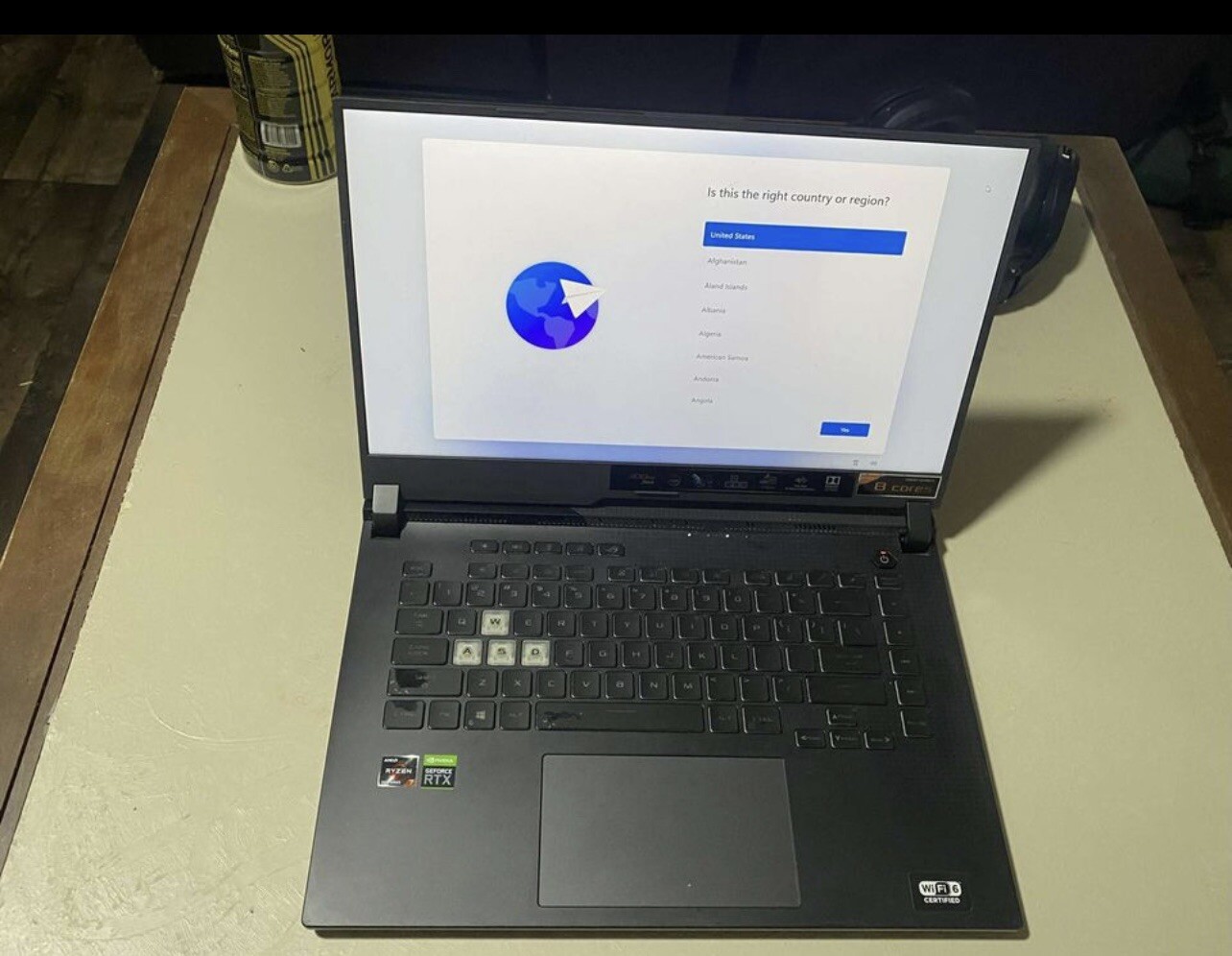


Asus ROG Strix G15 (2021) Gaming Laptop, 15.6†144Hz IPS Type FHD Display, Nvidia GeForce RTX 3050, AMD Ryzen 7 4800h, 8GB Ddr4, 512gb PCIe NVMe
Traditional Laptops by ASUS. Details:Focused firepower streamlines and elevates the core Windows 10 Pro gaming experience in the ROG Strix G15. With a powerful AMD RyzenTM CPU and GeForce GTXTM GPU, everything from gaming to multitasking is fast and fluid. Adaptive-Sync makes gameplay ultrasmooth, while advanced thermal upgrades help you stay cool under pressure. No matter what your game is, you can achieve your perfect play.
Traditional Laptops by ASUS. Details:Focused firepower streamlines and elevates the core Windows 10 Pro gaming experience in the ROG Strix G15. With a powerful AMD RyzenTM CPU and GeForce GTXTM GPU, everything from gaming to multitasking is fast and fluid. Adaptive-Sync makes gameplay ultrasmooth, while advanced thermal upgrades help you stay cool under pressure. No matter what your game is, you can achieve your perfect play.
Traditional Laptops by ASUS. Details:Focused firepower streamlines and elevates the core Windows 10 Pro gaming experience in the ROG Strix G15. With a powerful AMD RyzenTM CPU and GeForce GTXTM GPU, everything from gaming to multitasking is fast and fluid. Adaptive-Sync makes gameplay ultrasmooth, while advanced thermal upgrades help you stay cool under pressure. No matter what your game is, you can achieve your perfect play.
Traditional Laptops by ASUS. Details:Focused firepower streamlines and elevates the core Windows 10 Pro gaming experience in the ROG Strix G15. With a powerful AMD RyzenTM CPU and GeForce GTXTM GPU, everything from gaming to multitasking is fast and fluid. Adaptive-Sync makes gameplay ultrasmooth, while advanced thermal upgrades help you stay cool under pressure. No matter what your game is, you can achieve your perfect play.
in 7 offers
The lowest price for Asus ROG Strix G15 (2021) Gaming Laptop, 15.6†144Hz IPS Type FHD Display, Nvidia GeForce RTX 3050, AMD Ryzen 7 4800h, 8GB Ddr4, 512gb PCIe NVMe right now is $1,118.88 at eBay.com.au, compared across 6 retailers.
The all-time low was $1,118.88 on 24 Aug 2026. That's the lowest price we've ever tracked — a great time to buy.
Prices last updated 24 Aug 2026.
Last updated at 24/08/2026 22:33:32
ASUS ROG Strix G15 (2021) Gaming Laptop, 15.6†144Hz IPS Type FHD Display, NVIDIA GeForce RTX 3050, AMD Ryzen 7 4800H, 8GB DDR4, 512GB PCIe NVMe SSD,
Affiliate Disclosure: We may receive a small commission for purchases made through this link at no extra cost to you. This helps support our site. Thank you!
ASUS ROG Strix G15 15.6'' (512GB SSD AMD Ryzen 7 4800H 4.2GHz 8GB RAM) Gaming Laptop - Gray - G513IC-EB73
Affiliate Disclosure: We may receive a small commission for purchases made through this link at no extra cost to you. This helps support our site. Thank you!
ASUS ROG Strix G15 (2021) Gaming Laptop, 15.6a 144Hz IPS Type FHD Display, NVIDIA GeForce RTX 3050, AMD Ryzen 7 4800H, 8GB DDR4, 512GB PCIe NVMe SSD,
Delivery between 29 Aug – 2 Sept $35.88
ASUS ROG Strix G15 (2021) Gaming Laptop, 15.6” 144Hz IPS Type FHD Display, NVIDIA GeForce RTX 3050, AMD Ryzen 7 4800H, 8GB DDR4, 512GB PCIe NVMe
Delivery between 29 Aug – 2 Sept $35.88
Asus Rog Strix G15 (2021) Gaming Laptop, 15.6 144 Hz Ips Type Fhd Display, Nvidia Ge Force Rtx 3050, Amd Ryzen 7 4800 H, 8 Gb Ddr4, 512 Gb Pc Ie Nv Me
Free delivery between 2–8 Sept
ASUS ROG Strix G15 (2021) Gaming Laptop, 15.6†144Hz IPS Type FHD Display, NVIDIA GeForce RTX 3050, AMD Ryzen 7 4800H, 8GB DDR4, 512GB PCIe NVMe SSD,
Free delivery
ASUS ROG Strix G15 (2021) Gaming Laptop, 15.6†144Hz IPS Type FHD Display, NVIDIA GeForce RTX 3050, AMD Ryzen 7 4800H, 8GB DDR4, 512GB PCIe NVMe SSD,
Free delivery
originally posted on bestbuy.com
I would love to give this 5 stars but I’ve had an issue with the laptop that needs to be said because it seems to happen to a lot of asus laptops. Firstly this computer is a monster. It has no problem running games like arma 3, beam NG drive (it’ll run 60 FPS with higher settings), storm works, from the depths and gta V (I got 90 FPS with higher settings) it has no webcam which I do not care for, it’s a little loud and gets decently warm I’d recommend a laptop cooler if you game for a multiple hours a day. The screen is nice, I’d only see you get 165 FPS in esports and indie titles. No mux switch but you can bypass the IGPU by using a USB-C to HDMI or Display Port which will increase your FPS. Yes it’s true this laptop comes with “slow” memory and you can see up to ... MoreI would love to give this 5 stars but I’ve had an issue with the laptop that needs to be said because it seems to happen to a lot of asus laptops. Firstly this computer is a monster. It has no problem running games like arma 3, beam NG drive (it’ll run 60 FPS with higher settings), storm works, from the depths and gta V (I got 90 FPS with higher settings) it has no webcam which I do not care for, it’s a little loud and gets decently warm I’d recommend a laptop cooler if you game for a multiple hours a day. The screen is nice, I’d only see you get 165 FPS in esports and indie titles. No mux switch but you can bypass the IGPU by using a USB-C to HDMI or Display Port which will increase your FPS. Yes it’s true this laptop comes with “slow” memory and you can see up to a 20% increase in power if you upgrade (32 gigs will run you about 100-160$ I’d recommend crucial) the charging brick is not a joke, it is a genuine brick and will hurt your foot if you drop it. The keyboard is very nice and I find no issue. Compared to a MacBook Pro 2019 it is slightly more “mushy”. The laptop is amazing for the price that got it (1350$ after tax) so it’s worth it.Now the issue. Asus has strange phenomenon where sometimes for whatever reason the GPU gets stuck in “Extreme Power Savings Mode” this doesn’t change when you restart, plug in, or manually change it in windows or Armory Crate. You may ask, well if you still own the laptop how did you fix it? Well first thing I tried was reinstalling windows 10 (I had switched for a bit) that worked for about a day or so. I switched back to windows 11, still didn’t work then I went into the bios and boom my GPU was showing there so I saved and exited and it worked! Then it happened again did the same thing and worked again! It occurred a few more times then I started booting fr the bios and after a few more times the laptop just works now and I’m very happy! I have not had a problem since!So all in all besides strange software glitches and issues the laptop is nearly perfect!
originally posted on bestbuy.com
I bought this laptop on sale at 1099 on November 2022 from 1699 of the original price.With the money I saved I upgraded the SSD with 2 fast 1TB Gen 3 from Sabrent (I have cloned the internal to the first Sabrent and then replace it with another Sabrent for a 2TB total SSD), I replaced the slow stock ram 1Rx16 CL22 with super-fast 2x16GB DDR4 1Rx8 CL20 Kingston FURY (total 32GB) & I also replaced the unreliable WI-FI/Bluetooth card with a fast and reliable INTEL AX210 NGW. All this costed about 400$.All the components I have removed I sold them for used and I made some extra cash for the rest of the upgrades.All the above are super easy to do if you have basic computer skills, 15’ time and a screwdriver.With the remaining money bought also on sale: one ROG ... MoreI bought this laptop on sale at 1099 on November 2022 from 1699 of the original price.With the money I saved I upgraded the SSD with 2 fast 1TB Gen 3 from Sabrent (I have cloned the internal to the first Sabrent and then replace it with another Sabrent for a 2TB total SSD), I replaced the slow stock ram 1Rx16 CL22 with super-fast 2x16GB DDR4 1Rx8 CL20 Kingston FURY (total 32GB) & I also replaced the unreliable WI-FI/Bluetooth card with a fast and reliable INTEL AX210 NGW. All this costed about 400$.All the components I have removed I sold them for used and I made some extra cash for the rest of the upgrades.All the above are super easy to do if you have basic computer skills, 15’ time and a screwdriver.With the remaining money bought also on sale: one ROG Falchion NX 65 keyboard, one mouse ROG Chakram, the AUKEY PC-LM1E 1080p camera and the Creative Pebble V3 Speakers.All the above upgrades and accessories costed less than the discount I got from best buy and I added a few more $ to the ones I made by selling the stock parts for one LG Ultra gear 27GP850-B monitor than is currently on sale at 300$ for a full gaming set up and for bypassing completely the integrated GPU.On benchmarks and on new AAA games this configuration is faster about 25% of the original configuration and faster than a i7 11800H + RTX 3080M laptop that cost about double the original 1699 price of this laptop with smaller SSD and less RAM!Every game run on ultra-settings smoothly as butter.I highly recommend it even on original price at best buy if you are considering buying the Nvidia variation and you will have the fastest laptop out there and a lot of hard earned $ saved.
originally posted on bestbuy.com
I bought this laptop to purely learn the potential of the AMD advantage(AMD-AMD) system, and I'm genuinely impressed. This laptop is a true beast, with unparalleled performance at its price range(speaking of the discount currently going on, along with the 3 free 40-60$ games AMD rewards). Note that this machine has the potential to be some of the greatest portable gaming machines in this era(yes, even in the era of AMD 6000 series and Intel 12th gen mobile). I fully upgraded it myself(man those LED ribbon cables, meh) with 2x2T Samsung 970 Evo Plus, an Intel Killer 1650X wifi 6-E card, and Kingston 2x16 G 3200MT/Cl 20 kit of ram. While testing with 3D mark TS, the whole machine can totally boost over my desktop with 5800x3d+3080 10g, with a 6-7Ghz on the CPU(and a ... MoreI bought this laptop to purely learn the potential of the AMD advantage(AMD-AMD) system, and I'm genuinely impressed. This laptop is a true beast, with unparalleled performance at its price range(speaking of the discount currently going on, along with the 3 free 40-60$ games AMD rewards). Note that this machine has the potential to be some of the greatest portable gaming machines in this era(yes, even in the era of AMD 6000 series and Intel 12th gen mobile). I fully upgraded it myself(man those LED ribbon cables, meh) with 2x2T Samsung 970 Evo Plus, an Intel Killer 1650X wifi 6-E card, and Kingston 2x16 G 3200MT/Cl 20 kit of ram. While testing with 3D mark TS, the whole machine can totally boost over my desktop with 5800x3d+3080 10g, with a 6-7Ghz on the CPU(and a 211W CPU package power draw). It definitely hosts its potential, and you can unleash it with a decent external monitor and a decent ram kit.Pros: Excellent performance, bang for the buck, performance wise is actually greater than most RTX 3080 Mobile laptops thanks to AMD smart shift and AMD Smart Access Memory. CPU is absolutely a beast, constantly boost up to 5-7Ghz without liquid nitrogen, just turn on overclock in AMD Adrenaline and you are good to go. For wifi, as soon as I upgrade the wifi card, together with Game first/Rog Boost, I can constantly rob internet bandwidth from all of my other devices combined(950 Mb/s+ considering my plan is 1Gig, and my desktop PC and Zephyrus duo 16 get the rest 50 Mbs, which could be unhelpful if I'm trying to do work on other devices while downloading a steam game on this laptop). Also even though it's a hybrid laptop without eco mode, it can constantly outperform my Zephyrus duo 16 on eco mode(probably is the mini led screen? IDK really), the Strix 15 can last up to 8 hours If my boss put me at fieldwork, while Zephyrus duo 16 only lasts about 3hr 40 min, considering they are both AMD systems(I do disable the 3080TiM on Zephyrus duo for work reasons, as it doesn't provide enough color accuracy as the AMD iGPU).Cons: No Mux Switch, Unstable Wifi Card(that's majorly Mediatek's fault), slow PCI-E Gen 3 speed(seems the chipset splits it to PCI-E 3x2 for each SSD instead of your regular PCI-E 3x4), Screen is only 8 bit instead of 10 bit, Still using the slow sluggish ram even we are past the parts shortage era.For my set up I used all the hardware upgrades mentioned above, paired with a turbo IETS 5000RPM laptop cooler, a Uni USBC to DP cable, and the monitors are ROG Strix XG349C and Rog Swift PG35VQ.
| Standing screen display size | 15.6 Inches |
| Screen Resolution | 1920 x 1080 pixels |
| Max Screen Resolution | 1920 x 1080 Pixels |
| Processor | amd_ryzen_7 |
| RAM | 8 GB DDR4 |
ASUS ROG Strix G15 (2021) Gaming Laptop, 15.6†144Hz IPS Type FHD Display, NVIDIA GeForce RTX 3050, AMD Ryzen 7 4800H, 8GB DDR4, 512GB PCIe NVMe SSD,
Affiliate Disclosure: We may receive a small commission for purchases made through this link at no extra cost to you. This helps support our site. Thank you!
ASUS ROG Strix G15 15.6'' (512GB SSD AMD Ryzen 7 4800H 4.2GHz 8GB RAM) Gaming Laptop - Gray - G513IC-EB73
Affiliate Disclosure: We may receive a small commission for purchases made through this link at no extra cost to you. This helps support our site. Thank you!
ASUS ROG Strix G15 (2021) Gaming Laptop, 15.6a 144Hz IPS Type FHD Display, NVIDIA GeForce RTX 3050, AMD Ryzen 7 4800H, 8GB DDR4, 512GB PCIe NVMe SSD,
Delivery between 29 Aug – 2 Sept $35.88
ASUS ROG Strix G15 (2021) Gaming Laptop, 15.6” 144Hz IPS Type FHD Display, NVIDIA GeForce RTX 3050, AMD Ryzen 7 4800H, 8GB DDR4, 512GB PCIe NVMe
Delivery between 29 Aug – 2 Sept $35.88
Asus Rog Strix G15 (2021) Gaming Laptop, 15.6 144 Hz Ips Type Fhd Display, Nvidia Ge Force Rtx 3050, Amd Ryzen 7 4800 H, 8 Gb Ddr4, 512 Gb Pc Ie Nv Me
Free delivery between 2–8 Sept
I would love to give this 5 stars but I’ve had an issue with the laptop that needs to be said because it seems to happen to a lot of asus laptops. Firstly this computer is a monster. It has no problem running games like arma 3, beam NG drive (it’ll run 60 FPS with higher settings), storm works, from the depths and gta V (I got 90 FPS with higher settings) it has no webcam which I do not care for, it’s a little loud and gets decently warm I’d recommend a laptop cooler if you game for a multiple hours a day. The screen is nice, I’d only see you get 165 FPS in esports and indie titles. No mux switch but you can bypass the IGPU by using a USB-C to HDMI or Display Port which will increase your FPS. Yes it’s true this laptop comes with “slow” memory and you can see up to ... MoreI would love to give this 5 stars but I’ve had an issue with the laptop that needs to be said because it seems to happen to a lot of asus laptops. Firstly this computer is a monster. It has no problem running games like arma 3, beam NG drive (it’ll run 60 FPS with higher settings), storm works, from the depths and gta V (I got 90 FPS with higher settings) it has no webcam which I do not care for, it’s a little loud and gets decently warm I’d recommend a laptop cooler if you game for a multiple hours a day. The screen is nice, I’d only see you get 165 FPS in esports and indie titles. No mux switch but you can bypass the IGPU by using a USB-C to HDMI or Display Port which will increase your FPS. Yes it’s true this laptop comes with “slow” memory and you can see up to a 20% increase in power if you upgrade (32 gigs will run you about 100-160$ I’d recommend crucial) the charging brick is not a joke, it is a genuine brick and will hurt your foot if you drop it. The keyboard is very nice and I find no issue. Compared to a MacBook Pro 2019 it is slightly more “mushy”. The laptop is amazing for the price that got it (1350$ after tax) so it’s worth it.Now the issue. Asus has strange phenomenon where sometimes for whatever reason the GPU gets stuck in “Extreme Power Savings Mode” this doesn’t change when you restart, plug in, or manually change it in windows or Armory Crate. You may ask, well if you still own the laptop how did you fix it? Well first thing I tried was reinstalling windows 10 (I had switched for a bit) that worked for about a day or so. I switched back to windows 11, still didn’t work then I went into the bios and boom my GPU was showing there so I saved and exited and it worked! Then it happened again did the same thing and worked again! It occurred a few more times then I started booting fr the bios and after a few more times the laptop just works now and I’m very happy! I have not had a problem since!So all in all besides strange software glitches and issues the laptop is nearly perfect!
I bought this laptop on sale at 1099 on November 2022 from 1699 of the original price.With the money I saved I upgraded the SSD with 2 fast 1TB Gen 3 from Sabrent (I have cloned the internal to the first Sabrent and then replace it with another Sabrent for a 2TB total SSD), I replaced the slow stock ram 1Rx16 CL22 with super-fast 2x16GB DDR4 1Rx8 CL20 Kingston FURY (total 32GB) & I also replaced the unreliable WI-FI/Bluetooth card with a fast and reliable INTEL AX210 NGW. All this costed about 400$.All the components I have removed I sold them for used and I made some extra cash for the rest of the upgrades.All the above are super easy to do if you have basic computer skills, 15’ time and a screwdriver.With the remaining money bought also on sale: one ROG ... MoreI bought this laptop on sale at 1099 on November 2022 from 1699 of the original price.With the money I saved I upgraded the SSD with 2 fast 1TB Gen 3 from Sabrent (I have cloned the internal to the first Sabrent and then replace it with another Sabrent for a 2TB total SSD), I replaced the slow stock ram 1Rx16 CL22 with super-fast 2x16GB DDR4 1Rx8 CL20 Kingston FURY (total 32GB) & I also replaced the unreliable WI-FI/Bluetooth card with a fast and reliable INTEL AX210 NGW. All this costed about 400$.All the components I have removed I sold them for used and I made some extra cash for the rest of the upgrades.All the above are super easy to do if you have basic computer skills, 15’ time and a screwdriver.With the remaining money bought also on sale: one ROG Falchion NX 65 keyboard, one mouse ROG Chakram, the AUKEY PC-LM1E 1080p camera and the Creative Pebble V3 Speakers.All the above upgrades and accessories costed less than the discount I got from best buy and I added a few more $ to the ones I made by selling the stock parts for one LG Ultra gear 27GP850-B monitor than is currently on sale at 300$ for a full gaming set up and for bypassing completely the integrated GPU.On benchmarks and on new AAA games this configuration is faster about 25% of the original configuration and faster than a i7 11800H + RTX 3080M laptop that cost about double the original 1699 price of this laptop with smaller SSD and less RAM!Every game run on ultra-settings smoothly as butter.I highly recommend it even on original price at best buy if you are considering buying the Nvidia variation and you will have the fastest laptop out there and a lot of hard earned $ saved.
I bought this laptop to purely learn the potential of the AMD advantage(AMD-AMD) system, and I'm genuinely impressed. This laptop is a true beast, with unparalleled performance at its price range(speaking of the discount currently going on, along with the 3 free 40-60$ games AMD rewards). Note that this machine has the potential to be some of the greatest portable gaming machines in this era(yes, even in the era of AMD 6000 series and Intel 12th gen mobile). I fully upgraded it myself(man those LED ribbon cables, meh) with 2x2T Samsung 970 Evo Plus, an Intel Killer 1650X wifi 6-E card, and Kingston 2x16 G 3200MT/Cl 20 kit of ram. While testing with 3D mark TS, the whole machine can totally boost over my desktop with 5800x3d+3080 10g, with a 6-7Ghz on the CPU(and a ... MoreI bought this laptop to purely learn the potential of the AMD advantage(AMD-AMD) system, and I'm genuinely impressed. This laptop is a true beast, with unparalleled performance at its price range(speaking of the discount currently going on, along with the 3 free 40-60$ games AMD rewards). Note that this machine has the potential to be some of the greatest portable gaming machines in this era(yes, even in the era of AMD 6000 series and Intel 12th gen mobile). I fully upgraded it myself(man those LED ribbon cables, meh) with 2x2T Samsung 970 Evo Plus, an Intel Killer 1650X wifi 6-E card, and Kingston 2x16 G 3200MT/Cl 20 kit of ram. While testing with 3D mark TS, the whole machine can totally boost over my desktop with 5800x3d+3080 10g, with a 6-7Ghz on the CPU(and a 211W CPU package power draw). It definitely hosts its potential, and you can unleash it with a decent external monitor and a decent ram kit.Pros: Excellent performance, bang for the buck, performance wise is actually greater than most RTX 3080 Mobile laptops thanks to AMD smart shift and AMD Smart Access Memory. CPU is absolutely a beast, constantly boost up to 5-7Ghz without liquid nitrogen, just turn on overclock in AMD Adrenaline and you are good to go. For wifi, as soon as I upgrade the wifi card, together with Game first/Rog Boost, I can constantly rob internet bandwidth from all of my other devices combined(950 Mb/s+ considering my plan is 1Gig, and my desktop PC and Zephyrus duo 16 get the rest 50 Mbs, which could be unhelpful if I'm trying to do work on other devices while downloading a steam game on this laptop). Also even though it's a hybrid laptop without eco mode, it can constantly outperform my Zephyrus duo 16 on eco mode(probably is the mini led screen? IDK really), the Strix 15 can last up to 8 hours If my boss put me at fieldwork, while Zephyrus duo 16 only lasts about 3hr 40 min, considering they are both AMD systems(I do disable the 3080TiM on Zephyrus duo for work reasons, as it doesn't provide enough color accuracy as the AMD iGPU).Cons: No Mux Switch, Unstable Wifi Card(that's majorly Mediatek's fault), slow PCI-E Gen 3 speed(seems the chipset splits it to PCI-E 3x2 for each SSD instead of your regular PCI-E 3x4), Screen is only 8 bit instead of 10 bit, Still using the slow sluggish ram even we are past the parts shortage era.For my set up I used all the hardware upgrades mentioned above, paired with a turbo IETS 5000RPM laptop cooler, a Uni USBC to DP cable, and the monitors are ROG Strix XG349C and Rog Swift PG35VQ.
This laptop is amazing, I had originally purchased the 5900HX back when it released and I returned it in edit due to the amount of issues it had, track pad was misaligned, overhearing because the liquid metal leaked and was not applied properly, a myriad of issues really. Skip to August 2022 and I purchased the 5980HX model and I can honestly say I’m impressed, the unit I received is perfect, it has the fast ram and not the subpar one that came with the original version, the trackpad was perfectly aligned, no overheating issues. Honestly the only issue I had at first was the speakers crackling and as soon as I updated the laptop with the myasus drivers that was fixed. I do recommend what someone else wrote on a review here, IMMEDIATELY download the amd adrenaline ... MoreThis laptop is amazing, I had originally purchased the 5900HX back when it released and I returned it in edit due to the amount of issues it had, track pad was misaligned, overhearing because the liquid metal leaked and was not applied properly, a myriad of issues really. Skip to August 2022 and I purchased the 5980HX model and I can honestly say I’m impressed, the unit I received is perfect, it has the fast ram and not the subpar one that came with the original version, the trackpad was perfectly aligned, no overheating issues. Honestly the only issue I had at first was the speakers crackling and as soon as I updated the laptop with the myasus drivers that was fixed. I do recommend what someone else wrote on a review here, IMMEDIATELY download the amd adrenaline drivers and use those instead of the ones myasus provides. That being said, this laptop runs all of my games at 1440p maxed out at least at 60fps on the really demanding ones, and way more on others. The 6800m sits in the middle of the 3070 and 3080 laptop GPUs, so the performance is really good. Honestly at the price point I purchased this laptop, why anyone would choose anything else would be beyond me. The 1440p screen is beautiful, the performance is amazing. Honestly other than just getting a bigger NVME, and making sure the unit received has the good RAM timings, I find no issue with this laptop. I play WoW maxed out and no issues, fps drops are not even felt because of the freesync on the rare occasions they may happen. The laptop truly is amazing, the price rivals those of 3070tis and 3080s. Honestly if you’re in the market for one, now is a great time to get one, with the release of ryzen 6000 series, these laptops are a STEAL.
I bought this laptop a few days ago and right out of the box there were issues. Nvidia GeForce Experience would fail to update GPU drivers. After reinstalling the application to update the driver games ran so poorly. I would be getting 15-30 fps playing old games and new games(Such as Uno, Old School Rune Scape, Elden Ring). The next issue I ran into was the wireless would drop out randomly, then after clicking on the available networks icon it would show "no available networks". I would toggle on and off the wireless adapter and tried putting the laptop into airplane mode and then turned airplane mode off and the issue would persist until a restart of the device happened. My third issue and final issue (so far..) was with the touch pad. If I left clicked in a ... MoreI bought this laptop a few days ago and right out of the box there were issues. Nvidia GeForce Experience would fail to update GPU drivers. After reinstalling the application to update the driver games ran so poorly. I would be getting 15-30 fps playing old games and new games(Such as Uno, Old School Rune Scape, Elden Ring). The next issue I ran into was the wireless would drop out randomly, then after clicking on the available networks icon it would show "no available networks". I would toggle on and off the wireless adapter and tried putting the laptop into airplane mode and then turned airplane mode off and the issue would persist until a restart of the device happened. My third issue and final issue (so far..) was with the touch pad. If I left clicked in a particular spot the touch pad seems to get stuck.After reinstalling Windows 11 on the machine, the issue with being unable to update my graphics driver and the poor FPS in games went away. However the issue with the wireless adapter was still there. There was no driver update for the wireless adapter but after doing some research I had found a forum post on Microsoft's website stating to open Device Manager - double click on the wireless network adapter - Advanced - Properties - 802.11ax/ac/n/abg - select 802.11ac. For now, the problem is seeming like it it may be fixed.As far as the touchpad goes, I haven't been able to figure out a fix for this other than using a mouse instead of the touch pad.This was my first gaming laptop purchase and other than the nice staff that helped me with my purchase, it has been a nightmare.Do not purchase this unless you're somewhat tech savvy. I would highly recommend reinstalling windows right out of the box to alleviate some headache.
I have now had this product for about 3 months so I feel this review will be relevant.My main complaint is, like all laptops really to be fair, it is sold bundled with ASUS specific software (what I refer to as "bloatware", like the "Armory Crate" for example). It doesn't affect the performance of the laptop when it's on and unlocked (normal function).But it seems to affect it's ability to start up once the lid is closed, as well as creating other minor buggy things. Or at least I guess some software it comes with is the reason (maybe the updates it recommended in the other bundled app called MyASUS).At any rate, to make a long story short in the last month I've had to do what they call a "hard reset" of the "notebook" (they call these "notebooks" even though ... MoreI have now had this product for about 3 months so I feel this review will be relevant.My main complaint is, like all laptops really to be fair, it is sold bundled with ASUS specific software (what I refer to as "bloatware", like the "Armory Crate" for example). It doesn't affect the performance of the laptop when it's on and unlocked (normal function).But it seems to affect it's ability to start up once the lid is closed, as well as creating other minor buggy things. Or at least I guess some software it comes with is the reason (maybe the updates it recommended in the other bundled app called MyASUS).At any rate, to make a long story short in the last month I've had to do what they call a "hard reset" of the "notebook" (they call these "notebooks" even though it's a laptop) to get it to turn on. This is my biggest issue with this product.I read somewhere (I don't remember where, maybe in some of the documentation in MyASUS or in the laptop manual, I don't remember) it was recommended to turn the laptop off when not using it "for an extended period of time". I don't know what they mean by "extended period of time" but before I had been keeping it on (with the lid closed) so it would get updates in "sleep" mode, like the desktop I have built myself (and runs perfectly because it has no bloatware I'm convinced).But when I left it on, it seemed to have issues with the backlit keyboard (not lighting up after the PIN was entered to unlock the machine) as well as game lags. Which, by the way, seemed to be caused by a bluetooth mouse I was using. It was a great mouse that worked well with my games on a previous laptop I had. So, I read some documentation recommending the above and now have had two issues in the last month with it not starting when I push the power button to turn it on after shutting down overnight. This hasn't solved the issue with the game lags either, so I may go back to my favorite mouse. But I now use a wireless mouse (with a USB dongle) and that seems fine with games. But again, have had an issue with not powering on after shut down.I've done all the recommended things to do: I've put the battery performance (via MyASUS not the Windows utility) on maximum life (not balanced but maximum life which only charges it to 60%). I've even turned off the AURA sync (which I thought might be the problem with the backlit keyboard issue but no), I've updated virtually everything through MyASUS and also Windows.The issue (of it not powering on) SEEMS to develop after a GPU driver update. Which, by the way, even though I've installed the GEForce Experience app, doesn't come as a notice when a new driver is available for download. On my own desktop the GeForce Experience app tells me when there's a driver available, but this one doesn't. I have to check manually to keep the graphics driver up to date. I mean this is a gaming laptop, or supposed to be, I don't know why there'd be some seeming incompatibility between ASUS's apps and the GeForce Experience. But apparently there is, at least in terms of notifications of new drivers. Also, Whispermode 2.0 in GeForce Experience; it can't be enabled as the last qualification to do so is "Enabled by Notebook" which apparently ASUS doesn't enable it. Armory Crate has a similar feature so maybe that's why it's disabled in GeForce Experience. But still, it's the bloatware I'm talking about.This is a machine (apparently) made for at least mid-level gaming and gamers. I'd think such a person should be able to manage their own graphics settings, GPU settings, etc, via apps like GeForce Experience or even totally manually. "Armory Crate" and "MyASUS" don't seem to bring much to the table except offers to buy more software you don't need (like Mcaffe Anti-virus ugh).Again though, the power on issue seems to come associated with a graphics driver update. But like I wrote above, I've had the power on issue before, and it wasn't right after a driver update, so I'm not sure of that either.If after this rather long-winded rant, you're still interested in this laptop and would like to hear how well it does with games, it's great (when you have a gaming mouse plugged into it not connected wirelessly). I've played WoW and Eve Online and A Plague Tale: Requiem on it and it's beautiful the graphics and sound and frame rates everything. This is why I gave it two stars instead of one. AS you might imagine with a machine with an i9 processor and GeForce RTX 3070 8 GB RAM etc, all the specs you see. It's a beautiful machine, WHEN it works.It has other various buggy things (like sometimes the charge cord, hasn't changed in position, but suddenly MyASUS, for no reason, will say it's not plugged in correctly and to take it out and replug it back in, and the bluetooth mouse issue as above), that just drive me nuts. Other things too, I could go on but it's enough now.Today again I had to do a hard reset to get it to turn on this makes 3 times since getting it, and 2 times in the last month. That's why I'm writing this now. This machine reminds me of a Lamborghini or Ferrari maybe, high performance luxury, but always "in the shop" for some reason or another. So yeah, you will get a massive performance boost if you get this machine, but potentially with all the bugs I've mentioned and maybe more. I reached out to ASUS support today about the power on issue and all they did was ask me for my BIOS version and if I'd updated Windows recently (of course Windows is up to date). But that was it. So now I don't even know if it's worth it to buy a warranty extension with service like that.I just hope this lasts me a few years at least. Bottom line: It's NOT worth the price in my opinion. I would NOT recommend to a friend.
This laptop is advertised as a gaming laptop, and it definitely looked the part with the flash RGB and sleek design. It has all the specs it needs to run well, but for some reason mine just didn’t. Ever since I got it, the laptop randomly crashes out of nowhere. I’m not even playing games on it and it just decides to crash. And this happened quite often. Another issue was that the screen and laptop were clearly on but the screen stayed black, with the only visible thing being the mouse cursor. This also happened confusingly often. Now let me talk about gaming on it. I am a college student, so gaming on my laptop wasn’t a huge focus, and the games I play are really not too demanding (minecraft, muck, out of the park baseball). What really caught me off guard was that ... MoreThis laptop is advertised as a gaming laptop, and it definitely looked the part with the flash RGB and sleek design. It has all the specs it needs to run well, but for some reason mine just didn’t. Ever since I got it, the laptop randomly crashes out of nowhere. I’m not even playing games on it and it just decides to crash. And this happened quite often. Another issue was that the screen and laptop were clearly on but the screen stayed black, with the only visible thing being the mouse cursor. This also happened confusingly often. Now let me talk about gaming on it. I am a college student, so gaming on my laptop wasn’t a huge focus, and the games I play are really not too demanding (minecraft, muck, out of the park baseball). What really caught me off guard was that I was not able to play muck. If anyone knows muck, they would know that a computer much less decked out than this laptop advertises itself to be should handle it adequately. The two times I tried playing a multiplayer game of muck the laptop crashed. Like, seriously? It crashed over multiplayer muck? Whatever, like I said I don’t use it to game that much since I’m in college, so I just need it to be good enough for me to use as a work laptop. Six months after using this laptop, i believe the battery has completely depleted. I used to be able to take my laptop out during the day for my classes and while it would lose battery very quickly (which I just got used to), the two days ago the laptop had run itself completely dry by just sitting in my backpack unopened. Yes, I had opened my laptop once. I had not even taken it out of my backpack. It died by sitting in my backpack, fully closed. That night, I went back to my dorm and plugged it in, and I was surprised to see it turn on. The battery symbol said it had completely drained, but was now charging again. The next morning I did the same: I put the laptop in my backpack and left the dorm for school, but this time I expected it to die so I brought my charger along with me. As expected, when I opened it the laptop was completely dead, but no worries since I had my charger, right? I had it plugged in for probably more than twenty minutes. Nothing. I return to my dorm frustrated and hope that plugging it in there will bring it back to life like it did the night before. It has been plugged in for nearly 12 hours. Nothing. I just don’t understand how a laptop that was built to handle quality games does not have a good enough battery to support it for more than six months. I understand that I should have looked for a better laptop (when I asked my dad for a school laptop, he got me this gaming one which I thought was overkill but thought it would work good enough as a school laptop nonetheless), but even with it running these specs, I believe this gaming laptop should still be able to run fine as simply a LAPTOP for more than six months. But even before the battery went, it had very annoying problems that seemed to arise out of nowhere. I don’t know if I’m a special case, but I would not recommend this laptop, unless you want to sit around all day with it plugged in 100% of the time, because I maybe got 2 and a half hours of unplugged functionality—and that was without me running Triple A games left and right (who knows if it could even handle triple A, it couldn’t even handle muck…). And if that’s what you want to do anyway, you should really just get a PC then. Because this has laptop has no use of being a laptop if it has to be constantly connected to a plug.
Just opened it last night, and it seemed to work fine out of the box. I setup and updated Windows, updated ASUS drivers and BIOS, and even tried playing a game on Steam to great success.Then I tried the I/O (apart from LAN as I don't have a cable) and realized the rear USB Type A port was not working. The HDMI, USB Type C, and side USB Type A ports were functioning normally, but just that port would not work. I googled it, and saw that I should try uninstalling the Root USB Hub driver in Device Manager, and then restart. I was a bit nervous about doing that, however, and decided to read the warranty before attempting anything of the sort.So, I put the laptop to sleep, and returned to it the next day, only to realize that my laptop was not detecting any WiFi ... MoreJust opened it last night, and it seemed to work fine out of the box. I setup and updated Windows, updated ASUS drivers and BIOS, and even tried playing a game on Steam to great success.Then I tried the I/O (apart from LAN as I don't have a cable) and realized the rear USB Type A port was not working. The HDMI, USB Type C, and side USB Type A ports were functioning normally, but just that port would not work. I googled it, and saw that I should try uninstalling the Root USB Hub driver in Device Manager, and then restart. I was a bit nervous about doing that, however, and decided to read the warranty before attempting anything of the sort.So, I put the laptop to sleep, and returned to it the next day, only to realize that my laptop was not detecting any WiFi network. I checked my router, moved closer to the router, reset the network adapter, rolled back the WiFi drivers, and even reinstalled the driver using the setup file I downloaded from MyASUS when updating it the previous day. None of this worked, however, and I ended up doing an Advanced Startup to reset the laptop to factory settings.This worked flawlessly, and soon I was back to Windows setup, only to find that I could not progress because it still was not detecting any WiFi network. I turned it off and decided to take a break to determine my next step. I came back after an hour and restarted the Windows setup, only to find that it was actually detecting WiFi networks again! I was happy but also concerned because both times, I did nothing to affect the state of the WiFi (put it to sleep only to find it broken, and forced a shut down only to find it fixed). I hope this is not going to be an ongoing problem.Finally, after completing Windows setup once more, I tried plugging in my wireless mouse in the rear USB Type A port again (it worked fine in the side ports) only to find that the rear port still did not work. Just to test a theory, I plugged in my TWS charging case, and it did not light up as it should when charging. As expected, the rear USB Type A port was probably dead on arrival, having never worked (unlike the WiFi).So now I'm stuck wondering whether I should return a laptop I really like because of one faulty USB port or just stick with it and use a USB Hub when I need more ports. I'll probably see if the WiFi issue crops up again in the next few days before I decide.
This laptop was only $1200 after taxes for me after I purchased it on sale, the week before Black Friday. I LOVE THIS LAPTOP so much. For Sims 4, with custom content, both CPU & GPU do exactly what they are supposed to, to maintain ultra-high graphics settings. The screen resolution is *chef's kiss* crisp as well. Create A Sim, Build/Buy Mode, and custom content in the game looks so beautiful and high quality. During gameplay, using mods to enhance gameplay works smoothly. Teleporting more than 20 Sims on the lots using the MC Command Center/Teleporter mods works smoothly, & selecting tasks for Sims just runs a lot better than what I experienced on my old office laptop. I will mention 2 downsides though: I wish this laptop came with a webcam, & 512 GB of storage is ... MoreThis laptop was only $1200 after taxes for me after I purchased it on sale, the week before Black Friday. I LOVE THIS LAPTOP so much. For Sims 4, with custom content, both CPU & GPU do exactly what they are supposed to, to maintain ultra-high graphics settings. The screen resolution is *chef's kiss* crisp as well. Create A Sim, Build/Buy Mode, and custom content in the game looks so beautiful and high quality. During gameplay, using mods to enhance gameplay works smoothly. Teleporting more than 20 Sims on the lots using the MC Command Center/Teleporter mods works smoothly, & selecting tasks for Sims just runs a lot better than what I experienced on my old office laptop. I will mention 2 downsides though: I wish this laptop came with a webcam, & 512 GB of storage is not enough. My mods folder is already taking up almost 200 GB of CC package files and I'm losing space fast. On the upside, I know I'll be good to purchase a C920 camera or 4k Brio webcam & be fine + the storage is upgradeable so I am looking forward to modifying that and putting in a Samsung 980 1 TB SSD in the D drive with Geek Squad's help. Even then, the default SSD is pretty fast. I never experienced GEN 3 speeds before, so compared to what I had before, this is waaayy better. 16 GB of ram is more than enough on Laptop mode with Sims 4, but I do experience slight screen tearing on ultra-high graphics & in Blender when working on pose packs, so I am looking forward to upgrading the ram to 32GB when the new year hits. The battery life with regular custom content downloading, Youtube, office work, and other basic things, can go up to 6 hours without needing to plug in the adapter, and is super quiet. Even typing on the pretty LED keyboard is less clicky-clacky compared to the laptop I had previously. I will say, as SOON as you turn on Sims, Discord, or screen recording in-game, be prepared to plug in the adapter within an hour or two. Because once this laptop goes into Turbo mode for performance, it DEVOURS the battery life fast, and you hear the laptop's fans turn on like a jet engine; it gets hot sitting on my lap as well. I definitely need to purchase a laptop cooling desk or something. Overall, this laptop makes me so happy though. It is everything I need and I'm looking forward to doing more with it. I've had it for a month so far and it's my baby. So happy I purchased it! So excited about the future of my Sims 4 CC career & I hope other Simmers find this well and helpful; Definitely worth the buy for Sims, ESPECIALLY WHEN IT GOES ON SALE!
I got this laptop as an “open box excellent Certified” however, I’m starting to have issues with this particular laptop such as, not being able to online through wifi after the laptop wakes from sleep mode aka any time my laptop is not being used but still on. Also, this applies for when I turn my computer off after I shut it down, wifi does not connect. The only solution to this issue is to either restart the computer or run constant wifi troubleshooting which it gets easily annoying.Another issue with this open box laptop is that it came with a small tiny dead pixel on the top left area which I almost did not noticed. Additionally, this laptop gets pretty hot anytime you run a game if you increase the fan speed or will stay at around 90 C which is bad compared ... MoreI got this laptop as an “open box excellent Certified” however, I’m starting to have issues with this particular laptop such as, not being able to online through wifi after the laptop wakes from sleep mode aka any time my laptop is not being used but still on. Also, this applies for when I turn my computer off after I shut it down, wifi does not connect. The only solution to this issue is to either restart the computer or run constant wifi troubleshooting which it gets easily annoying.Another issue with this open box laptop is that it came with a small tiny dead pixel on the top left area which I almost did not noticed. Additionally, this laptop gets pretty hot anytime you run a game if you increase the fan speed or will stay at around 90 C which is bad compared to another laptop I have which it stays at around 70 C with tan mode on.As such, this laptop also came with several finger prints and wear which I expected a big but not to the degree that I received this laptop from, The final and most important issue with this laptop is that it constantly crashes the games I play which some are AMD based such as The Division 2, I also had crashed while playing GTA V and also in MW2 Warzone.The only pro I can see to this laptop is that it’s constant on sale at around $1,299.99 which is Ok considering RTX Intel based laptops. The graphics card may rival with the RTX 3070 and 3080 but it falls behind with DLSS support which is only found on RTX graphics cards. Power supply seems to hold pretty good at the exception of a heavy massive laptop and a bulky heavy power adapter.If you can get a laptop with an RTX 3070 or higher then avoid this laptop as the technical flaws are not worth the hassle.
| Standing screen display size | 15.6 Inches |
| Screen Resolution | 1920 x 1080 pixels |
| Max Screen Resolution | 1920 x 1080 Pixels |
| Processor | amd_ryzen_7 |
| RAM | 8 GB DDR4 |

