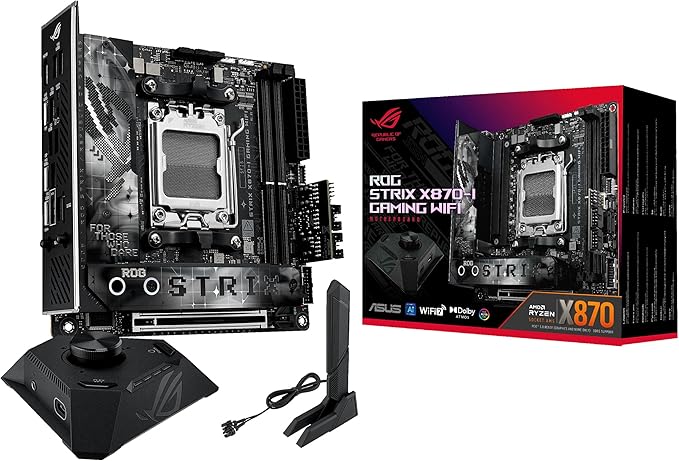
Asus ROG Strix X870-F Gaming Wifi AMD X870 Socket AM5 ATX Accessories
The ROG Strix X870F Gaming WiFi is designed to dominate with AMD Ryzen 9000 Series desktop processors. Its advanced power design and AI solutions ensure top performance, while two USB4 ports, WiFi 7, and highspeed DDR5 slots provide cuttingedge connectivity. This motherboard delivers the power and speed required for elite gaming and the demands of advanced AI PC applications. ASUS AI Overclocking creates profiles for the CPU and cooling to determine the optimal configuration and push the system to its limits. Predicted values can be automatically applied or used as a starting point for further experimentation. Tune the temperatures and noise levels of any build with a single click. An ASUS proprietary algorithm suppresses unnecessary noise while conducting a quick stress test, then monitors CPU temperatures to dynamically adjust the fans to optimal speeds.
The ROG Strix X870F Gaming WiFi is designed to dominate with AMD Ryzen 9000 Series desktop processors. Its advanced power design and AI solutions ensure top performance, while two USB4 ports, WiFi 7, and highspeed DDR5 slots provide cuttingedge connectivity. This motherboard delivers the power and speed required for elite gaming and the demands of advanced AI PC applications. ASUS AI Overclocking creates profiles for the CPU and cooling to determine the optimal configuration and push the system to its limits. Predicted values can be automatically applied or used as a starting point for further experimentation. Tune the temperatures and noise levels of any build with a single click. An ASUS proprietary algorithm suppresses unnecessary noise while conducting a quick stress test, then monitors CPU temperatures to dynamically adjust the fans to optimal speeds.
The ROG Strix X870F Gaming WiFi is designed to dominate with AMD Ryzen 9000 Series desktop processors. Its advanced power design and AI solutions ensure top performance, while two USB4 ports, WiFi 7, and highspeed DDR5 slots provide cuttingedge connectivity. This motherboard delivers the power and speed required for elite gaming and the demands of advanced AI PC applications. ASUS AI Overclocking creates profiles for the CPU and cooling to determine the optimal configuration and push the system to its limits. Predicted values can be automatically applied or used as a starting point for further experimentation. Tune the temperatures and noise levels of any build with a single click. An ASUS proprietary algorithm suppresses unnecessary noise while conducting a quick stress test, then monitors CPU temperatures to dynamically adjust the fans to optimal speeds.
The ROG Strix X870F Gaming WiFi is designed to dominate with AMD Ryzen 9000 Series desktop processors. Its advanced power design and AI solutions ensure top performance, while two USB4 ports, WiFi 7, and highspeed DDR5 slots provide cuttingedge connectivity. This motherboard delivers the power and speed required for elite gaming and the demands of advanced AI PC applications. ASUS AI Overclocking creates profiles for the CPU and cooling to determine the optimal configuration and push the system to its limits. Predicted values can be automatically applied or used as a starting point for further experimentation. Tune the temperatures and noise levels of any build with a single click. An ASUS proprietary algorithm suppresses unnecessary noise while conducting a quick stress test, then monitors CPU temperatures to dynamically adjust the fans to optimal speeds.
in 3 offers
The lowest price for Asus ROG Strix X870-F Gaming Wifi AMD X870 Socket AM5 ATX Accessories right now is $449.04 at Amazon.com.au, compared across 3 retailers.
The all-time low was $437.99 on 14 Nov 2025 — today's price is 3% above the lowest ever. This is at or near its all-time low — a good time to buy.
Prices last updated 17 Aug 2026.
Last updated at 17/08/2026 23:02:57
ASUS ROG Strix X870-F Gaming WiFi Motherboard Socket AM5 (AMD, X870, ATX, 16+2+2 Power Stages, Dynamic OC Switcher, Core Flex, DDR5, WiFi 7, M.2, PCIe
Affiliate Disclosure: We may receive a small commission for purchases made through this link at no extra cost to you. This helps support our site. Thank you!
ASUS Rog STRIX X870-F Gaming WIFI
Delivery between Thu – Mon $16
ASUS AMD ROG STRIX X870-F GAMING WIFI (AM5) ATX Motherboard, DDR5 192GB, 1x PCIe 5.0 x16 slot, 4 x M.2 slots, 2x SATA, Wi-Fi 7, 1 x HDMI, 1 x DP2
Delivery between 20–28 Aug $10
originally posted on asus.com
So the Dark Hero board is impressive fromThe outset - the box is large, heavy - and black…tying in with the “dark” theme.On opening the box, you have the motherboard itself which seems well laid out and with a decent specification. The back panel has everything you would need, from an HDMI port for on chip GFX, to ports for the built in sound. Also there are loads of USB-A and USB-C ports. There is a single 2.5Gbps Ethernet LAN port. Lastly there are connectors for the WiFI-6 dongle that will give you rapid connectivity if you want to avoid Ethernet cables. However, the vast majority of people using this board will have a discrete (probably high end) video card, probably a dedicated sound card and will use a wired network connection for low latency/low ping ... MoreSo the Dark Hero board is impressive fromThe outset - the box is large, heavy - and black…tying in with the “dark” theme.On opening the box, you have the motherboard itself which seems well laid out and with a decent specification. The back panel has everything you would need, from an HDMI port for on chip GFX, to ports for the built in sound. Also there are loads of USB-A and USB-C ports. There is a single 2.5Gbps Ethernet LAN port. Lastly there are connectors for the WiFI-6 dongle that will give you rapid connectivity if you want to avoid Ethernet cables. However, the vast majority of people using this board will have a discrete (probably high end) video card, probably a dedicated sound card and will use a wired network connection for low latency/low ping gaming. The boats can take a huge amount of DDR5 memory over 4 slots (max 192GB if I remember right).The board was super easy to fit (it helped the at my previous board was an ASUS X99). The on board connectors are well labelled and easy to get things running - even for someone who last did this 25 years ago (I still got it 🤣).So on to the “buts”. Number one was the utter nightmare I had with drivers. The motherboard comes with some branded “ROG” swag like stickers and a keychain thingy, but very usefully has a branded ROG USB drive with all the drivers you needed to set things up - except my one was totally blank. I contacted ASUs who said contact the board vendor who in turn said they could source one - so going in circles. I eventually managed to get things running by downloading individual drivers, but some items in device manager were not obvious to say the least.Secondly - and this is a potential red flag for some. If you fit a 5th gen M.2 drive into the dedicated 5th gen M.2 slot, it means that you can only run a x8 GFX card. If you insert the next generation of graphics cards that will have x16, then the 5th gen M.2 slot is disabled, because that M.2 and the main PCIE slot share lanes. There is a YouTube review flagging this up as well. For me, I don’t game much, so I am happy with a current gen gfx card - but would not be happy if I had to move my nice fast PCIE 5 M.2 to a PCIE 4 slot.Overall, a great board but it could have been better if there had been more lanes to share between the main M.2 and PCIE SLOT
originally posted on asus.com
Motherboard is absolutely sexy! Definitely packed with everything and more. Loaded with the I9-14900KF it's a monster performer. Could not ask for a better MB before the change to the new 15th gen socket and processor's circa end of 2024 start of 2025. This setup will definitely be a high-end gaming competitor for the next couple years. Can not wait to see what is next for ASUS. I have only purchased ASUS products except for my Corsair ram-(CORSAIR Dominator Titanium RGB DDR5 RAM 32GB (2x16GB) DDR5 7200MHz CL34 Intel XMP iCUE Compatible Computer Memory - Black) and (PSU- HX1000i Fully Modular Ultra-Low Noise Platinum ATX 1000 Watt PC Power Supply) which i stole for a $110 w/wiring. The MB coupled with the stated above is a complete powerhouse. Did I mention I only ... MoreMotherboard is absolutely sexy! Definitely packed with everything and more. Loaded with the I9-14900KF it's a monster performer. Could not ask for a better MB before the change to the new 15th gen socket and processor's circa end of 2024 start of 2025. This setup will definitely be a high-end gaming competitor for the next couple years. Can not wait to see what is next for ASUS. I have only purchased ASUS products except for my Corsair ram-(CORSAIR Dominator Titanium RGB DDR5 RAM 32GB (2x16GB) DDR5 7200MHz CL34 Intel XMP iCUE Compatible Computer Memory - Black) and (PSU- HX1000i Fully Modular Ultra-Low Noise Platinum ATX 1000 Watt PC Power Supply) which i stole for a $110 w/wiring. The MB coupled with the stated above is a complete powerhouse. Did I mention I only use this to game...lol. Any ways ASUS is the absolute best when it comes to products and i for one will never buy anything but ASUS MB's, CASES, COOLERS And More!
originally posted on asus.com
For the build, I selected the ASUS ROG STRIX Z790 GAMING WIFI motherboard with an Intel Core-i9 14900K processor with 64GB of DDR5 RAM, 2 - 12TB WD Red Plus drives and a GEFORCE RTX 4070 WINDFORCE OC 12GB video card. I purchased computer components on Thursday and Friday and Saturday, November 11, 2023, I began loading Windows 11. I expected to use the onboard WIFI of the ASUS ROG STRIX Z790 GAMING WIFI motherboard to provide the necessary internet connection needed for installation and updating the operating system and software I intend to use but the WIFI would not connect to my home system. I contacted ASUS Support for assistance. In the Rules it says I should not talk about problems here, I should contact ASUS Support. As I said, "I contacted ASUS Support" and I ... MoreFor the build, I selected the ASUS ROG STRIX Z790 GAMING WIFI motherboard with an Intel Core-i9 14900K processor with 64GB of DDR5 RAM, 2 - 12TB WD Red Plus drives and a GEFORCE RTX 4070 WINDFORCE OC 12GB video card. I purchased computer components on Thursday and Friday and Saturday, November 11, 2023, I began loading Windows 11. I expected to use the onboard WIFI of the ASUS ROG STRIX Z790 GAMING WIFI motherboard to provide the necessary internet connection needed for installation and updating the operating system and software I intend to use but the WIFI would not connect to my home system. I contacted ASUS Support for assistance. In the Rules it says I should not talk about problems here, I should contact ASUS Support. As I said, "I contacted ASUS Support" and I have the service numbers, but that didn't help solve my problem described below.ASUS Support determined that it would be necessary to update the BIOS from the loaded Version 0220 to a minimum of Version 0506. Trying for 2 more days, using 2 additional support agents, including an ASUS Software Engineer, and they were unable to update the BIOS and suspected that the motherboard could be bad out of the box. The following Monday, I emailed the Micro Center 045 sales associate, who helped me select the components for the build, and Micro Center 045 called me and suggested I bring the build in and have their Service Repair staff try to update the BIOS.The service technician at Micro Center 045 quickly determined that the latest BIOS update programs, listed on the ASUS website were out of date. My problem was that I purchased a board that had only been out for a month. It was fortunate that I purchased the build from Micro Center 045. The problem was that the BIOS loaded in the motherboard at the ASUS factory did not support the WIFI installed in the ASUS ROG STRIX Z790 GAMING WIFI motherboard. Like me, the service tech could not find the correct BIOS update on the ASUS website, but he knew where he could get it, and get it he did. It took him 20 minutes, start to finish, to load the BIOS and make my build work perfectly. The bonus for me was that the Micro Center tech saw that I had not installed the RAM correctly (slot 1 & 2) and moved the RAM from slot 2 to slot 3 for the 33% increase in transfer speed. I left Micro Center 045 satisfied with the help I received. Everyone at the store I talked to was very helpful. The best part of all is that the update was made at no cost. Wanting the latest features in the build, I would not have had a problem if the ASUS Driver Update if the website had the latest drivers for my motherboard. Fortunately, I purchased the motherboard from Micro Center 045 and they have well trained knowledgeable service technicians. If I had purchased the motherboard anywhere else, my only resource would have been ASUS and that didn’t work out. There was a value in purchasing my build from Micro Center 045 because it cost a little less than the online store I was planning to use and I now have a fully functioning build.For 20 years I ASUS motherboards have been trouble free. I knew that once the BIOS was updated, I could expect the same trouble-free performance in the future. So now I am again a happy ASUS customer.
ASUS ROG Strix X870-F Gaming WiFi Motherboard Socket AM5 (AMD, X870, ATX, 16+2+2 Power Stages, Dynamic OC Switcher, Core Flex, DDR5, WiFi 7, M.2, PCIe
Affiliate Disclosure: We may receive a small commission for purchases made through this link at no extra cost to you. This helps support our site. Thank you!
ASUS Rog STRIX X870-F Gaming WIFI
Delivery between Thu – Mon $16
ASUS AMD ROG STRIX X870-F GAMING WIFI (AM5) ATX Motherboard, DDR5 192GB, 1x PCIe 5.0 x16 slot, 4 x M.2 slots, 2x SATA, Wi-Fi 7, 1 x HDMI, 1 x DP2
Delivery between 20–28 Aug $10
So the Dark Hero board is impressive fromThe outset - the box is large, heavy - and black…tying in with the “dark” theme.On opening the box, you have the motherboard itself which seems well laid out and with a decent specification. The back panel has everything you would need, from an HDMI port for on chip GFX, to ports for the built in sound. Also there are loads of USB-A and USB-C ports. There is a single 2.5Gbps Ethernet LAN port. Lastly there are connectors for the WiFI-6 dongle that will give you rapid connectivity if you want to avoid Ethernet cables. However, the vast majority of people using this board will have a discrete (probably high end) video card, probably a dedicated sound card and will use a wired network connection for low latency/low ping ... MoreSo the Dark Hero board is impressive fromThe outset - the box is large, heavy - and black…tying in with the “dark” theme.On opening the box, you have the motherboard itself which seems well laid out and with a decent specification. The back panel has everything you would need, from an HDMI port for on chip GFX, to ports for the built in sound. Also there are loads of USB-A and USB-C ports. There is a single 2.5Gbps Ethernet LAN port. Lastly there are connectors for the WiFI-6 dongle that will give you rapid connectivity if you want to avoid Ethernet cables. However, the vast majority of people using this board will have a discrete (probably high end) video card, probably a dedicated sound card and will use a wired network connection for low latency/low ping gaming. The boats can take a huge amount of DDR5 memory over 4 slots (max 192GB if I remember right).The board was super easy to fit (it helped the at my previous board was an ASUS X99). The on board connectors are well labelled and easy to get things running - even for someone who last did this 25 years ago (I still got it 🤣).So on to the “buts”. Number one was the utter nightmare I had with drivers. The motherboard comes with some branded “ROG” swag like stickers and a keychain thingy, but very usefully has a branded ROG USB drive with all the drivers you needed to set things up - except my one was totally blank. I contacted ASUs who said contact the board vendor who in turn said they could source one - so going in circles. I eventually managed to get things running by downloading individual drivers, but some items in device manager were not obvious to say the least.Secondly - and this is a potential red flag for some. If you fit a 5th gen M.2 drive into the dedicated 5th gen M.2 slot, it means that you can only run a x8 GFX card. If you insert the next generation of graphics cards that will have x16, then the 5th gen M.2 slot is disabled, because that M.2 and the main PCIE slot share lanes. There is a YouTube review flagging this up as well. For me, I don’t game much, so I am happy with a current gen gfx card - but would not be happy if I had to move my nice fast PCIE 5 M.2 to a PCIE 4 slot.Overall, a great board but it could have been better if there had been more lanes to share between the main M.2 and PCIE SLOT
Motherboard is absolutely sexy! Definitely packed with everything and more. Loaded with the I9-14900KF it's a monster performer. Could not ask for a better MB before the change to the new 15th gen socket and processor's circa end of 2024 start of 2025. This setup will definitely be a high-end gaming competitor for the next couple years. Can not wait to see what is next for ASUS. I have only purchased ASUS products except for my Corsair ram-(CORSAIR Dominator Titanium RGB DDR5 RAM 32GB (2x16GB) DDR5 7200MHz CL34 Intel XMP iCUE Compatible Computer Memory - Black) and (PSU- HX1000i Fully Modular Ultra-Low Noise Platinum ATX 1000 Watt PC Power Supply) which i stole for a $110 w/wiring. The MB coupled with the stated above is a complete powerhouse. Did I mention I only ... MoreMotherboard is absolutely sexy! Definitely packed with everything and more. Loaded with the I9-14900KF it's a monster performer. Could not ask for a better MB before the change to the new 15th gen socket and processor's circa end of 2024 start of 2025. This setup will definitely be a high-end gaming competitor for the next couple years. Can not wait to see what is next for ASUS. I have only purchased ASUS products except for my Corsair ram-(CORSAIR Dominator Titanium RGB DDR5 RAM 32GB (2x16GB) DDR5 7200MHz CL34 Intel XMP iCUE Compatible Computer Memory - Black) and (PSU- HX1000i Fully Modular Ultra-Low Noise Platinum ATX 1000 Watt PC Power Supply) which i stole for a $110 w/wiring. The MB coupled with the stated above is a complete powerhouse. Did I mention I only use this to game...lol. Any ways ASUS is the absolute best when it comes to products and i for one will never buy anything but ASUS MB's, CASES, COOLERS And More!
For the build, I selected the ASUS ROG STRIX Z790 GAMING WIFI motherboard with an Intel Core-i9 14900K processor with 64GB of DDR5 RAM, 2 - 12TB WD Red Plus drives and a GEFORCE RTX 4070 WINDFORCE OC 12GB video card. I purchased computer components on Thursday and Friday and Saturday, November 11, 2023, I began loading Windows 11. I expected to use the onboard WIFI of the ASUS ROG STRIX Z790 GAMING WIFI motherboard to provide the necessary internet connection needed for installation and updating the operating system and software I intend to use but the WIFI would not connect to my home system. I contacted ASUS Support for assistance. In the Rules it says I should not talk about problems here, I should contact ASUS Support. As I said, "I contacted ASUS Support" and I ... MoreFor the build, I selected the ASUS ROG STRIX Z790 GAMING WIFI motherboard with an Intel Core-i9 14900K processor with 64GB of DDR5 RAM, 2 - 12TB WD Red Plus drives and a GEFORCE RTX 4070 WINDFORCE OC 12GB video card. I purchased computer components on Thursday and Friday and Saturday, November 11, 2023, I began loading Windows 11. I expected to use the onboard WIFI of the ASUS ROG STRIX Z790 GAMING WIFI motherboard to provide the necessary internet connection needed for installation and updating the operating system and software I intend to use but the WIFI would not connect to my home system. I contacted ASUS Support for assistance. In the Rules it says I should not talk about problems here, I should contact ASUS Support. As I said, "I contacted ASUS Support" and I have the service numbers, but that didn't help solve my problem described below.ASUS Support determined that it would be necessary to update the BIOS from the loaded Version 0220 to a minimum of Version 0506. Trying for 2 more days, using 2 additional support agents, including an ASUS Software Engineer, and they were unable to update the BIOS and suspected that the motherboard could be bad out of the box. The following Monday, I emailed the Micro Center 045 sales associate, who helped me select the components for the build, and Micro Center 045 called me and suggested I bring the build in and have their Service Repair staff try to update the BIOS.The service technician at Micro Center 045 quickly determined that the latest BIOS update programs, listed on the ASUS website were out of date. My problem was that I purchased a board that had only been out for a month. It was fortunate that I purchased the build from Micro Center 045. The problem was that the BIOS loaded in the motherboard at the ASUS factory did not support the WIFI installed in the ASUS ROG STRIX Z790 GAMING WIFI motherboard. Like me, the service tech could not find the correct BIOS update on the ASUS website, but he knew where he could get it, and get it he did. It took him 20 minutes, start to finish, to load the BIOS and make my build work perfectly. The bonus for me was that the Micro Center tech saw that I had not installed the RAM correctly (slot 1 & 2) and moved the RAM from slot 2 to slot 3 for the 33% increase in transfer speed. I left Micro Center 045 satisfied with the help I received. Everyone at the store I talked to was very helpful. The best part of all is that the update was made at no cost. Wanting the latest features in the build, I would not have had a problem if the ASUS Driver Update if the website had the latest drivers for my motherboard. Fortunately, I purchased the motherboard from Micro Center 045 and they have well trained knowledgeable service technicians. If I had purchased the motherboard anywhere else, my only resource would have been ASUS and that didn’t work out. There was a value in purchasing my build from Micro Center 045 because it cost a little less than the online store I was planning to use and I now have a fully functioning build.For 20 years I ASUS motherboards have been trouble free. I knew that once the BIOS was updated, I could expect the same trouble-free performance in the future. So now I am again a happy ASUS customer.
Great motherboard, but came without the proper drivers installed. Causing me to not be able to connect to the internet through wifi or LAN. I built my new pc but I am reusing my old m.2 ssd’s because I still had about 4 TB’s of storage on them, and I own a real estate business so I needed the files that they contained. Lack of internet connection posed a huge issue. I couldn’t access the desktop without resetting my PIN, which requires internet connection to do so. So I had to do a complete windows re-installation, and use the command prompt to force update the drivers from files on a usb drive. This was extremely difficult and took about 9 hours to figure out, as there is really no information online about it. After force updating the drivers, it still wouldn’t ... MoreGreat motherboard, but came without the proper drivers installed. Causing me to not be able to connect to the internet through wifi or LAN. I built my new pc but I am reusing my old m.2 ssd’s because I still had about 4 TB’s of storage on them, and I own a real estate business so I needed the files that they contained. Lack of internet connection posed a huge issue. I couldn’t access the desktop without resetting my PIN, which requires internet connection to do so. So I had to do a complete windows re-installation, and use the command prompt to force update the drivers from files on a usb drive. This was extremely difficult and took about 9 hours to figure out, as there is really no information online about it. After force updating the drivers, it still wouldn’t work for about the next 5 times we turned the PC off and on to try to fix it another way, but randomly it just worked on the 6 time we restarted the PC. Huge pain in the butt. I was freaking out because my newly built $5,000 was a paperweight for about 9 hours. It runs fine now, but when you pay almost $400 USD for a single motherboard you would think it would just come with proper drivers installed.
An excellent motherboard! You can feel the quality straight out of the box -Feels very well made. The one issue I have is that there are no drivers included. As per most manufacturers nowadays, Asus assume you will download the drivers over the internet. this is fine if you have internet access but in my case I had to boot with an old copy of Windows 10. It didn't have the Ethernet / internet drivers for a board of this type so I couldn't get online to download the drivers! A real catch 22! Eventually I did resolve it but it was very time consuming. Apart from that it's pretty awesome.I bought it to do C.A.D work, not for gaming so I wasn't keen on the Mboard graphics as I wanted something discreet. I needn't have worried as Asus supply the gamers graphics as a ... MoreAn excellent motherboard! You can feel the quality straight out of the box -Feels very well made. The one issue I have is that there are no drivers included. As per most manufacturers nowadays, Asus assume you will download the drivers over the internet. this is fine if you have internet access but in my case I had to boot with an old copy of Windows 10. It didn't have the Ethernet / internet drivers for a board of this type so I couldn't get online to download the drivers! A real catch 22! Eventually I did resolve it but it was very time consuming. Apart from that it's pretty awesome.I bought it to do C.A.D work, not for gaming so I wasn't keen on the Mboard graphics as I wanted something discreet. I needn't have worried as Asus supply the gamers graphics as a sticker pack so you can choose to leave them off if you want, which is what I did -It looks great in black!. The heat sink at the top left of the board actually lights up but it's not garish like you might expect & I quite like it. So far everything seems to run smoothly and is stable and much quicker than my previous MSI board that this will replace because it is 10 yrs old now. Aside from the aforementioned driver issue the only other point of concern is it seems quite slow to boot up, even though Fast-Boot is selected in the BIOS. My old MSI X79A-GD45 + was way quicker on that score. It's not a deal breaker and I may need to just adjust some settings somewhere.Otherwise very pleased with this purchase. It's fast, well made and great value!
I've been a ROG ASUS motherboard customer since the P5B. It had its quirks, but was a powerhouse at the time. Same has been true of my Maximus V Extreme, which lasted 12 years without a hitch. Now, I've evolved to this motherboard, and it's the best of them all, not just for all the features, but for the stability and reliability.I've never been a heavy overclocker, just experimenting with the basics, using ASUS' excellent implementation of the American Megatrends BIOS, a BIOS I've known since I started building computers in the Intel 486 Era. The ASUS BIOS system has always been extremely clear, thorough and open to all kinds of deep tweaks, and I've experimented (carefully!) with many of them. With all that said, the basic ASUS AI Overclocking, Cooling and Power ... MoreI've been a ROG ASUS motherboard customer since the P5B. It had its quirks, but was a powerhouse at the time. Same has been true of my Maximus V Extreme, which lasted 12 years without a hitch. Now, I've evolved to this motherboard, and it's the best of them all, not just for all the features, but for the stability and reliability.I've never been a heavy overclocker, just experimenting with the basics, using ASUS' excellent implementation of the American Megatrends BIOS, a BIOS I've known since I started building computers in the Intel 486 Era. The ASUS BIOS system has always been extremely clear, thorough and open to all kinds of deep tweaks, and I've experimented (carefully!) with many of them. With all that said, the basic ASUS AI Overclocking, Cooling and Power Savings controls have always been more than sufficient for me. I'm not looking to win at specs benchmarks, just at optimizing my system for a wide variety of uses, in both music production and of course games.I mention this system, and Armoury Crate, first, because while there are many online criticisms of quirkiness, I've found almost all the problems over time to be ones of proper usage, not software defect. There's a learning curve to this stuff, and you have to pay attention! Where there have been issues, ASUS has always been very prompt and diligent at fixing them with updates across the board. The Z90 Hero, being a relatively new motherboard, is being especially well supported at the moment, and it's clear ASUS are working to expand things like the memory Qualified Vendor List to include ever better selections of a wide range of memory.I'm using my Hero with a pair of 16GB Corsair Vengeance 6000MT, and they're supported by the motherboard. They're just recently as of this writing on the QVL., and are running quite stable at the rated speed, with XMP Tweaked implemented (an ASUS customization of XMP II I would assume; I am looking forward to implementation of XMP 3.0, which is not visible in the options yet).Despite pairing the Hero with an Intel 14900K, which is mildly overclocked by AI Overclocking to 6 GHz (for the Primary Cores; the Efficiency Cores run at a cooler/slower 4500MHz), the Hero is running all its components at remarkably cool temperatures! An average of no more than 45-50c, with of course higher temps under heavier loads (latest games like Alan Wake II will raise temps to 80-85C at peak, but with no thermal throttling -- and I'm just running this setup with a CoolerMaster 240 MP Liquid Flux 2-fan liquid cooling system, fans mounted at top of case. This AIO system has a MTBF of 70,000 hours so I'm not worried about leaks; I'll be replacing it long before it risks dying).The layout of the motherboard is quite logical and efficient, and dare I say it, beautiful! I'm new to the whole ARGB culture, but ASUS have clearly gone to town supporting it both in their hardware and their software, and it truly is a new art form, a special kind of engineering which is worth spending time on to build an aesthetically pleasing computer. I'm very happy to see the massive improvements in the I/O interface from my older Maximus mobo, all of it is far hardier, and the onboard Realtek Audio is good enough to run my sound system without the addition of the Creative Labs cards I've relied on in the past for good, general audio output (I use an external audio system for electronic music work, and it slots in without any complications; ASIO4All is great, of course, but make sure you get whatever outboard audio solution you choose to install properly, there's plenty of automation to simplify implementation of same on the motherboard).That last point brings me to the external I/O, and the extensive internal device support. This is a storage monster! It's compliant with the best of the current NVMe offerings out there, and is provisioned to support the newer PCIe 5.0 devices as well as they become available. I'm sure ASUS will be tracking these as they start to come on the market, and will be providing any updates to insure compatibility. So with all the internal support, including the Hyper M.2 card which comes with the system to support PCI 3.2 NVMe RAID functionality, you'll never be lacking for storage. And the back (I now make it the front!) of my system is completely festooned with USB-C, USB 3.2 and USB 2.0 ports, so backwards compatibility with external devices as well as forward compatibility with USB-C latest spec devices is assured.This motherboard is at the cutting edge of what I would call the new modular computing. Over time, the various components we've all come to assume have been hardlocked into a PC's design are becoming increasingly hot-swappable. A PC is really increasingly the center of an ecosystem of devices, not just a thing sui generis. If you have an inkling of what the possibilities are with a motherboard like this at the center of such an environment, you'll realize the Hero is an absolute steal at its current price, and will have longevity like few others out there. It is worth every penny of its price. Just learn how to use and master it; like any ROG hardware, you are part of the process, and cannot just casually assume you can plug stuff in without thought and make it work.I'm incredibly impressed and happy with this board, and am confident it will last me a long time, and provide extensive service. Ignore it at your peril.
I love Asus MB, I have one that I've used now for more than 12 years and it is still running strong, but, it doesn't support Windows 11 and some of the newer games and software I would like to use. So I bought a new one, the ROG STRIX X670E-E GAMING WIFI and love all the new features, bells and whistles it comes with. Connecting to the internet via wifi instead having to run another cable to my new machine, all the USB configurations and ports available and since my old machine lost sound from a faulty jack nine years ago, I FINALLY HAVE SOUND again! I Love everything about this MB and all it's capabilities, connections and uses I can now do that I couldn't before. The BIOS is a little intimidating and labels in Bios that I have no idea what they mean or do, but ... MoreI love Asus MB, I have one that I've used now for more than 12 years and it is still running strong, but, it doesn't support Windows 11 and some of the newer games and software I would like to use. So I bought a new one, the ROG STRIX X670E-E GAMING WIFI and love all the new features, bells and whistles it comes with. Connecting to the internet via wifi instead having to run another cable to my new machine, all the USB configurations and ports available and since my old machine lost sound from a faulty jack nine years ago, I FINALLY HAVE SOUND again! I Love everything about this MB and all it's capabilities, connections and uses I can now do that I couldn't before. The BIOS is a little intimidating and labels in Bios that I have no idea what they mean or do, but that will come in time. I am also having an issue with long file access times, installing programs, booting times and what not accessing the SSD drive. I am still trying to figure out why, along with rebooting while playing Tom Clancy's Modern Warfare, Wildlands. But other than those two issues I am expecting a long and happy relationship with this machine as I have my old ASUS build. Love you (ASUS) guys and gals!!
I purchased my B650 motherboard from Scan Computers on the back that in 2020 I purchased a B450 motherboard from them and its been the best pc setup to date in speed and reliability by far. Unfortunately, I took advice from a colleague who advised me to upgrade my and accidentally snapped off a memory clamp (most annoying) so decided on an upgrade.I chose the B650 on the back of that and I must say how pleased I am with it so far. Scan did all the work in providing me with a good setup with compatible components and an easy swap. The upgrade to my pc was an easy swap, although I did have an issue with the additional 4 pin 12V power lead and had to make one myself (another story).Although the performance is much greater due to the addition of a AMD Ryzen 7 7800X3D ... MoreI purchased my B650 motherboard from Scan Computers on the back that in 2020 I purchased a B450 motherboard from them and its been the best pc setup to date in speed and reliability by far. Unfortunately, I took advice from a colleague who advised me to upgrade my and accidentally snapped off a memory clamp (most annoying) so decided on an upgrade.I chose the B650 on the back of that and I must say how pleased I am with it so far. Scan did all the work in providing me with a good setup with compatible components and an easy swap. The upgrade to my pc was an easy swap, although I did have an issue with the additional 4 pin 12V power lead and had to make one myself (another story).Although the performance is much greater due to the addition of a AMD Ryzen 7 7800X3D chip Ido have a couple of issues. The minor one being that Bluetooth no longer connects to my phone app 100%; It connects to the phone. and does texts and retrieves photos, but will not connect the phone (weird). My old Bluetooth dongle sadly wont work! The other is more annoying! From power up to the post purge beep there is a long delay of 80 seconds, then a beep and within 8 seconds Windows 11 is up and running. Its frustrating when booting up, but not a huge issue as normally only switch off at weekends.Overall, I'm very pleased with my new motherboard and the increase in power.
Absolutely terrible experience handling this Mobo. It's surprising how this company can have such premium products but have the worst software to go along with. How am I paying $500 for a motherboard and the ethernet port doesn't even work? ASUS tech support didn't know either. They said they want me to fill out a form and someone will get back to me in 24-48 hours. I don't understand that but at least the wifi worked on a premium product that cost that much money. The software and programs that I was supposed to download that go along with the motherboard wasn't working properly as they should. The tech support girl asked me if I downloaded the Lan Driver from the Asus website? I told her yes I did and it said that the driver was not allowed on the operation ... MoreAbsolutely terrible experience handling this Mobo. It's surprising how this company can have such premium products but have the worst software to go along with. How am I paying $500 for a motherboard and the ethernet port doesn't even work? ASUS tech support didn't know either. They said they want me to fill out a form and someone will get back to me in 24-48 hours. I don't understand that but at least the wifi worked on a premium product that cost that much money. The software and programs that I was supposed to download that go along with the motherboard wasn't working properly as they should. The tech support girl asked me if I downloaded the Lan Driver from the Asus website? I told her yes I did and it said that the driver was not allowed on the operation system. Also, everytime I would try to use the ASUS Setup to download anything, it wouldn't work. I'm highly disappointed with this motherboard and to make matters worst, it's brand new. It only takes one time for me to have a bad experience at something for me to never want to do it again. So ASUS, thank you for showing me how much trash you all produce in that warehouse of yours cause I will never buy another motherboard from your company ever again! I will be tell all my TikTok followers about this!
I don't know if there's a perfect motherboard mostly because there are so many variables and people needs vary, I choose the ROG STRIX B650E-F because it had most of what I needed. A strong VRM, with plenty of everything I needed. I was looking for a good balance of USB ports including some C types for some of my non gaming activities I also wanted a strong audio section. This board installed flawlessly and the BIOS update was painless. And its a good looking solid board, with a smidge of RGB.Everything worked, first time! I plugged in a AMD 7800x3d, along with a AMD RX 7900XT.But this board is a 4.5 for me, I can live with having to purchase the Optical out adapter because this gives me the option to add that if I need it. But the USB and Fan headers, ... MoreI don't know if there's a perfect motherboard mostly because there are so many variables and people needs vary, I choose the ROG STRIX B650E-F because it had most of what I needed. A strong VRM, with plenty of everything I needed. I was looking for a good balance of USB ports including some C types for some of my non gaming activities I also wanted a strong audio section. This board installed flawlessly and the BIOS update was painless. And its a good looking solid board, with a smidge of RGB.Everything worked, first time! I plugged in a AMD 7800x3d, along with a AMD RX 7900XT.But this board is a 4.5 for me, I can live with having to purchase the Optical out adapter because this gives me the option to add that if I need it. But the USB and Fan headers, particularly the ones on the bottom of the card, should come off the board horizontally. Particularly when using a ATX case. It would make the cables much easier to manage. As it is the USB and Fan cables need to be bent 90 degrees. I don't know why ASUS isn't doing this but they should.