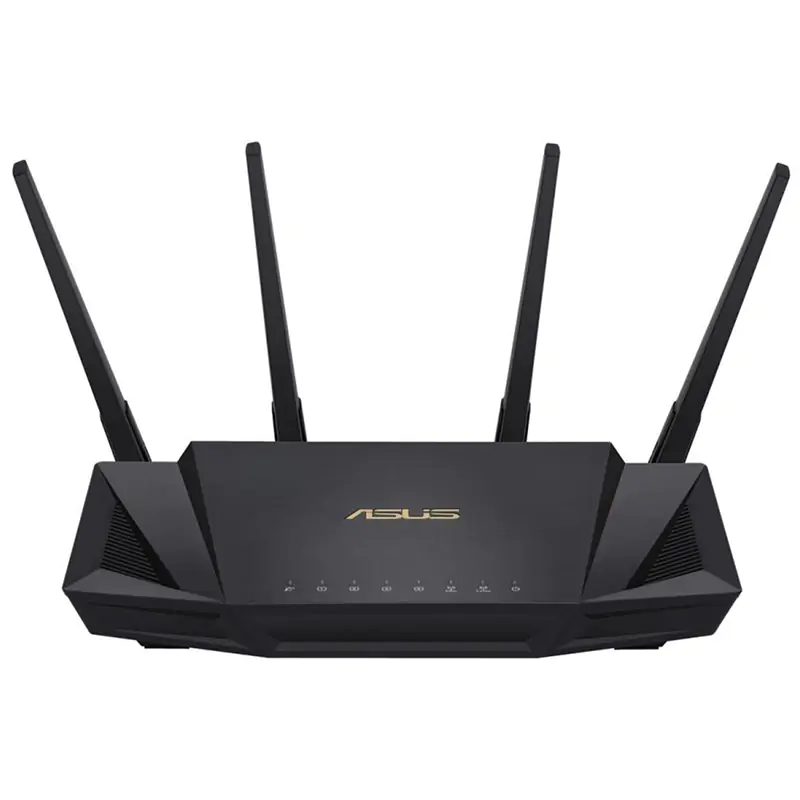
Asus RT-AC88U Dual-Band wireless-AC3100 Gigabit Router
Whether you're gaming online in a heated competition or streaming a live event in 4K/UHD, lag and buffering are simply not an option. NitroQAM (1024-QAM) technology on the RT-AC88U delivers a combined 3167 Mbps Wi-Fi speed, ensuring everyone on your network can enjoy smooth streaming and low-latency online gaming. Ping time and variance are critical technical parameters that affect responsiveness in online gaming, and their values depend heavily on the route game packets take to and from their destination. The Gamers Private Network (GPN) from WTFast automatically performs route optimization, choosing the most efficient route for game packets, resulting in consistently-lower ping time and minimal packet loss. With RT-AC88U this optimization is free, so users can enjoy the results on virtually every competitive multi-player online game - at no extra cost!
Whether you're gaming online in a heated competition or streaming a live event in 4K/UHD, lag and buffering are simply not an option. NitroQAM (1024-QAM) technology on the RT-AC88U delivers a combined 3167 Mbps Wi-Fi speed, ensuring everyone on your network can enjoy smooth streaming and low-latency online gaming. Ping time and variance are critical technical parameters that affect responsiveness in online gaming, and their values depend heavily on the route game packets take to and from their destination. The Gamers Private Network (GPN) from WTFast automatically performs route optimization, choosing the most efficient route for game packets, resulting in consistently-lower ping time and minimal packet loss. With RT-AC88U this optimization is free, so users can enjoy the results on virtually every competitive multi-player online game - at no extra cost!
Whether you're gaming online in a heated competition or streaming a live event in 4K/UHD, lag and buffering are simply not an option. NitroQAM (1024-QAM) technology on the RT-AC88U delivers a combined 3167 Mbps Wi-Fi speed, ensuring everyone on your network can enjoy smooth streaming and low-latency online gaming. Ping time and variance are critical technical parameters that affect responsiveness in online gaming, and their values depend heavily on the route game packets take to and from their destination. The Gamers Private Network (GPN) from WTFast automatically performs route optimization, choosing the most efficient route for game packets, resulting in consistently-lower ping time and minimal packet loss. With RT-AC88U this optimization is free, so users can enjoy the results on virtually every competitive multi-player online game - at no extra cost!
Whether you're gaming online in a heated competition or streaming a live event in 4K/UHD, lag and buffering are simply not an option. NitroQAM (1024-QAM) technology on the RT-AC88U delivers a combined 3167 Mbps Wi-Fi speed, ensuring everyone on your network can enjoy smooth streaming and low-latency online gaming. Ping time and variance are critical technical parameters that affect responsiveness in online gaming, and their values depend heavily on the route game packets take to and from their destination. The Gamers Private Network (GPN) from WTFast automatically performs route optimization, choosing the most efficient route for game packets, resulting in consistently-lower ping time and minimal packet loss. With RT-AC88U this optimization is free, so users can enjoy the results on virtually every competitive multi-player online game - at no extra cost!
in 7 offers
The lowest price for Asus RT-AC88U Dual-Band wireless-AC3100 Gigabit Router right now is $93.34 at eBay.com.au, compared across 5 retailers.
The all-time low was $91.02 on 9 May 2026 — today's price is 3% above the lowest ever. This is at or near its all-time low — a good time to buy.
Prices last updated 5 June 2026.
Last updated at 05/06/2026 15:45:25
Asus Ac3100 Rt-ac88u Dual-band Extreme Wi-fi Gaming Gigabit Router .
Delivery $65.97
Affiliate Disclosure: We may receive a small commission for purchases made through this link at no extra cost to you. This helps support our site. Thank you!
Asus Rt-ac88u Ac3100 Dual Band Wireless Router 8 Lan Ports Aimesh
Free delivery
Affiliate Disclosure: We may receive a small commission for purchases made through this link at no extra cost to you. This helps support our site. Thank you!
Asus Rt-ac88u Gaming Gigabit Wireless-router+ Latest Asuswrt-merlin
Delivery $206.53
Affiliate Disclosure: We may receive a small commission for purchases made through this link at no extra cost to you. This helps support our site. Thank you!
Asus RT-AC88U Gigabit 5G Dual band VPN Client 802.11ac 3167Mbps MU-MIMO 2.4 GHz/5 GHz 8x1000Mbps
Delivery $19.26
Asus Dual Band AC3100 Gigabit Router (RT-AC88U)
30-day returns
Asus Dual Band AC3100 Gigabit Router (RT-AC88U)
30-day returns
Asus RT-AC88UX2 Dual-Band Wireless AC3100 Router Twin Pack
7-day returns
originally posted on neweggbusiness.com
ProTip 4: (Update 8/31): If the router dropped and the antenna's plastic hinge-pins broke out -- yeah, sh-- happens, I see it all the time in the field -- find a friend who's into 3D Printing and ask for a small piece of 1.75mm filament -- black ABS being ideal. The diameter is darn near perfect as a replacement, and the filament will feed all the way through if you set the hinge at 90 degrees so the antenna wire stays out of the way while feeding the hinge pin. You can then lock the repair into place permanently by melting the ends out with a hot blade or knife. These hinge-pins appear to be designed to sacrifice themselves to prevent even worse damage to the antennas (thankfully) so don't just stick a paperclip or other piece of metal as a hinge-pin repair. ProTip ... MoreProTip 4: (Update 8/31): If the router dropped and the antenna's plastic hinge-pins broke out -- yeah, sh-- happens, I see it all the time in the field -- find a friend who's into 3D Printing and ask for a small piece of 1.75mm filament -- black ABS being ideal. The diameter is darn near perfect as a replacement, and the filament will feed all the way through if you set the hinge at 90 degrees so the antenna wire stays out of the way while feeding the hinge pin. You can then lock the repair into place permanently by melting the ends out with a hot blade or knife. These hinge-pins appear to be designed to sacrifice themselves to prevent even worse damage to the antennas (thankfully) so don't just stick a paperclip or other piece of metal as a hinge-pin repair. ProTip 3: (Update 8/30): For anyone experiencing "5G Dropout" issues - Go to your 5G WiFi Settings, and TURN OFF the "auto channel" setting -- it's best to manually set your router's channel. Use "Wifi Analyzer" or similar tool on an Android Phone to visually inspect nearby traffic, and select a channel that's not so saturated. It really is that simple. I've experienced "5G Dropout" on a couple of sites, and found that the default "auto channel" setting just doesn't optimize or change the 5G channel at all. (Probably an ASUS firmware bug, but when on a field-service call, I gotta get in, fix the breakage, and get out quickly -- setting the channel manually is the easiest quick-fix) ProTip 2: (Update 3/27): The unit I received to replace the one I sent back was running BETA firmware from April 2016 -- a version that's known be faulty! Note that the Beta version numbers are higher than the production version numbers, so the router was unable to self-detect any firmware updates once this Beta firmware was installed. Manually downloading the firmware file from ASUS to a PC, and then uploading that to the Router solved the issue with the device, and it's now rock solid as it should be. Very happy with both now. ProTip: If you suspect glitchy hardware (Wifi or WAN won't stay connected), look at the router's General Logs. If you see lots of repeated kernel messages that are nearly identical, chances are you do indeed have hardware problems that are not user-serviceable. You could also try a Factory Default Reset, a 30-30-30 restart, and re-upload the firmware; if the device still doesn't right itself, send it back for a replacement. If device is truly faulty, it should demonstrate that within first day or week of service - it's up to you to test thoroughly -- say, BitTorrent the MAME ROMs from archive.org, or synchronize a large Dropbox folder over WiFi over the course of a weekend?
originally posted on bhphotovideo.com
I am using this as a basement-located primary router in an Asus AiMesh network. I use one lan port for wired backhaul from the second floor node, two wired ports to unmanaged switches that handle tvs, workstations, and the print server, and the fourth for my voip device to my legacy two-line land-line equipment.My network is a screamer so we don't think about it. Between this main router and the AC68u node, It often runs two workstations, three high powered laptops and 4 phones without stress and three of us regularly edit video and send it to our collaborators while the fourth creates still images for the web. and all our entertainments come in through this router. One floor above it and 35 lateral feet away I am still getting wireless speeds of well over 300 ... MoreI am using this as a basement-located primary router in an Asus AiMesh network. I use one lan port for wired backhaul from the second floor node, two wired ports to unmanaged switches that handle tvs, workstations, and the print server, and the fourth for my voip device to my legacy two-line land-line equipment.My network is a screamer so we don't think about it. Between this main router and the AC68u node, It often runs two workstations, three high powered laptops and 4 phones without stress and three of us regularly edit video and send it to our collaborators while the fourth creates still images for the web. and all our entertainments come in through this router. One floor above it and 35 lateral feet away I am still getting wireless speeds of well over 300 mbps.If you look into the architecture you'll find the AC88u is the same router with an added 4 port switch in the cabinet, so if you need more than 4 wired lan devices with this router, just directly connect an unmanaged switch or two as I did. It's short money and less than 1/10 millisecond delay, the same negligible delay as using the other four ports on the 8 port AC88u.Standard current firmware is great and supports regular vpn protocols and if you want to nerd out and install the Merlin firmware (factory endorsed, warranty compliant) you get unmatched customizability and the opportunity to use more vpn protocols There is a huge community of users for this router and a quick search will get you high-quality guidance on almost any problem. You will soon find the right websites with knowledgeable and generous users, including the head of the Merlin project. I am using this on windows,android, and iphone devices. Hot tips: disable implicit beamforming; if you have over 200 mbps internet speed, disable qos. If you have a spare laptop fan, put the router on top of it.I am not in love with Asus customer support, and had sub-optimal experiences with them for my no longer used laptop, but this router has been everything I need for collaborating on creating videos with people who live thousands of miles away while my wife is streaming HD video and my daughter is hosting a Zoom meeting for her next production. You give up some privacy to use the advance security feature, but I like multiple rings of defense these days. It's not 1993 any more. I am not using attached storage, it would be convenient but I like thunderbolt 3 and usb 3 speeds, and like to make users responsible for their own backups.
originally posted on asus.com
Great wifi coverage. I do like the GUI interface. I find it easy to navigate through. Easy and great parental controls. Great network traffic features built into the device so you can see the live traffic of your network. My only major issue. is the that the the firmware is buggy when it comes to configuring certain criterias in the GUI. My main problem is when I'm trying to manually assign IP from the DHCP server. For some reason after i click apply it logs me out of the device and doesn't save my recent changes to static IP changes. I found a few work arounds that sometimes work. It appears to have issues when you attempt to change the hostname of the device. Usually be not changing the hostname when assigning a static it doesn't cause the glitch. I then will ... MoreGreat wifi coverage. I do like the GUI interface. I find it easy to navigate through. Easy and great parental controls. Great network traffic features built into the device so you can see the live traffic of your network. My only major issue. is the that the the firmware is buggy when it comes to configuring certain criterias in the GUI. My main problem is when I'm trying to manually assign IP from the DHCP server. For some reason after i click apply it logs me out of the device and doesn't save my recent changes to static IP changes. I found a few work arounds that sometimes work. It appears to have issues when you attempt to change the hostname of the device. Usually be not changing the hostname when assigning a static it doesn't cause the glitch. I then will change the hostname in the current connect device list on the main page. With that said I have one Nintendo Switch that the router just wont let me assign a static too. I bought another RT-AC3100 for my girlfriend and I didn't have those issues when assigning a static to the 3 switches they have. Since I use Starlink, and they share my private IP with other customers, I'm unable to utilize the built in VPN server. That's slightly annoying, but more of an issue with my ISP and not the router. Their phone app is also great for monitoring network status, bandwidth usage, and controlling internet usage to devices (such as parental control devices) while away from home.
| General | |
| Device Type | Wireless router - 8-port switch (integrated) |
| Enclosure Type | Desktop |
| Connectivity Technology | Wireless, wired |
| Data Link Protocol | Ethernet, Fast Ethernet, Gigabit Ethernet, IEEE 802.11b, IEEE 802.11a, IEEE 802.11g, IEEE 802.11n, IEEE 802.11ac |
Asus Ac3100 Rt-ac88u Dual-band Extreme Wi-fi Gaming Gigabit Router .
Delivery $65.97
Affiliate Disclosure: We may receive a small commission for purchases made through this link at no extra cost to you. This helps support our site. Thank you!
Asus Rt-ac88u Ac3100 Dual Band Wireless Router 8 Lan Ports Aimesh
Free delivery
Affiliate Disclosure: We may receive a small commission for purchases made through this link at no extra cost to you. This helps support our site. Thank you!
Asus Rt-ac88u Gaming Gigabit Wireless-router+ Latest Asuswrt-merlin
Delivery $206.53
Affiliate Disclosure: We may receive a small commission for purchases made through this link at no extra cost to you. This helps support our site. Thank you!
Asus RT-AC88U Gigabit 5G Dual band VPN Client 802.11ac 3167Mbps MU-MIMO 2.4 GHz/5 GHz 8x1000Mbps
Delivery $19.26
Asus Dual Band AC3100 Gigabit Router (RT-AC88U)
30-day returns
ProTip 4: (Update 8/31): If the router dropped and the antenna's plastic hinge-pins broke out -- yeah, sh-- happens, I see it all the time in the field -- find a friend who's into 3D Printing and ask for a small piece of 1.75mm filament -- black ABS being ideal. The diameter is darn near perfect as a replacement, and the filament will feed all the way through if you set the hinge at 90 degrees so the antenna wire stays out of the way while feeding the hinge pin. You can then lock the repair into place permanently by melting the ends out with a hot blade or knife. These hinge-pins appear to be designed to sacrifice themselves to prevent even worse damage to the antennas (thankfully) so don't just stick a paperclip or other piece of metal as a hinge-pin repair. ProTip ... MoreProTip 4: (Update 8/31): If the router dropped and the antenna's plastic hinge-pins broke out -- yeah, sh-- happens, I see it all the time in the field -- find a friend who's into 3D Printing and ask for a small piece of 1.75mm filament -- black ABS being ideal. The diameter is darn near perfect as a replacement, and the filament will feed all the way through if you set the hinge at 90 degrees so the antenna wire stays out of the way while feeding the hinge pin. You can then lock the repair into place permanently by melting the ends out with a hot blade or knife. These hinge-pins appear to be designed to sacrifice themselves to prevent even worse damage to the antennas (thankfully) so don't just stick a paperclip or other piece of metal as a hinge-pin repair. ProTip 3: (Update 8/30): For anyone experiencing "5G Dropout" issues - Go to your 5G WiFi Settings, and TURN OFF the "auto channel" setting -- it's best to manually set your router's channel. Use "Wifi Analyzer" or similar tool on an Android Phone to visually inspect nearby traffic, and select a channel that's not so saturated. It really is that simple. I've experienced "5G Dropout" on a couple of sites, and found that the default "auto channel" setting just doesn't optimize or change the 5G channel at all. (Probably an ASUS firmware bug, but when on a field-service call, I gotta get in, fix the breakage, and get out quickly -- setting the channel manually is the easiest quick-fix) ProTip 2: (Update 3/27): The unit I received to replace the one I sent back was running BETA firmware from April 2016 -- a version that's known be faulty! Note that the Beta version numbers are higher than the production version numbers, so the router was unable to self-detect any firmware updates once this Beta firmware was installed. Manually downloading the firmware file from ASUS to a PC, and then uploading that to the Router solved the issue with the device, and it's now rock solid as it should be. Very happy with both now. ProTip: If you suspect glitchy hardware (Wifi or WAN won't stay connected), look at the router's General Logs. If you see lots of repeated kernel messages that are nearly identical, chances are you do indeed have hardware problems that are not user-serviceable. You could also try a Factory Default Reset, a 30-30-30 restart, and re-upload the firmware; if the device still doesn't right itself, send it back for a replacement. If device is truly faulty, it should demonstrate that within first day or week of service - it's up to you to test thoroughly -- say, BitTorrent the MAME ROMs from archive.org, or synchronize a large Dropbox folder over WiFi over the course of a weekend?
I am using this as a basement-located primary router in an Asus AiMesh network. I use one lan port for wired backhaul from the second floor node, two wired ports to unmanaged switches that handle tvs, workstations, and the print server, and the fourth for my voip device to my legacy two-line land-line equipment.My network is a screamer so we don't think about it. Between this main router and the AC68u node, It often runs two workstations, three high powered laptops and 4 phones without stress and three of us regularly edit video and send it to our collaborators while the fourth creates still images for the web. and all our entertainments come in through this router. One floor above it and 35 lateral feet away I am still getting wireless speeds of well over 300 ... MoreI am using this as a basement-located primary router in an Asus AiMesh network. I use one lan port for wired backhaul from the second floor node, two wired ports to unmanaged switches that handle tvs, workstations, and the print server, and the fourth for my voip device to my legacy two-line land-line equipment.My network is a screamer so we don't think about it. Between this main router and the AC68u node, It often runs two workstations, three high powered laptops and 4 phones without stress and three of us regularly edit video and send it to our collaborators while the fourth creates still images for the web. and all our entertainments come in through this router. One floor above it and 35 lateral feet away I am still getting wireless speeds of well over 300 mbps.If you look into the architecture you'll find the AC88u is the same router with an added 4 port switch in the cabinet, so if you need more than 4 wired lan devices with this router, just directly connect an unmanaged switch or two as I did. It's short money and less than 1/10 millisecond delay, the same negligible delay as using the other four ports on the 8 port AC88u.Standard current firmware is great and supports regular vpn protocols and if you want to nerd out and install the Merlin firmware (factory endorsed, warranty compliant) you get unmatched customizability and the opportunity to use more vpn protocols There is a huge community of users for this router and a quick search will get you high-quality guidance on almost any problem. You will soon find the right websites with knowledgeable and generous users, including the head of the Merlin project. I am using this on windows,android, and iphone devices. Hot tips: disable implicit beamforming; if you have over 200 mbps internet speed, disable qos. If you have a spare laptop fan, put the router on top of it.I am not in love with Asus customer support, and had sub-optimal experiences with them for my no longer used laptop, but this router has been everything I need for collaborating on creating videos with people who live thousands of miles away while my wife is streaming HD video and my daughter is hosting a Zoom meeting for her next production. You give up some privacy to use the advance security feature, but I like multiple rings of defense these days. It's not 1993 any more. I am not using attached storage, it would be convenient but I like thunderbolt 3 and usb 3 speeds, and like to make users responsible for their own backups.
Great wifi coverage. I do like the GUI interface. I find it easy to navigate through. Easy and great parental controls. Great network traffic features built into the device so you can see the live traffic of your network. My only major issue. is the that the the firmware is buggy when it comes to configuring certain criterias in the GUI. My main problem is when I'm trying to manually assign IP from the DHCP server. For some reason after i click apply it logs me out of the device and doesn't save my recent changes to static IP changes. I found a few work arounds that sometimes work. It appears to have issues when you attempt to change the hostname of the device. Usually be not changing the hostname when assigning a static it doesn't cause the glitch. I then will ... MoreGreat wifi coverage. I do like the GUI interface. I find it easy to navigate through. Easy and great parental controls. Great network traffic features built into the device so you can see the live traffic of your network. My only major issue. is the that the the firmware is buggy when it comes to configuring certain criterias in the GUI. My main problem is when I'm trying to manually assign IP from the DHCP server. For some reason after i click apply it logs me out of the device and doesn't save my recent changes to static IP changes. I found a few work arounds that sometimes work. It appears to have issues when you attempt to change the hostname of the device. Usually be not changing the hostname when assigning a static it doesn't cause the glitch. I then will change the hostname in the current connect device list on the main page. With that said I have one Nintendo Switch that the router just wont let me assign a static too. I bought another RT-AC3100 for my girlfriend and I didn't have those issues when assigning a static to the 3 switches they have. Since I use Starlink, and they share my private IP with other customers, I'm unable to utilize the built in VPN server. That's slightly annoying, but more of an issue with my ISP and not the router. Their phone app is also great for monitoring network status, bandwidth usage, and controlling internet usage to devices (such as parental control devices) while away from home.
Successful Twice 06/03/2017 I'll reconfigure one RT AC3100 for a repeater, keeping the other as a media bridge, and add a RT AC5300 if the neighbors start drowning my home network again. The added beauty of having two RT AC3100 routers is they will work perfectly with the RT AC5300, and each will output a rate almost as well as a single RT AC3100 does alone when used in conjunction with the RT AC5300 - since the RT AC5300 has a much higher output rate with its three bands. UPDATE 7/26/2017: I purchased a refurbished open box RT AC5300 to go along with my two refurbished RT AC3100s. The refurbished AC5300 arrived with a non-working 2.4 GHz radio. But, it did allow me to see how well its two 5 GHz radios worked with my AC3100s. I returned the refurbished AC5300 and ... MoreSuccessful Twice 06/03/2017 I'll reconfigure one RT AC3100 for a repeater, keeping the other as a media bridge, and add a RT AC5300 if the neighbors start drowning my home network again. The added beauty of having two RT AC3100 routers is they will work perfectly with the RT AC5300, and each will output a rate almost as well as a single RT AC3100 does alone when used in conjunction with the RT AC5300 - since the RT AC5300 has a much higher output rate with its three bands. UPDATE 7/26/2017: I purchased a refurbished open box RT AC5300 to go along with my two refurbished RT AC3100s. The refurbished AC5300 arrived with a non-working 2.4 GHz radio. But, it did allow me to see how well its two 5 GHz radios worked with my AC3100s. I returned the refurbished AC5300 and purchased a brand new AC5300. The factory fresh RT AC5300 works perfectly - supplying strong signals to each of my AC3100s (configured as media bridge/wireless repeaters). Reported signal rates stay at 1950 mbps. on each AC3100 media bridge - using a separate 5 GHz band to each AC3100. The 2.4 GHz band on this RT AC5300 also works perfectly. I couldn't be more pleased - with all three units working seamlessly together. I now have blanket wireless coverage in my home that is no longer affected by the numerous over-boosted wireless router signals being broadcast in my neighborhood - two of the over boosted signals were coming from 1/8 mile away, with none of the others within 400 feet of my house. Problem solved once and for all. UPDATE 8/4/2020: Both of my ASUS RT AC3100 routers are still configured to wireless media bridge and are still working perfectly with my ASUS RT AC5300. I have multiple smart TVs now that wirelessly connect to both RT AC3100 "media bridges". Viewing Internet TV on my 4K Samsung smart TVs is never a problem until my cable company is working on a problem at their end. I have never had to reboot or so much as make a single settings change to either RT AC3100 or the RT AC5300 they connect to. It just doesn't get any better than this.
The short version: The main reason for this purchase was to get longer wireless range. It did extend the range, but not really enough to be sufficient for my needs/intentions. There are cheaper and more effective solutions to weak 5GHz WiFi range than just buying a "long-range" router. The long version: For years, I've been relying on the built-in WiFi 2.4/5GHz wireless solution that's built into my cable modem. It worked for many years for emails, browsing websites, and streaming Netflix. However as I added more and more wireless devices (smart thermostat, Ring/security cameras, streaming boxes like Apple TV, etc), it seems to have gotten overwhelmed. Many of the IoT devices intermittently couldn't connect and the PCs weren't able to utilize all the Internet ... MoreThe short version: The main reason for this purchase was to get longer wireless range. It did extend the range, but not really enough to be sufficient for my needs/intentions. There are cheaper and more effective solutions to weak 5GHz WiFi range than just buying a "long-range" router. The long version: For years, I've been relying on the built-in WiFi 2.4/5GHz wireless solution that's built into my cable modem. It worked for many years for emails, browsing websites, and streaming Netflix. However as I added more and more wireless devices (smart thermostat, Ring/security cameras, streaming boxes like Apple TV, etc), it seems to have gotten overwhelmed. Many of the IoT devices intermittently couldn't connect and the PCs weren't able to utilize all the Internet bandwidth that was available. Speed tests showed 100+MB/sec throughput, and doing things like downloading large files or watching movies that could be buffered worked fine. But communications that required real-time low-latency communications was inconsistent. In March 2019 when my wife and I both started working from home, this solution proved incapable of the demands. Internet audio (Teams & Zoom) was completely unusable for either of us. VPN connections frequently dropped and had to reconnect. And when I relocatedmy make-shift kitchen-table office to my basement, I couldn't get a 5GHz WiFi connection. 2.4GHz was possible, but throughput wasn't nearly good enough for my needs. So I installed a 5GHz WiFi repeater. For those not familiar, a WiFi repeater is just a poor-man's mesh network extension that bridges the communications between my existing SSID and a new one that the repeater hosts. That got me 5GHz connection to my office and was OK for general Internet access, but only made the existing latency issues worse. As an experiment, I disabled the built-in WiFi in my cable modem and added a cheap Asus router (AC1300 RT-ARCH13) setup as an access point. This improved my wireless performance DRAMATICALLY! It sped up my top speed to the Internet to ~230MB/sec as well as got rid of the latency issues making internet audio possible and VPN connections perfectly stable. However the router couldn't extend the signal all the way to my office. The repeater's lag still made Internet audio not reliable enough to rely on, but it was at least possible and intermittently usable. That's where I got the idea to try a long-range router like the RT-AC88U. Since I was already familiar with Asus' user interface from using the cheap router I already had, I decided to stay with Asus. So I bought one (used).And as expected, it was a drop-in replacement for the cheap router (after being configured exactly like the cheap router). It was able to get its 5GHz signal to my office, but the signal was so weak that going through the repeater still gave me better throughput and performance. So the experiment was a fail. The real answer for my dilemma is to relocate my WiFi router (acting as an access point) to a more-central location in my house. If I did that, I'm absolutely confident the cheap little Asus router would work just fine AND would let me get rid of the repeater. The only thing holding me back from this is getting an Ethernet cable run between the Cable Modem and where I'd locate the WiFi router. At some point, I will do that. And since I have it, I'll keep the RT-AC88U, but it is WAY overkill for my intentions. If I were going to host a gaming server where each device on the network would benefit from high-speed ultra-low latency access to each other, this router would make a lot more sense over a cheaper one. Low-latency (LAN-party) gaming really is the intention of this tier of router. But I cannot recommend this router over cheaper alternatives for it's 5GHz range-improvement alone. Spend the extra money relocating the router OR on a true mesh-network architecture.
I bought this outer as an update to my existing ASUS Router as that one was older and seemed to be increasingly dropping the wireless connections. It is very stylish and installation was really easy. Biggest hassle was changing passcode on devices as I decided this was a good opportunity to update passwords, SSIDs, and so on.There was some odd behavior on the part of the router as wireless connections seem to drop randomly (no problem with wired connections) and more frequently that the router I had replaced. I gave it time as maybe there needed to be a period of stabilization or something to get it right (no such thing, I know, but in today's chaotic world I wanted to be a bit optimistic). The router continues to drop wireless connections and I really haven't ... MoreI bought this outer as an update to my existing ASUS Router as that one was older and seemed to be increasingly dropping the wireless connections. It is very stylish and installation was really easy. Biggest hassle was changing passcode on devices as I decided this was a good opportunity to update passwords, SSIDs, and so on.There was some odd behavior on the part of the router as wireless connections seem to drop randomly (no problem with wired connections) and more frequently that the router I had replaced. I gave it time as maybe there needed to be a period of stabilization or something to get it right (no such thing, I know, but in today's chaotic world I wanted to be a bit optimistic). The router continues to drop wireless connections and I really haven't figured out why. There are no transmitting devices anywhere near the unit. Besides the router and cell phones, the only transmitting things in my house are wireless devices (tablets, Firesticks, and the like). Not one to be easily discouraged, I am going to attempt to relocate the Router into the living room where most of the devices are used. This will be a challenge as it will essentially disable the device from being used as a wired router and the patch panel is located in the basement, immediately under the living room floor. With four antennas and higher power, I am not sure why the location would make a distance; literally 10 feed away through a single layer hardwood floor with no wiring, ductwork, or other betting between the two locations. If this does not work, I will likely return the router as defective and try a new one. Should that fail, I will have to research another highspeed router that takes advantage of my 1gig internet connection.
Bought this router June 2018 and configured it, but it went back into the box until February 2019.Several times a day the wireless will disconnect my laptop and rejoining the network doesn't work. And often the admin page will not load over wifi while it will (usually) work over wired using the same device and browser. I've done some tuning on the 2.4 and 5 Ghz bands to rule out wifi interference since I'm downtown in a city. No good. And sometimes it takes several reboots or extended power off time (minutes vs an off for 30 seconds and back on) to get the router andits wifi networks to all work again.I have it not doing DHCP services (a system on my LAN does) and only use this device as the uplink to my ISP and as a “dump switch” for the LAN since it has GB ... MoreBought this router June 2018 and configured it, but it went back into the box until February 2019.Several times a day the wireless will disconnect my laptop and rejoining the network doesn't work. And often the admin page will not load over wifi while it will (usually) work over wired using the same device and browser. I've done some tuning on the 2.4 and 5 Ghz bands to rule out wifi interference since I'm downtown in a city. No good. And sometimes it takes several reboots or extended power off time (minutes vs an off for 30 seconds and back on) to get the router andits wifi networks to all work again.I have it not doing DHCP services (a system on my LAN does) and only use this device as the uplink to my ISP and as a “dump switch” for the LAN since it has GB ports. (Easier than going to WAP mode and then configuring another system as the uplink gateway.) I have zero of the extra features enabled: port forwarding, upnp, guest networks, DMZ, usb apps, AI Cloud, game boost, QoS, AI Protect, and VPN are all off. Load on the device itself appears fine using ssh to the router and using Linux tools to query logs, load, etc.Can only say the firmware is appears to be far less than good because the chipsets it uses are rated very good by Linux communities (this router runs Linux). Also, the admin page lacks basic features such as wifi scanning, plus doesn't always function properly (LAN port traffic is getting counted as being on the wifi port if you check via the connected clients screen0 and the gui very often doesn't load correctly. Boot/reboot time for the device is also beyond terribly slow; think late 90s PC startup time: ridiculous for an embedded device.As for my experience level with networking devices: I've worked as systems engineer and as part of network security teams for enterprises. I really wanted a decent selection of available features and easy to use (set it up and forget about it) router, and this one is far less stable than an old TP-Link I bought a decade ago for $30.
I bought this in 2020 because I have been a long time ASUS fan. It worked fine at first, then issues arised with connectivity.Constant latency, constant connectivity issues, and a very poor ability to maintain a connection with mesh extenders.Finally, the nail in the coffin. Attempted to do a firmware upgrade, but now all of a sudden, I cannot access the router interface at all. Not through the web browser and not through the app. Upon login, it just times out or spins.What is going on ASUS? You pay this much money for a router that wasnt worth the price, slap a paultry 2 year warranty on it, and then cant even get the thing right?Yeah, I am going to have SO MUCH fun factory resetting this stupid thing and restoring my entire network.I guess this is what ... MoreI bought this in 2020 because I have been a long time ASUS fan. It worked fine at first, then issues arised with connectivity.Constant latency, constant connectivity issues, and a very poor ability to maintain a connection with mesh extenders.Finally, the nail in the coffin. Attempted to do a firmware upgrade, but now all of a sudden, I cannot access the router interface at all. Not through the web browser and not through the app. Upon login, it just times out or spins.What is going on ASUS? You pay this much money for a router that wasnt worth the price, slap a paultry 2 year warranty on it, and then cant even get the thing right?Yeah, I am going to have SO MUCH fun factory resetting this stupid thing and restoring my entire network.I guess this is what happens when you have lackluster standards.Dear ASUS, this will be the last product from you I ever buy.
I bought this router to add an additional layer to my multi-level house to get better signal upstairs as my main router lived in the basement. I had a Netgear r7000 which worked great, but reviews on the newer Netgear routers weren't so great so I decided to change to Asus for my additional wireless layer upstairs. Due to some connection issues with the Asus and Netgear router I ended up getting two RT-AC3100 routers completely replacing the Netgear and take advantage of the mesh network and it works great. I placed one upstairs and placed one in the basement replacing the Netgear. My signal is solid throughout the entire house.As far as greatness over the Netgear I replaced, I didn't see any real difference in speed or variance in signal throughput both wired and ... MoreI bought this router to add an additional layer to my multi-level house to get better signal upstairs as my main router lived in the basement. I had a Netgear r7000 which worked great, but reviews on the newer Netgear routers weren't so great so I decided to change to Asus for my additional wireless layer upstairs. Due to some connection issues with the Asus and Netgear router I ended up getting two RT-AC3100 routers completely replacing the Netgear and take advantage of the mesh network and it works great. I placed one upstairs and placed one in the basement replacing the Netgear. My signal is solid throughout the entire house.As far as greatness over the Netgear I replaced, I didn't see any real difference in speed or variance in signal throughput both wired and wireless, if I would have had confidence in the latest Netgear products I would have probably stuck with them. The cost to get two brand new routers was a tough pill to swallow, but I had coupons so it eased the pain slightly. If you're router is on it's last leg or is old enough it doesn't take advantage of the increased speeds then you won't be disappointed.I don't get too involved in features as I don't have anything over the top that requires it, but the UI is very easy to work with and setting things up is pretty simple. I have a couple of servers I run so setting up static IPs is nice and easy along with port forwarding. I typically have 20 clients connected at a given time and things run smooth. I use the parental controls and time scheduling which work great and the app is nice to manage the few things it allows or check usage from my phone.As far as features I use, I use the AI protection feature which adds additional security layers to your network and although I don't really get too concerned with the usage, the traffic analyzer is nice to peak at to see what's gobbling up most of the data (it's usually me). One of the features I did like only because it was new for me was the ability to assign icons to each client that is connected, I actually took extra time and either took a picture or found one online to assign each client. When you look through the client list the pictures show up as thumbnails and you can also rename them as needed. A lot of the other features such as the VPN, USB Application, AiCloud, Alexa and some of the more detailed filtering elements I don't use. I haven't seen too much on them to say they're bad so it might be in your best interest to research those areas if you use them before you buy.The one thing I had/have issues with is my printer, I've had issues with it losing connections (wireless printer) and I've read that this router has issues with printers that aren't specifically listed on their compatibility list. I've tried several different solutions and it tends to just be intermittent, but every so often I'm unable to access the printer features from my desktop because it has lost connection even though my printer display says I'm connected. From the manual and online info it seems Asus wants you to directly connect your printer to the router via USB, this adds complexity for me as my layout doesn't permit nor do I want to. The EZ Printer Setup only allows USB connection with Wireless Printer sharing which to me defeats the whole purpose of having a truly wireless printer.Other than this small issue I'm pretty happy with the router and although I've moved away from Asus motherboards their router is quite impressive.
If you're looking for one of the best dual-band routers on the market, then this is the one to get. It's definitely priced like a flagship router, but it comes with a ton of features for pro users and anyone who wants very granular control over their home network. Because this is a high-end router, it also has a very large footprint, but you can't get away from that, regardless of brand or model. It's one of the more "normal" looking routers, considering how the trend nowadays seems to be to make a router look as much as a UFO as possible.This is an dual-band AC3100 router, which means it has a 2.4GHz band that has a theoretical maximum speed of 1000 Mbps and a 5.0GHz band that has a theoretical maximum speed of 2167 Mbps, but you'll never see those speeds in ... MoreIf you're looking for one of the best dual-band routers on the market, then this is the one to get. It's definitely priced like a flagship router, but it comes with a ton of features for pro users and anyone who wants very granular control over their home network. Because this is a high-end router, it also has a very large footprint, but you can't get away from that, regardless of brand or model. It's one of the more "normal" looking routers, considering how the trend nowadays seems to be to make a router look as much as a UFO as possible.This is an dual-band AC3100 router, which means it has a 2.4GHz band that has a theoretical maximum speed of 1000 Mbps and a 5.0GHz band that has a theoretical maximum speed of 2167 Mbps, but you'll never see those speeds in real-world applications. For most users, a dual-band router is enough, especially if you just have a few devices.On my old router (a Linksys wireless-N), I was getting a download speed of around 73 Mbps in a room 30 ft away from the router. With this router, I was getting over 300 Mbps, which is the same as my wired connection. Both tests were conducted on the 5.0 GHz band on the same channel. I have a three-level house, and the signal was pretty good on the first two floors. I noticed a weaker signal on the third floor, but it's rarely used, so it's not a big deal.The browser interface is full of options and is very easy to navigate. It gives power users granular control over their network and has many features like guest-mode wifi, prioritizing traffic, configuring WOL, and many other features. Users of Asus routers will be pretty familiar with the layout.Like I said earlier, this router is big and can run kind of hot. So far, I haven't seen any problems with it, but make sure it's in a well ventilated area so it doesn't overheat. If you have the money, then this is the router to get.
| General | |
| Device Type | Wireless router - 8-port switch (integrated) |
| Enclosure Type | Desktop |
| Connectivity Technology | Wireless, wired |
| Data Link Protocol | Ethernet, Fast Ethernet, Gigabit Ethernet, IEEE 802.11b, IEEE 802.11a, IEEE 802.11g, IEEE 802.11n, IEEE 802.11ac |