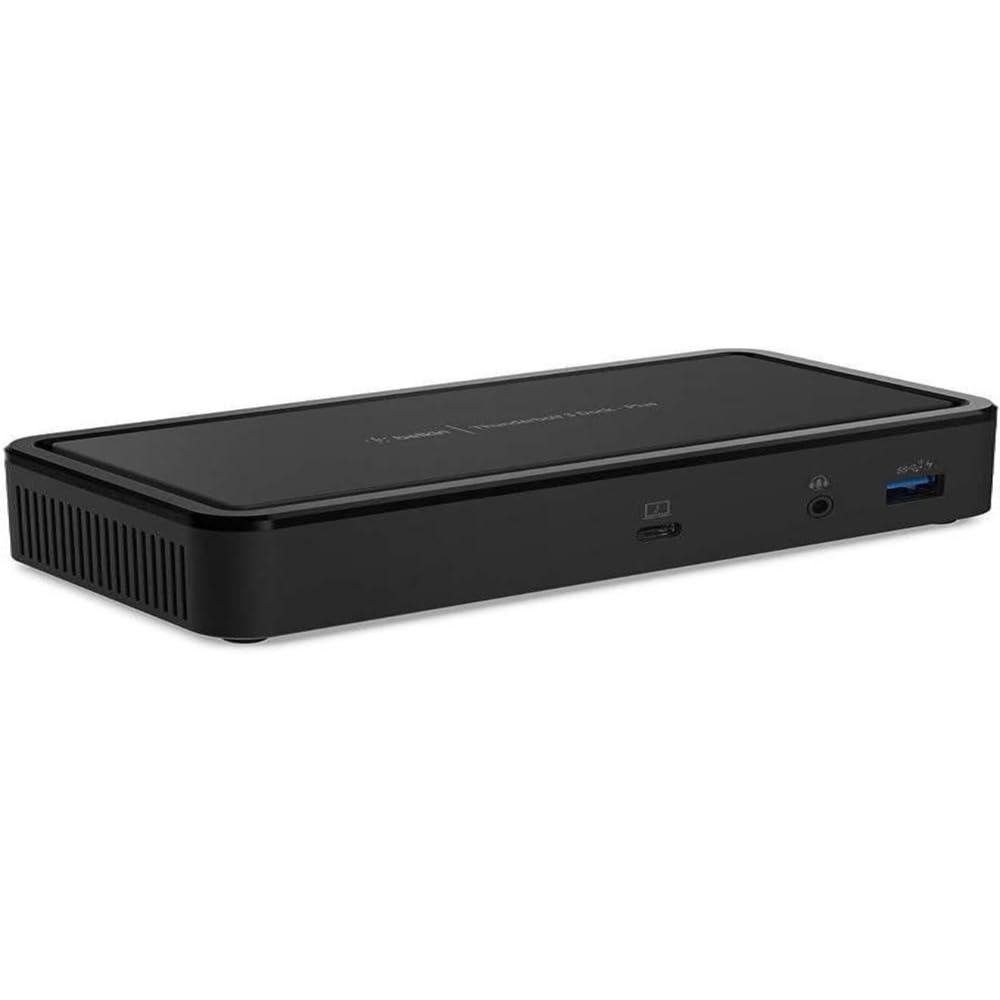
Belkin Thunderbolt 3 Dock Core
The Belkin TB3 Dock Core brings speed, high-definition and performance of Thunderbolt technology to Mac and Windows laptops. Dual-powered dock Supports dual 4K UHD displays Connect multiple devices to your laptop through one dock Supports pass-through power from a laptop to connected devices Compatible with Mac and Windows laptops with a Thunderbolt 3 port 1 x Thunderbolt 3, 1 x USB-C PD, 1 x DP, 1 x HDMI, 2x USB-A, 1 x Audio in/out, 1 x Gigabit Ethernet With all the power and versatility of Thunderbolt 3 plus ports to connect multiple peripherals to a Thunderbolt laptop, the Belkin TB3 Dock Core is a streamlined way to create an expanded, high-performing desktop through a single tethered cable. Works with Thunderbolt 3 devices It is an ideal single-dock solution for businesses using MacBooks running on Mac OS and laptops running on Windows. This broad compatibility is also ideal for shared work environments or temporary workstations where laptop users are looking for a high-performing workstation with minimal setup. Dual 4K monitor support Supports dual 4K 60Hz monitors for a versatile desktop configuration via a dedicated DisplayPort and an HDMI 2.0 port. Also supports a single 5K monitor at 60Hz and capable of reaching 8K 30Hz. Dual-powered functionality When the Thunderbolt 3 dock is connected to a laptop, it powers peripheral devices connected to the dock without the need for a separate power cable. Keep your laptop charged by connecting its existing power supply unit (60W recommended) to the USB-C PD port on the Thunderbolt dock.
The Belkin TB3 Dock Core brings speed, high-definition and performance of Thunderbolt technology to Mac and Windows laptops. Dual-powered dock Supports dual 4K UHD displays Connect multiple devices to your laptop through one dock Supports pass-through power from a laptop to connected devices Compatible with Mac and Windows laptops with a Thunderbolt 3 port 1 x Thunderbolt 3, 1 x USB-C PD, 1 x DP, 1 x HDMI, 2x USB-A, 1 x Audio in/out, 1 x Gigabit Ethernet With all the power and versatility of Thunderbolt 3 plus ports to connect multiple peripherals to a Thunderbolt laptop, the Belkin TB3 Dock Core is a streamlined way to create an expanded, high-performing desktop through a single tethered cable. Works with Thunderbolt 3 devices It is an ideal single-dock solution for businesses using MacBooks running on Mac OS and laptops running on Windows. This broad compatibility is also ideal for shared work environments or temporary workstations where laptop users are looking for a high-performing workstation with minimal setup. Dual 4K monitor support Supports dual 4K 60Hz monitors for a versatile desktop configuration via a dedicated DisplayPort and an HDMI 2.0 port. Also supports a single 5K monitor at 60Hz and capable of reaching 8K 30Hz. Dual-powered functionality When the Thunderbolt 3 dock is connected to a laptop, it powers peripheral devices connected to the dock without the need for a separate power cable. Keep your laptop charged by connecting its existing power supply unit (60W recommended) to the USB-C PD port on the Thunderbolt dock.
The Belkin TB3 Dock Core brings speed, high-definition and performance of Thunderbolt technology to Mac and Windows laptops. Dual-powered dock Supports dual 4K UHD displays Connect multiple devices to your laptop through one dock Supports pass-through power from a laptop to connected devices Compatible with Mac and Windows laptops with a Thunderbolt 3 port 1 x Thunderbolt 3, 1 x USB-C PD, 1 x DP, 1 x HDMI, 2x USB-A, 1 x Audio in/out, 1 x Gigabit Ethernet With all the power and versatility of Thunderbolt 3 plus ports to connect multiple peripherals to a Thunderbolt laptop, the Belkin TB3 Dock Core is a streamlined way to create an expanded, high-performing desktop through a single tethered cable. Works with Thunderbolt 3 devices It is an ideal single-dock solution for businesses using MacBooks running on Mac OS and laptops running on Windows. This broad compatibility is also ideal for shared work environments or temporary workstations where laptop users are looking for a high-performing workstation with minimal setup. Dual 4K monitor support Supports dual 4K 60Hz monitors for a versatile desktop configuration via a dedicated DisplayPort and an HDMI 2.0 port. Also supports a single 5K monitor at 60Hz and capable of reaching 8K 30Hz. Dual-powered functionality When the Thunderbolt 3 dock is connected to a laptop, it powers peripheral devices connected to the dock without the need for a separate power cable. Keep your laptop charged by connecting its existing power supply unit (60W recommended) to the USB-C PD port on the Thunderbolt dock.
The Belkin TB3 Dock Core brings speed, high-definition and performance of Thunderbolt technology to Mac and Windows laptops. Dual-powered dock Supports dual 4K UHD displays Connect multiple devices to your laptop through one dock Supports pass-through power from a laptop to connected devices Compatible with Mac and Windows laptops with a Thunderbolt 3 port 1 x Thunderbolt 3, 1 x USB-C PD, 1 x DP, 1 x HDMI, 2x USB-A, 1 x Audio in/out, 1 x Gigabit Ethernet With all the power and versatility of Thunderbolt 3 plus ports to connect multiple peripherals to a Thunderbolt laptop, the Belkin TB3 Dock Core is a streamlined way to create an expanded, high-performing desktop through a single tethered cable. Works with Thunderbolt 3 devices It is an ideal single-dock solution for businesses using MacBooks running on Mac OS and laptops running on Windows. This broad compatibility is also ideal for shared work environments or temporary workstations where laptop users are looking for a high-performing workstation with minimal setup. Dual 4K monitor support Supports dual 4K 60Hz monitors for a versatile desktop configuration via a dedicated DisplayPort and an HDMI 2.0 port. Also supports a single 5K monitor at 60Hz and capable of reaching 8K 30Hz. Dual-powered functionality When the Thunderbolt 3 dock is connected to a laptop, it powers peripheral devices connected to the dock without the need for a separate power cable. Keep your laptop charged by connecting its existing power supply unit (60W recommended) to the USB-C PD port on the Thunderbolt dock.
in 94 offers
The lowest price for Belkin Thunderbolt 3 Dock Core right now is $36.72 at eBay.com.au, compared across 30 retailers.
The all-time low was $36.72 on 14 Oct 2026. That's the lowest price we've ever tracked — a great time to buy.
Prices last updated 14 Oct 2026.
Last updated at 14/10/2026 05:51:59
Belkin Thunderbolt 3 Docking Station Core for Windows and Mac
Affiliate Disclosure: We may receive a small commission for purchases made through this link at no extra cost to you. This helps support our site. Thank you!
Belkin Thunderbolt 3 Dock Core F4u110
Delivery $40.69
Affiliate Disclosure: We may receive a small commission for purchases made through this link at no extra cost to you. This helps support our site. Thank you!
Belkin Thunderbolt 3 Dock Core
Delivery $4
Belkin Thunderbolt 3 Dock Core 7-in-1 USB-C Hub with 60W Pass-Through Charging, Dual Display (DisplayPort 1.4 + HDMI 2.0)
Delivery $8.95
Belkin Thunderbolt 3 Dock Core for Mac and Windows
30-day returns
Belkin Thunderbolt 3 Dock Core for Mac & Windows 1xDisplay 1xHDMI 2xUSB-A 1xGbE 1xAudio 1xUSB-C PD (Input) Dual Monitor & Powered docking Station
Delivery $7.95
Belkin Thunderbolt 3 Dock Core With Thunderbolt 3 Cable - Usb C Hub - 7-In-1 Docking Station For Macs & Windows, 60W Upstream Charging, With Gigabit E
Free delivery between 23–28 Oct
Belkin Thunderbolt 3 Dock Core Docking Station for Windows and Mac Supports 2x4K [F4U110bt]
Free delivery between 17–21 Oct
Belkin Thunderbolt 3 Dock Core, Dual 4K Display, Thunderbolt 3, USB-C PD, DisplayPort, HDMI, USB-A 3.2, USB-A 2.01, Audio, Ethernet F4U110BT
Belkin Thunderbolt 3 Dock Core Wired Black
originally posted on belkin.com
If you are on the fence about purchasing this dock, just get it. You won’t find another one that checks all your boxes like this one does. I’ve had mine since July and I use mine every single day for my digital audio studio. It’s solid, reliable and it’s the only device that allows me to run my Dual monitor setup, extended mode with Mac Monterey via DP and HMDI at the same time.I use it for my Audio interface and MIDI devices as well and so much more. The uses and functionality are just about endless, I have put it to the test and it far exceeded my expectations. In 6 months of extensive use, I haven’t experienced any connection issues or compatibility issues at all.Also, you can have another dock hook into it as well if you need even more ports. It works ... MoreIf you are on the fence about purchasing this dock, just get it. You won’t find another one that checks all your boxes like this one does. I’ve had mine since July and I use mine every single day for my digital audio studio. It’s solid, reliable and it’s the only device that allows me to run my Dual monitor setup, extended mode with Mac Monterey via DP and HMDI at the same time.I use it for my Audio interface and MIDI devices as well and so much more. The uses and functionality are just about endless, I have put it to the test and it far exceeded my expectations. In 6 months of extensive use, I haven’t experienced any connection issues or compatibility issues at all.Also, you can have another dock hook into it as well if you need even more ports. It works flawlessly and it’s the best dock I’ve used hands down. It may be a little more money than others out there, but in this instance you get quality and reliability that pays for its self. I know I sound like a Belkin spokesperson or something but it’s all true, and I couldn’t do 1/4 of the music producing and video/audio editing that I do without it.
originally posted on belkin.com
Belkin's Thunderbolt 3 Dock Core replaces 2 or 3 USB-C dongles, and allows me to quickly connect my laptop to a monitor, headphones, ethernet (more reliable than WiFi for videoconferencing), a USB license key, and a USB backup drive. It's solidly built and USB devices stay reliably connected and powered (when the dock is connected to a USB-C power supply) unlike with some other USB hubs. The attached USB-C cord is on the short side though (~20cm). This requires the dock to be positioned pretty much next to your computer, like a dongle. The USB-C port seems to be for incoming power only and the dock seems happiest when connected to a power supply; one that passes power and data would be a nice addition for future models. This product falls somewhere between a dongle ... MoreBelkin's Thunderbolt 3 Dock Core replaces 2 or 3 USB-C dongles, and allows me to quickly connect my laptop to a monitor, headphones, ethernet (more reliable than WiFi for videoconferencing), a USB license key, and a USB backup drive. It's solidly built and USB devices stay reliably connected and powered (when the dock is connected to a USB-C power supply) unlike with some other USB hubs. The attached USB-C cord is on the short side though (~20cm). This requires the dock to be positioned pretty much next to your computer, like a dongle. The USB-C port seems to be for incoming power only and the dock seems happiest when connected to a power supply; one that passes power and data would be a nice addition for future models. This product falls somewhere between a dongle and a dock, and provides functionality and convenience of both. It's not as compact as the former (but can take the place of 2-3), and it's few ports short of being a full-fledged dock (but takes up less space than most docks and allows one to use the power supply you already have for your laptop). I can also see using this as a handy port extender for a desktop instead of fumbling behind the machine looking for ports.
originally posted on belkin.com
Just received this to go with a new Macbook Pro. Has the right set of features and small enough to carry in a backpack or laptop case. Since the Macbook only provides 2 USB-C ports, this gives you pretty much whatever else you'd need; 2 USB-A, 1 USB-C, ethernet, HDMI, displayport, and analog headphone/mic port.The packaging is simple with just the square boxy unit and small fold out diagram of the connections. There is no real written manual, but you pretty much just plug it in to your laptop's thunderbolt (USB-C) port. You can then take your laptop's USB-C charger and plug into the USB-C on the Belkin dock. That allows you to charge/power the laptop while still using all the dock's ports.I specifically tested the USB-A with a 256MB flash drive and Mac OS ... MoreJust received this to go with a new Macbook Pro. Has the right set of features and small enough to carry in a backpack or laptop case. Since the Macbook only provides 2 USB-C ports, this gives you pretty much whatever else you'd need; 2 USB-A, 1 USB-C, ethernet, HDMI, displayport, and analog headphone/mic port.The packaging is simple with just the square boxy unit and small fold out diagram of the connections. There is no real written manual, but you pretty much just plug it in to your laptop's thunderbolt (USB-C) port. You can then take your laptop's USB-C charger and plug into the USB-C on the Belkin dock. That allows you to charge/power the laptop while still using all the dock's ports.I specifically tested the USB-A with a 256MB flash drive and Mac OS recognized the drive with no problem. Then we hooked up the HDMI to my large LG TV and Mac OS recognized and configured it automatically as an external display.One question I had was if the dock would work without external power from the laptop charger, and it does in fact seem to work just fine, drawing power from the laptop's thunderbolt port.
| Compatible OS | Windows |
| Compatible Brand | Windows, Mac |
| Compatible Device Type | Laptop |
| Universal Compatibility | Yes |
| Supported Resolutions | Dual 4K |

Belkin Thunderbolt 3 Docking Station Core for Windows and Mac
Affiliate Disclosure: We may receive a small commission for purchases made through this link at no extra cost to you. This helps support our site. Thank you!
Belkin Thunderbolt 3 Dock Core F4u110
Delivery $40.69
Affiliate Disclosure: We may receive a small commission for purchases made through this link at no extra cost to you. This helps support our site. Thank you!
Belkin Thunderbolt 3 Dock Core
Delivery $4
Belkin Thunderbolt 3 Dock Core 7-in-1 USB-C Hub with 60W Pass-Through Charging, Dual Display (DisplayPort 1.4 + HDMI 2.0)
Delivery $8.95
Belkin Thunderbolt 3 Dock Core for Mac and Windows
30-day returns
If you are on the fence about purchasing this dock, just get it. You won’t find another one that checks all your boxes like this one does. I’ve had mine since July and I use mine every single day for my digital audio studio. It’s solid, reliable and it’s the only device that allows me to run my Dual monitor setup, extended mode with Mac Monterey via DP and HMDI at the same time.I use it for my Audio interface and MIDI devices as well and so much more. The uses and functionality are just about endless, I have put it to the test and it far exceeded my expectations. In 6 months of extensive use, I haven’t experienced any connection issues or compatibility issues at all.Also, you can have another dock hook into it as well if you need even more ports. It works ... MoreIf you are on the fence about purchasing this dock, just get it. You won’t find another one that checks all your boxes like this one does. I’ve had mine since July and I use mine every single day for my digital audio studio. It’s solid, reliable and it’s the only device that allows me to run my Dual monitor setup, extended mode with Mac Monterey via DP and HMDI at the same time.I use it for my Audio interface and MIDI devices as well and so much more. The uses and functionality are just about endless, I have put it to the test and it far exceeded my expectations. In 6 months of extensive use, I haven’t experienced any connection issues or compatibility issues at all.Also, you can have another dock hook into it as well if you need even more ports. It works flawlessly and it’s the best dock I’ve used hands down. It may be a little more money than others out there, but in this instance you get quality and reliability that pays for its self. I know I sound like a Belkin spokesperson or something but it’s all true, and I couldn’t do 1/4 of the music producing and video/audio editing that I do without it.
Belkin's Thunderbolt 3 Dock Core replaces 2 or 3 USB-C dongles, and allows me to quickly connect my laptop to a monitor, headphones, ethernet (more reliable than WiFi for videoconferencing), a USB license key, and a USB backup drive. It's solidly built and USB devices stay reliably connected and powered (when the dock is connected to a USB-C power supply) unlike with some other USB hubs. The attached USB-C cord is on the short side though (~20cm). This requires the dock to be positioned pretty much next to your computer, like a dongle. The USB-C port seems to be for incoming power only and the dock seems happiest when connected to a power supply; one that passes power and data would be a nice addition for future models. This product falls somewhere between a dongle ... MoreBelkin's Thunderbolt 3 Dock Core replaces 2 or 3 USB-C dongles, and allows me to quickly connect my laptop to a monitor, headphones, ethernet (more reliable than WiFi for videoconferencing), a USB license key, and a USB backup drive. It's solidly built and USB devices stay reliably connected and powered (when the dock is connected to a USB-C power supply) unlike with some other USB hubs. The attached USB-C cord is on the short side though (~20cm). This requires the dock to be positioned pretty much next to your computer, like a dongle. The USB-C port seems to be for incoming power only and the dock seems happiest when connected to a power supply; one that passes power and data would be a nice addition for future models. This product falls somewhere between a dongle and a dock, and provides functionality and convenience of both. It's not as compact as the former (but can take the place of 2-3), and it's few ports short of being a full-fledged dock (but takes up less space than most docks and allows one to use the power supply you already have for your laptop). I can also see using this as a handy port extender for a desktop instead of fumbling behind the machine looking for ports.
Just received this to go with a new Macbook Pro. Has the right set of features and small enough to carry in a backpack or laptop case. Since the Macbook only provides 2 USB-C ports, this gives you pretty much whatever else you'd need; 2 USB-A, 1 USB-C, ethernet, HDMI, displayport, and analog headphone/mic port.The packaging is simple with just the square boxy unit and small fold out diagram of the connections. There is no real written manual, but you pretty much just plug it in to your laptop's thunderbolt (USB-C) port. You can then take your laptop's USB-C charger and plug into the USB-C on the Belkin dock. That allows you to charge/power the laptop while still using all the dock's ports.I specifically tested the USB-A with a 256MB flash drive and Mac OS ... MoreJust received this to go with a new Macbook Pro. Has the right set of features and small enough to carry in a backpack or laptop case. Since the Macbook only provides 2 USB-C ports, this gives you pretty much whatever else you'd need; 2 USB-A, 1 USB-C, ethernet, HDMI, displayport, and analog headphone/mic port.The packaging is simple with just the square boxy unit and small fold out diagram of the connections. There is no real written manual, but you pretty much just plug it in to your laptop's thunderbolt (USB-C) port. You can then take your laptop's USB-C charger and plug into the USB-C on the Belkin dock. That allows you to charge/power the laptop while still using all the dock's ports.I specifically tested the USB-A with a 256MB flash drive and Mac OS recognized the drive with no problem. Then we hooked up the HDMI to my large LG TV and Mac OS recognized and configured it automatically as an external display.One question I had was if the dock would work without external power from the laptop charger, and it does in fact seem to work just fine, drawing power from the laptop's thunderbolt port.
First impression upon examining this dock is that it is solid and well built. There is the heft of a quality piece of equipment, though it is not heavy. It is roughly 3.5 inches square and about 1 inch tall. The cord is about 8 inches long and solidly constructed. The dock is an attractive quality black plastic with a non-reflective matte finish. This supplies the necessary ports that have slowly disappeared over the last few years - giving you 2 USB ports, a headphone/microphone jack, network port, HDMI, DisplayPort and a Thunderbolt 3 port. Since I have external monitors and "legacy" equipment these ports are welcome. It is very easy to just leave those devices plugged into this dock and just insert one plug to gain access to everything.I could not detect any ... MoreFirst impression upon examining this dock is that it is solid and well built. There is the heft of a quality piece of equipment, though it is not heavy. It is roughly 3.5 inches square and about 1 inch tall. The cord is about 8 inches long and solidly constructed. The dock is an attractive quality black plastic with a non-reflective matte finish. This supplies the necessary ports that have slowly disappeared over the last few years - giving you 2 USB ports, a headphone/microphone jack, network port, HDMI, DisplayPort and a Thunderbolt 3 port. Since I have external monitors and "legacy" equipment these ports are welcome. It is very easy to just leave those devices plugged into this dock and just insert one plug to gain access to everything.I could not detect any lag in response at all and the unit performs as advertised. I did not appreciate any excess heat. It just worked. The layout is makes sense with the ports of the more "permanent" peripherals to the back - namely the video and the network ports. The USB and headphone/microphone are to the left. The 8 inch cord seems about perfect, sturdy and is not long enough to get in the way.This has all the ports I will likely need and the additional Thunderbolt 3 port will let me add on in the future.If you need a dock to attach peripherals or convert your laptop into a desktop, this is a very solid choice in a Thunderbolt 3 dock.
First, I love the design, it's very simple and understated, but also very efficient and doesn't look gaudy on a desk. I have 2 other USB-C hubs, but this is the 1st TB3 dock I've used, and is definitely the best looking. When plugging into my HP Spectre I got a Thunderbolt 3 notification, notifying me it was a genuine TB3 device. It worked flawlessly with Ethernet, dual displays, and powering my usb devices with excellent throughput.I also tried this device with my SurfaceGo 2, but since that doesn't support TB3, it wouldn't connect and work properly. I'm not sure that is a problem with the dock and not the TB3 spec, so keep in mind that your device MUST support TB3, and USB-C alone isn't enough.I think the ideal use case for this is as a separate travel/mobile ... MoreFirst, I love the design, it's very simple and understated, but also very efficient and doesn't look gaudy on a desk. I have 2 other USB-C hubs, but this is the 1st TB3 dock I've used, and is definitely the best looking. When plugging into my HP Spectre I got a Thunderbolt 3 notification, notifying me it was a genuine TB3 device. It worked flawlessly with Ethernet, dual displays, and powering my usb devices with excellent throughput.I also tried this device with my SurfaceGo 2, but since that doesn't support TB3, it wouldn't connect and work properly. I'm not sure that is a problem with the dock and not the TB3 spec, so keep in mind that your device MUST support TB3, and USB-C alone isn't enough.I think the ideal use case for this is as a separate travel/mobile dock or if being used as the main dock, with the laptop placed directly on the desk and not elevated. My main setup uses a laptop stand, so I needed to stack some things under the dock to get it to the laptop's height due to the short cable. When using this with a laptop that's not on a stand, I think it should be placed behind the computer so as not to obstruct any of the ports.As long as you use it with a Thunderbolt 3 device that is on a flat surfce, I think it's a great device with plenty of ports, speed, and style. Highly recommended if you want/need maximum TB3 bandwidth in a small package.
I got the Thunderbolt 3 docking station and since I work from home, I definitely wanted to try it out. This is an amazing docking station. I am able to connect my laptop and monitors all together to work efficiently. What I like the most is the size. My desk is already filled with items but since this is on the smaller size, it does not take up much space. I would recommend if you want a smaller, powerful docking station with plenty of connections.
I am a loyal Mac user but I cannot tell you how many times over the years I have wanted to use a flash drive and not been able to because my Macbook doesn't have USB ports. My job requires large video file downloads and my Macbook has the smallest memory that was available for purchase, so things fill up quickly. I absolutely love being able to use a flash drive and my old portable hard drive for storage again. I also love the ability to connect a monitor to my Macbook now, its made working so much easier!
SETUP:Running the Belkin Thunderbolt 3 Dock Core on macOS, there are no drivers or applications to install, so the unit is plug and play right out of the box.GENERAL:I configured the Belkin hub with a 2016 MacBook Pro and used it to drive two 1440p displays, while supplying power, USB, and ethernet to the laptop. After using the Dock for a week, it performed flawlessly, with not so much as a hiccup to give any concern for its reliability and stability. The high definition signal passed to the monitors was everything you would expect.STRENGTHS:No set up required, compact size, and works flawlessly right out of the box. The Thunderbolt 3 Dock Core expands the functionality of the notebook to support multiple high-performance peripherals as one would have ... MoreSETUP:Running the Belkin Thunderbolt 3 Dock Core on macOS, there are no drivers or applications to install, so the unit is plug and play right out of the box.GENERAL:I configured the Belkin hub with a 2016 MacBook Pro and used it to drive two 1440p displays, while supplying power, USB, and ethernet to the laptop. After using the Dock for a week, it performed flawlessly, with not so much as a hiccup to give any concern for its reliability and stability. The high definition signal passed to the monitors was everything you would expect.STRENGTHS:No set up required, compact size, and works flawlessly right out of the box. The Thunderbolt 3 Dock Core expands the functionality of the notebook to support multiple high-performance peripherals as one would have with a full desktop.WEAKNESSES:The cable attached to the dock is quite short and does not allow it to be located far from the MacBook (or other brand notebook) and takes up valuable space on the desk in the primary work area. The unit tends to run warm, but not so much as to make it a concern for the service life of the device.CONCLUSION:I highly recommend the Belkin Thunderbolt 3 Dock Core to expand the capability of any laptop by connecting multiple high-performance peripherals. It sets up quickly, runs flawlessly, and is very stable/reliable.
Positives: Thunderbolt 3 2nd generation (Titan Ridge), which allows up to 8K @30fps or 5K @60fps out of a single DP port. Therefore, DP version here is DP1.4, which is still rare. To take advantage of the DP1.4 resolutions (8K @30fps or 5K @60fps), you must have a 15" MacBook Pro (2018-2019), 16" MacBook Pro (2019), MacBook Air (2020) or 13" MacBook Pro (2020) with a 10th generation CPU. Any other MacBook Pros will not support higher resolutions out of one DP1.4 port on this dock and will be limited with 4K @60Hz. Even the 13" 2020 MacBook Pros with the 8th generation CPU will be limited to 4K@60Hz (due to the integrated iGPU that doesn't support DP1.4 in one stream).Negatives: The GigabitEthernet port is flaky and the speed is all over the place. If you need ... MorePositives: Thunderbolt 3 2nd generation (Titan Ridge), which allows up to 8K @30fps or 5K @60fps out of a single DP port. Therefore, DP version here is DP1.4, which is still rare. To take advantage of the DP1.4 resolutions (8K @30fps or 5K @60fps), you must have a 15" MacBook Pro (2018-2019), 16" MacBook Pro (2019), MacBook Air (2020) or 13" MacBook Pro (2020) with a 10th generation CPU. Any other MacBook Pros will not support higher resolutions out of one DP1.4 port on this dock and will be limited with 4K @60Hz. Even the 13" 2020 MacBook Pros with the 8th generation CPU will be limited to 4K@60Hz (due to the integrated iGPU that doesn't support DP1.4 in one stream).Negatives: The GigabitEthernet port is flaky and the speed is all over the place. If you need reliable and fast GigabitEthernet out of this dock, then forget it.More Negatives: Others report similar issues with USB-3 ports on the dock that provide flaky connectivity and unreliable connection speeds. I didn't test that, but I can tell you that when I plugged in an 8GB Transcend USB3 flash drive in to a USB3 port on this dock, it mounted as a USB3 device, but after only about 10 minutes of being plugged in to the USB3 port on the dock, the USB connector on the flash drive was hot to the touch.I think this dock has cooling problems, which affects the consistency of the GigabitEthernet and the USB port speeds. On the other hand, the DP1.4 port worked flawlessly, and the connected 5K monitor was able to go to sleep and wake up together with the Mac as expected.
This docking station is very useful for those with laptops that have thunderbolt 3. This docking station includes a display port, hdmi, Ethernet, just to name a few. It's really helpful to have a display port and hdmi to be able to connect two external monitors. The docking station is small so it doesn't take up too much space (if you happen to have a small desk space). Overall, I am really enjoying this docking station with my Mac laptop. Definitely, a product that I enjoy having and it's very productive.
| Compatible OS | Windows |
| Compatible Brand | Windows, Mac |
| Compatible Device Type | Laptop |
| Universal Compatibility | Yes |
| Supported Resolutions | Dual 4K |