Belkin USB-C Multimedia + Charge Adapter
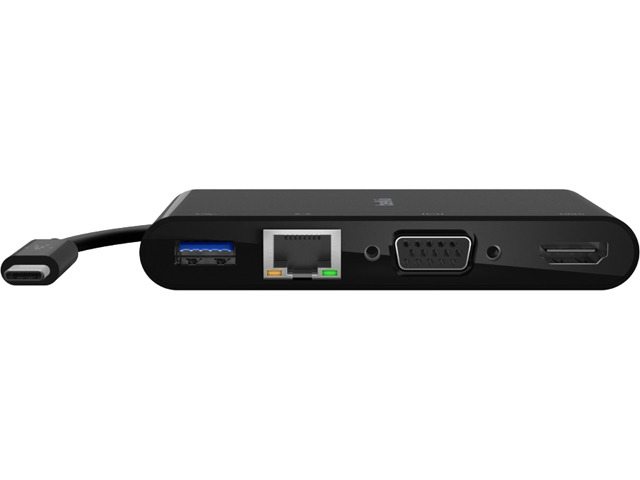
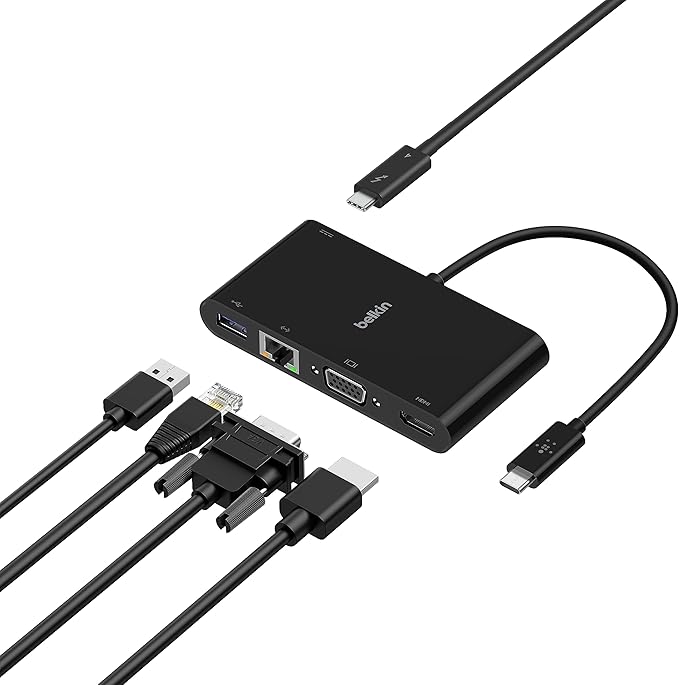
Keep connected on any occasion with this Belkin charge adapter. It links up to Mac and Windows laptops with a USB-C port, but the brains of the operation is on the other side. This is where it gets a bit techy. It's got 4 other ports for USB-A, Ethernet, VGA and 4K HDMI connections - it's like it was made for that jungle of wires tucked away in the kitchen drawer. When everything's plugged in, you can show off your videos and presentations in amazing 4K Ultra HD definition. And it'll even charge up any devices attached to it once you hook it up to a mains socket.
Keep connected on any occasion with this Belkin charge adapter. It links up to Mac and Windows laptops with a USB-C port, but the brains of the operation is on the other side. This is where it gets a bit techy. It's got 4 other ports for USB-A, Ethernet, VGA and 4K HDMI connections - it's like it was made for that jungle of wires tucked away in the kitchen drawer. When everything's plugged in, you can show off your videos and presentations in amazing 4K Ultra HD definition. And it'll even charge up any devices attached to it once you hook it up to a mains socket.
Keep connected on any occasion with this Belkin charge adapter. It links up to Mac and Windows laptops with a USB-C port, but the brains of the operation is on the other side. This is where it gets a bit techy. It's got 4 other ports for USB-A, Ethernet, VGA and 4K HDMI connections - it's like it was made for that jungle of wires tucked away in the kitchen drawer. When everything's plugged in, you can show off your videos and presentations in amazing 4K Ultra HD definition. And it'll even charge up any devices attached to it once you hook it up to a mains socket.
Keep connected on any occasion with this Belkin charge adapter. It links up to Mac and Windows laptops with a USB-C port, but the brains of the operation is on the other side. This is where it gets a bit techy. It's got 4 other ports for USB-A, Ethernet, VGA and 4K HDMI connections - it's like it was made for that jungle of wires tucked away in the kitchen drawer. When everything's plugged in, you can show off your videos and presentations in amazing 4K Ultra HD definition. And it'll even charge up any devices attached to it once you hook it up to a mains socket.
in 11 offers
The lowest price for Belkin USB-C Multimedia + Charge Adapter right now is $50.00 at eBay.com.au, compared across 10 retailers.
The all-time low was $29.00 on 12 July 2023 — today's price is 72% above the lowest ever. It has been notably cheaper before — worth setting a price alert.
Prices last updated 15 Oct 2026.
Last updated at 15/10/2026 04:37:36
Belkin Usb-c Multimedia + Charge Adapter (100w)
Delivery $15
Affiliate Disclosure: We may receive a small commission for purchases made through this link at no extra cost to you. This helps support our site. Thank you!
Belkin USB-C Multimedia Adapter with PD Pass-Through
Delivery $11.99
Belkin Usb-c Multimedia And Charge Adapter Black
Delivery $23.99
USB-C Ethernet/HDMI/VGA/USB-A Multiport Adapter
Free delivery between 26–29 Oct
Belkin USB Type C Docking Station for Notebook - Charging Capability - 100 W - 4K - 3840 x 2160 - 1 x USB 3.0 - USB Type-A - USB Type-C - Network - -
Delivery $7.95
Belkin USB-C Multimedia Charge Adapter 100w Accessory For MacBook Air Black
Free delivery
Belkin USB-C Multimedia Charge Adapter 100w Accessory For MacBook Air Black
Delivery between 18–26 Oct $10
Belkin USB Type C Docking Station for Notebook - Charging Capability - 100 W - 4K - 3840 x 2160 - 1 x USB 3.0 - USB Type-A - USB Type-C - Network - -
Free delivery between 19–22 Oct
Belkin USB-C Multimedia + Charge Adapter
Delivery between 18–23 Oct $7.95
Belkin USB-C Multimedia + Charge Adapter
Free delivery
originally posted on belkin.com
So far this adapter is working well for us but it has a limitation I did not anticipate. I am disappointed that you cannot use both the vga and hdmi ports at the same time. Before purchasing this a read the description multiple times and did not see that limitation mentioned anywhere. We purchased 19 of these from amazon and now wish I had purchased a different model. I think it should be obvious in the description and even on the packaging that only one video port can be used at a time but it is not. We are still able to use these but one monitor has to plugged to the hdmi port on the laptop which is what we were trying to avoid.
originally posted on belkin.com
This adapter is plugged into my Android tablet. With this adapter I can add an external monitor and charge my tablet at the same time. Having 2 screen makes it great for multitasking. Just an FYI, this adapter is not extending the DEX desktop. It is running its own screen, meaning I can run 1 app/program on the larger monitor and run a different app/ program on the tablet. I assume that if you plug this adapter into a windows laptop, it will extend the windows monitor. With this adapter, you can connect an external monitor via HDMI or via VGA. I tired connecting 2 monitors via both connection and it does not display on both monitor simultaneously. I could run only 1 display or the other. Also, I not sure if it due to my monitor or the adapter but when plugging via ... MoreThis adapter is plugged into my Android tablet. With this adapter I can add an external monitor and charge my tablet at the same time. Having 2 screen makes it great for multitasking. Just an FYI, this adapter is not extending the DEX desktop. It is running its own screen, meaning I can run 1 app/program on the larger monitor and run a different app/ program on the tablet. I assume that if you plug this adapter into a windows laptop, it will extend the windows monitor. With this adapter, you can connect an external monitor via HDMI or via VGA. I tired connecting 2 monitors via both connection and it does not display on both monitor simultaneously. I could run only 1 display or the other. Also, I not sure if it due to my monitor or the adapter but when plugging via VGA connection, the monitor is blurry. This adapter also adds a USB Type-A port as well as a Network port. Overall, this is an awesome adapter if you want to add ports and an external monitor.
originally posted on belkin.com
I love using the Belkin Multimedia + Charge Adapter (100W) daily since enables me to keep watching and stay charged with a multimedia adapter that enables up to 100W of pass-through power with its five-port adapter. This simple plug-and-play technology is compatible with Mac and Windows laptops and USB-C devices.I have been using the This simple plug-and-play technology is compatible with Mac and Windows laptops and USB-C devices. daily and find it extremely useful to my household.With this a dedicated, tethered USB-C cable anchors my adapter and provides seamless compatibility with Mac and Windows laptops and other USB-C devices alike.I can't talk enough of this amazing Belkin Multimedia + Charge Adapter and have already recommended it to many of my friends ... MoreI love using the Belkin Multimedia + Charge Adapter (100W) daily since enables me to keep watching and stay charged with a multimedia adapter that enables up to 100W of pass-through power with its five-port adapter. This simple plug-and-play technology is compatible with Mac and Windows laptops and USB-C devices.I have been using the This simple plug-and-play technology is compatible with Mac and Windows laptops and USB-C devices. daily and find it extremely useful to my household.With this a dedicated, tethered USB-C cable anchors my adapter and provides seamless compatibility with Mac and Windows laptops and other USB-C devices alike.I can't talk enough of this amazing Belkin Multimedia + Charge Adapter and have already recommended it to many of my friends and family who always love to stay connected with their devices, and several of them have already purchased and used it, and find it very useful to their households too, in order to keep them stay connected with their devices.
| Type | Docking Station, Multimedia adapter |
| Power Over Ethernet (PoE) | No |
| Supported Features | Pass-through power, Plug-and-play technology |
| Data Transfer Rate | 1 Gbps |
| Network Ports | VGA |
Belkin Usb-c Multimedia + Charge Adapter (100w)
Delivery $15
Affiliate Disclosure: We may receive a small commission for purchases made through this link at no extra cost to you. This helps support our site. Thank you!
Belkin USB-C Multimedia Adapter with PD Pass-Through
Delivery $11.99
Belkin Usb-c Multimedia And Charge Adapter Black
Delivery $23.99
USB-C Ethernet/HDMI/VGA/USB-A Multiport Adapter
Free delivery between 26–29 Oct
Belkin USB Type C Docking Station for Notebook - Charging Capability - 100 W - 4K - 3840 x 2160 - 1 x USB 3.0 - USB Type-A - USB Type-C - Network - -
Delivery $7.95
So far this adapter is working well for us but it has a limitation I did not anticipate. I am disappointed that you cannot use both the vga and hdmi ports at the same time. Before purchasing this a read the description multiple times and did not see that limitation mentioned anywhere. We purchased 19 of these from amazon and now wish I had purchased a different model. I think it should be obvious in the description and even on the packaging that only one video port can be used at a time but it is not. We are still able to use these but one monitor has to plugged to the hdmi port on the laptop which is what we were trying to avoid.
This adapter is plugged into my Android tablet. With this adapter I can add an external monitor and charge my tablet at the same time. Having 2 screen makes it great for multitasking. Just an FYI, this adapter is not extending the DEX desktop. It is running its own screen, meaning I can run 1 app/program on the larger monitor and run a different app/ program on the tablet. I assume that if you plug this adapter into a windows laptop, it will extend the windows monitor. With this adapter, you can connect an external monitor via HDMI or via VGA. I tired connecting 2 monitors via both connection and it does not display on both monitor simultaneously. I could run only 1 display or the other. Also, I not sure if it due to my monitor or the adapter but when plugging via ... MoreThis adapter is plugged into my Android tablet. With this adapter I can add an external monitor and charge my tablet at the same time. Having 2 screen makes it great for multitasking. Just an FYI, this adapter is not extending the DEX desktop. It is running its own screen, meaning I can run 1 app/program on the larger monitor and run a different app/ program on the tablet. I assume that if you plug this adapter into a windows laptop, it will extend the windows monitor. With this adapter, you can connect an external monitor via HDMI or via VGA. I tired connecting 2 monitors via both connection and it does not display on both monitor simultaneously. I could run only 1 display or the other. Also, I not sure if it due to my monitor or the adapter but when plugging via VGA connection, the monitor is blurry. This adapter also adds a USB Type-A port as well as a Network port. Overall, this is an awesome adapter if you want to add ports and an external monitor.
I love using the Belkin Multimedia + Charge Adapter (100W) daily since enables me to keep watching and stay charged with a multimedia adapter that enables up to 100W of pass-through power with its five-port adapter. This simple plug-and-play technology is compatible with Mac and Windows laptops and USB-C devices.I have been using the This simple plug-and-play technology is compatible with Mac and Windows laptops and USB-C devices. daily and find it extremely useful to my household.With this a dedicated, tethered USB-C cable anchors my adapter and provides seamless compatibility with Mac and Windows laptops and other USB-C devices alike.I can't talk enough of this amazing Belkin Multimedia + Charge Adapter and have already recommended it to many of my friends ... MoreI love using the Belkin Multimedia + Charge Adapter (100W) daily since enables me to keep watching and stay charged with a multimedia adapter that enables up to 100W of pass-through power with its five-port adapter. This simple plug-and-play technology is compatible with Mac and Windows laptops and USB-C devices.I have been using the This simple plug-and-play technology is compatible with Mac and Windows laptops and USB-C devices. daily and find it extremely useful to my household.With this a dedicated, tethered USB-C cable anchors my adapter and provides seamless compatibility with Mac and Windows laptops and other USB-C devices alike.I can't talk enough of this amazing Belkin Multimedia + Charge Adapter and have already recommended it to many of my friends and family who always love to stay connected with their devices, and several of them have already purchased and used it, and find it very useful to their households too, in order to keep them stay connected with their devices.
This thing works perfect. My laptop doesn’t have an HDMI out, with this I can hook it to my TV and watch movies no problem. It has pass through charging so I don’t have to worry about my laptop dying while watching movies. If you don’t have an Ethernet cord this really comes in handy. It also has a USB-A 3.0 port to give you one more USB port. Plus it has a VGA output as well. If you’re in need of any of these functions, I highly recommend this.
New macbook only has 2 usb-c ports. This provided all the ports I need to hook up keyboard, mouse, monitor, ethernet plus pass-through power to the macbook. Still leaves me one port open on the macbook. Paired it with a belkin usb port extender to add multiple usb devices. Works perfect.
This USB C multimedia and charger adapter has made my life so much easier. I don’t need no more cables and connectors, this one fits all my need. I work with two external monitors and when I am in the office I use LAN cable for internet connection. This adapter works like magic! With 100W pass through power I haven’t experienced any battery issue with my laptop. There is no lag in multimedia connections as well. Everything works perfectly. I highly recommend it to all IT and tech savvy people.
I bought this as we have an urgent need for USB-C ethernet/Video connectivity in our office. Our preferred Dell D310 units are months out of stock.The product works fine, but there is no information regarding the VGA + HDMI connectivity. I discovered that you can have ONLY ONE video connected at a time. This is not a deal breaker for most stations in our office, but some staff have dual monitors + their laptops. They will need to plug in via the Laptop HDMI port to get a dual monitor setup. Unfortunately I had to dig deep to find this out on the Belkin web site.
Pros: All the functions works properly as described. Quality is better than most of the competeters.Cons: I do not know why but HDMI port and VGA port cannot work at the same time. While both of them works fine individually.
I like this hub because it is portable and convenient for my home/work offices and for travel. It is plug and play so I can use with different devices immediately with no fuss. This hooks up straight to my Windows 10 laptop USB-C slot. I can add a monitor, my tv, and my projector via the HDMI or VGA ports in seconds. This hub also includes an ethernet port and a USB-A slot. My wife's laptop says it is receiving insufficient power and can not charge. Adding a larger power supply to the hub resolved this issue (USB-C slot in the back of the hub as was recommended by the manufacturer. This hub would be convenient for anyone that uses an external display without a docking station for their laptop.
It’s nice and perfectly working on it’s own. Problems appear when you leave it out of sight and connect it to your MacBook adding a USB-C extension cable (1m long, female to male). Unacceptable image, shaking, turning off and on every few seconds, unusable. When disconnecting and reconnecting the extension cable from the MacBook, the image becomes almost stable, shaking just a little bit here and then. Apple MacBook charger connected to the HUB, HDMI cable from the HUB to an external display, ETH cable to the HUB, HUB via it’s USB-C and the extension cable connected to the MacBook. HDMI and USB-C extension cables replaced/swapped for other brands and even better types - no change. Also when I switch the HUB with a other one (other brand), everything is working just ... MoreIt’s nice and perfectly working on it’s own. Problems appear when you leave it out of sight and connect it to your MacBook adding a USB-C extension cable (1m long, female to male). Unacceptable image, shaking, turning off and on every few seconds, unusable. When disconnecting and reconnecting the extension cable from the MacBook, the image becomes almost stable, shaking just a little bit here and then. Apple MacBook charger connected to the HUB, HDMI cable from the HUB to an external display, ETH cable to the HUB, HUB via it’s USB-C and the extension cable connected to the MacBook. HDMI and USB-C extension cables replaced/swapped for other brands and even better types - no change. Also when I switch the HUB with a other one (other brand), everything is working just fine…
| Type | Docking Station, Multimedia adapter |
| Power Over Ethernet (PoE) | No |
| Supported Features | Pass-through power, Plug-and-play technology |
| Data Transfer Rate | 1 Gbps |
| Network Ports | VGA |