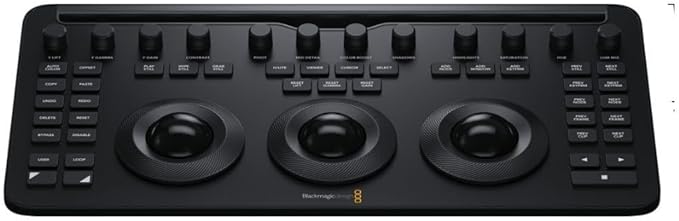
Blackmagic Design Davinci Resolve Micro Panel
The DaVinci Resolve Micro Color Panel is a compact colour grading surface designed for editors and colorists who want professional control in a portable form. It features three high-precision trackballs with control rings, a row of direct access knobs, and transport keys to speed up grading sessions. The panel also includes tools for advanced grading such as adding windows, along with a built-in tablet slot for use with an iPad running DaVinci Resolve. Connectivity is via USB-C or Bluetooth 5.1 LE, with multilingual button labelling for global use. Powered by an internal rechargeable battery (USB-C charging), the Micro Color Panel is ideal for freelancers, studios, and on-set workflows.
The DaVinci Resolve Micro Color Panel is a compact colour grading surface designed for editors and colorists who want professional control in a portable form. It features three high-precision trackballs with control rings, a row of direct access knobs, and transport keys to speed up grading sessions. The panel also includes tools for advanced grading such as adding windows, along with a built-in tablet slot for use with an iPad running DaVinci Resolve. Connectivity is via USB-C or Bluetooth 5.1 LE, with multilingual button labelling for global use. Powered by an internal rechargeable battery (USB-C charging), the Micro Color Panel is ideal for freelancers, studios, and on-set workflows.
The DaVinci Resolve Micro Color Panel is a compact colour grading surface designed for editors and colorists who want professional control in a portable form. It features three high-precision trackballs with control rings, a row of direct access knobs, and transport keys to speed up grading sessions. The panel also includes tools for advanced grading such as adding windows, along with a built-in tablet slot for use with an iPad running DaVinci Resolve. Connectivity is via USB-C or Bluetooth 5.1 LE, with multilingual button labelling for global use. Powered by an internal rechargeable battery (USB-C charging), the Micro Color Panel is ideal for freelancers, studios, and on-set workflows.
The DaVinci Resolve Micro Color Panel is a compact colour grading surface designed for editors and colorists who want professional control in a portable form. It features three high-precision trackballs with control rings, a row of direct access knobs, and transport keys to speed up grading sessions. The panel also includes tools for advanced grading such as adding windows, along with a built-in tablet slot for use with an iPad running DaVinci Resolve. Connectivity is via USB-C or Bluetooth 5.1 LE, with multilingual button labelling for global use. Powered by an internal rechargeable battery (USB-C charging), the Micro Color Panel is ideal for freelancers, studios, and on-set workflows.
in 15 offers
The lowest price for Blackmagic Design Davinci Resolve Micro Panel right now is $1,110.38 at showtechnix.com.au, compared across 15 retailers.
The all-time low was $316.50 on 16 Jan 2024 — today's price is 251% above the lowest ever. It has been notably cheaper before — worth setting a price alert.
Prices last updated 24 Oct 2026.
Last updated at 24/10/2026 06:06:37
Blackmagic DaVinci Resolve Micro Panel
Delivery $30
Blackmagic Design DaVinci Resolve Micro Panel
Delivery $16.50
DaVinci Resolve Micro Panel | Compact 3-Trackball Control Panel with USB-C
Delivery between 29 Oct – 2 Nov $20
Blackmagic DVRESBBPNLMIC DaVinci Resolve Micro Panel
Delivery between 29 Oct – 3 Nov $36.88
Blackmagic Design DaVinci Resolve Micro Panel (includes DaVinci Resolve)
Delivery between 28 Oct – 5 Nov $15
Blackmagic Design DaVinci Resolve Micro Panel
Delivery $9.90
Blackmagic Design DaVinci Resolve Micro Panel with DaVinci Resolve Studio
Delivery $7.90
Blackmagic Design DaVinci Resolve Micro Panel
Blackmagic DaVinci Resolve Micro Control Panel
Free delivery between Tue – Fri
Blackmagic Design DaVinci Resolve Micro Panel with Resolve Software
Delivery between 28 Oct – 5 Nov $15
originally posted on cvp.com
Since buying the Blackmagic Pocket Cinema Camera 4K and using the DaVinci Resolve Studio15 software I got free with the camera, I’ve become a convert to Resolve completely. I’ve used Adobe Premier Pro and After Effects for years for editing and grading but after trying Resolve 15 for a month or so I now use it as a part of my workflow, in fact, all of my workflow from beginning to delivery. As the Pocket 4K shoots BRAW, my prefered shooting codec, I found myself using the colour page more and more and coupled with my second camera, the GH5 which now shoots V-Log L since recently purchasing the key code from Panasonic even more so that it’s become an obsession with me. As a retired professional I no longer have to sell my work to survive, then time was money and time ... MoreSince buying the Blackmagic Pocket Cinema Camera 4K and using the DaVinci Resolve Studio15 software I got free with the camera, I’ve become a convert to Resolve completely. I’ve used Adobe Premier Pro and After Effects for years for editing and grading but after trying Resolve 15 for a month or so I now use it as a part of my workflow, in fact, all of my workflow from beginning to delivery. As the Pocket 4K shoots BRAW, my prefered shooting codec, I found myself using the colour page more and more and coupled with my second camera, the GH5 which now shoots V-Log L since recently purchasing the key code from Panasonic even more so that it’s become an obsession with me. As a retired professional I no longer have to sell my work to survive, then time was money and time spent colour grading wasn’t always an option. Now as a hobby I have the time to indulge my passion. The only thing that annoyed me was using the mouse to make fine adjustments to my balance and primary colour grade, it was very difficult and frustrating. So I decided to invest, for my own sanity in the DaVinci Resolve Micro Panel and I’m glad I did. For me, as a perfectionist at heart it has saved me so much grief and has brought the joy back into grading as well as speeding up the process, not that speed is important to me now I’ve retired. However if I had to earn a living from my work once again, the Micro Panel would be on the top of my shopping list alongside DaVinci Resolve. It’s very well made, construction is the best but most of all a real pleasure to use.
originally posted on bhphotovideo.com
Right out of the box, the Davinci Resolve micro panel is pretty impressive.This thing is solid and well constructed.You can also make the smallest of adjustments to your grades because the trackballs have such smooth and fluid movement.Blackmagic Design obviously had travel in mind when thinking up and building this tool, as it is durable and solid without being too heavy.In total, the die-cast and machined aluminum body comes in at just under eight pounds.If the bulk of your colour grading work is grinding out basic grades, fixing white balances and making sure skin tones are legit, then this product is all you will ever really need.The DaVinci Resolve Micro Panel is a worthy and super solid investment even if colour grading is something you only do a ... MoreRight out of the box, the Davinci Resolve micro panel is pretty impressive.This thing is solid and well constructed.You can also make the smallest of adjustments to your grades because the trackballs have such smooth and fluid movement.Blackmagic Design obviously had travel in mind when thinking up and building this tool, as it is durable and solid without being too heavy.In total, the die-cast and machined aluminum body comes in at just under eight pounds.If the bulk of your colour grading work is grinding out basic grades, fixing white balances and making sure skin tones are legit, then this product is all you will ever really need.The DaVinci Resolve Micro Panel is a worthy and super solid investment even if colour grading is something you only do a few times a week.Your grading will improve because you’ll be working in DaVinci Resolve the way it was intended.I am extremely happy with the purchase of this item from B&H photo and look forward to adding more Blackmagic Design tools to my workflow in the future.
originally posted on bhphotovideo.com
First of all, before purchasing the Micro panel, I had the Tangent Element (Tk and Kb panels) and was working on Premiere Pro. I switch to Resolve a month ago because I didn’t want to pay anymore 75$ CDN for the Adobe subscription.The rings on the Tangent are awesome, even better than those on the micro panel. They have a rubbery feel and are flat. The rings on the Micro panel don’t have the same grippy feel and are not flat, they lean towards the center so I often end up touching the ball when turning the ring. I had to change the way I grab the rings instead of just putting a finger on top of the ring and turning it, just like I did with the Element.But the problem with the Element is it rely on a screen to show you what the buttons and knobs do. So one knob can ... MoreFirst of all, before purchasing the Micro panel, I had the Tangent Element (Tk and Kb panels) and was working on Premiere Pro. I switch to Resolve a month ago because I didn’t want to pay anymore 75$ CDN for the Adobe subscription.The rings on the Tangent are awesome, even better than those on the micro panel. They have a rubbery feel and are flat. The rings on the Micro panel don’t have the same grippy feel and are not flat, they lean towards the center so I often end up touching the ball when turning the ring. I had to change the way I grab the rings instead of just putting a finger on top of the ring and turning it, just like I did with the Element.But the problem with the Element is it rely on a screen to show you what the buttons and knobs do. So one knob can be mapped to multiple fonctions depending in what menu you’re in.That’s where the Micro panel stands out. Every button or knobs do only one thing and are labeled (except the rings and balls controls not only the lift-gamma-gain, but can also control Offset-temperature-tint and log).My only gripe is the knob’s label are not illuminated.Some have mention that the micro panel lack “add node” buttons, but this can be easily address with keyboard shortcuts (mine are mapped to F1-F4) or with a XKeys pad.I am very happy with my purchase.
| Type | Editing controller, Portable low profile panel |
| Compatible Devices | Mac, PC, Select Linux Installations, Windows |
| Included Components | USB 3.0 Type-A to Type-C Cable |
| Length | 54 cm |
| Connectivity Type | USB Type-C, Bluetooth, USB-C |
Blackmagic DaVinci Resolve Micro Panel
Delivery $30
Blackmagic Design DaVinci Resolve Micro Panel
Delivery $16.50
DaVinci Resolve Micro Panel | Compact 3-Trackball Control Panel with USB-C
Delivery between 29 Oct – 2 Nov $20
Blackmagic DVRESBBPNLMIC DaVinci Resolve Micro Panel
Delivery between 29 Oct – 3 Nov $36.88
Blackmagic Design DaVinci Resolve Micro Panel (includes DaVinci Resolve)
Delivery between 28 Oct – 5 Nov $15
Since buying the Blackmagic Pocket Cinema Camera 4K and using the DaVinci Resolve Studio15 software I got free with the camera, I’ve become a convert to Resolve completely. I’ve used Adobe Premier Pro and After Effects for years for editing and grading but after trying Resolve 15 for a month or so I now use it as a part of my workflow, in fact, all of my workflow from beginning to delivery. As the Pocket 4K shoots BRAW, my prefered shooting codec, I found myself using the colour page more and more and coupled with my second camera, the GH5 which now shoots V-Log L since recently purchasing the key code from Panasonic even more so that it’s become an obsession with me. As a retired professional I no longer have to sell my work to survive, then time was money and time ... MoreSince buying the Blackmagic Pocket Cinema Camera 4K and using the DaVinci Resolve Studio15 software I got free with the camera, I’ve become a convert to Resolve completely. I’ve used Adobe Premier Pro and After Effects for years for editing and grading but after trying Resolve 15 for a month or so I now use it as a part of my workflow, in fact, all of my workflow from beginning to delivery. As the Pocket 4K shoots BRAW, my prefered shooting codec, I found myself using the colour page more and more and coupled with my second camera, the GH5 which now shoots V-Log L since recently purchasing the key code from Panasonic even more so that it’s become an obsession with me. As a retired professional I no longer have to sell my work to survive, then time was money and time spent colour grading wasn’t always an option. Now as a hobby I have the time to indulge my passion. The only thing that annoyed me was using the mouse to make fine adjustments to my balance and primary colour grade, it was very difficult and frustrating. So I decided to invest, for my own sanity in the DaVinci Resolve Micro Panel and I’m glad I did. For me, as a perfectionist at heart it has saved me so much grief and has brought the joy back into grading as well as speeding up the process, not that speed is important to me now I’ve retired. However if I had to earn a living from my work once again, the Micro Panel would be on the top of my shopping list alongside DaVinci Resolve. It’s very well made, construction is the best but most of all a real pleasure to use.
Right out of the box, the Davinci Resolve micro panel is pretty impressive.This thing is solid and well constructed.You can also make the smallest of adjustments to your grades because the trackballs have such smooth and fluid movement.Blackmagic Design obviously had travel in mind when thinking up and building this tool, as it is durable and solid without being too heavy.In total, the die-cast and machined aluminum body comes in at just under eight pounds.If the bulk of your colour grading work is grinding out basic grades, fixing white balances and making sure skin tones are legit, then this product is all you will ever really need.The DaVinci Resolve Micro Panel is a worthy and super solid investment even if colour grading is something you only do a ... MoreRight out of the box, the Davinci Resolve micro panel is pretty impressive.This thing is solid and well constructed.You can also make the smallest of adjustments to your grades because the trackballs have such smooth and fluid movement.Blackmagic Design obviously had travel in mind when thinking up and building this tool, as it is durable and solid without being too heavy.In total, the die-cast and machined aluminum body comes in at just under eight pounds.If the bulk of your colour grading work is grinding out basic grades, fixing white balances and making sure skin tones are legit, then this product is all you will ever really need.The DaVinci Resolve Micro Panel is a worthy and super solid investment even if colour grading is something you only do a few times a week.Your grading will improve because you’ll be working in DaVinci Resolve the way it was intended.I am extremely happy with the purchase of this item from B&H photo and look forward to adding more Blackmagic Design tools to my workflow in the future.
First of all, before purchasing the Micro panel, I had the Tangent Element (Tk and Kb panels) and was working on Premiere Pro. I switch to Resolve a month ago because I didn’t want to pay anymore 75$ CDN for the Adobe subscription.The rings on the Tangent are awesome, even better than those on the micro panel. They have a rubbery feel and are flat. The rings on the Micro panel don’t have the same grippy feel and are not flat, they lean towards the center so I often end up touching the ball when turning the ring. I had to change the way I grab the rings instead of just putting a finger on top of the ring and turning it, just like I did with the Element.But the problem with the Element is it rely on a screen to show you what the buttons and knobs do. So one knob can ... MoreFirst of all, before purchasing the Micro panel, I had the Tangent Element (Tk and Kb panels) and was working on Premiere Pro. I switch to Resolve a month ago because I didn’t want to pay anymore 75$ CDN for the Adobe subscription.The rings on the Tangent are awesome, even better than those on the micro panel. They have a rubbery feel and are flat. The rings on the Micro panel don’t have the same grippy feel and are not flat, they lean towards the center so I often end up touching the ball when turning the ring. I had to change the way I grab the rings instead of just putting a finger on top of the ring and turning it, just like I did with the Element.But the problem with the Element is it rely on a screen to show you what the buttons and knobs do. So one knob can be mapped to multiple fonctions depending in what menu you’re in.That’s where the Micro panel stands out. Every button or knobs do only one thing and are labeled (except the rings and balls controls not only the lift-gamma-gain, but can also control Offset-temperature-tint and log).My only gripe is the knob’s label are not illuminated.Some have mention that the micro panel lack “add node” buttons, but this can be easily address with keyboard shortcuts (mine are mapped to F1-F4) or with a XKeys pad.I am very happy with my purchase.
Initially, I wasn't sure to invest in this Panel, but after using the panel for a couple of weeks, I can see why it is a fundamental tool for a professional colorist, when you learn it ( normal learning curve ) your works will speed up 100%.Pros : Very well build, solid construction, good medium size, definitively takes color correction workflow to the next level. Almost a must for professional colorists. Davinci Resolve license included for 2 Machines. Doesn't need a power adapter the USB port is enough to power.Cons : All the names labels of the knobs and switches are back-illuminated, but not the very first line of knobs, this can be an issue because you can't read the first line of labels if you have a professional darkroom for color correction based on ... MoreInitially, I wasn't sure to invest in this Panel, but after using the panel for a couple of weeks, I can see why it is a fundamental tool for a professional colorist, when you learn it ( normal learning curve ) your works will speed up 100%.Pros : Very well build, solid construction, good medium size, definitively takes color correction workflow to the next level. Almost a must for professional colorists. Davinci Resolve license included for 2 Machines. Doesn't need a power adapter the USB port is enough to power.Cons : All the names labels of the knobs and switches are back-illuminated, but not the very first line of knobs, this can be an issue because you can't read the first line of labels if you have a professional darkroom for color correction based on calibrated video monitors nits. ( usually a very dark environment )The position of the USB C port maybe can be improved.
I recently had the pleasure of using the Blackmagic Design DaVinci Resolve Micro Panel with Resolve Studio Software, and I must say, it exceeded my expectations on multiple fronts. Let me break down why this product has earned its place in my editing toolkit.First and foremost, the ease of use is unparalleled. The intuitive layout of the Micro Panel makes the daunting task of color grading a breeze, even for someone like me who's not a seasoned pro. The ergonomic design and tactile controls provide a hands-on experience that enhances the creative process. From adjusting color balance to fine-tuning contrast, every knob and button feels purposeful and responsive, giving you precise control over your color grading.The seamless integration with Resolve Studio ... MoreI recently had the pleasure of using the Blackmagic Design DaVinci Resolve Micro Panel with Resolve Studio Software, and I must say, it exceeded my expectations on multiple fronts. Let me break down why this product has earned its place in my editing toolkit.First and foremost, the ease of use is unparalleled. The intuitive layout of the Micro Panel makes the daunting task of color grading a breeze, even for someone like me who's not a seasoned pro. The ergonomic design and tactile controls provide a hands-on experience that enhances the creative process. From adjusting color balance to fine-tuning contrast, every knob and button feels purposeful and responsive, giving you precise control over your color grading.The seamless integration with Resolve Studio Software is where the magic truly happens. The Micro Panel enhances the already robust features of the software, allowing for a more immersive and efficient editing experience. The synergy between hardware and software is evident in the smooth workflow, making complex color grading tasks more accessible for both beginners and experienced users.In terms of practicality, the compact size of the Micro Panel is a game-changer. It fits seamlessly into my workspace without taking up much real estate, yet it doesn't compromise on functionality. The build quality is robust, ensuring durability for long editing sessions. The inclusion of customizable shortcut buttons adds another layer of convenience, allowing you to tailor the panel to your specific workflow.When it comes to purchasing the Micro Panel, Blackmagic Design has made the process incredibly straightforward. Ordering from their website was a breeze, with a user-friendly interface guiding me through the purchase. The delivery was prompt, and the product arrived in perfect condition, ready to elevate my editing game.In conclusion, the Blackmagic Design DaVinci Resolve Micro Panel with Resolve Studio Software is a gem for any video editor or colorist. Its ease of use, practical design, and hassle-free purchase process make it a must-have tool for anyone serious about achieving professional-grade color grading. It's an investment that pays off in both efficiency and the quality of the final product.
Beware that there is an issue with some Micro Panels and Apple Macbook Pro with the M1 chipset. The device is recognized with by the Control Panels Setup App but is not responsive in the Resolve editing software. Frustratingly, it works randomly (about once every 5-10 projects) and when it does, works great. No way to get it running reliably (reboot, reinstalling software, etc). A great product that really speeds up color grading but you will spend more time trying to get it to work than color grading.
Absolutely love this panel! My workflow on projects has defiantly gotten faster overall. Its a perfect size for a small workstation. I can say I do use all of the buttons on the panel itself. The only button it is missing is the create a new node. But a work around to this is create your node structure ahead of time and then you can jump between nodes on the panel. You cant beat the price of this panel compared to other brands. In my opinion its best to stick with the Blackmagic brand. It does come with a free copy of Resolve Studio.
Betweeen the Micro Panel for coloring and the Speed Editor for edits, I'm nearly free of the mouse completely while editing in Resolve. A month ago, my wrist was killing me from long days of editing with way too much reliance on the mouse.The color panel helps so much with getting free of the challenge around trying to grab the dials within the color oage and then realizing you wither didn't grab the dial like you thought or you over/under do it. These make it all much more about the tactile feel, and muscle memory. Besides, buttons and dials are just fun.It's really helped me make better use of the internal ball feature - contrasted with trying to use that onscreen, I just never got a feel for it - here, it's so clear what you're affecting
I was a bit skeptical about getting a console but thought I would give it a try and just return it if not convinced. But I have to say my color grading has gone to a new level with this addition. Grading has become more organic and instinctive and very much faster. The accuracy of the adjustments using the wheels is much higher than with the mouse, you can make micro adjustments very easily.I had to re-arrange my desk layout to get a comfortable workflow. I moved my clean feed monitor to the left side and put the console in front of my main editing monitor. I bought an aluminum laptop stand from micro center which lifts the back of the console about 4 inches so it tilts towards me. Also got a wireless keyboard so cable aren't in the way. The build quality of this ... MoreI was a bit skeptical about getting a console but thought I would give it a try and just return it if not convinced. But I have to say my color grading has gone to a new level with this addition. Grading has become more organic and instinctive and very much faster. The accuracy of the adjustments using the wheels is much higher than with the mouse, you can make micro adjustments very easily.I had to re-arrange my desk layout to get a comfortable workflow. I moved my clean feed monitor to the left side and put the console in front of my main editing monitor. I bought an aluminum laptop stand from micro center which lifts the back of the console about 4 inches so it tilts towards me. Also got a wireless keyboard so cable aren't in the way. The build quality of this product is very high and I was impressed.I also recommend using a stream deck 4x8 so you can assign macro keys for all your common keyboard shortcuts.
I was tepid about purchasing this because from the review videos I watched it really looked like a nice to have but not really vital item.Well it is true you can grade without this using just a mouse but after using the panel for a week I can without a doubt say it is like the difference between painting with a paintbrush vs painting with a brick.Build quality is great, it's a solid panel. I would have loved backlighting on the top dial labels since you can't see them in the dark but after a week or so they become muscle memory. Just like every review mentioned you will need a shuttlePRO or a streamdeck to add the buttons you are missing on the micro panel such as add node buttons but once you set those up you will be flying through your grades in davinci. If ... MoreI was tepid about purchasing this because from the review videos I watched it really looked like a nice to have but not really vital item.Well it is true you can grade without this using just a mouse but after using the panel for a week I can without a doubt say it is like the difference between painting with a paintbrush vs painting with a brick.Build quality is great, it's a solid panel. I would have loved backlighting on the top dial labels since you can't see them in the dark but after a week or so they become muscle memory. Just like every review mentioned you will need a shuttlePRO or a streamdeck to add the buttons you are missing on the micro panel such as add node buttons but once you set those up you will be flying through your grades in davinci. If you are doing a lot of grades seriously this panel is worth it's weight in gold, if you are the slap a LUT and maybe do some small adjustments afterwards kind of person save your money.
| Type | Editing controller, Portable low profile panel |
| Compatible Devices | Mac, PC, Select Linux Installations, Windows |
| Included Components | USB 3.0 Type-A to Type-C Cable |
| Length | 54 cm |
| Connectivity Type | USB Type-C, Bluetooth, USB-C |

