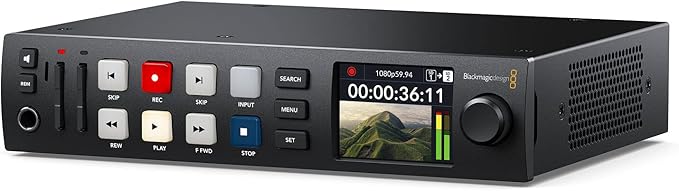
Blackmagic Design - HyperDeck Studio HD Plus
HyperDeck Studio HD Plus includes all the features of the Mini model, but is larger so it has more space for extra controls and extra connections. This model adds 6G-SDI so it can record and playback ProRes up to Ultra HD 30fps, and it includes an SDI loop out and HDR support. Plus the two 6G-SDI outputs allow fill and key playback up to 1080p60. There is also an HDMI input and a dedicated 3G-SDI monitoring output with overlays. Any button pushed on the front panel is sent to a dedicated RS-422 remote output and the DC power is now a broadcast style XLR connector. The front panel is also upgraded with better transport control buttons, a headphone socket and built in speaker.The World's Most Advanced Broadcast Decks! The advanced design of the HyperDeck Studio family puts the powerful features of a professional grade deck into a compact size that's only 1 rack unit high. This incredible miniaturization is made possible because HyperDeck Studio records onto inexpensive, commonly available SD cards or UHS-II cards, which are a fraction of the size of professional media used in the past. The full rack width Pro models even add dual SSD slots in addition to the SD cards, so you get 4 media slots in total! The small size, combined with dual recorders, professional connections and familiar VTR style controls let you use HyperDeck Studio in ways that are simply impossible with a larger deck!
HyperDeck Studio HD Plus includes all the features of the Mini model, but is larger so it has more space for extra controls and extra connections. This model adds 6G-SDI so it can record and playback ProRes up to Ultra HD 30fps, and it includes an SDI loop out and HDR support. Plus the two 6G-SDI outputs allow fill and key playback up to 1080p60. There is also an HDMI input and a dedicated 3G-SDI monitoring output with overlays. Any button pushed on the front panel is sent to a dedicated RS-422 remote output and the DC power is now a broadcast style XLR connector. The front panel is also upgraded with better transport control buttons, a headphone socket and built in speaker.The World's Most Advanced Broadcast Decks! The advanced design of the HyperDeck Studio family puts the powerful features of a professional grade deck into a compact size that's only 1 rack unit high. This incredible miniaturization is made possible because HyperDeck Studio records onto inexpensive, commonly available SD cards or UHS-II cards, which are a fraction of the size of professional media used in the past. The full rack width Pro models even add dual SSD slots in addition to the SD cards, so you get 4 media slots in total! The small size, combined with dual recorders, professional connections and familiar VTR style controls let you use HyperDeck Studio in ways that are simply impossible with a larger deck!
HyperDeck Studio HD Plus includes all the features of the Mini model, but is larger so it has more space for extra controls and extra connections. This model adds 6G-SDI so it can record and playback ProRes up to Ultra HD 30fps, and it includes an SDI loop out and HDR support. Plus the two 6G-SDI outputs allow fill and key playback up to 1080p60. There is also an HDMI input and a dedicated 3G-SDI monitoring output with overlays. Any button pushed on the front panel is sent to a dedicated RS-422 remote output and the DC power is now a broadcast style XLR connector. The front panel is also upgraded with better transport control buttons, a headphone socket and built in speaker.The World's Most Advanced Broadcast Decks! The advanced design of the HyperDeck Studio family puts the powerful features of a professional grade deck into a compact size that's only 1 rack unit high. This incredible miniaturization is made possible because HyperDeck Studio records onto inexpensive, commonly available SD cards or UHS-II cards, which are a fraction of the size of professional media used in the past. The full rack width Pro models even add dual SSD slots in addition to the SD cards, so you get 4 media slots in total! The small size, combined with dual recorders, professional connections and familiar VTR style controls let you use HyperDeck Studio in ways that are simply impossible with a larger deck!
HyperDeck Studio HD Plus includes all the features of the Mini model, but is larger so it has more space for extra controls and extra connections. This model adds 6G-SDI so it can record and playback ProRes up to Ultra HD 30fps, and it includes an SDI loop out and HDR support. Plus the two 6G-SDI outputs allow fill and key playback up to 1080p60. There is also an HDMI input and a dedicated 3G-SDI monitoring output with overlays. Any button pushed on the front panel is sent to a dedicated RS-422 remote output and the DC power is now a broadcast style XLR connector. The front panel is also upgraded with better transport control buttons, a headphone socket and built in speaker.The World's Most Advanced Broadcast Decks! The advanced design of the HyperDeck Studio family puts the powerful features of a professional grade deck into a compact size that's only 1 rack unit high. This incredible miniaturization is made possible because HyperDeck Studio records onto inexpensive, commonly available SD cards or UHS-II cards, which are a fraction of the size of professional media used in the past. The full rack width Pro models even add dual SSD slots in addition to the SD cards, so you get 4 media slots in total! The small size, combined with dual recorders, professional connections and familiar VTR style controls let you use HyperDeck Studio in ways that are simply impossible with a larger deck!
in 36 offers
The lowest price for Blackmagic Design - HyperDeck Studio HD Plus right now is $926.30 at showtechnix.com.au, compared across 36 retailers.
The all-time low was $794.00 on 9 Nov 2024 — today's price is 17% above the lowest ever. That's a little above the best price we've seen.
Prices last updated 23 Oct 2026.
Last updated at 23/10/2026 10:39:41
Blackmagic HyperDeck Studio HD Plus
Delivery $30
Blackmagic Design Hyperdeck Studio HD Plus
Delivery $16.50
Blackmagic HyperDeck HD Plus Studio Video Recorder
Blackmagic HyperDeck Studio HD Plus
Blackmagic HyperDeck Studio HD Plus – Ultra HD Broadcast Recorder
Delivery between 28–30 Oct $20
Blackmagic HyperDeck Studio HD Plus
Free delivery between 28 Oct – 4 Nov
Blackmagic HyperDeck Studio HD Plus
Delivery by Wed $25
BlackMagic HYPERDSTDCHP HyperDeck Studio HD Plus
Delivery between 29 Oct – 3 Nov $26.64
Blackmagic Design HyperDeck Studio HD Plus
Delivery between 26 Oct – 3 Nov $15
Blackmagic Design HyperDeck Studio HD Plus
Delivery between Tue – Thu $16
originally posted on bhphotovideo.com
We produce events with multiple cameras and regularly are asked if each camera is recording. We take that responsibility off the camera operator by ISO recording to our Hyperdeck ISO recording rack. If you are involved in event production it is very important to record each camera for post production purposes. Today some switchers can do ISO recording but not at higher resolutions (ProRes, 4K etc). Blackmagic Hyperdeck is the perfect solution for us.
originally posted on bhphotovideo.com
HyperDeck AudioIt was with excited anticipation that I awaited for the arrival of my HyperDeck Studio HD Plus.It arrived today and everything hooked up as it should.Video recording was superb as I expected. And although finding the right setting in Davinci Resolve to be able to actually play in the HyperDeck took some time, I was finally able to find the correct render settings to get the video files to load and play in the HyperDeck correctly.But I cannot express how disappointed I am with the problems it has with playing audio into a ATEM Mini Extreme ISO using HDMI.At first, I thought perhaps I had made a mistake in my render process... no it was fine.Then to be sure, I recorded something directly into the HyperDeck to see how it played audio back - ... MoreHyperDeck AudioIt was with excited anticipation that I awaited for the arrival of my HyperDeck Studio HD Plus.It arrived today and everything hooked up as it should.Video recording was superb as I expected. And although finding the right setting in Davinci Resolve to be able to actually play in the HyperDeck took some time, I was finally able to find the correct render settings to get the video files to load and play in the HyperDeck correctly.But I cannot express how disappointed I am with the problems it has with playing audio into a ATEM Mini Extreme ISO using HDMI.At first, I thought perhaps I had made a mistake in my render process... no it was fine.Then to be sure, I recorded something directly into the HyperDeck to see how it played audio back - same result.The audio playback on this HyperDeck stinks.Random glitches in the audio happen at irregular intervals - to the extent that the unit is basically worthless to me as a playback system.To confirm that this problem is the HyperDeck and NOT the video files, I exported files from the HyperDeck to my computer and played them back there.The audio played back perfectly in my computer. To make this point clear, these exact same files played on the HyperDeck had glitches in the audio at random intervals. But when those same files were played back on the computer, they played perfectly.This is completely unacceptable.I returned the unit and got my money back.Now I just use VLC - problem solved.
originally posted on bhphotovideo.com
We were using another solution for prerecorded video and motion graphics during our church's livestream, which had been in use for 3 years. It had a catastrophic failure, and needed a replacement. We purchased the Blackmagic Design HyperDeck Studio HD Plus, as we have several devices in use from Blackmagic, so it integrated perfectly into our system.I have tested every aspect of this device, and it works flawlessly.The Hyperdeck is connected to an ATEM Mini Extreme through two Blackmagic Design Micro Converter Bidirectional SDI/HDMI 3G. This is perfect for keying upstream and downstream motion and still graphics during our services, and is vital for Intro and Outro prerecorded video. We use both SD cards, and USB-C SSD drives for content.The setup was simple, ... MoreWe were using another solution for prerecorded video and motion graphics during our church's livestream, which had been in use for 3 years. It had a catastrophic failure, and needed a replacement. We purchased the Blackmagic Design HyperDeck Studio HD Plus, as we have several devices in use from Blackmagic, so it integrated perfectly into our system.I have tested every aspect of this device, and it works flawlessly.The Hyperdeck is connected to an ATEM Mini Extreme through two Blackmagic Design Micro Converter Bidirectional SDI/HDMI 3G. This is perfect for keying upstream and downstream motion and still graphics during our services, and is vital for Intro and Outro prerecorded video. We use both SD cards, and USB-C SSD drives for content.The setup was simple, and quick. The instructions are thorough, plus the benefit of YouTube having lots of tutorials that will assist in this process.We have been using the Hyperdeck for about 4 weeks now, and have had great success in using for our intended purposes. We do not use the recording feature from our 3 cameras, but I have tested this function multiple times, without fail.I highly recommend this device for anyone needing to using still or motion graphics and prerecorded video, as this device meets this need perfectly.
| Input Resolution | HD |
| Connectivity Inputs | HDMI |
| Connectivity Outputs | SDI video outputs (2), 6.35 mm headphone jack (1), BNC Out (Reference Connections), BNC Out (Timecode Connections) |
| Network Capabilities | Ethernet (1Gb/s), Blackmagic HyperDeck Ethernet Protocol, Remote FTP file upload |
| Wireless Connectivity | No |
Blackmagic HyperDeck Studio HD Plus
Delivery $30
Blackmagic Design Hyperdeck Studio HD Plus
Delivery $16.50
Blackmagic HyperDeck HD Plus Studio Video Recorder
Blackmagic HyperDeck Studio HD Plus
Blackmagic HyperDeck Studio HD Plus – Ultra HD Broadcast Recorder
Delivery between 28–30 Oct $20
We produce events with multiple cameras and regularly are asked if each camera is recording. We take that responsibility off the camera operator by ISO recording to our Hyperdeck ISO recording rack. If you are involved in event production it is very important to record each camera for post production purposes. Today some switchers can do ISO recording but not at higher resolutions (ProRes, 4K etc). Blackmagic Hyperdeck is the perfect solution for us.
HyperDeck AudioIt was with excited anticipation that I awaited for the arrival of my HyperDeck Studio HD Plus.It arrived today and everything hooked up as it should.Video recording was superb as I expected. And although finding the right setting in Davinci Resolve to be able to actually play in the HyperDeck took some time, I was finally able to find the correct render settings to get the video files to load and play in the HyperDeck correctly.But I cannot express how disappointed I am with the problems it has with playing audio into a ATEM Mini Extreme ISO using HDMI.At first, I thought perhaps I had made a mistake in my render process... no it was fine.Then to be sure, I recorded something directly into the HyperDeck to see how it played audio back - ... MoreHyperDeck AudioIt was with excited anticipation that I awaited for the arrival of my HyperDeck Studio HD Plus.It arrived today and everything hooked up as it should.Video recording was superb as I expected. And although finding the right setting in Davinci Resolve to be able to actually play in the HyperDeck took some time, I was finally able to find the correct render settings to get the video files to load and play in the HyperDeck correctly.But I cannot express how disappointed I am with the problems it has with playing audio into a ATEM Mini Extreme ISO using HDMI.At first, I thought perhaps I had made a mistake in my render process... no it was fine.Then to be sure, I recorded something directly into the HyperDeck to see how it played audio back - same result.The audio playback on this HyperDeck stinks.Random glitches in the audio happen at irregular intervals - to the extent that the unit is basically worthless to me as a playback system.To confirm that this problem is the HyperDeck and NOT the video files, I exported files from the HyperDeck to my computer and played them back there.The audio played back perfectly in my computer. To make this point clear, these exact same files played on the HyperDeck had glitches in the audio at random intervals. But when those same files were played back on the computer, they played perfectly.This is completely unacceptable.I returned the unit and got my money back.Now I just use VLC - problem solved.
We were using another solution for prerecorded video and motion graphics during our church's livestream, which had been in use for 3 years. It had a catastrophic failure, and needed a replacement. We purchased the Blackmagic Design HyperDeck Studio HD Plus, as we have several devices in use from Blackmagic, so it integrated perfectly into our system.I have tested every aspect of this device, and it works flawlessly.The Hyperdeck is connected to an ATEM Mini Extreme through two Blackmagic Design Micro Converter Bidirectional SDI/HDMI 3G. This is perfect for keying upstream and downstream motion and still graphics during our services, and is vital for Intro and Outro prerecorded video. We use both SD cards, and USB-C SSD drives for content.The setup was simple, ... MoreWe were using another solution for prerecorded video and motion graphics during our church's livestream, which had been in use for 3 years. It had a catastrophic failure, and needed a replacement. We purchased the Blackmagic Design HyperDeck Studio HD Plus, as we have several devices in use from Blackmagic, so it integrated perfectly into our system.I have tested every aspect of this device, and it works flawlessly.The Hyperdeck is connected to an ATEM Mini Extreme through two Blackmagic Design Micro Converter Bidirectional SDI/HDMI 3G. This is perfect for keying upstream and downstream motion and still graphics during our services, and is vital for Intro and Outro prerecorded video. We use both SD cards, and USB-C SSD drives for content.The setup was simple, and quick. The instructions are thorough, plus the benefit of YouTube having lots of tutorials that will assist in this process.We have been using the Hyperdeck for about 4 weeks now, and have had great success in using for our intended purposes. We do not use the recording feature from our 3 cameras, but I have tested this function multiple times, without fail.I highly recommend this device for anyone needing to using still or motion graphics and prerecorded video, as this device meets this need perfectly.
The lighted control buttons are a welcome addition to this compact device. Unlike the earlier Mini version, PoE is no longer an option. However there is a 4-pin XLR connection for 14 V battery operation in addition to line power. The power supply is internal, so there are no annoying line-lumps or wall-warts needed. There are several recording/playback codecs available, including ProRes. You can add videos to an SD card with a computer, but they must be in the same codec set for recording (not in the manual). You can select from a list of files on one card, but the search will not span cards and there is no easy way to change the active card without pulling one or the other. When recording, you can span SD cards, and hot-swap the idle card for continuous, gapless ... MoreThe lighted control buttons are a welcome addition to this compact device. Unlike the earlier Mini version, PoE is no longer an option. However there is a 4-pin XLR connection for 14 V battery operation in addition to line power. The power supply is internal, so there are no annoying line-lumps or wall-warts needed. There are several recording/playback codecs available, including ProRes. You can add videos to an SD card with a computer, but they must be in the same codec set for recording (not in the manual). You can select from a list of files on one card, but the search will not span cards and there is no easy way to change the active card without pulling one or the other. When recording, you can span SD cards, and hot-swap the idle card for continuous, gapless operation. For ultimate control, the Hyperdeck must be used with an ATEM computer panel. However local controls are sufficient for nearly any switcher, including an Atomos Shogun 7.
We've had lots of issues with BlackMagic stuff in the past and was hesitant to get this HyperDeck, but it's been what we've needed to start and stop recording from a single Canon PTZ on an accessible SD card. I really appreciate the UHS-II and HDMI 2.0 compatibility.
Very nice Blackmagic product, quality and easy to use for good price.First, I found somes issues recording in 4K30p with lines imperfections on the image and the playback video on the monitor was without sound, also in 4K only Pro Reso is offering for recording.But i bought it for recording video in HD 1080 and i am 100% satisfied because image and sound are very fantastic! Supporting Record all fps 60,59,50,30,29,25 everything working perfectly in HD, the H264 codecs is beautiful and use low data, the Pro Reso is the best if you want maximum quality.You can use this recorder for a professional camera or like a "VCR" connecting via the HDMI your computer, your appleTV, or other player..It's will be a plus if can be possible recording in same time on the both ... MoreVery nice Blackmagic product, quality and easy to use for good price.First, I found somes issues recording in 4K30p with lines imperfections on the image and the playback video on the monitor was without sound, also in 4K only Pro Reso is offering for recording.But i bought it for recording video in HD 1080 and i am 100% satisfied because image and sound are very fantastic! Supporting Record all fps 60,59,50,30,29,25 everything working perfectly in HD, the H264 codecs is beautiful and use low data, the Pro Reso is the best if you want maximum quality.You can use this recorder for a professional camera or like a "VCR" connecting via the HDMI your computer, your appleTV, or other player..It's will be a plus if can be possible recording in same time on the both SD Cards.I recommend this product if you need only HD, if you want recording in 4K, better go to the HyperDeck Studio 4K Pro.Thank you B&H and Blackmagic.
I just made the update to the version 8.0.2 of HyperDeck internal software and good news the 4K30p now works perfectly ! No More lines imperfections.Blackmagic added some features in the Menu like the default resolution when you insert your SD card to play different files recording in various resolutions.They made better the SEARCH with the jog wheel you have now 3 speed positions.So now i put 5 stars to this recorder.Good job Blackmagic.
HyperDeck Studio HD PlusIt was the same that it was excited anticipation that Iawaited for the arrival of my HyperDeck Studio HD Plus.Unfortunately, I was disappointed with the very first touchof this device.I have only SD SDI signals in my office, so I tried to recordsome files to HD Studio HD Plus and got crackling audio in therecorded files.I tried to change codecs, but the result was the same - crackleaudio.Then I changed the input from SDI to HDMI from my computer andrecorded some files in 4K with good picture quality and sound.It's okay.The next day a moved the device to my OB VAN with 1920x1080 HD-SDIinfrastructure. The recording is good and the audio is good.So, I think that BM did not have the possibility to test SD SDIin ... MoreHyperDeck Studio HD PlusIt was the same that it was excited anticipation that Iawaited for the arrival of my HyperDeck Studio HD Plus.Unfortunately, I was disappointed with the very first touchof this device.I have only SD SDI signals in my office, so I tried to recordsome files to HD Studio HD Plus and got crackling audio in therecorded files.I tried to change codecs, but the result was the same - crackleaudio.Then I changed the input from SDI to HDMI from my computer andrecorded some files in 4K with good picture quality and sound.It's okay.The next day a moved the device to my OB VAN with 1920x1080 HD-SDIinfrastructure. The recording is good and the audio is good.So, I think that BM did not have the possibility to test SD SDIin their laboratory ))Now about the broadcast quality of the interface.It is not true!The buttons really look like the BetacamSP buttons, butyou have to press only REC button to record. If you are pressing Rec+Play (like on Betacam) - the HyperDeck freezesand you have to reload the system.As soon as we have no power button onboard - you have to turn off the power cable from the device, and then switch it back.Very Comfortable!After the formatting SD cards in the device - the same storyHyperDeck is olso freezes.So, in my opinion - it is good for school television, but notfor a broadcast company.
The hyoerdeck is a great addition to my workload. I'm not recording to it, but I am using it for media playback, both regular video and transparent video with alpha channel. I love how fast it is. It is easily controlled by additional software such as the Atem software control or Bitfocus Compannion for the Elgato Streamdeck. However, I have a few drawbacks with it. If you dont have a 4k player, don't upload anything 4k. It will not play it back, even at 1080p. Not a big deal, but I learned the hard way. In addition, it doesn't not mix amd match formats l, at least not that ove been able to do. One you have a codex selected, stick to it. It uses a wide variety of codexs, but it struggles to play videos of differnt formats. Same thing with framerates... if one video ... MoreThe hyoerdeck is a great addition to my workload. I'm not recording to it, but I am using it for media playback, both regular video and transparent video with alpha channel. I love how fast it is. It is easily controlled by additional software such as the Atem software control or Bitfocus Compannion for the Elgato Streamdeck. However, I have a few drawbacks with it. If you dont have a 4k player, don't upload anything 4k. It will not play it back, even at 1080p. Not a big deal, but I learned the hard way. In addition, it doesn't not mix amd match formats l, at least not that ove been able to do. One you have a codex selected, stick to it. It uses a wide variety of codexs, but it struggles to play videos of differnt formats. Same thing with framerates... if one video is 24fps, all videos have to be 24fps or it doesn't play back to others. Same thing with resolution, if one video is 1920 x 1080 than all have to be. I feel like it could've been designed to work without thise limitations, but it wasn't. Overall, once I got around those issues, its a great device that I would recommend to anyone playing back video during their broadcasts. It sure beats PowerPoint over NDI or screen capture.
I bought this primarily to be able to play graphics with an alpha channel. Perfect for that.Secondarily I'd like to play back arbitrary video files, say when I'm teaching a class. The HyperDeck will only play back files that match exactly the codec (including frame rate) you have set to record with. That means I have to take all of my video files and transcode them to that setting.Since these are going into an ATEM Mini Extreme ISO which can take video in using a wide range of formats, I'm having to do transcoding that isn't needed by the ATEM mini. I have no idea why the recorder won't simply play whatever the format is stored.By contrast I have PlayoutBee - a software based video player (still in beta) that runs on a RaspberryPi that can play lots of formats ... MoreI bought this primarily to be able to play graphics with an alpha channel. Perfect for that.Secondarily I'd like to play back arbitrary video files, say when I'm teaching a class. The HyperDeck will only play back files that match exactly the codec (including frame rate) you have set to record with. That means I have to take all of my video files and transcode them to that setting.Since these are going into an ATEM Mini Extreme ISO which can take video in using a wide range of formats, I'm having to do transcoding that isn't needed by the ATEM mini. I have no idea why the recorder won't simply play whatever the format is stored.By contrast I have PlayoutBee - a software based video player (still in beta) that runs on a RaspberryPi that can play lots of formats - that doesn't have this constraint. They HyperDeck is more reliable than PlayoutBee and much better integrated into Companion, so I'd like to use it for more.I do really like that Blackmagic design has implemented a text-based interface you can connect to via a terminal. That's handy for diagnosing issues. I wish it had autocomplete and basic things common to terminal interfaces (recall previous commands, basic in-line editing).
| Input Resolution | HD |
| Connectivity Inputs | HDMI |
| Connectivity Outputs | SDI video outputs (2), 6.35 mm headphone jack (1), BNC Out (Reference Connections), BNC Out (Timecode Connections) |
| Network Capabilities | Ethernet (1Gb/s), Blackmagic HyperDeck Ethernet Protocol, Remote FTP file upload |
| Wireless Connectivity | No |

