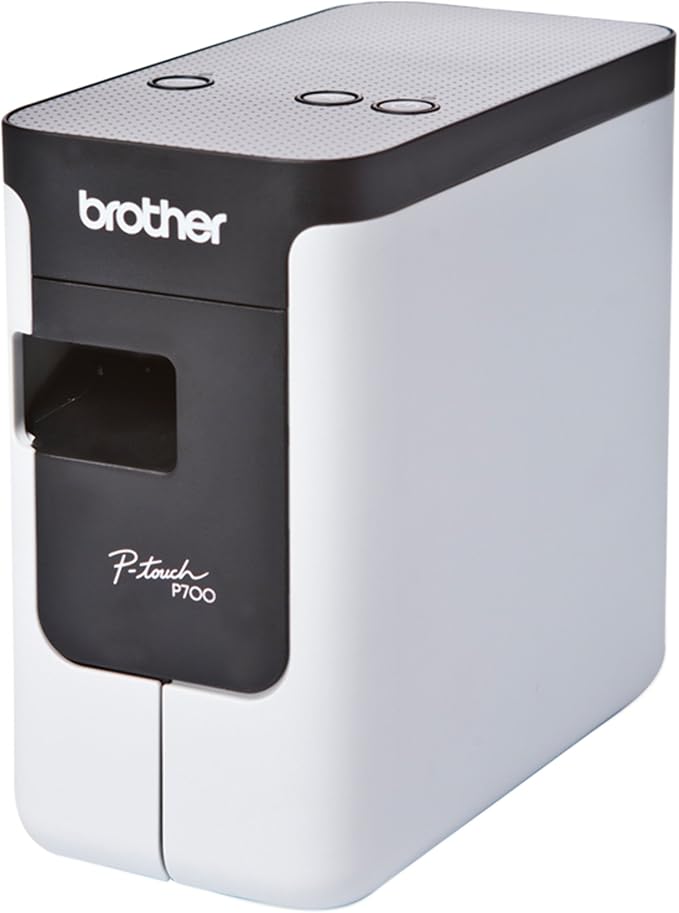
Brother PT-P700 P-Touch Machine
Print labels quickly and easily. The PT-P700 offers simple connectivity – so there’s no software or drivers to install. Simply connect to your computer via the included USB cable and launch the built-in software to get started creating professional labels using your own keyboard. Create multi-line labels using fonts and graphics on your computer. Fast print speeds and automatic label cutting help speed large labeling jobs along. For more advanced labeling, such as including bar codes or printing from a database, you can use the P-touch Editor software. Print labels up to 24mm wide, with large crisp text up to 48pt. The PT-P700 is compatible with durable, TZe series tapes – great for indoor applications or harsher environments – such as outdoors. Choose from a variety of colors and sizes, including Extra-strength adhesive, Acid free, Cable and wire, Tamper evident, Fabric iron-on, Super narrow or decorative Simply Stylish. The split back tapes offer a hassle free application, with easy peel and stick. – No software or drivers to install – just connect via included USB cable to get started – Create large, durable labels up to 24mm wide – suitable for indoor or outdoor use – Customize labels using fonts and graphics on your computer – Quickly create multi-line labels using the built-in software and your own keyboard – Fast print speeds and automatic label cutting help support efficient labeling – Download templates from the Cloud to add to your P-touch Editor label library – When finished, simply turn it off and unplug. No software is left behind on your computer – Powered by AC adapter (included) or 6 x AA batteries (sold separately) – Includes 0.94” (24mm) laminated starter tape, AC adapter, USB cable and software.
Print labels quickly and easily. The PT-P700 offers simple connectivity – so there’s no software or drivers to install. Simply connect to your computer via the included USB cable and launch the built-in software to get started creating professional labels using your own keyboard. Create multi-line labels using fonts and graphics on your computer. Fast print speeds and automatic label cutting help speed large labeling jobs along. For more advanced labeling, such as including bar codes or printing from a database, you can use the P-touch Editor software. Print labels up to 24mm wide, with large crisp text up to 48pt. The PT-P700 is compatible with durable, TZe series tapes – great for indoor applications or harsher environments – such as outdoors. Choose from a variety of colors and sizes, including Extra-strength adhesive, Acid free, Cable and wire, Tamper evident, Fabric iron-on, Super narrow or decorative Simply Stylish. The split back tapes offer a hassle free application, with easy peel and stick. – No software or drivers to install – just connect via included USB cable to get started – Create large, durable labels up to 24mm wide – suitable for indoor or outdoor use – Customize labels using fonts and graphics on your computer – Quickly create multi-line labels using the built-in software and your own keyboard – Fast print speeds and automatic label cutting help support efficient labeling – Download templates from the Cloud to add to your P-touch Editor label library – When finished, simply turn it off and unplug. No software is left behind on your computer – Powered by AC adapter (included) or 6 x AA batteries (sold separately) – Includes 0.94” (24mm) laminated starter tape, AC adapter, USB cable and software.
Print labels quickly and easily. The PT-P700 offers simple connectivity – so there’s no software or drivers to install. Simply connect to your computer via the included USB cable and launch the built-in software to get started creating professional labels using your own keyboard. Create multi-line labels using fonts and graphics on your computer. Fast print speeds and automatic label cutting help speed large labeling jobs along. For more advanced labeling, such as including bar codes or printing from a database, you can use the P-touch Editor software. Print labels up to 24mm wide, with large crisp text up to 48pt. The PT-P700 is compatible with durable, TZe series tapes – great for indoor applications or harsher environments – such as outdoors. Choose from a variety of colors and sizes, including Extra-strength adhesive, Acid free, Cable and wire, Tamper evident, Fabric iron-on, Super narrow or decorative Simply Stylish. The split back tapes offer a hassle free application, with easy peel and stick. – No software or drivers to install – just connect via included USB cable to get started – Create large, durable labels up to 24mm wide – suitable for indoor or outdoor use – Customize labels using fonts and graphics on your computer – Quickly create multi-line labels using the built-in software and your own keyboard – Fast print speeds and automatic label cutting help support efficient labeling – Download templates from the Cloud to add to your P-touch Editor label library – When finished, simply turn it off and unplug. No software is left behind on your computer – Powered by AC adapter (included) or 6 x AA batteries (sold separately) – Includes 0.94” (24mm) laminated starter tape, AC adapter, USB cable and software.
Print labels quickly and easily. The PT-P700 offers simple connectivity – so there’s no software or drivers to install. Simply connect to your computer via the included USB cable and launch the built-in software to get started creating professional labels using your own keyboard. Create multi-line labels using fonts and graphics on your computer. Fast print speeds and automatic label cutting help speed large labeling jobs along. For more advanced labeling, such as including bar codes or printing from a database, you can use the P-touch Editor software. Print labels up to 24mm wide, with large crisp text up to 48pt. The PT-P700 is compatible with durable, TZe series tapes – great for indoor applications or harsher environments – such as outdoors. Choose from a variety of colors and sizes, including Extra-strength adhesive, Acid free, Cable and wire, Tamper evident, Fabric iron-on, Super narrow or decorative Simply Stylish. The split back tapes offer a hassle free application, with easy peel and stick. – No software or drivers to install – just connect via included USB cable to get started – Create large, durable labels up to 24mm wide – suitable for indoor or outdoor use – Customize labels using fonts and graphics on your computer – Quickly create multi-line labels using the built-in software and your own keyboard – Fast print speeds and automatic label cutting help support efficient labeling – Download templates from the Cloud to add to your P-touch Editor label library – When finished, simply turn it off and unplug. No software is left behind on your computer – Powered by AC adapter (included) or 6 x AA batteries (sold separately) – Includes 0.94” (24mm) laminated starter tape, AC adapter, USB cable and software.
in 92 offers
The lowest price for Brother PT-P700 P-Touch Machine right now is $110.00 at Device Deal, compared across 35 retailers.
The all-time low was $47.15 on 19 July 2025 — today's price is 133% above the lowest ever. It has been notably cheaper before — worth setting a price alert.
Prices last updated 11 Oct 2026.
Last updated at 11/10/2026 00:57:06
Brother PT-P700 Desktop Label Printer 24 mm USB PC/Mac High-Speed
Delivery $11.99
Brother P700 P Touch Machine
Delivery $17
Brother P-Touch PT-P700 Plug-and-print label printer compatible with PC and Mac PT-P700
Free delivery between Mon – Thu
Brother PT-P700 Desktop Thermal Transfer Label Printer
Delivery between Mon – Wed $7.95
BROTHER PT-P700 P-TOUCH PLUG-AND-PRINT DESKTOP LABEL PRINTER
Delivery between 19–22 Oct $32
Brother PT-P700 PC Label Printer - Plug-and-Print, 3.5-24mm TZE Tape - For PC and MAC
Delivery between 15–24 Oct $12
Brother PT-P700 P Touch USB Label Printer | Best Online Computer Store
Delivery between 16–23 Oct $12.10
Brother PT-P700 Desktop Label Printer – USB Plug & Print
Free delivery between Mon – Fri
Brother P-Touch PT-P700 labelling labelling machine
Free delivery between Tue – Thu
Brother Pt-P700 P-Touch Desktop Label Maker With Usb
Delivery between 14–23 Oct $16.50
originally posted on brother.co.uk
Just bought this specially to work with both my MAC (2019 Macbook Pro), and Windows. After wasting an fruitless hour got onto support who confirmed that it does not work with "does not have support for different USB ports for new Mac computer", my MAC. He asked me if I was connecting it to a USB2.0 port, which no MAC has had for about 5 years at least. So effectively does not work with Macbook Pros, Macbook Airs, or presumably any other current model. Would be nice if the website stated that before wasting my time and money.....
originally posted on officedepot.com
I am familiar with and have used P-Touch label makers since the mid-1990's. I like them, and they are often the go-to labeler for those needing label tapes. P-Touch is so ubiquitous that the brand itself is an eponym, much like Kleenex or Clorox.The only negative that I find with this product is the amount of label tape that it wastes. Brother has deliberately engineered this printer so that it cuts off a small portion of tape, prints, and then cuts the tape so you have a label. The official answer from Brother is that they have to do this for the label to print properly. In the end that is just lazy engineering and ends up wasting tape meaning that you have to buy tape earlier than you would normally have to. That is my only complaint about the printer, but it is ... MoreI am familiar with and have used P-Touch label makers since the mid-1990's. I like them, and they are often the go-to labeler for those needing label tapes. P-Touch is so ubiquitous that the brand itself is an eponym, much like Kleenex or Clorox.The only negative that I find with this product is the amount of label tape that it wastes. Brother has deliberately engineered this printer so that it cuts off a small portion of tape, prints, and then cuts the tape so you have a label. The official answer from Brother is that they have to do this for the label to print properly. In the end that is just lazy engineering and ends up wasting tape meaning that you have to buy tape earlier than you would normally have to. That is my only complaint about the printer, but it is a big one and the reason that it only gets 3 starts IMHO.
originally posted on bhphotovideo.com
I use this printer primarily for creating asset tags that have our company logo on them. It was important to be able to connect and print from a computer to this printer. It connects through USB only. I currently us the P-Touch Editor version 5.0.120. I used to use a Brother PT-2730. The PT-2730 has a keyboard that I never used, I always used the computer software, even for a simple one line label. The PT-P700 interfaces perfectly with this software. I have not used the on-board lite version of the P-Touch editor software, so I can't comment on that. The printer will accept a variety of TZe size tapes from 6mm to 24mm making it very versatile. It's quick and quiet. My only gripe, and this is with any Brother label printer is the amount of tape it must waste before ... MoreI use this printer primarily for creating asset tags that have our company logo on them. It was important to be able to connect and print from a computer to this printer. It connects through USB only. I currently us the P-Touch Editor version 5.0.120. I used to use a Brother PT-2730. The PT-2730 has a keyboard that I never used, I always used the computer software, even for a simple one line label. The PT-P700 interfaces perfectly with this software. I have not used the on-board lite version of the P-Touch editor software, so I can't comment on that. The printer will accept a variety of TZe size tapes from 6mm to 24mm making it very versatile. It's quick and quiet. My only gripe, and this is with any Brother label printer is the amount of tape it must waste before printing. Before each job, about an inch of tape is ejected from the labeler before printing the submitted job. One way I've found to minimize the lead tape problem is to print multiple copies of the same label, or, set up a label as a template, then use the database feature to print multiple labels in a particular sequence. You still get the initial wasted piece, but, subsequent labels print one after another with no waste. Obviously this isn't enough to keep me from using the product, but, I have to wonder how many potential cartridges worth of tape have been ejected needlessly before each print job? I would recommend this printer to anyone who wants an easy-to-use, extremely portable label printer that is controlled solely from a computer. There is no keypad on this unit. The unit will run on 6-AA batteries and comes with an AC adapter. I believe it came with a CD-ROM containing software and drivers, but, I always go to the MFG website and download the latest drivers.
| Tape Width | Up to 24mm |
| Cartridge Type | TZe series tapes |
| Consumable Compatibility | durable, TZe series tapes |
| Label Color | Variety of colors |
| Label Material | tamper-evident tape, laminated plastic labels |
Brother PT-P700 Desktop Label Printer 24 mm USB PC/Mac High-Speed
Delivery $11.99
Brother P700 P Touch Machine
Delivery $17
Brother P-Touch PT-P700 Plug-and-print label printer compatible with PC and Mac PT-P700
Free delivery between Mon – Thu
Brother PT-P700 Desktop Thermal Transfer Label Printer
Delivery between Mon – Wed $7.95
BROTHER PT-P700 P-TOUCH PLUG-AND-PRINT DESKTOP LABEL PRINTER
Delivery between 19–22 Oct $32
Just bought this specially to work with both my MAC (2019 Macbook Pro), and Windows. After wasting an fruitless hour got onto support who confirmed that it does not work with "does not have support for different USB ports for new Mac computer", my MAC. He asked me if I was connecting it to a USB2.0 port, which no MAC has had for about 5 years at least. So effectively does not work with Macbook Pros, Macbook Airs, or presumably any other current model. Would be nice if the website stated that before wasting my time and money.....
I am familiar with and have used P-Touch label makers since the mid-1990's. I like them, and they are often the go-to labeler for those needing label tapes. P-Touch is so ubiquitous that the brand itself is an eponym, much like Kleenex or Clorox.The only negative that I find with this product is the amount of label tape that it wastes. Brother has deliberately engineered this printer so that it cuts off a small portion of tape, prints, and then cuts the tape so you have a label. The official answer from Brother is that they have to do this for the label to print properly. In the end that is just lazy engineering and ends up wasting tape meaning that you have to buy tape earlier than you would normally have to. That is my only complaint about the printer, but it is ... MoreI am familiar with and have used P-Touch label makers since the mid-1990's. I like them, and they are often the go-to labeler for those needing label tapes. P-Touch is so ubiquitous that the brand itself is an eponym, much like Kleenex or Clorox.The only negative that I find with this product is the amount of label tape that it wastes. Brother has deliberately engineered this printer so that it cuts off a small portion of tape, prints, and then cuts the tape so you have a label. The official answer from Brother is that they have to do this for the label to print properly. In the end that is just lazy engineering and ends up wasting tape meaning that you have to buy tape earlier than you would normally have to. That is my only complaint about the printer, but it is a big one and the reason that it only gets 3 starts IMHO.
I use this printer primarily for creating asset tags that have our company logo on them. It was important to be able to connect and print from a computer to this printer. It connects through USB only. I currently us the P-Touch Editor version 5.0.120. I used to use a Brother PT-2730. The PT-2730 has a keyboard that I never used, I always used the computer software, even for a simple one line label. The PT-P700 interfaces perfectly with this software. I have not used the on-board lite version of the P-Touch editor software, so I can't comment on that. The printer will accept a variety of TZe size tapes from 6mm to 24mm making it very versatile. It's quick and quiet. My only gripe, and this is with any Brother label printer is the amount of tape it must waste before ... MoreI use this printer primarily for creating asset tags that have our company logo on them. It was important to be able to connect and print from a computer to this printer. It connects through USB only. I currently us the P-Touch Editor version 5.0.120. I used to use a Brother PT-2730. The PT-2730 has a keyboard that I never used, I always used the computer software, even for a simple one line label. The PT-P700 interfaces perfectly with this software. I have not used the on-board lite version of the P-Touch editor software, so I can't comment on that. The printer will accept a variety of TZe size tapes from 6mm to 24mm making it very versatile. It's quick and quiet. My only gripe, and this is with any Brother label printer is the amount of tape it must waste before printing. Before each job, about an inch of tape is ejected from the labeler before printing the submitted job. One way I've found to minimize the lead tape problem is to print multiple copies of the same label, or, set up a label as a template, then use the database feature to print multiple labels in a particular sequence. You still get the initial wasted piece, but, subsequent labels print one after another with no waste. Obviously this isn't enough to keep me from using the product, but, I have to wonder how many potential cartridges worth of tape have been ejected needlessly before each print job? I would recommend this printer to anyone who wants an easy-to-use, extremely portable label printer that is controlled solely from a computer. There is no keypad on this unit. The unit will run on 6-AA batteries and comes with an AC adapter. I believe it came with a CD-ROM containing software and drivers, but, I always go to the MFG website and download the latest drivers.
This brother label printer is great. Its a nice compact size, looks great. Installs quickly and so easy to install. Handles any type of Brother cartridge and prints nice and clean. I've used a lot of the brother label printers in the past and this one is the best bang for the buck. I would highly recommend this.
This is a great value! You get all the features of PC connectivity, without the hassle or added cost of a wirelessly connected solution. The P-Touch software is great! You can create labels as simple or as intricate as you'd like. There's even a "simple" and "advanced" mode, so the software really works at your level. Labels print quickly and the quality is pretty good, but not QUITE as good as the top tier 360 dpi models, however I doubt many home or home business users would complain. I personally used this model to print perfume bottle labels 1"x1.2" and it worked great for me! And the labels are extremely durable, so it was a no brainer to use Brother labels as opposed to some of the alternatives. Yes, it does waste a little bit of tape before printing, but the ... MoreThis is a great value! You get all the features of PC connectivity, without the hassle or added cost of a wirelessly connected solution. The P-Touch software is great! You can create labels as simple or as intricate as you'd like. There's even a "simple" and "advanced" mode, so the software really works at your level. Labels print quickly and the quality is pretty good, but not QUITE as good as the top tier 360 dpi models, however I doubt many home or home business users would complain. I personally used this model to print perfume bottle labels 1"x1.2" and it worked great for me! And the labels are extremely durable, so it was a no brainer to use Brother labels as opposed to some of the alternatives. Yes, it does waste a little bit of tape before printing, but the end result is worth it.
This labeler is one of my favorite labelers. I've had 6 or 7 labelers over the years, but this one is the one I use the most. It is a great time saver. You load the software of your computer, then you can design your label and save it on the computer. It is easy to change the font to anything on my computer. You can add all kinds of pictures and frames to design your own. The best feature that I love and use is the automatic counting and printing feature. I can design a label that has numbers and then tell it how many numbers to increase each label by and print it, i.e. computer 1, computer 2, computer 3 etc. It changes the number and prints them out without me typing in each label. It also does the same with letters in the alphabet. When I get a new computer or ... MoreThis labeler is one of my favorite labelers. I've had 6 or 7 labelers over the years, but this one is the one I use the most. It is a great time saver. You load the software of your computer, then you can design your label and save it on the computer. It is easy to change the font to anything on my computer. You can add all kinds of pictures and frames to design your own. The best feature that I love and use is the automatic counting and printing feature. I can design a label that has numbers and then tell it how many numbers to increase each label by and print it, i.e. computer 1, computer 2, computer 3 etc. It changes the number and prints them out without me typing in each label. It also does the same with letters in the alphabet. When I get a new computer or upgrade my computer the software for the labeler and the software for the editor is easily downloaded. The P-touch Editor saves your label designs where ever you want to keep them, so they can be readily available. I can also adjust the size of the label and how much lead is put on the label, then it will automatically cut between each label made. I can make 36 labels in about 6 or 7 minutes. I can also adjust the size of the label and how much lead is put on the label, then it will automatically cut between each label made. I can make 36 labels in about 6 or 7 minutes. I would recommend this labeler for anyone that needs to make large (or small) amounts of labels. What a time saver!
I had to retire my P-touch 2730. All the labels that I saved the last 10 years were retrievable through the P-touch software. The PT-P700 is a simple compact design, were I was able to set it up and use it without instructions. It's compact design is key to saving space and makes it portable. Very please with it!
The printer itself works fine and makes clear, attractive labels. The software is another story. Don't bother with the CD that comes with the printer. It's way out of date and harks back to Win8.Download the latest software and firmware updates directly from Brother. But even that software is difficult to use. The onscreen user interface is small and difficult to read and interpret. Online manual is not very clear or well-written.So get the printer, but use the simplest version of the software.
I bought the PT-P700 to replace an existing label printer as I was looking for additional functionality. I've found the P700 to offer a lot of flexibility in its easy incorporation of graphics, and ability to print on different materials - such as shrink wrap. There are a lot of neat touches in the P-Touch Editor software too - and they work very nicely together. Loading new tapes is very straightforward. Setup too was reasonably simple. The only thing that threw me initially was the need to turn off the in-built software to allow my Mac to control the device.
I do not have real issues with it. I used it under Linux with VirtualBox and qemu / virt-manager and USB passthrough to Windows guest, with bundled software. It is easy to use, and works nicely. I only used it to print normal one-line or 2-line texts, but the software also allows serialization, cable flags, cable shrink wraps, barcodes, etc.Now, I use mostly ptouch-print from github, which is easy to use command line tool to print images and text. Way easier and quicker, and can be easily automated to do serialization, barcodes, etc.It works fine with original and 3rd party tapes. No silly DRM like HP, Epson, etc. Original Brother tapes (from reputable source), are really high quality. Variety of options, small, big, opaque, transparent, various adhesives ... MoreI do not have real issues with it. I used it under Linux with VirtualBox and qemu / virt-manager and USB passthrough to Windows guest, with bundled software. It is easy to use, and works nicely. I only used it to print normal one-line or 2-line texts, but the software also allows serialization, cable flags, cable shrink wraps, barcodes, etc.Now, I use mostly ptouch-print from github, which is easy to use command line tool to print images and text. Way easier and quicker, and can be easily automated to do serialization, barcodes, etc.It works fine with original and 3rd party tapes. No silly DRM like HP, Epson, etc. Original Brother tapes (from reputable source), are really high quality. Variety of options, small, big, opaque, transparent, various adhesives strength, colors, text colors, temperature ranges, shrink wrap, etc.Printing is fast, prints are very durable, and tapes can be used immediately.Auto-cut feature is great!Some people might complain about "wasted" tape on start of each print. It is not a waste, and is kind of required due to how the tape works. If you want to waste less, just produce multiple labels using a long text (possibly separate by 2 spaces each part), and cut the pieces yourself.I got device for free as a reward for some other purchases in Digitec, it was few years ago. The main cost is in tapes. Brother ones are bit on a high side, but actually considering their quality, I think it is worth it. Search for multi-packs, to save some money on them (i.e. 3 for price of 2). For less demanding tasks, 3rd party tapes, which can be cheaper and pretty good, are doing well too.Uses USB 2.0, with Mini plug type. Plus 12V/2A power supply (very small and light). Wish it was fully powered from USB, using USB Type C and 12V PD (Power Delivery), so it could run from a laptop, hub or a battery.
| Tape Width | Up to 24mm |
| Cartridge Type | TZe series tapes |
| Consumable Compatibility | durable, TZe series tapes |
| Label Color | Variety of colors |
| Label Material | tamper-evident tape, laminated plastic labels |

