Last updated at 24/08/2026 13:47:04
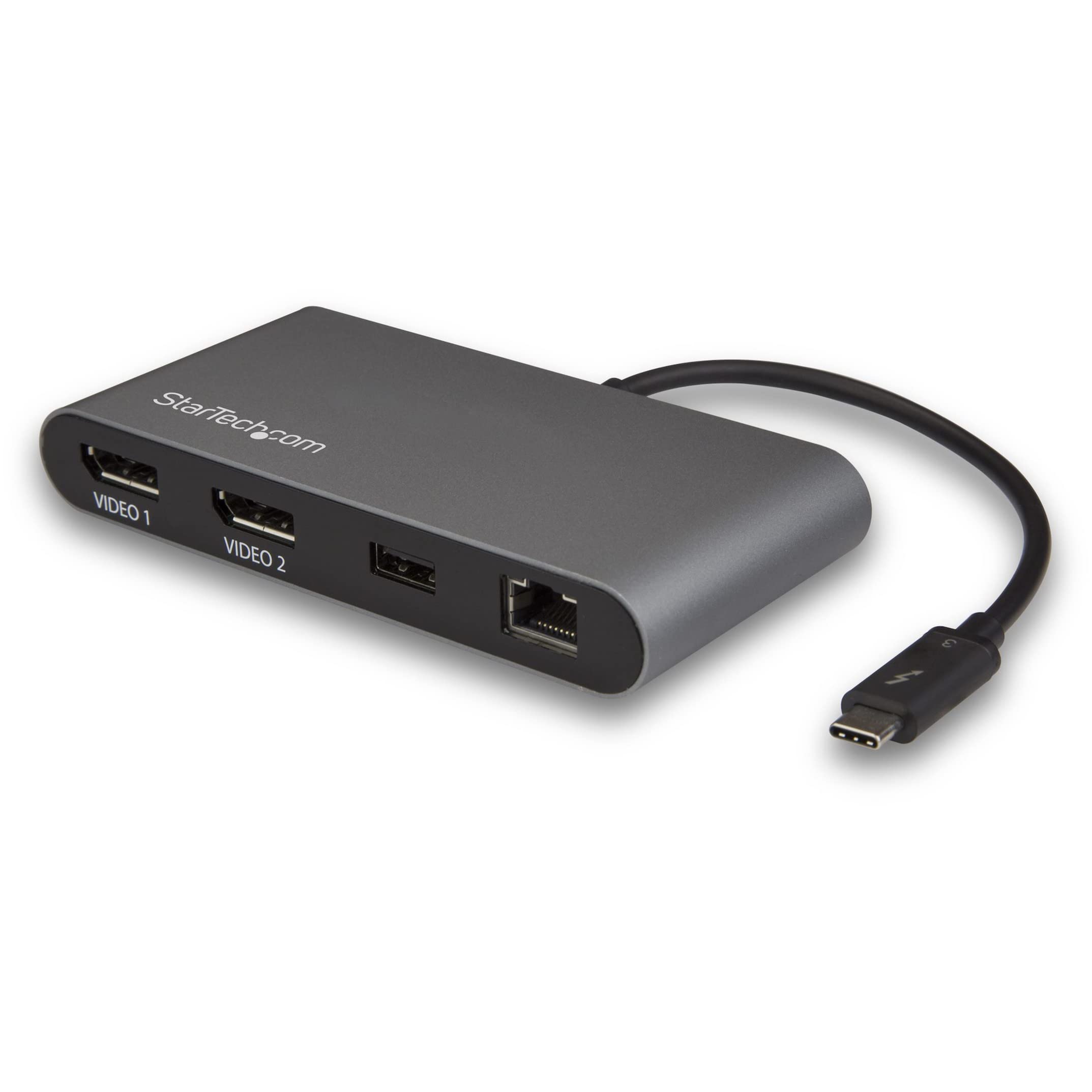
Caldigit Thunderbolt Usb-c 3 Mini Dock Dual 4k Display Adapter
Free delivery
Affiliate Disclosure: We may receive a small commission for purchases made through this link at no extra cost to you. This helps support our site. Thank you!
originally posted on bhphotovideo.com
I needed a dock that connected to my Thunderbolt 3 connector on my MB-Pro AND could drive my 2 external monitors via HDMI - with all monitors (the 2 external and the MB-Pro) independent. You cannot believe how hard it is to find such a dock as MOST seem to simply MIRROR the 2 external monitors (I have no idea why this is such a problem). In any case, the CalDigit Dock does the job, and does it very very well. Thus all three monitors are independent (as I wanted).The Dock itself is built very solidly. The wire that connects the Dock to the Thunderbolt 3 port is not removable but is a decent length and is of no problem for my use-case.
originally posted on bhphotovideo.com
Using the Caldigit Thunderbolt 3 Mini Dock Dual HDMI with a MacBook Pro 16” (2019) with 8 GB video Ram. Works as desired when connected to 2 24” HP monitors with a third 24” monitor being connected through the Apple A/V connector (the one with power, HDMI, USB-A). Also connecting to Ethernet and a USB drive at the same time.Very straightforward. No drivers to add. Works seamlessly.My only complaint (and 4 stars instead of 5) is the Thunderbolt 3 cable is very short. Would rather have a had a TB3 port on the dock rather than the short connection cable so I could pick the length of cable I wanted to put the dock in a different position on the desk.
originally posted on homeessentialsdirect.com
Caldigit is well known for making devices for photo and video editors. I am using this with Macbook pro 15 inch 2017: This Caldigit hub is very well made (aluminum could for venting heat) and works as it is supposed to. Its Thunderbolt 3 hardwired to Dual Display port 4k@60hz, Ethernet, USB3. There is also version with two HDMI ports and an extra USB2 port. Many Thunderbolt adapters cost $200 to $350 though they naturally include more ports. I already had Apple AV adapter, Ethernet adapter, USB3 3 port adapter, usbc to display port adapters and more. But these took up every port I had requiring power pass though on either the Apple AV or USB 3 adapter. Please note that if your using external monitor/s lid closed you will have occasional wake from sleep issues ... MoreCaldigit is well known for making devices for photo and video editors. I am using this with Macbook pro 15 inch 2017: This Caldigit hub is very well made (aluminum could for venting heat) and works as it is supposed to. Its Thunderbolt 3 hardwired to Dual Display port 4k@60hz, Ethernet, USB3. There is also version with two HDMI ports and an extra USB2 port. Many Thunderbolt adapters cost $200 to $350 though they naturally include more ports. I already had Apple AV adapter, Ethernet adapter, USB3 3 port adapter, usbc to display port adapters and more. But these took up every port I had requiring power pass though on either the Apple AV or USB 3 adapter. Please note that if your using external monitor/s lid closed you will have occasional wake from sleep issues getting signal to the displays whether use Apple's AV adapter or any adapters or hubs. Worse case scenario is jack and unjack the usb c connection or wake from macbook keyboard and display. This does not happen to me all the time but it happens. It i less frequent without pass though power since your getting the full 87watts while many pass though powers clip some power some. I am using Dual 32 Inch monitors, external keyboard, mouse, bluetooth Plantronics headset adapter, usb 3 hub, and now I am free to power my macbook pro directly without pass though power. This Caldigit tb hub works very well and requires no software on the mac.
| Cable type | Thunderbolt |
| Cable length | 20 cm/7.87 in. |
| Connections | Ethernet, HDMI, Thunderbolt 3 (USB-C), USB-A |
| Operating System | macOS 10.12 or later |
Caldigit Thunderbolt Usb-c 3 Mini Dock Dual 4k Display Adapter
Free delivery
Affiliate Disclosure: We may receive a small commission for purchases made through this link at no extra cost to you. This helps support our site. Thank you!
I needed a dock that connected to my Thunderbolt 3 connector on my MB-Pro AND could drive my 2 external monitors via HDMI - with all monitors (the 2 external and the MB-Pro) independent. You cannot believe how hard it is to find such a dock as MOST seem to simply MIRROR the 2 external monitors (I have no idea why this is such a problem). In any case, the CalDigit Dock does the job, and does it very very well. Thus all three monitors are independent (as I wanted).The Dock itself is built very solidly. The wire that connects the Dock to the Thunderbolt 3 port is not removable but is a decent length and is of no problem for my use-case.
Using the Caldigit Thunderbolt 3 Mini Dock Dual HDMI with a MacBook Pro 16” (2019) with 8 GB video Ram. Works as desired when connected to 2 24” HP monitors with a third 24” monitor being connected through the Apple A/V connector (the one with power, HDMI, USB-A). Also connecting to Ethernet and a USB drive at the same time.Very straightforward. No drivers to add. Works seamlessly.My only complaint (and 4 stars instead of 5) is the Thunderbolt 3 cable is very short. Would rather have a had a TB3 port on the dock rather than the short connection cable so I could pick the length of cable I wanted to put the dock in a different position on the desk.
Caldigit is well known for making devices for photo and video editors. I am using this with Macbook pro 15 inch 2017: This Caldigit hub is very well made (aluminum could for venting heat) and works as it is supposed to. Its Thunderbolt 3 hardwired to Dual Display port 4k@60hz, Ethernet, USB3. There is also version with two HDMI ports and an extra USB2 port. Many Thunderbolt adapters cost $200 to $350 though they naturally include more ports. I already had Apple AV adapter, Ethernet adapter, USB3 3 port adapter, usbc to display port adapters and more. But these took up every port I had requiring power pass though on either the Apple AV or USB 3 adapter. Please note that if your using external monitor/s lid closed you will have occasional wake from sleep issues ... MoreCaldigit is well known for making devices for photo and video editors. I am using this with Macbook pro 15 inch 2017: This Caldigit hub is very well made (aluminum could for venting heat) and works as it is supposed to. Its Thunderbolt 3 hardwired to Dual Display port 4k@60hz, Ethernet, USB3. There is also version with two HDMI ports and an extra USB2 port. Many Thunderbolt adapters cost $200 to $350 though they naturally include more ports. I already had Apple AV adapter, Ethernet adapter, USB3 3 port adapter, usbc to display port adapters and more. But these took up every port I had requiring power pass though on either the Apple AV or USB 3 adapter. Please note that if your using external monitor/s lid closed you will have occasional wake from sleep issues getting signal to the displays whether use Apple's AV adapter or any adapters or hubs. Worse case scenario is jack and unjack the usb c connection or wake from macbook keyboard and display. This does not happen to me all the time but it happens. It i less frequent without pass though power since your getting the full 87watts while many pass though powers clip some power some. I am using Dual 32 Inch monitors, external keyboard, mouse, bluetooth Plantronics headset adapter, usb 3 hub, and now I am free to power my macbook pro directly without pass though power. This Caldigit tb hub works very well and requires no software on the mac.
Unless you know the ins and outs of Thunderbolt, you'll have trouble getting this set up. Thunderbolt devices require permissions set in a Windows app. It will silently fail otherwise. CalDigit tech support helped me out with good, detailed how-to info. The device was not plug'n'play for me. Also, beware if your laptop doesn't have a Thunderbolt interface with enough lanes, only one HDMI port will work at a time. It is slow to initialize after a Windows reboot, which is probably normal. But you have to be patient for all the ports to become active after a boot-up. I am happy with the device otherwise and would buy it again.
I bought the CalDigit Thunderbolt 3 Mini Dock because it was the only one that offered a variety of I/O's along with TWO HDMI 4k Display Adapters. I have a multi-display set up and I did not want to connect multiple wires to my laptop each time I came into the office. I wanted the ease of a "dock" but also the portability of a hub and the CalDigit Thunderbolt 3 Mini Dock seemed to fit the bill. After having used it for a few weeks, here are a few of my observations. 1) The Mini Dock tends to get warm to the touch from time to time. I don't know how this tendency will affect the longevity of the internal hardware. 2) When I connect something else using the second USB C input on the same side of my MacBook Pro 2018 as the Mini Dock and then unplug it, the Mini Dock ... MoreI bought the CalDigit Thunderbolt 3 Mini Dock because it was the only one that offered a variety of I/O's along with TWO HDMI 4k Display Adapters. I have a multi-display set up and I did not want to connect multiple wires to my laptop each time I came into the office. I wanted the ease of a "dock" but also the portability of a hub and the CalDigit Thunderbolt 3 Mini Dock seemed to fit the bill. After having used it for a few weeks, here are a few of my observations. 1) The Mini Dock tends to get warm to the touch from time to time. I don't know how this tendency will affect the longevity of the internal hardware. 2) When I connect something else using the second USB C input on the same side of my MacBook Pro 2018 as the Mini Dock and then unplug it, the Mini Dock for some reason malfunctions where screens are non-responsive or goes to sleep because of a lack of signal from the Mini Dock. I had to unplug the Mini Dock and then reinsert it to reset the Mini Dock and get my multi-monitors working as they should. Other than the above mentioned issues, the other I/O's seem to function as they should. If anything else goes wrong, I'll update this review. Otherwise, I assess the CalDigit Thunderbolt 3 Mini Dock as a solid product that provides what I needed.
It's hard to find a dongle with 2 displays + usb 3, so I was hoping this thing would be my final answer. I'm not sure if the problems I've encountered are macOS problems or dongle problems, but 2 major hiccups I've experienced in the past week of using it at work are: 1. The displays get mixed up by macOS randomly (some kind of race condition). I have 2 displays hooked up, one horizontal, and one vertical (rotated 90 degrees in macOS). Sometimes when I plug it in, my vertical display is horizontal, and the horizontal display is vertical. Sometimes it's the other way around. The only solution I've found so far is just to keep unplugging it and plugging it back in until the monitors get the correct profile. 2. Sometimes when I wake the laptop from sleep, the external ... MoreIt's hard to find a dongle with 2 displays + usb 3, so I was hoping this thing would be my final answer. I'm not sure if the problems I've encountered are macOS problems or dongle problems, but 2 major hiccups I've experienced in the past week of using it at work are: 1. The displays get mixed up by macOS randomly (some kind of race condition). I have 2 displays hooked up, one horizontal, and one vertical (rotated 90 degrees in macOS). Sometimes when I plug it in, my vertical display is horizontal, and the horizontal display is vertical. Sometimes it's the other way around. The only solution I've found so far is just to keep unplugging it and plugging it back in until the monitors get the correct profile. 2. Sometimes when I wake the laptop from sleep, the external monitors go into standby and I have to force restart the MBP. For the price and with these flaws, I can't recommend it.
The dock works great for displays, although the laptop detects them at random places each time it's connected, no matter what laptop or OS is used. It appears the dock is randomly assigning a monitor to each display port, even when nothing is unplugged. The USB port however, is POWER ONLY, it does not transmit data. You can charge a device or a phone, but you can't connect a thumbdrive, external USB drive or any other device that needs data from the port. UPDATE: After an additional week of testing, it's actually much worse than I reported above. Every time the laptop is locked, screensaver activates or the laptop is suspended with the dock connected, I have to reconfigure the displays when I bring it back out of suspend or unlock the screensaver. Sometimes the ... MoreThe dock works great for displays, although the laptop detects them at random places each time it's connected, no matter what laptop or OS is used. It appears the dock is randomly assigning a monitor to each display port, even when nothing is unplugged. The USB port however, is POWER ONLY, it does not transmit data. You can charge a device or a phone, but you can't connect a thumbdrive, external USB drive or any other device that needs data from the port. UPDATE: After an additional week of testing, it's actually much worse than I reported above. Every time the laptop is locked, screensaver activates or the laptop is suspended with the dock connected, I have to reconfigure the displays when I bring it back out of suspend or unlock the screensaver. Sometimes the laptop's LCD is the primary, other times it's randomly one of the other displays attached to the dock. In many cases, 2 of the 3 are mirrored, even though they were configured as 'extend' before the laptop was locked or went into suspend. In other words, I have to reconfigure my monitors 1-3 dozen times a day, every day, when using the dock. VERY frustrating.
This is a first impression on this product. I literally just opened it and have only been using it for about 30 minutes, so I cannot speak to the durability or long term functionality. My first impression is wonderful though. I plugged the device into two hdmi 1920x1080 monitors, and then plugged the thunderbolt side into my 2018 MacBook Air. Both of the monitors were immediately picked up by the MacBook Air. Other than arranging the virtual placement of the external monitors, there was no configuration required. A+ for plug and play. My setup is working with the two external monitors, as well as the MacBook Air's built in monitor. Everything is working with a total of three monitors. I also plugged in a separate powered USB hub into this hub's USB 3.1 port. The ... MoreThis is a first impression on this product. I literally just opened it and have only been using it for about 30 minutes, so I cannot speak to the durability or long term functionality. My first impression is wonderful though. I plugged the device into two hdmi 1920x1080 monitors, and then plugged the thunderbolt side into my 2018 MacBook Air. Both of the monitors were immediately picked up by the MacBook Air. Other than arranging the virtual placement of the external monitors, there was no configuration required. A+ for plug and play. My setup is working with the two external monitors, as well as the MacBook Air's built in monitor. Everything is working with a total of three monitors. I also plugged in a separate powered USB hub into this hub's USB 3.1 port. The other hub has a 500GB HDD backup drive, and an external headphone amp/dac. So far everything is working wonderfully. I will report back if anything changes. The only con I have is that I wish the thunderbolt cable was detachable, so that I could have more flexibility for placing the dock somewhere off of my desk, and out of my way. This is nothing that a male to female thunderbolt 3 extension cable wont fix though. TLDR; Works great with 2018 Retina MacBook Air. Cable is short, but can be remedied with extension cable.
This looked like it would do the trick. Small, portable and just the outputs I needed. Coming out of the box, it didn't seem very substantial, and sure enough, before I even got around to hooking up the network and USB one of the Display Port outlets failed. Something like that usually indicates a design or broad manufacturing issue so I didn't even bother to swap it out. To make matters worse, Home Essentials Direct will only let you return this to one of their dropoff points. Which in this case is right by the local university where traffic is always heavy and all parking is metered or garage. From now on most of my computer related purchases are coming from Microcenter, where the travel time to exchange is roughly equivalent but I don't pay to park.
The HDMI ports on the dock I bought work but the USB ports do not. CalDigit sent a replacement dock but none of the ports worked! Then CalDigit sent another replacement dock, and, as with the first dock, the HDMI ports work but the USB ports do not work.Moreover, CalDigit's instructions for managing the Thunderbolt software do not at all match the actual options available on the Thunderbolt software on my machine. This makes me suspect that the Minidock didn't work because CalDigit does not have a good grip on how Thunderbolt software works on different machines.
| Cable type | Thunderbolt |
| Cable length | 20 cm/7.87 in. |
| Connections | Ethernet, HDMI, Thunderbolt 3 (USB-C), USB-A |
| Operating System | macOS 10.12 or later |

Mini Dock | Thunderbolt 3 | HDMI | DisplayPort – CalDigit
Mini Dock | Thunderbolt 3 | HDMI | DisplayPort – CalDigit
in 1 offers
The lowest price for CalDigit Thunderbolt 3 Mini Dock - Dual HDMI right now is $147.42 at eBay.com.au.
The all-time low was $147.32 on 21 Aug 2026. That's the lowest price we've ever tracked — a great time to buy.
Prices last updated 24 Aug 2026.
CalDigit Thunderbolt 3 Mini Dock - Dual HDMI
Mini Dock | Thunderbolt 3 | HDMI | DisplayPort – CalDigit
Mini Dock | Thunderbolt 3 | HDMI | DisplayPort – CalDigit