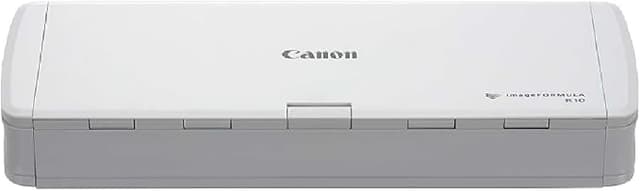
Canon imageFORMULA R10 Portable Document Scanner, 2-Sided Scanning with 20 Page Feeder, Easy Setup for Home or Office, Includes Software, (4861C001)
Scan on the go with the simple yet effective and portable imageFORMULA R10 scanner. This double-sided scanner is ideal for quick and easy document scanning without any software or driver installation. With scanning speeds of up to 12 ppm and resolutions of 600 dpi, you can scan up to 20 sheets at a time thanks to the ADF feeder, or 500 sheets per day. Never worry about forgetting chargers, as this device uses a USB cable only, minimizing hassle and reducing the time it takes to start scanning. Reliably scan a range of documents from A4 papers to receipts and plastic business cards. Plus, its advanced document detection features automatically adjust scan settings, allowing you to achieve optimal results with every scan.
Scan on the go with the simple yet effective and portable imageFORMULA R10 scanner. This double-sided scanner is ideal for quick and easy document scanning without any software or driver installation. With scanning speeds of up to 12 ppm and resolutions of 600 dpi, you can scan up to 20 sheets at a time thanks to the ADF feeder, or 500 sheets per day. Never worry about forgetting chargers, as this device uses a USB cable only, minimizing hassle and reducing the time it takes to start scanning. Reliably scan a range of documents from A4 papers to receipts and plastic business cards. Plus, its advanced document detection features automatically adjust scan settings, allowing you to achieve optimal results with every scan.
Scan on the go with the simple yet effective and portable imageFORMULA R10 scanner. This double-sided scanner is ideal for quick and easy document scanning without any software or driver installation. With scanning speeds of up to 12 ppm and resolutions of 600 dpi, you can scan up to 20 sheets at a time thanks to the ADF feeder, or 500 sheets per day. Never worry about forgetting chargers, as this device uses a USB cable only, minimizing hassle and reducing the time it takes to start scanning. Reliably scan a range of documents from A4 papers to receipts and plastic business cards. Plus, its advanced document detection features automatically adjust scan settings, allowing you to achieve optimal results with every scan.
Scan on the go with the simple yet effective and portable imageFORMULA R10 scanner. This double-sided scanner is ideal for quick and easy document scanning without any software or driver installation. With scanning speeds of up to 12 ppm and resolutions of 600 dpi, you can scan up to 20 sheets at a time thanks to the ADF feeder, or 500 sheets per day. Never worry about forgetting chargers, as this device uses a USB cable only, minimizing hassle and reducing the time it takes to start scanning. Reliably scan a range of documents from A4 papers to receipts and plastic business cards. Plus, its advanced document detection features automatically adjust scan settings, allowing you to achieve optimal results with every scan.
in 15 offers
The lowest price for Canon imageFORMULA R10 Portable Document Scanner, 2-Sided Scanning with 20 Page Feeder, Easy Setup for Home or Office, Includes Software, (4861C001) right now is $218.95 at eBay.com.au, compared across 10 retailers.
The all-time low was $122.62 on 21 Mar 2026 — today's price is 79% above the lowest ever. It has been notably cheaper before — worth setting a price alert.
Prices last updated 30 Oct 2026.
Last updated at 30/10/2026 14:08:20
Canon ImageFORMULA R10 PG Document Scanner
Affiliate Disclosure: We may receive a small commission for purchases made through this link at no extra cost to you. This helps support our site. Thank you!
Canon imageFORMULA R10 Portable Document Scanner
Affiliate Disclosure: We may receive a small commission for purchases made through this link at no extra cost to you. This helps support our site. Thank you!
Canon imageFORMULA R10
Canon ImageFORMULA R10 JPN Document Scanner
Delivery between 4–8 Nov $41
Canon imageFORMULA R10 - Portable Document Scanner, USB Powered, Duplex Scanning, Document Feeder, Easy Setup, Convenient, Perfect For Mobile Users,
Delivery $28.43
Canon imageFORMULA R10 - Portable Document Scanner, USB Powered, Duplex Scanning, Document Feeder, Easy Setup, Convenient, Perfect for Mobile Users, W
Delivery between 5–8 Nov $29
Canon imageFORMULA R10 Sheet-fed scanner 600 x 600 DPI A4 White
Free delivery
Canon imageFORMULA R10 - Portable Document Scanner, USB Powered, Duplex Scanning, Document Feeder, Easy Setup, Convenient, Perfect for Mobile Users
Free delivery
Canon imageFORMULA R10 - Portable Document Scanner, USB Powered, Duplex Scanning, Document Feeder, Easy Setup, Convenient, Perfect for Mobile Users
Free delivery
Canon imageFORMULA R10 Portable Document Scanner, 2-Sided Scanning with 20 Page Feeder, Easy Setup For Home or Office, Includes Software, (4861C001)
Free delivery between 10–13 Nov
originally posted on canon.com
Difficult to connect; randomly disconnects once connected (at least 65% of the time). I travel 1-3 times a month and though this would be a great tool but it has proven to be an embarrassment. It is 100% more efficient to use the can feature on my phone
originally posted on bhphotovideo.com
Pros:- Scans are high resolution and clearly legible- It handles receipts fairly well (although it does pull in multiple papers on occasion, so you should watch for that)- No power brick; all you need to take with you is the scanner and a USB cable (included in the box)- Super compact and less weight than other duplex ADF scanners- All the software you need is installed in the device itself and shows up on your computer screen when you connect the device via its USB cableCons:- The scanner takes 10-15 seconds to begin scanning after the I ask it to scan. Once it gets going, it continuously feeds through each of the pages in the document feeder without delay. When there are no more pages in the feeder, it asks you whether you want to scan more pages to ... MorePros:- Scans are high resolution and clearly legible- It handles receipts fairly well (although it does pull in multiple papers on occasion, so you should watch for that)- No power brick; all you need to take with you is the scanner and a USB cable (included in the box)- Super compact and less weight than other duplex ADF scanners- All the software you need is installed in the device itself and shows up on your computer screen when you connect the device via its USB cableCons:- The scanner takes 10-15 seconds to begin scanning after the I ask it to scan. Once it gets going, it continuously feeds through each of the pages in the document feeder without delay. When there are no more pages in the feeder, it asks you whether you want to scan more pages to the same file or save what's been scanned already. If you choose to add more pages, there's another 10-second delay before it starts scanning again. Kind of annoying.- The software user interface is clunky. It offers two preset scanning profiles for Black & White and Color, which you can customize (or create your own new profiles). But the customization interface is really convoluted, and if you enter the Advanced profile settings, it forgets everything you set in the basic profile, and you have to reset those settings again in Advanced. I learned not to go into Advanced at all, but for users who want to squeeze the very best color correction, etc. out of this scanner, beware that the settings panels can be a pain.Overall: It scans well, and the portability can't be beat. The scanning delays are a minor inconvenience, especially for occasional use. If you need a compact, lightweight portable scanner, especially for your flight carry-on bag, then I don't know of any better choice.
originally posted on ebay.com
Have had this scanner for almost 2 years. We are primarily using it to copy our paper pictures into digital format (jpg). So far it has scanned over 15,000 with good quality. The images can be named during the scanning process and are automatically uploaded to our network document storage computer where they are searchable and easier to find. We can copy and take them with us on a tablet and show them on the TV. You can download a program to creating job configurations for the different types of images (jpg, PDF, tiff). The configurations are uploaded to the scanner and are accessed by the touch screen buttons. The job configurations are a bit of a challenge but the downloadable program helps with that. We also scan almost all of our documents into PDF images. They ... MoreHave had this scanner for almost 2 years. We are primarily using it to copy our paper pictures into digital format (jpg). So far it has scanned over 15,000 with good quality. The images can be named during the scanning process and are automatically uploaded to our network document storage computer where they are searchable and easier to find. We can copy and take them with us on a tablet and show them on the TV. You can download a program to creating job configurations for the different types of images (jpg, PDF, tiff). The configurations are uploaded to the scanner and are accessed by the touch screen buttons. The job configurations are a bit of a challenge but the downloadable program helps with that. We also scan almost all of our documents into PDF images. They are easier to find and the paper clutter is gone. Just remember to regularly do you BACKUPS in at least 2 seperate places.
| Optical Resolution | 600 dpi |
| Scanner Type | Portable |
| Compatibility | PC, Mac |
| Scan Speed | 12 ppm |
| Daily Duty Cycle | 500 sheets per day |

Canon ImageFORMULA R10 PG Document Scanner
Affiliate Disclosure: We may receive a small commission for purchases made through this link at no extra cost to you. This helps support our site. Thank you!
Canon imageFORMULA R10 Portable Document Scanner
Affiliate Disclosure: We may receive a small commission for purchases made through this link at no extra cost to you. This helps support our site. Thank you!
Canon imageFORMULA R10
Canon ImageFORMULA R10 JPN Document Scanner
Delivery between 4–8 Nov $41
Canon imageFORMULA R10 - Portable Document Scanner, USB Powered, Duplex Scanning, Document Feeder, Easy Setup, Convenient, Perfect For Mobile Users,
Delivery $28.43
Difficult to connect; randomly disconnects once connected (at least 65% of the time). I travel 1-3 times a month and though this would be a great tool but it has proven to be an embarrassment. It is 100% more efficient to use the can feature on my phone
Pros:- Scans are high resolution and clearly legible- It handles receipts fairly well (although it does pull in multiple papers on occasion, so you should watch for that)- No power brick; all you need to take with you is the scanner and a USB cable (included in the box)- Super compact and less weight than other duplex ADF scanners- All the software you need is installed in the device itself and shows up on your computer screen when you connect the device via its USB cableCons:- The scanner takes 10-15 seconds to begin scanning after the I ask it to scan. Once it gets going, it continuously feeds through each of the pages in the document feeder without delay. When there are no more pages in the feeder, it asks you whether you want to scan more pages to ... MorePros:- Scans are high resolution and clearly legible- It handles receipts fairly well (although it does pull in multiple papers on occasion, so you should watch for that)- No power brick; all you need to take with you is the scanner and a USB cable (included in the box)- Super compact and less weight than other duplex ADF scanners- All the software you need is installed in the device itself and shows up on your computer screen when you connect the device via its USB cableCons:- The scanner takes 10-15 seconds to begin scanning after the I ask it to scan. Once it gets going, it continuously feeds through each of the pages in the document feeder without delay. When there are no more pages in the feeder, it asks you whether you want to scan more pages to the same file or save what's been scanned already. If you choose to add more pages, there's another 10-second delay before it starts scanning again. Kind of annoying.- The software user interface is clunky. It offers two preset scanning profiles for Black & White and Color, which you can customize (or create your own new profiles). But the customization interface is really convoluted, and if you enter the Advanced profile settings, it forgets everything you set in the basic profile, and you have to reset those settings again in Advanced. I learned not to go into Advanced at all, but for users who want to squeeze the very best color correction, etc. out of this scanner, beware that the settings panels can be a pain.Overall: It scans well, and the portability can't be beat. The scanning delays are a minor inconvenience, especially for occasional use. If you need a compact, lightweight portable scanner, especially for your flight carry-on bag, then I don't know of any better choice.
Have had this scanner for almost 2 years. We are primarily using it to copy our paper pictures into digital format (jpg). So far it has scanned over 15,000 with good quality. The images can be named during the scanning process and are automatically uploaded to our network document storage computer where they are searchable and easier to find. We can copy and take them with us on a tablet and show them on the TV. You can download a program to creating job configurations for the different types of images (jpg, PDF, tiff). The configurations are uploaded to the scanner and are accessed by the touch screen buttons. The job configurations are a bit of a challenge but the downloadable program helps with that. We also scan almost all of our documents into PDF images. They ... MoreHave had this scanner for almost 2 years. We are primarily using it to copy our paper pictures into digital format (jpg). So far it has scanned over 15,000 with good quality. The images can be named during the scanning process and are automatically uploaded to our network document storage computer where they are searchable and easier to find. We can copy and take them with us on a tablet and show them on the TV. You can download a program to creating job configurations for the different types of images (jpg, PDF, tiff). The configurations are uploaded to the scanner and are accessed by the touch screen buttons. The job configurations are a bit of a challenge but the downloadable program helps with that. We also scan almost all of our documents into PDF images. They are easier to find and the paper clutter is gone. Just remember to regularly do you BACKUPS in at least 2 seperate places.
This nifty Canon document scanner will help you get rid of loads of documents that you could then recycle such as receipts.It scans in color & B&W and you could then use OCR software to insert text into anything on a computer or mobile device!Works great with other Canon devices!
Installation and operation of the Canon imageFORMULA R10 on new Apple Macs with Apple silicon (M1, M2, M3) is difficult, clunky, and badly implemented. The installation requires Rosetta for compatibility and controls relating to custom file destinations, for example, do not work. The R10 will scan and it does that relatively quickly. Canon needs to development proper software for the current Macs. This purchase will likely be returned. Disappointed.
It is very easy to set up, although where to set it up may be a problem depending on the space around your desk. The machine needs to have the room to place the documents processed. I did not receive a user's manual with it, but it is readily available at the canon support website. Once the unit is set up, the icon to select to scan is not as intuitive as it may seem. In my case I experimented a bit to get what I wanted. One big advantage is its portability, the unit is 11x4x1 and does not weigh very much. Once an item is scanned the picture looks very much like the scanned paper both in color and black/white.
I have been disappointed with this product's ability to handle multiple sized paper/content. Full-sized sheets of paper (8.5 x 11) consistently work well, but I have difficulty loading receipts and business cards, for example.
I bought this scanner and I am so happy to have made the purchase. It comes with a built in software so there was no need for a setup process - just plug and use. Very intuitive, easy to use, and very adorable as well. I highly recommend! 5 stars from me :)
Been using as main Baseball card scanner for ebay postings with good quality. DOWN SIDE, R10 DOES NOT work on newer Model M1 & M2 chip Ventura OS MacBooks. Reason being Canon has not updated a driver compatible with those chips. Latest 12/9/2023 R10 firmware update DID NOT INCLUDE new M1 M2 chip drivers. There is no Canon release date to correct M1 M2 Driver problem, confirmed with Customer Service 9/14/2023, no update scheduled.
I ordered this originally to help me with overly long legal documents. I am now using it to digitize my parents correspondence from their college years. It has gone much easier than when I tried to digitize the letters with a flatbed scanner. My only warning is that when you start going through your parents' correspondence you may not like a lot of what you read.
| Optical Resolution | 600 dpi |
| Scanner Type | Portable |
| Compatibility | PC, Mac |
| Scan Speed | 12 ppm |
| Daily Duty Cycle | 500 sheets per day |


