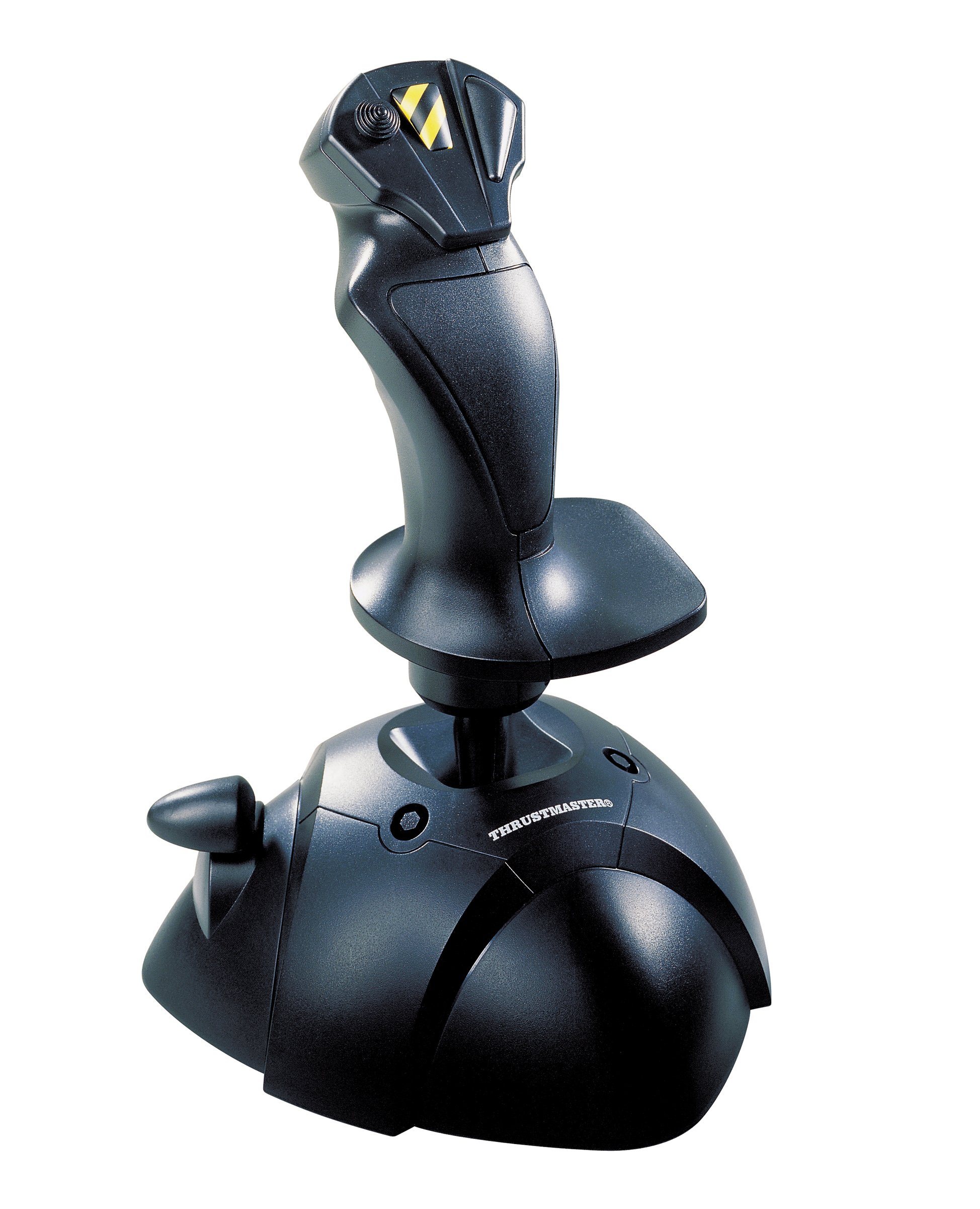
Whether you're on a leisurely commercial flight full of passengers or hurtling through the sky on daring mid-air battles, complete control is of the utmost importance. Flight is no joking matter, but it can be intensely thrilling, so you need the tools to ensure you can navigate the skies and still have the time of your life. With this USB Flight Stick in your arsenal, you can take flight gameplay to the next level and experience what it's really like to be a pilot controlling a giant mechanical bird as it shoots through the air. Designed to provide an authentic flying experience, this Flight Stick features three axes, four buttons and one trigger to give you the ultimate in control. Sail the skies with amazing precision and hurtle above the clouds at unthinkable speeds thanks to the speed control thumb throttle. Nothing can take you off guard, since you control the camera angle with the point-of-view button. A weighted base and nonslip rubber pads, along with the ergonomic design and enlarged rest ensure that you can spend hours in flight securely and comfortably. So strap yourself in and get ready to take off — you've got the controls you need to soar through incredible flying adventures.
Whether you're on a leisurely commercial flight full of passengers or hurtling through the sky on daring mid-air battles, complete control is of the utmost importance. Flight is no joking matter, but it can be intensely thrilling, so you need the tools to ensure you can navigate the skies and still have the time of your life. With this USB Flight Stick in your arsenal, you can take flight gameplay to the next level and experience what it's really like to be a pilot controlling a giant mechanical bird as it shoots through the air. Designed to provide an authentic flying experience, this Flight Stick features three axes, four buttons and one trigger to give you the ultimate in control. Sail the skies with amazing precision and hurtle above the clouds at unthinkable speeds thanks to the speed control thumb throttle. Nothing can take you off guard, since you control the camera angle with the point-of-view button. A weighted base and nonslip rubber pads, along with the ergonomic design and enlarged rest ensure that you can spend hours in flight securely and comfortably. So strap yourself in and get ready to take off — you've got the controls you need to soar through incredible flying adventures.
in 2 offers
The lowest price for Citi Card off | Thrustmaster USB Joystick - 2960623 right now is $38.00 at CeX, compared across 2 retailers.
The all-time low was $38.00 on 16 Mar 2026. That's the lowest price we've ever tracked — a great time to buy.
Prices last updated 8 June 2026.
Citi Card off | Thrustmaster USB Joystick - 2960623
Whether you're on a leisurely commercial flight full of passengers or hurtling through the sky on daring mid-air battles, complete control is of the utmost importance. Flight is no joking matter, but it can be intensely thrilling, so you need the tools to ensure you can navigate the skies and still have the time of your life. With this USB Flight Stick in your arsenal, you can take flight gameplay to the next level and experience what it's really like to be a pilot controlling a giant mechanical bird as it shoots through the air. Designed to provide an authentic flying experience, this Flight Stick features three axes, four buttons and one trigger to give you the ultimate in control. Sail the skies with amazing precision and hurtle above the clouds at unthinkable speeds thanks to the speed control thumb throttle. Nothing can take you off guard, since you control the camera angle with the point-of-view button. A weighted base and nonslip rubber pads, along with the ergonomic design and enlarged rest ensure that you can spend hours in flight securely and comfortably. So strap yourself in and get ready to take off — you've got the controls you need to soar through incredible flying adventures.
Whether you're on a leisurely commercial flight full of passengers or hurtling through the sky on daring mid-air battles, complete control is of the utmost importance. Flight is no joking matter, but it can be intensely thrilling, so you need the tools to ensure you can navigate the skies and still have the time of your life. With this USB Flight Stick in your arsenal, you can take flight gameplay to the next level and experience what it's really like to be a pilot controlling a giant mechanical bird as it shoots through the air. Designed to provide an authentic flying experience, this Flight Stick features three axes, four buttons and one trigger to give you the ultimate in control. Sail the skies with amazing precision and hurtle above the clouds at unthinkable speeds thanks to the speed control thumb throttle. Nothing can take you off guard, since you control the camera angle with the point-of-view button. A weighted base and nonslip rubber pads, along with the ergonomic design and enlarged rest ensure that you can spend hours in flight securely and comfortably. So strap yourself in and get ready to take off — you've got the controls you need to soar through incredible flying adventures.
Last updated at 08/06/2026 15:50:17
Thrustmaster USB Joystick for PC
Affiliate Disclosure: We may receive a small commission for purchases made through this link at no extra cost to you. This helps support our site. Thank you!
Thrustmaster USB Joystick, B
Delivery $4
originally posted on microcenter.com
I am nearing 80 and no longer current with my licenses but I do try to keep my hand in the flight game by flying a Flight simulator once a week or so. I decided to divest myself of a Windows Computer over a year ago and use a State of the Art Tablet and a BlueTooth mouse and keyboard instead. It worked but it did not work well and all the while I missed my Microsoft Flight Sim usage. I recently bought a Windows-based Laptop (also from Microcenter) and reinstalled Steams Microsoft Simulator on my new computer. Then I needed a flight stick at the bare minimum. I purchased this USB Thrustmaster Flight Stick from Microcenter and installed it. Although not as responsive as the Control yoke setups I have had in the past it works just fine. In the future (near) I will ... MoreI am nearing 80 and no longer current with my licenses but I do try to keep my hand in the flight game by flying a Flight simulator once a week or so. I decided to divest myself of a Windows Computer over a year ago and use a State of the Art Tablet and a BlueTooth mouse and keyboard instead. It worked but it did not work well and all the while I missed my Microsoft Flight Sim usage. I recently bought a Windows-based Laptop (also from Microcenter) and reinstalled Steams Microsoft Simulator on my new computer. Then I needed a flight stick at the bare minimum. I purchased this USB Thrustmaster Flight Stick from Microcenter and installed it. Although not as responsive as the Control yoke setups I have had in the past it works just fine. In the future (near) I will purchase a much more responsive flight control setup but in the interim, I am enjoying using this entry-level flight stick. It is well worth the price I paid for it.
originally posted on microcenter.com
Very inexpensive controller that gets the job done. I bought this to play the new Star Wars Squadrons game and it works just fine. It's not as heavy as I think it should be and could definitely use more buttons (or a 3rd axis) but again, for this price it was worth trying out. If you're really going to get into flight sims, I'd buy something better.
originally posted on microcenter.com
For the price I don't think you can beat the Thrustmaster USB Joystick. With four buttons, trigger, hat and throttle you have all the basic hand controls for basic flight games and sims. Beats my ancient two button CH Flightstick. And the trigger doesn't cut into my finger like the Flightstick. The spring resistance is stiffer than I'm used to but that's what training is all about.Just plug it into a USB port and Windows 10 recognizes it as a USB game controller. You should calibrate the stick through Windows control panel for best results. No drivers needed.The unit is light but the base is large and the rubber feet sticky enough to stay put on smooth surfaces without slipping or lifting up in the tensest combat situation.Yaw (twist) and rudder buttons on the ... MoreFor the price I don't think you can beat the Thrustmaster USB Joystick. With four buttons, trigger, hat and throttle you have all the basic hand controls for basic flight games and sims. Beats my ancient two button CH Flightstick. And the trigger doesn't cut into my finger like the Flightstick. The spring resistance is stiffer than I'm used to but that's what training is all about.Just plug it into a USB port and Windows 10 recognizes it as a USB game controller. You should calibrate the stick through Windows control panel for best results. No drivers needed.The unit is light but the base is large and the rubber feet sticky enough to stay put on smooth surfaces without slipping or lifting up in the tensest combat situation.Yaw (twist) and rudder buttons on the base would be nice but this is a basic stick. You need to spend more of you want those features.For the budget or beginner gamer though this joystick is an excellent choice.Back in the air again with my old copy of Red Baron 3D!
| Device interface | USB |
| Device type | Joystick |
| Compatible operating systems | Windows 98 SE, ME, 2000, XP, Vista |
| Mac compatibility | N |
| Minimum system requirements | USB 2.0 |
Thrustmaster USB Joystick for PC
Affiliate Disclosure: We may receive a small commission for purchases made through this link at no extra cost to you. This helps support our site. Thank you!
Thrustmaster USB Joystick, B
Delivery $4
I am nearing 80 and no longer current with my licenses but I do try to keep my hand in the flight game by flying a Flight simulator once a week or so. I decided to divest myself of a Windows Computer over a year ago and use a State of the Art Tablet and a BlueTooth mouse and keyboard instead. It worked but it did not work well and all the while I missed my Microsoft Flight Sim usage. I recently bought a Windows-based Laptop (also from Microcenter) and reinstalled Steams Microsoft Simulator on my new computer. Then I needed a flight stick at the bare minimum. I purchased this USB Thrustmaster Flight Stick from Microcenter and installed it. Although not as responsive as the Control yoke setups I have had in the past it works just fine. In the future (near) I will ... MoreI am nearing 80 and no longer current with my licenses but I do try to keep my hand in the flight game by flying a Flight simulator once a week or so. I decided to divest myself of a Windows Computer over a year ago and use a State of the Art Tablet and a BlueTooth mouse and keyboard instead. It worked but it did not work well and all the while I missed my Microsoft Flight Sim usage. I recently bought a Windows-based Laptop (also from Microcenter) and reinstalled Steams Microsoft Simulator on my new computer. Then I needed a flight stick at the bare minimum. I purchased this USB Thrustmaster Flight Stick from Microcenter and installed it. Although not as responsive as the Control yoke setups I have had in the past it works just fine. In the future (near) I will purchase a much more responsive flight control setup but in the interim, I am enjoying using this entry-level flight stick. It is well worth the price I paid for it.
Very inexpensive controller that gets the job done. I bought this to play the new Star Wars Squadrons game and it works just fine. It's not as heavy as I think it should be and could definitely use more buttons (or a 3rd axis) but again, for this price it was worth trying out. If you're really going to get into flight sims, I'd buy something better.
For the price I don't think you can beat the Thrustmaster USB Joystick. With four buttons, trigger, hat and throttle you have all the basic hand controls for basic flight games and sims. Beats my ancient two button CH Flightstick. And the trigger doesn't cut into my finger like the Flightstick. The spring resistance is stiffer than I'm used to but that's what training is all about.Just plug it into a USB port and Windows 10 recognizes it as a USB game controller. You should calibrate the stick through Windows control panel for best results. No drivers needed.The unit is light but the base is large and the rubber feet sticky enough to stay put on smooth surfaces without slipping or lifting up in the tensest combat situation.Yaw (twist) and rudder buttons on the ... MoreFor the price I don't think you can beat the Thrustmaster USB Joystick. With four buttons, trigger, hat and throttle you have all the basic hand controls for basic flight games and sims. Beats my ancient two button CH Flightstick. And the trigger doesn't cut into my finger like the Flightstick. The spring resistance is stiffer than I'm used to but that's what training is all about.Just plug it into a USB port and Windows 10 recognizes it as a USB game controller. You should calibrate the stick through Windows control panel for best results. No drivers needed.The unit is light but the base is large and the rubber feet sticky enough to stay put on smooth surfaces without slipping or lifting up in the tensest combat situation.Yaw (twist) and rudder buttons on the base would be nice but this is a basic stick. You need to spend more of you want those features.For the budget or beginner gamer though this joystick is an excellent choice.Back in the air again with my old copy of Red Baron 3D!
This is a functional joystick, without much fluff, but I wouldn't purchase it for anything too intense. I picked this one in particular up because I wanted a peripheral to play Star Wars: Squadrons with, but I didn't want to spend more than I did on a game for a peripheral to improve my experience. I'd qualify my experience as "okay, I guess." Some features (like the throttle) simply haven't worked out of the box, which is kind of a bummer. If you're alright working around glitches and technical issues, this joystick will do. But I wouldn't recommend it for anything other than light use.
For about a year now, computer parts, components and peripherals have been harder and harder to get, at least for reasonable prices. This joystick was available for the merest of moments online so of course I snapped it up, since I needed one for my flying/space games. Thrustmaster makes some great gaming products, this is..... ok. To be fair, it is the cheapest joystick they make so I am trying not to judge too hard. But whilst it works perfectly fine, it is cheaply made and quite lightweight, nothing like my ancient Top Gun by the "same" company from the 90s, which I would have loved to used again but its gameport connection needs an adapter for modern PCs. The old timer just seems better built, with few creaks and a solid stable base. The newbie just seems a bit ... MoreFor about a year now, computer parts, components and peripherals have been harder and harder to get, at least for reasonable prices. This joystick was available for the merest of moments online so of course I snapped it up, since I needed one for my flying/space games. Thrustmaster makes some great gaming products, this is..... ok. To be fair, it is the cheapest joystick they make so I am trying not to judge too hard. But whilst it works perfectly fine, it is cheaply made and quite lightweight, nothing like my ancient Top Gun by the "same" company from the 90s, which I would have loved to used again but its gameport connection needs an adapter for modern PCs. The old timer just seems better built, with few creaks and a solid stable base. The newbie just seems a bit flimsy, but it works ok otherwise. I'm happy to actually have a modern plug and play joystick to play with, but will look forward to when I can get a better one at a reasonable price.
I made a big mistake on this purchase (and bought two of these) thinking they had a rudder control which is operated by (twisting the stick left and right) as it is with the $30 dollar Thrust-master. Well they don't have any rudder control, and of course they have less buttons than the $30 dollar Thrust-master. I CAN NOT recommend this joystick and CAN NOT recommend the more expensive one; because 3 out of 5 of the more expensive ones...also broke via normal use ... I am now out several hundred dollars on these cheap products and should have purchased a better joystick. If you are still wanting one? ..Then at least get the $30 dollar Thrust-master it should last you six months? If your real careful when operating it...plus it stands better on the table, because it ... MoreI made a big mistake on this purchase (and bought two of these) thinking they had a rudder control which is operated by (twisting the stick left and right) as it is with the $30 dollar Thrust-master. Well they don't have any rudder control, and of course they have less buttons than the $30 dollar Thrust-master. I CAN NOT recommend this joystick and CAN NOT recommend the more expensive one; because 3 out of 5 of the more expensive ones...also broke via normal use ... I am now out several hundred dollars on these cheap products and should have purchased a better joystick. If you are still wanting one? ..Then at least get the $30 dollar Thrust-master it should last you six months? If your real careful when operating it...plus it stands better on the table, because it is heavier, than this lighter and less weighted ... Thrustmaster 2960623 USB Joystick. SORRY ... they are just cheap junk.
Good Points: Plug and play setup, very easy to map buttons and sturdy build.Improvement Points: Plastic seems a bit janky in areas. Button on the side of joystick is a little uncomfortable to use.
Good Points: Great value for money.Portable - much lighter and more compact than most flight controllers.Compatability is good across various machines.Improvement Points: Quite an old design now.Flight stick suffers from some wobble after lots of use, although no adverse effects when using it.Throttle becomes loose over time, and while still functional not as enjoyable to use.
| Device interface | USB |
| Device type | Joystick |
| Compatible operating systems | Windows 98 SE, ME, 2000, XP, Vista |
| Mac compatibility | N |
| Minimum system requirements | USB 2.0 |

