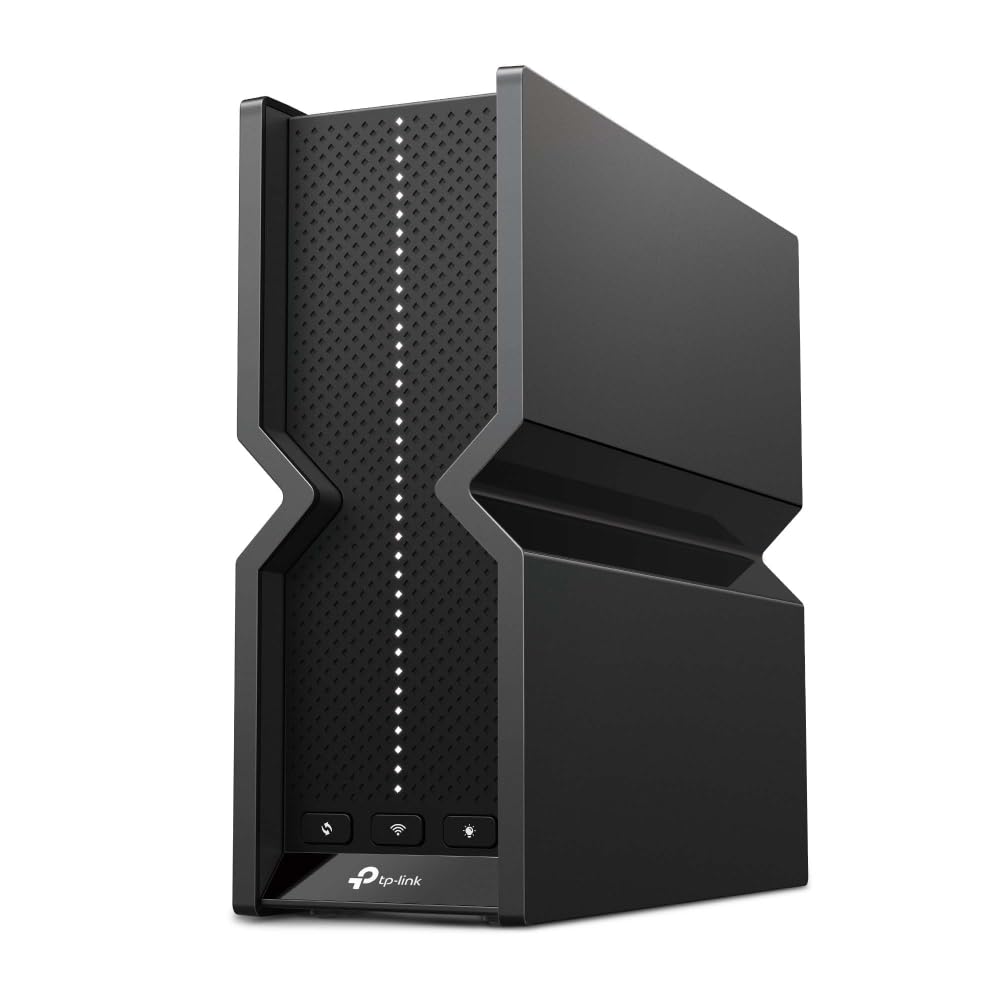
Citi Card off | TP-Link Archer BE550 BE9300 Tri-Band Wi-Fi 7 Router
The Archer BE550 V1.6 from TP-Link is a wireless router designed to meet the demands of high-speed Internet users. With its support for Wi-Fi 6E technology and 2.5 Gigabit Ethernet, this router delivers high data transfer rates of up to 9214 Mbps, making it suitable for 4K/8K UHD video streaming, online gaming, and large file transfers. Equipped with six internal antennas and advanced security features such as WPA3 encryption, Stateful Packet Inspection Firewall (SPIF), and TP-Link HomeShield, the Archer BE550 V1.6 ensures your network is protected against external threats and unauthorized access. Additionally, its compatibility with Alexa and Google Assistant makes it an ideal choice for smart homes, offering convenience and enhanced control over your devices. For those seeking easy network management, this router features a user-friendly interface, remote firmware upgrades, and comprehensive parental controls, making it easy to customize your network to fit your needs. Whether you're a tech enthusiast or simply looking for a reliable and secure router, the Archer BE550 V1.6 offers the performance, security, and features to keep you connected.
The Archer BE550 V1.6 from TP-Link is a wireless router designed to meet the demands of high-speed Internet users. With its support for Wi-Fi 6E technology and 2.5 Gigabit Ethernet, this router delivers high data transfer rates of up to 9214 Mbps, making it suitable for 4K/8K UHD video streaming, online gaming, and large file transfers. Equipped with six internal antennas and advanced security features such as WPA3 encryption, Stateful Packet Inspection Firewall (SPIF), and TP-Link HomeShield, the Archer BE550 V1.6 ensures your network is protected against external threats and unauthorized access. Additionally, its compatibility with Alexa and Google Assistant makes it an ideal choice for smart homes, offering convenience and enhanced control over your devices. For those seeking easy network management, this router features a user-friendly interface, remote firmware upgrades, and comprehensive parental controls, making it easy to customize your network to fit your needs. Whether you're a tech enthusiast or simply looking for a reliable and secure router, the Archer BE550 V1.6 offers the performance, security, and features to keep you connected.
The Archer BE550 V1.6 from TP-Link is a wireless router designed to meet the demands of high-speed Internet users. With its support for Wi-Fi 6E technology and 2.5 Gigabit Ethernet, this router delivers high data transfer rates of up to 9214 Mbps, making it suitable for 4K/8K UHD video streaming, online gaming, and large file transfers. Equipped with six internal antennas and advanced security features such as WPA3 encryption, Stateful Packet Inspection Firewall (SPIF), and TP-Link HomeShield, the Archer BE550 V1.6 ensures your network is protected against external threats and unauthorized access. Additionally, its compatibility with Alexa and Google Assistant makes it an ideal choice for smart homes, offering convenience and enhanced control over your devices. For those seeking easy network management, this router features a user-friendly interface, remote firmware upgrades, and comprehensive parental controls, making it easy to customize your network to fit your needs. Whether you're a tech enthusiast or simply looking for a reliable and secure router, the Archer BE550 V1.6 offers the performance, security, and features to keep you connected.
The Archer BE550 V1.6 from TP-Link is a wireless router designed to meet the demands of high-speed Internet users. With its support for Wi-Fi 6E technology and 2.5 Gigabit Ethernet, this router delivers high data transfer rates of up to 9214 Mbps, making it suitable for 4K/8K UHD video streaming, online gaming, and large file transfers. Equipped with six internal antennas and advanced security features such as WPA3 encryption, Stateful Packet Inspection Firewall (SPIF), and TP-Link HomeShield, the Archer BE550 V1.6 ensures your network is protected against external threats and unauthorized access. Additionally, its compatibility with Alexa and Google Assistant makes it an ideal choice for smart homes, offering convenience and enhanced control over your devices. For those seeking easy network management, this router features a user-friendly interface, remote firmware upgrades, and comprehensive parental controls, making it easy to customize your network to fit your needs. Whether you're a tech enthusiast or simply looking for a reliable and secure router, the Archer BE550 V1.6 offers the performance, security, and features to keep you connected.
in 54 offers
The lowest price for Citi Card off | TP-Link Archer BE550 BE9300 Tri-Band Wi-Fi 7 Router right now is $305.31 at microless.com, compared across 40 retailers.
The all-time low was $100.00 on 8 June 2026 — today's price is 205% above the lowest ever. It has been notably cheaper before — worth setting a price alert.
Prices last updated 2 Sept 2026.
Last updated at 02/09/2026 19:56:01
TP-Link Archer BE550 BE9300 Tri Band Wi-Fi 7 Router, MLO, 2.5Gbps, EasyMesh | Improved coverage. Stable connection for more devices. Less Latency. VPN
Free delivery
Affiliate Disclosure: We may receive a small commission for purchases made through this link at no extra cost to you. This helps support our site. Thank you!
TP-Link BE9300 Tri-Band Wi-Fi 7 Router, Wi-Fi 7 (802.11be), Up to 9214 Mb/s Throughput, 2.4 GHz / 5 GHz / 6 GHz (Tri-Band), 6 x Internal Antennas, 4 x
Delivery between 7–14 Sept $44.81
tp-link BE9300 Tri-Band Wi-Fi 7 Router ARCHER-BE550
Free delivery between 4–11 Sept
tp-link BE9300 Tri-Band Wi-Fi 7 Router ARCHER-BE550
Affiliate Disclosure: We may receive a small commission for purchases made through this link at no extra cost to you. This helps support our site. Thank you!
TP-Link BE9300 Tri-Band Wi-Fi 7 Router
Delivery between 8–15 Sept $7.95
TP-Link TP Link Archer BE9300 Tri-Band Wi-Fi 7 Router
Free delivery between 4–14 Sept
TP-Link BE9300 Tri-Band Wi-Fi 7 Router | Retravision
Delivery between 4–14 Sept $11.66
TP-Link Archer BE550 - BE9300 Tri-Band Wi-Fi 7 Router
Delivery between 4–15 Sept $19.98
TP-Link Archer BE550 BE9300 Tri-Band Wi-Fi 7 Router
Free delivery between Fri – Sat
TP-Link Archer BE550 BE9300 Tri-Band Wi-Fi 7 Router
Free delivery between Fri – Tue
originally posted on walmart.com
This seems to perform well and is stable so far and had the features I wanted at a very reasonable price. It's hard to render a final judgement on a product like this until it's been in operation for several weeks at a minimum however. The product does seem well made and was well packaged and easy to set up. The only drawback for me was that it is tall and should be positioned vertically for best antenna performance - there is no indication that it is meant to operate horizontally. But the space I have for it was too low for vertical placement on the shelf. There are no provisions for a bracket or support, so a new shelf or some form or rack (or relocation to a new area) was needed. But I didn't want to move it since my broadband modem and coaxial entry point is in ... MoreThis seems to perform well and is stable so far and had the features I wanted at a very reasonable price. It's hard to render a final judgement on a product like this until it's been in operation for several weeks at a minimum however. The product does seem well made and was well packaged and easy to set up. The only drawback for me was that it is tall and should be positioned vertically for best antenna performance - there is no indication that it is meant to operate horizontally. But the space I have for it was too low for vertical placement on the shelf. There are no provisions for a bracket or support, so a new shelf or some form or rack (or relocation to a new area) was needed. But I didn't want to move it since my broadband modem and coaxial entry point is in this space (central closet.)
originally posted on walmart.com
There’s a lot to love about this router! To preface, I am an above average home network enthusiast, but far from a networking professional. I’ve never worked a day in IT or had any formal training, however, I’m fascinated by the technology and have just enough knowledge to do an internet search for my questions and comprehend the jargon and the research.I’m sure there are hundreds of true networking professionals who will give detailed reports of this router’s specifications and quantify its performance. So I’ll focus more on the average home-user experience rather than a detailed technical review of the router’s capabilities.Let’s look at some of the characteristics:Performance: It works just as a router should! Great transfer speeds, consistency, and ... MoreThere’s a lot to love about this router! To preface, I am an above average home network enthusiast, but far from a networking professional. I’ve never worked a day in IT or had any formal training, however, I’m fascinated by the technology and have just enough knowledge to do an internet search for my questions and comprehend the jargon and the research.I’m sure there are hundreds of true networking professionals who will give detailed reports of this router’s specifications and quantify its performance. So I’ll focus more on the average home-user experience rather than a detailed technical review of the router’s capabilities.Let’s look at some of the characteristics:Performance: It works just as a router should! Great transfer speeds, consistency, and reliability. My house has a basement, main floor, and a second story. Currently, the ISP feed is located in the basement, and that is where the router also resides. I get great coverage in the basement and main floor. But the second story receives only 2 of 4 bars of Wi-Fi signal strength. However, I find that to be pretty impressive, given the walls, floors, and distance the signal must penetrate, not to mention the dozens of neighboring routers filling the air with their signals.Looks: As silly as it seems, I like the sleek design and the fact that there are no external antennas. Yet, I still get the same coverage in my home as previous TP link routers with 8 external antennas. Below are some speed tests with and without mesh range extenders.Interface: I really enjoy the firmware and the interface, to include the Tether app. The interface is the crowning jewel of this amazing router. Despite the incredible amount of features and functionality, the app and the online interface is incredibly intuitive to use. One noticeable defect, however, is that my connected devices are not always listed on the “online clients” section of the firmware—particularly when they were connected to the extender vs. the router.Ethernet/LAN ports: This router comes with the standard 4 LAN ports (not including the 1 “internet” or WAN port). They work great, of course, and even have their own “ethernet status” section on the online firmware interface. However, given that this router is such a high-end option, I wish it came with 8 ports. Perhaps I am stuck in the past, but I prefer wired over wireless when possible for the stability, security, and for saving as much broadband as possible for mobile devices. Even though this is easily resolved with a network switch (see pic), I still wish the router included more ports.Mesh: The mesh capability is very cool! TP Link’s “Easy Mesh” makes it especially easy. I was able to seamlessly link an RE500X with the push of 2 buttons. It was incredibly simple, and the mesh seems to work just as it should as my mobile device can seamlessly transition between the router and the extender. However, I am deeply disappointed that I’m not able to mesh with a TP link access point. If I put my RE500X into access point mode rather than extender mode, it is not mesh capable, but rather broadcasts a separate and individual signal that I must manually choose with my mobile device. Even after reaching out to TP link’s support chat line, they confirmed that TP link doesn’t make an access point that is mesh capable. The reason this is so disappointing to me is that it would be much more effective to mesh a home network if I could physically plug in an access point in the opposite side of the house. For example, using the router alone (no extender), I went to the most opposite corner of my house to conduct a simple internet speed test. With just 2-of-4 bars of Wi-Fi signal, I had a download speed of 86.5 Mbps. With the extender, I received 3 to 4 bars of signal on my phone but only 71 Mbps. Repeating the signal was actually slower than just the original weaker signal. In either case, my 300 Mbps internet service was significantly degraded. If a mesh capable access point were possible, this problem would be completely alleviated. All that critique mentioned, it’s not this router’s fault perse, which is why it still receives 5 stars. But it’s still disappointing as the mesh capability is almost useless to me, as my extender can only be placed near the router in order to have enough signal to be able to repeat, and repeating the signal degrades the transfer speed.Bottom line, this router is extremely impressive! I love it. It’s fast, it’s sleek, it’s intuitive and user friendly, and it has exceeded (most) all my expectations. I hope that as mesh technology evolves, access points will be more available. I can’t wait to try out the Wi-Fi 7.
originally posted on walmart.com
The TP-Link Archer BE9300; Tri-Band WiFi 7 Wireless Router with up to 9.2 Gbps speeds and easy setup; with parental controls is available for the early adopters of the newest technology. Experience a powerful Wi-Fi 7 router with fast Wi-Fi speeds up to 9214 Mbps (mega bytes per second).Enjoy full access to 8K streaming.,With six times optimally positioned antennas, proprietary WiFi optimization, I expect the state of the art technology to deliver broader coverage, more capacity, stronger and more reliable connections, and less interferences.The setup was completed using the Tether App in about fifteen minutes by a technology savvy person with knowledge and experience; not a novice. A technology knowledgeable person gauged himself to be an eight, on a scale of one ... MoreThe TP-Link Archer BE9300; Tri-Band WiFi 7 Wireless Router with up to 9.2 Gbps speeds and easy setup; with parental controls is available for the early adopters of the newest technology. Experience a powerful Wi-Fi 7 router with fast Wi-Fi speeds up to 9214 Mbps (mega bytes per second).Enjoy full access to 8K streaming.,With six times optimally positioned antennas, proprietary WiFi optimization, I expect the state of the art technology to deliver broader coverage, more capacity, stronger and more reliable connections, and less interferences.The setup was completed using the Tether App in about fifteen minutes by a technology savvy person with knowledge and experience; not a novice. A technology knowledgeable person gauged himself to be an eight, on a scale of one to ten.The TP-Link Archer BE9300; Tri-Band WiFi 7 Wireless Router is compatible with Amazon Alexa and promises Google Assistant, as well. It has 2 x 2.5 Gbps Ports for multi-gigabit connectivity.The Archer BE9300 can run a VPN and ordinary internet connections at the same time for added security. The Home Shield (enhanced security) feature will provide: parental controls, network protection, quality of service (QoS) and comprehensive reports. The value added feature is easy mesh compatibility. The longevity of the product is to be seen. . I am looking forward to the Thanksgiving Day family type gatherings where, at least, twenty five family members can connect their internet devices plus multiple televisions will be streaming assorted viewing choices with a promised 3.6 times faster speeds. I hope my guests can enjoy uninterrupted streaming with lower latency and minimal buffering.

TP-Link Archer BE550 BE9300 Tri Band Wi-Fi 7 Router, MLO, 2.5Gbps, EasyMesh | Improved coverage. Stable connection for more devices. Less Latency. VPN
Free delivery
Affiliate Disclosure: We may receive a small commission for purchases made through this link at no extra cost to you. This helps support our site. Thank you!
TP-Link BE9300 Tri-Band Wi-Fi 7 Router, Wi-Fi 7 (802.11be), Up to 9214 Mb/s Throughput, 2.4 GHz / 5 GHz / 6 GHz (Tri-Band), 6 x Internal Antennas, 4 x
Delivery between 7–14 Sept $44.81
tp-link BE9300 Tri-Band Wi-Fi 7 Router ARCHER-BE550
Free delivery between 4–11 Sept
tp-link BE9300 Tri-Band Wi-Fi 7 Router ARCHER-BE550
Affiliate Disclosure: We may receive a small commission for purchases made through this link at no extra cost to you. This helps support our site. Thank you!
TP-Link BE9300 Tri-Band Wi-Fi 7 Router
Delivery between 8–15 Sept $7.95
This seems to perform well and is stable so far and had the features I wanted at a very reasonable price. It's hard to render a final judgement on a product like this until it's been in operation for several weeks at a minimum however. The product does seem well made and was well packaged and easy to set up. The only drawback for me was that it is tall and should be positioned vertically for best antenna performance - there is no indication that it is meant to operate horizontally. But the space I have for it was too low for vertical placement on the shelf. There are no provisions for a bracket or support, so a new shelf or some form or rack (or relocation to a new area) was needed. But I didn't want to move it since my broadband modem and coaxial entry point is in ... MoreThis seems to perform well and is stable so far and had the features I wanted at a very reasonable price. It's hard to render a final judgement on a product like this until it's been in operation for several weeks at a minimum however. The product does seem well made and was well packaged and easy to set up. The only drawback for me was that it is tall and should be positioned vertically for best antenna performance - there is no indication that it is meant to operate horizontally. But the space I have for it was too low for vertical placement on the shelf. There are no provisions for a bracket or support, so a new shelf or some form or rack (or relocation to a new area) was needed. But I didn't want to move it since my broadband modem and coaxial entry point is in this space (central closet.)
There’s a lot to love about this router! To preface, I am an above average home network enthusiast, but far from a networking professional. I’ve never worked a day in IT or had any formal training, however, I’m fascinated by the technology and have just enough knowledge to do an internet search for my questions and comprehend the jargon and the research.I’m sure there are hundreds of true networking professionals who will give detailed reports of this router’s specifications and quantify its performance. So I’ll focus more on the average home-user experience rather than a detailed technical review of the router’s capabilities.Let’s look at some of the characteristics:Performance: It works just as a router should! Great transfer speeds, consistency, and ... MoreThere’s a lot to love about this router! To preface, I am an above average home network enthusiast, but far from a networking professional. I’ve never worked a day in IT or had any formal training, however, I’m fascinated by the technology and have just enough knowledge to do an internet search for my questions and comprehend the jargon and the research.I’m sure there are hundreds of true networking professionals who will give detailed reports of this router’s specifications and quantify its performance. So I’ll focus more on the average home-user experience rather than a detailed technical review of the router’s capabilities.Let’s look at some of the characteristics:Performance: It works just as a router should! Great transfer speeds, consistency, and reliability. My house has a basement, main floor, and a second story. Currently, the ISP feed is located in the basement, and that is where the router also resides. I get great coverage in the basement and main floor. But the second story receives only 2 of 4 bars of Wi-Fi signal strength. However, I find that to be pretty impressive, given the walls, floors, and distance the signal must penetrate, not to mention the dozens of neighboring routers filling the air with their signals.Looks: As silly as it seems, I like the sleek design and the fact that there are no external antennas. Yet, I still get the same coverage in my home as previous TP link routers with 8 external antennas. Below are some speed tests with and without mesh range extenders.Interface: I really enjoy the firmware and the interface, to include the Tether app. The interface is the crowning jewel of this amazing router. Despite the incredible amount of features and functionality, the app and the online interface is incredibly intuitive to use. One noticeable defect, however, is that my connected devices are not always listed on the “online clients” section of the firmware—particularly when they were connected to the extender vs. the router.Ethernet/LAN ports: This router comes with the standard 4 LAN ports (not including the 1 “internet” or WAN port). They work great, of course, and even have their own “ethernet status” section on the online firmware interface. However, given that this router is such a high-end option, I wish it came with 8 ports. Perhaps I am stuck in the past, but I prefer wired over wireless when possible for the stability, security, and for saving as much broadband as possible for mobile devices. Even though this is easily resolved with a network switch (see pic), I still wish the router included more ports.Mesh: The mesh capability is very cool! TP Link’s “Easy Mesh” makes it especially easy. I was able to seamlessly link an RE500X with the push of 2 buttons. It was incredibly simple, and the mesh seems to work just as it should as my mobile device can seamlessly transition between the router and the extender. However, I am deeply disappointed that I’m not able to mesh with a TP link access point. If I put my RE500X into access point mode rather than extender mode, it is not mesh capable, but rather broadcasts a separate and individual signal that I must manually choose with my mobile device. Even after reaching out to TP link’s support chat line, they confirmed that TP link doesn’t make an access point that is mesh capable. The reason this is so disappointing to me is that it would be much more effective to mesh a home network if I could physically plug in an access point in the opposite side of the house. For example, using the router alone (no extender), I went to the most opposite corner of my house to conduct a simple internet speed test. With just 2-of-4 bars of Wi-Fi signal, I had a download speed of 86.5 Mbps. With the extender, I received 3 to 4 bars of signal on my phone but only 71 Mbps. Repeating the signal was actually slower than just the original weaker signal. In either case, my 300 Mbps internet service was significantly degraded. If a mesh capable access point were possible, this problem would be completely alleviated. All that critique mentioned, it’s not this router’s fault perse, which is why it still receives 5 stars. But it’s still disappointing as the mesh capability is almost useless to me, as my extender can only be placed near the router in order to have enough signal to be able to repeat, and repeating the signal degrades the transfer speed.Bottom line, this router is extremely impressive! I love it. It’s fast, it’s sleek, it’s intuitive and user friendly, and it has exceeded (most) all my expectations. I hope that as mesh technology evolves, access points will be more available. I can’t wait to try out the Wi-Fi 7.
The TP-Link Archer BE9300; Tri-Band WiFi 7 Wireless Router with up to 9.2 Gbps speeds and easy setup; with parental controls is available for the early adopters of the newest technology. Experience a powerful Wi-Fi 7 router with fast Wi-Fi speeds up to 9214 Mbps (mega bytes per second).Enjoy full access to 8K streaming.,With six times optimally positioned antennas, proprietary WiFi optimization, I expect the state of the art technology to deliver broader coverage, more capacity, stronger and more reliable connections, and less interferences.The setup was completed using the Tether App in about fifteen minutes by a technology savvy person with knowledge and experience; not a novice. A technology knowledgeable person gauged himself to be an eight, on a scale of one ... MoreThe TP-Link Archer BE9300; Tri-Band WiFi 7 Wireless Router with up to 9.2 Gbps speeds and easy setup; with parental controls is available for the early adopters of the newest technology. Experience a powerful Wi-Fi 7 router with fast Wi-Fi speeds up to 9214 Mbps (mega bytes per second).Enjoy full access to 8K streaming.,With six times optimally positioned antennas, proprietary WiFi optimization, I expect the state of the art technology to deliver broader coverage, more capacity, stronger and more reliable connections, and less interferences.The setup was completed using the Tether App in about fifteen minutes by a technology savvy person with knowledge and experience; not a novice. A technology knowledgeable person gauged himself to be an eight, on a scale of one to ten.The TP-Link Archer BE9300; Tri-Band WiFi 7 Wireless Router is compatible with Amazon Alexa and promises Google Assistant, as well. It has 2 x 2.5 Gbps Ports for multi-gigabit connectivity.The Archer BE9300 can run a VPN and ordinary internet connections at the same time for added security. The Home Shield (enhanced security) feature will provide: parental controls, network protection, quality of service (QoS) and comprehensive reports. The value added feature is easy mesh compatibility. The longevity of the product is to be seen. . I am looking forward to the Thanksgiving Day family type gatherings where, at least, twenty five family members can connect their internet devices plus multiple televisions will be streaming assorted viewing choices with a promised 3.6 times faster speeds. I hope my guests can enjoy uninterrupted streaming with lower latency and minimal buffering.
In the short amount of time I have already had with TP Link BE9300 has been the best choice I have made. I personally do not do too many things on my internet besides streaming TV or an occasional movie on my laptop. In the past have always had issues with freezing or a loss of internet at the worst times. After reading some other reviews, I went with this particular Router and I could not be happier! I never thought too much about my speed, now I do! I have noticed with changing to TP-Link there arent delays, things I research and look up, pop right up. Ive realized I can have more things hooked up to my internet and it all runs quickly and smoothly. I can say without a doubt I am beyond happy and so glad I made the decision to go with this particular one.I love ... MoreIn the short amount of time I have already had with TP Link BE9300 has been the best choice I have made. I personally do not do too many things on my internet besides streaming TV or an occasional movie on my laptop. In the past have always had issues with freezing or a loss of internet at the worst times. After reading some other reviews, I went with this particular Router and I could not be happier! I never thought too much about my speed, now I do! I have noticed with changing to TP-Link there arent delays, things I research and look up, pop right up. Ive realized I can have more things hooked up to my internet and it all runs quickly and smoothly. I can say without a doubt I am beyond happy and so glad I made the decision to go with this particular one.I love the way this router looks. To me, its a fun design and it fits perfectly under my bed where no one even sees it. Its very sleek and has a very modern look to it. This was packaged so nice and everything was placed so neatly and easy to figure out what goes where. Great instructions and easy to follow.I absolutely love this router! I never thought my internet experience could improve this much and streaming my favorite movies and shows could be anymore enjoyable. I dont get frustrated when I'm browsing the internet and things dont "buffer" or freeze like they used to. I highly recommend this!
The tp-link wifi 7 router is a really powerful router. It has 6 antennas and is really fast but it does get hot. It has this very simple LED display and looks really good. It came beautifully packed in a really nice box. It has a higher capacity so it can support more devices as well. It has a 2 year warranty. It has 1, 2.5Gbps and 3, 1 Gbps LAN ports. It also has a 2,5 Gbps WAN port and a USB 3.0 port. It was super easy to setup. The instructions were clear and it only took about 15 to 20 min to setup and get connected. We need to install the Tether app and everything is easy to setup from there. It comes with a free basic plan of Homeshield which is supposed to provide enhanced security. Another very nice feature is that it allows you to set parental controls ... MoreThe tp-link wifi 7 router is a really powerful router. It has 6 antennas and is really fast but it does get hot. It has this very simple LED display and looks really good. It came beautifully packed in a really nice box. It has a higher capacity so it can support more devices as well. It has a 2 year warranty. It has 1, 2.5Gbps and 3, 1 Gbps LAN ports. It also has a 2,5 Gbps WAN port and a USB 3.0 port. It was super easy to setup. The instructions were clear and it only took about 15 to 20 min to setup and get connected. We need to install the Tether app and everything is easy to setup from there. It comes with a free basic plan of Homeshield which is supposed to provide enhanced security. Another very nice feature is that it allows you to set parental controls straight from the router itself. This router is Easy mesh compatible and in our home, I found that the connection is not that great in some of the upstairs rooms so I will definitely need to get a compatible mesh or a WiFi extender. A really solid feature is that this router allows us to set up a separate IoT network so your smart home devices can be protected from external access and keeps your network safe. This router has so many great features and I believe this is a really great device to have in our home for better network security.
Overall, this router has been pretty good. I went from a enthusiast grade Wi-Fi five router which had pretty much every feature you could ever dream of plus additional and going to this one. It was a little bit different because I had gotten spoiled with being able to have six different guest networks running at once, plus one 2.4 and two 5 GHz bands.This router only allows one per band for a total of three, I got around that by running a couple wi-Fi 6 mesh nodes as access points, and utilizing the main bands and guest bands from those as additional SSIDs.I did see a speed increase going from my Wi-Fi 5 router to this Wi-Fi 7 router.The user interface is a little dumbed down for my taste, but for most other people, it will be excellent.I just like to be able ... MoreOverall, this router has been pretty good. I went from a enthusiast grade Wi-Fi five router which had pretty much every feature you could ever dream of plus additional and going to this one. It was a little bit different because I had gotten spoiled with being able to have six different guest networks running at once, plus one 2.4 and two 5 GHz bands.This router only allows one per band for a total of three, I got around that by running a couple wi-Fi 6 mesh nodes as access points, and utilizing the main bands and guest bands from those as additional SSIDs.I did see a speed increase going from my Wi-Fi 5 router to this Wi-Fi 7 router.The user interface is a little dumbed down for my taste, but for most other people, it will be excellent.I just like to be able to have access to every possible setting to tweak things the way I want to tweak them.If you can pick this router up for the price that I paid which was around $279, then it is a great deal. I am normally a ASUS fan. But the comparable router from Asus was like between $700-$900 and I just didn’t have that much money to spend on a router. I did not need 10 Gig ports on my router. I only have a 1.2 gig Internet speed.If you can pick this one up for less than $350 then it’s definitely worth it if it’s more than that you might start looking at comparable products from Asus or Netgear and if you go with Wi-Fi 6E, it will be cheaper than Wi-Fi 7 and you will still get the new band on the 6 GHz spectrum
We have tested and used many WiFi routers because our home has 92 WiFi devices and as new gadgets appear, we'll likely add more.Welink is our internet service and provided us with Eero Pro 6E router which does good job on 6E speeds but terrible 2.4 and 5G coverage so we have it Ethernet linked to REYEE RG-E6 router which is the best WiFi router we've ever tested for those frequenvcies and area coverage. We purchased the TP-Link with the expectation that it would surpass Eeero and REYEE download speeds and coverage. It falied on ALl counts. Only linked 68 of our WiFi devices which took 26 minutes to even do that AND the WiFi 6E download speeds were HALF what we get from Eero router. Maybe TP-Link can/will improve the BE9300 in the future with firmware updates but ... MoreWe have tested and used many WiFi routers because our home has 92 WiFi devices and as new gadgets appear, we'll likely add more.Welink is our internet service and provided us with Eero Pro 6E router which does good job on 6E speeds but terrible 2.4 and 5G coverage so we have it Ethernet linked to REYEE RG-E6 router which is the best WiFi router we've ever tested for those frequenvcies and area coverage. We purchased the TP-Link with the expectation that it would surpass Eeero and REYEE download speeds and coverage. It falied on ALl counts. Only linked 68 of our WiFi devices which took 26 minutes to even do that AND the WiFi 6E download speeds were HALF what we get from Eero router. Maybe TP-Link can/will improve the BE9300 in the future with firmware updates but for now, we returned it.
I think the model number is actually Archer BE700 Pro not BE15000, I guess it is a marketing decision to make sure consumer knows the speed for this can go up to 15,000 Mbps or 15 Gbps.This is a tri band wireless router, has three bands of frequency; 2.4Ghz, 5Ghz and 6Ghz similar to WIFI 6E. This is WIFI 7 because of the ability to achieve extremely high throughput and has multi-link operation (MLO) feature that enables the router to transmit data to a single device using multi bands simultaneously.The router also claimed 4x lower latency by switching WIFI band dynamically.Wi-Fi 7 also has Restricted Target Wake Time feature that lets your router reserve bandwidth for certain types of transmissions, this will save battery life of your connected devices.The ... MoreI think the model number is actually Archer BE700 Pro not BE15000, I guess it is a marketing decision to make sure consumer knows the speed for this can go up to 15,000 Mbps or 15 Gbps.This is a tri band wireless router, has three bands of frequency; 2.4Ghz, 5Ghz and 6Ghz similar to WIFI 6E. This is WIFI 7 because of the ability to achieve extremely high throughput and has multi-link operation (MLO) feature that enables the router to transmit data to a single device using multi bands simultaneously.The router also claimed 4x lower latency by switching WIFI band dynamically.Wi-Fi 7 also has Restricted Target Wake Time feature that lets your router reserve bandwidth for certain types of transmissions, this will save battery life of your connected devices.The design is very nice and compact, it uses 6 internal antennas resulted in a clean looking device that you can place anywhere unlike other router with many external antennas that is an eye sore.Internally it has a quad-core CPU and plenty of memory, with more than 40 clients connected, it only consumes 44% of memory.Externally, it has four 2.5 Gbps LAN ports, looks like it is time to upgrade all my 1 Gbps devices to 2.5.The WAN port where you connect to your ISP is a 10 Gbps port, some ISP already provides 10G service so this will future proof your network.It also has a USB 3.0 port allows fast file and media sharing.With so much bandwidth, this router can support 8K streaming.The router also has OFDMA (Orthogonal Frequency Division Multiple Access) feature to vastly improve network efficiency and capacity.If you have larger house, it supports EasyMesh to form seamless whole home mesh WIFI with compatible device. My house is 2500sf and without mesh, part of my house only gets the 2.4Ghz band.Setup is very easy unless you have ISP that must use their modem router. You just plug the router to the modem, power on and continue with the Tether app or go to 192.168.0.1 to continue setup.It should work with any ISP by auto detect the wan port.Wifi Smart Connect is automatically enabled and allows each of the router's 2.4 GHz and 5 GHz bands to use the same wireless settings. The router can balance network demand and assign devices to the optimum band. It does not smart connect to the 6 GHz band though, it has its own wifi ssid, not sure why.This router can function as access point mode if you already have a better router. These are other features included:VPN server and client,Private network for IOT devices,HomeShield with limited functionality such as limited parental controls and network check/protection.The limited parental controls only able to block content, block websites and set sleeping time. The older tp-link wifi 6 router I have has more control such as time limit and custom sleep time by day of week. To get these features you have to subscribe to the Pro package. Boooo!Here is my speed test:6 Ghz speed test using my Pixel 8 pro phone getting342 Mbps down and 204 Mbps up when I am one floor away.606 Mbps down and 338 Mbps up when I am in the same room.2.4/5 Ghz smart connect, I get55 Mbps down and 9.5 Mbps up when I am 50 feet away from the router.Wired connection I get 945Mbps down and 942Mbps up.Beside losing parental control feature, my Feit electric light bulb cannot connect to the router smart connection. I then turn off smart connect and try to make the light bulb connect to the 2.4 GHz band but still would not connect. I had to connect it to the 2.4 Ghz guest network (I only enable 2.4GHz for the guest network). Strange.Also the paper box smell like fish. They don’t want you to keep the box.
I hate to slam this router because customer service was excellent but the router was problematic. When I 1st hooked it up all appeared ok. Then the next day I could no longer watch YouTube or listen to music on Spotify when using Ethernet. If I switch to Wifi then I could watch and listen to my programs. I checked the wires and even switched them out with the same results. I have Ring security cameras and the videos dropped out 13 times so far. The WiFi signal doesn’t reach my entire house and I have a small house. My old router never had these problems and unfortunately I’m going to reinstall it. I thought I was upgrading to a much better Wifi 7 router over my 6. Boy was I wrong. I’m returning this junk as soon as possible!
The Walmart version is stripped down and not the same as other models you can but from Amazon or Best Buy. I was expecting 5x2.5Gb ethernet ports on the back of the device just as the photos in the description show, but instead it only has one 2.5Gb WAN and one 2.5Gb LAN port. I saved $10 over Amazon but now I have to buy a $70 wired switch to make up for the cost cutting that Walmart demands of manufacturers. I'm sure there are other missing features and cut corners that I haven't found yet. It's fast, but setup was a pain and I couldn't get it to work from my desktop computer. I had to install the TP-Link Tether app on my smartphone to get it setup properly. And then each time you change a setting ot takes 5 minutes for the Wi-Fi to come back. For the price, I ... MoreThe Walmart version is stripped down and not the same as other models you can but from Amazon or Best Buy. I was expecting 5x2.5Gb ethernet ports on the back of the device just as the photos in the description show, but instead it only has one 2.5Gb WAN and one 2.5Gb LAN port. I saved $10 over Amazon but now I have to buy a $70 wired switch to make up for the cost cutting that Walmart demands of manufacturers. I'm sure there are other missing features and cut corners that I haven't found yet. It's fast, but setup was a pain and I couldn't get it to work from my desktop computer. I had to install the TP-Link Tether app on my smartphone to get it setup properly. And then each time you change a setting ot takes 5 minutes for the Wi-Fi to come back. For the price, I expected better. For Walmart, I guess I expected nothing less.



