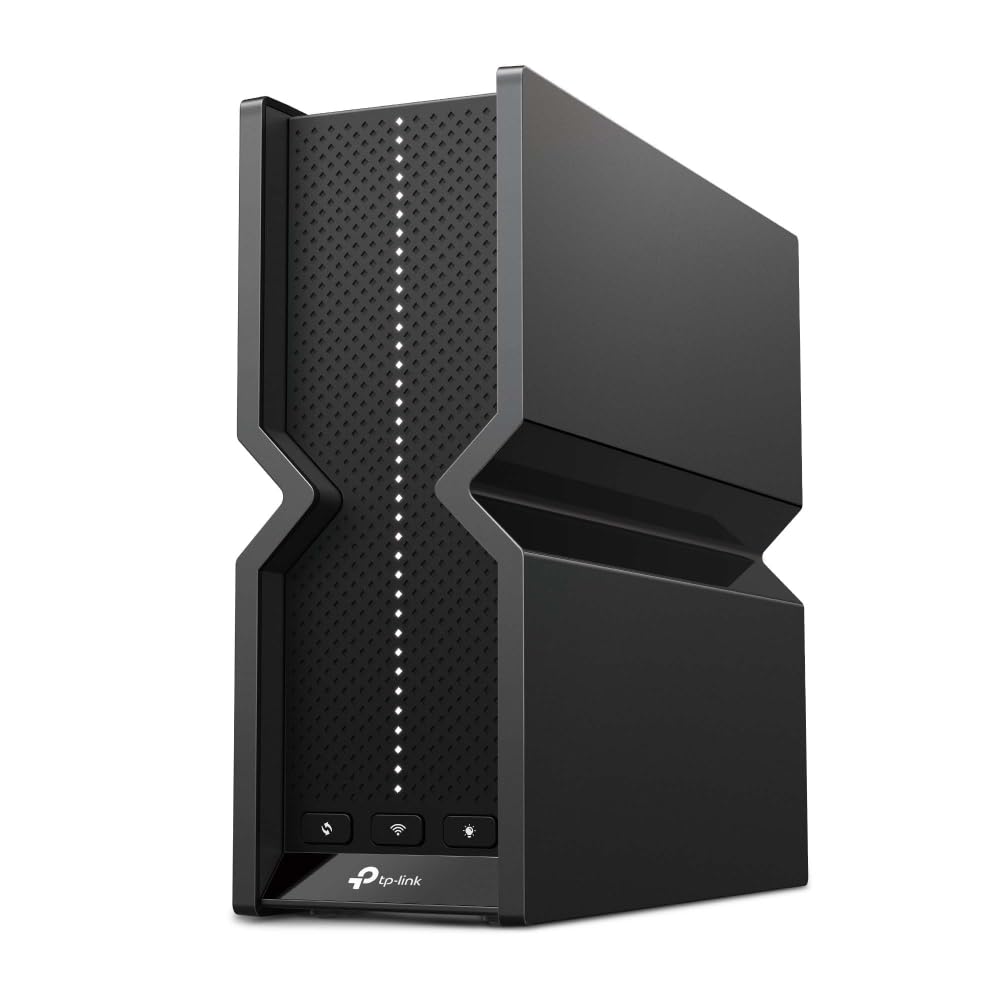
Citi Card Off | TP-Link Deco BE65(1-pack) BE11000 Tri-Band Wifi 7 Mesh Router 2.5g Wan
The TP-Link Deco BE65 is a cutting-edge Mesh system designed to elevate your home networking experience. With its sleek white finish, this device seamlessly blends into any modern decor. The Deco BE65 operates on a tri-band Wi-Fi configuration, utilizing 2.4 GHz, 5 GHz, and 6 GHz bands to deliver exceptional performance. Supporting the latest Wi-Fi 7 (802.11be) standard, it boasts a maximum WLAN data transfer rate of 11000 Mbit/s, ensuring that you can enjoy ultra-fast internet speeds across multiple devices simultaneously. Equipped with internal antennas, the Deco BE65 provides robust coverage throughout your home, eliminating dead zones and ensuring a stable connection. This device is compatible with popular virtual assistants such as Amazon Alexa and Google Assistant, allowing for seamless voice control of your network. Additionally, the TP-Link ID cloud services enhance your user experience, providing easy access to network management features and updates. One of the standout features of the Deco BE65 is its comprehensive parental control capabilities, which include options like bedtime settings, custom profiles, and the ability to pause the internet. This ensures that families can manage their online time effectively, promoting a healthy digital lifestyle. With its advanced technology and user-friendly features, the TP-Link Deco BE65 is an ideal choice for anyone looking to enhance their home network.
The TP-Link Deco BE65 is a cutting-edge Mesh system designed to elevate your home networking experience. With its sleek white finish, this device seamlessly blends into any modern decor. The Deco BE65 operates on a tri-band Wi-Fi configuration, utilizing 2.4 GHz, 5 GHz, and 6 GHz bands to deliver exceptional performance. Supporting the latest Wi-Fi 7 (802.11be) standard, it boasts a maximum WLAN data transfer rate of 11000 Mbit/s, ensuring that you can enjoy ultra-fast internet speeds across multiple devices simultaneously. Equipped with internal antennas, the Deco BE65 provides robust coverage throughout your home, eliminating dead zones and ensuring a stable connection. This device is compatible with popular virtual assistants such as Amazon Alexa and Google Assistant, allowing for seamless voice control of your network. Additionally, the TP-Link ID cloud services enhance your user experience, providing easy access to network management features and updates. One of the standout features of the Deco BE65 is its comprehensive parental control capabilities, which include options like bedtime settings, custom profiles, and the ability to pause the internet. This ensures that families can manage their online time effectively, promoting a healthy digital lifestyle. With its advanced technology and user-friendly features, the TP-Link Deco BE65 is an ideal choice for anyone looking to enhance their home network.
The TP-Link Deco BE65 is a cutting-edge Mesh system designed to elevate your home networking experience. With its sleek white finish, this device seamlessly blends into any modern decor. The Deco BE65 operates on a tri-band Wi-Fi configuration, utilizing 2.4 GHz, 5 GHz, and 6 GHz bands to deliver exceptional performance. Supporting the latest Wi-Fi 7 (802.11be) standard, it boasts a maximum WLAN data transfer rate of 11000 Mbit/s, ensuring that you can enjoy ultra-fast internet speeds across multiple devices simultaneously. Equipped with internal antennas, the Deco BE65 provides robust coverage throughout your home, eliminating dead zones and ensuring a stable connection. This device is compatible with popular virtual assistants such as Amazon Alexa and Google Assistant, allowing for seamless voice control of your network. Additionally, the TP-Link ID cloud services enhance your user experience, providing easy access to network management features and updates. One of the standout features of the Deco BE65 is its comprehensive parental control capabilities, which include options like bedtime settings, custom profiles, and the ability to pause the internet. This ensures that families can manage their online time effectively, promoting a healthy digital lifestyle. With its advanced technology and user-friendly features, the TP-Link Deco BE65 is an ideal choice for anyone looking to enhance their home network.
The TP-Link Deco BE65 is a cutting-edge Mesh system designed to elevate your home networking experience. With its sleek white finish, this device seamlessly blends into any modern decor. The Deco BE65 operates on a tri-band Wi-Fi configuration, utilizing 2.4 GHz, 5 GHz, and 6 GHz bands to deliver exceptional performance. Supporting the latest Wi-Fi 7 (802.11be) standard, it boasts a maximum WLAN data transfer rate of 11000 Mbit/s, ensuring that you can enjoy ultra-fast internet speeds across multiple devices simultaneously. Equipped with internal antennas, the Deco BE65 provides robust coverage throughout your home, eliminating dead zones and ensuring a stable connection. This device is compatible with popular virtual assistants such as Amazon Alexa and Google Assistant, allowing for seamless voice control of your network. Additionally, the TP-Link ID cloud services enhance your user experience, providing easy access to network management features and updates. One of the standout features of the Deco BE65 is its comprehensive parental control capabilities, which include options like bedtime settings, custom profiles, and the ability to pause the internet. This ensures that families can manage their online time effectively, promoting a healthy digital lifestyle. With its advanced technology and user-friendly features, the TP-Link Deco BE65 is an ideal choice for anyone looking to enhance their home network.
in 54 offers
The lowest price for Citi Card Off | TP-Link Deco BE65(1-pack) BE11000 Tri-Band Wifi 7 Mesh Router 2.5g Wan right now is $303.88 at microless.com, compared across 41 retailers.
The all-time low was $240.00 on 5 July 2025 — today's price is 27% above the lowest ever. It has been notably cheaper before — worth setting a price alert.
Prices last updated 3 Sept 2026.
Last updated at 03/09/2026 19:32:52
TP-Link Deco BE65 BE9300 Whole Home Mesh WiFi 7 System, 9214 Mbps Tri-Band WiFi, 2.5 Gbps Wired Connections, Multi-Link Operation, 320MHz Channels, Wo
Delivery between 8–15 Sept $44.60
TP-Link Deco BE65(1-pack) BE11000 Whole Home Mesh WiFi7 Router - 1 Pack
Delivery between 7–11 Sept $14.50
TP Link BE11000 Whole Home Mesh Wi Fi 7 System Router Deco BE65 1 pack - Wireless Access Points (WAP)
Delivery $19.18
TP Link BE11000 Whole Home Mesh Wi Fi 7 System Router Deco BE65 1 pack - Wireless Access Points (WAP)
Delivery $15
TP-LINK DECO BE65 MESH WI-FI SYSTEM BE11000 TRI-BAND 1-PACK 2.5 Gbps(4) ANT(4) 3YR W
Delivery $16.50
TP-Link Deco BE65 BE11000 Whole Home Mesh Wi-Fi 7 System (WIFI7), 574 Mbps at 2.4 GHz + 4320 Mbps at 5 GHz + 5760 Mbps at 6 GHz
Delivery $12.99
Tp-link Deco Be65 Be11000 Whole Home Mesh Wi-fi 7 System Tri-band 2.5g
Free delivery
Affiliate Disclosure: We may receive a small commission for purchases made through this link at no extra cost to you. This helps support our site. Thank you!
TP-Link Deco BE65 BE11000 Whole Home Mesh Wi-Fi 7 System (WIFI7) 574 Mbps at ...
Delivery between Mon – Tue $15
TP-Link Deco BE65 Mesh WiFi 7 — BE11000 Tri-Band
Free delivery between Mon – Wed
TP-Link Deco BE65 BE11000 Whole Home Mesh Wi-Fi 7 System (WIFI7), 574 Mbps at 2.4 GHz + 4320 Mbps at 5 GHz + 5760 Mbps at 6 GHz
originally posted on noelleeming.co.nz
Deco BE85 was purchased for two storey family home with the total floor area of 250 sq. meters. We have one WiFi-7 device, a few WiFi-6E/6 devices and a plenty of WiFi-5 devices. We are on Spark’s Gigabit fibre broadband. The main Deco unit is directly connected to the ONT box. The satellite Deco units have wired backhaul. The main objective of the purchase was to achieve a fast and reliable Internet connection in all corners of the property. It was successfully accomplished. The WiFi signal is very strong literally everywhere. There are no more blind spots in our home and no more complains about sudden connection drops.Connecting Deco to Internet didn’t go smoothly. Deco didn’t automatically recognize PPPoE connection type and didn’t apply New Zealand Spark UFB ... MoreDeco BE85 was purchased for two storey family home with the total floor area of 250 sq. meters. We have one WiFi-7 device, a few WiFi-6E/6 devices and a plenty of WiFi-5 devices. We are on Spark’s Gigabit fibre broadband. The main Deco unit is directly connected to the ONT box. The satellite Deco units have wired backhaul. The main objective of the purchase was to achieve a fast and reliable Internet connection in all corners of the property. It was successfully accomplished. The WiFi signal is very strong literally everywhere. There are no more blind spots in our home and no more complains about sudden connection drops.Connecting Deco to Internet didn’t go smoothly. Deco didn’t automatically recognize PPPoE connection type and didn’t apply New Zealand Spark UFB connection profile. So, the automatic Internet connection has failed. My first attempt of the manual connection has failed as well. I don’t know why, perhaps a typo upon entering the values using the touchscreen of my phone. The factory reset and the second attempt of connecting to the Internet manually were successful. All other aspects of the initial setup (setting the new WiFi network and defining the satellites) were straight forward and easy.Deco app is the major downside of this product. It is the only tool available for setting and controlling the home network. Please be aware that TP-Link doesn’t offer a WEB interface to Deco or a Windows version of the app. This is a big deal for me. It’s not just a personal preference of doing System Administration on a decent computer screen using a proper keyboard and a mouse. I have sight and dexterity problems. This app on my Android phone is a real pain.Another issue with this app is the fact that some functions and control options typically available on the high-end and mid-range WiFi routers are either just absent or obtainable as a paid subscription. Please do your research if you can live with what’s included.I was aware about the issues above before the purchase and it was my conscious decision that these downfalls are the reasonable compromises for the whole-home fast and reliable Internet connection. Unfortunately, I didn’t know that TP-Link requires to have an account with them and allows to start the app only by login into this account. Yes, you read this correctly: the credentials I enter to start the app are not for the app on my mobile device and not for my Deco system – they are login to my TP-Link account over the Internet. So, I need an Internet access to establish or fix my Internet access. Isn’t it dumb? The bigger question is, do I really own the product if I need a third party to be able to control it? What would I do if TP-Link and their user accounts go under? Am I comfortable with sharing the information about all WiFi devices in my household and their activity status with the third party? Currently I don’t have an option of controlling my home network from just inside the network. I wouldn’t have bought this product if I knew this.
| Special feature | Access Point Mode |
| Frequency band class | Tri-Band |
| Compatible devices | Laptop, Tablet, Smart Television, Smartphone |
| Operating System | RouterOS |
| Product dimensions | 15.1 x 15.1 x 27.65 cm; 1.3 Kilograms |
TP-Link Deco BE65 BE9300 Whole Home Mesh WiFi 7 System, 9214 Mbps Tri-Band WiFi, 2.5 Gbps Wired Connections, Multi-Link Operation, 320MHz Channels, Wo
Delivery between 8–15 Sept $44.60
TP-Link Deco BE65(1-pack) BE11000 Whole Home Mesh WiFi7 Router - 1 Pack
Delivery between 7–11 Sept $14.50
TP Link BE11000 Whole Home Mesh Wi Fi 7 System Router Deco BE65 1 pack - Wireless Access Points (WAP)
Delivery $19.18
TP Link BE11000 Whole Home Mesh Wi Fi 7 System Router Deco BE65 1 pack - Wireless Access Points (WAP)
Delivery $15
TP-LINK DECO BE65 MESH WI-FI SYSTEM BE11000 TRI-BAND 1-PACK 2.5 Gbps(4) ANT(4) 3YR W
Delivery $16.50
Deco BE85 was purchased for two storey family home with the total floor area of 250 sq. meters. We have one WiFi-7 device, a few WiFi-6E/6 devices and a plenty of WiFi-5 devices. We are on Spark’s Gigabit fibre broadband. The main Deco unit is directly connected to the ONT box. The satellite Deco units have wired backhaul. The main objective of the purchase was to achieve a fast and reliable Internet connection in all corners of the property. It was successfully accomplished. The WiFi signal is very strong literally everywhere. There are no more blind spots in our home and no more complains about sudden connection drops.Connecting Deco to Internet didn’t go smoothly. Deco didn’t automatically recognize PPPoE connection type and didn’t apply New Zealand Spark UFB ... MoreDeco BE85 was purchased for two storey family home with the total floor area of 250 sq. meters. We have one WiFi-7 device, a few WiFi-6E/6 devices and a plenty of WiFi-5 devices. We are on Spark’s Gigabit fibre broadband. The main Deco unit is directly connected to the ONT box. The satellite Deco units have wired backhaul. The main objective of the purchase was to achieve a fast and reliable Internet connection in all corners of the property. It was successfully accomplished. The WiFi signal is very strong literally everywhere. There are no more blind spots in our home and no more complains about sudden connection drops.Connecting Deco to Internet didn’t go smoothly. Deco didn’t automatically recognize PPPoE connection type and didn’t apply New Zealand Spark UFB connection profile. So, the automatic Internet connection has failed. My first attempt of the manual connection has failed as well. I don’t know why, perhaps a typo upon entering the values using the touchscreen of my phone. The factory reset and the second attempt of connecting to the Internet manually were successful. All other aspects of the initial setup (setting the new WiFi network and defining the satellites) were straight forward and easy.Deco app is the major downside of this product. It is the only tool available for setting and controlling the home network. Please be aware that TP-Link doesn’t offer a WEB interface to Deco or a Windows version of the app. This is a big deal for me. It’s not just a personal preference of doing System Administration on a decent computer screen using a proper keyboard and a mouse. I have sight and dexterity problems. This app on my Android phone is a real pain.Another issue with this app is the fact that some functions and control options typically available on the high-end and mid-range WiFi routers are either just absent or obtainable as a paid subscription. Please do your research if you can live with what’s included.I was aware about the issues above before the purchase and it was my conscious decision that these downfalls are the reasonable compromises for the whole-home fast and reliable Internet connection. Unfortunately, I didn’t know that TP-Link requires to have an account with them and allows to start the app only by login into this account. Yes, you read this correctly: the credentials I enter to start the app are not for the app on my mobile device and not for my Deco system – they are login to my TP-Link account over the Internet. So, I need an Internet access to establish or fix my Internet access. Isn’t it dumb? The bigger question is, do I really own the product if I need a third party to be able to control it? What would I do if TP-Link and their user accounts go under? Am I comfortable with sharing the information about all WiFi devices in my household and their activity status with the third party? Currently I don’t have an option of controlling my home network from just inside the network. I wouldn’t have bought this product if I knew this.
| Special feature | Access Point Mode |
| Frequency band class | Tri-Band |
| Compatible devices | Laptop, Tablet, Smart Television, Smartphone |
| Operating System | RouterOS |
| Product dimensions | 15.1 x 15.1 x 27.65 cm; 1.3 Kilograms |