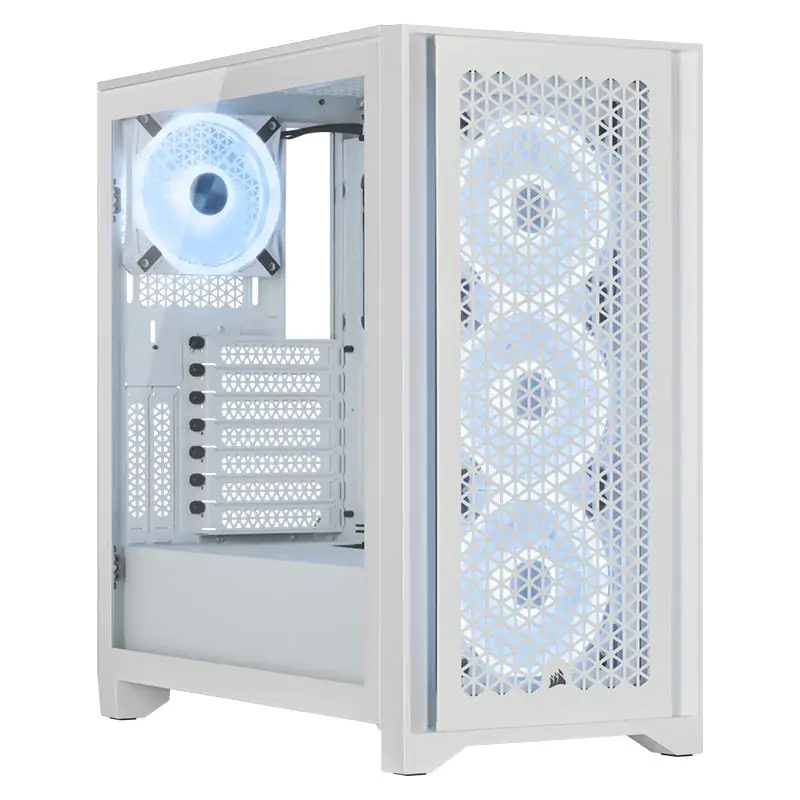
Corsair iCUE 4000X RGB Tempered Glass Mid-Tower ATX Case - White
The CORSAIR iCUE 4000X RGB is a distinctive and customizable tempered glass mid-tower ATX case with easy cable management and exceptional cooling, with three included CORSAIR AirGuide RGB fans. A clean start to a great build As beautiful to look at as it is easy to build in, the 4000X RGB tempered glass merges elegance with innovation - the perfect starting point for a world-class build. Tempered glass side and front panels Show off your components and RGB lighting, with dedicated front ventilation channels for ample airflow. CORSAIR RapidRoute cable management Route your major cables through a single channel, with a roomy 25mm of space behind the motherboard for all of your cables, making a clean-looking build easier than ever. Powerful directed airflow Equipped with three CORSAIR 120mm fans featuring AirGuide technology with anti-vortex vanes to concentrate airflow and enhance cooling. Elegantly versatile Build it how you want today, with an easy upgrade path for tomorrow. Extreme cooling potential A spacious interior fits up to 6x 120mm or 4x 140mm cooling fans, along with multiple radiators including a 360mm in front and 280mm in the roof. Vertical GPU mount ready With included vertical PCIe slots and a screw mount for a cable, you can show off your GPU and keep it secure at the same time. Put your connections within easy reach The modern front panel includes a USB 3.1 Type-C port, USB 3.0 port, and a combination audio/microphone jack. Easy slide-on, slide-off side panel Show off your high-profile components and RGB lighting with an easy slide-on, slide-off attach method.
The CORSAIR iCUE 4000X RGB is a distinctive and customizable tempered glass mid-tower ATX case with easy cable management and exceptional cooling, with three included CORSAIR AirGuide RGB fans. A clean start to a great build As beautiful to look at as it is easy to build in, the 4000X RGB tempered glass merges elegance with innovation - the perfect starting point for a world-class build. Tempered glass side and front panels Show off your components and RGB lighting, with dedicated front ventilation channels for ample airflow. CORSAIR RapidRoute cable management Route your major cables through a single channel, with a roomy 25mm of space behind the motherboard for all of your cables, making a clean-looking build easier than ever. Powerful directed airflow Equipped with three CORSAIR 120mm fans featuring AirGuide technology with anti-vortex vanes to concentrate airflow and enhance cooling. Elegantly versatile Build it how you want today, with an easy upgrade path for tomorrow. Extreme cooling potential A spacious interior fits up to 6x 120mm or 4x 140mm cooling fans, along with multiple radiators including a 360mm in front and 280mm in the roof. Vertical GPU mount ready With included vertical PCIe slots and a screw mount for a cable, you can show off your GPU and keep it secure at the same time. Put your connections within easy reach The modern front panel includes a USB 3.1 Type-C port, USB 3.0 port, and a combination audio/microphone jack. Easy slide-on, slide-off side panel Show off your high-profile components and RGB lighting with an easy slide-on, slide-off attach method.
The CORSAIR iCUE 4000X RGB is a distinctive and customizable tempered glass mid-tower ATX case with easy cable management and exceptional cooling, with three included CORSAIR AirGuide RGB fans. A clean start to a great build As beautiful to look at as it is easy to build in, the 4000X RGB tempered glass merges elegance with innovation - the perfect starting point for a world-class build. Tempered glass side and front panels Show off your components and RGB lighting, with dedicated front ventilation channels for ample airflow. CORSAIR RapidRoute cable management Route your major cables through a single channel, with a roomy 25mm of space behind the motherboard for all of your cables, making a clean-looking build easier than ever. Powerful directed airflow Equipped with three CORSAIR 120mm fans featuring AirGuide technology with anti-vortex vanes to concentrate airflow and enhance cooling. Elegantly versatile Build it how you want today, with an easy upgrade path for tomorrow. Extreme cooling potential A spacious interior fits up to 6x 120mm or 4x 140mm cooling fans, along with multiple radiators including a 360mm in front and 280mm in the roof. Vertical GPU mount ready With included vertical PCIe slots and a screw mount for a cable, you can show off your GPU and keep it secure at the same time. Put your connections within easy reach The modern front panel includes a USB 3.1 Type-C port, USB 3.0 port, and a combination audio/microphone jack. Easy slide-on, slide-off side panel Show off your high-profile components and RGB lighting with an easy slide-on, slide-off attach method.
The CORSAIR iCUE 4000X RGB is a distinctive and customizable tempered glass mid-tower ATX case with easy cable management and exceptional cooling, with three included CORSAIR AirGuide RGB fans. A clean start to a great build As beautiful to look at as it is easy to build in, the 4000X RGB tempered glass merges elegance with innovation - the perfect starting point for a world-class build. Tempered glass side and front panels Show off your components and RGB lighting, with dedicated front ventilation channels for ample airflow. CORSAIR RapidRoute cable management Route your major cables through a single channel, with a roomy 25mm of space behind the motherboard for all of your cables, making a clean-looking build easier than ever. Powerful directed airflow Equipped with three CORSAIR 120mm fans featuring AirGuide technology with anti-vortex vanes to concentrate airflow and enhance cooling. Elegantly versatile Build it how you want today, with an easy upgrade path for tomorrow. Extreme cooling potential A spacious interior fits up to 6x 120mm or 4x 140mm cooling fans, along with multiple radiators including a 360mm in front and 280mm in the roof. Vertical GPU mount ready With included vertical PCIe slots and a screw mount for a cable, you can show off your GPU and keep it secure at the same time. Put your connections within easy reach The modern front panel includes a USB 3.1 Type-C port, USB 3.0 port, and a combination audio/microphone jack. Easy slide-on, slide-off side panel Show off your high-profile components and RGB lighting with an easy slide-on, slide-off attach method.
in 26 offers
The lowest price for Corsair iCUE 4000X RGB Tempered Glass Mid-Tower ATX Case - White right now is $84.17 at eBay.com.au, compared across 23 retailers.
The all-time low was $84.17 on 26 Aug 2026. That's the lowest price we've ever tracked — a great time to buy.
Prices last updated 26 Aug 2026.
Last updated at 26/08/2026 14:01:45
Corsair iCUE 4000x RGB Mid-tower White Computer Case
Affiliate Disclosure: We may receive a small commission for purchases made through this link at no extra cost to you. This helps support our site. Thank you!
Corsair Carbide Series 4000x Rgb E-atx, Atx, Tempered Glass Front &
Free delivery
Affiliate Disclosure: We may receive a small commission for purchases made through this link at no extra cost to you. This helps support our site. Thank you!
Corsair iCUE 4000X RGB Tempered Glass Mid-Tower ATX Case - White, ATX/E-ATX, 360mm GPU, 170mm CPU, 2yr wty
Delivery between Fri – Wed $30.55
Corsair 4000X Window 3xfans ATX White PC Case
Free delivery between 2–7 Sept
Corsair Carbide Series 4000X RGB E-ATX, ATX, Tempered Glass Front & Side. White,3x 120mm RGB Fans pre-installed. USB 3.0 and Type-C x 1. PCI 7+2, Case
Delivery by 3 Sept $15
Corsair iCUE 4000X Tempered Glass Mid-Tower ATX Computer case White
Corsair iCUE 4000X RGB Tempered Glass Mid-Tower ATX Case in White CC-9011205-WW
Delivery $22
Corsair 4000X RGB ATX Case - White
Delivery $50
Corsair Carbide Series 4000X RGB E-ATX, ATX, Tempered Glass Front & Side. White,3x 120mm RGB Fans pre-installed. USB 3.0 and Type-C x 1. PCI 7+2, Case
Delivery $7.95
Corsair iCUE 4000X RGB Tempered Glass Mid-Tower ATX Case White
Delivery between 31 Aug – 3 Sept $12
originally posted on bestbuy.com
The Corsair iCUE 4000X RGB case is the culmination of years of development, and it shows clearly in the iCUE 4000X.The case is the best engineered and implemented case I have used for my builds; it dots all the I’s and crosses all the T’s.Not one of the cases I have used over decades was so completely thought out built. Have cases costing far more than the iCUE 4000X that do not come close to the excellence of this build.Notes:- RGB controller is intuitive to use, works great with the ICUE software.- Side panels and the front panel are easily removeable.- Cable management channels are superb.- Magnetic dust filters are easily accessible. Great stuffDo not recall a case that something was lacking or just not right, not the 4000x, they got it right.If ... MoreThe Corsair iCUE 4000X RGB case is the culmination of years of development, and it shows clearly in the iCUE 4000X.The case is the best engineered and implemented case I have used for my builds; it dots all the I’s and crosses all the T’s.Not one of the cases I have used over decades was so completely thought out built. Have cases costing far more than the iCUE 4000X that do not come close to the excellence of this build.Notes:- RGB controller is intuitive to use, works great with the ICUE software.- Side panels and the front panel are easily removeable.- Cable management channels are superb.- Magnetic dust filters are easily accessible. Great stuffDo not recall a case that something was lacking or just not right, not the 4000x, they got it right.If you are looking for a case that delivers on capacity, ease of installation, airflow cooling, upgradable, solid build and delivers at a fraction of the cost of many cases give the iCUE 4000X a look. It is truly a Winner.
originally posted on bestbuy.com
When it comes to Mid Tower ATX cases - this is about as good as it gets. From construction to its capabilities this is a solid choice and comes in two great color combos Black and White/Gray. PLEASE NOTE - This has a 240 top - therefore you can only fit a 240 rad and not a triple 360 rad - if that is a deal-breaker but you love the case look to the 5000x/7000x as it is the same case just bigger.Construction- Just like every other PC at this price point, this is created with a metal chassis and tempered front and side glass for optimal RGB. Nothing on this PC felt cheap while building it and even the things that could have been plastic or cheaper were generally above the quality I expected - Especially for $100. It has one USB type C and One USB type A on the front ... MoreWhen it comes to Mid Tower ATX cases - this is about as good as it gets. From construction to its capabilities this is a solid choice and comes in two great color combos Black and White/Gray. PLEASE NOTE - This has a 240 top - therefore you can only fit a 240 rad and not a triple 360 rad - if that is a deal-breaker but you love the case look to the 5000x/7000x as it is the same case just bigger.Construction- Just like every other PC at this price point, this is created with a metal chassis and tempered front and side glass for optimal RGB. Nothing on this PC felt cheap while building it and even the things that could have been plastic or cheaper were generally above the quality I expected - Especially for $100. It has one USB type C and One USB type A on the front case connectors along with a Mic/headphone port.Cable Management - This case comes with a great main channel to route Cables through and several ties for management down the line in the build. You will need your own zip ties, but your cable management opportunity here is based on your skill and not really the case as Corsair has really killed it with this one.Features/Fans- The fans that the case comes with are...ok. For $100 you can't expect them to throw in great fans as well so plan to replace them if you are putting anything serious in it but if you are doing an I5 or below you should be good. The case comes with its own RGB hub in the back good for 6 fans but no fan hub like on the 5000x and 7000x and this is probably due to the cost factor so plan on using one of their nodes or some other method for your 6+ fan headers other than what is brought in on this case. Another great feature is every vent you could want a mesh fan filter - has one and they are pretty good! It has three plats in the back for SSD's and a Hard Drive caddy good for two HDDs or four SSD's (must buy an adaptor for the 4ssd's but it has the potential for two out of the box).Conclusion - If you like the aesthetic of the case, pull the trigger at BestBuy! They generally have better deals plus your points vs corsair. This was a great case to build in and I have zero complaints, I upgraded the fans and added a core (which came with the AIO I got for it so it wasn't additional) and I was all good to go on the case. Truly another Mastercraft example of corsairs ability to build and execute on high-end cases.
originally posted on bestbuy.com
So like the title implies the case looks very nice. But it doea have some things im not super thrilled about. First thing is corsair please include the rear fan with these cases because without it it has terrible flow. I run a 5600x asus x570 and a rtx 3080 currently. Anyway so i had this thing air cooled at first and twmps were up mid 90s twrrible so i added a rear fan got them down to mid 80s took the side panel off low 70s . This is all under full game load. And those are cpu temps. Anyway ended up putting a liquid cooler in the case h115i lets say its probably to thick for this case on top but thata where it is now just touching the ram. Not my favorite but it works the problem is the 140 fans on h115 are too thick. The h110 fits perfectly and i would go.thst ... MoreSo like the title implies the case looks very nice. But it doea have some things im not super thrilled about. First thing is corsair please include the rear fan with these cases because without it it has terrible flow. I run a 5600x asus x570 and a rtx 3080 currently. Anyway so i had this thing air cooled at first and twmps were up mid 90s twrrible so i added a rear fan got them down to mid 80s took the side panel off low 70s . This is all under full game load. And those are cpu temps. Anyway ended up putting a liquid cooler in the case h115i lets say its probably to thick for this case on top but thata where it is now just touching the ram. Not my favorite but it works the problem is the 140 fans on h115 are too thick. The h110 fits perfectly and i would go.thst direction n3ct build. But with all that in there it runs 72 to 76 under full load 1440p or 4k . The last issue is if you want to vertical mount the card which looks cool its too close to the glass to be actually usefull. It overheats the graphulics card and im talking 92 so thats useless with a 3080 or probably any large card i would assume. Hopefully that answers many questions if i could rate it a 3.5 i think thats a accurate number.
| General | |
| Form Factor | Tower |
| Windowed Side Panel | Yes |
| Windowed Side Panel Material | Tempered glass |
| Max Mainboard Size | ATX |
Corsair iCUE 4000x RGB Mid-tower White Computer Case
Affiliate Disclosure: We may receive a small commission for purchases made through this link at no extra cost to you. This helps support our site. Thank you!
Corsair Carbide Series 4000x Rgb E-atx, Atx, Tempered Glass Front &
Free delivery
Affiliate Disclosure: We may receive a small commission for purchases made through this link at no extra cost to you. This helps support our site. Thank you!
Corsair iCUE 4000X RGB Tempered Glass Mid-Tower ATX Case - White, ATX/E-ATX, 360mm GPU, 170mm CPU, 2yr wty
Delivery between Fri – Wed $30.55
Corsair 4000X Window 3xfans ATX White PC Case
Free delivery between 2–7 Sept
Corsair Carbide Series 4000X RGB E-ATX, ATX, Tempered Glass Front & Side. White,3x 120mm RGB Fans pre-installed. USB 3.0 and Type-C x 1. PCI 7+2, Case
Delivery by 3 Sept $15
The Corsair iCUE 4000X RGB case is the culmination of years of development, and it shows clearly in the iCUE 4000X.The case is the best engineered and implemented case I have used for my builds; it dots all the I’s and crosses all the T’s.Not one of the cases I have used over decades was so completely thought out built. Have cases costing far more than the iCUE 4000X that do not come close to the excellence of this build.Notes:- RGB controller is intuitive to use, works great with the ICUE software.- Side panels and the front panel are easily removeable.- Cable management channels are superb.- Magnetic dust filters are easily accessible. Great stuffDo not recall a case that something was lacking or just not right, not the 4000x, they got it right.If ... MoreThe Corsair iCUE 4000X RGB case is the culmination of years of development, and it shows clearly in the iCUE 4000X.The case is the best engineered and implemented case I have used for my builds; it dots all the I’s and crosses all the T’s.Not one of the cases I have used over decades was so completely thought out built. Have cases costing far more than the iCUE 4000X that do not come close to the excellence of this build.Notes:- RGB controller is intuitive to use, works great with the ICUE software.- Side panels and the front panel are easily removeable.- Cable management channels are superb.- Magnetic dust filters are easily accessible. Great stuffDo not recall a case that something was lacking or just not right, not the 4000x, they got it right.If you are looking for a case that delivers on capacity, ease of installation, airflow cooling, upgradable, solid build and delivers at a fraction of the cost of many cases give the iCUE 4000X a look. It is truly a Winner.
When it comes to Mid Tower ATX cases - this is about as good as it gets. From construction to its capabilities this is a solid choice and comes in two great color combos Black and White/Gray. PLEASE NOTE - This has a 240 top - therefore you can only fit a 240 rad and not a triple 360 rad - if that is a deal-breaker but you love the case look to the 5000x/7000x as it is the same case just bigger.Construction- Just like every other PC at this price point, this is created with a metal chassis and tempered front and side glass for optimal RGB. Nothing on this PC felt cheap while building it and even the things that could have been plastic or cheaper were generally above the quality I expected - Especially for $100. It has one USB type C and One USB type A on the front ... MoreWhen it comes to Mid Tower ATX cases - this is about as good as it gets. From construction to its capabilities this is a solid choice and comes in two great color combos Black and White/Gray. PLEASE NOTE - This has a 240 top - therefore you can only fit a 240 rad and not a triple 360 rad - if that is a deal-breaker but you love the case look to the 5000x/7000x as it is the same case just bigger.Construction- Just like every other PC at this price point, this is created with a metal chassis and tempered front and side glass for optimal RGB. Nothing on this PC felt cheap while building it and even the things that could have been plastic or cheaper were generally above the quality I expected - Especially for $100. It has one USB type C and One USB type A on the front case connectors along with a Mic/headphone port.Cable Management - This case comes with a great main channel to route Cables through and several ties for management down the line in the build. You will need your own zip ties, but your cable management opportunity here is based on your skill and not really the case as Corsair has really killed it with this one.Features/Fans- The fans that the case comes with are...ok. For $100 you can't expect them to throw in great fans as well so plan to replace them if you are putting anything serious in it but if you are doing an I5 or below you should be good. The case comes with its own RGB hub in the back good for 6 fans but no fan hub like on the 5000x and 7000x and this is probably due to the cost factor so plan on using one of their nodes or some other method for your 6+ fan headers other than what is brought in on this case. Another great feature is every vent you could want a mesh fan filter - has one and they are pretty good! It has three plats in the back for SSD's and a Hard Drive caddy good for two HDDs or four SSD's (must buy an adaptor for the 4ssd's but it has the potential for two out of the box).Conclusion - If you like the aesthetic of the case, pull the trigger at BestBuy! They generally have better deals plus your points vs corsair. This was a great case to build in and I have zero complaints, I upgraded the fans and added a core (which came with the AIO I got for it so it wasn't additional) and I was all good to go on the case. Truly another Mastercraft example of corsairs ability to build and execute on high-end cases.
So like the title implies the case looks very nice. But it doea have some things im not super thrilled about. First thing is corsair please include the rear fan with these cases because without it it has terrible flow. I run a 5600x asus x570 and a rtx 3080 currently. Anyway so i had this thing air cooled at first and twmps were up mid 90s twrrible so i added a rear fan got them down to mid 80s took the side panel off low 70s . This is all under full game load. And those are cpu temps. Anyway ended up putting a liquid cooler in the case h115i lets say its probably to thick for this case on top but thata where it is now just touching the ram. Not my favorite but it works the problem is the 140 fans on h115 are too thick. The h110 fits perfectly and i would go.thst ... MoreSo like the title implies the case looks very nice. But it doea have some things im not super thrilled about. First thing is corsair please include the rear fan with these cases because without it it has terrible flow. I run a 5600x asus x570 and a rtx 3080 currently. Anyway so i had this thing air cooled at first and twmps were up mid 90s twrrible so i added a rear fan got them down to mid 80s took the side panel off low 70s . This is all under full game load. And those are cpu temps. Anyway ended up putting a liquid cooler in the case h115i lets say its probably to thick for this case on top but thata where it is now just touching the ram. Not my favorite but it works the problem is the 140 fans on h115 are too thick. The h110 fits perfectly and i would go.thst direction n3ct build. But with all that in there it runs 72 to 76 under full load 1440p or 4k . The last issue is if you want to vertical mount the card which looks cool its too close to the glass to be actually usefull. It overheats the graphulics card and im talking 92 so thats useless with a 3080 or probably any large card i would assume. Hopefully that answers many questions if i could rate it a 3.5 i think thats a accurate number.
I bought this over a year ago and love it. The tempered glass is practically invisible. And It's the perfect mid-tower size. I have an Asus ROG ATX MB & top-mounted Corsair iCUE H100i ELITE CAPELLIX (240mm) that fit in perfectly. My previous mid-tower had a lot of extra open space that made all the parts feel really small and it just looked silly.I removed the pre-installed Lighting Node Core & used the Commander Core that came with the AIO instead. And I took out the HD cage (didn't need it + waste of space). The SSD sleds were confusing until I looked up some images online. In the end it all worked out! (even though my cable management is *poor*).Highly recommend this! Though I am a big Corsair fan so I will almost always recommend them
Decent case, I enjoyed that it came with the three 8-LED fans in the front plus a node inside the case to connect those fans to. Easy to build in for the most part, and the design of the case looks very nice.Their glass side-panel mounting solution could be better, the side panel feels pretty much suctioned to the case which caused me to shatter my first one (super fun) and always gives me resistance so it can be dreadful to take off for getting inside the PC, which is obviously necessary.My real gripe lies on the other side, towards the back of the MOBO. I'm running the 850W PSU from Corsair, and the cables are so thick (mainly the 24-pin) that even pressed all the way against the back of my case, it still causes the outer panel to bend, and (not trying to flex) ... MoreDecent case, I enjoyed that it came with the three 8-LED fans in the front plus a node inside the case to connect those fans to. Easy to build in for the most part, and the design of the case looks very nice.Their glass side-panel mounting solution could be better, the side panel feels pretty much suctioned to the case which caused me to shatter my first one (super fun) and always gives me resistance so it can be dreadful to take off for getting inside the PC, which is obviously necessary.My real gripe lies on the other side, towards the back of the MOBO. I'm running the 850W PSU from Corsair, and the cables are so thick (mainly the 24-pin) that even pressed all the way against the back of my case, it still causes the outer panel to bend, and (not trying to flex) my cable management inside the case is pretty much flawless. Rather ironic I would say, that I pair a corsair PSU with a Corsair Case, and their cables won't even fit in the back panel properly, which makes adding cable extensions or extra fan headers to this case pretty much a nightmare.Also, I know this is a common thing for RGB fans, but the double wires for one fan (one for RGB and one for actual fan control) is a little ridiculous. If you're mix-and-matching fans from Corsair, like me (one LL fan, and five 8-LEDs) you (might) have to get an extra node/header to control them since they use one fan to tell the others what to do, or else the RGB won't work properly on one series of fans (I could've planned for this better, but really).You might know this, but iCue can be pretty awful. Most recently, I was having an issue where my fans connected through a Commander Pro would go on and off every 5 seconds and a USB-disconnect sound would sound every time the fans would turn on and off, and my fans would go full-throttle when it happened. I fixed it by disabling some USB setting, but most of the forums I visited said it's an issue with other programs interfering with RGB control, so take that as you will.THERMALS AND NOISE PERFORMANCE: I'm running a Gigabyte 2080 super and an i7-9700K (stock OC, same voltage) with a h100i Elite Cappelix 240mm AIO mounted at the top of the case (there's an option for 280mm but my RAM, corsair vengeance RGB, barely had clearance with the 240). My CPU never goes above 65 degrees and same with my GPU, so I can't complain about that.Under load, I would say the noise level is alright, it can be quite loud but the tone of the noise isn't unpleasant. Compared to something like the jet engine of a PS4, this is way better, it just sounds like a really big fan blowing wind without any mechanical noises or whirring, so I would say a clean sound.PROS:- RGB looks nice especially with smoked panels, overall very sleek-looking case- Decent-good airflow and performance.- Relatively easy to build in.CONS:- Area behind MOBO for cable management is too small for Corsair PSU cables, bends my side-panel even without stacking wires + good cable management.- iCue is not good- Glass side-panel mounting needs improvement, can be annoying- If running with Corsair fans, LOTS OF WIRESIn short: I love the way it looks and it performs well, but for individuals who are less experienced, it can be quite tedious to deal with Corsair's software if pairing with other Corsair peripherals. If you're not looking to build with Corsair fans, go find another case 100%! Be wary of pairing with a PSU that uses thick cables.
Though this is a pricier option than some other cases... the build quality and thought of design is just impeccable! You can tell that a lot of thought went into making sure that everything is in just the right place.I was originally confused with how to remove the side panel, but discovered that after removing the screws, you pull "up" on the tabs instead of sliding the panel out. It has some snaps that hold it in place. They used the same mechanism for holding the front tempered glass panel in place.The fans are surprisingly quiet for being the free "included" fans. Having just a touch of OCD, I was annoyed that one of the fans has an off-center sticker with the corsair logo in the center. The other two fans have the sticker perfectly centered so that it does ... MoreThough this is a pricier option than some other cases... the build quality and thought of design is just impeccable! You can tell that a lot of thought went into making sure that everything is in just the right place.I was originally confused with how to remove the side panel, but discovered that after removing the screws, you pull "up" on the tabs instead of sliding the panel out. It has some snaps that hold it in place. They used the same mechanism for holding the front tempered glass panel in place.The fans are surprisingly quiet for being the free "included" fans. Having just a touch of OCD, I was annoyed that one of the fans has an off-center sticker with the corsair logo in the center. The other two fans have the sticker perfectly centered so that it does not visibly oscillate while spinning. From a purely functional standpoint, they have surpassed my expectations however.All of the inlet locations for air have dust covers that are easy to get to and easy to clean. It also includes an RGB controller with three extra slots for additional RGB fans.The velcro straps on the back panel were in the perfect locations to make hiding the wiring easy.Overall, I've been very pleased with this purchase and fully intend on purchasing another Corsair case for my next build. Happy customer here!
I'm a fan of Corsair products for my builds. This case is ok, not the greatest in my opinion. For me, I really don't recommend using this case for larger builds. The spot where you put the motherboard, the ram, the gpu is not the issue, the issue lies behind the back panel where the cables are. When I opened the back panel, I saw the case cables already organized but things started to go down south when I added the psu cables. I had issues taking out the 3.5 hard drive bay but a pair of pliers saved the day to unscrew those screws.The case has a pre installed RGB light controller but no controller for the fans. You will need to get PWM extension cables so you can hook up to the motherboard sys_fan connector. You can buy a Corsair controller (iCue Commander Core ... MoreI'm a fan of Corsair products for my builds. This case is ok, not the greatest in my opinion. For me, I really don't recommend using this case for larger builds. The spot where you put the motherboard, the ram, the gpu is not the issue, the issue lies behind the back panel where the cables are. When I opened the back panel, I saw the case cables already organized but things started to go down south when I added the psu cables. I had issues taking out the 3.5 hard drive bay but a pair of pliers saved the day to unscrew those screws.The case has a pre installed RGB light controller but no controller for the fans. You will need to get PWM extension cables so you can hook up to the motherboard sys_fan connector. You can buy a Corsair controller (iCue Commander Core XT) but its kind of big since I need room to do the cable management. Plus you will need a usb hub for your AIO pump.However, if you are not using a AIO or water cooling system, just a cpu fan in your build, you should be good.The case serves it purpose for the components of the computer but not recommended for complex projects.
Corsair makes some solid cases and others have more airflow than this. However, I haven't had any issues with this case. I wanted a glass front and something that came with fans. These aren't Corsair's top end fans, but they work. I added another LL120 fan on the rear exhaust so I could use the controller it comes with. Corsair does not let you mix and match fans with their controller.You technically can, but controlling the RGB doesn't work out. I paired this case with an additional LL120 fan and their H100i elite LCD AiO. I paid more for their LCD AiO, but it looks nice, and I wanted to use one program (iCUE) for managing all RGB.I have iCUE set all fans to quiet operation. My system consists of a Ryzen 7 5800X CPU and RTX 4070Ti graphics card. I put five ... MoreCorsair makes some solid cases and others have more airflow than this. However, I haven't had any issues with this case. I wanted a glass front and something that came with fans. These aren't Corsair's top end fans, but they work. I added another LL120 fan on the rear exhaust so I could use the controller it comes with. Corsair does not let you mix and match fans with their controller.You technically can, but controlling the RGB doesn't work out. I paired this case with an additional LL120 fan and their H100i elite LCD AiO. I paid more for their LCD AiO, but it looks nice, and I wanted to use one program (iCUE) for managing all RGB.I have iCUE set all fans to quiet operation. My system consists of a Ryzen 7 5800X CPU and RTX 4070Ti graphics card. I put five temperature probes throughout my tower so I could measure the air temperature coming into the case (top and bottom), what's coming directly into the graphics card under it (above the power supply shield), what's leaving the back exhaust, and what's being pushed through the AiO out the top.Internal case temperatures while gaming never go above 40°C while my CPU sits at 65°C. My graphics card gets warmer, around 80°C, but it's a power hungry 4070Ti and it's still well below any levels of concern.Overall, I'm pleased with this case and the performance it provides. I could probably get some cooler temperatures with one of their airflow cases, but I prefer the way this one looks. The front glass is a nice touch and the glass around the system is easy to see through. I do wish it was 1-2" taller for easier cable management, especially since I have 6 fans with RBG, the LCD AiO, and 4 of Corsair's LED strips all paired to four Corsair controller boxes each requiring SATA power. Things would be an absolute mess if I didn't have a modular power supply.There are options for cable management in the back, and Corsair gives you 5-6 Velcro cable straps and a dozen or so small zip ties. There are multiple hooks and loops for cable management, it still becomes a mess when there's this much lighting in it.Either way, there's plenty of space for 40-series and 7000-series graphics card and adequate cooling.
Does everything you'd expect from a high-quality gaming PC case. Everything feels sturdy and durable, it's easy to open and close the case panels to work on the internals. The X model comes with three case fans at the front, I couldn't test them all, but 2 of them work fine so far. I just wish the setup came with a fan cable splitter so I could hook all three fans directly to one SYS_FAN connection as soon as I got the case, but I guess it's a lot to ask. I've ordered some splitter cables so I can hook up all my fans soon and test the third fan. The case is extremely spacious, with ample space for additional features such as a radiator if desired. The back side of the case has quite a lot of space for cable management, but I've noticed one issue - the HDD tray sits ... MoreDoes everything you'd expect from a high-quality gaming PC case. Everything feels sturdy and durable, it's easy to open and close the case panels to work on the internals. The X model comes with three case fans at the front, I couldn't test them all, but 2 of them work fine so far. I just wish the setup came with a fan cable splitter so I could hook all three fans directly to one SYS_FAN connection as soon as I got the case, but I guess it's a lot to ask. I've ordered some splitter cables so I can hook up all my fans soon and test the third fan. The case is extremely spacious, with ample space for additional features such as a radiator if desired. The back side of the case has quite a lot of space for cable management, but I've noticed one issue - the HDD tray sits right behind the PSU, which made it very hard to manage my power cables (they are quite stiff) even after moving the tray further towards the front of the case. Even after setting up everything, currently all my cables have so little space that they spill over to the front of the HDD tray, meaning if I ever want to take out a drive, I'll have to move a bunch of cables out of the way. With that said, I do believe my power cables are *very* stiff and are a major factor in the issue, so I'll say if you have bulky, stiff power cables, expect some struggle making everything fit in the space between the back of the PSU and the HDD tray. Better cables might ease the issue. Otherwise, it's going to be a bit harder, but definitely not a huge concern, just a little bit annoying. Overall, I'm very satisfied with the case and have zero regret going for this upgrade from a tiny, over-encumbered case I had before. With this, I have more space, better cable management, and ample space to future-proof in case I upgrade later.
I've built two computers using this exact case, and two using the Corsair Spec-Delta. This is a higher end case, and is much better for cable management. It's a solid, heavy case with rubber feet, so the fans don't cause it to vibrate and make noise.Air enters the tower through a fine screen behind the front glass plate, drawn in by three beautifully lit, included LED fans. If you have a dusty house with multiple pets, this screen rapidly collects dust circles in front of each fan dimming the beautiful fan LEDs. On white, this is probably even more apparent, but the good thing, I suppose, it is serves as a more constant reminder (than the dark plastic face of the Spec-Delta, at least) to keep it clean.The good news is, that's easy: both the front tempered glass ... MoreI've built two computers using this exact case, and two using the Corsair Spec-Delta. This is a higher end case, and is much better for cable management. It's a solid, heavy case with rubber feet, so the fans don't cause it to vibrate and make noise.Air enters the tower through a fine screen behind the front glass plate, drawn in by three beautifully lit, included LED fans. If you have a dusty house with multiple pets, this screen rapidly collects dust circles in front of each fan dimming the beautiful fan LEDs. On white, this is probably even more apparent, but the good thing, I suppose, it is serves as a more constant reminder (than the dark plastic face of the Spec-Delta, at least) to keep it clean.The good news is, that's easy: both the front tempered glass plate and the fine screen pop off with a little steady pressure. The screen rinses off easily, and you can pat it dry with a couple of paper towels and it looks good as new. There is plenty of ventilation through the top and back as well, plus, it just looks spectacular.On an earlier build, I wanted the black model but it was unavailable and I got white instead. I liked it so much that I used this tower to build a mid-range gaming unit for my son.
| General | |
| Form Factor | Tower |
| Windowed Side Panel | Yes |
| Windowed Side Panel Material | Tempered glass |
| Max Mainboard Size | ATX |