Last updated at 14/05/2026 15:02:42
Crucial CT250MX200SSD1 250GB SATA Solid State Drive
Crucial CT250MX200SSD1 MX200 250GB SATA 6Gbps 2.5" SSD
Free delivery between Fri – Wed
Crucial 250gb Ssd Hard Drive+caddy For Atomos Samurai Ninja Shogun Sdi
Delivery $28.93
Affiliate Disclosure: We may receive a small commission for purchases made through this link at no extra cost to you. This helps support our site. Thank you!
originally posted on neweggbusiness.com
I have only run this drive for a week but I've been a loyal Micron PC/Crucial customer since the late 1990's and their products rock! I recognize that ink cartridges, hard drives and SSD's are consumable items but I have confidence I will get many years of service from this SSD. It's rock solid. I did not use the cloning software because I was replacing a 3 year old Windows 7 install that I'd performed an in place upgrade to Windows 10 a few months ago. Figured a fresh W10 install would be best, and it was. Meanwhile the HDD I'd replaced was switched to a usb hard drive enclosure for the purpose of restoring my iTunes also backing stuff up to another machine. But for some reason this confused the HP bios. This was a dual boot machine and when I ran my Linux boot, ... MoreI have only run this drive for a week but I've been a loyal Micron PC/Crucial customer since the late 1990's and their products rock! I recognize that ink cartridges, hard drives and SSD's are consumable items but I have confidence I will get many years of service from this SSD. It's rock solid. I did not use the cloning software because I was replacing a 3 year old Windows 7 install that I'd performed an in place upgrade to Windows 10 a few months ago. Figured a fresh W10 install would be best, and it was. Meanwhile the HDD I'd replaced was switched to a usb hard drive enclosure for the purpose of restoring my iTunes also backing stuff up to another machine. But for some reason this confused the HP bios. This was a dual boot machine and when I ran my Linux boot, for some reason when I plugged in the usb hard drive enclosure the computer mounted the SSD instead. Then later, booted back to Windows and copied my music over from the HDD to the SSD, reformated the former HDD connected via the usb bus successfully. Next (oh-oh) loaded a Windows based data destruction program. Launched a nuke on my HDD but for some reason the software attacked my SSD instead. Crash. Windows 10 reinstall needed, oh yeah and all my software too. Ouch. I'm 100% sure this is a bios bug, not anything Crucial did wrong because it happened both in Linux and Windows 10. Don't know how many HP or other machines might be affected by this but it's worth mentioning if I can help other folks having this same problem.
originally posted on ebay.com
Here are my thoughts about Crucial SSD, model CT500MX200SSD1. PROs: 1. SATA3 (6Gb/s) interface, compatible to SATA2 (3Gb/s). 2. It uses MLC memory chips (2bit/cell), not TLC ones (3bit/cell). They have inherently better reliability and offer higher sustained write speed (because there is no need for a SLC cache hence the absence of the write hole). 3. This is a self-encrypted drive. It uses AES 256-bit encryption, is TCG Opal 2.0 and IEEE-1667 compliant, and compatible with Microsoft eDrive. 4. Has Power Loss Protection for data at rest. A small area of its PCB hosts a bank of multi-level ceramic capacitors which hold enough energy to power the electronics to an orderly shut-down in case of an unexpected power loss. 5. Read/Write speed are consistent and independent ... MoreHere are my thoughts about Crucial SSD, model CT500MX200SSD1. PROs: 1. SATA3 (6Gb/s) interface, compatible to SATA2 (3Gb/s). 2. It uses MLC memory chips (2bit/cell), not TLC ones (3bit/cell). They have inherently better reliability and offer higher sustained write speed (because there is no need for a SLC cache hence the absence of the write hole). 3. This is a self-encrypted drive. It uses AES 256-bit encryption, is TCG Opal 2.0 and IEEE-1667 compliant, and compatible with Microsoft eDrive. 4. Has Power Loss Protection for data at rest. A small area of its PCB hosts a bank of multi-level ceramic capacitors which hold enough energy to power the electronics to an orderly shut-down in case of an unexpected power loss. 5. Read/Write speed are consistent and independent of data content (compressible vs. incompressible). 6. This is a proper SSD, with a decent controller and own RAM (for the FTL mapping). So it doesn't use the host's RAM for the said operation and has fewer write amplification issues. 7. After 5 firmware updates, one hopes all the kinks have been ironed out (fingers crossed). CONs: 8. Crucial/Micron has been caught with their pants down concerning their implementation of security protocols. Are they up to snuff now? 8.5 This is a consumer drive, so it's not FIPS 140-x certified. A purse snatcher / windows smasher would not be able to crack its encryption (once activated). I'm not so sure about alphabet soup agencies (four letters here in Canada, three letters south of the border). 9. Again, being a consumer drive it has no total power failure protection (no big ass electrolytic capacitors on board). 10. They've been out of production for quite a while, so if your drive goes belly up you are out of luck. 11. TLC drives tend to be cheaper per GB, but have fewer P/E cycles, and with the exception of Crucial/Micron and Samsung no other players have SED drives. Tallying up the PROs and CONs, I'd say this and its bigger brother (CT1000MX200SSD1) are the best SSDs regular folks can buy. For those with unlimited budgets, that title goes to Samsung 860PRO series. Just my two Canadian cents...
originally posted on neweggbusiness.com
If this is going to replace your boot drive (C:drive and/or you don't want to reinstall windows) on a desktop computer and you are maxed out on SATA connections, here is how you can copy your existing C: drive to the new SSD. (You must have a back-up drive connected to your computer to store a copy of your C: drive). So first after installing Acronis on your computer. Run the Acronis software that is included as a D/L from Crucial. just make a Acronis Bootable Media CD. Then do a full C: drive back up using Acronis True Image. *(after the back-up completes, you must validate the True Image back-up) To validate the disc image, open Acronis True Image, view Back-up's, Right click on the Back-up you just made and select "Validate". After image passes "validate", with ... MoreIf this is going to replace your boot drive (C:drive and/or you don't want to reinstall windows) on a desktop computer and you are maxed out on SATA connections, here is how you can copy your existing C: drive to the new SSD. (You must have a back-up drive connected to your computer to store a copy of your C: drive). So first after installing Acronis on your computer. Run the Acronis software that is included as a D/L from Crucial. just make a Acronis Bootable Media CD. Then do a full C: drive back up using Acronis True Image. *(after the back-up completes, you must validate the True Image back-up) To validate the disc image, open Acronis True Image, view Back-up's, Right click on the Back-up you just made and select "Validate". After image passes "validate", with the Acronis Bootable Media CD in the Cd drive, go ahead and shut down your Computer. Remove the original C: drive and replace it with the new SSD. Restart your computer . hit F12 and pick what to boot from. Select your optical drive (The Drive with the Acronis Bootable Media CD you made). Select-"Start Acronis disc Recovery" and run "recover from disc image". pick the back up image you made and start recovery. As long as your used data doesn't exceed the size if the SSD, including any hidden partitions It will automatically resize your unused space to fit onto the SSD. Don't worry if you make a mistake, because your original C: drive will still be on the old drive, just as it was before you started.
| General | |
| Device Type | Solid state drive - internal |
| Capacity | 250 GB |
| Hardware Encryption | Yes |
| NAND Flash Memory Type | Multi-level cell (MLC) |
Crucial CT250MX200SSD1 250GB SATA Solid State Drive
Crucial CT250MX200SSD1 MX200 250GB SATA 6Gbps 2.5" SSD
Free delivery between Fri – Wed
Crucial 250gb Ssd Hard Drive+caddy For Atomos Samurai Ninja Shogun Sdi
Delivery $28.93
Affiliate Disclosure: We may receive a small commission for purchases made through this link at no extra cost to you. This helps support our site. Thank you!
I have only run this drive for a week but I've been a loyal Micron PC/Crucial customer since the late 1990's and their products rock! I recognize that ink cartridges, hard drives and SSD's are consumable items but I have confidence I will get many years of service from this SSD. It's rock solid. I did not use the cloning software because I was replacing a 3 year old Windows 7 install that I'd performed an in place upgrade to Windows 10 a few months ago. Figured a fresh W10 install would be best, and it was. Meanwhile the HDD I'd replaced was switched to a usb hard drive enclosure for the purpose of restoring my iTunes also backing stuff up to another machine. But for some reason this confused the HP bios. This was a dual boot machine and when I ran my Linux boot, ... MoreI have only run this drive for a week but I've been a loyal Micron PC/Crucial customer since the late 1990's and their products rock! I recognize that ink cartridges, hard drives and SSD's are consumable items but I have confidence I will get many years of service from this SSD. It's rock solid. I did not use the cloning software because I was replacing a 3 year old Windows 7 install that I'd performed an in place upgrade to Windows 10 a few months ago. Figured a fresh W10 install would be best, and it was. Meanwhile the HDD I'd replaced was switched to a usb hard drive enclosure for the purpose of restoring my iTunes also backing stuff up to another machine. But for some reason this confused the HP bios. This was a dual boot machine and when I ran my Linux boot, for some reason when I plugged in the usb hard drive enclosure the computer mounted the SSD instead. Then later, booted back to Windows and copied my music over from the HDD to the SSD, reformated the former HDD connected via the usb bus successfully. Next (oh-oh) loaded a Windows based data destruction program. Launched a nuke on my HDD but for some reason the software attacked my SSD instead. Crash. Windows 10 reinstall needed, oh yeah and all my software too. Ouch. I'm 100% sure this is a bios bug, not anything Crucial did wrong because it happened both in Linux and Windows 10. Don't know how many HP or other machines might be affected by this but it's worth mentioning if I can help other folks having this same problem.
Here are my thoughts about Crucial SSD, model CT500MX200SSD1. PROs: 1. SATA3 (6Gb/s) interface, compatible to SATA2 (3Gb/s). 2. It uses MLC memory chips (2bit/cell), not TLC ones (3bit/cell). They have inherently better reliability and offer higher sustained write speed (because there is no need for a SLC cache hence the absence of the write hole). 3. This is a self-encrypted drive. It uses AES 256-bit encryption, is TCG Opal 2.0 and IEEE-1667 compliant, and compatible with Microsoft eDrive. 4. Has Power Loss Protection for data at rest. A small area of its PCB hosts a bank of multi-level ceramic capacitors which hold enough energy to power the electronics to an orderly shut-down in case of an unexpected power loss. 5. Read/Write speed are consistent and independent ... MoreHere are my thoughts about Crucial SSD, model CT500MX200SSD1. PROs: 1. SATA3 (6Gb/s) interface, compatible to SATA2 (3Gb/s). 2. It uses MLC memory chips (2bit/cell), not TLC ones (3bit/cell). They have inherently better reliability and offer higher sustained write speed (because there is no need for a SLC cache hence the absence of the write hole). 3. This is a self-encrypted drive. It uses AES 256-bit encryption, is TCG Opal 2.0 and IEEE-1667 compliant, and compatible with Microsoft eDrive. 4. Has Power Loss Protection for data at rest. A small area of its PCB hosts a bank of multi-level ceramic capacitors which hold enough energy to power the electronics to an orderly shut-down in case of an unexpected power loss. 5. Read/Write speed are consistent and independent of data content (compressible vs. incompressible). 6. This is a proper SSD, with a decent controller and own RAM (for the FTL mapping). So it doesn't use the host's RAM for the said operation and has fewer write amplification issues. 7. After 5 firmware updates, one hopes all the kinks have been ironed out (fingers crossed). CONs: 8. Crucial/Micron has been caught with their pants down concerning their implementation of security protocols. Are they up to snuff now? 8.5 This is a consumer drive, so it's not FIPS 140-x certified. A purse snatcher / windows smasher would not be able to crack its encryption (once activated). I'm not so sure about alphabet soup agencies (four letters here in Canada, three letters south of the border). 9. Again, being a consumer drive it has no total power failure protection (no big ass electrolytic capacitors on board). 10. They've been out of production for quite a while, so if your drive goes belly up you are out of luck. 11. TLC drives tend to be cheaper per GB, but have fewer P/E cycles, and with the exception of Crucial/Micron and Samsung no other players have SED drives. Tallying up the PROs and CONs, I'd say this and its bigger brother (CT1000MX200SSD1) are the best SSDs regular folks can buy. For those with unlimited budgets, that title goes to Samsung 860PRO series. Just my two Canadian cents...
If this is going to replace your boot drive (C:drive and/or you don't want to reinstall windows) on a desktop computer and you are maxed out on SATA connections, here is how you can copy your existing C: drive to the new SSD. (You must have a back-up drive connected to your computer to store a copy of your C: drive). So first after installing Acronis on your computer. Run the Acronis software that is included as a D/L from Crucial. just make a Acronis Bootable Media CD. Then do a full C: drive back up using Acronis True Image. *(after the back-up completes, you must validate the True Image back-up) To validate the disc image, open Acronis True Image, view Back-up's, Right click on the Back-up you just made and select "Validate". After image passes "validate", with ... MoreIf this is going to replace your boot drive (C:drive and/or you don't want to reinstall windows) on a desktop computer and you are maxed out on SATA connections, here is how you can copy your existing C: drive to the new SSD. (You must have a back-up drive connected to your computer to store a copy of your C: drive). So first after installing Acronis on your computer. Run the Acronis software that is included as a D/L from Crucial. just make a Acronis Bootable Media CD. Then do a full C: drive back up using Acronis True Image. *(after the back-up completes, you must validate the True Image back-up) To validate the disc image, open Acronis True Image, view Back-up's, Right click on the Back-up you just made and select "Validate". After image passes "validate", with the Acronis Bootable Media CD in the Cd drive, go ahead and shut down your Computer. Remove the original C: drive and replace it with the new SSD. Restart your computer . hit F12 and pick what to boot from. Select your optical drive (The Drive with the Acronis Bootable Media CD you made). Select-"Start Acronis disc Recovery" and run "recover from disc image". pick the back up image you made and start recovery. As long as your used data doesn't exceed the size if the SSD, including any hidden partitions It will automatically resize your unused space to fit onto the SSD. Don't worry if you make a mistake, because your original C: drive will still be on the old drive, just as it was before you started.
I'm wondering about Crucial's new business strategy concerning the BX100 and MX200 line of SSD's. 1. There's no official reviews for the BX100, but lots of heavy marketing saying how fast it is compared to a Hard Drive. Really? Comparing it against Hard Drives in this day and age? The BX100's are Crucial's budget line of SSD's. Their first SSD product that uses the Silicon Motion 2246EN controller. It uses 16nm 128Gbit NAND (but we don't know if it's MLC or TLC NAND - most likely the latter, but we don't really know because there's no official reviews for it). It also has no M-class features like hardware-accelerated encryption or SLC caching. How come no official reviews have come out for it before release like other SSD's? 2. The MX200, from two official reviews, ... MoreI'm wondering about Crucial's new business strategy concerning the BX100 and MX200 line of SSD's. 1. There's no official reviews for the BX100, but lots of heavy marketing saying how fast it is compared to a Hard Drive. Really? Comparing it against Hard Drives in this day and age? The BX100's are Crucial's budget line of SSD's. Their first SSD product that uses the Silicon Motion 2246EN controller. It uses 16nm 128Gbit NAND (but we don't know if it's MLC or TLC NAND - most likely the latter, but we don't really know because there's no official reviews for it). It also has no M-class features like hardware-accelerated encryption or SLC caching. How come no official reviews have come out for it before release like other SSD's? 2. The MX200, from two official reviews, shows it as being identical to the MX100, other than a firmware update having it perform differently. If you applied the same firmware that's on the MX200 on the MX100, would it essentially become a MX200? I'm afraid that if this is true, then consumers are essentially paying for firmware updates. It would be like if NVIDIA releasing a GTX 980, stopped giving out driver updates past 347.52, then releasing a GTX 1080 (which is exactly the same as a GTX 980), but it gets driver updates past 347.52, which increases performance by 10% - 15% over the previous drivers. If you look at Crucial's Firmware download page, you'll notice that there's no firmware updates for the MX100, even though it was released over 7 months ago (June 2014). You've got to wonder about that.
I bought two of these for use in my new Gaming machine. One as the boot disk and one as the Game disk.Both were very quick and Easy to fit. Remove a screw on the Motherboard, slot the drive into place and then secure again with the screw.I have a Gigabyte GA-Z170X-Gaming7-EU motherboard, and even thought these particular drives were not on the list of supported M.2 devices, there was no drama with them. They were seen immediately on boot.I installed Windows 10 64bit onto the first of them. My computer now boots into Windows and is ready to use in about 20 seconds. I could probably make that even faster as I haven't optimised the boot process yet by removing the functions and applications that I do not want.When using the disks within Windows, the response is ... MoreI bought two of these for use in my new Gaming machine. One as the boot disk and one as the Game disk.Both were very quick and Easy to fit. Remove a screw on the Motherboard, slot the drive into place and then secure again with the screw.I have a Gigabyte GA-Z170X-Gaming7-EU motherboard, and even thought these particular drives were not on the list of supported M.2 devices, there was no drama with them. They were seen immediately on boot.I installed Windows 10 64bit onto the first of them. My computer now boots into Windows and is ready to use in about 20 seconds. I could probably make that even faster as I haven't optimised the boot process yet by removing the functions and applications that I do not want.When using the disks within Windows, the response is immediate; no waiting for the disk to start spinning up that you get even with a 10,000rpm disk (of which I had two previously). The games I run are definitely running more smoothly, especially on load.The disks themselves are completely in-obtrusive. You probably wouldn't even know they were there unless you were looking for them.
I had previously purchased two 500GB Samsung Pro SSD drives for two different laptops. These SSD's came with their own cloning/copying software as well as instructions on how to replace an existing drive. Both installed the first time flawlessly, and I wanted to stick with Samsung but there was just too much of a price difference between those and this Crucial drive when it comes to the 1TB versions so I went with this. It comes with a serial code and a website so that you can download a very limited/neutered version of Acronis True Image (which then pesters you to purchase the full version BTW). I hooked my SSD drive up to the same USB adapter I used for cloning the other drives in the past, selected the Acronis clone option, and off it went. It said it would take ... MoreI had previously purchased two 500GB Samsung Pro SSD drives for two different laptops. These SSD's came with their own cloning/copying software as well as instructions on how to replace an existing drive. Both installed the first time flawlessly, and I wanted to stick with Samsung but there was just too much of a price difference between those and this Crucial drive when it comes to the 1TB versions so I went with this. It comes with a serial code and a website so that you can download a very limited/neutered version of Acronis True Image (which then pesters you to purchase the full version BTW). I hooked my SSD drive up to the same USB adapter I used for cloning the other drives in the past, selected the Acronis clone option, and off it went. It said it would take about 3 hours, but in reality took around 5. At one point I checked on my desktop to see what the progress was but my screen was blank, my mouse and keyboard were unresponsive, yet the desktop was full powered up. I couldn't get it to respond to anything, so I powered it down and removed the SSD from the USB adapter and powered it back up. Blue Screen of DEATH! Well not quite, Windows (7, pro, 64-bit if anyone cares) complained it couldn't not start due to errors with the MBR. It then complained it could not recover from the error. UGH! Luckily after shutting it down, hooking the Crucial SSD back up, and switching it on again it fired up fine but I'm not sure what state my computer is really in, or what it was in that weird half-dead state hours into the cloning process. By default Acronis wants to shut down your computer after it finishes cloning, but I had unselected that option so it shouldn't have done anything once it was finished.I will absolutely revisit this review once I get 'er and and functioning correctly, but so far I'm kicking myself that I didn't just spend the extra money and get the tried-and-true brand of SSD that I had purchased previously. I'm not at all impressed with Acronis, and I hate the lack of any real instructions that SHOULD come with this drive but don't. * EDIT - the initial problem I had with cloning my existing hard drive was due to my computer going into sleep mode automatically after 5 hours. Once I fixed that in the power settings, I was able to clone successfully. This new SSD has raised my Windows Experience Index rating for the hard drive from a 5.7 to a 7.9, a pretty drastic improvement. I still wish it had come with some basic installation instructions and better software than this stripped-down version of Acronis, but I'm happy with my purchase and would give it a solid 4 eggs out of 5.
I bought this SSD and all indications were that it would be a nice cheap SSD that would perform well enough for most basic use-cases. What I found when I started to copy large files like movies and videos to it, is that this SSD suffers from pathetic write speeds when its write cache fills up. Its cache is so small that very quickly is it filled and once it is, I consistently was seeing speeds of ~50-60MB/s write speeds in these situations. I know the SSD is cheap but IMO those write speeds killed off any interest I had in keeping this SSD. IMO the Adata SP550 is a better choice in this regard as it uses a better cache that is also larger. The SP550 will drop to ~100 MB/s but because its cache is bigger it won't happen as quickly as the BX200 240GB. Better than the ... MoreI bought this SSD and all indications were that it would be a nice cheap SSD that would perform well enough for most basic use-cases. What I found when I started to copy large files like movies and videos to it, is that this SSD suffers from pathetic write speeds when its write cache fills up. Its cache is so small that very quickly is it filled and once it is, I consistently was seeing speeds of ~50-60MB/s write speeds in these situations. I know the SSD is cheap but IMO those write speeds killed off any interest I had in keeping this SSD. IMO the Adata SP550 is a better choice in this regard as it uses a better cache that is also larger. The SP550 will drop to ~100 MB/s but because its cache is bigger it won't happen as quickly as the BX200 240GB. Better than the SP550 is the SanDisk Ultra II 240GB. It can write up 24GB before its cache is saturated and then it only falls to ~200MB/s write speeds. All of these SSDs mentioned use cheap TLC nand. I learned the hard way that how these various companies utilize and manage TLC with respect to cache specifically, greatly impacts the real life performance that joe blows like me notice.
Dell Inspiron 11-3147 with Windows 10 I, at first attempted to clone to the SSD with it connected to a USB port using Macrium, but Macrium would not do it (error message). So, I attempted a clone using EaseUS, which indicated a successful cloning operation. EasUS took an extraordinary amount of time (4 hours) to perform the operation. I then installed the SSD into the laptop, but it would not boot. The next thing I tried was to boot the laptop from a Macrium USB boot drive and to perform a restore from a backup of the HDD. That took less than an hour. Afterward, it took several atttempts to get the SSD to boot (Windows kept coming up with error messages). Eventually the SSD was booting up Windows successfully, however, on occasion I still get a message stating that ... MoreDell Inspiron 11-3147 with Windows 10 I, at first attempted to clone to the SSD with it connected to a USB port using Macrium, but Macrium would not do it (error message). So, I attempted a clone using EaseUS, which indicated a successful cloning operation. EasUS took an extraordinary amount of time (4 hours) to perform the operation. I then installed the SSD into the laptop, but it would not boot. The next thing I tried was to boot the laptop from a Macrium USB boot drive and to perform a restore from a backup of the HDD. That took less than an hour. Afterward, it took several atttempts to get the SSD to boot (Windows kept coming up with error messages). Eventually the SSD was booting up Windows successfully, however, on occasion I still get a message stating that no boot device is found. Retrying does cause it to boot properly. Its now only been a day since installation. Time will tell on how frequently I'll have to make multiple attempts at booting. Overall I'm satisfied with improvements the Crucial 500GB SSD provides, but am suspicious of continued success. Previously, I installed a Samsung SSD in my desktop. I don't remember how I cloned the HDD, but I do know that it did go smoothly. By the way I didn't use the Acronis method because having used it as a backup program for several years, I was reluctant to have it on my computer. Acronis proved to be very unreliable with restoring backups even though they had been verified as being OK. Macrium is much better.
I spent a lot of time reading up on all the different SSDs out there before choosing the Crucial MX200. First, the MX200 is uses MLC NAND rather than TLC, meaning only 2 bits per cell instead of three. This means less storage per cell, but also a lower error rate and faster performance. In reality, most TLC devices out there are slow to write unless they use a buffer and then you can overrun the buffer quickly. The only high performance TLC SSD out there is by Samsung, but I've never had luck with any Samsung products other than Televisions so I chose to remove them from my selection process. That leaves a lot of slower performing TLC devices that seem to have high failure rates. The MX200 also includes some nifty hardware protection to keep your data safe. It will ... MoreI spent a lot of time reading up on all the different SSDs out there before choosing the Crucial MX200. First, the MX200 is uses MLC NAND rather than TLC, meaning only 2 bits per cell instead of three. This means less storage per cell, but also a lower error rate and faster performance. In reality, most TLC devices out there are slow to write unless they use a buffer and then you can overrun the buffer quickly. The only high performance TLC SSD out there is by Samsung, but I've never had luck with any Samsung products other than Televisions so I chose to remove them from my selection process. That leaves a lot of slower performing TLC devices that seem to have high failure rates. The MX200 also includes some nifty hardware protection to keep your data safe. It will route data in such a way to minimize heat, and has some capacitors on board for data retention if there is a power failure. While my unit is installed in a Mac Mini which is connected to a UPS, I still like that extra bit of protection. Finally, Crucial tends to provide reliable Mac support for their products, usually qualifying the hardware on Macs. My Mini runs on Crucial RAM, and now a Crucial SSD. The cons are that Crucial makes no attempt to supply Mac OS X compatible software. I had to pull down the ISO disk image for firmware MU03 (my unit was MU02) and burn to a CD-ROM (which is now very easy in OS X, simply right click the ISO file and select BURN XXX to Disk) Then boot from this disk and let it install of the firmware update. I chose to do this before doing anything else, figuring I'd remove a possible problem by starting with updated firmware on a blank SSD. There is no disk copy software included for Mac, but instructions on how to do so using Mac OS recovery are easily found. I would like some way of seeing the SMART data for the drive, but there are no tools from Crucial to do so. Oh, and I did use trimforce enable after rebooting with the SSD. Performance wise, well, its fast in comparison to my old HGST 5400rpm system disk, with boot times running about 30 seconds instead of the 2 - 3 minutes I saw before. The only other SSD I have is the SanDisk Ultra II which is TLC based and while fast in some things, overall, the Crucial seems to be performing better. Finally, I chose to purchase from B&H because they have competitive prices and I've never had a problem with them. While a few places may have lower prices, when adding in free shipping and no sales tax, B&H tends to win out. I would also suggest picking up the StarTech USB 3.0 to 2.5 SATA III Drive Adapter cable if you don't have one. This will allow you to plus the SSD into a usb 3.0 port and do your data migration, then test it, before swapping disks.
From PeteM: Crucial’s new BX200 sounded like a good follow-up to the solid-as-a-rock BX100. But actual review testing reveals some serious shortcomings. Tom’s Hardware Guide tested the BX200 and found reasonable read performance but impaired latency and sustained write performance that drops below even an old-style mechanical HDD. They point out the BX200 “goes down as one of the most disappointing SSDs introduced since 2008, when early JMicron DRAM-less controllers suffered the stutter fiasco.” Anandtech tested the BX200 with similar results and highlights another problem with high power consumption in some idle modes (20x higher than the previous BX100 model) that would hamper use in laptop computer. Their summary: “to bring down drive prices, it's easy to ... MoreFrom PeteM: Crucial’s new BX200 sounded like a good follow-up to the solid-as-a-rock BX100. But actual review testing reveals some serious shortcomings. Tom’s Hardware Guide tested the BX200 and found reasonable read performance but impaired latency and sustained write performance that drops below even an old-style mechanical HDD. They point out the BX200 “goes down as one of the most disappointing SSDs introduced since 2008, when early JMicron DRAM-less controllers suffered the stutter fiasco.” Anandtech tested the BX200 with similar results and highlights another problem with high power consumption in some idle modes (20x higher than the previous BX100 model) that would hamper use in laptop computer. Their summary: “to bring down drive prices, it's easy to understand why Crucial wanted to release a TLC drive in the BX series. But it's hard to understand why they're releasing it in what seems to be such a poor performing state.” In summary the new BX200 seems like an odd duck - a new cheaper to produce TLC drive with better read performance than traditional HDDs but overall performance well short of current mainstream SSDs such as Samsung’s 850 Evo or even Crucial’s own MX200. If the BX200 cost 30% less than mainstream SSDs that makes sense, but at nearly the same price it’s a questionable value. lots of excellent SSD options around the same price so compare before you buy the BX200.
| General | |
| Device Type | Solid state drive - internal |
| Capacity | 250 GB |
| Hardware Encryption | Yes |
| NAND Flash Memory Type | Multi-level cell (MLC) |
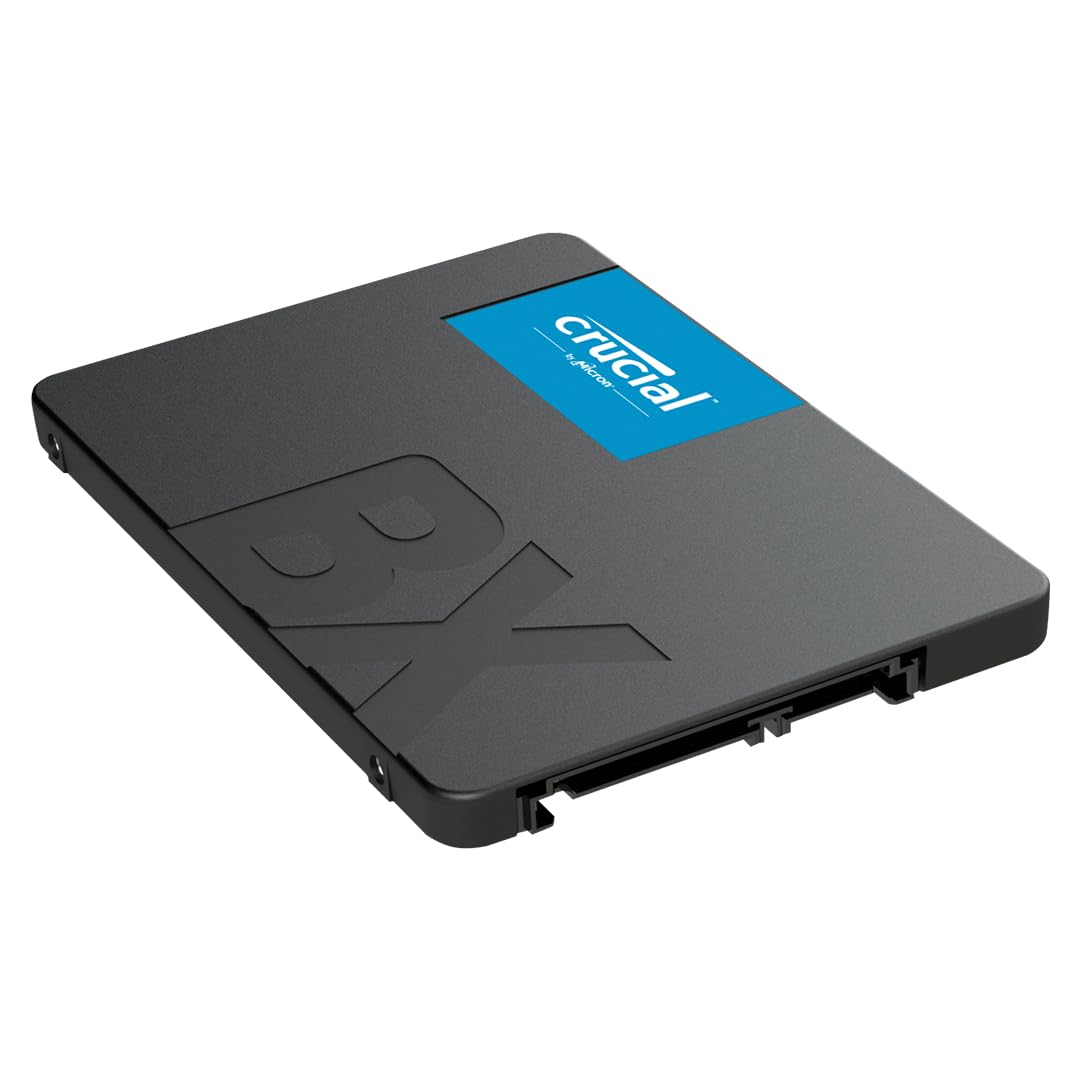
Crucial 250GB MX200 2.5in SATA SSD CT250MX200SSD1
When the Crucial MX100 was released, it set a new standard for SSDs that the Crucial MX200 pushes even further. Leveraging leading specs on all fronts, along with new Dynamic Write Acceleration technology, the Crucial MX200 is loaded with innovative features and immediately increases your system's performance.Do more. Faster. Longer. The Crucial MX200 delivers 555 MB/s sequential reads on both compressible and incompressible data, and outperforms a typical hard drive by 400 MB/s. Even better, the performance doesn't let up, as the Crucial MX200 posts an endurance rating that's up to 5 times greater than a typical client SSD.Max out performance and increase reliability. Our engineers created RAIN technology to protect your data at the component level, similar to how RAID is used with multiple hard drives. This technology increases the security and protection of your data to a level that's rarely seen in consumer-class SSDs.Transfer and save large files in a matter of seconds. Competing SSDs typically rely on a fixed cache of multi-level cell flash memory, which allows you to write sequential data at published specs, but only for so long. Our industry-leading Dynamic Write Acceleration technology solves this problem by using an adaptable pool of high speed, single-level cell flash memory for consistently fast performance that doesn't let up. Encrypt and protect your data at the highest possible level. Keep personal files and sensitive information secure from hackers and thieves with AES 256-bit encryption - the same grade used by banks and hospitals. The Crucial MX200 meets or exceeds all industry encryption standards, including Microsoft eDrive, IEEE-1667, and TCG Opal 2.0.
When the Crucial MX100 was released, it set a new standard for SSDs that the Crucial MX200 pushes even further. Leveraging leading specs on all fronts, along with new Dynamic Write Acceleration technology, the Crucial MX200 is loaded with innovative features and immediately increases your system's performance.Do more. Faster. Longer. The Crucial MX200 delivers 555 MB/s sequential reads on both compressible and incompressible data, and outperforms a typical hard drive by 400 MB/s. Even better, the performance doesn't let up, as the Crucial MX200 posts an endurance rating that's up to 5 times greater than a typical client SSD.Max out performance and increase reliability. Our engineers created RAIN technology to protect your data at the component level, similar to how RAID is used with multiple hard drives. This technology increases the security and protection of your data to a level that's rarely seen in consumer-class SSDs.Transfer and save large files in a matter of seconds. Competing SSDs typically rely on a fixed cache of multi-level cell flash memory, which allows you to write sequential data at published specs, but only for so long. Our industry-leading Dynamic Write Acceleration technology solves this problem by using an adaptable pool of high speed, single-level cell flash memory for consistently fast performance that doesn't let up. Encrypt and protect your data at the highest possible level. Keep personal files and sensitive information secure from hackers and thieves with AES 256-bit encryption - the same grade used by banks and hospitals. The Crucial MX200 meets or exceeds all industry encryption standards, including Microsoft eDrive, IEEE-1667, and TCG Opal 2.0.
When the Crucial MX100 was released, it set a new standard for SSDs that the Crucial MX200 pushes even further. Leveraging leading specs on all fronts, along with new Dynamic Write Acceleration technology, the Crucial MX200 is loaded with innovative features and immediately increases your system's performance.Do more. Faster. Longer. The Crucial MX200 delivers 555 MB/s sequential reads on both compressible and incompressible data, and outperforms a typical hard drive by 400 MB/s. Even better, the performance doesn't let up, as the Crucial MX200 posts an endurance rating that's up to 5 times greater than a typical client SSD.Max out performance and increase reliability. Our engineers created RAIN technology to protect your data at the component level, similar to how RAID is used with multiple hard drives. This technology increases the security and protection of your data to a level that's rarely seen in consumer-class SSDs.Transfer and save large files in a matter of seconds. Competing SSDs typically rely on a fixed cache of multi-level cell flash memory, which allows you to write sequential data at published specs, but only for so long. Our industry-leading Dynamic Write Acceleration technology solves this problem by using an adaptable pool of high speed, single-level cell flash memory for consistently fast performance that doesn't let up. Encrypt and protect your data at the highest possible level. Keep personal files and sensitive information secure from hackers and thieves with AES 256-bit encryption - the same grade used by banks and hospitals. The Crucial MX200 meets or exceeds all industry encryption standards, including Microsoft eDrive, IEEE-1667, and TCG Opal 2.0.
When the Crucial MX100 was released, it set a new standard for SSDs that the Crucial MX200 pushes even further. Leveraging leading specs on all fronts, along with new Dynamic Write Acceleration technology, the Crucial MX200 is loaded with innovative features and immediately increases your system's performance.Do more. Faster. Longer. The Crucial MX200 delivers 555 MB/s sequential reads on both compressible and incompressible data, and outperforms a typical hard drive by 400 MB/s. Even better, the performance doesn't let up, as the Crucial MX200 posts an endurance rating that's up to 5 times greater than a typical client SSD.Max out performance and increase reliability. Our engineers created RAIN technology to protect your data at the component level, similar to how RAID is used with multiple hard drives. This technology increases the security and protection of your data to a level that's rarely seen in consumer-class SSDs.Transfer and save large files in a matter of seconds. Competing SSDs typically rely on a fixed cache of multi-level cell flash memory, which allows you to write sequential data at published specs, but only for so long. Our industry-leading Dynamic Write Acceleration technology solves this problem by using an adaptable pool of high speed, single-level cell flash memory for consistently fast performance that doesn't let up. Encrypt and protect your data at the highest possible level. Keep personal files and sensitive information secure from hackers and thieves with AES 256-bit encryption - the same grade used by banks and hospitals. The Crucial MX200 meets or exceeds all industry encryption standards, including Microsoft eDrive, IEEE-1667, and TCG Opal 2.0.
in 3 offers
The lowest price for Crucial 250GB MX200 2.5in SATA SSD CT250MX200SSD1 right now is $134.28 at DiscTech.com, compared across 3 retailers.
The all-time low was $40.59 on 25 Apr 2026 — today's price is 231% above the lowest ever. It has been notably cheaper before — worth setting a price alert.
Prices last updated 14 May 2026.

