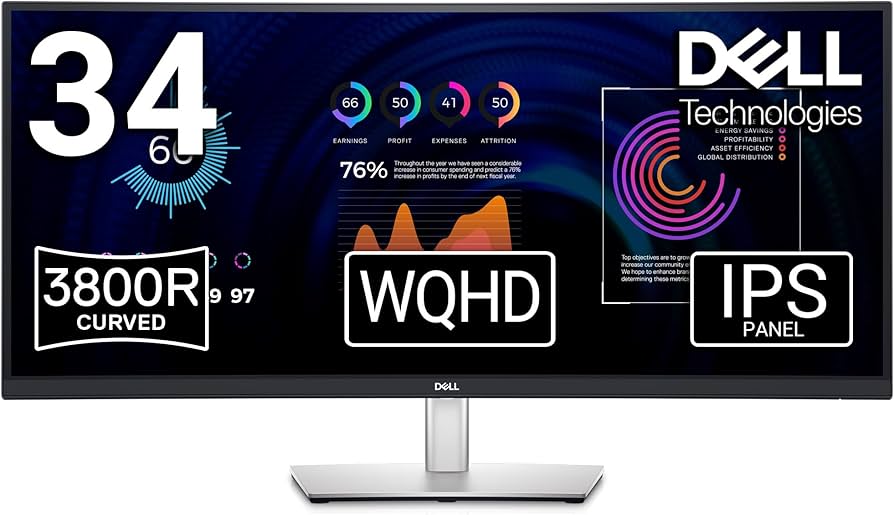
Elevate your home office. 34" curved, ultra-wide WQHD (3440 x 1440) screen designed to keep you immersed in any task you choose. Featuring USB-C connectivity and built-in speakers.
Elevate your home office. 34" curved, ultra-wide WQHD (3440 x 1440) screen designed to keep you immersed in any task you choose. Featuring USB-C connectivity and built-in speakers.
in 1 offers
The lowest price for Dell 34 Curved USB-C Monitor - - PXC3K right now is $1,542.14 at eBay.com.au.
The all-time low was $914.45 on 12 Feb 2026 — today's price is 69% above the lowest ever. It has been notably cheaper before — worth setting a price alert.
Prices last updated 12 Aug 2026.
Dell 34 Curved USB-C Monitor - - PXC3K
Elevate your home office. 34" curved, ultra-wide WQHD (3440 x 1440) screen designed to keep you immersed in any task you choose. Featuring USB-C connectivity and built-in speakers.
Elevate your home office. 34" curved, ultra-wide WQHD (3440 x 1440) screen designed to keep you immersed in any task you choose. Featuring USB-C connectivity and built-in speakers.
Last updated at 12/08/2026 12:07:08
Dell S3423dwc S Series S3423dwc 86.4 Cm
Free delivery
Affiliate Disclosure: We may receive a small commission for purchases made through this link at no extra cost to you. This helps support our site. Thank you!
originally posted on dell.com
I am very pleased with this purchase. It does everything I need it to do simply and effectively, and at a really good value compared to other specialised monitors that do the same thing but for three times the price. I bought it for gaming AND work. It has a feature which splits the screen in two effectively giving you the equivalent of 3 monitors when deployed with a laptop. It comes with a USB C cable which charges my laptop so the charging cable stays in my laptop bag and I never have to worry about forgetting it.I can also run our desktop PC specialised it at the same time as it has two HDMI ports. Plus the model I bought came with speakers which were adequate for what I need. There are more specialised and dedicated monitors out there for gaming / and or ... MoreI am very pleased with this purchase. It does everything I need it to do simply and effectively, and at a really good value compared to other specialised monitors that do the same thing but for three times the price. I bought it for gaming AND work. It has a feature which splits the screen in two effectively giving you the equivalent of 3 monitors when deployed with a laptop. It comes with a USB C cable which charges my laptop so the charging cable stays in my laptop bag and I never have to worry about forgetting it.I can also run our desktop PC specialised it at the same time as it has two HDMI ports. Plus the model I bought came with speakers which were adequate for what I need. There are more specialised and dedicated monitors out there for gaming / and or working but this one does both light gaming and working tasks equally well.
originally posted on dell.com
Things I like:Resolution, brightness, ease of assembly and setup, multiple computer inputs, charging port.Things that could be better:Driver-the sound is sub-par even given the 5w powered speakers. Dell should at least make the driver work at least as well as the Real-Tek driver for the laptop speakers.Height adjustment-For me it needs to be about 4 inches higher. My previous monitor was a Dell 27 inch videoconference monitor and I could adjust it to a greater height.USB-C 3.2 gen 2 cable. The one supplied is only about a meter long. Previous Dell monitor was less expensive and had a 2m cable. I had to use a third party cable for this monitor.
originally posted on dell.com
Overall, I am pretty satisfied with this monitor. I think the size is perfect for what I use it for (I'm a therapist and do a lot of virtual work). It looks better than having multiple monitors and moving windows around is more seamless (literally). I also really like that it has speakers (they aren't great; but they are just fine for video calls and help declutter my desk).I am using this with a Mac Mini M2, however, and did not realize that the Dell software for this monitor is not available for Mac users. pretty unfortunate as I had to resort to (and pay for) third party software that lets me manage the screen real estate more effectively. I think other "premium" Dell monitors have software that works with Mac so I'm not sure why it can't trickle down to these ... MoreOverall, I am pretty satisfied with this monitor. I think the size is perfect for what I use it for (I'm a therapist and do a lot of virtual work). It looks better than having multiple monitors and moving windows around is more seamless (literally). I also really like that it has speakers (they aren't great; but they are just fine for video calls and help declutter my desk).I am using this with a Mac Mini M2, however, and did not realize that the Dell software for this monitor is not available for Mac users. pretty unfortunate as I had to resort to (and pay for) third party software that lets me manage the screen real estate more effectively. I think other "premium" Dell monitors have software that works with Mac so I'm not sure why it can't trickle down to these more budget oriented ones. I am not a graphic designer or gamer so really had no need to pay 3x as much for perfect colour accuracy or faster response times... but I would like to be able to access all the basic features of this on my Mac.My only other gripe is that I wish it had a second USB-C port (or at least an additional USB-A port). My previous USB-C monitor had all the ports I needed. This one requires I plug some things into the Mac itself which I have hidden away so it's less convenient.4 stars.
Dell S3423dwc S Series S3423dwc 86.4 Cm
Free delivery
Affiliate Disclosure: We may receive a small commission for purchases made through this link at no extra cost to you. This helps support our site. Thank you!
I am very pleased with this purchase. It does everything I need it to do simply and effectively, and at a really good value compared to other specialised monitors that do the same thing but for three times the price. I bought it for gaming AND work. It has a feature which splits the screen in two effectively giving you the equivalent of 3 monitors when deployed with a laptop. It comes with a USB C cable which charges my laptop so the charging cable stays in my laptop bag and I never have to worry about forgetting it.I can also run our desktop PC specialised it at the same time as it has two HDMI ports. Plus the model I bought came with speakers which were adequate for what I need. There are more specialised and dedicated monitors out there for gaming / and or ... MoreI am very pleased with this purchase. It does everything I need it to do simply and effectively, and at a really good value compared to other specialised monitors that do the same thing but for three times the price. I bought it for gaming AND work. It has a feature which splits the screen in two effectively giving you the equivalent of 3 monitors when deployed with a laptop. It comes with a USB C cable which charges my laptop so the charging cable stays in my laptop bag and I never have to worry about forgetting it.I can also run our desktop PC specialised it at the same time as it has two HDMI ports. Plus the model I bought came with speakers which were adequate for what I need. There are more specialised and dedicated monitors out there for gaming / and or working but this one does both light gaming and working tasks equally well.
Things I like:Resolution, brightness, ease of assembly and setup, multiple computer inputs, charging port.Things that could be better:Driver-the sound is sub-par even given the 5w powered speakers. Dell should at least make the driver work at least as well as the Real-Tek driver for the laptop speakers.Height adjustment-For me it needs to be about 4 inches higher. My previous monitor was a Dell 27 inch videoconference monitor and I could adjust it to a greater height.USB-C 3.2 gen 2 cable. The one supplied is only about a meter long. Previous Dell monitor was less expensive and had a 2m cable. I had to use a third party cable for this monitor.
Overall, I am pretty satisfied with this monitor. I think the size is perfect for what I use it for (I'm a therapist and do a lot of virtual work). It looks better than having multiple monitors and moving windows around is more seamless (literally). I also really like that it has speakers (they aren't great; but they are just fine for video calls and help declutter my desk).I am using this with a Mac Mini M2, however, and did not realize that the Dell software for this monitor is not available for Mac users. pretty unfortunate as I had to resort to (and pay for) third party software that lets me manage the screen real estate more effectively. I think other "premium" Dell monitors have software that works with Mac so I'm not sure why it can't trickle down to these ... MoreOverall, I am pretty satisfied with this monitor. I think the size is perfect for what I use it for (I'm a therapist and do a lot of virtual work). It looks better than having multiple monitors and moving windows around is more seamless (literally). I also really like that it has speakers (they aren't great; but they are just fine for video calls and help declutter my desk).I am using this with a Mac Mini M2, however, and did not realize that the Dell software for this monitor is not available for Mac users. pretty unfortunate as I had to resort to (and pay for) third party software that lets me manage the screen real estate more effectively. I think other "premium" Dell monitors have software that works with Mac so I'm not sure why it can't trickle down to these more budget oriented ones. I am not a graphic designer or gamer so really had no need to pay 3x as much for perfect colour accuracy or faster response times... but I would like to be able to access all the basic features of this on my Mac.My only other gripe is that I wish it had a second USB-C port (or at least an additional USB-A port). My previous USB-C monitor had all the ports I needed. This one requires I plug some things into the Mac itself which I have hidden away so it's less convenient.4 stars.
This monitor is great value, a massive upgrade over my old dual TN panel setup. Love the KVM feature, makes it easy to use my PC and laptop. 100hz is still enough to make office work + gaming feel nice and smooth. Response times are good. Brightness is great. Not enough backlight bleed to be an issue.The pitfall is that colours are pretty average using Linux colour management, but I haven't played around with screen/softwate settings much. Viewing angles are also a bit average if you aren't sitting in front. A stand that adjusted a bit higher also would've been nice.These are nitpicks and you won't be disappointed with this monitor unless you're doing creative work that's highly dependent on colour reproduction. Highly recommend!
Good quality monitor. Always used dual monitors so this was my first attempt at one larger wide screen monitor. Initially tossing between getting a 4k normal or widescreen WQHD. After trying it now for a few months, and getting used to the different feel of it I am very happy with the result. I mostly use this for business work, rather than gaming, and find it ideal to use. M365 products , including teams are excellent and I can get multiple applications open as I did on the dual monitors with less physical space taken up on the desk. USB C is terrific having only one cable to connect to my laptop (although make sure you buy the proper USB C cable, there different types, so get one for Video and charging (the right one comes in the box). The USB hub is great ... MoreGood quality monitor. Always used dual monitors so this was my first attempt at one larger wide screen monitor. Initially tossing between getting a 4k normal or widescreen WQHD. After trying it now for a few months, and getting used to the different feel of it I am very happy with the result. I mostly use this for business work, rather than gaming, and find it ideal to use. M365 products , including teams are excellent and I can get multiple applications open as I did on the dual monitors with less physical space taken up on the desk. USB C is terrific having only one cable to connect to my laptop (although make sure you buy the proper USB C cable, there different types, so get one for Video and charging (the right one comes in the box). The USB hub is great although a couple more USB outlets would be better. It does come with speakers but they are tinny , so sound quality would be its weakest feature (works ok for video calls). Over all a great monitor, good specs such as a higher refresh rate and good price point. Highly recommend this monitor.
I had two 27” monitors connected to my Dell Laptop that I had been using for years. I tried this 34” curved monitor and immediately saw the benefits in going with one single monitor. The Dell monitor provides the quality and size that is perfect for my work situation. I can have several windows open across the screen with seamless flow between windows. Also being able to open a single application window wider than on my 27” is super useful. I work with flowcharts, mind maps and spreadsheets allot. I also have video conference calls and I feel like I’m not have to swivel between 2 screens anymore.The monitor was super easy to setup and it displayed my desktop automatically so didn’t have to play with settings. I have it connected to a second laptop and need to try ... MoreI had two 27” monitors connected to my Dell Laptop that I had been using for years. I tried this 34” curved monitor and immediately saw the benefits in going with one single monitor. The Dell monitor provides the quality and size that is perfect for my work situation. I can have several windows open across the screen with seamless flow between windows. Also being able to open a single application window wider than on my 27” is super useful. I work with flowcharts, mind maps and spreadsheets allot. I also have video conference calls and I feel like I’m not have to swivel between 2 screens anymore.The monitor was super easy to setup and it displayed my desktop automatically so didn’t have to play with settings. I have it connected to a second laptop and need to try to make the KVM feature work next. It also enabled me to clear up my desk space and dangling cables from 2 monitors. If I wasn’t frugale, I probably should have purchased the 38”.
I wasn't sold on the curved screen, but a colleague recommended one with a type-c connection to eliminate the need for a dock. Finally caved and got the Dell curved 34 inch along with a new laptop. The Type-C connection is a single cable to the computer that charges the laptop while the screen has one power cable to the wall. 2 cables and my setup is now complete. This screen also has 2 USB-A ports which helps for other things like a cable to charge my phone and, as my new laptop only has one type-a USB I can plug my wired mouse and keyboard into the screen and this works too! Also USB stick. It's a great screen and meets every single need I had. I'll move onto wireless mouse and keyboard eventually as well. My eyes also seem less tired from using the curved screen, ... MoreI wasn't sold on the curved screen, but a colleague recommended one with a type-c connection to eliminate the need for a dock. Finally caved and got the Dell curved 34 inch along with a new laptop. The Type-C connection is a single cable to the computer that charges the laptop while the screen has one power cable to the wall. 2 cables and my setup is now complete. This screen also has 2 USB-A ports which helps for other things like a cable to charge my phone and, as my new laptop only has one type-a USB I can plug my wired mouse and keyboard into the screen and this works too! Also USB stick. It's a great screen and meets every single need I had. I'll move onto wireless mouse and keyboard eventually as well. My eyes also seem less tired from using the curved screen, but not sure how that works. The positioning options for the screen is great too: up/down, tilt forward/back, and can tilt clockwise/counter-clockwise a tiny amount too (although not very important), but what a good screen. The plastic (border or whatever) around the screen is small as well. The screen is also so big I use it as 2 screens in one for many programs. The only extra thing I wanted was a webcam as attaching one is bulky, but not that big of a deal. Phenomenal screen!
Once upon a time I had one monitor at work. Then it became the norm to have two. My workload was increasing and I needed to be more productive and having a second monitor really helped. They say history repeats itself and now I’m back to one monitor… The difference is it’s a 34 inch monitor. This is a game changer. I’m in control of how many sessions I open and I can arrange them anyway I want within the monitor. The Dell 34 inch monitor is clear and bright And with my mini devices I can even charge a phone from the monitor itself. I enjoyed this monitor so so much at work that I purchased one for home and I’m loving it even more. There is a picture in picture setting that I can work on one side of the screen and watch something on the other side of the screen it’s ... MoreOnce upon a time I had one monitor at work. Then it became the norm to have two. My workload was increasing and I needed to be more productive and having a second monitor really helped. They say history repeats itself and now I’m back to one monitor… The difference is it’s a 34 inch monitor. This is a game changer. I’m in control of how many sessions I open and I can arrange them anyway I want within the monitor. The Dell 34 inch monitor is clear and bright And with my mini devices I can even charge a phone from the monitor itself. I enjoyed this monitor so so much at work that I purchased one for home and I’m loving it even more. There is a picture in picture setting that I can work on one side of the screen and watch something on the other side of the screen it’s an awesome feature. Whether working checking emails or watching streaming this monitor has been one of the best purchases this year.
Phenomenal monitor - turned out to be one of the few with the features for the price that I needed. However a few points of caution before you buy:1) The 100Hz doesn't work on split screen. I have two laptops connected and when I use this monitor to view each laptop individually, I can see this monitor (correctly) displays each individual laptop at 100Hz (which is great, since this is one of the main reasons I bought this monitor). However, if you want to view both laptops simultaneously in either side-by-side or picture in picture mode, the monitor will default down to only 60Hz capability for both laptops. Just know this before going in!2) The Dell Display and Peripheral Manager for macOS doesn't work on this monitor! So if you are buying this monitor for MacOS ... MorePhenomenal monitor - turned out to be one of the few with the features for the price that I needed. However a few points of caution before you buy:1) The 100Hz doesn't work on split screen. I have two laptops connected and when I use this monitor to view each laptop individually, I can see this monitor (correctly) displays each individual laptop at 100Hz (which is great, since this is one of the main reasons I bought this monitor). However, if you want to view both laptops simultaneously in either side-by-side or picture in picture mode, the monitor will default down to only 60Hz capability for both laptops. Just know this before going in!2) The Dell Display and Peripheral Manager for macOS doesn't work on this monitor! So if you are buying this monitor for MacOS machines, you'll need to rely on other software to get the mouse/keyboard to 'flow' from one machine to another in split screen mode. Fortunately I have a Logitech MX keyboard and mouse, so can just use Logitech software to accomplish the same task. But if you are relying on Dell's software to do this on Mac... you can't!3) The two cables supplied are only 1m long. They work well - however are likely going to be a bit short - especially if you're using a monitor arm so double check how long the cables you'll need are. Unless your machine is right next to the monitor you may find you need longer cables. If you do buy longer cables, make sure they can display 2k @ 100Hz (not all can)!Apart from these 3 items, this monitor really is the best of a wide field. The USB-hub is *phenomenal* and I use this to share a USB webcam, microphone and speakers between two machines. The 100Hz display is what I wanted. The USB-C/DP with PowerDelivery port is *excellent*. And the 2k QHD Ultrawide is an exceptional new way to work for me - so good that I didn't even need a laptop monitor as a second screen on the side anymore. (I've now changed the desk setup to super clean/minimal dual closed clamshells - both closed macbooks powering this one screen.)Really glad I made this choice in the end.Wishlist to improve this monitor further:* Have two USB-C to DisplayPorts with PowerDelivery to power both laptops connected to this monitor, and* Have more USB-C downstream ports to connect/power accessories
This rating is for the Dell Curved USB-C S3423DWC I bought in June 2023. The width of the monitor is what I was looking to use to connect to my new MacBook Pro M1 laptop. The USB-C connection was important to me since the laptop has only type C connections. So, why the 4 stars? The specs indicated the brightness to be 300 candles and while I typically require at least 400 candles I was willing to try it. As it turned out it really is noticeable because I have to bring the monitor closer to me than I intended. After working with it for two weeks I am getting accustomed to the brightness but I will not buy another with less than 400 candles again. On the positive side; the monitor height and angle are adjustable. This is important because the window light is behind me ... MoreThis rating is for the Dell Curved USB-C S3423DWC I bought in June 2023. The width of the monitor is what I was looking to use to connect to my new MacBook Pro M1 laptop. The USB-C connection was important to me since the laptop has only type C connections. So, why the 4 stars? The specs indicated the brightness to be 300 candles and while I typically require at least 400 candles I was willing to try it. As it turned out it really is noticeable because I have to bring the monitor closer to me than I intended. After working with it for two weeks I am getting accustomed to the brightness but I will not buy another with less than 400 candles again. On the positive side; the monitor height and angle are adjustable. This is important because the window light is behind me during the day and of course the screen isn’t as bright to compensate. There are a few additional USB type connections but the USB-C was key for connecting my laptop and portable SSD hard drive which is also uses a USB-C connection. The packaging the monitor comes in was exceptional. It was well packed to protect the monitor. The monitor stand is sturdy and will not slide around on the desk. The connection for the monitor/stand is ingenious and easy to connect. It is also possible to mount it to the wall or arm if you get the appropriate equipment. While not all that I hoped for I am satisfied with the purchase and would recommend to a friend with the caveat I mentioned.