Last updated at 05/09/2026 06:57:33
Dell S2721DGF 27" IPS LED Gaming Monitor White
Delivery between 9–13 Sept $35.88
originally posted on dell.com
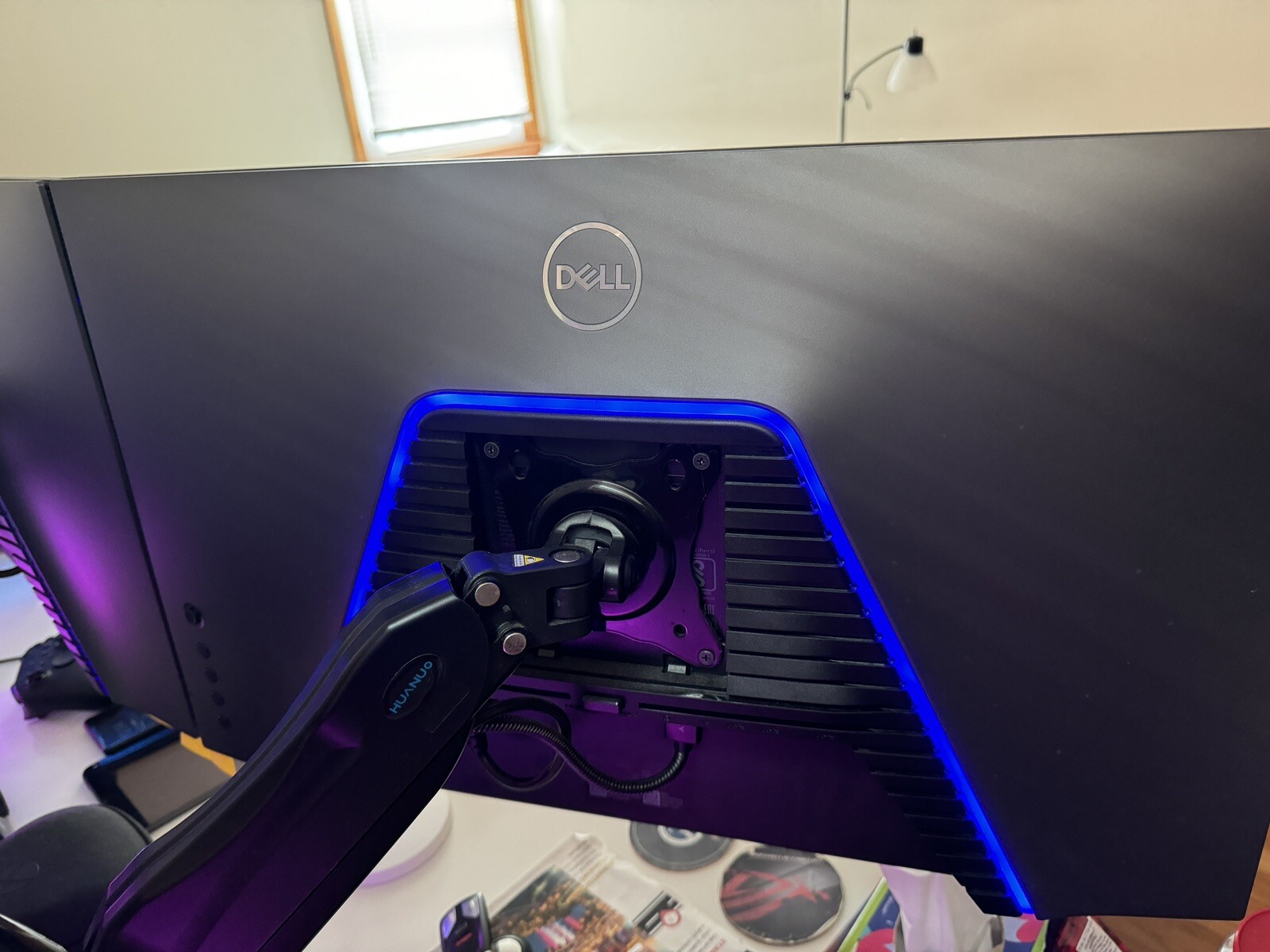
This year I decided it was time to upgrade my 24 inch monitor. I have a PC and a PS5, and I wanted to take advantage of the PS5 now supporting 1440p. I had purchased another 27 inch monitor by another brand but returned it due to the issues it was having. I was reading about how most monitors had issues. Then I came across this Dell 27 inch monitor that people were raving about. I thought I'll try it out and see if it lives up the hype. It definitely is worth it. When my 27 inch Dell monitor arrived I quickly set it up which was easy due to its toolless assembly. The build quality is solid and I like the way the monitor and the base look on my desk. The screen is simply amazing. My monitor has no dead pixels, and the uniformity is fantastic. It works well on my PC ... MoreThis year I decided it was time to upgrade my 24 inch monitor. I have a PC and a PS5, and I wanted to take advantage of the PS5 now supporting 1440p. I had purchased another 27 inch monitor by another brand but returned it due to the issues it was having. I was reading about how most monitors had issues. Then I came across this Dell 27 inch monitor that people were raving about. I thought I'll try it out and see if it lives up the hype. It definitely is worth it. When my 27 inch Dell monitor arrived I quickly set it up which was easy due to its toolless assembly. The build quality is solid and I like the way the monitor and the base look on my desk. The screen is simply amazing. My monitor has no dead pixels, and the uniformity is fantastic. It works well on my PC and my PS5. The graphics on the games and media I play shine. I really like the blue light that shines on the back of the monitor, even if the color can't be changed. I'm also a big fan of the auto switching feature, which works so well and saves me from having to fiddle with the toggle to change input devices. I'm extremely happy that I went with a Dell for the first time. I'm definitely a satisfied customer.
originally posted on dell.com
Highly recommended for friends and family.Pros:- 27"is a great size for QHD resolution; 24" would have been too small and simply full HD would have produced text too large for this size monitor.- As the fourth monitor I've ordered, colour is near-accurate (per X-Rite calibration).- I like glossy screens in general for colours, but this works well with both PC and Mac (with the MacBook Pro, pictures still "pop" and look amazing).- Two x HDMI and one x DisplayPort allows for clear, sharp, digital connectivity to multiple devices at once (for me a PC laptop and MacBook Pro).- Adjustable height all the worthwhile compared to lower-priced models in the Dell family.Second Thoughts:- The speakers are nice (they save space for those who don't want desk clutter ... MoreHighly recommended for friends and family.Pros:- 27"is a great size for QHD resolution; 24" would have been too small and simply full HD would have produced text too large for this size monitor.- As the fourth monitor I've ordered, colour is near-accurate (per X-Rite calibration).- I like glossy screens in general for colours, but this works well with both PC and Mac (with the MacBook Pro, pictures still "pop" and look amazing).- Two x HDMI and one x DisplayPort allows for clear, sharp, digital connectivity to multiple devices at once (for me a PC laptop and MacBook Pro).- Adjustable height all the worthwhile compared to lower-priced models in the Dell family.Second Thoughts:- The speakers are nice (they save space for those who don't want desk clutter with external speakers), but they lack bass - focused more on treble. Good for listening to podcasts and YouTube videos, but you're going to want something else if watching movies or gaming. Laptop speakers may be better at times...
originally posted on dell.com
I bought this monitor along with my new Dell G15 gaming laptop for the fact that this is a G-Sync compatible monitor.To my surprise, there is no way I can use the G-Sync feature on this monitor made by Dell with a RTX 3070 laptop also made by Dell. The reason being this monitor only supports G-Sync via a display port and the Dell G15 gaming laptop has no display port. I tried using it with a USB-C to display port converter and it still doesn't work because the output is going through the integrated Intel GPU and not the discrete Nvidia GPU. It should be clearly mentioned or even better, customers should be able to see a feature compatibility matrix before buying the item online.I even tried customer service and while talking to them I could tell the guy had no ... MoreI bought this monitor along with my new Dell G15 gaming laptop for the fact that this is a G-Sync compatible monitor.To my surprise, there is no way I can use the G-Sync feature on this monitor made by Dell with a RTX 3070 laptop also made by Dell. The reason being this monitor only supports G-Sync via a display port and the Dell G15 gaming laptop has no display port. I tried using it with a USB-C to display port converter and it still doesn't work because the output is going through the integrated Intel GPU and not the discrete Nvidia GPU. It should be clearly mentioned or even better, customers should be able to see a feature compatibility matrix before buying the item online.I even tried customer service and while talking to them I could tell the guy had no idea what I meant by G-Sync and simply got back to me a day later telling me that I need to buy an expensive Dell USB-C to DisplayPort converter.I don't think that'll work either cos the USB-C display port connection is going through the integrated GPU and not the discrete GPU. Even if it does work, I don't think it's too much for Dell to include a converter with the laptop or the monitor. At this stage unless someone from Dell can give me a guarantee that I will get my money back, I am not spending anymore money on the cable.Lastly, you can only get the 165Hz refresh rate via the display port and not the HDMI port.
| Panel Type | IPS |
| Brightness | 400 cd/m2 |
| Contrast | 1000:1 |
| Refresh Rate | 144Hz |
| Screen Size (Inches) | 27.00 Inch |
Dell S2721DGF 27" IPS LED Gaming Monitor White
Delivery between 9–13 Sept $35.88
This year I decided it was time to upgrade my 24 inch monitor. I have a PC and a PS5, and I wanted to take advantage of the PS5 now supporting 1440p. I had purchased another 27 inch monitor by another brand but returned it due to the issues it was having. I was reading about how most monitors had issues. Then I came across this Dell 27 inch monitor that people were raving about. I thought I'll try it out and see if it lives up the hype. It definitely is worth it. When my 27 inch Dell monitor arrived I quickly set it up which was easy due to its toolless assembly. The build quality is solid and I like the way the monitor and the base look on my desk. The screen is simply amazing. My monitor has no dead pixels, and the uniformity is fantastic. It works well on my PC ... MoreThis year I decided it was time to upgrade my 24 inch monitor. I have a PC and a PS5, and I wanted to take advantage of the PS5 now supporting 1440p. I had purchased another 27 inch monitor by another brand but returned it due to the issues it was having. I was reading about how most monitors had issues. Then I came across this Dell 27 inch monitor that people were raving about. I thought I'll try it out and see if it lives up the hype. It definitely is worth it. When my 27 inch Dell monitor arrived I quickly set it up which was easy due to its toolless assembly. The build quality is solid and I like the way the monitor and the base look on my desk. The screen is simply amazing. My monitor has no dead pixels, and the uniformity is fantastic. It works well on my PC and my PS5. The graphics on the games and media I play shine. I really like the blue light that shines on the back of the monitor, even if the color can't be changed. I'm also a big fan of the auto switching feature, which works so well and saves me from having to fiddle with the toggle to change input devices. I'm extremely happy that I went with a Dell for the first time. I'm definitely a satisfied customer.
Highly recommended for friends and family.Pros:- 27"is a great size for QHD resolution; 24" would have been too small and simply full HD would have produced text too large for this size monitor.- As the fourth monitor I've ordered, colour is near-accurate (per X-Rite calibration).- I like glossy screens in general for colours, but this works well with both PC and Mac (with the MacBook Pro, pictures still "pop" and look amazing).- Two x HDMI and one x DisplayPort allows for clear, sharp, digital connectivity to multiple devices at once (for me a PC laptop and MacBook Pro).- Adjustable height all the worthwhile compared to lower-priced models in the Dell family.Second Thoughts:- The speakers are nice (they save space for those who don't want desk clutter ... MoreHighly recommended for friends and family.Pros:- 27"is a great size for QHD resolution; 24" would have been too small and simply full HD would have produced text too large for this size monitor.- As the fourth monitor I've ordered, colour is near-accurate (per X-Rite calibration).- I like glossy screens in general for colours, but this works well with both PC and Mac (with the MacBook Pro, pictures still "pop" and look amazing).- Two x HDMI and one x DisplayPort allows for clear, sharp, digital connectivity to multiple devices at once (for me a PC laptop and MacBook Pro).- Adjustable height all the worthwhile compared to lower-priced models in the Dell family.Second Thoughts:- The speakers are nice (they save space for those who don't want desk clutter with external speakers), but they lack bass - focused more on treble. Good for listening to podcasts and YouTube videos, but you're going to want something else if watching movies or gaming. Laptop speakers may be better at times...
I bought this monitor along with my new Dell G15 gaming laptop for the fact that this is a G-Sync compatible monitor.To my surprise, there is no way I can use the G-Sync feature on this monitor made by Dell with a RTX 3070 laptop also made by Dell. The reason being this monitor only supports G-Sync via a display port and the Dell G15 gaming laptop has no display port. I tried using it with a USB-C to display port converter and it still doesn't work because the output is going through the integrated Intel GPU and not the discrete Nvidia GPU. It should be clearly mentioned or even better, customers should be able to see a feature compatibility matrix before buying the item online.I even tried customer service and while talking to them I could tell the guy had no ... MoreI bought this monitor along with my new Dell G15 gaming laptop for the fact that this is a G-Sync compatible monitor.To my surprise, there is no way I can use the G-Sync feature on this monitor made by Dell with a RTX 3070 laptop also made by Dell. The reason being this monitor only supports G-Sync via a display port and the Dell G15 gaming laptop has no display port. I tried using it with a USB-C to display port converter and it still doesn't work because the output is going through the integrated Intel GPU and not the discrete Nvidia GPU. It should be clearly mentioned or even better, customers should be able to see a feature compatibility matrix before buying the item online.I even tried customer service and while talking to them I could tell the guy had no idea what I meant by G-Sync and simply got back to me a day later telling me that I need to buy an expensive Dell USB-C to DisplayPort converter.I don't think that'll work either cos the USB-C display port connection is going through the integrated GPU and not the discrete GPU. Even if it does work, I don't think it's too much for Dell to include a converter with the laptop or the monitor. At this stage unless someone from Dell can give me a guarantee that I will get my money back, I am not spending anymore money on the cable.Lastly, you can only get the 165Hz refresh rate via the display port and not the HDMI port.
Gonna try to keep this short but provide enough quality info to hopefully help someone who is considering buying this.It's IPS, flat, 27 inch 1440p and 165 hz. If you have a gpu capable of pushing this monitor then go for it.My only complaint is the contrast ratio isn't the best, I went into this knowing what I was getting into. It uses an LG panel and they are known for mediocre at best contrast ratio.Expect around 900:1 contrast ratio, 340 nits birghtness, the HDR for me was useless, great input lag and response times.6.3ms response time at 165hz7.4ms response time at 120hzInput lag at 165hz 3.7msInput lag at 120hz 4.8msTheres no ghosting or black smearing. For me IPS is the only way to go as it feels like a jack of all trades and a master of none. ... MoreGonna try to keep this short but provide enough quality info to hopefully help someone who is considering buying this.It's IPS, flat, 27 inch 1440p and 165 hz. If you have a gpu capable of pushing this monitor then go for it.My only complaint is the contrast ratio isn't the best, I went into this knowing what I was getting into. It uses an LG panel and they are known for mediocre at best contrast ratio.Expect around 900:1 contrast ratio, 340 nits birghtness, the HDR for me was useless, great input lag and response times.6.3ms response time at 165hz7.4ms response time at 120hzInput lag at 165hz 3.7msInput lag at 120hz 4.8msTheres no ghosting or black smearing. For me IPS is the only way to go as it feels like a jack of all trades and a master of none. For $300 on sale this monitor is awesome.You won't get dark blacks like a VA but you get no smearingYou won't get 1ms response times like a TN panel but you get way better colors.You won't get insant response times like an Oled but you won't et burn in.This is a great monitor for the price, I don't regret getting it at all. Paired with a 5600x and a rtx 3080 I'm very happy with it
Overall I'm pretty happy with this monitor but there is one glaring issue that makes it hard to recommend: local dimming that you cannot turn off unless you turn off HDR completely.Monitors should not have this and if they do it should be able to be turned off. A computer monitor is not a TV - they are generally smaller and viewed more closely. They should not tamper with the image if the user does not want them to.Because of the smaller screen size (and the local dimming zones being comparatively large) dimming causes a terrible visual experience. I can't count how many times I have seen subtitles or interface elements in games that should be pure white turn dingy gray before my eyes just because the image NEAR them was dark. Skin tones on characters become a ... MoreOverall I'm pretty happy with this monitor but there is one glaring issue that makes it hard to recommend: local dimming that you cannot turn off unless you turn off HDR completely.Monitors should not have this and if they do it should be able to be turned off. A computer monitor is not a TV - they are generally smaller and viewed more closely. They should not tamper with the image if the user does not want them to.Because of the smaller screen size (and the local dimming zones being comparatively large) dimming causes a terrible visual experience. I can't count how many times I have seen subtitles or interface elements in games that should be pure white turn dingy gray before my eyes just because the image NEAR them was dark. Skin tones on characters become a blown-out pinkish blob because they're near a shadow or dark part of the screen. It causes all definition to disappear and results in a dingy, washed-out image with next to no dynamic range. To top it all off, the dimming/lightening doesn't even happen quickly! You can actually watch it happen.The only way to turn this "feature" off is to turn off HDR entirely which is not an acceptable solution. I bought this monitor for HDR. To make matters worse the only way to have HDR at all is to enabled Dell's "SmartHDR" which is a selection of presets that all generally look AWFUL. The 'desktop' setting is the closest I could find to an unmolested image but still suffers from the dimming issue. The other presets are so terrible (adding way too much sharpening that can't be turned off) as to be unusable.Even more frustrating is that all the glowing reviews I found online before purchasing made almost no mention of this. This is a massive negative.Just let us have an HDR mode without this "SmartHDR" nonsense.
Bottom line up front: This monitor has terrible color over saturation out of the box. BUT it can be fixed!Let's get the cons out of the way:- Over saturation: Reds have a bright radioactive hue to them that washes out detail, skin tones are colored red like someone is blushing or has a sun burn. This gives the colors a noticably unnatural look overall.Pros:- The color over saturation may not bother you. But it can be fixed if it does. First go to preset modes in settings and change to custom color. Set the gain to R: 91, G: 87, B: 100. Response time: Super Fast. Brightness: 86, Contrast 75. See if you like those settings. If colors still seem saturated download "novideo_srgb" from GitHub via a Google search. Install the application and activate the "Clamped" ... MoreBottom line up front: This monitor has terrible color over saturation out of the box. BUT it can be fixed!Let's get the cons out of the way:- Over saturation: Reds have a bright radioactive hue to them that washes out detail, skin tones are colored red like someone is blushing or has a sun burn. This gives the colors a noticably unnatural look overall.Pros:- The color over saturation may not bother you. But it can be fixed if it does. First go to preset modes in settings and change to custom color. Set the gain to R: 91, G: 87, B: 100. Response time: Super Fast. Brightness: 86, Contrast 75. See if you like those settings. If colors still seem saturated download "novideo_srgb" from GitHub via a Google search. Install the application and activate the "Clamped" seeing. This will clamp the colors the sRGB, which pretty much everything uses. This should significantly tame the over saturation.- Ergonomics on this monitor are great. Height, tilt, swivel, settings adjustments are all a breeze. The power button is a nice stealthy placement under the front right bezel.- Performance is great in everything I have thrown at it, games, home office use as remote work primary monitor.Overall this monitor is pretty hard to beat once you get it configured properly.
PROs:+ 165Hz refresh rate, 1ms response time+ QHD (2540 x 1440) for a very reasonable price+ Sharp text and graphics+ Good color rendition, IPS panel is very nice+ AMD FreeSync Pro; G-Sync compatible+ HDR is an added bonus (although honestly rarely used)+ Comes with HDMI, DisplayPort, USB Hub cables included+ USB 3.0 hub adds additional USB ports to the bottom of each monitor+ A standard power plug (this makes it easier to plug into battery backups vs. some monitors which use large, bulky plugs)+ Clean and professional design+ Back-lighting is a nice surprise, but it can be disabled if desired+ 100mm VESA mountCONs:- IPS panel somewhat limited in contrast range, no truly black blacks (you'll need to go high-end if you want this, such as ... MorePROs:+ 165Hz refresh rate, 1ms response time+ QHD (2540 x 1440) for a very reasonable price+ Sharp text and graphics+ Good color rendition, IPS panel is very nice+ AMD FreeSync Pro; G-Sync compatible+ HDR is an added bonus (although honestly rarely used)+ Comes with HDMI, DisplayPort, USB Hub cables included+ USB 3.0 hub adds additional USB ports to the bottom of each monitor+ A standard power plug (this makes it easier to plug into battery backups vs. some monitors which use large, bulky plugs)+ Clean and professional design+ Back-lighting is a nice surprise, but it can be disabled if desired+ 100mm VESA mountCONs:- IPS panel somewhat limited in contrast range, no truly black blacks (you'll need to go high-end if you want this, such as an expensive OLED monitor)- OSD Menu buttons are on the back right side which is fine until you have it mounted onto a multi-display monitor stand (making the left monitor harder to adjust)- HDR peak brightness is only HDR400, although what do you expect at this price point?- Screen panels seem a bit prone to scratches and cracks; be careful when adjusting these not to press against them too hard- No audio (this isn't really a con for me, since I have other audio options, but it may be for you)- Only 1-year limited warrantyFor the price, this monitor is a pretty top-notch monitor. I purchased two of these and they are sharp and clear with mostly good color rendition (maybe they need to be calibrated?). These are G-Sync compatible, which is a plus for anyone with Nvidia graphics, although this only works over DisplayPort, not HDMI. The menu system is very nice, although this leads to one of my complaints -- the buttons on the back of the monitor are right aligned, so if you mount the monitor side by side, the monitor on the left is harder to adjust the OSD menu.The USB Hub is a very nice inclusion here, and an unexpected one. I was not aware of this before purchasing, but it provides extra USB 3.0 ports. This makes it easier to plug in peripherals as needed.The 165Hz refresh rate is great, although not quite as obvious as the adjustment from 60Hz to 144Hz. Once you've tried a refresh rate 144Hz and above, it's hard to go back. Cursor moves are smoother on the screen, and everything feels more responsive.At full resolution of 2540 x 1440, text and icons do appear very small (I had to adjust Windows to 125% magnification to compensate). At 27", this is about as high a resolution as I would go. If you want a 4k monitor, I would definitely recommend a larger screen size too. The extra resolution does make graphics sharper and also provides extra screen real estate for applications.Overall, these are a welcome upgrade from my previous LG monitors. Dell is a consistent manufacturer of computer peripherals, and I am rarely disappointed by what they produce. Solid construction, great picture quality, and a good price point makes these hard to pass up. Highly recommended!
I ordered these based on a few various online reviews that recommended them, and seeing they were on sale for significantly less than MSRP. I ordered two, looking for a good work/play set of monitors for my home office.My early impressions are not good. I can't identify what it is, but something about them causes a lot of eye strain. They're uncomfortable to look at, even when in "comfort" mode (AKA red mode...).The color and brightness of the two monitors is very mismatched. I had to reduce the brightness of one by about 10% to match the brightness of the other, and I've really been struggling to get the colors to match. The factory QC seems to be pretty loose on theseAlso, the blue light on the back is stupid. It's that painful blue LED color you see on a ... MoreI ordered these based on a few various online reviews that recommended them, and seeing they were on sale for significantly less than MSRP. I ordered two, looking for a good work/play set of monitors for my home office.My early impressions are not good. I can't identify what it is, but something about them causes a lot of eye strain. They're uncomfortable to look at, even when in "comfort" mode (AKA red mode...).The color and brightness of the two monitors is very mismatched. I had to reduce the brightness of one by about 10% to match the brightness of the other, and I've really been struggling to get the colors to match. The factory QC seems to be pretty loose on theseAlso, the blue light on the back is stupid. It's that painful blue LED color you see on a lot of cheap electronics. First thing I did was turn that off.I'm on the fence whether I will return these. If I don't return, I may exchange one panel, just to see if I have better luck with the color matching out of the box. Just have to wait for the local store to have them back in stock. I'll sit with them and update my review if my experience improves.I did not have these problems with my Dell U2719D which I have at work. I would have bought those, but they're overpriced and I wanted to try out a higher refresh rate monitor.
Clean lines and a pleasant contrast between the black frame of the screen and the matte silver stand mean that this is an aesthetically pleasing monitor. I'm now relieved that I did not go for a monitor that was all black (all silver was never an option, I am of an age where I still remember the bitter divide between audiophiles about whether your stereo system should be black or silver).The on / off light is just as annoying as every other monitor ever but it is comparatively small and discreet. The Dell logo doesn't catch your eye as much as others either. In time, both of these issues will be addressed with black tape and since there are no monitors out there without these issues I guess I am just ranting at this point. It's better than most, how's that.The ... MoreClean lines and a pleasant contrast between the black frame of the screen and the matte silver stand mean that this is an aesthetically pleasing monitor. I'm now relieved that I did not go for a monitor that was all black (all silver was never an option, I am of an age where I still remember the bitter divide between audiophiles about whether your stereo system should be black or silver).The on / off light is just as annoying as every other monitor ever but it is comparatively small and discreet. The Dell logo doesn't catch your eye as much as others either. In time, both of these issues will be addressed with black tape and since there are no monitors out there without these issues I guess I am just ranting at this point. It's better than most, how's that.The stand has a greater range of motion than I do these days. It's angular design walks the thin line between aggresive and reassuring. Over time it will become a shelf for the mouse, I may then Bonsai dress it with a small carpet, maybe some shrine artifacts for the internet Gods. I think the design will date but by the time it does I will no longer be able to see it.I have seen other stand designs that do a better job of hiding your cabling but a couple of velcro straps will have you tidy enough when sat in front of the screen. Just avert your eyes as you walk around the room.The speakers are not why you bought this Monitor, you bought it to get 2560 / 1440 on a 27 inch screen (and then maybe had to buy a cheap GPU to get the resolution because your integrated graphics wouldn't play ball) Go buy some speakers. Don't wait until the sound this monitor produces infuriates you.Image quality for everyday work, imgur, Youtube, films...all perfectly good.The reason this is four star is not because of anything I have written above but because, whilst I appreciate that I have bought an entry level monitor at this size and resolution, the lack of a USB socket (I added LED backlighting but it could be you need to charge a phone, or have a dongle for wireless mouse etc) seems a little mean.No VGA was OK because even my old PC had an HDMI (and almost any GPU you buy will have an HDMI port) but not a single USB? You could have made this without the speakers and given me a couple of USBs, eh? So, 4 stars.However, given the difference in price between this and what I wanted (never mind what I REALLY wanted but my PC couldn't possibly run) this reduction of a star comes with the hefty caveat that I would be looking at a 24 inch monitor right now where it not for this monitors existence...and it has made a BIG difference to my day to have gone up in both size and resolution. So, 4 1/2 stars.
Still going good after 1 year. Used it with XBOX One X for a few months. 1440p 120hz and PC RGB colors better than cheap 4k living room TV. Got a Series X back in December and almost shat myself playing some games in 120hz 120fps. Low input lag and response times just as professional reviews pointed out. But as good as it sounds, REMEMBER, it is IPS so the contrast and brightness is abysmal. Yes, IPS glow galore, gray blacks, dull grays, but for competitive FPS, you'll forget it. Red color is oversaturated and I couldn't get red to balance in custom so I stuck with FPS or MOBA/RTS setting and lowered saturation. No HDR for Xbox because this monitor does not do (fake) 4k 60hz upscale. Even if it did, HDR probably won't be much better than SDR.1-star deducted ... MoreStill going good after 1 year. Used it with XBOX One X for a few months. 1440p 120hz and PC RGB colors better than cheap 4k living room TV. Got a Series X back in December and almost shat myself playing some games in 120hz 120fps. Low input lag and response times just as professional reviews pointed out. But as good as it sounds, REMEMBER, it is IPS so the contrast and brightness is abysmal. Yes, IPS glow galore, gray blacks, dull grays, but for competitive FPS, you'll forget it. Red color is oversaturated and I couldn't get red to balance in custom so I stuck with FPS or MOBA/RTS setting and lowered saturation. No HDR for Xbox because this monitor does not do (fake) 4k 60hz upscale. Even if it did, HDR probably won't be much better than SDR.1-star deducted because this monitor should no longer be at this price. I got it for $299 on sale but now in 2023, all the other 27" 1440p monitors from Asus, LG, Samsung, Benq, have dropped below $400.
| Panel Type | IPS |
| Brightness | 400 cd/m2 |
| Contrast | 1000:1 |
| Refresh Rate | 144Hz |
| Screen Size (Inches) | 27.00 Inch |


Dell 27 Inch Gaming Monitor: S2721DGF | Dell USA
Dell 27 Inch Gaming Monitor: S2721DGF | Dell USA
in 1 offers
The lowest price for Dell S2721DGF 27" QHD IPS 1ms 144Hz DisplayHDR 400 Monitor right now is $518.00 at Ubuy Australia.
The all-time low was $219.81 on 16 July 2026 — today's price is 136% above the lowest ever. It has been notably cheaper before — worth setting a price alert.
Prices last updated 5 Sept 2026.
Dell S2721DGF 27" QHD IPS 1ms 144Hz DisplayHDR 400 Monitor
Dell 27 Inch Gaming Monitor: S2721DGF | Dell USA
Dell 27 Inch Gaming Monitor: S2721DGF | Dell USA

