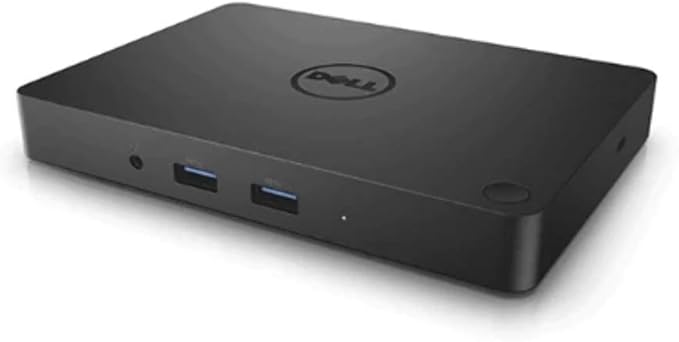
Dell WD15 Monitor Dock 4K With 130W Adapter USB-C (450-AFGM) Black
The Dell dock provides a common docking experience for your platforms via DisplayPort over USB Type-CTM, ensuring a reliable connection and crisp display. The dock connects with a single cable, freeing up space on your desk and in your workspace with the added ability to mount behind a monitor or on your desk. Great for presentations, the small and compact Dell dock enables fast, efficient connectivity to multiple displays and all your everyday peripherals through one convenient cable.
The Dell dock provides a common docking experience for your platforms via DisplayPort over USB Type-CTM, ensuring a reliable connection and crisp display. The dock connects with a single cable, freeing up space on your desk and in your workspace with the added ability to mount behind a monitor or on your desk. Great for presentations, the small and compact Dell dock enables fast, efficient connectivity to multiple displays and all your everyday peripherals through one convenient cable.
The Dell dock provides a common docking experience for your platforms via DisplayPort over USB Type-CTM, ensuring a reliable connection and crisp display. The dock connects with a single cable, freeing up space on your desk and in your workspace with the added ability to mount behind a monitor or on your desk. Great for presentations, the small and compact Dell dock enables fast, efficient connectivity to multiple displays and all your everyday peripherals through one convenient cable.
The Dell dock provides a common docking experience for your platforms via DisplayPort over USB Type-CTM, ensuring a reliable connection and crisp display. The dock connects with a single cable, freeing up space on your desk and in your workspace with the added ability to mount behind a monitor or on your desk. Great for presentations, the small and compact Dell dock enables fast, efficient connectivity to multiple displays and all your everyday peripherals through one convenient cable.
in 20 offers
The lowest price for Dell WD15 Monitor Dock 4K With 130W Adapter USB-C (450-AFGM) Black right now is $25.00 at eBay.com.au, compared across 8 retailers.
The all-time low was $15.60 on 7 June 2026 — today's price is 60% above the lowest ever. It has been notably cheaper before — worth setting a price alert.
Prices last updated 22 Aug 2026.
Last updated at 22/08/2026 08:42:52
Dell WD15 (K17A) USB‐C Docking Station – 4K HDMI, MiniDP, VGA, Gigabit LAN, 90W Power Delivery (Renewed)
Free delivery
Affiliate Disclosure: We may receive a small commission for purchases made through this link at no extra cost to you. This helps support our site. Thank you!
[C] Dell Business Docking station WD15 K17A USB Type-C HDMI VGA DP
Affiliate Disclosure: We may receive a small commission for purchases made through this link at no extra cost to you. This helps support our site. Thank you!
Dell Usb C Dock Docking Station Wd15 K17a Hdmi Mdp Lan Type Typec
Free delivery
Affiliate Disclosure: We may receive a small commission for purchases made through this link at no extra cost to you. This helps support our site. Thank you!
Dell WD15 K17A USB-C Universal Docking Station 4K HDMI USB 3 LAN mini DP
Affiliate Disclosure: We may receive a small commission for purchases made through this link at no extra cost to you. This helps support our site. Thank you!
Dell Business Docking Station Wd15 K17a Usb Type-c Hdmi Vga Dp
Free delivery
Affiliate Disclosure: We may receive a small commission for purchases made through this link at no extra cost to you. This helps support our site. Thank you!
Dell Docking Station Wd15 Usb-c With 130w Psu
Free delivery
Affiliate Disclosure: We may receive a small commission for purchases made through this link at no extra cost to you. This helps support our site. Thank you!
Dell Usb-c 4k Dock Station For Latitude 7520 7640 9440 2-in-1 Laptop
Delivery $69.06
Affiliate Disclosure: We may receive a small commission for purchases made through this link at no extra cost to you. This helps support our site. Thank you!
Dell Usb-c 4k Dock Station For Latitude 3320 3330 3410 3420 W/130w Ac
Delivery $69.06
Affiliate Disclosure: We may receive a small commission for purchases made through this link at no extra cost to you. This helps support our site. Thank you!
Dell Usb-c 4k Docking Station For Xps 15 9560 9570 9575 Laptop W/130w
Delivery $69.06
Affiliate Disclosure: We may receive a small commission for purchases made through this link at no extra cost to you. This helps support our site. Thank you!
Dell Usb-c 4k Docking Station For Dell Wyse 5470 Thin Client W/130w Ac
Delivery $69.06
Affiliate Disclosure: We may receive a small commission for purchases made through this link at no extra cost to you. This helps support our site. Thank you!
originally posted on mydeal.com.au
False and misleading. They tell you in the fine print they it doesn't have a power cord. Would never buy a thing from them again. When I asked to send back for a refund they told me it's not fault I can't read. One would think I wouldn't have to go downThe bottom and click more to find out it doesn't have a power cord. Terrible customer service.
originally posted on dell.com
I honestly had no idea what an amazing product I was getting when I ordered this! It docks to your Dell Laptop and has so many different ports for adding external monitors or other peripherals. (You can read what ports it has in the item specs.) It really expands the capabilities of your laptop. It plugs in to your laptop with a USB-C cable, so be sure yours is compatible. It's genuine Dell, so it's well-made, and you can feel it's heavy duty and good quality. The instructions are easy to understand. I'm very happy with it and would definitely recommend it to others.
originally posted on dell.com
I work in an enterprise environment serving a client at a site with 500 users, with 15,000 nationally. Easily 10% of the users I deploy this dock to have problems within weeks.The most common problem is that the Ethernet port drops connection briefly every few minutes. If you're browsing, streaming, or gaming, you may not even notice, but my client has several applications that crash immediately and lose unsaved data every time it happens. The only work-around is to not use an Ethernet cable connected to the dock.Audio over the 3.5mm port is poor quality.The difference between "connected" and "disconnected" is about 1mm and a very gentle click, a problem inherent to the USB-C connector and not exclusive to this model of dock.USB-C is fragile, and the cable ... MoreI work in an enterprise environment serving a client at a site with 500 users, with 15,000 nationally. Easily 10% of the users I deploy this dock to have problems within weeks.The most common problem is that the Ethernet port drops connection briefly every few minutes. If you're browsing, streaming, or gaming, you may not even notice, but my client has several applications that crash immediately and lose unsaved data every time it happens. The only work-around is to not use an Ethernet cable connected to the dock.Audio over the 3.5mm port is poor quality.The difference between "connected" and "disconnected" is about 1mm and a very gentle click, a problem inherent to the USB-C connector and not exclusive to this model of dock.USB-C is fragile, and the cable is thick and stiff, which limits placement on the desk. The fact that the cable is on the left side of the dock, and Dell places most USB-C charging ports on the left side of the laptop limits placement further.Leave at least 6" of clearance from the USB-C port, or there is a good chance it will break early. Make certain never to place the USB-C connector on top of anything, or rest anything on top of it for the same reason.
| Ports Spec | HDMI / DVI / VGA |
Dell WD15 (K17A) USB‐C Docking Station – 4K HDMI, MiniDP, VGA, Gigabit LAN, 90W Power Delivery (Renewed)
Free delivery
Affiliate Disclosure: We may receive a small commission for purchases made through this link at no extra cost to you. This helps support our site. Thank you!
[C] Dell Business Docking station WD15 K17A USB Type-C HDMI VGA DP
Affiliate Disclosure: We may receive a small commission for purchases made through this link at no extra cost to you. This helps support our site. Thank you!
Dell Usb C Dock Docking Station Wd15 K17a Hdmi Mdp Lan Type Typec
Free delivery
Affiliate Disclosure: We may receive a small commission for purchases made through this link at no extra cost to you. This helps support our site. Thank you!
Dell WD15 K17A USB-C Universal Docking Station 4K HDMI USB 3 LAN mini DP
Affiliate Disclosure: We may receive a small commission for purchases made through this link at no extra cost to you. This helps support our site. Thank you!
Dell Business Docking Station Wd15 K17a Usb Type-c Hdmi Vga Dp
Free delivery
Affiliate Disclosure: We may receive a small commission for purchases made through this link at no extra cost to you. This helps support our site. Thank you!
False and misleading. They tell you in the fine print they it doesn't have a power cord. Would never buy a thing from them again. When I asked to send back for a refund they told me it's not fault I can't read. One would think I wouldn't have to go downThe bottom and click more to find out it doesn't have a power cord. Terrible customer service.
I honestly had no idea what an amazing product I was getting when I ordered this! It docks to your Dell Laptop and has so many different ports for adding external monitors or other peripherals. (You can read what ports it has in the item specs.) It really expands the capabilities of your laptop. It plugs in to your laptop with a USB-C cable, so be sure yours is compatible. It's genuine Dell, so it's well-made, and you can feel it's heavy duty and good quality. The instructions are easy to understand. I'm very happy with it and would definitely recommend it to others.
I work in an enterprise environment serving a client at a site with 500 users, with 15,000 nationally. Easily 10% of the users I deploy this dock to have problems within weeks.The most common problem is that the Ethernet port drops connection briefly every few minutes. If you're browsing, streaming, or gaming, you may not even notice, but my client has several applications that crash immediately and lose unsaved data every time it happens. The only work-around is to not use an Ethernet cable connected to the dock.Audio over the 3.5mm port is poor quality.The difference between "connected" and "disconnected" is about 1mm and a very gentle click, a problem inherent to the USB-C connector and not exclusive to this model of dock.USB-C is fragile, and the cable ... MoreI work in an enterprise environment serving a client at a site with 500 users, with 15,000 nationally. Easily 10% of the users I deploy this dock to have problems within weeks.The most common problem is that the Ethernet port drops connection briefly every few minutes. If you're browsing, streaming, or gaming, you may not even notice, but my client has several applications that crash immediately and lose unsaved data every time it happens. The only work-around is to not use an Ethernet cable connected to the dock.Audio over the 3.5mm port is poor quality.The difference between "connected" and "disconnected" is about 1mm and a very gentle click, a problem inherent to the USB-C connector and not exclusive to this model of dock.USB-C is fragile, and the cable is thick and stiff, which limits placement on the desk. The fact that the cable is on the left side of the dock, and Dell places most USB-C charging ports on the left side of the laptop limits placement further.Leave at least 6" of clearance from the USB-C port, or there is a good chance it will break early. Make certain never to place the USB-C connector on top of anything, or rest anything on top of it for the same reason.
This is a review for the Dell WD15 product, and not the market place seller. I also bought this at much less than MSRP which made it a great deal, but at MSRP I think there are better options out there.I got this Dell dock for my XPS 13 9315. Before this, I had an Anker USB-C hub that powered a wireless USB Logitech receiver, HDMI monitor, ethernet, etc. The hub was okay but often got really hot, wireless USB keyboard and mouse receivers weren't that great on it--you got better reception plugging it directly into the laptop. Plus, I'd have to open my laptop each time I wanted to power it on. It just became really annoying to have to drag all the cables across my desk and plug in the hub.With the Dell Dock, the single power button turns on my laptop and reduces ... MoreThis is a review for the Dell WD15 product, and not the market place seller. I also bought this at much less than MSRP which made it a great deal, but at MSRP I think there are better options out there.I got this Dell dock for my XPS 13 9315. Before this, I had an Anker USB-C hub that powered a wireless USB Logitech receiver, HDMI monitor, ethernet, etc. The hub was okay but often got really hot, wireless USB keyboard and mouse receivers weren't that great on it--you got better reception plugging it directly into the laptop. Plus, I'd have to open my laptop each time I wanted to power it on. It just became really annoying to have to drag all the cables across my desk and plug in the hub.With the Dell Dock, the single power button turns on my laptop and reduces the amount of desk organizing I need to do each time I want to use the office desk. The device runs cool and really just stays out of the way once it's up and running. Support wise, the single HDMI for a 4k screen is just fine, a few 3.0 USB and ethernet ports for the occasional flash drive and solid connectivity are perfect for light office use. If you need the multiple 4k screens and lot's of external drives, etc, then you should look for higher end devices.There are only a few downsides to this device.Little annoyed that I can't use the display port without a dedicated dongle, but nothing that can't be fixed if really needed.The setup takes a bit of time, and will require a reboot or two to finally get working. Then you go through the usual motions of setting the external monitor as the only display.I kind of wish that there was a USB C port built-in, just to future proof the dock a little more, but ultimately I use the XPS's other spare USB C port in a pinch.I also wish the WD15 dock was USB PD powered, and the adapter was USB C instead of the old school barrel plug. It would be a great backup adapter to have and plug into any other USB C powered device if necessary.
I recently received the Dell Docking Station Business Dock which has two USB 2.0 ports, three USB 3.0 ports, speaker output, combo audio, gigabit ethernet, kensington lock slot, and a 130W AC adapter . The docking station allows me to easily hook up my laptop to my monitor at home, giving me the ability to utilize my home office in much the same way I work at my place of business. I leave the dock hooked up to my monitor at home, and with one plug am able to access my laptop so I have seamless workflow from office to home. I no longer have to mess with cables, hookups, and getting down and around the back of my PC and monitor in order to continue working at home. This is a must have for those that continue to work at home after the office has closed. So far, the ... MoreI recently received the Dell Docking Station Business Dock which has two USB 2.0 ports, three USB 3.0 ports, speaker output, combo audio, gigabit ethernet, kensington lock slot, and a 130W AC adapter . The docking station allows me to easily hook up my laptop to my monitor at home, giving me the ability to utilize my home office in much the same way I work at my place of business. I leave the dock hooked up to my monitor at home, and with one plug am able to access my laptop so I have seamless workflow from office to home. I no longer have to mess with cables, hookups, and getting down and around the back of my PC and monitor in order to continue working at home. This is a must have for those that continue to work at home after the office has closed. So far, the connections all feel secure, and the unit works as it should. Set up was a breeze, easy for those that are somewhat techy and for the tech novice as well. This unit enables me to add more connections to my laptop than the original laptop body allowed for. I'm able to add a second monitor, which makes working more efficient for me as well. This is something I didn't know I needed, but once I had it, I don't know how I lived without it.
We have had numerous issues with the USB-C cable that links to the laptop just stop working. It is a simple fix-just replace it. Problem is that you have to send it back to Dell for a new one. If you don't get the right rep, they insist you send the laptop with it to test. I cannot just take the user's laptop from them when they are claims specialists.The USB-c port is also very difficult to maintain. Any movement makes it disconnect. There is no "click" or anything that affirms you are securely connected to the cable in the dock.
Simple to connect, worked first time with my Dell XPS13, gives single cable set-up to connect to a desktop screen and keyboard/mouse. I am using the HDMI port to connect to a single large screen. Also my backup disc connects to a USB3 port and the network port connects to the router, the wifi adaptor automatically switches off. Took a little while to get Windows to change the screen scaling too suit the larger screen, and you have to change the power profile so the external screen works when the laptop is closed, but once you have solved that it is remembered each time you connect and disconnect. Only two negatives: The laptop powers on when you connect the dock via the USB-C port. I don't seem to be able to stop this. The cable to the USB-C port is quite large and ... MoreSimple to connect, worked first time with my Dell XPS13, gives single cable set-up to connect to a desktop screen and keyboard/mouse. I am using the HDMI port to connect to a single large screen. Also my backup disc connects to a USB3 port and the network port connects to the router, the wifi adaptor automatically switches off. Took a little while to get Windows to change the screen scaling too suit the larger screen, and you have to change the power profile so the external screen works when the laptop is closed, but once you have solved that it is remembered each time you connect and disconnect. Only two negatives: The laptop powers on when you connect the dock via the USB-C port. I don't seem to be able to stop this. The cable to the USB-C port is quite large and stiff. OK if you can arrange your desk to accommodate it, just something you need to be aware of.
It works great! Good quality, looks just like new and hooked up to my Dell laptop and Dell monitors easily. I purchased this as a replacement since my original docking station, the thunderbolt cord seemed to not be working properly and sometimes the monitors would work and sometimes not, sometimes the keyboard and mouse would work and sometimes not. After several trial and error tests, realized it was the thunderbolt cord from the docking station to the laptop. Very satisfied with this product and works great.
I took a bit of a punt buying this and not knowing for sure whether or not it would work. Having a new work computer fitted with one, I loved the idea of a single USB C cable to charge and connect everything. Newer computers have only 2 USB C ports and one of those is for charging. I'm going to try this with my Surface Book Pro when it gets back from repairs. (It turns out that Microsoft's flagshit hardware is held together by cheap glue which allows it to split at the seams when the batteries expand 5 minutes after the warranty expires. ) For now it's hooked up to my Google Pixelbook and attached to:- 1: external Samsung curved widescreen monitor, 2: hp printer 3: dymo label printer 4: RJ45 LAN (in) 5: 3 x LaCie external hard drives (total 12TB and simultaneously ... MoreI took a bit of a punt buying this and not knowing for sure whether or not it would work. Having a new work computer fitted with one, I loved the idea of a single USB C cable to charge and connect everything. Newer computers have only 2 USB C ports and one of those is for charging. I'm going to try this with my Surface Book Pro when it gets back from repairs. (It turns out that Microsoft's flagshit hardware is held together by cheap glue which allows it to split at the seams when the batteries expand 5 minutes after the warranty expires. ) For now it's hooked up to my Google Pixelbook and attached to:- 1: external Samsung curved widescreen monitor, 2: hp printer 3: dymo label printer 4: RJ45 LAN (in) 5: 3 x LaCie external hard drives (total 12TB and simultaneously readable) 6: vacant USB ports available for phones, video, iPad etc And all connected via a single USB C to the Pixelbook which allows the other one spare!
Recommend the seller. Product is fully functional and shipping has good tracking which is important because of the rampant package stealing all across where I live.The product a Dell model that is not the most latest but I know its shortcoming so i know I got a more than decent deal and I am satisfied with the purchase 100%. would not hesitate to buy from same seller again.
| Ports Spec | HDMI / DVI / VGA |

