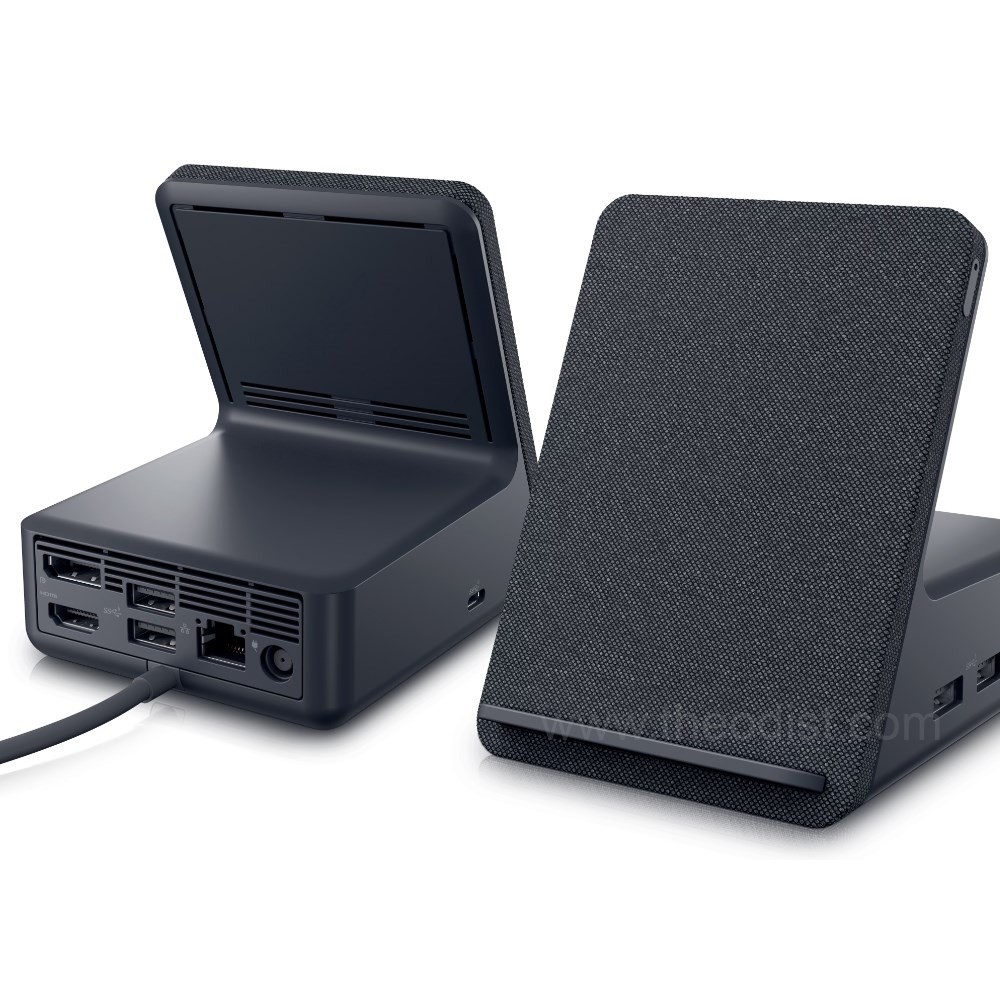
Dell WD19TBS Thunderbolt 3 Docking Station - 210-AZDD
A platform into which you can install a portable computer. The docking station typically contains slots for expansion cards, bays for storage devices, and I/O connectors for peripheral devices, such as printers and monitors. Once inserted in a docking station, the portable computer essentially becomes a desktop model computer. Most importantly, the same data is accessible in both modes because it resides on the portable computer's drives. The idea behind docking stations is to let you simultaneously enjoy the expansion possibilities of desktop model computers with the portability of notebook computers. In addition, the docking station enables you to use a full-size keyboard and monitor when you're not traveling.
A platform into which you can install a portable computer. The docking station typically contains slots for expansion cards, bays for storage devices, and I/O connectors for peripheral devices, such as printers and monitors. Once inserted in a docking station, the portable computer essentially becomes a desktop model computer. Most importantly, the same data is accessible in both modes because it resides on the portable computer's drives. The idea behind docking stations is to let you simultaneously enjoy the expansion possibilities of desktop model computers with the portability of notebook computers. In addition, the docking station enables you to use a full-size keyboard and monitor when you're not traveling.
A platform into which you can install a portable computer. The docking station typically contains slots for expansion cards, bays for storage devices, and I/O connectors for peripheral devices, such as printers and monitors. Once inserted in a docking station, the portable computer essentially becomes a desktop model computer. Most importantly, the same data is accessible in both modes because it resides on the portable computer's drives. The idea behind docking stations is to let you simultaneously enjoy the expansion possibilities of desktop model computers with the portability of notebook computers. In addition, the docking station enables you to use a full-size keyboard and monitor when you're not traveling.
A platform into which you can install a portable computer. The docking station typically contains slots for expansion cards, bays for storage devices, and I/O connectors for peripheral devices, such as printers and monitors. Once inserted in a docking station, the portable computer essentially becomes a desktop model computer. Most importantly, the same data is accessible in both modes because it resides on the portable computer's drives. The idea behind docking stations is to let you simultaneously enjoy the expansion possibilities of desktop model computers with the portability of notebook computers. In addition, the docking station enables you to use a full-size keyboard and monitor when you're not traveling.
in 31 offers
The lowest price for Dell WD19TBS Thunderbolt 3 Docking Station - 210-AZDD right now is $49.99 at eBay.com.au, compared across 16 retailers.
The all-time low was $49.99 on 23 July 2026. That's the lowest price we've ever tracked — a great time to buy.
Prices last updated 19 Oct 2026.
Last updated at 19/10/2026 23:07:22
Dell WD19TBS (210-AZDD) Universal Docking Station, USBx3, USB-C, HDMI, DPx2, LAN, T/Bolt
Free delivery
Affiliate Disclosure: We may receive a small commission for purchases made through this link at no extra cost to you. This helps support our site. Thank you!
Dell Universal Usb-c Dock Docking Station Wd19tbs 4k Hdmi Thundebolt 3
Delivery $18.99
Affiliate Disclosure: We may receive a small commission for purchases made through this link at no extra cost to you. This helps support our site. Thank you!
Dell WD19TBS USB C Pro Thunderbolt Docking Station with 180W PSU
Free delivery
Dell K20A | K20A001| WD19TB | 180W Charger | USB-C | Thunderbolt | Docking Station | HDMI + DP - REFURBISHED
Free delivery
Dell K20A | K20A001| WD19TB | 180W Charger | USB-C | Thunderbolt | Docking Station | HDMI + DP - REFURBISHED
Free delivery
Dell K20A | K20A001| WD19TB | 180W Charger | USB-C | Thunderbolt | Docking Station | HDMI + DP - REFURBISHED
Free delivery
Refurbished -- Dell WD19TBS 4K UHD Thunderbolt 3 Docking Station
Dell Thunderbolt Dock- 130w Power Delivery 180w AC. WD19TBS
Delivery $28.64
Dell Wd19Tb Thunderbolt 180W AC (130W Power Delivery) ()
Free delivery between 28 Oct – 3 Nov
Dell 210-AZDD | WD19TBS Thunderbolt Docking Station, 180W, 130W PD
Delivery between Tue – Fri $15
originally posted on dell.com
The 180W dock works well and I can certainly recommend it, though there are some features that would make it more useful for me. It can be a little noisy at times, which is OK if you are in a busy office environment, and the short lead to connect to the laptop means it can't be moved too far away. It would benefit from a couple of addditional USB Type-A and ports and another USB-C port and I wold have preferred 2x HDMI and 1x DP rather than the other way round that it is. Gettng it to start from a power off situation can take several attempts, not helped by the push button not providing very good feedback and a delay in response. Bottom line, it is worth getting, more so if there is a discount from the quite high base price.
originally posted on dell.com
Overall, not bad. Would have liked it better if it had 2 hdmi ports instead of 2 display ports. Docking via USB C is great, however where the docking station's USB C cable plugs into the USB C port on the laptop is not supported properly. We've had several of them break already. The USB C needs a small bump or something on the end to support the weight of the cable and connector. The USB C male end isn't sufficient for holding that weight. My new one is already slanted at an angle. USB ports on the front would have been better served by having them face up for easy access. I have to move my laptop if I wanted to use them.
originally posted on bhphotovideo.com
This is very cool docking station. Connects to the laptop via USB-C Thunderbolt 3 cable (make sure your laptop has Tunderbolt 3 or 4 port) and provides Gigabit Ethernet, Video signal and also power to charge the battery (130 W for Dell selected laptops).The only one thing I coud not figure out - how to supply the Audio signal from the Laptop to the Monitor with built-in speakers. For some reason the Audio signal does not go from the laptop through the dockiong station to the monitor connected via HDMI cable (latest version). Also please note that this docking station model is WD19TBS (simplified version) which doesn't have the Audio 3.5 mm Output port (unlike WD19TB model). The unit and it's power supply stay slightly warm. The B&H price is great, much lover then ... MoreThis is very cool docking station. Connects to the laptop via USB-C Thunderbolt 3 cable (make sure your laptop has Tunderbolt 3 or 4 port) and provides Gigabit Ethernet, Video signal and also power to charge the battery (130 W for Dell selected laptops).The only one thing I coud not figure out - how to supply the Audio signal from the Laptop to the Monitor with built-in speakers. For some reason the Audio signal does not go from the laptop through the dockiong station to the monitor connected via HDMI cable (latest version). Also please note that this docking station model is WD19TBS (simplified version) which doesn't have the Audio 3.5 mm Output port (unlike WD19TB model). The unit and it's power supply stay slightly warm. The B&H price is great, much lover then Dell.com offers. The unit came brand new and very well packed. Thank you B&H !
| General | |
| Product Type | Docking station |
| Width | 20.5 cm |
| Depth | 9 cm |
| Height | 2.9 cm |

Dell WD19TBS (210-AZDD) Universal Docking Station, USBx3, USB-C, HDMI, DPx2, LAN, T/Bolt
Free delivery
Affiliate Disclosure: We may receive a small commission for purchases made through this link at no extra cost to you. This helps support our site. Thank you!
Dell Universal Usb-c Dock Docking Station Wd19tbs 4k Hdmi Thundebolt 3
Delivery $18.99
Affiliate Disclosure: We may receive a small commission for purchases made through this link at no extra cost to you. This helps support our site. Thank you!
Dell WD19TBS USB C Pro Thunderbolt Docking Station with 180W PSU
Free delivery
Dell K20A | K20A001| WD19TB | 180W Charger | USB-C | Thunderbolt | Docking Station | HDMI + DP - REFURBISHED
Free delivery
Dell K20A | K20A001| WD19TB | 180W Charger | USB-C | Thunderbolt | Docking Station | HDMI + DP - REFURBISHED
Free delivery
The 180W dock works well and I can certainly recommend it, though there are some features that would make it more useful for me. It can be a little noisy at times, which is OK if you are in a busy office environment, and the short lead to connect to the laptop means it can't be moved too far away. It would benefit from a couple of addditional USB Type-A and ports and another USB-C port and I wold have preferred 2x HDMI and 1x DP rather than the other way round that it is. Gettng it to start from a power off situation can take several attempts, not helped by the push button not providing very good feedback and a delay in response. Bottom line, it is worth getting, more so if there is a discount from the quite high base price.
Overall, not bad. Would have liked it better if it had 2 hdmi ports instead of 2 display ports. Docking via USB C is great, however where the docking station's USB C cable plugs into the USB C port on the laptop is not supported properly. We've had several of them break already. The USB C needs a small bump or something on the end to support the weight of the cable and connector. The USB C male end isn't sufficient for holding that weight. My new one is already slanted at an angle. USB ports on the front would have been better served by having them face up for easy access. I have to move my laptop if I wanted to use them.
This is very cool docking station. Connects to the laptop via USB-C Thunderbolt 3 cable (make sure your laptop has Tunderbolt 3 or 4 port) and provides Gigabit Ethernet, Video signal and also power to charge the battery (130 W for Dell selected laptops).The only one thing I coud not figure out - how to supply the Audio signal from the Laptop to the Monitor with built-in speakers. For some reason the Audio signal does not go from the laptop through the dockiong station to the monitor connected via HDMI cable (latest version). Also please note that this docking station model is WD19TBS (simplified version) which doesn't have the Audio 3.5 mm Output port (unlike WD19TB model). The unit and it's power supply stay slightly warm. The B&H price is great, much lover then ... MoreThis is very cool docking station. Connects to the laptop via USB-C Thunderbolt 3 cable (make sure your laptop has Tunderbolt 3 or 4 port) and provides Gigabit Ethernet, Video signal and also power to charge the battery (130 W for Dell selected laptops).The only one thing I coud not figure out - how to supply the Audio signal from the Laptop to the Monitor with built-in speakers. For some reason the Audio signal does not go from the laptop through the dockiong station to the monitor connected via HDMI cable (latest version). Also please note that this docking station model is WD19TBS (simplified version) which doesn't have the Audio 3.5 mm Output port (unlike WD19TB model). The unit and it's power supply stay slightly warm. The B&H price is great, much lover then Dell.com offers. The unit came brand new and very well packed. Thank you B&H !
Dell picked an inopportune time to ask for my review. I have had the WD19TBS for about ten days. As instructed, I downloaded any possible driver updates before using the product. I connected a second monitor in the HDMI port, internet cable in the Ethernet port and wireless mouse and a wired keyboard in the USB ports. Every device plugged into the WD9TBS worked flawlessly. I took my laptop with me on a five day trip. When I plugged the WD9TBS into my laptop upon my return the only devices that are now operational are the power supply and the second monitor. None of the USB ports or the Ethernet port are functional. I have shutdown and restarted my laptop a number of times and have unplugged and plugged back in the WD9TBS a number of times without success of ... MoreDell picked an inopportune time to ask for my review. I have had the WD19TBS for about ten days. As instructed, I downloaded any possible driver updates before using the product. I connected a second monitor in the HDMI port, internet cable in the Ethernet port and wireless mouse and a wired keyboard in the USB ports. Every device plugged into the WD9TBS worked flawlessly. I took my laptop with me on a five day trip. When I plugged the WD9TBS into my laptop upon my return the only devices that are now operational are the power supply and the second monitor. None of the USB ports or the Ethernet port are functional. I have shutdown and restarted my laptop a number of times and have unplugged and plugged back in the WD9TBS a number of times without success of restoring the functions of the non-responsive ports. I not yet contacted Dell with these issues but will do so as soon as I finish this review. Hopefully, they have a suitable resolution to this aggravating problem.
We've used Dell USB Docks for some time. One advantage is that they are quick and easy. The disadvantage is they are clumsy to configure on desks. We've never had an install that we were satisfied with. Power is on the front instead of the back, which usually, but not always is a problem. it seems a better location would be on the back at the end. if they put the power on the back, they might as well add the Network port on that side too, it just makes sense. The cable to connect to the PC is on the end, which actually works in most situations. The usable ports on the "front" are fine, but they might consider moving the two ports that are currently on the back, to the end. It would be nice if they had mounting on the bottom so the unit could be mounted under desks ... MoreWe've used Dell USB Docks for some time. One advantage is that they are quick and easy. The disadvantage is they are clumsy to configure on desks. We've never had an install that we were satisfied with. Power is on the front instead of the back, which usually, but not always is a problem. it seems a better location would be on the back at the end. if they put the power on the back, they might as well add the Network port on that side too, it just makes sense. The cable to connect to the PC is on the end, which actually works in most situations. The usable ports on the "front" are fine, but they might consider moving the two ports that are currently on the back, to the end. It would be nice if they had mounting on the bottom so the unit could be mounted under desks near the wire hole. We've had to extend the USB C cable, which causes some issues when the users accidentally unplug it. Having a way to use different length USB C cables, that were securely attached, would be nice.
Great product - poor in documentation. Two issues of note: 1. The docking stations' data transfer cable plugs into the same port as the computer's power supply. Nothing in the documentation indicated that the computer would now draw its power directly from the docking station. 2. The monitor loses a couple of features when plugged into the docking station. The shutdown and startup is connected to the docking station. When plugged in directly to the computer the monitors shut down and startup with the computer. Now it's another step in the process. So, I left the monitor attached to the computer.
It does what is needed and it's better made than most USB docks I've tested but USB docking stations in general require really good drivers and that is not what I'm finding. The driver and firmware updates on these docking stations have to be constantly updated and checked. If a system gets corrupted for any reason a rebuild is the only way you can get these installed again on a windows machine. Also, unlike the older docking stations that used the Latitude specialty connectors any USB docking station is just inferior to what was a true desktop replacement with the older dock design. These have a decent amount of ports but even using the Thunderbolt connection the serial nature of USB shows in the video response, network speed, odd video glitches, etc. Display port, ... MoreIt does what is needed and it's better made than most USB docks I've tested but USB docking stations in general require really good drivers and that is not what I'm finding. The driver and firmware updates on these docking stations have to be constantly updated and checked. If a system gets corrupted for any reason a rebuild is the only way you can get these installed again on a windows machine. Also, unlike the older docking stations that used the Latitude specialty connectors any USB docking station is just inferior to what was a true desktop replacement with the older dock design. These have a decent amount of ports but even using the Thunderbolt connection the serial nature of USB shows in the video response, network speed, odd video glitches, etc. Display port, mouse and keyboard response time things that should be fast and robust just can't keep up when you are doing anything that demands a good percentage of your bandwidth to work. I'm not talking about games, though those are affected, I'm talking about business analysis software that requires good data speed and fast graphics for analysis and visualization. Many would say use a desktop for that work but for the past 20 years multiple companies and clients have not needed to buy two systems thanks to truly quality docking stations that were available on the Latitude line of notebooks. Notebooks have enough power to do this work, some even better than desktops, but notebooks are small and hard to work on 8 plus hours a day because of small keyboards and screens. They just need good connectivity and docking to make the process comfortable for people to work every day and still be able to take the machine with them when they go home to do other things that are not as intensive or focused. Ideally we will start seeing USB docks that can truly take advantage of Thunderbolt but getting clean and stable drivers that don't need to be constantly checked and updated is the first step.
Excellent power pack/hub option or the road warrior. Right size, right weight, right ports functionality. Specially the ability to connect to devices data and peripherals while charging. The recharging of the battery pack has the convenience of the power cable being attached to it.
This is one of the best docks on the market. This Dell Dock works great right out of the box equally well with Dell Laptop and MacBook Pro. Initially, I got this for work laptop to connect to the Dell 34” Curved Monitor, network, dongle for the Dell Pro Wireless Keyboard & Mouse and external Hard Drive. I decided to try it with my personal MacBook Pro, that I bring to work once in a while. Thunderbolt 3 cord is about 18 inches long so it is plenty of reach. The power button is a nice addition. Now I can simply plug in the main Thunderbolt 3 cable, that comes out of the dock, into either the MacBook Pro or the Dell Latitude 9520 and all of peripherals connected to the dock work with either laptop. At the same time either laptop can be charged, as Dell Thunderbolt ... MoreThis is one of the best docks on the market. This Dell Dock works great right out of the box equally well with Dell Laptop and MacBook Pro. Initially, I got this for work laptop to connect to the Dell 34” Curved Monitor, network, dongle for the Dell Pro Wireless Keyboard & Mouse and external Hard Drive. I decided to try it with my personal MacBook Pro, that I bring to work once in a while. Thunderbolt 3 cord is about 18 inches long so it is plenty of reach. The power button is a nice addition. Now I can simply plug in the main Thunderbolt 3 cable, that comes out of the dock, into either the MacBook Pro or the Dell Latitude 9520 and all of peripherals connected to the dock work with either laptop. At the same time either laptop can be charged, as Dell Thunderbolt Dock- WD19TBS supplies more than enough power to do so. This is fantastic! This docking station is an excellent addition to my desk setup.
When used with the back USBC port of my Dell Precision 5560 laptop, the built-in screen kept shrinking/restoring and after 10 minutes I would loose picture on the external monitor, and the USB-A ports didn't work. After trying many combinations, it all works fine now using the 2nd-from-back USBC port on the left of the laptop and the DisplayPort output of the doc instead of HDMI. This was frustrating. I wish there was some documentation or a utility to advise which port to use on the laptop, and that you may need to use DisplayPort instead of HDMI. The cheap USBC->HDMI/single USBA dongle that came with the laptop worked better and wasn't picky about which USBC port it used.
| General | |
| Product Type | Docking station |
| Width | 20.5 cm |
| Depth | 9 cm |
| Height | 2.9 cm |