Dell Webcam - WB3023
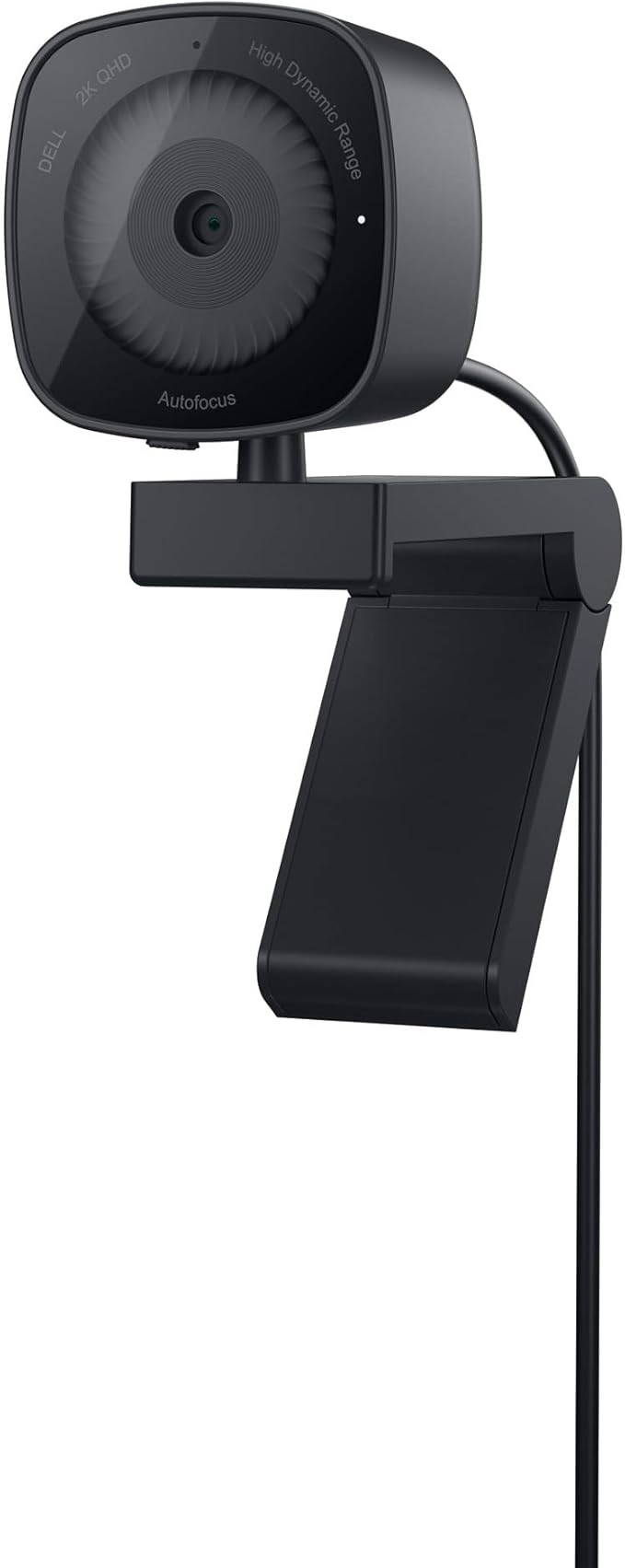
Collaborate confidently with this 2K QHD webcam that's essential for everyday use. Picture perfect Experience vivid picture clarity through this 2K QHD. 1440p camera with a Sony image sensor. Authentically you Experience true-to-life colour with High Dynamic Range (HDR) in most lighting situations. See facial features clearly with Facial Detection Auto Exposure (FDAE) that evens out harsh lighting. Enjoy image clarity even in low light with Temporal (3D) and Spatial (2D) Noise Reduction that eliminates graininess and motion blur. Make your voice heard Communicate clearly no matter what's going on around you with the built-in noise reduction mic. Adjust your view Protect your privacy with the integrated sliding privacy shutter for when the webcam is not in use. Manage how much of your surroundings are included in frame with the swivel and tilt features as well as adjustable Field of View (65°. Personalise your settings Dell Peripheral Managersoftware offers a wide range of presets and customisable features like HDR and Field of View that you can adjust to fit your preferences.
Collaborate confidently with this 2K QHD webcam that's essential for everyday use. Picture perfect Experience vivid picture clarity through this 2K QHD. 1440p camera with a Sony image sensor. Authentically you Experience true-to-life colour with High Dynamic Range (HDR) in most lighting situations. See facial features clearly with Facial Detection Auto Exposure (FDAE) that evens out harsh lighting. Enjoy image clarity even in low light with Temporal (3D) and Spatial (2D) Noise Reduction that eliminates graininess and motion blur. Make your voice heard Communicate clearly no matter what's going on around you with the built-in noise reduction mic. Adjust your view Protect your privacy with the integrated sliding privacy shutter for when the webcam is not in use. Manage how much of your surroundings are included in frame with the swivel and tilt features as well as adjustable Field of View (65°. Personalise your settings Dell Peripheral Managersoftware offers a wide range of presets and customisable features like HDR and Field of View that you can adjust to fit your preferences.
Collaborate confidently with this 2K QHD webcam that's essential for everyday use. Picture perfect Experience vivid picture clarity through this 2K QHD. 1440p camera with a Sony image sensor. Authentically you Experience true-to-life colour with High Dynamic Range (HDR) in most lighting situations. See facial features clearly with Facial Detection Auto Exposure (FDAE) that evens out harsh lighting. Enjoy image clarity even in low light with Temporal (3D) and Spatial (2D) Noise Reduction that eliminates graininess and motion blur. Make your voice heard Communicate clearly no matter what's going on around you with the built-in noise reduction mic. Adjust your view Protect your privacy with the integrated sliding privacy shutter for when the webcam is not in use. Manage how much of your surroundings are included in frame with the swivel and tilt features as well as adjustable Field of View (65°. Personalise your settings Dell Peripheral Managersoftware offers a wide range of presets and customisable features like HDR and Field of View that you can adjust to fit your preferences.
Collaborate confidently with this 2K QHD webcam that's essential for everyday use. Picture perfect Experience vivid picture clarity through this 2K QHD. 1440p camera with a Sony image sensor. Authentically you Experience true-to-life colour with High Dynamic Range (HDR) in most lighting situations. See facial features clearly with Facial Detection Auto Exposure (FDAE) that evens out harsh lighting. Enjoy image clarity even in low light with Temporal (3D) and Spatial (2D) Noise Reduction that eliminates graininess and motion blur. Make your voice heard Communicate clearly no matter what's going on around you with the built-in noise reduction mic. Adjust your view Protect your privacy with the integrated sliding privacy shutter for when the webcam is not in use. Manage how much of your surroundings are included in frame with the swivel and tilt features as well as adjustable Field of View (65°. Personalise your settings Dell Peripheral Managersoftware offers a wide range of presets and customisable features like HDR and Field of View that you can adjust to fit your preferences.
in 6 offers
The lowest price for Dell Webcam - WB3023 right now is $88.00 at Clove Technology, compared across 6 retailers.
The all-time low was $38.67 on 17 Mar 2026 — today's price is 128% above the lowest ever. It has been notably cheaper before — worth setting a price alert.
Prices last updated 23 Oct 2026.
Last updated at 23/10/2026 16:12:07
Dell Webcam - WB3023
Affiliate Disclosure: We may receive a small commission for purchases made through this link at no extra cost to you. This helps support our site. Thank you!
DELL Webcam - WB3023 - 2K QHD
Dell Wb3023 Qhd Webcam Silver
Delivery $19.49
DELL Webcam - WB3023 - 2K QHD
Delivery $155.48
Dell Webcam - Wb3023
Free delivery
Affiliate Disclosure: We may receive a small commission for purchases made through this link at no extra cost to you. This helps support our site. Thank you!
DELL WB3023 - Webcamera, 2K QHD, Black
Delivery $91.54
originally posted on dell.com
It's a decent webcam with sharp visual quality in a well-lit room, with a brighter than average low-light video output. After downloading Dell Peripheral Manager, if you enable HDR, the sharpness and brightness will auto-adjust to make both the background and foreground very high quality. With HDR on, you would need to enable auto white balance because the colors end up having a certain overly pink or blue hue to it. HDR does increase brightness in very low-lit rooms (such as light from your monitor only), however there will be artifacting and ghosting (i.e. and afterimage) because I believe the sensor superimposes its captures over one another to artificially increase brightness. Other existing webcams may achieve the same brightness in low-lit rooms without the ... MoreIt's a decent webcam with sharp visual quality in a well-lit room, with a brighter than average low-light video output. After downloading Dell Peripheral Manager, if you enable HDR, the sharpness and brightness will auto-adjust to make both the background and foreground very high quality. With HDR on, you would need to enable auto white balance because the colors end up having a certain overly pink or blue hue to it. HDR does increase brightness in very low-lit rooms (such as light from your monitor only), however there will be artifacting and ghosting (i.e. and afterimage) because I believe the sensor superimposes its captures over one another to artificially increase brightness. Other existing webcams may achieve the same brightness in low-lit rooms without the ghosting. It looks fine if you don't move around much though. The AI Auto Framing works fine if you set the tracking sensitivity to Fast and the frame size to Narrow. The camera only has 65 and 78 degree field of view options, a supposed 4x digital zoom, autofocus and manual focus works alright, the priority between exposure and frame rate have little effect (and will not work while HDR is on), there are brightness, sharpness, contrast, and saturation sliders and 50Hz and 60Hz anti-flicker options. At 2K resolution, you only have 24 and 30 fps framerate options. Full HD and HD options allow 24, 30, and 60fps framerate. The camera has a microphone but I don't use it because any USB microphone these days will have clearer audio, but I heard that it wasn't too bad (it has a bit of muffle to it but otherwise it's not too terrible). Also, compared to other webcams, it takes about 1-2 seconds longer to begin showing an output. I do enjoy the cover being able to clip on magnetically; the webcam itself contains the magnets and not the round cover.
originally posted on dell.com
I got the Dell WB3022 to replace an older 1080p camera to use for Zoom meetings from my home office. Aesthetically the shape and color are beautiful, and the dark grey was a perfect match to that of my Dell monitor. In comparison to my old webcam this webcam feels very solid in its construction. Connection is via a standard USB-A. I had an open one on the back of my monitor which made for easy cable management. The first thing that becomes evident is the added detail in the image captured moving from 1080 to 2K resolution. There is very little noise in the image and the contrast was also a noticeable improved over my old webcam. While it is perfectly fine to simply use plug and play I would encourage people to play around with the Dell Peripheral Manager software. ... MoreI got the Dell WB3022 to replace an older 1080p camera to use for Zoom meetings from my home office. Aesthetically the shape and color are beautiful, and the dark grey was a perfect match to that of my Dell monitor. In comparison to my old webcam this webcam feels very solid in its construction. Connection is via a standard USB-A. I had an open one on the back of my monitor which made for easy cable management. The first thing that becomes evident is the added detail in the image captured moving from 1080 to 2K resolution. There is very little noise in the image and the contrast was also a noticeable improved over my old webcam. While it is perfectly fine to simply use plug and play I would encourage people to play around with the Dell Peripheral Manager software. This allows you to to choose from various presets, fine tune color correction, turn HDR on/off, use autofocus, and choose between 65 or 78 degree fields of view. I also used the camera with NVIDIA broadcast app without issues. The built in privacy slider is also a nice feature.
originally posted on dell.com
I was hoping for a bit more in terms of image quality and performance. It has a nice physical design, and does plug-and-play quite easily, but every time I join a call, it's blurry (out of focus) for about 15-20 seconds before coming into focus. I don't understand what it's doing. I even set a manual focus using the (pretty nicely designed) software that ships with it. Even with manual focus set up, the camera starts blurry every single time I turn it on, and it just sits there blurry for an extended period before finally shifting into focus.One other thing is the HDRI option which was available in the software. I actually thought I was going to have to return the camera because I experiencing terrible color banding and compression on my video. I finally figured ... MoreI was hoping for a bit more in terms of image quality and performance. It has a nice physical design, and does plug-and-play quite easily, but every time I join a call, it's blurry (out of focus) for about 15-20 seconds before coming into focus. I don't understand what it's doing. I even set a manual focus using the (pretty nicely designed) software that ships with it. Even with manual focus set up, the camera starts blurry every single time I turn it on, and it just sits there blurry for an extended period before finally shifting into focus.One other thing is the HDRI option which was available in the software. I actually thought I was going to have to return the camera because I experiencing terrible color banding and compression on my video. I finally figured out it was happening because this HDRI option was enabled. The image quality was decent without it. Why include this feature? It massively degraded the image quality.I don't just want to complain. As mentioned before, the physical design is rather pretty. The image quality is decent, and it's nice to have the controls provided in the included software. It has impressive low-light handling so you can be visible on a call in almost any lighting condition. I wish there was a shallower depth of field, so that I could blur out the background in-cameraOverall, it's pretty nice, but the biggest problem is that extended period of blurriness at the start of every call.
| Frame Rate | 60 fps (HD) |
| Storage Media | SD |
| Photo Resolution | 2560 x 1920 |
| Resolution | 2K QHD |
| HD Format | 2K QHD |

Dell Webcam - WB3023
Affiliate Disclosure: We may receive a small commission for purchases made through this link at no extra cost to you. This helps support our site. Thank you!
DELL Webcam - WB3023 - 2K QHD
Dell Wb3023 Qhd Webcam Silver
Delivery $19.49
DELL Webcam - WB3023 - 2K QHD
Delivery $155.48
Dell Webcam - Wb3023
Free delivery
Affiliate Disclosure: We may receive a small commission for purchases made through this link at no extra cost to you. This helps support our site. Thank you!
It's a decent webcam with sharp visual quality in a well-lit room, with a brighter than average low-light video output. After downloading Dell Peripheral Manager, if you enable HDR, the sharpness and brightness will auto-adjust to make both the background and foreground very high quality. With HDR on, you would need to enable auto white balance because the colors end up having a certain overly pink or blue hue to it. HDR does increase brightness in very low-lit rooms (such as light from your monitor only), however there will be artifacting and ghosting (i.e. and afterimage) because I believe the sensor superimposes its captures over one another to artificially increase brightness. Other existing webcams may achieve the same brightness in low-lit rooms without the ... MoreIt's a decent webcam with sharp visual quality in a well-lit room, with a brighter than average low-light video output. After downloading Dell Peripheral Manager, if you enable HDR, the sharpness and brightness will auto-adjust to make both the background and foreground very high quality. With HDR on, you would need to enable auto white balance because the colors end up having a certain overly pink or blue hue to it. HDR does increase brightness in very low-lit rooms (such as light from your monitor only), however there will be artifacting and ghosting (i.e. and afterimage) because I believe the sensor superimposes its captures over one another to artificially increase brightness. Other existing webcams may achieve the same brightness in low-lit rooms without the ghosting. It looks fine if you don't move around much though. The AI Auto Framing works fine if you set the tracking sensitivity to Fast and the frame size to Narrow. The camera only has 65 and 78 degree field of view options, a supposed 4x digital zoom, autofocus and manual focus works alright, the priority between exposure and frame rate have little effect (and will not work while HDR is on), there are brightness, sharpness, contrast, and saturation sliders and 50Hz and 60Hz anti-flicker options. At 2K resolution, you only have 24 and 30 fps framerate options. Full HD and HD options allow 24, 30, and 60fps framerate. The camera has a microphone but I don't use it because any USB microphone these days will have clearer audio, but I heard that it wasn't too bad (it has a bit of muffle to it but otherwise it's not too terrible). Also, compared to other webcams, it takes about 1-2 seconds longer to begin showing an output. I do enjoy the cover being able to clip on magnetically; the webcam itself contains the magnets and not the round cover.
I got the Dell WB3022 to replace an older 1080p camera to use for Zoom meetings from my home office. Aesthetically the shape and color are beautiful, and the dark grey was a perfect match to that of my Dell monitor. In comparison to my old webcam this webcam feels very solid in its construction. Connection is via a standard USB-A. I had an open one on the back of my monitor which made for easy cable management. The first thing that becomes evident is the added detail in the image captured moving from 1080 to 2K resolution. There is very little noise in the image and the contrast was also a noticeable improved over my old webcam. While it is perfectly fine to simply use plug and play I would encourage people to play around with the Dell Peripheral Manager software. ... MoreI got the Dell WB3022 to replace an older 1080p camera to use for Zoom meetings from my home office. Aesthetically the shape and color are beautiful, and the dark grey was a perfect match to that of my Dell monitor. In comparison to my old webcam this webcam feels very solid in its construction. Connection is via a standard USB-A. I had an open one on the back of my monitor which made for easy cable management. The first thing that becomes evident is the added detail in the image captured moving from 1080 to 2K resolution. There is very little noise in the image and the contrast was also a noticeable improved over my old webcam. While it is perfectly fine to simply use plug and play I would encourage people to play around with the Dell Peripheral Manager software. This allows you to to choose from various presets, fine tune color correction, turn HDR on/off, use autofocus, and choose between 65 or 78 degree fields of view. I also used the camera with NVIDIA broadcast app without issues. The built in privacy slider is also a nice feature.
I was hoping for a bit more in terms of image quality and performance. It has a nice physical design, and does plug-and-play quite easily, but every time I join a call, it's blurry (out of focus) for about 15-20 seconds before coming into focus. I don't understand what it's doing. I even set a manual focus using the (pretty nicely designed) software that ships with it. Even with manual focus set up, the camera starts blurry every single time I turn it on, and it just sits there blurry for an extended period before finally shifting into focus.One other thing is the HDRI option which was available in the software. I actually thought I was going to have to return the camera because I experiencing terrible color banding and compression on my video. I finally figured ... MoreI was hoping for a bit more in terms of image quality and performance. It has a nice physical design, and does plug-and-play quite easily, but every time I join a call, it's blurry (out of focus) for about 15-20 seconds before coming into focus. I don't understand what it's doing. I even set a manual focus using the (pretty nicely designed) software that ships with it. Even with manual focus set up, the camera starts blurry every single time I turn it on, and it just sits there blurry for an extended period before finally shifting into focus.One other thing is the HDRI option which was available in the software. I actually thought I was going to have to return the camera because I experiencing terrible color banding and compression on my video. I finally figured out it was happening because this HDRI option was enabled. The image quality was decent without it. Why include this feature? It massively degraded the image quality.I don't just want to complain. As mentioned before, the physical design is rather pretty. The image quality is decent, and it's nice to have the controls provided in the included software. It has impressive low-light handling so you can be visible on a call in almost any lighting condition. I wish there was a shallower depth of field, so that I could blur out the background in-cameraOverall, it's pretty nice, but the biggest problem is that extended period of blurriness at the start of every call.
Absolutely love this webcam. I'm sure there will be reviews that cover all of the features in detail but I'll add 2 favorites. My home office is by large window (love the light!) but my laptop webcam would wash out my face. The Dell software has a setting for warm tones and that completely brought back my beautiful complexion. Second, the software has an AI tracking feature that is a hit with others on video calls. It will zoom in to my face perfectly. If I lean left or right, the zoom follows me. If I lean back in my chair to listen, my laptop looked like I was in the next county. The software again zooms in. It is slow and unobtrusive. I love this thing and the price/value was awesome. Great looking product too with the trick magnetic screen cap. So darn happy!
I needed a new camera for my business and for gaming. I was gifted this dell WebCam and I am absolutely in love with it. It’s easy to use and easy to install. The picture clarity is absolutely amazing. The picture so clear it has 2k QHD 1440p high resolution uncompromised video quality. The microphone quality is very clear and it’s easy to understand while gaming and while showing my products to customers. I have had many more sells thanks to this amazing camera because I’m able to show every detail on my items where I wasn’t able to do that before. I am able to show my products to my customers and they are able to see every detail of my beautiful jewelry. I love how easy the camera sets up and that it is easy to attach to my monitor. I really like that Dell makes ... MoreI needed a new camera for my business and for gaming. I was gifted this dell WebCam and I am absolutely in love with it. It’s easy to use and easy to install. The picture clarity is absolutely amazing. The picture so clear it has 2k QHD 1440p high resolution uncompromised video quality. The microphone quality is very clear and it’s easy to understand while gaming and while showing my products to customers. I have had many more sells thanks to this amazing camera because I’m able to show every detail on my items where I wasn’t able to do that before. I am able to show my products to my customers and they are able to see every detail of my beautiful jewelry. I love how easy the camera sets up and that it is easy to attach to my monitor. I really like that Dell makes it easy for you to also access any help that you need with customer support. They provide a pamphlet for QuickStart guide that also gives you a QR code that you can scan with your camera and easily access customer support. I have never had a problem with Dells customer support they have been amazing and very helpful and walk me through every step that I’ve needed help with. That’s one of the main reasons why I love using Dell products is because their customer service is actually great. The camera is all black and it has a clip that’s easy to attach to your computer monitor that folds up. They had designed the camera to sit perfectly on your monitor so that it sits level and doesn’t move on you. The microphone quality is very clear and it’s easy to understand while gaming and while showing my products to customers. I have had many more sells thanks to this amazing camera because I’m able to show every detail because of the camera and explain the products because of the clear quality on the speaker. This is a great camera I highly recommend it. I love how clear everything looks. The difference in my old camera and this new dell web camera is night and day. This is an amazing product and I definitely recommend it.
The Dell WB3023 if a very nice 2K webcam that offers flexibility and multiple configuration options. The build quality of the camera seems very good. It has a nice weight to it which is important for mounting on top of a monitor. It has an option to thread a tripod in as well if needed. The clip on the front holds it securely to the top of the monitor.The camera is plug and play and should prompt to install the Dell Peripheral manager as an optional piece of software. Without any adjustments, the picture quality is much better than the standard laptop camera. Downloading and installing the Dell Peripheral manager will give you some quick options to adjust picture quality. Furthermore, it has plenty of advanced options to adjust the picture as well as change the ... MoreThe Dell WB3023 if a very nice 2K webcam that offers flexibility and multiple configuration options. The build quality of the camera seems very good. It has a nice weight to it which is important for mounting on top of a monitor. It has an option to thread a tripod in as well if needed. The clip on the front holds it securely to the top of the monitor.The camera is plug and play and should prompt to install the Dell Peripheral manager as an optional piece of software. Without any adjustments, the picture quality is much better than the standard laptop camera. Downloading and installing the Dell Peripheral manager will give you some quick options to adjust picture quality. Furthermore, it has plenty of advanced options to adjust the picture as well as change the resolution, enable/disable the microphone and more. The microphone sound quality is pretty decent for a webcam.Overall, the Dell WB3023 is a really nice 2K webcam option that won't disappoint.
I got this webcam to complete the Dell computer I recently bought. I don't know how much I will use it in the future, nor do I know much about the technical aspects of the camera. This one seemed to be a mid-range product, both in features and in price. It was very easy to install. Right after I pulgged it in, the instructions appeared on the screen automatically. I tested it by making a short recording of myself and it worked fine. The picture was very clear and the sound was good, even though I wasn't speaking very loudly. I do like the cover for the lens, since I won't be using it much. I think that this webcam will be fine for me if and when I need it in the future.
This camera requires a lot of calibration to work well. Physically, I agree with other reviews that it is well built - but there's no pivot on the camera itself. In other words, the 'kickstand' on the back is very sensitive and despite the rubberized surface that coats it (which I appreciate) even poster puddy doesn't fully secure it to the monitor and it flops around A LOT. I used to have a camera with a hinge on the base that allowed you to control the angle of the camera without disturbing the base. Not here. The whole body of this camera moves and prevents any fine tuning to the angle. The AI in it is also very laggy. For example, when I join a zoom call - I'm invariably overexposed for several moments - long enough for the audience to comment - until it ... MoreThis camera requires a lot of calibration to work well. Physically, I agree with other reviews that it is well built - but there's no pivot on the camera itself. In other words, the 'kickstand' on the back is very sensitive and despite the rubberized surface that coats it (which I appreciate) even poster puddy doesn't fully secure it to the monitor and it flops around A LOT. I used to have a camera with a hinge on the base that allowed you to control the angle of the camera without disturbing the base. Not here. The whole body of this camera moves and prevents any fine tuning to the angle. The AI in it is also very laggy. For example, when I join a zoom call - I'm invariably overexposed for several moments - long enough for the audience to comment - until it calibrates to the ambient light. And - yes - there are a lot of sliders and adjustments in Dell's peripheral app to control this - but I think there's a breakdown between what this app controls and what zoom accepts. I'm guessing there's a secret battle going on behind the scenes between the 2 apps to control my image and I'm not sure where or how to make adjustments permanent. Either way, plan to spend 1-2 minutes PER call adjusting the camera in the Dell app and then via test zoom call BEFORE going into your main meeting. The image is not much better than my old LogiTech from 12 years ago and at least that camera had a nice hinge that allowed for real-time adjustments to framing without it falling off the monitor. I think the mic is acceptable and glad it is incorporated. I will say the magnetic cover is a nice feature and give it high marks there - but the fine tuning before EVERY call is a massive productivity drain for my workflow.
The design of the webcam is unusual in that it is square instead of rectangular shape like most webcams are designed.The webcam is plug-and-play. However, to get the most out of the features that the webcam provides you will need to download the Dell Peripheral Manager. If I recall, when you connect the webcam to your device, it should prompt you to install the Peripheral Manager, if it is not installed already. If not, you can go to Dell’s website to get the software.The webcam fits securely to my Dell U2722D monitor. At first, I thought the USB cable would weigh the webcam down, but it does not hinder adjusting the camera.It has a security shutter, which is easily accessible to close and open.The picture quality is exceptional. Also, you can adjust the ... MoreThe design of the webcam is unusual in that it is square instead of rectangular shape like most webcams are designed.The webcam is plug-and-play. However, to get the most out of the features that the webcam provides you will need to download the Dell Peripheral Manager. If I recall, when you connect the webcam to your device, it should prompt you to install the Peripheral Manager, if it is not installed already. If not, you can go to Dell’s website to get the software.The webcam fits securely to my Dell U2722D monitor. At first, I thought the USB cable would weigh the webcam down, but it does not hinder adjusting the camera.It has a security shutter, which is easily accessible to close and open.The picture quality is exceptional. Also, you can adjust the camera settings in the Peripheral Manager for the correct lighting in your surroundings.
I recently received my Dell S3422DW curved monitor and was completely blown away! It is fantastic!I am blessed with pretty equal left brain/right brain functioning. When I am left braining I am a linear thinker working with my spreadsheets, stock options portfolio, and bookkeeping business. I have a great legacy desktop computer with all of my data and applications. Life was good.When I am right braining I am a creative digital artist with a large portfolio. But AI came onto the scene and my legacy computer did not have the horsepower to create the images that I wanted to create. I had Dell build an XPS 8960 for me. I now needed a display with enough real estate, brilliance, and definition to help in my creativity. The solution was the S3422DW curved monitor. With ... MoreI recently received my Dell S3422DW curved monitor and was completely blown away! It is fantastic!I am blessed with pretty equal left brain/right brain functioning. When I am left braining I am a linear thinker working with my spreadsheets, stock options portfolio, and bookkeeping business. I have a great legacy desktop computer with all of my data and applications. Life was good.When I am right braining I am a creative digital artist with a large portfolio. But AI came onto the scene and my legacy computer did not have the horsepower to create the images that I wanted to create. I had Dell build an XPS 8960 for me. I now needed a display with enough real estate, brilliance, and definition to help in my creativity. The solution was the S3422DW curved monitor. With some innovative cabling, switching, and adapting I now have both my legacy computer and graphics computer using the same fantastic monitor. I am a happy camper.Oh, by the way – I’m 88 years old!
| Frame Rate | 60 fps (HD) |
| Storage Media | SD |
| Photo Resolution | 2560 x 1920 |
| Resolution | 2K QHD |
| HD Format | 2K QHD |


