Last updated at 11/08/2026 00:38:42
Epson EcoTank ET-3850 A4 Multifunction Wi-Fi Ink Tank Printer, with Up to 3 Years of Ink Included
Free delivery
Affiliate Disclosure: We may receive a small commission for purchases made through this link at no extra cost to you. This helps support our site. Thank you!
originally posted on Currys
Pros: Solidly built, quality feel. VG print quality. Scan works well. Do not use fax. Early days of use but ink appears to be lasting well. Once set up, printing via our home network is trouble-free and easy.Would recommend this printer. Cons: Printer is set on shelf 92cm (3') above the floor but need to stoop a long way to see the control screen which is also very small with tiny font size. If you have a dodgy back, as I do, this is not ideal. However, instructions all seem to work OK from the PC so need to peer at printer display largely disappears. Rear paper support works but seems rather flimsy compared to traditional paper tray. Printer is connected via ethernet cable to our router. Works well but installation of all the software is needed on each PC as far as ... MorePros: Solidly built, quality feel. VG print quality. Scan works well. Do not use fax. Early days of use but ink appears to be lasting well. Once set up, printing via our home network is trouble-free and easy.Would recommend this printer. Cons: Printer is set on shelf 92cm (3') above the floor but need to stoop a long way to see the control screen which is also very small with tiny font size. If you have a dodgy back, as I do, this is not ideal. However, instructions all seem to work OK from the PC so need to peer at printer display largely disappears. Rear paper support works but seems rather flimsy compared to traditional paper tray. Printer is connected via ethernet cable to our router. Works well but installation of all the software is needed on each PC as far as I can tell. The original set up PC has to confirm ink tanks have been filled and product registered - which is fine - but each networked PC is asked the same questions. This could be simplified.
originally posted on Currys
Pros: Huge quantity of ink for a huge number of prints even at max quality. Also considering it's designed for home office, the photo quality is really good with Epson premium glossy paper. The fact that this printer has ethernet, usb and wi-fi a real plus point too and Epson's smart panel app makes it a breeze to print from Android and iOS phones/tablets.I know this printer may seem expensive at first but when you consider that a set of printer cartridges can easily cost over £60 and has less than 10ml of ink... The bottles for this printer hold 70ml in each colour and 125ml of black, plus a full set barely scrapes £40. If you print a fair bit, the savings on ink are ENORMOUS:) Cons: Nothing I can think of, it's a fair price for a good product.
originally posted on Currys
Pros: Really economical on ink and with good print quality for this price point. Nice and easy paper loader tray system. A quick enough printer for a small office and also fairly quiet compared to the last few printers we have used. I would definitely recommend this printer (although I have only had it a few weeks but have used it daily and so far so good) and if I had the spare budget and needed to use it for much bigger print volumes then upgrading to Epson's top range EcoTank models wouldn't of been a bad idea. Cons: Could be improved with a touch screen, but the menu is quick and easy enough to navigate though.
| General | |
| Device Type | Multifunction printer |
| Printing Technology | Ink-jet - colour |
| Display Colour Support | Colour |
| Connection Availability | Yes |
Epson EcoTank ET-3850 A4 Multifunction Wi-Fi Ink Tank Printer, with Up to 3 Years of Ink Included
Free delivery
Affiliate Disclosure: We may receive a small commission for purchases made through this link at no extra cost to you. This helps support our site. Thank you!
Pros: Solidly built, quality feel. VG print quality. Scan works well. Do not use fax. Early days of use but ink appears to be lasting well. Once set up, printing via our home network is trouble-free and easy.Would recommend this printer. Cons: Printer is set on shelf 92cm (3') above the floor but need to stoop a long way to see the control screen which is also very small with tiny font size. If you have a dodgy back, as I do, this is not ideal. However, instructions all seem to work OK from the PC so need to peer at printer display largely disappears. Rear paper support works but seems rather flimsy compared to traditional paper tray. Printer is connected via ethernet cable to our router. Works well but installation of all the software is needed on each PC as far as ... MorePros: Solidly built, quality feel. VG print quality. Scan works well. Do not use fax. Early days of use but ink appears to be lasting well. Once set up, printing via our home network is trouble-free and easy.Would recommend this printer. Cons: Printer is set on shelf 92cm (3') above the floor but need to stoop a long way to see the control screen which is also very small with tiny font size. If you have a dodgy back, as I do, this is not ideal. However, instructions all seem to work OK from the PC so need to peer at printer display largely disappears. Rear paper support works but seems rather flimsy compared to traditional paper tray. Printer is connected via ethernet cable to our router. Works well but installation of all the software is needed on each PC as far as I can tell. The original set up PC has to confirm ink tanks have been filled and product registered - which is fine - but each networked PC is asked the same questions. This could be simplified.
Pros: Huge quantity of ink for a huge number of prints even at max quality. Also considering it's designed for home office, the photo quality is really good with Epson premium glossy paper. The fact that this printer has ethernet, usb and wi-fi a real plus point too and Epson's smart panel app makes it a breeze to print from Android and iOS phones/tablets.I know this printer may seem expensive at first but when you consider that a set of printer cartridges can easily cost over £60 and has less than 10ml of ink... The bottles for this printer hold 70ml in each colour and 125ml of black, plus a full set barely scrapes £40. If you print a fair bit, the savings on ink are ENORMOUS:) Cons: Nothing I can think of, it's a fair price for a good product.
Pros: Really economical on ink and with good print quality for this price point. Nice and easy paper loader tray system. A quick enough printer for a small office and also fairly quiet compared to the last few printers we have used. I would definitely recommend this printer (although I have only had it a few weeks but have used it daily and so far so good) and if I had the spare budget and needed to use it for much bigger print volumes then upgrading to Epson's top range EcoTank models wouldn't of been a bad idea. Cons: Could be improved with a touch screen, but the menu is quick and easy enough to navigate though.
This is a middle of the range printer that works well unless you want high quality colour printing. The colours are definitely more muted than previous copiers I’ve used but for everyday printing it’s fine. It’s very easy to set up and so far, it’s used a tiny amount of ink and has a huge reservoir for each colour which is a bonus. The paper feed works well and instructions on the screen at the front are clear (it is a small screen though). The scanner part is less easy to set up but I did it with a bit of trial and error. Overall it’s a good option but lacks the quality to tip into into an excellent buy hence the 4 stars.
My 4-year-old OfficeJet Pro 8728 was breaking down and the cost of repair was excessive. Also it was costing me a fortune in ink even buying from third parties. When I bought it the 8728 offered the best value for money for the functionality I needed for my home office but that was clearly only a short-term view The Epson ET-4850 provides all the functionality I had with the HP printer except for duplex scanning a feature I rarely used anyway. And of course it uses low-cost refillable ink and even came with a double quantity of black ink in the box. The price of the printer was reasonable compared to other refillable brands. I have other Epson printers and they have served me well over many years I expect the ET4850 to do likewise.
it's fast, does colour printing, duplex printing and has copy and scan features setup through a phone was easy and quick, phone app is the best and most modern method now of setting it up. But the best feature for me, is that it's ink tank system saves me money No more cartidges to buy. My previous printer was a cannon pixma mg5450, which i had for 8 years, it was good but the cartridge system it used was becoming a problem. As a familly we do a reasonable amount of printing. To date, I am really pleased with my purchase.
Pros: Technology is up to date easy to connect airdrops. AirPlay works good with Apple, nice and square has its own tray can dispatch print top and bottom, automatic double side, printing, very easy to fill inkAlso has its own email to send prints or documents to your own home printer while you are out absolutely fantastic Cons: A tray for prints to drop in instead of pull out and accessories. A.k.a. a nice square protective cover. Internet cable should have been provided with product.
I bought this on the recommendation of my brother he waxed lyrical about how easy it was to setup and I agree with one caveat it struggled to connect to my WifI from the iOS Epson Smart Panel App. As I was going to be using this using my PC I really didn t care that much. Using the Software Disc supplied brother didn t get that interesting I installed the software on my PC then used the printer LCD panel to setup the WiFi no issues at all. I then deleted and reinstalled the Smart Panel App and all was good. Printed a page or 6 from eBay then scanned 2 of the pages using the ADF slightly askew but that might have been in my loading then printed them on double sided brilliant. Everything just seems to happen. What is brilliant is the loading of the inks no mess no ... MoreI bought this on the recommendation of my brother he waxed lyrical about how easy it was to setup and I agree with one caveat it struggled to connect to my WifI from the iOS Epson Smart Panel App. As I was going to be using this using my PC I really didn t care that much. Using the Software Disc supplied brother didn t get that interesting I installed the software on my PC then used the printer LCD panel to setup the WiFi no issues at all. I then deleted and reinstalled the Smart Panel App and all was good. Printed a page or 6 from eBay then scanned 2 of the pages using the ADF slightly askew but that might have been in my loading then printed them on double sided brilliant. Everything just seems to happen. What is brilliant is the loading of the inks no mess no fuss I m sure I nicked that from a TV ad but anyway what a brilliant wee printer. Highly recommended.
Great product to replace my now elderly Epson Workforce WF-3540 which was so so reliable - the paper jammed maybe 3 to 5 times over 8 years . This new printer is more compact with a small footprint and looks smart even if in a living space. This machine was easy to set up although I did have to spend some time sorting out the new scanning software but Epson Scan 2 is somewhat improved over the first version. One small hiccup is that the ScanSmart software does not allow me to add or edit page its greyed-out but Epson are kindly looking into that for me and the Scan 2 software is ample for my needs. Filling the ink tanks is hassle-and mess-free and I look forward to much-reduced bills . On top of that the service from Printerland has been first class. Over the phone ... MoreGreat product to replace my now elderly Epson Workforce WF-3540 which was so so reliable - the paper jammed maybe 3 to 5 times over 8 years . This new printer is more compact with a small footprint and looks smart even if in a living space. This machine was easy to set up although I did have to spend some time sorting out the new scanning software but Epson Scan 2 is somewhat improved over the first version. One small hiccup is that the ScanSmart software does not allow me to add or edit page its greyed-out but Epson are kindly looking into that for me and the Scan 2 software is ample for my needs. Filling the ink tanks is hassle-and mess-free and I look forward to much-reduced bills . On top of that the service from Printerland has been first class. Over the phone I received sound courteous advice and the item arrived swiftly. Overall I am happy so far.
Cons: I found it a nightmare to set up, compared with my earlier ET-4500. The instruction on screen are NOT simple and you should NOT expect a familiarity with all such instructions. Scanning is particularly difficult and you really need to test the instructions on older persons to see if they are workable! I am, regrettably, an older person now.
| General | |
| Device Type | Multifunction printer |
| Printing Technology | Ink-jet - colour |
| Display Colour Support | Colour |
| Connection Availability | Yes |
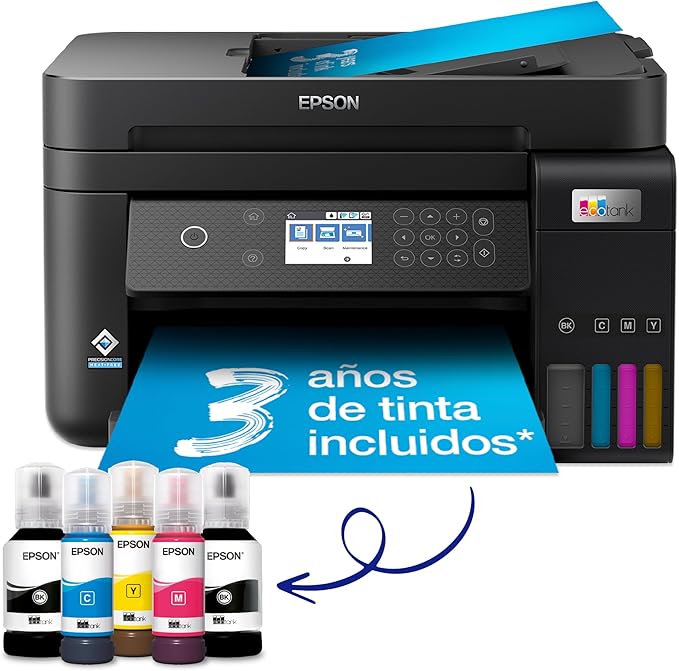
Epson C11CJ61401 EcoTank Printer Seamlessly Splices Low Print Costs with Top Performance Say goodbye to cartridges with the Epson C11CJ61401 EcoTank Printer! This economical printer saves you up to 90% on printing costs with Epson’s cartridge-free EcoTank ink bottle system. Supplied with high-yield ink bottles and integrated ink tanks, this printer is easy to fill with no mess. The key-lock bottles ensure that only the correct colour can be inserted. With one set of ink bottles, you can get up to 7,500 pages in black and 6,000 in colour, equivalent to up to 72 cartridges worth of ink! Epson C11CJ61401 Features for Home Office Versatility Make the most of a variety of tasks with 6.1 cm color LCD screen, automatic double-sided printing and 30-page document feeder, 250-page front paper tray, and print speeds of up to 15.5 pages per minute. You can also integrate the Epson C11CJ61401 printer with an existing home or office setup easily and print from mobiles, tablets and laptops. Keep on Saving with Epson's Smart Panel App To get the most out of your C11CJ61401 EcoTank Printer, take advantage of Epson's Smart Panel App. This app allows you to control your printer from your smart device and helps you set up, monitor and troubleshoot your printer from your phone or tablet. Heat-Free Technology for Maximized Durability The Epson C11CJ61401 also features cutting-edge PrecisionCoreHeat-Free Technology that offers reduced energy consumption and fewer replacement parts. The printhead also comes pre-installed for hassle-free setup. To top it off, the printer comes with an extra black ink bottle for up to 3 years' worth of ink included in the box.
Epson C11CJ61401 EcoTank Printer Seamlessly Splices Low Print Costs with Top Performance Say goodbye to cartridges with the Epson C11CJ61401 EcoTank Printer! This economical printer saves you up to 90% on printing costs with Epson’s cartridge-free EcoTank ink bottle system. Supplied with high-yield ink bottles and integrated ink tanks, this printer is easy to fill with no mess. The key-lock bottles ensure that only the correct colour can be inserted. With one set of ink bottles, you can get up to 7,500 pages in black and 6,000 in colour, equivalent to up to 72 cartridges worth of ink! Epson C11CJ61401 Features for Home Office Versatility Make the most of a variety of tasks with 6.1 cm color LCD screen, automatic double-sided printing and 30-page document feeder, 250-page front paper tray, and print speeds of up to 15.5 pages per minute. You can also integrate the Epson C11CJ61401 printer with an existing home or office setup easily and print from mobiles, tablets and laptops. Keep on Saving with Epson's Smart Panel App To get the most out of your C11CJ61401 EcoTank Printer, take advantage of Epson's Smart Panel App. This app allows you to control your printer from your smart device and helps you set up, monitor and troubleshoot your printer from your phone or tablet. Heat-Free Technology for Maximized Durability The Epson C11CJ61401 also features cutting-edge PrecisionCoreHeat-Free Technology that offers reduced energy consumption and fewer replacement parts. The printhead also comes pre-installed for hassle-free setup. To top it off, the printer comes with an extra black ink bottle for up to 3 years' worth of ink included in the box.
in 1 offers
The lowest price for right now is .
Epson EcoTank ET-3850
Epson C11CJ61401 EcoTank Printer Seamlessly Splices Low Print Costs with Top Performance Say goodbye to cartridges with the Epson C11CJ61401 EcoTank Printer! This economical printer saves you up to 90% on printing costs with Epson’s cartridge-free EcoTank ink bottle system. Supplied with high-yield ink bottles and integrated ink tanks, this printer is easy to fill with no mess. The key-lock bottles ensure that only the correct colour can be inserted. With one set of ink bottles, you can get up to 7,500 pages in black and 6,000 in colour, equivalent to up to 72 cartridges worth of ink! Epson C11CJ61401 Features for Home Office Versatility Make the most of a variety of tasks with 6.1 cm color LCD screen, automatic double-sided printing and 30-page document feeder, 250-page front paper tray, and print speeds of up to 15.5 pages per minute. You can also integrate the Epson C11CJ61401 printer with an existing home or office setup easily and print from mobiles, tablets and laptops. Keep on Saving with Epson's Smart Panel App To get the most out of your C11CJ61401 EcoTank Printer, take advantage of Epson's Smart Panel App. This app allows you to control your printer from your smart device and helps you set up, monitor and troubleshoot your printer from your phone or tablet. Heat-Free Technology for Maximized Durability The Epson C11CJ61401 also features cutting-edge PrecisionCoreHeat-Free Technology that offers reduced energy consumption and fewer replacement parts. The printhead also comes pre-installed for hassle-free setup. To top it off, the printer comes with an extra black ink bottle for up to 3 years' worth of ink included in the box.
Epson C11CJ61401 EcoTank Printer Seamlessly Splices Low Print Costs with Top Performance Say goodbye to cartridges with the Epson C11CJ61401 EcoTank Printer! This economical printer saves you up to 90% on printing costs with Epson’s cartridge-free EcoTank ink bottle system. Supplied with high-yield ink bottles and integrated ink tanks, this printer is easy to fill with no mess. The key-lock bottles ensure that only the correct colour can be inserted. With one set of ink bottles, you can get up to 7,500 pages in black and 6,000 in colour, equivalent to up to 72 cartridges worth of ink! Epson C11CJ61401 Features for Home Office Versatility Make the most of a variety of tasks with 6.1 cm color LCD screen, automatic double-sided printing and 30-page document feeder, 250-page front paper tray, and print speeds of up to 15.5 pages per minute. You can also integrate the Epson C11CJ61401 printer with an existing home or office setup easily and print from mobiles, tablets and laptops. Keep on Saving with Epson's Smart Panel App To get the most out of your C11CJ61401 EcoTank Printer, take advantage of Epson's Smart Panel App. This app allows you to control your printer from your smart device and helps you set up, monitor and troubleshoot your printer from your phone or tablet. Heat-Free Technology for Maximized Durability The Epson C11CJ61401 also features cutting-edge PrecisionCoreHeat-Free Technology that offers reduced energy consumption and fewer replacement parts. The printhead also comes pre-installed for hassle-free setup. To top it off, the printer comes with an extra black ink bottle for up to 3 years' worth of ink included in the box.
The all-time low was $559.48 on 18 Oct 2025 — today's price is 37% above the lowest ever. It has been notably cheaper before — worth setting a price alert.
Prices last updated 11 Aug 2026.

