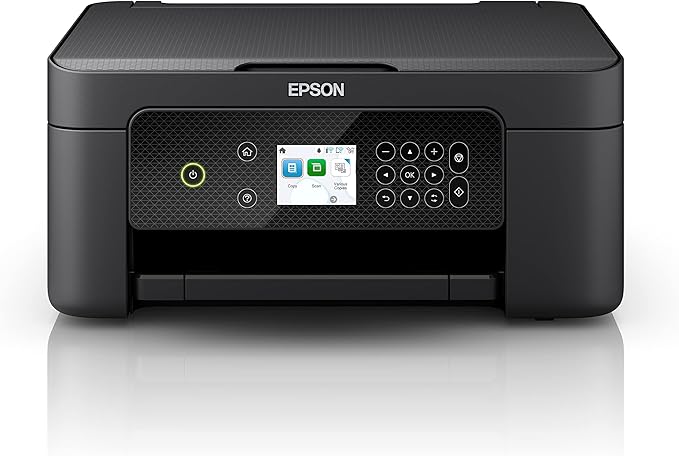
Epson Expression Home XP-4200 Multifunction Printer
A multifunctional is really an all-in-one device; it is both a scanner and a printer, and often even has a fax function. So effectively it’s a copier, but one that has the scanning and printing functions available separately. All this is a great advantage when you have limited office space. Moreover, you will be able to work faster and more efficiently by using the device’s convenient special functions.
A multifunctional is really an all-in-one device; it is both a scanner and a printer, and often even has a fax function. So effectively it’s a copier, but one that has the scanning and printing functions available separately. All this is a great advantage when you have limited office space. Moreover, you will be able to work faster and more efficiently by using the device’s convenient special functions.
A multifunctional is really an all-in-one device; it is both a scanner and a printer, and often even has a fax function. So effectively it’s a copier, but one that has the scanning and printing functions available separately. All this is a great advantage when you have limited office space. Moreover, you will be able to work faster and more efficiently by using the device’s convenient special functions.
A multifunctional is really an all-in-one device; it is both a scanner and a printer, and often even has a fax function. So effectively it’s a copier, but one that has the scanning and printing functions available separately. All this is a great advantage when you have limited office space. Moreover, you will be able to work faster and more efficiently by using the device’s convenient special functions.
in 58 offers
The lowest price for Epson Expression Home XP-4200 Multifunction Printer right now is $89.00 at Amazon.com.au, compared across 32 retailers.
The all-time low was $71.00 on 27 Feb 2024 — today's price is 25% above the lowest ever. It has been notably cheaper before — worth setting a price alert.
Prices last updated 13 Oct 2026.
Last updated at 13/10/2026 19:28:29
Epson Expression Home XP-4200 Multifunction Printer
Free delivery
Affiliate Disclosure: We may receive a small commission for purchases made through this link at no extra cost to you. This helps support our site. Thank you!
Epson Expression Home 4 Colour Multifunction Printers XP4200
Delivery between 14–22 Oct $15
Epson Expression Home XP-4200 Multifunction Printer
Delivery $12.99
EPSON XP-4200 EXPRESSION HOME PRINT / COPY / SCAN / WIFI 4 CLR MULTIFUNCTION PRINTER
Delivery $16.50
Epson Expression Home XP-4200 Multi-Function Wi-Fi Direct ADP Inkjet Printer (Print/Copy/Scan)
Delivery between Thu – Tue $36
Refurbished Epson Expression Home XP-4205 A4 Multifunction Printer C11CK65502 [Factory Refurbished Unit]-Factory Refurbished Unit
Delivery between 16–21 Oct $26.05
Epson Expression Home XP-4200 Multi-Function Printer
Delivery $29.95
Epson Expression Home XP-4200 3-in1 Multifunction Printer | Retravision
Delivery between 15–23 Oct $27.48
Epson Expression XP-4200 Inkjet A4 5760 x 1440 DPI Wi-Fi
Epson Expression Home XP-4200 A4 Colour Inkjet Multifunction Printer Duplex WiFi (C11CK65501)
Delivery $14.99
originally posted on bestbuy.com
I usually opt for laser jet printers but needed something to print photos. This printer fit the bill perfectly! The printer is very small and takes up less space on my desk then expected. It was very easy to setup and get working with my android smart phone and windows 11 desktop. I did experience some issues with setting up on my windows 10 laptop, but I don't think its the printer. I would recommend downloading the Epson app for your phone as it walks you through the whole setup process and then you can use the app for printing photos/documents/etc from your phone. I setup my printer on my wifi network so anyone in the family can print to it. There is an option to do a direct wifi connect to the printer, I have not tested that as I don't see a need since its on my ... MoreI usually opt for laser jet printers but needed something to print photos. This printer fit the bill perfectly! The printer is very small and takes up less space on my desk then expected. It was very easy to setup and get working with my android smart phone and windows 11 desktop. I did experience some issues with setting up on my windows 10 laptop, but I don't think its the printer. I would recommend downloading the Epson app for your phone as it walks you through the whole setup process and then you can use the app for printing photos/documents/etc from your phone. I setup my printer on my wifi network so anyone in the family can print to it. There is an option to do a direct wifi connect to the printer, I have not tested that as I don't see a need since its on my network. What I love about this printer: Printing is very quick even pictures Printing pictures look great along with text It does double sided printing, the part I love is that it automatically does it without me having to flip the paper! This is such a great feature and helps reduce paper waste. Some of the things I really like about this printer: Individual ink cartridges so you can easily change the color that's low and not all of them. Compact Size Easy Setup Menu Screen and buttons are easy to use and the menu makes sense and is not overly complicated Android App is easy to use and works seamlessly with the printer Has an auto shutoff that can be adjusted along with sleep mode. Copier has various modes such as ID card, book copy, and borderless copy Things I dislike: I like that it does double sided, but it can be a little slow for the printer to flip the paper. Not a deal breaker but if you are in a rush it might be frustrating. I really do not have anything bad to say about this printer. This is a great printer that is capable of doing all the things a family or college student would need. Since its so easy to setup this would be a great printer for someone who isn't really tech savvy. Plus it looks great on my desk!
originally posted on bestbuy.com
It's an okay family printer. It does an ok job printing photo, and it has a flatbed scanner with high enough resolution and color depth to scan and copy all kinds of documents. However, its color accuracy is quite bad, and the cost of ink adds up quickly since the cartridges don't last long. Build Quality This printer has a passable design. The body is made of plastic that feels nice, but the output tray and extender are quite flimsy. The rear paper input also doesn't keep dust from accumulating on your paper. While the scanner lid can stay open on its own, the hinges don't extend to let you scan thicker documents on the flatbed. The printer also needs to be turned on to access the ink cartridges. It’s a compact multipurpose printer that's quite lightweight. This ... MoreIt's an okay family printer. It does an ok job printing photo, and it has a flatbed scanner with high enough resolution and color depth to scan and copy all kinds of documents. However, its color accuracy is quite bad, and the cost of ink adds up quickly since the cartridges don't last long. Build Quality This printer has a passable design. The body is made of plastic that feels nice, but the output tray and extender are quite flimsy. The rear paper input also doesn't keep dust from accumulating on your paper. While the scanner lid can stay open on its own, the hinges don't extend to let you scan thicker documents on the flatbed. The printer also needs to be turned on to access the ink cartridges. It’s a compact multipurpose printer that's quite lightweight. This makes it suitable for use in a dorm room or small home office. Display Screen The display is adequate. The buttons around the screen are used to navigate within the menu, and the home button provides a quick exit back to the main display. The buttons are flush on the panel but aren't touch-sensitive, so they need to be pressed. The screen is responsive and easy-to-read when you're looking straight at it. The display panel can swivel up and down for better visibility at different vertical viewing angles; however, it's harder to see clearly when viewing from the sides. Cartridge It has a poor inkjet cartridge system. Its page yield is quite bad, and the printer stops printing entirely if just one-color cartridge runs out. The black page yield is especially terrible, so you'll likely need to change the black cartridge often. On the upside, it has multiple color cartridges, meaning you don't have to replace colors you don't use as often. Scanner Features This printer has mediocre scanner features. Since it doesn't have a sheetfed scanner, you can only scan one side of a single document at a time. On the upside, the scan resolution and color depth should be high enough for most uses. In The Box User manual Starter cartridges 1 - Black 1 - Cyan 1 - Magenta 1 - Yellow Power cable *USB cable not included Cost-Per-Print The cost-per-print is alright. The cartridges don't last very long, but they're also not too expensive, which helps keep the cost-per-print reasonable. That said, the more you print, the more you'll end up spending in total. Also, keep in mind that even if you print only in black, most inkjet printers continue using their color cartridges for servicing tasks, so they'll likely need replacing at some point as well. Printing Speed The printing speed is passable. While the first page of a black-only document doesn't take too long, it can still take a few minutes to print longer documents since the following pages don't come out much faster. The color printing speed is even worse, and you can expect to wait well over a minute for a single 4" x 6" photo. The input tray is also quite small, holding only 100 sheets of paper. Color Accuracy This printer has bad color accuracy. While it's unlikely to be a problem if you just print documents from time-to-time for personal use, it keeps professional documents like business reports from looking their best. Connectivity It has decent connectivity options. You can connect to it wirelessly either via Wi-Fi Direct or by setting it up with your home's wireless router. Mobile App When we tried to connect the printer, it prompted us to use the Epson Smart Panel app. This app is outstanding. It allows you to print many file types and scan documents directly to your phone. You can also check the printer's ink levels, initiate routine maintenance tasks like print-head cleaning, and order more ink, which is quite convenient.
originally posted on bestbuy.com
I just installed the Epson Expression Home XP-4200 Color Inkjet in my home “office”, and I have to say I’m impressed with this small but capable All-in-One printer. The quick-start instructions are pretty much what you would expect, but the Epson Smart Panel app for Apple or Android smartphones used to set up the printer is world class. I installed the app on an Apple SE (iOS 15.6.1) and used it to finish the setup process including linking the printer to the Wi-Fi network. The app took on the appearance of a series of text messages and graphics telling me exactly what it was doing and what I should do next. Once the printer install completed, the app provided full control of the printer. The app has all the features you get from the PC software. The Epson driver ... MoreI just installed the Epson Expression Home XP-4200 Color Inkjet in my home “office”, and I have to say I’m impressed with this small but capable All-in-One printer. The quick-start instructions are pretty much what you would expect, but the Epson Smart Panel app for Apple or Android smartphones used to set up the printer is world class. I installed the app on an Apple SE (iOS 15.6.1) and used it to finish the setup process including linking the printer to the Wi-Fi network. The app took on the appearance of a series of text messages and graphics telling me exactly what it was doing and what I should do next. Once the printer install completed, the app provided full control of the printer. The app has all the features you get from the PC software. The Epson driver and software install on a Windows 10 PC went just as smoothly. There is also an USB connection available. The unit has a 2.4” full color display, but it is not a touchscreen. Menu navigation is handled by using the adjacent keyboard. Epson supplies a complete suite of scanning and printing software. The ScanSmart app produced a sharp, color restored, scan of a 5x7” photo at 1600 dpi in 2.75 minutes. Not the fastest scan time, but still respectable for a feature rich, low priced All-in-One. The printer also has automatic double-sided printing. There is no document feeder, single documents a placed on the scanner glass. Paper is loaded in the upper back of the printer and can handle U.S. and European paper up to legal and A4. The scanner software has special settings for scanning id cards and bound books. Print quality is excellent. The “Clarina” ink used in this printer provides vivid, water-resistant output, something I tested on mixed text and graphics on standard inkjet paper. There was absolutely no smudging of the printing when wiped with a moistened tissue. Amazing! For me, color inkjet printers are best suited to printing photographs and other graphics. The XP-4200 exceeded my expectations when printing a photograph on Epson Premium Glossy Photo Paper. I had outstanding results when printing a bright, color intense 5x7” photo using the printer driver’s standard settings. The maximum print density for photos is 5760 x 1440 dpi, something you don’t find on many low-cost inkjet printers. The one feature I found to be helpful, but somewhat restrictive, is the limited opening allowed when lifting the scanner bed to install ink cartridges. The Epson engineers provided a plastic arm to hold the scanner bed open – much like the rod you use to hood open the hood of your car – but it has a positive stop and can only be opened about 5”. It is enough to provide access to the ink cartridges but seems a bit restrictive. To avoid damage to the arm, proper opening and closing of the scanner bed is important, but not immediately intuitive. I am guessing the arm will be the first thing I break. Ignoring the just mentioned concern, I would recommend this printer to anybody looking for a quality, low cost, multifunction, color inkjet printer. With only a few days of use I do not know how the printer will fair over the long haul, but there is a one year warranty and unlimited telephone support by Epson.
| Wireless | Yes |
| Yes | |
| Scan | Yes |
| Copy | Yes |
| Automatic Double Sided Printing | Yes |

Epson Expression Home XP-4200 Multifunction Printer
Free delivery
Affiliate Disclosure: We may receive a small commission for purchases made through this link at no extra cost to you. This helps support our site. Thank you!
Epson Expression Home 4 Colour Multifunction Printers XP4200
Delivery between 14–22 Oct $15
Epson Expression Home XP-4200 Multifunction Printer
Delivery $12.99
EPSON XP-4200 EXPRESSION HOME PRINT / COPY / SCAN / WIFI 4 CLR MULTIFUNCTION PRINTER
Delivery $16.50
Epson Expression Home XP-4200 Multi-Function Wi-Fi Direct ADP Inkjet Printer (Print/Copy/Scan)
Delivery between Thu – Tue $36
I usually opt for laser jet printers but needed something to print photos. This printer fit the bill perfectly! The printer is very small and takes up less space on my desk then expected. It was very easy to setup and get working with my android smart phone and windows 11 desktop. I did experience some issues with setting up on my windows 10 laptop, but I don't think its the printer. I would recommend downloading the Epson app for your phone as it walks you through the whole setup process and then you can use the app for printing photos/documents/etc from your phone. I setup my printer on my wifi network so anyone in the family can print to it. There is an option to do a direct wifi connect to the printer, I have not tested that as I don't see a need since its on my ... MoreI usually opt for laser jet printers but needed something to print photos. This printer fit the bill perfectly! The printer is very small and takes up less space on my desk then expected. It was very easy to setup and get working with my android smart phone and windows 11 desktop. I did experience some issues with setting up on my windows 10 laptop, but I don't think its the printer. I would recommend downloading the Epson app for your phone as it walks you through the whole setup process and then you can use the app for printing photos/documents/etc from your phone. I setup my printer on my wifi network so anyone in the family can print to it. There is an option to do a direct wifi connect to the printer, I have not tested that as I don't see a need since its on my network. What I love about this printer: Printing is very quick even pictures Printing pictures look great along with text It does double sided printing, the part I love is that it automatically does it without me having to flip the paper! This is such a great feature and helps reduce paper waste. Some of the things I really like about this printer: Individual ink cartridges so you can easily change the color that's low and not all of them. Compact Size Easy Setup Menu Screen and buttons are easy to use and the menu makes sense and is not overly complicated Android App is easy to use and works seamlessly with the printer Has an auto shutoff that can be adjusted along with sleep mode. Copier has various modes such as ID card, book copy, and borderless copy Things I dislike: I like that it does double sided, but it can be a little slow for the printer to flip the paper. Not a deal breaker but if you are in a rush it might be frustrating. I really do not have anything bad to say about this printer. This is a great printer that is capable of doing all the things a family or college student would need. Since its so easy to setup this would be a great printer for someone who isn't really tech savvy. Plus it looks great on my desk!
It's an okay family printer. It does an ok job printing photo, and it has a flatbed scanner with high enough resolution and color depth to scan and copy all kinds of documents. However, its color accuracy is quite bad, and the cost of ink adds up quickly since the cartridges don't last long. Build Quality This printer has a passable design. The body is made of plastic that feels nice, but the output tray and extender are quite flimsy. The rear paper input also doesn't keep dust from accumulating on your paper. While the scanner lid can stay open on its own, the hinges don't extend to let you scan thicker documents on the flatbed. The printer also needs to be turned on to access the ink cartridges. It’s a compact multipurpose printer that's quite lightweight. This ... MoreIt's an okay family printer. It does an ok job printing photo, and it has a flatbed scanner with high enough resolution and color depth to scan and copy all kinds of documents. However, its color accuracy is quite bad, and the cost of ink adds up quickly since the cartridges don't last long. Build Quality This printer has a passable design. The body is made of plastic that feels nice, but the output tray and extender are quite flimsy. The rear paper input also doesn't keep dust from accumulating on your paper. While the scanner lid can stay open on its own, the hinges don't extend to let you scan thicker documents on the flatbed. The printer also needs to be turned on to access the ink cartridges. It’s a compact multipurpose printer that's quite lightweight. This makes it suitable for use in a dorm room or small home office. Display Screen The display is adequate. The buttons around the screen are used to navigate within the menu, and the home button provides a quick exit back to the main display. The buttons are flush on the panel but aren't touch-sensitive, so they need to be pressed. The screen is responsive and easy-to-read when you're looking straight at it. The display panel can swivel up and down for better visibility at different vertical viewing angles; however, it's harder to see clearly when viewing from the sides. Cartridge It has a poor inkjet cartridge system. Its page yield is quite bad, and the printer stops printing entirely if just one-color cartridge runs out. The black page yield is especially terrible, so you'll likely need to change the black cartridge often. On the upside, it has multiple color cartridges, meaning you don't have to replace colors you don't use as often. Scanner Features This printer has mediocre scanner features. Since it doesn't have a sheetfed scanner, you can only scan one side of a single document at a time. On the upside, the scan resolution and color depth should be high enough for most uses. In The Box User manual Starter cartridges 1 - Black 1 - Cyan 1 - Magenta 1 - Yellow Power cable *USB cable not included Cost-Per-Print The cost-per-print is alright. The cartridges don't last very long, but they're also not too expensive, which helps keep the cost-per-print reasonable. That said, the more you print, the more you'll end up spending in total. Also, keep in mind that even if you print only in black, most inkjet printers continue using their color cartridges for servicing tasks, so they'll likely need replacing at some point as well. Printing Speed The printing speed is passable. While the first page of a black-only document doesn't take too long, it can still take a few minutes to print longer documents since the following pages don't come out much faster. The color printing speed is even worse, and you can expect to wait well over a minute for a single 4" x 6" photo. The input tray is also quite small, holding only 100 sheets of paper. Color Accuracy This printer has bad color accuracy. While it's unlikely to be a problem if you just print documents from time-to-time for personal use, it keeps professional documents like business reports from looking their best. Connectivity It has decent connectivity options. You can connect to it wirelessly either via Wi-Fi Direct or by setting it up with your home's wireless router. Mobile App When we tried to connect the printer, it prompted us to use the Epson Smart Panel app. This app is outstanding. It allows you to print many file types and scan documents directly to your phone. You can also check the printer's ink levels, initiate routine maintenance tasks like print-head cleaning, and order more ink, which is quite convenient.
I just installed the Epson Expression Home XP-4200 Color Inkjet in my home “office”, and I have to say I’m impressed with this small but capable All-in-One printer. The quick-start instructions are pretty much what you would expect, but the Epson Smart Panel app for Apple or Android smartphones used to set up the printer is world class. I installed the app on an Apple SE (iOS 15.6.1) and used it to finish the setup process including linking the printer to the Wi-Fi network. The app took on the appearance of a series of text messages and graphics telling me exactly what it was doing and what I should do next. Once the printer install completed, the app provided full control of the printer. The app has all the features you get from the PC software. The Epson driver ... MoreI just installed the Epson Expression Home XP-4200 Color Inkjet in my home “office”, and I have to say I’m impressed with this small but capable All-in-One printer. The quick-start instructions are pretty much what you would expect, but the Epson Smart Panel app for Apple or Android smartphones used to set up the printer is world class. I installed the app on an Apple SE (iOS 15.6.1) and used it to finish the setup process including linking the printer to the Wi-Fi network. The app took on the appearance of a series of text messages and graphics telling me exactly what it was doing and what I should do next. Once the printer install completed, the app provided full control of the printer. The app has all the features you get from the PC software. The Epson driver and software install on a Windows 10 PC went just as smoothly. There is also an USB connection available. The unit has a 2.4” full color display, but it is not a touchscreen. Menu navigation is handled by using the adjacent keyboard. Epson supplies a complete suite of scanning and printing software. The ScanSmart app produced a sharp, color restored, scan of a 5x7” photo at 1600 dpi in 2.75 minutes. Not the fastest scan time, but still respectable for a feature rich, low priced All-in-One. The printer also has automatic double-sided printing. There is no document feeder, single documents a placed on the scanner glass. Paper is loaded in the upper back of the printer and can handle U.S. and European paper up to legal and A4. The scanner software has special settings for scanning id cards and bound books. Print quality is excellent. The “Clarina” ink used in this printer provides vivid, water-resistant output, something I tested on mixed text and graphics on standard inkjet paper. There was absolutely no smudging of the printing when wiped with a moistened tissue. Amazing! For me, color inkjet printers are best suited to printing photographs and other graphics. The XP-4200 exceeded my expectations when printing a photograph on Epson Premium Glossy Photo Paper. I had outstanding results when printing a bright, color intense 5x7” photo using the printer driver’s standard settings. The maximum print density for photos is 5760 x 1440 dpi, something you don’t find on many low-cost inkjet printers. The one feature I found to be helpful, but somewhat restrictive, is the limited opening allowed when lifting the scanner bed to install ink cartridges. The Epson engineers provided a plastic arm to hold the scanner bed open – much like the rod you use to hood open the hood of your car – but it has a positive stop and can only be opened about 5”. It is enough to provide access to the ink cartridges but seems a bit restrictive. To avoid damage to the arm, proper opening and closing of the scanner bed is important, but not immediately intuitive. I am guessing the arm will be the first thing I break. Ignoring the just mentioned concern, I would recommend this printer to anybody looking for a quality, low cost, multifunction, color inkjet printer. With only a few days of use I do not know how the printer will fair over the long haul, but there is a one year warranty and unlimited telephone support by Epson.
Being on dyalsis & with limited budget I always wanted to get a printer .so I could keep my medical records copies which sometimes I have to submit to others. Plus other things like car related insurance and repair documents. I used to go to library where 20 pages are free to print on each visit. But after COVID libraries closed for long time and had to go to neighborhood grocery stores where they charged $0:10 cents per copy but now a days it's difficult to find the stores they offer this service as only few have them . every time save some money but suddenly a friend's or neighbors child birthday pops up and I spend that savings for the her/his gift .But God is great .Best Buy offer me this printer for a exchange of honest review .( My reviews hits 60000 on ... MoreBeing on dyalsis & with limited budget I always wanted to get a printer .so I could keep my medical records copies which sometimes I have to submit to others. Plus other things like car related insurance and repair documents. I used to go to library where 20 pages are free to print on each visit. But after COVID libraries closed for long time and had to go to neighborhood grocery stores where they charged $0:10 cents per copy but now a days it's difficult to find the stores they offer this service as only few have them . every time save some money but suddenly a friend's or neighbors child birthday pops up and I spend that savings for the her/his gift .But God is great .Best Buy offer me this printer for a exchange of honest review .( My reviews hits 60000 on Google) .thanks for Best Buy I always find good deals with quality products in a very affordable price range . Let's go to the printer Epson XP4200 I received by FedEx .first two days I was busy in dyalsis and fixing broken car .third day I unpacked the box . In my thoughts I was expecting it very easy to hook it with my smart phone even it was the first time in my life to use a printer at home . First read the start sheet . Honestly the product manufacturer has to fix this start here four page sheet.. it's shows No1 how to unpack . Like remove all the protective material .( I left some blue color tape stripes but when had problem starting the machine called a friend and he said remove every single small thin blue tape stripes if u leave any one it will not work so I follow his advice) .lowering the scanner unit was displayed good so handling it was a piece of cake . connected the power cord to electric outlet . Now here comes the real hurdle chooseing a set up method was pain in the neck for me . Download the Epson smart panel app for my android phone .hold the power button until it lights up launch the app but could not start setting up .the problem is in this start sheet it's not mention how to use product's control panel .no picture illustration nothing.any way call the friend again but he couldn't and said it's not easy so should stop here and wait for him till Saturday he will come and fix it. I go to YouTube and got a vedio in which the gentleman showed perfectly step by step how to start Epson printer and how to use printer control panel manually ..I installed ink cartridges again in start sheet page 2 Step 4 install ink cartridges it's not clearly showed which side should stay upside of the catrige and which downword I open the first with the red label on it after gently trying to put in first slot I realized I am doing wrong the first slot is for black ink cartridge and in my hand is red .any way out all four following instructions.lower the scanner unit completely press ok .the printer starts charging ink took few minutes to charge .and the printer's LCD screen showed charging is completed .load paper . Now again the Install software step become the most confusing part .try to blue tooth phone with Epson printer it didn't work ..following the start sheet page 3 step 6 is very confusing .try Epson smart panel app but it didn't work as the app just keep on trying to find Epson printer 4200 .Go back to YouTube video find out how to connect with my wireless network using the product's control panel on LCD screen .now again problem pops up that password for my wireless router I had it I forget a little bit .after few attempts using words moving here and there manually took one hour for me but reward was good I was able to connect my Printer with my wireless internet . .Now I uninstalled Epson smart panel app go back to Epson page and down load again .this time it worked . After that with some effort I finally hook my smart phone with printer .print first page from Geico .it came super perfect .no page adjustments needs no ink quality adjustment was needed ...it was 2 am and I was tired . So just tried few more pages to print .printer worked super fine and easy with my phone I was tired but it makes me so happy that now I have my own printer I don't have to go outside find parking in conjusted street then pay for copy or printing . .To further check how color print quality of this machine is I have to go to staples to get glossy paper which I will do on Saturday I hope I will come back to put further light on the quality of color photos and also how the scanner performs .till then let me take a break for some times God bless all you reading this and bless every one a printer who find difficult to afford it .God bless Best Buy too .see u guys very soon
The Expression XP-4200 from Epson was a bit of a pleasant surprise (the printer looks really nice out of the box) and bit of a disappointment at the same time. As per disappointment, when I tried printing a photo OF THE PRINTER that I took (printed on regular inkjet paper), the colors were disappointing. I cannot say whether or not the output would have been better on "Epson Specialty Paper" because none of that was included in what I was shipped to evaluate it here with. I do know on other color printers I own (inkjet and laser, even from another Epson) the colors are definitely more vivid on standard paper. Before that, I was set up for disappointment as I followed through the installation procedure: First it prompts me to scan a QR code to download the printer's ... MoreThe Expression XP-4200 from Epson was a bit of a pleasant surprise (the printer looks really nice out of the box) and bit of a disappointment at the same time. As per disappointment, when I tried printing a photo OF THE PRINTER that I took (printed on regular inkjet paper), the colors were disappointing. I cannot say whether or not the output would have been better on "Epson Specialty Paper" because none of that was included in what I was shipped to evaluate it here with. I do know on other color printers I own (inkjet and laser, even from another Epson) the colors are definitely more vivid on standard paper. Before that, I was set up for disappointment as I followed through the installation procedure: First it prompts me to scan a QR code to download the printer's app, I follow through, but while the app can see my other Epson printer, it cannot see this one. It's worth noting at this point I had not yet been given the option to set up the printer on WiFi, so that may be why the app couldn't find the printer (but it's the one controlling the order of things). Next, the prompts on the screen for the initialization are poorly written, for example, it prompts with "Initialization Starts. Install the Ink Cartridge for Setup that came with the printer"-- and what got me there is that the words "Initialization Starts" do not sound like something meant for me (the end user) to read, but rather a step that the design folks were to follow. Next, I have to wait 6 minutes for the printer to initialize, and I'm wondering (1) every time I change the ink is it going to be 6 minutes, or (2) if not, instead could they have done some of the initialization at the factory? Then there is an information screen after the initialization which not only seems unnecessary, it seems -- I'll say, poorly worded: It says "Initialization complete. Move on to print quality adjustments"- and like the "Initialization Starts" screen the "Move on" (which seems rude) sounds like instructions for the programmer more so than something I should be reading-- it should just take me to print quality adjustments without having me "move on" by pressing ok. Finally, initialization completes, I'm at the main menu, and it *still* hasn't connected me to WiFi which one would've thought would be part of initialization. I was able to go to settings and set up WiFI, though, and it connected fine. Besides Photos, I tried out printing a PDF file and maybe I'm just used to laser quality but I thought the text looked relatively poor quality, it's not smooth. It does print text quickly which is nice (unlike photos which took many minutes a page), and it does print on both sides of the page (which will save you paper).
To begin, printers are generally thought of as a headache. From ink prices, connectivity, software and many other hoops and hurdles - printers are something we need but never want. This makes a good printer the holy grail and unfortunately this printer just misses the mark for me. In a market where everything is moving mobile and as fast as possible as easy as possible - this printer is stuck a generation behind the competition. Build- The printer is well built and easy to figure out, it has a non-touch screen that gives you basic info and a large tray to hold paper and easily unjam it should you get a paper jam. It also has a scanner on top that works well and is quite slim on top. To replace the ink you just lift up the "lid" like almost every other printer and ... MoreTo begin, printers are generally thought of as a headache. From ink prices, connectivity, software and many other hoops and hurdles - printers are something we need but never want. This makes a good printer the holy grail and unfortunately this printer just misses the mark for me. In a market where everything is moving mobile and as fast as possible as easy as possible - this printer is stuck a generation behind the competition. Build- The printer is well built and easy to figure out, it has a non-touch screen that gives you basic info and a large tray to hold paper and easily unjam it should you get a paper jam. It also has a scanner on top that works well and is quite slim on top. To replace the ink you just lift up the "lid" like almost every other printer and everything is easily accessible. This is a well built printer and has a very clean/sleek look. Should you be sitting or standing the screen/controls will move as you can change the angle on the front I/O panel. App - The app from Epson isn't bad per say but after using my HP printers app, you can really tell they didn't put as much work into this. From an odd UI to laggy interactions, the app is almost a heel for the printer. The biggest flop for me here is if you request to print a document or picture - you have to keep the app open while it prints for the entire print time. If you are printing a 13 page paper then you need to keep that app open for all 13 pages or else the print will pause right in its track. Pictures- This is probably where I was disappointed the most, you cant print full size photos without getting TERRIBLE scan lines on the image. I tried several different photos to make sure it wasn't just a certain color or image but it was just the printer unfortunately. Documents/Scan - Outside of everything else, this does print documents quick and clean. It scans almost just as fast and as a basic printer does its job well if you are just sending jobs from your PC to scan or print. Value- Hitting over the $100 mark this printer is getting into the mid range tier for printers and is competing with everyone in the market. I really think this is a poor value, from the app to the poor picture performance it is easily beat out on both of those points by my cheaper HP Envy that does everything this printer does but better. Both are available at BestBuy so it almost DOESNT make sense to get this printer knowing there is better for cheaper. To conclude this review, I was quite disappointed with the performance of this printer and hope to see something better out of the Epson camp in the future. I have had Epson printers in the past and really enjoyed them, however, this printer didn't do the job well enough to get me to switch over to it.
I was hopeful that this printer would be more than what it is. In terms of simplicity of operation, I'd say it's good to have around home for occasional printing. It sets up easily with WiFi, and works great with a computer and with a tablet or phone. Scanner works great too and is easy to use while doing a good job. I do like that it has double sided printing capability and a rear feeding tray. Print quality is good and the speed is just okay unless you print black and then it's decent. Photos come out looking good but like other 3 ink systems they could be better depending on the photo. Based on my testing so far, most come out just fine. Keep in mind that Epson does recommend using Epson paper with the Claria ink for the best results. I didn't have any more Epson ... MoreI was hopeful that this printer would be more than what it is. In terms of simplicity of operation, I'd say it's good to have around home for occasional printing. It sets up easily with WiFi, and works great with a computer and with a tablet or phone. Scanner works great too and is easy to use while doing a good job. I do like that it has double sided printing capability and a rear feeding tray. Print quality is good and the speed is just okay unless you print black and then it's decent. Photos come out looking good but like other 3 ink systems they could be better depending on the photo. Based on my testing so far, most come out just fine. Keep in mind that Epson does recommend using Epson paper with the Claria ink for the best results. I didn't have any more Epson paper for all of my prints but they still turned out good on other photo paper. That said, this printer really is the bottom of the lineup printer and feels like it in how fast it is unfortunately. If all you need is something simple for occasional use this will do the job but beware of the ink! As I printed all the test prints I noticed that the ink levels went down fairly quick. That brings up the next point, there's a spot on the box, and Epson makes it clear you can only use genuine cartridges, so make sure you note that BEFORE you purchase this model. Simply going on Amazon and getting whatever cartridge you see comes up with the cartridge number will not fly with this printer, and it's clearly stated which is unfortunate because you have to dig to find the right ones just as with every other Epson cartridge. I like that Epson is making this clear and it's the only reason I'd rate it 2 stars, but it's also a negative for me, and I say that purely just comparing to other similar printers and the printouts you get, even Epson's own Eco Tank printers which they recommend if you want to use whatever ink you want. Don't get me wrong, it's overall a decent printer, I'd say 3-4 stars depending on how you use it (3 stars for photos and 4 stars for everyday use), but there are better options, even from Epson, so from that perspective I have to rate it two stars. It's unfortunate Epson does not provide options for ink for this printer so for that reason I think it falls behind all the others. You'd think with the extreme measures they take to stop you from using 3rd party ones they'd at least make it easier to use theirs with a subscription service or something like that but they do not. So, I honestly don't see what you are gaining in comparing the printouts over a comparable leading brand or an Eco Tank printer. The photos that come off this are no different than those that come off the other name brand printer I have in my home office so for that reason I have to say I cannot recommend this printer.
Good all in one printer. It comes with a set of inks to start printing. They do not include an USB printer cable (I highly recommend you have one handy just in case, I'll explain later). Setting it up was easy for me as I am very computer savvy, however there was some extra steps I had to take to be able to print wirelessly using my computers at home. You have to download Epson's app to your phone and it will guide you step by step with the setup process. You first remove all the blue stickers holding the parts together. Then you turn the printer on and install all the ink tanks. It will print some pages and will do some tests to have the printer heads correctly aligned. Afterwards it will guide you on how to connect the printer to your wifi router. Here is where I ... MoreGood all in one printer. It comes with a set of inks to start printing. They do not include an USB printer cable (I highly recommend you have one handy just in case, I'll explain later). Setting it up was easy for me as I am very computer savvy, however there was some extra steps I had to take to be able to print wirelessly using my computers at home. You have to download Epson's app to your phone and it will guide you step by step with the setup process. You first remove all the blue stickers holding the parts together. Then you turn the printer on and install all the ink tanks. It will print some pages and will do some tests to have the printer heads correctly aligned. Afterwards it will guide you on how to connect the printer to your wifi router. Here is where I encountered a hiccup. It did connect to my wifi using the setup app on my phone, however once moving over to installing the software on my PC, the software would not find the printer over the network, even though it was connected to my wifi (100% confirmed). I had to go back a few steps in the PC software and tell it to temporally do the setup using a printer USB cable (thank god I had one, and its not your regular USB cable, one of the ends must by for printers, its like a square end, if you need one, make sure you buy this type of USB cable). Using that cable it did detect the printer and I entered all my wifi credentials -again- and finally, the PC did find the printer over the network (once the setup using the printer USB cable is over, you can remove the cable). The driver/software combo installed quite a few free programs (like scanner software, photo software, drivers, monitoring etc). Print quality is good and the printer is fast (at least on standard mode) and its not that noisy (the settings do have a quiet mode, which is quieter but slower). I like that it can print two sided pages automatically (saves paper). The only two cons I can find about the printer is that it feeds itself paper on the back (you know, like old printers, paper is exposed to dust etc) and not thru an internal cassette/paper tray, also the scanner does not auto feed paper, it's just your good old scanner bed where you have to put one paper at the time manually. So it's a very simple all in one in those regards, but hey, quality is good and price is good too. Highly recommend it for home use or for a student.
The printer/scanner is loaded with useful features such as being able to print when away from home via email, google classroom integration and sharing your printer with a friend/family member. The display on the printer is really sharp and clear , it could be a bit bigger but it works and the controls are responsive with very little lag. The scanned documents come out really nice and it captures a lot of the detail of what it is scanning. The app for the printer is also full of features , such as scanning documents directly to your phone/tablet. The amount of features that are included with the printer are amazing and if all of them were done correctly it would be one of the best personal printers. All of the features stated above are great and they work perfectly , ... MoreThe printer/scanner is loaded with useful features such as being able to print when away from home via email, google classroom integration and sharing your printer with a friend/family member. The display on the printer is really sharp and clear , it could be a bit bigger but it works and the controls are responsive with very little lag. The scanned documents come out really nice and it captures a lot of the detail of what it is scanning. The app for the printer is also full of features , such as scanning documents directly to your phone/tablet. The amount of features that are included with the printer are amazing and if all of them were done correctly it would be one of the best personal printers. All of the features stated above are great and they work perfectly , however there are certain things that need to be fixed. Any pictures you print through the app print out grainy , speaking of photos not text, and it doesn’t matter what quality you state or which paper you use (I used Espon premium photo paper and normal white paper). However if you print the same picture without the app it comes out great, the colors are rich and very close to how the picture was actually taken. The printer/scanner works great and connects easily to any computer on the same Wi-Fi network and was a breeze to set up via Wi-Fi or by connecting it directly to the computer. I did run into an issue when setting it up on my phone through the app and the app kept saying it wasn’t connected but it actually was. Overall i think it does a great job at printing text and scanning documents which is what it is made for but the features that are included/provided need to be fixed with a software update.
I've been without a printer at home for a decent amount of time, but going to the print shops when I do need to print can be inconvenient. For the average person (like myself) the Epson XP-4200 will get the job done. Set up was a little agitating, but not too hard. While the printer has a decent sized display, the display isn't touch screen. That would have helped out a lot more when entering my Wifi password. Still, this is only a minor annoyance as you only have to do it at initial setup. Had I properly followed the instructions, I would have noticed the mention of the app. Once the wifi is setup, you upgrade the firmware, and slide the edges of the paper loader out, you're ready to go! I had no problem connecting my devices to the printer after it was connected ... MoreI've been without a printer at home for a decent amount of time, but going to the print shops when I do need to print can be inconvenient. For the average person (like myself) the Epson XP-4200 will get the job done. Set up was a little agitating, but not too hard. While the printer has a decent sized display, the display isn't touch screen. That would have helped out a lot more when entering my Wifi password. Still, this is only a minor annoyance as you only have to do it at initial setup. Had I properly followed the instructions, I would have noticed the mention of the app. Once the wifi is setup, you upgrade the firmware, and slide the edges of the paper loader out, you're ready to go! I had no problem connecting my devices to the printer after it was connected to the wifi. It easily popped up on set up. Printing quality is solid. I didn't get high quality paper, with regular paper (which most people will be using) it was great. I've attached two images of prints from the print, one of a color test I got from the internet which turned out great, another of a photograph of my son I printed direclty from my phone via the app, which, considering I was using regular paper, turned out pretty solid for all the details of the picture. I copied another image of my birth certificate and the copy came out great as well. For the average day to day user, this printer is a great printer. I would have preferred touch screen LCD on the printer, but in all reality you're not going to be using the screen on the printer that often, most things can be done via the app, or the device you're printing from. Highly recommend this for the average consumer.
| Wireless | Yes |
| Yes | |
| Scan | Yes |
| Copy | Yes |
| Automatic Double Sided Printing | Yes |


