Epson Workforce ES-50 Scanner
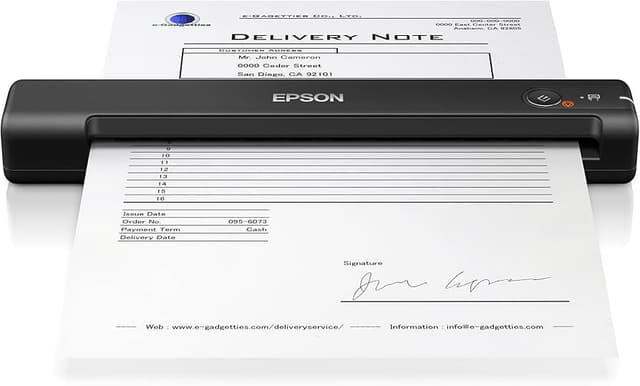
The lightweight portable scanner for fast scanning on the go. The fastest and lightest mobile single-sheet-fed document scanner in its class, the WorkForce ES-50 features fast speeds ― scanning a single page in as fast as 5.5 seconds. This small, portable scanner accommodates extra-long pages, ID cards and more. Epson ScanSmart Software enables you to easily scan, review and save important files, while the Automatic Feeding Mode makes it easy to combine multi-page scans into one file. With Nuance OCR included, you can create searchable PDFs and editable Word and Excel files. Windows and Mac compatible, the scanner also includes a TWAIN driver. And, no batteries or external power are required when it's is connected to a computer via the USB port.
The lightweight portable scanner for fast scanning on the go. The fastest and lightest mobile single-sheet-fed document scanner in its class, the WorkForce ES-50 features fast speeds ― scanning a single page in as fast as 5.5 seconds. This small, portable scanner accommodates extra-long pages, ID cards and more. Epson ScanSmart Software enables you to easily scan, review and save important files, while the Automatic Feeding Mode makes it easy to combine multi-page scans into one file. With Nuance OCR included, you can create searchable PDFs and editable Word and Excel files. Windows and Mac compatible, the scanner also includes a TWAIN driver. And, no batteries or external power are required when it's is connected to a computer via the USB port.
The lightweight portable scanner for fast scanning on the go. The fastest and lightest mobile single-sheet-fed document scanner in its class, the WorkForce ES-50 features fast speeds ― scanning a single page in as fast as 5.5 seconds. This small, portable scanner accommodates extra-long pages, ID cards and more. Epson ScanSmart Software enables you to easily scan, review and save important files, while the Automatic Feeding Mode makes it easy to combine multi-page scans into one file. With Nuance OCR included, you can create searchable PDFs and editable Word and Excel files. Windows and Mac compatible, the scanner also includes a TWAIN driver. And, no batteries or external power are required when it's is connected to a computer via the USB port.
The lightweight portable scanner for fast scanning on the go. The fastest and lightest mobile single-sheet-fed document scanner in its class, the WorkForce ES-50 features fast speeds ― scanning a single page in as fast as 5.5 seconds. This small, portable scanner accommodates extra-long pages, ID cards and more. Epson ScanSmart Software enables you to easily scan, review and save important files, while the Automatic Feeding Mode makes it easy to combine multi-page scans into one file. With Nuance OCR included, you can create searchable PDFs and editable Word and Excel files. Windows and Mac compatible, the scanner also includes a TWAIN driver. And, no batteries or external power are required when it's is connected to a computer via the USB port.
in 13 offers
The lowest price for Epson Workforce ES-50 Scanner right now is $183.99 at Techinn.com, compared across 13 retailers.
The all-time low was $148.00 on 5 Sept 2024 — today's price is 24% above the lowest ever. It has been notably cheaper before — worth setting a price alert.
Prices last updated 28 Oct 2026.
Last updated at 28/10/2026 04:18:42
Epson Workforce ES-50 Mobile Document Scanner, Black - 10PPM - USB
Affiliate Disclosure: We may receive a small commission for purchases made through this link at no extra cost to you. This helps support our site. Thank you!
Epson Workforce Es-50 Portable Scanner Black EU Plug 220V
Delivery $28.99
Epson WorkForce ES-50 Portable Photo Scanner
Epson WorkForce ES-50 Sheetfed Scanner - 1200 dpi Optical
Epson WorkForce ES-50 Sheetfed Scanner - 1200 dpi Optical
Delivery $30
Epson Workforce es-50 Scanner
Epson WorkForce ES-50 Photo Scanner [B11B252501]
Epson WorkForce ES-50 Lightweight Portable Photo Scanner
Free delivery between 2–5 Nov
Epson Workforce Es-50 Portable Document Scanner Usb Mobile Color
Delivery $101.87
Affiliate Disclosure: We may receive a small commission for purchases made through this link at no extra cost to you. This helps support our site. Thank you!
EPSON ES50 Portable Scanner
Delivery between 31 Oct – 8 Nov $10
originally posted on epson.com
I love this scanner!! I love that its convenient, compact and portable and I can just put it into my bag or briefcase without worrying about wires and where I'm going to plug it in for use. It is extremely lightweight you wont even know you're carrying it. I like that it has wireless connection so when I am having conferences in coffee shops or outside conference rooms, I can just connect to the WIFI and scan my documents. It also has an amazing battery life depending on how much you need to scan at a given time.The one touch scanning makes scanning documents a breeze. Just put the paper by the feeder, press the button an BOOM, scanning made easy. It also has automatic feeding so you don't have to constantly press the scanning button. Just keep feeding the papers ... MoreI love this scanner!! I love that its convenient, compact and portable and I can just put it into my bag or briefcase without worrying about wires and where I'm going to plug it in for use. It is extremely lightweight you wont even know you're carrying it. I like that it has wireless connection so when I am having conferences in coffee shops or outside conference rooms, I can just connect to the WIFI and scan my documents. It also has an amazing battery life depending on how much you need to scan at a given time.The one touch scanning makes scanning documents a breeze. Just put the paper by the feeder, press the button an BOOM, scanning made easy. It also has automatic feeding so you don't have to constantly press the scanning button. Just keep feeding the papers until you're finishes and it'll keep taking the papers for scanning.I love that it saves to a cloud so you don't have to worry about having a portable drive or laptop computer to do your saving of documents.I also use the scanner for my home office and it takes up absolutely no space! You can take this little amazing electronic anywhere you need to take it to scan documents for your convenience. You can get onto your cloud from any computer and retrieve you paperwork.This is a review for the Epson WorkForce ES-50 Portable Document Scanner that I received free of charge to do a beta test and review.
originally posted on epson.com
Pros: easy to use, works well, easy installation, light-weight, portable, 600dpi quality, fast, easy-to-use software, full color scanCons: short cordThe Epson ES-50 is really nice! It’s easy to install, use, and works well. The Epson ES-50 is really nice, and it’s very easy to install. The instructions are clear and easy to understand. All you have to do is plug it into the computer, let it automatically install the drivers and then visit Epson’s website as described for downloading Drivers and Utilities. When I first visited nothing showed up and I was about to search for them, it took about 60 seconds for them to pop up. Then you just follow the instructions on the screen and it walks you through the rest of the instillation. Then it checks to make sure the ... MorePros: easy to use, works well, easy installation, light-weight, portable, 600dpi quality, fast, easy-to-use software, full color scanCons: short cordThe Epson ES-50 is really nice! It’s easy to install, use, and works well. The Epson ES-50 is really nice, and it’s very easy to install. The instructions are clear and easy to understand. All you have to do is plug it into the computer, let it automatically install the drivers and then visit Epson’s website as described for downloading Drivers and Utilities. When I first visited nothing showed up and I was about to search for them, it took about 60 seconds for them to pop up. Then you just follow the instructions on the screen and it walks you through the rest of the instillation. Then it checks to make sure the scanner is working, which you actually insert something to scan and then it’s finished. Finally, after that I had one more update which was firmware. This failed initially for no particular reason, but I was easily able to retry and it had zero issues on the second attempt.The Epson ES-50 is easy to use. Once fully installed and you’re ready to scan on your own all you do is insert whatever you want to scan and it makes a little noise and grabs the paper, you hit the button, and it automatically scans and then pops up the scanned image to the Epson SmartScanner, which automatically comes up on the computer. Then just follow the instructions on the screen to decide if you want to make changes or if you want to save and where and what to save it to, send it or print it out.The scanned images are really nice, they are fully colored, detailed, and a quality 600dpi. This scanner scans things extremely fast too. The unit itself is very light-weight and easily portable. The only thing I don’t like is that it has a short cord, and it’s definitely not a deal-breaker.Overall, I am super happy with the EPSON ES-50. It’s easy to use, light-weight, portable, works well, scans fast, and provides a really great scan and an easy interface to follow. I would absolutely recommend it! This is a review for the Epson WorkForce ES-50 Portable Document Scanner that I received free of charge to do a beta test and review.
originally posted on staples.com
I had no intentions of getting this. Until I was asked for an important document at hospital. I watched and asked where is document in computer. To my surprise I knew when explained I needed this just in case. The fellow in staples installed it and showed me how to use it. One catch I have a Mac Book Pro, I had to buy a USB C to connect the scanner to MacBook. That was another 53.00.All is good.
| Scanning | |
| Scan speed (b/w, low res, A4) | 5.5 sec/page |
| Scan speed (colour, low res, A4) | 5.5 sec/page |
| Output grayscale depth | 8 bit |
| Output colour depth | 24 bit |

Epson Workforce ES-50 Mobile Document Scanner, Black - 10PPM - USB
Affiliate Disclosure: We may receive a small commission for purchases made through this link at no extra cost to you. This helps support our site. Thank you!
Epson Workforce Es-50 Portable Scanner Black EU Plug 220V
Delivery $28.99
Epson WorkForce ES-50 Portable Photo Scanner
Epson WorkForce ES-50 Sheetfed Scanner - 1200 dpi Optical
Epson WorkForce ES-50 Sheetfed Scanner - 1200 dpi Optical
Delivery $30
I love this scanner!! I love that its convenient, compact and portable and I can just put it into my bag or briefcase without worrying about wires and where I'm going to plug it in for use. It is extremely lightweight you wont even know you're carrying it. I like that it has wireless connection so when I am having conferences in coffee shops or outside conference rooms, I can just connect to the WIFI and scan my documents. It also has an amazing battery life depending on how much you need to scan at a given time.The one touch scanning makes scanning documents a breeze. Just put the paper by the feeder, press the button an BOOM, scanning made easy. It also has automatic feeding so you don't have to constantly press the scanning button. Just keep feeding the papers ... MoreI love this scanner!! I love that its convenient, compact and portable and I can just put it into my bag or briefcase without worrying about wires and where I'm going to plug it in for use. It is extremely lightweight you wont even know you're carrying it. I like that it has wireless connection so when I am having conferences in coffee shops or outside conference rooms, I can just connect to the WIFI and scan my documents. It also has an amazing battery life depending on how much you need to scan at a given time.The one touch scanning makes scanning documents a breeze. Just put the paper by the feeder, press the button an BOOM, scanning made easy. It also has automatic feeding so you don't have to constantly press the scanning button. Just keep feeding the papers until you're finishes and it'll keep taking the papers for scanning.I love that it saves to a cloud so you don't have to worry about having a portable drive or laptop computer to do your saving of documents.I also use the scanner for my home office and it takes up absolutely no space! You can take this little amazing electronic anywhere you need to take it to scan documents for your convenience. You can get onto your cloud from any computer and retrieve you paperwork.This is a review for the Epson WorkForce ES-50 Portable Document Scanner that I received free of charge to do a beta test and review.
Pros: easy to use, works well, easy installation, light-weight, portable, 600dpi quality, fast, easy-to-use software, full color scanCons: short cordThe Epson ES-50 is really nice! It’s easy to install, use, and works well. The Epson ES-50 is really nice, and it’s very easy to install. The instructions are clear and easy to understand. All you have to do is plug it into the computer, let it automatically install the drivers and then visit Epson’s website as described for downloading Drivers and Utilities. When I first visited nothing showed up and I was about to search for them, it took about 60 seconds for them to pop up. Then you just follow the instructions on the screen and it walks you through the rest of the instillation. Then it checks to make sure the ... MorePros: easy to use, works well, easy installation, light-weight, portable, 600dpi quality, fast, easy-to-use software, full color scanCons: short cordThe Epson ES-50 is really nice! It’s easy to install, use, and works well. The Epson ES-50 is really nice, and it’s very easy to install. The instructions are clear and easy to understand. All you have to do is plug it into the computer, let it automatically install the drivers and then visit Epson’s website as described for downloading Drivers and Utilities. When I first visited nothing showed up and I was about to search for them, it took about 60 seconds for them to pop up. Then you just follow the instructions on the screen and it walks you through the rest of the instillation. Then it checks to make sure the scanner is working, which you actually insert something to scan and then it’s finished. Finally, after that I had one more update which was firmware. This failed initially for no particular reason, but I was easily able to retry and it had zero issues on the second attempt.The Epson ES-50 is easy to use. Once fully installed and you’re ready to scan on your own all you do is insert whatever you want to scan and it makes a little noise and grabs the paper, you hit the button, and it automatically scans and then pops up the scanned image to the Epson SmartScanner, which automatically comes up on the computer. Then just follow the instructions on the screen to decide if you want to make changes or if you want to save and where and what to save it to, send it or print it out.The scanned images are really nice, they are fully colored, detailed, and a quality 600dpi. This scanner scans things extremely fast too. The unit itself is very light-weight and easily portable. The only thing I don’t like is that it has a short cord, and it’s definitely not a deal-breaker.Overall, I am super happy with the EPSON ES-50. It’s easy to use, light-weight, portable, works well, scans fast, and provides a really great scan and an easy interface to follow. I would absolutely recommend it! This is a review for the Epson WorkForce ES-50 Portable Document Scanner that I received free of charge to do a beta test and review.
I had no intentions of getting this. Until I was asked for an important document at hospital. I watched and asked where is document in computer. To my surprise I knew when explained I needed this just in case. The fellow in staples installed it and showed me how to use it. One catch I have a Mac Book Pro, I had to buy a USB C to connect the scanner to MacBook. That was another 53.00.All is good.
When it works it's a handy product. But it can only handle at most 20 scans before the software crashes. And the **ONLY** way to get it to start working again is to unplug iot and re-attach it. Even though the software probes for the device and sees it, it STILL won't run until you've unplugged it and plugged it back in. It is incapable of restarting itself otherwise.The software can't remember settings like preferred file format from one usage (or after it crashes) to another. The "scan" button on the device does nothing even though the application is running.If your receipt is too long it will DEFINITELY crash.
This is a nice little table top scanner. In order to get it to work with my Mac Mini, I had to download the drivers from the Epson website, but once downloaded/installed, it worked right away.The power cord that comes with the scanner is 36" long and hooks into the right side of the scanner, therefore, be mindful of where you position the scanner in relationship to where it will plug into your computer. In my case, my Mac Mini sits to the left of the scanner so I have to run the power cord behind the scanner and need to be careful that when I feed a document through the scanner it does not bump into the power cord.
Skew handling is not ideal for receipts. It keeps the document crooked as skew is manually corrected by scanner's left-hand guide, but if you're careful about feeding your receipt, its okay for a few. The fact it doesn't scan duplex surprised me, but that was my bad for not researching more thoroughly. I'm working with Epson support on correcting a defect I've found with scanning in Auto. The Auto Color/Grayscale mode fails and pages without color are being scanned as black and white (1-bit) instead of Grayscale (8-bit). I presume this will be fixed at some future point in firmware or software, but TBD. The black and white (1-bit) mode is useless on faded receipts and after hours of trying to find optimal settings I've just settled for larger image sizes with ... MoreSkew handling is not ideal for receipts. It keeps the document crooked as skew is manually corrected by scanner's left-hand guide, but if you're careful about feeding your receipt, its okay for a few. The fact it doesn't scan duplex surprised me, but that was my bad for not researching more thoroughly. I'm working with Epson support on correcting a defect I've found with scanning in Auto. The Auto Color/Grayscale mode fails and pages without color are being scanned as black and white (1-bit) instead of Grayscale (8-bit). I presume this will be fixed at some future point in firmware or software, but TBD. The black and white (1-bit) mode is useless on faded receipts and after hours of trying to find optimal settings I've just settled for larger image sizes with greyscales provided I can get that to work with Epson. All said, I like the form factor for my periodic usage. Provided Epson fixes the auto color/grayscale issue, the price/value mix is okay. I'll revise rating and return the product though if they fail to resolve the issue.
After a couple years & a couple hundred scans, the cable connection at the scanner end failed. Probably in part because the plug is so far recessed, it is literally not possible to see it to plug it in. You must try to feel the plug insertion, which over time wares out these delicate electronics. An ergonomic Fail. Now looking to replace the unit, I will go with a different brand.But if you leave it plugged in all the time, it may work forever. The price was good, scan speed about 12 seconds from scan to on the screen.
The whole process from start to finish was very user friendly; you just connect it to the computer & go to the website listed in the user guide to download & install the drivers & utility package. From opening the box to actually using the scanner was about 5 minutes, the longest part was installing the software but that's just a waiting game. In the box was a cleaning sheet & calibration sheet which will be so useful in the future once I put more miles on it.I love how many options you have for what to do with a scan once it's complete, it can be saved to your computer like anything else or you can attach it to an email, print, save to places like Word, or send it to Dropbox & other locations. Navigating through the settings did take some getting used to as it ... MoreThe whole process from start to finish was very user friendly; you just connect it to the computer & go to the website listed in the user guide to download & install the drivers & utility package. From opening the box to actually using the scanner was about 5 minutes, the longest part was installing the software but that's just a waiting game. In the box was a cleaning sheet & calibration sheet which will be so useful in the future once I put more miles on it.I love how many options you have for what to do with a scan once it's complete, it can be saved to your computer like anything else or you can attach it to an email, print, save to places like Word, or send it to Dropbox & other locations. Navigating through the settings did take some getting used to as it would with any new device but once I took a few minutes to explore what everything did, I was scanning work documents, photos & miscellaneous notes in no time. You can change the resolution anywhere from 75 to 1200 dpi. The higher the resolution, the faster it took to load after scanning something in but surprisingly no matter what resolution, it seemed to scan equally fast. My favorite part about the scanner is not having to deal with the hassle of cropping an image after you scan it, if you scan something like a business card, it crops it automatically! I know that's been a for a while now but the quality is better than it used to be, it's more accurate. Scanners have come a longer way since they first came out, this one is very compact & sleek & is so lightweight an 8 ounce bottle of water is probably heavier. This is a review for the Epson WorkForce ES-50 Portable Document Scanner that I received free of charge to do a beta test and review.
The Epson Workforce ES-50 Scanner is so cool and convenient. I honesty can’t believe how small and lightweight it is. I also love that I can wirelessly scan all my important documents very quickly and efficiently. The scanner comes with a USB cord that makes it easy to charge up. Once the scanner is charged fully it’s ready to go. I downloaded the software instructed in the easy to read instructions and began scanning my documents effortlessly.What I really like about the scanner is that you can keep feeding it multiple documents and it will keep taking them and scanning them. I’ve saved a lot of time and space with this scanner. I have an IOS device so I downloaded the Epson DocumentScan app on my phone and scanned documents from there as well. Usually it takes a ... MoreThe Epson Workforce ES-50 Scanner is so cool and convenient. I honesty can’t believe how small and lightweight it is. I also love that I can wirelessly scan all my important documents very quickly and efficiently. The scanner comes with a USB cord that makes it easy to charge up. Once the scanner is charged fully it’s ready to go. I downloaded the software instructed in the easy to read instructions and began scanning my documents effortlessly.What I really like about the scanner is that you can keep feeding it multiple documents and it will keep taking them and scanning them. I’ve saved a lot of time and space with this scanner. I have an IOS device so I downloaded the Epson DocumentScan app on my phone and scanned documents from there as well. Usually it takes a minute for a scanner to scan multiple documents, but this Epson scanner is super quick, it takes the documents and scans them in a matter of seconds. Concerning the software, I was very pleased with how easy it was to download and use. Now I have several important documents scanned and saved into my computer and it was all very effortless and easily done with the Epson WorkForce ES-50 scanner. This is a review for the Epson WorkForce ES-50 Portable Document Scanner that I received free of charge to do a beta test and review.
I scan my clients' tax documents, and this Epson WorkForce is my best friend! I used to use a flatbed scanner, and each document scan took forever. With one quick pass, this item scans the document in seconds and saves it to the folder I designate. I've yet to have a single error or malfunction. You can rely on this little guy! Don't let the size fool you...this scanner is a work horse!
| Scanning | |
| Scan speed (b/w, low res, A4) | 5.5 sec/page |
| Scan speed (colour, low res, A4) | 5.5 sec/page |
| Output grayscale depth | 8 bit |
| Output colour depth | 24 bit |