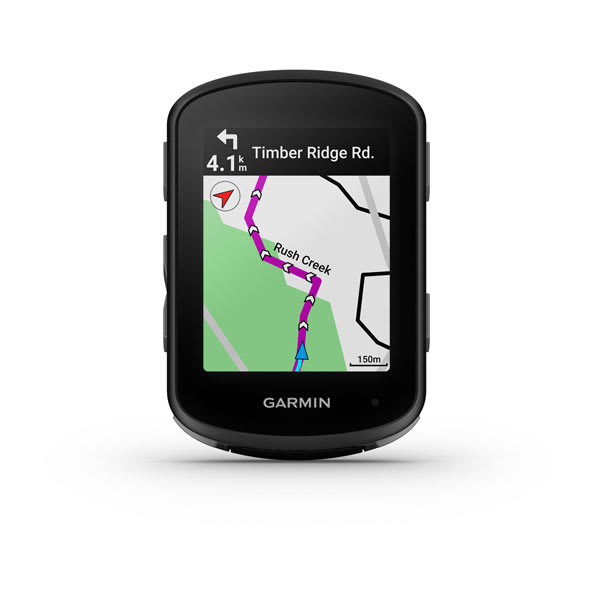
Garmin Edge 540 GPS 2023
Improve every day with Edge 540, the cycling computer with button controls and targeted adaptive coaching1. It’s the optimal gear to prepare you for upcoming races or personal milestones. Get up to 42 hours of battery life on a single charge in battery saver mode. Enjoy superior accuracy with multi-band GNSS technology. Get stamina insights1 while you ride to know how much longer you can crush it. Push your performance with daily suggested workouts1. Cycle like a local with ride type-specific maps and navigation. Quickly set up your new device by transferring existing ride data and profiles.
Improve every day with Edge 540, the cycling computer with button controls and targeted adaptive coaching1. It’s the optimal gear to prepare you for upcoming races or personal milestones. Get up to 42 hours of battery life on a single charge in battery saver mode. Enjoy superior accuracy with multi-band GNSS technology. Get stamina insights1 while you ride to know how much longer you can crush it. Push your performance with daily suggested workouts1. Cycle like a local with ride type-specific maps and navigation. Quickly set up your new device by transferring existing ride data and profiles.
Improve every day with Edge 540, the cycling computer with button controls and targeted adaptive coaching1. It’s the optimal gear to prepare you for upcoming races or personal milestones. Get up to 42 hours of battery life on a single charge in battery saver mode. Enjoy superior accuracy with multi-band GNSS technology. Get stamina insights1 while you ride to know how much longer you can crush it. Push your performance with daily suggested workouts1. Cycle like a local with ride type-specific maps and navigation. Quickly set up your new device by transferring existing ride data and profiles.
Improve every day with Edge 540, the cycling computer with button controls and targeted adaptive coaching1. It’s the optimal gear to prepare you for upcoming races or personal milestones. Get up to 42 hours of battery life on a single charge in battery saver mode. Enjoy superior accuracy with multi-band GNSS technology. Get stamina insights1 while you ride to know how much longer you can crush it. Push your performance with daily suggested workouts1. Cycle like a local with ride type-specific maps and navigation. Quickly set up your new device by transferring existing ride data and profiles.
in 15 offers
The lowest price for Garmin Edge 540 GPS 2023 right now is $610.23 at Racer Sportif, compared across 13 retailers.
The all-time low was $98.99 on 29 May 2024 — today's price is 516% above the lowest ever. It has been notably cheaper before — worth setting a price alert.
Prices last updated 15 Oct 2026.
Last updated at 15/10/2026 16:36:19
Garmin Edge 540 Cycling Computer Bundle
Free delivery between 17–23 Oct
Garmin Edge 540 GPS Cycling Computer
Delivery between 27–30 Oct $49.01
Garmin Edge 540 Bundle
30-day returns
Garmin Edge 540 Bike Computer Bundle
Free 30-day returns
Garmin Edge 540 Sensor Bundle
GARMIN EDGE 540 SENSOR BUNDLE
Delivery between 20–28 Oct $14.95
Garmin Edge 540 Bundle GPS Cycling Computer
Delivery $15
Garmin Edge 540 Bundle
Free delivery
Garmin Edge 540 GPS Computer | ABC Bikes Sensor Bundle
Delivery $12.61
Garmin Edge 540 Cycling Computer, Black
Free delivery
originally posted on garmin.com
Here are my thoughts after the first half-dozen rides. I'm not commenting based on months of experience. I replaced my trusty 520 with a 540 and am so glad I did! The setup was very easy due to the ability to sync settings from my old device to the new one. And, thus far, I have found the UI to be great, way better than I was led to believe by a couple of reviews that indicated the interface worked if you were running it on a 840 with drag and drop capabilities, but not well using the 540's buttons. I haven't found that to be an issue. In fact, the UI often highlights a button to suggest how to continue or complete a setting change. I really like that. As an (ahem) older rider, I also like that the screen text is adequately sized so I can read it during a ride ... MoreHere are my thoughts after the first half-dozen rides. I'm not commenting based on months of experience. I replaced my trusty 520 with a 540 and am so glad I did! The setup was very easy due to the ability to sync settings from my old device to the new one. And, thus far, I have found the UI to be great, way better than I was led to believe by a couple of reviews that indicated the interface worked if you were running it on a 840 with drag and drop capabilities, but not well using the 540's buttons. I haven't found that to be an issue. In fact, the UI often highlights a button to suggest how to continue or complete a setting change. I really like that. As an (ahem) older rider, I also like that the screen text is adequately sized so I can read it during a ride without the need to stop and use my reading glasses. The text would no doubt get smaller if I added items to my display pages, but my primary page shows 4 metrics and they are all easy to read. I suspect, but don't know for sure, that connecting to two GPS signals has resulted in a more consistent reading for mileage or speed. I find that the variation from one day to the next on my favorite ride is considerably less than it was with my 520. Finally, both the speed on start-up and battery usage are thus far exceptional. I expect the battery to lose life over the years, but thus far I i'm very happy with my experience.
originally posted on garmin.com
I've been using the Garmin Edge 540 for about a month now on several rides, and here are my early thoughts. First, the user manual/guide is digital and navigation around the document is terrible. There is no effective index so you can find topics quickly. I've ended up just punching buttons on the device until I find out how to do what I need to do, but that takes a lot of time. Second, the buttons on the device sometimes don't respond to a press. I think this is because the buttons are like rockers; they don't just press inward uniformly but move in on one side or the other of their centers; especially when I'm riding, it's very frustrating to have to press a button multiple times to get the needed response. This also takes my attention away from the road for a ... MoreI've been using the Garmin Edge 540 for about a month now on several rides, and here are my early thoughts. First, the user manual/guide is digital and navigation around the document is terrible. There is no effective index so you can find topics quickly. I've ended up just punching buttons on the device until I find out how to do what I need to do, but that takes a lot of time. Second, the buttons on the device sometimes don't respond to a press. I think this is because the buttons are like rockers; they don't just press inward uniformly but move in on one side or the other of their centers; especially when I'm riding, it's very frustrating to have to press a button multiple times to get the needed response. This also takes my attention away from the road for a second or two, which can certainly be a safety problem. Third, the battery life is great. I've ridden several times for 17 to 26 miles each ride and still have not had to recharge the battery. Granted, I don't ride centuries or tours, but going weeks without having to recharge to me is great. Fourth, the included extended mount that attaches to the handle bar just to the left of the head tube has two issues. First, when you attach the Edge 540 to the mount, it's not level left to right. It's slightly downhill to the right; this is a nuisance but a distraction nonetheless. Second, the extended mount only mounts on the handlebar to the left of the head tube; to install it I had to move my front light to the right of the head tube, but there is still some interference because of the way the Edge is suspended out in front but also over the center. I could move the Edge mount further to the left, but that makes the whole installation look asymmetrical and unprofessional. I don't like the front light on the right of the head tube because it places it on the opposite side of where the open-coming road traffic will be coming from and increases the possibility that the light will be blocked from being seen by oncoming vehicles by the Edge device or the bike components during turns. Overall, I'm mostly pleased with the Garmin Edge 540, but I think it's overpriced and that for the price, Garmin should have done a better job of integrating it with various bike brands (mine is a Trek) and geometries and also with the user manual/guide.
originally posted on REI
As someone who strictly mountain bikes, I haven't found the touch-centric software to be problematic, since I basically bring up my dashboard with ride data and leave it throughout my rides. I imagine if you use navigation, or scroll through screens a lot, the touch screen 840 would probably be worth the extra $100. Compared to the 520, the controls that I routinely use are identical. I have had no problems going through the settings or even scrolling through all the new features. I don't think it deserves the flack it's getting for not being the 840. If you want the 840, get the 840.The simple setup is what truly blew my mind. If you are upgrading from an x20 or newer device, the setup is insanely easy. I was actually loading up my bike for a ride when the UPS ... MoreAs someone who strictly mountain bikes, I haven't found the touch-centric software to be problematic, since I basically bring up my dashboard with ride data and leave it throughout my rides. I imagine if you use navigation, or scroll through screens a lot, the touch screen 840 would probably be worth the extra $100. Compared to the 520, the controls that I routinely use are identical. I have had no problems going through the settings or even scrolling through all the new features. I don't think it deserves the flack it's getting for not being the 840. If you want the 840, get the 840.The simple setup is what truly blew my mind. If you are upgrading from an x20 or newer device, the setup is insanely easy. I was actually loading up my bike for a ride when the UPS truck dropped off my 540. I decided to check it out a minute but didn't plan to go through the whole setup before heading out. My 520's battery life had become dismal so I've lately been using my smartwatch for capturing my rides. I powered it on and it showed around 75% out of the box. OK, so I select my language and it asks if I want to sync the settings from another device. Why, yes I do. It displays a QR code that has to be scanned on my phone. Scan the code and it launches the Garmin Connect app on the phone, with a list of my devices. I pick the 520, agree, and bam. In literally seconds, it transferred all of my settings, the dashboard that I use with the data fields set up the way I want them, and best of all, every connected sensor was now automatically paired with the 540! Done. It pulls everything from Garmin Connect, so you don't even need the old device. Good thing, since the battery was dead. I was able to use the new computer without having to do anything else.The dual GPS is impressive. My ride mapping is spot-on even when riding under a thick canopy of trees. This also improves the data gathered for speed, altitude, etc. It also added several metrics I'd never seen before. The respiratory rate calculated using HRV with my existing chest strap. Grit? Cool. Flow? Pretty cool too. The summary at the end of the ride provided more information in a very intuitive format as well.I skipped the 530, so maybe it's just the jump from the 520 to the 540 that has impressed me so much. The larger screen is easier to read while riding bumpy trails. The setup was crazy easy. The accuracy is amazing. And, to me anyway, navigating through the screens I tend to use, the buttons work well to get me where I need to be. If you use navigation a lot, I imagine the 840 would be a worthy upgrade. No regrets from me though.
| GPS Type | GPS |
| Satellite Systems | GPS, Multi-band GNSS |
| Distance Function | Trip distance |
| Speed Function | Speed (shown in LiveTrack) |
| Time Measurement | Time (shown in LiveTrack) |
Garmin Edge 540 Cycling Computer Bundle
Free delivery between 17–23 Oct
Garmin Edge 540 GPS Cycling Computer
Delivery between 27–30 Oct $49.01
Garmin Edge 540 Bundle
30-day returns
Garmin Edge 540 Bike Computer Bundle
Free 30-day returns
Garmin Edge 540 Sensor Bundle
Here are my thoughts after the first half-dozen rides. I'm not commenting based on months of experience. I replaced my trusty 520 with a 540 and am so glad I did! The setup was very easy due to the ability to sync settings from my old device to the new one. And, thus far, I have found the UI to be great, way better than I was led to believe by a couple of reviews that indicated the interface worked if you were running it on a 840 with drag and drop capabilities, but not well using the 540's buttons. I haven't found that to be an issue. In fact, the UI often highlights a button to suggest how to continue or complete a setting change. I really like that. As an (ahem) older rider, I also like that the screen text is adequately sized so I can read it during a ride ... MoreHere are my thoughts after the first half-dozen rides. I'm not commenting based on months of experience. I replaced my trusty 520 with a 540 and am so glad I did! The setup was very easy due to the ability to sync settings from my old device to the new one. And, thus far, I have found the UI to be great, way better than I was led to believe by a couple of reviews that indicated the interface worked if you were running it on a 840 with drag and drop capabilities, but not well using the 540's buttons. I haven't found that to be an issue. In fact, the UI often highlights a button to suggest how to continue or complete a setting change. I really like that. As an (ahem) older rider, I also like that the screen text is adequately sized so I can read it during a ride without the need to stop and use my reading glasses. The text would no doubt get smaller if I added items to my display pages, but my primary page shows 4 metrics and they are all easy to read. I suspect, but don't know for sure, that connecting to two GPS signals has resulted in a more consistent reading for mileage or speed. I find that the variation from one day to the next on my favorite ride is considerably less than it was with my 520. Finally, both the speed on start-up and battery usage are thus far exceptional. I expect the battery to lose life over the years, but thus far I i'm very happy with my experience.
I've been using the Garmin Edge 540 for about a month now on several rides, and here are my early thoughts. First, the user manual/guide is digital and navigation around the document is terrible. There is no effective index so you can find topics quickly. I've ended up just punching buttons on the device until I find out how to do what I need to do, but that takes a lot of time. Second, the buttons on the device sometimes don't respond to a press. I think this is because the buttons are like rockers; they don't just press inward uniformly but move in on one side or the other of their centers; especially when I'm riding, it's very frustrating to have to press a button multiple times to get the needed response. This also takes my attention away from the road for a ... MoreI've been using the Garmin Edge 540 for about a month now on several rides, and here are my early thoughts. First, the user manual/guide is digital and navigation around the document is terrible. There is no effective index so you can find topics quickly. I've ended up just punching buttons on the device until I find out how to do what I need to do, but that takes a lot of time. Second, the buttons on the device sometimes don't respond to a press. I think this is because the buttons are like rockers; they don't just press inward uniformly but move in on one side or the other of their centers; especially when I'm riding, it's very frustrating to have to press a button multiple times to get the needed response. This also takes my attention away from the road for a second or two, which can certainly be a safety problem. Third, the battery life is great. I've ridden several times for 17 to 26 miles each ride and still have not had to recharge the battery. Granted, I don't ride centuries or tours, but going weeks without having to recharge to me is great. Fourth, the included extended mount that attaches to the handle bar just to the left of the head tube has two issues. First, when you attach the Edge 540 to the mount, it's not level left to right. It's slightly downhill to the right; this is a nuisance but a distraction nonetheless. Second, the extended mount only mounts on the handlebar to the left of the head tube; to install it I had to move my front light to the right of the head tube, but there is still some interference because of the way the Edge is suspended out in front but also over the center. I could move the Edge mount further to the left, but that makes the whole installation look asymmetrical and unprofessional. I don't like the front light on the right of the head tube because it places it on the opposite side of where the open-coming road traffic will be coming from and increases the possibility that the light will be blocked from being seen by oncoming vehicles by the Edge device or the bike components during turns. Overall, I'm mostly pleased with the Garmin Edge 540, but I think it's overpriced and that for the price, Garmin should have done a better job of integrating it with various bike brands (mine is a Trek) and geometries and also with the user manual/guide.
As someone who strictly mountain bikes, I haven't found the touch-centric software to be problematic, since I basically bring up my dashboard with ride data and leave it throughout my rides. I imagine if you use navigation, or scroll through screens a lot, the touch screen 840 would probably be worth the extra $100. Compared to the 520, the controls that I routinely use are identical. I have had no problems going through the settings or even scrolling through all the new features. I don't think it deserves the flack it's getting for not being the 840. If you want the 840, get the 840.The simple setup is what truly blew my mind. If you are upgrading from an x20 or newer device, the setup is insanely easy. I was actually loading up my bike for a ride when the UPS ... MoreAs someone who strictly mountain bikes, I haven't found the touch-centric software to be problematic, since I basically bring up my dashboard with ride data and leave it throughout my rides. I imagine if you use navigation, or scroll through screens a lot, the touch screen 840 would probably be worth the extra $100. Compared to the 520, the controls that I routinely use are identical. I have had no problems going through the settings or even scrolling through all the new features. I don't think it deserves the flack it's getting for not being the 840. If you want the 840, get the 840.The simple setup is what truly blew my mind. If you are upgrading from an x20 or newer device, the setup is insanely easy. I was actually loading up my bike for a ride when the UPS truck dropped off my 540. I decided to check it out a minute but didn't plan to go through the whole setup before heading out. My 520's battery life had become dismal so I've lately been using my smartwatch for capturing my rides. I powered it on and it showed around 75% out of the box. OK, so I select my language and it asks if I want to sync the settings from another device. Why, yes I do. It displays a QR code that has to be scanned on my phone. Scan the code and it launches the Garmin Connect app on the phone, with a list of my devices. I pick the 520, agree, and bam. In literally seconds, it transferred all of my settings, the dashboard that I use with the data fields set up the way I want them, and best of all, every connected sensor was now automatically paired with the 540! Done. It pulls everything from Garmin Connect, so you don't even need the old device. Good thing, since the battery was dead. I was able to use the new computer without having to do anything else.The dual GPS is impressive. My ride mapping is spot-on even when riding under a thick canopy of trees. This also improves the data gathered for speed, altitude, etc. It also added several metrics I'd never seen before. The respiratory rate calculated using HRV with my existing chest strap. Grit? Cool. Flow? Pretty cool too. The summary at the end of the ride provided more information in a very intuitive format as well.I skipped the 530, so maybe it's just the jump from the 520 to the 540 that has impressed me so much. The larger screen is easier to read while riding bumpy trails. The setup was crazy easy. The accuracy is amazing. And, to me anyway, navigating through the screens I tend to use, the buttons work well to get me where I need to be. If you use navigation a lot, I imagine the 840 would be a worthy upgrade. No regrets from me though.
Attention! Initial review after setup and first 50 km solo ride.My main sport is running and I've been using Garmin running-specific devices since 2009: Forerunner 405, 225, 735XT, 245, 245 Music, fēnix 6X Pro Solar, and Enduro 2. Love those and the overall development progress throughout the years.The logic says I have to go with Garmin when choosing a bicycle computer. Great experience and the data stays at one base.However, after today I’m sure the wearables team doesn’t even speak to the cycling computer division folks because they’re ashamed of them. There’s almost nothing from the experience you have using wearables (except maybe glances).Navigation is awful. On a straight 5 km stretch the device shows arrows left and right marking intersections. The ... MoreAttention! Initial review after setup and first 50 km solo ride.My main sport is running and I've been using Garmin running-specific devices since 2009: Forerunner 405, 225, 735XT, 245, 245 Music, fēnix 6X Pro Solar, and Enduro 2. Love those and the overall development progress throughout the years.The logic says I have to go with Garmin when choosing a bicycle computer. Great experience and the data stays at one base.However, after today I’m sure the wearables team doesn’t even speak to the cycling computer division folks because they’re ashamed of them. There’s almost nothing from the experience you have using wearables (except maybe glances).Navigation is awful. On a straight 5 km stretch the device shows arrows left and right marking intersections. The distinction between intersection notifications and actual turns is unnoticeable. That’s how I missed the exit, luckily that was on the cycling lane and I was able to return.I was in luck in the second part of the route, I have been riding there with a friend a couple of weeks ago.The whole user experience is of automotive sector devices, e.g., some Tom Tom from 2008.An hour before sunrise, when it gets a little darker the contrast was almost off. Checked “Auto Brightness” is on. Combine that with screen glare and you have one awful combination.And I don’t even have anything to compare to, is there anything? My Enduro 2 with magnifying glass mount?
This is my first computer, and I must say that I love this thing.It is so awesome to be able to track all of this information. I can't wait to finish my ride and see my stats. I have really enjoyed the navigation aspect of this as well. It has really helped me out. when I'm riding somewhere new.This has really helped save my phone's battery as well.I debated between this and the 840 and or course the solar. I'm really glad I got the 540. I love having the buttons and you don't have to worry about accidentally touching then screen. As far as the solar.. the length of charge this thing has in unreal. I read almost everyday it will be at 40% by the end of the week.I don't think you can go wrong with this unit.
I had read plenty of initial reviews before buying this, and was a little skeptical about going with both the 540 and the solar version. After using it now for about 3 weeks I couldn't be happier. The "long hold" buttons takes a little to get used to, but if you watch any review videos before hand it's not too hard to figure out. The new climb pro feature is awesome, and the old version where it is only initiated with a route loaded is basically more souped up. Giving even more in climb details than before. The solar feature does seem to add battery life, but I suppose you could argue if it's worth the extra $100 or not (I got mine on sale so it made the decision easy for me). Had mine not been on sale I'd have probably been perfectly happy with the non solar ... MoreI had read plenty of initial reviews before buying this, and was a little skeptical about going with both the 540 and the solar version. After using it now for about 3 weeks I couldn't be happier. The "long hold" buttons takes a little to get used to, but if you watch any review videos before hand it's not too hard to figure out. The new climb pro feature is awesome, and the old version where it is only initiated with a route loaded is basically more souped up. Giving even more in climb details than before. The solar feature does seem to add battery life, but I suppose you could argue if it's worth the extra $100 or not (I got mine on sale so it made the decision easy for me). Had mine not been on sale I'd have probably been perfectly happy with the non solar version. It also uploads rides faster than any garmin I've had before. I've had 3 other computers and all would lag on the uploads. This one is super quick and on par with their watches. Highly recommended and super happy with mine.
The instructions provided with Edge 540 are mostly useless and I'm sitting down with a friend to figure it out. He said the same thing - nothing intuitive about moving through menus or getting it to work appropriately. Did the Ride of Silence two nights ago and it kept beeping, with the menu buttons not doing anything. It was embarassing, and I ended up shutting it off so not to interrupt the ride for everyone. Most likely taking it back for a refund. I bought it specifically to connect with my Garmin watch. Haven't been able to make that happen either.
This device has a user interface designed around touch functionality. Trying to navigate with the side buttons is not intuitive. This was my first Garmin computer, so I assumed it was a learning curve. It wasn’t. The device is difficult to set up. Plan on an afternoon spent on initial setup. There are also limitations due to this being a new model. I returned it and paid the difference for the 840. Initially I decided against the touchscreen as I wanted to use gloves while riding, but I learned that the 840 has side buttons and the touchscreen. If you’re switching from Wahoo, you’ll like the color of this unit’s screen and the dynamic features, but you’ll wish you could use the mobile app for setup. Note that TyreWiz isn’t an available field on this unit.
+PowerGuide and Real-Time Stamina trickle down+Mount “wings” are now replaceable+USB-C charging+Class leading 26 hour battery life+Multi-band GNSS means more accurate tracking+No course required Climbing screen-Lacks full phone interface integration-Limited memory requires to uninstall North American maps before adding new areas such as Europe.
The battery life on my Edge 520 had started to degrade over the past couple of years. It's not terrible, but I have a long ride (8+ hours) coming up in July. So, I upgraded to the Edge 540. I'm pleased with the new computer. I really like some of the additional metrics that the new computer tracks, and even though the display is only slightly larger than the 520, the additional size is quite noticeable and impressive. With the ability to transfer many of my settings from the 520, the set up was quick and easy. Overall, I'm very happy with the upgrade to the new computer, and the old 520 has found a new home on my son's bike. It's truly a win, win!
| GPS Type | GPS |
| Satellite Systems | GPS, Multi-band GNSS |
| Distance Function | Trip distance |
| Speed Function | Speed (shown in LiveTrack) |
| Time Measurement | Time (shown in LiveTrack) |

