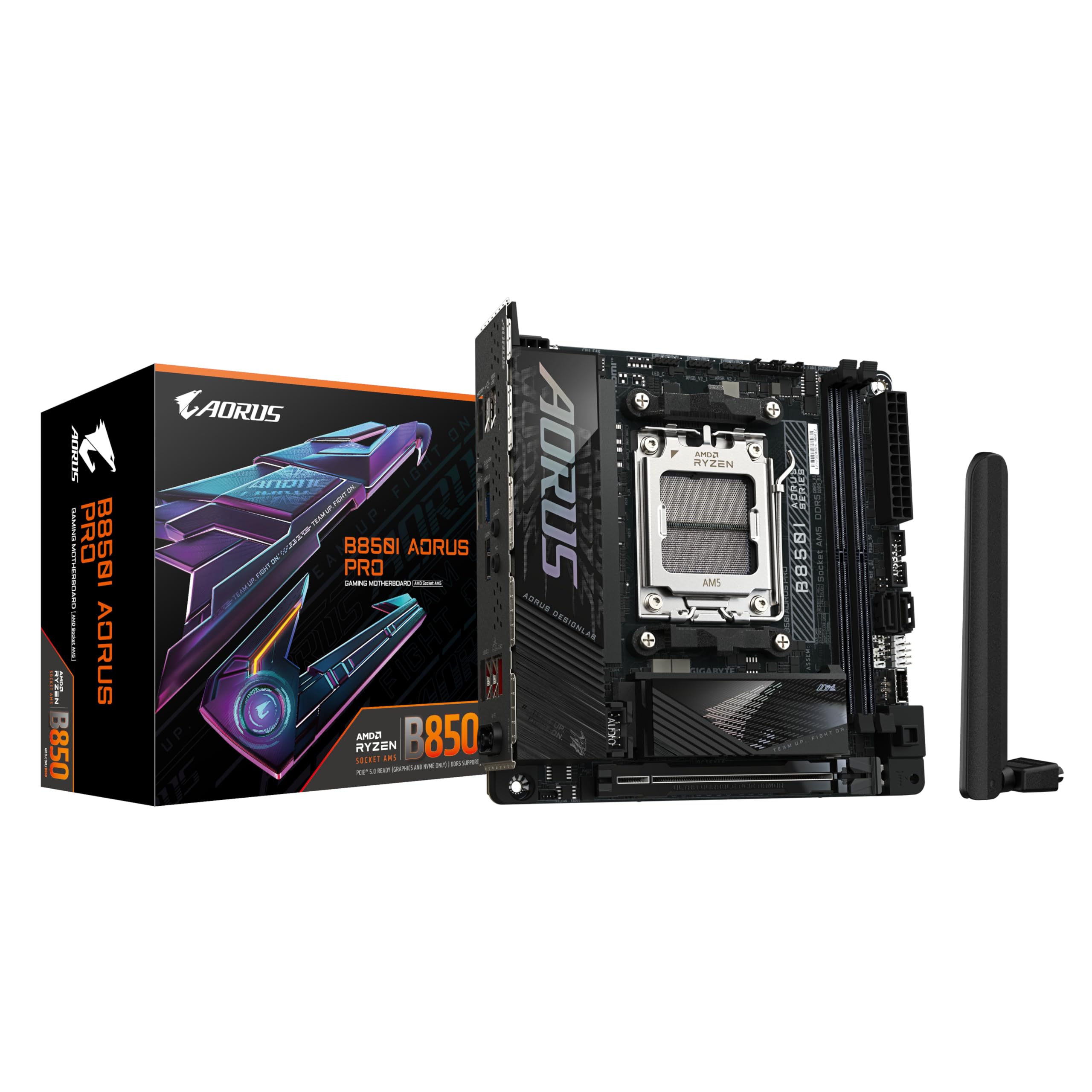
Gigabyte B450 I AORUS Pro Wifi AMD Mini-ITX Motherboard
The Gigabyte B450 I Aorus M uses hybrid PWMs and low RDS(on) MOSDETs to support the system performance and ultimate hardware scalability of Ryzen's 2nd generation processors. Gigabyte has developed a thermal solution for M.2 drives so that the mainboards can also offer long-lasting enjoyment. The M.2 Thermal Guard helps prevent throttling and bottlenecks in M.2 devices by reducing heat generation and dissipating it before it becomes a problem. Thanks to the exclusive Realtek 8118 Gaming LAN, the motherboard can feature high-speed Gigabit LAN with automatic bandwidth allocation. The powerful and easy-to-use player network chip is equipped with automatic bandwidth allocation to ensure the highest network priority of the game or application. Users can be offered the most comprehensive features and the fastest, smoothest Internet experience. Aorus motherboards equipped with RGB provide users with the ability to control integrated RGB and external RGBW / Digital LED light strips for their PC. Equipped with numerous colours and patterns, the digital LEDs are now also supported. External digital LED strips, each of which is digitally addressable, allow users to create even more patterns, styles and lighting. The digital LEDs are only available on selected motherboards, external LED strips, digital LED strips are not included with the mainboard. The Aorus Gaming motherboards can support digital LED strips and up to 300 LED lights. RGB with digital LEDs comes with 9 new patterns and different speed settings.
The Gigabyte B450 I Aorus M uses hybrid PWMs and low RDS(on) MOSDETs to support the system performance and ultimate hardware scalability of Ryzen's 2nd generation processors. Gigabyte has developed a thermal solution for M.2 drives so that the mainboards can also offer long-lasting enjoyment. The M.2 Thermal Guard helps prevent throttling and bottlenecks in M.2 devices by reducing heat generation and dissipating it before it becomes a problem. Thanks to the exclusive Realtek 8118 Gaming LAN, the motherboard can feature high-speed Gigabit LAN with automatic bandwidth allocation. The powerful and easy-to-use player network chip is equipped with automatic bandwidth allocation to ensure the highest network priority of the game or application. Users can be offered the most comprehensive features and the fastest, smoothest Internet experience. Aorus motherboards equipped with RGB provide users with the ability to control integrated RGB and external RGBW / Digital LED light strips for their PC. Equipped with numerous colours and patterns, the digital LEDs are now also supported. External digital LED strips, each of which is digitally addressable, allow users to create even more patterns, styles and lighting. The digital LEDs are only available on selected motherboards, external LED strips, digital LED strips are not included with the mainboard. The Aorus Gaming motherboards can support digital LED strips and up to 300 LED lights. RGB with digital LEDs comes with 9 new patterns and different speed settings.
The Gigabyte B450 I Aorus M uses hybrid PWMs and low RDS(on) MOSDETs to support the system performance and ultimate hardware scalability of Ryzen's 2nd generation processors. Gigabyte has developed a thermal solution for M.2 drives so that the mainboards can also offer long-lasting enjoyment. The M.2 Thermal Guard helps prevent throttling and bottlenecks in M.2 devices by reducing heat generation and dissipating it before it becomes a problem. Thanks to the exclusive Realtek 8118 Gaming LAN, the motherboard can feature high-speed Gigabit LAN with automatic bandwidth allocation. The powerful and easy-to-use player network chip is equipped with automatic bandwidth allocation to ensure the highest network priority of the game or application. Users can be offered the most comprehensive features and the fastest, smoothest Internet experience. Aorus motherboards equipped with RGB provide users with the ability to control integrated RGB and external RGBW / Digital LED light strips for their PC. Equipped with numerous colours and patterns, the digital LEDs are now also supported. External digital LED strips, each of which is digitally addressable, allow users to create even more patterns, styles and lighting. The digital LEDs are only available on selected motherboards, external LED strips, digital LED strips are not included with the mainboard. The Aorus Gaming motherboards can support digital LED strips and up to 300 LED lights. RGB with digital LEDs comes with 9 new patterns and different speed settings.
The Gigabyte B450 I Aorus M uses hybrid PWMs and low RDS(on) MOSDETs to support the system performance and ultimate hardware scalability of Ryzen's 2nd generation processors. Gigabyte has developed a thermal solution for M.2 drives so that the mainboards can also offer long-lasting enjoyment. The M.2 Thermal Guard helps prevent throttling and bottlenecks in M.2 devices by reducing heat generation and dissipating it before it becomes a problem. Thanks to the exclusive Realtek 8118 Gaming LAN, the motherboard can feature high-speed Gigabit LAN with automatic bandwidth allocation. The powerful and easy-to-use player network chip is equipped with automatic bandwidth allocation to ensure the highest network priority of the game or application. Users can be offered the most comprehensive features and the fastest, smoothest Internet experience. Aorus motherboards equipped with RGB provide users with the ability to control integrated RGB and external RGBW / Digital LED light strips for their PC. Equipped with numerous colours and patterns, the digital LEDs are now also supported. External digital LED strips, each of which is digitally addressable, allow users to create even more patterns, styles and lighting. The digital LEDs are only available on selected motherboards, external LED strips, digital LED strips are not included with the mainboard. The Aorus Gaming motherboards can support digital LED strips and up to 300 LED lights. RGB with digital LEDs comes with 9 new patterns and different speed settings.
in 8 offers
The lowest price for Gigabyte B450 I AORUS Pro Wifi AMD Mini-ITX Motherboard right now is $205.99 at eBay.com.au.
The all-time low was $110.00 on 30 Nov 2025 — today's price is 87% above the lowest ever. It has been notably cheaper before — worth setting a price alert.
Prices last updated 29 Oct 2026.
Last updated at 29/10/2026 03:34:05
Gigabyte B450i Aorus Pro Wifi Amd Am4 Ddr4 B450 Itx Motherboard Tested
Free delivery
Affiliate Disclosure: We may receive a small commission for purchases made through this link at no extra cost to you. This helps support our site. Thank you!
originally posted on microcenter.com
It's been awhile since I've worked with a mini-ITX board and I forgot how small these things really are (think palm-sized). It's incredible the amount of features they can pack into a small space. Only drawbacks compared to micro or full ATX is that you only get 2 memory slots and 1 16XPCIe slot, but for most builds, that's enough! I built a compact gaming rig that could finally sit ON my desk instead of under it. Paired nicely with a ThermalTake Cube v1. WiFi signal was great. I didn't notice until I installed it that it actually has an RGB strip integrated into the back of the board so that was a nice little touch for displaying it on my desk. I had no issues with a larger non-stock CPU cooler either (ThermalTake Contac Silent 12). I used it with a 2600X so I ... MoreIt's been awhile since I've worked with a mini-ITX board and I forgot how small these things really are (think palm-sized). It's incredible the amount of features they can pack into a small space. Only drawbacks compared to micro or full ATX is that you only get 2 memory slots and 1 16XPCIe slot, but for most builds, that's enough! I built a compact gaming rig that could finally sit ON my desk instead of under it. Paired nicely with a ThermalTake Cube v1. WiFi signal was great. I didn't notice until I installed it that it actually has an RGB strip integrated into the back of the board so that was a nice little touch for displaying it on my desk. I had no issues with a larger non-stock CPU cooler either (ThermalTake Contac Silent 12). I used it with a 2600X so I can't provide any feedback on compatibility with 3000-series Ryzen.
originally posted on neweggbusiness.com
Recently Mini-ITX boards have been difficult to obtain. I was originally planning on a B450 board but when this came up at this price, I jumped at it. Once I went to test however, the PC would only post once (could be booted into the pre-install of Debian I had on the M.2 drive I was using) but if you rebooted it wouldn't post at all (no error tones, nothing). Resetting the CMOS would allow the PC to boot again, but once restarted the issue would re-occur. I contacted ASRock support and was informed that even though the BIOS would recognize my processor that the board would not support ANY current Ryzen APUs, and that there was no plans in the near future to support any processor below a 3600 (which has no APU). This seems rather silly to me as the market for ... MoreRecently Mini-ITX boards have been difficult to obtain. I was originally planning on a B450 board but when this came up at this price, I jumped at it. Once I went to test however, the PC would only post once (could be booted into the pre-install of Debian I had on the M.2 drive I was using) but if you rebooted it wouldn't post at all (no error tones, nothing). Resetting the CMOS would allow the PC to boot again, but once restarted the issue would re-occur. I contacted ASRock support and was informed that even though the BIOS would recognize my processor that the board would not support ANY current Ryzen APUs, and that there was no plans in the near future to support any processor below a 3600 (which has no APU). This seems rather silly to me as the market for inexpensive Mini-ITX boards are typically APU builds (most cases will not have room for a dedicated GPU). This also seems artificially limited as the board itself recognizes the processor (the tech seemed to doubt that I was able to get the board to post once even). His recommendation of buying an X570 board to get support seemed sillier still... If you're looking for a cheap Mini-ITX board for a gaming build with a dedicate GPU, this board may be worth considering, however at this price you may want to go with a Micro-ATX board instead. Until the processor support situation changes, I cannot recommend this board or give it a good review. I myself will be returning this unit and going back to looking for a B450...
originally posted on neweggbusiness.com
Checked the functionality of the NVME heatsink with the new revision of WD Black PCIe SSD 256GB. During a few minutes of CrystalDiskMark benching the heatsink was able to keep the drive ~8C cooler than without it. Very nice to ensure the drive will never overheat and you always have consistent speeds. This turns out to be a $15-$20 value especially considering how beefy/serious the heatsink is. It is very simple to utilize the heatsink and it looks great. The aforementioned WD Black NVME SSD ran at advertised speeds; 3000 MB/s & 1600 MB/s. Absolutely mind-numbingly fast. The computer boots sub 10 seconds even without fast or ultra-fast boot mode enabled and everything happens in an instant. This board was the heart of a very simple office build including a Ryzen 3 ... MoreChecked the functionality of the NVME heatsink with the new revision of WD Black PCIe SSD 256GB. During a few minutes of CrystalDiskMark benching the heatsink was able to keep the drive ~8C cooler than without it. Very nice to ensure the drive will never overheat and you always have consistent speeds. This turns out to be a $15-$20 value especially considering how beefy/serious the heatsink is. It is very simple to utilize the heatsink and it looks great. The aforementioned WD Black NVME SSD ran at advertised speeds; 3000 MB/s & 1600 MB/s. Absolutely mind-numbingly fast. The computer boots sub 10 seconds even without fast or ultra-fast boot mode enabled and everything happens in an instant. This board was the heart of a very simple office build including a Ryzen 3 2200G, 256GB WD Black NVME, 8GB Patriot Viper 4 3000MHz, Cooler Master Elite 110, and an EVGA B450 modular PSU.
| General | |
| Product Type | Motherboard - mini ITX |
| Chipset Type | AMD B450 |
| Processor Socket | Socket AM4 |
| Max Processors Qty | 1 |
Gigabyte B450i Aorus Pro Wifi Amd Am4 Ddr4 B450 Itx Motherboard Tested
Free delivery
Affiliate Disclosure: We may receive a small commission for purchases made through this link at no extra cost to you. This helps support our site. Thank you!
It's been awhile since I've worked with a mini-ITX board and I forgot how small these things really are (think palm-sized). It's incredible the amount of features they can pack into a small space. Only drawbacks compared to micro or full ATX is that you only get 2 memory slots and 1 16XPCIe slot, but for most builds, that's enough! I built a compact gaming rig that could finally sit ON my desk instead of under it. Paired nicely with a ThermalTake Cube v1. WiFi signal was great. I didn't notice until I installed it that it actually has an RGB strip integrated into the back of the board so that was a nice little touch for displaying it on my desk. I had no issues with a larger non-stock CPU cooler either (ThermalTake Contac Silent 12). I used it with a 2600X so I ... MoreIt's been awhile since I've worked with a mini-ITX board and I forgot how small these things really are (think palm-sized). It's incredible the amount of features they can pack into a small space. Only drawbacks compared to micro or full ATX is that you only get 2 memory slots and 1 16XPCIe slot, but for most builds, that's enough! I built a compact gaming rig that could finally sit ON my desk instead of under it. Paired nicely with a ThermalTake Cube v1. WiFi signal was great. I didn't notice until I installed it that it actually has an RGB strip integrated into the back of the board so that was a nice little touch for displaying it on my desk. I had no issues with a larger non-stock CPU cooler either (ThermalTake Contac Silent 12). I used it with a 2600X so I can't provide any feedback on compatibility with 3000-series Ryzen.
Recently Mini-ITX boards have been difficult to obtain. I was originally planning on a B450 board but when this came up at this price, I jumped at it. Once I went to test however, the PC would only post once (could be booted into the pre-install of Debian I had on the M.2 drive I was using) but if you rebooted it wouldn't post at all (no error tones, nothing). Resetting the CMOS would allow the PC to boot again, but once restarted the issue would re-occur. I contacted ASRock support and was informed that even though the BIOS would recognize my processor that the board would not support ANY current Ryzen APUs, and that there was no plans in the near future to support any processor below a 3600 (which has no APU). This seems rather silly to me as the market for ... MoreRecently Mini-ITX boards have been difficult to obtain. I was originally planning on a B450 board but when this came up at this price, I jumped at it. Once I went to test however, the PC would only post once (could be booted into the pre-install of Debian I had on the M.2 drive I was using) but if you rebooted it wouldn't post at all (no error tones, nothing). Resetting the CMOS would allow the PC to boot again, but once restarted the issue would re-occur. I contacted ASRock support and was informed that even though the BIOS would recognize my processor that the board would not support ANY current Ryzen APUs, and that there was no plans in the near future to support any processor below a 3600 (which has no APU). This seems rather silly to me as the market for inexpensive Mini-ITX boards are typically APU builds (most cases will not have room for a dedicated GPU). This also seems artificially limited as the board itself recognizes the processor (the tech seemed to doubt that I was able to get the board to post once even). His recommendation of buying an X570 board to get support seemed sillier still... If you're looking for a cheap Mini-ITX board for a gaming build with a dedicate GPU, this board may be worth considering, however at this price you may want to go with a Micro-ATX board instead. Until the processor support situation changes, I cannot recommend this board or give it a good review. I myself will be returning this unit and going back to looking for a B450...
Checked the functionality of the NVME heatsink with the new revision of WD Black PCIe SSD 256GB. During a few minutes of CrystalDiskMark benching the heatsink was able to keep the drive ~8C cooler than without it. Very nice to ensure the drive will never overheat and you always have consistent speeds. This turns out to be a $15-$20 value especially considering how beefy/serious the heatsink is. It is very simple to utilize the heatsink and it looks great. The aforementioned WD Black NVME SSD ran at advertised speeds; 3000 MB/s & 1600 MB/s. Absolutely mind-numbingly fast. The computer boots sub 10 seconds even without fast or ultra-fast boot mode enabled and everything happens in an instant. This board was the heart of a very simple office build including a Ryzen 3 ... MoreChecked the functionality of the NVME heatsink with the new revision of WD Black PCIe SSD 256GB. During a few minutes of CrystalDiskMark benching the heatsink was able to keep the drive ~8C cooler than without it. Very nice to ensure the drive will never overheat and you always have consistent speeds. This turns out to be a $15-$20 value especially considering how beefy/serious the heatsink is. It is very simple to utilize the heatsink and it looks great. The aforementioned WD Black NVME SSD ran at advertised speeds; 3000 MB/s & 1600 MB/s. Absolutely mind-numbingly fast. The computer boots sub 10 seconds even without fast or ultra-fast boot mode enabled and everything happens in an instant. This board was the heart of a very simple office build including a Ryzen 3 2200G, 256GB WD Black NVME, 8GB Patriot Viper 4 3000MHz, Cooler Master Elite 110, and an EVGA B450 modular PSU.
Bought this motherboard for a PC build for my living room. I upgraded my PC and I had some extra parts from my son’s build as well. Enough parts that all I needed was a motherboard and ram. The CPU is a Ryzen 7 3700, the GPU is a Gigabyte RTX 2060, and the case is a Dan A4, a very tiny case and the Achilles heel of this build. I have used Gigabyte products (mobo’s, GPU’s) on a decent amount of builds. I’ve never had a problem that made me regret buying their products. This mobo is no exception. I am not tweaking it or doing any overclocking, I can only speak on the board as is, out of the box. It works, it looks nice (though that isn’t important to me in this case) and it works. Obviously I would buy again. I like their products.
This is my first ITX motherboard, but from what I've seen, the others give you two M.2's typically, with one being on the opposite side.I used this motherboard with an R5 3600, and 16 GB of Trident Z 3000 CL16 for my wife's rig. Worked just fine. WIFI works, not sure about quality since it's in the same room as the router so I cannot say for strength.Only has two RGB headers, so you'll need a hub if you want to bling up the ITX case. Unfortunately, the only RGB the mobo natively has on it, is a single addressable column of RGB on the right side (by literally everything that will block it).Got mine for $93 Open Box, I'd say it's worth the price so far as long as you're not paying 150. It's worth about 80-100 based on features.
TBH I probably wouldn't have gone with this board during normal times, but it's worked out super well. I've put in both a 3600 and 3700x; no issue and I see solid boosts. 2x8gb 3600mhz CL 16 memory sticks also worked out of the box with XMP profile, even though max on this board is officially 3200mhz. I also had 2x16gb 3600mhz CL 16 and it booted into Windows but was unstable and I had to run int at 3200mhz. Wifi is strong. Audio is super strong. The single fan header isn't an issue for 7L cases.Gigabyte seems to be hit or miss, and apparently this board is a hit!
Note: This review is based on having two of this board, both exhibiting all of the same issues. If you're planning on using this for a CPU-only build, you'll probably be fine. But I would not suggest putting an APU on this board, especially if you plan on overclocking it, until Gigabyte either revises the board or fixes the voltage control issues with a BIOS update. My 2400G APU pulls over 120W on stock motherboard settings during Cinebench and Blender testing, immediately causing the CPU to throttle even with aftermarket cooling. Core voltage was measured at over 1.4V, which is an insane amount of voltage considering stock voltage is 1.225!!! The GPU/SOC voltages suffered similar problems, with stock settings causing offsets of +.05-.1 volts (which is a lot ... MoreNote: This review is based on having two of this board, both exhibiting all of the same issues. If you're planning on using this for a CPU-only build, you'll probably be fine. But I would not suggest putting an APU on this board, especially if you plan on overclocking it, until Gigabyte either revises the board or fixes the voltage control issues with a BIOS update. My 2400G APU pulls over 120W on stock motherboard settings during Cinebench and Blender testing, immediately causing the CPU to throttle even with aftermarket cooling. Core voltage was measured at over 1.4V, which is an insane amount of voltage considering stock voltage is 1.225!!! The GPU/SOC voltages suffered similar problems, with stock settings causing offsets of +.05-.1 volts (which is a lot considering recommended SOC range is 1.05-1.2). With a 150W 80+ PSU, adjusting the GPU clocks at all would cause over-voltage protection to trip on the PSU, causing an immediate shutdown. This is unacceptable and is probably the poorest stock voltage regulation I've seen across multiple AM4 mITX boards from ASrock, Asus and Gigabyte. VRM cooling is also rather poor. Doing GPU only overclocking, I had to limit myself to 1.2V SOC voltage to keep VRM temps below 100C during extended load. Certainly part of this is due to my case being very small, but I ensured that the VRMs had plenty of intake and exhaust airflow to prevent recirculation. This heat and voltage limitation meant that instead of getting 1650MHz on my GPU (tested on a different board to be stable at 1.25V), I had to come all the way down to 1500MHz @ 1.175 for long-term stability. That's a lot of performance left on the table because of insufficient surface area for VRM cooling. The last annoyance is more of a pet-peeve, but still worth mentioning. When the GPU is being used, the SOC VRMs create a buzzing noise that changes frequency based on framerate, and volume depending on SOC voltage. It's definitely audible outside of the case with the cover on. The noise is evident everywhere the GPU is used, from the Windows 10 start menu (audible click on every single scroll) to synthetic and gaming benchmarks (Fire Strike combined test produces a slow, loud clicking noise @ 6 FPS, Crysis benchmark produces a constant grinding noise @ 60+ FPS).
I had to make a quick decision for an upgrade after a hardware failure, and this board worked. It's not super fancy and I've never been a Gigabyte fan, but I decided to give it a chance. Glad I did, it's fine and even has some nice bonuses for the price.Here's my gripe list:* Only two fan/AIO/pump headers* Six rear panel USB ports despite plenty of room for more (though that seems common for B450 boards of all sizes)* RGB header is in an odd, hard-to-get-to nook by the port cluster near the PCIe slot.* No fancy USB-CAnd my unexpected bonuses:* Intel LAN and WLAN. WLAN card is 802.11ac Gen 2 and has Bluetooth 5. Nice.* Two USB-C 3.1 Gen 2 (10 gigabit USB)* No non-fancy USB-C. If I only get 6 USB ports, at least I don't lose two of those to a single ... MoreI had to make a quick decision for an upgrade after a hardware failure, and this board worked. It's not super fancy and I've never been a Gigabyte fan, but I decided to give it a chance. Glad I did, it's fine and even has some nice bonuses for the price.Here's my gripe list:* Only two fan/AIO/pump headers* Six rear panel USB ports despite plenty of room for more (though that seems common for B450 boards of all sizes)* RGB header is in an odd, hard-to-get-to nook by the port cluster near the PCIe slot.* No fancy USB-CAnd my unexpected bonuses:* Intel LAN and WLAN. WLAN card is 802.11ac Gen 2 and has Bluetooth 5. Nice.* Two USB-C 3.1 Gen 2 (10 gigabit USB)* No non-fancy USB-C. If I only get 6 USB ports, at least I don't lose two of those to a single USB C that didn't even support Power Delivery.* Somehow the case LED/button header was laid out identically to my 8 year old Asus board, so front panel wiring took maybe 10 seconds.* RGB support is addressable, so I can use all these Neopixels I've got on hand from the DIY/Maker section.YMMV: It has built-in RGB LEDs. They default on. You can turn them off in firmware. You've been warned.
This board is stable for me which is very important, I certainly like the M.2 location making switching out the drive easy as well as for airflow. Gigabyte used a quality audio controller which is all important for someone like myself that does a lot of video editing. Due to the large heatsink next to the CPU socket and the socket being so high up as well large cooler compatibly can be a real issue. The bios does not always simply gray things out like most but rather hides the settings completely till the right combinations of settings allows it to show up. For instance ECO mode is such a nightmare to even get it showing that I simply gave up, your settings have to be just so and is way more difficult to enable than it should be. The monitoring software isn't as ... MoreThis board is stable for me which is very important, I certainly like the M.2 location making switching out the drive easy as well as for airflow. Gigabyte used a quality audio controller which is all important for someone like myself that does a lot of video editing. Due to the large heatsink next to the CPU socket and the socket being so high up as well large cooler compatibly can be a real issue. The bios does not always simply gray things out like most but rather hides the settings completely till the right combinations of settings allows it to show up. For instance ECO mode is such a nightmare to even get it showing that I simply gave up, your settings have to be just so and is way more difficult to enable than it should be. The monitoring software isn't as nice as the competing companies allowing me to see fan speeds, voltages and temps all on one screen and requires an interface to be installed separately in order to use some of the monitoring software, For most people an optical port does not matter, I almost always purchase a fairly high end sound system and almost always purchase with an optical port. So far it hasn't been a bad board, in terms of mITX at this point before the B550 release there are few quality options, one of which was more perfect for my personal use other than one huge issue... I needed the quality audio chip that this board has. Another was massively more expensive and another had too weak of mosfets which was concerning. This board was a kind of a middle ground; it does the job and was available at time of purchase.
Lastly, I've been using this since last year, and I'm only writing all these because I had enough of it. I updated to f40 to supposedly make the 3800x work flawlessly, little did i know that i wont be able to boot on my m.2 ssd with this bios rev, thankfully I had an android laying around to extract the latest bios on a thumb drive and flash it because i dont wanna put in my old cpu. After all this extra hustle for making the 3800x work, and finding out it's idle voltages, playing around with llc i just gave up with the bios and decided to use Ryzen Master. I ramped out one of the cores to 4.5ghz, 4.2 and 4.3 on the others with btw voltage set to 1.28v on bios with high llc. Now mind you, normally your computer would just restart because this is obviously unstable, ... MoreLastly, I've been using this since last year, and I'm only writing all these because I had enough of it. I updated to f40 to supposedly make the 3800x work flawlessly, little did i know that i wont be able to boot on my m.2 ssd with this bios rev, thankfully I had an android laying around to extract the latest bios on a thumb drive and flash it because i dont wanna put in my old cpu. After all this extra hustle for making the 3800x work, and finding out it's idle voltages, playing around with llc i just gave up with the bios and decided to use Ryzen Master. I ramped out one of the cores to 4.5ghz, 4.2 and 4.3 on the others with btw voltage set to 1.28v on bios with high llc. Now mind you, normally your computer would just restart because this is obviously unstable, that's why we're testing. Clicked apply, everything froze. Now it won't start. Mobo is dead. Tried cmos clear, still dead, tried to put in my old 1600, still dead. Ordered an msi b450i, because I don't even wanna go through the hassle of getting a replacement from gigabyte. Insist on durable says gigabyte btw.
| General | |
| Product Type | Motherboard - mini ITX |
| Chipset Type | AMD B450 |
| Processor Socket | Socket AM4 |
| Max Processors Qty | 1 |