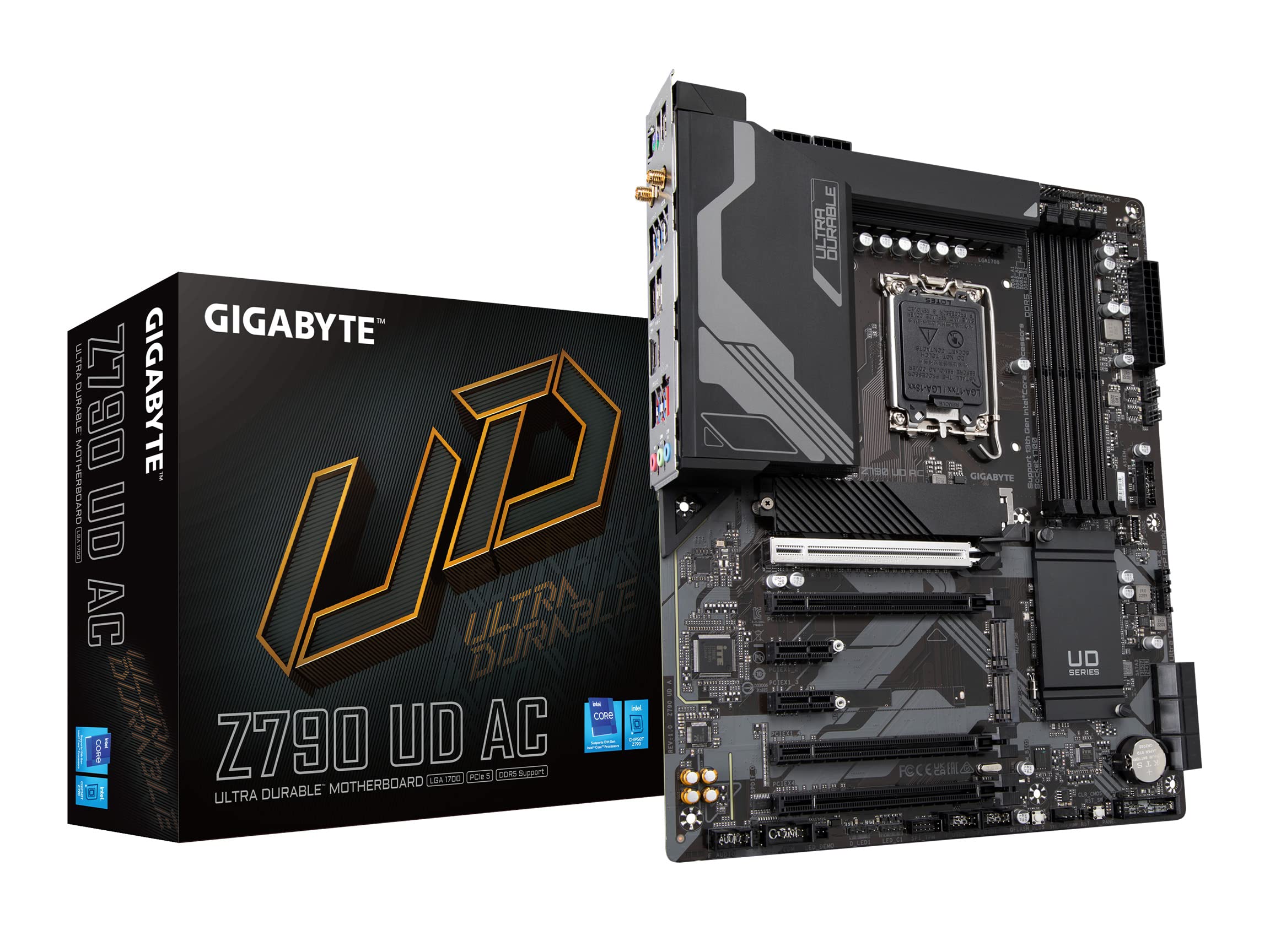
Gigabyte Z790 UD LGA 1700 ATX Motherboard
The GIGABYTE Z790 UD motherboard delivers performance with features geared towards gamers and PC builders. Designed with an Intel Z790 chipset, it provides support for 12th and 13th Generation Intel Core processors, ensuring compatibility for advanced tasks and gaming experiences. With up to 4 DIMM slots for DDR5 SDRAM and a maximum of 128 GB capacity, users can expect seamless multitasking and efficient workflows. The board is engineered to support high definition audio through its 7.1-channel sound card, enhancing the overall multimedia experience. Designed with an array of connectivity options, the Z790 UD includes multiple USB ports including USB-C Gen2x2, ensuring fast data transfer and versatility for various peripherals. It also features 2.5 Gigabit Ethernet for rapid networking, accommodating the demands of online gaming and large file transfers. With features like Q-Flash for BIOS updates and RGB FUSION 2.0 for customizable lighting, the motherboard combines functionality with aesthetic appeal, making it a choice for users seeking both performance and style.
The GIGABYTE Z790 UD motherboard delivers performance with features geared towards gamers and PC builders. Designed with an Intel Z790 chipset, it provides support for 12th and 13th Generation Intel Core processors, ensuring compatibility for advanced tasks and gaming experiences. With up to 4 DIMM slots for DDR5 SDRAM and a maximum of 128 GB capacity, users can expect seamless multitasking and efficient workflows. The board is engineered to support high definition audio through its 7.1-channel sound card, enhancing the overall multimedia experience. Designed with an array of connectivity options, the Z790 UD includes multiple USB ports including USB-C Gen2x2, ensuring fast data transfer and versatility for various peripherals. It also features 2.5 Gigabit Ethernet for rapid networking, accommodating the demands of online gaming and large file transfers. With features like Q-Flash for BIOS updates and RGB FUSION 2.0 for customizable lighting, the motherboard combines functionality with aesthetic appeal, making it a choice for users seeking both performance and style.
The GIGABYTE Z790 UD motherboard delivers performance with features geared towards gamers and PC builders. Designed with an Intel Z790 chipset, it provides support for 12th and 13th Generation Intel Core processors, ensuring compatibility for advanced tasks and gaming experiences. With up to 4 DIMM slots for DDR5 SDRAM and a maximum of 128 GB capacity, users can expect seamless multitasking and efficient workflows. The board is engineered to support high definition audio through its 7.1-channel sound card, enhancing the overall multimedia experience. Designed with an array of connectivity options, the Z790 UD includes multiple USB ports including USB-C Gen2x2, ensuring fast data transfer and versatility for various peripherals. It also features 2.5 Gigabit Ethernet for rapid networking, accommodating the demands of online gaming and large file transfers. With features like Q-Flash for BIOS updates and RGB FUSION 2.0 for customizable lighting, the motherboard combines functionality with aesthetic appeal, making it a choice for users seeking both performance and style.
The GIGABYTE Z790 UD motherboard delivers performance with features geared towards gamers and PC builders. Designed with an Intel Z790 chipset, it provides support for 12th and 13th Generation Intel Core processors, ensuring compatibility for advanced tasks and gaming experiences. With up to 4 DIMM slots for DDR5 SDRAM and a maximum of 128 GB capacity, users can expect seamless multitasking and efficient workflows. The board is engineered to support high definition audio through its 7.1-channel sound card, enhancing the overall multimedia experience. Designed with an array of connectivity options, the Z790 UD includes multiple USB ports including USB-C Gen2x2, ensuring fast data transfer and versatility for various peripherals. It also features 2.5 Gigabit Ethernet for rapid networking, accommodating the demands of online gaming and large file transfers. With features like Q-Flash for BIOS updates and RGB FUSION 2.0 for customizable lighting, the motherboard combines functionality with aesthetic appeal, making it a choice for users seeking both performance and style.
in 3 offers
The lowest price for Gigabyte Z790 UD LGA 1700 ATX Motherboard right now is $409.00 at Umart, compared across 3 retailers.
The all-time low was $249.00 on 25 Dec 2023 — today's price is 64% above the lowest ever. It has been notably cheaper before — worth setting a price alert.
Prices last updated 10 Sept 2026.
Last updated at 10/09/2026 17:47:28
Gigabyte Z790 UD LGA 1700 ATX Motherboard (Z790 UD)
30-day returns
Gigabyte Z790 UD LGA1700 ATX Desktop Motherboard
Delivery $18
Gigabyte Z790 UD Motherboard for 13th and 12th Gen Series Processors DDR5- LGA1700 Socket
Delivery between 17–20 Sept $29
originally posted on pbtech.co.nz
Good mobo, downside is that it dont have more 3 pin rgb headers. so will now have to get a splitter. and just more cables to route .....but it is a good solid mobo does what it needs. onboard audio is the worst. why do we have to put up with bad onboard audio these days..
originally posted on pbtech.co.nz
For the most part this is a great purchase, really easy install of all components and handy bios/flash system.It's a bit slow to update software for compatible peripherals. Still no support for the motherboard to be compatible with ICue software
originally posted on pbtech.co.nz
Works as per specs.The heatsinks around the board get quite hot during heavy load. Probably normal for a modern MB. The black color scheme is nice.
| CPU Socket | LGA 1700 |
| CPU | Socket |
| Motherboard Chipset | Intel Z790 |
| Product Use | General |
| RAM Type | DDR5 |
Gigabyte Z790 UD LGA 1700 ATX Motherboard (Z790 UD)
30-day returns
Gigabyte Z790 UD LGA1700 ATX Desktop Motherboard
Delivery $18
Gigabyte Z790 UD Motherboard for 13th and 12th Gen Series Processors DDR5- LGA1700 Socket
Delivery between 17–20 Sept $29
Good mobo, downside is that it dont have more 3 pin rgb headers. so will now have to get a splitter. and just more cables to route .....but it is a good solid mobo does what it needs. onboard audio is the worst. why do we have to put up with bad onboard audio these days..
For the most part this is a great purchase, really easy install of all components and handy bios/flash system.It's a bit slow to update software for compatible peripherals. Still no support for the motherboard to be compatible with ICue software
Works as per specs.The heatsinks around the board get quite hot during heavy load. Probably normal for a modern MB. The black color scheme is nice.
Whenever I build a PC for myself I always try to use Gigabyte UD (Ultra Durable). This model has more expansion slots than the 'gaming' designs and over time I have found them super reliable. This new one was no different - easy to install and set up, heatsink (Scythe Mugen 5 rev C) went on without trouble though I advise extra cooling fans with i5 and above. When Windows 11 is installed the motherboard somehow triggers a download of the drivers and management utility. All good apart from the 'dragon' bandwidth management util which can mess up your network speeds if you don't understand it and set it up properly. Best uninstall it otherwise.Had it running about two weeks now, rock solid.(used with i5 13600K at stock speed, Corsair Vengeance DDR5 5200 and Samsung ... MoreWhenever I build a PC for myself I always try to use Gigabyte UD (Ultra Durable). This model has more expansion slots than the 'gaming' designs and over time I have found them super reliable. This new one was no different - easy to install and set up, heatsink (Scythe Mugen 5 rev C) went on without trouble though I advise extra cooling fans with i5 and above. When Windows 11 is installed the motherboard somehow triggers a download of the drivers and management utility. All good apart from the 'dragon' bandwidth management util which can mess up your network speeds if you don't understand it and set it up properly. Best uninstall it otherwise.Had it running about two weeks now, rock solid.(used with i5 13600K at stock speed, Corsair Vengeance DDR5 5200 and Samsung 980 pro).Note, you need to manually configure your ram by selecting the correct speed from the list in bios setup, otherwise it will run at 4800.
This is a nice board, packed with features.I'm running a i7 13700KThe VRM isn't great for overclocking, don't get this board if that is a priority, small or auto OC's are fine.Audio is ALC897, this isn't stated anywhere in the specs or documents, it's not too bad though, and using a set of USB headphones or external DAC can mitigate this. Spdif is welcome.The nvme storage options are great, bios is easy to use, well though out board design.All in all, I'm happy with this board.
I've had it installed for about a week now and so far everything has been running perfect out the box. No issues with oc'ing my 13700k, turning on xmp for 7000cl32 ram and I actually like how simple and functional the native gigabyte control center app is.
After a very bad experience with Gigabyte Z690 UD DDR4 LGA1700 ATX MB, I ordered and set-up the same system using this MB. It's been operating great for about a month, no issues whatsoever, absolutely stable and responsive. I'm not a gamer, overclocker nor the like.
Pros: The motherboard just works. Years of experience made me trust Gigabyte and this time it didn’t let me down. Despite being built with the newest chipset it’s really stableCons: For some reason it detected my nvme drive properly only after tenth reboot. All my drives were MBR and GPT is the only option. There is a legacy boot option to support MBR but it took me hours to turn it on - it would just revert without any clear reason given. I still don’t know what I did exactly to make it work and forums didn’t have any info as the unit was a fresh model
Quickly after installing the mobo and posting successfully, I began to hear a high-pitch whine (similar to tinnitus). This was driving me crazy, so I removed all fan headers one by one, then removed the GPU, and finally moved the PSU outside the case, to see if I could hear the sound more clearly. The sound was not coming from any of these components, this was not coil-whine.I found that the sound was coming from the VRMs located near the DDR5 memory modules on the mobo.To confirm that the sound was coming from the mobo, I removed all components and purchased a new replacement mobo from MSI. I connected all the same components (M.2 SSD, RAM, GPU and PSU) to the new mobo, and the sound was immediately gone.On this basis, I cannot recommend this motherboard. I ... MoreQuickly after installing the mobo and posting successfully, I began to hear a high-pitch whine (similar to tinnitus). This was driving me crazy, so I removed all fan headers one by one, then removed the GPU, and finally moved the PSU outside the case, to see if I could hear the sound more clearly. The sound was not coming from any of these components, this was not coil-whine.I found that the sound was coming from the VRMs located near the DDR5 memory modules on the mobo.To confirm that the sound was coming from the mobo, I removed all components and purchased a new replacement mobo from MSI. I connected all the same components (M.2 SSD, RAM, GPU and PSU) to the new mobo, and the sound was immediately gone.On this basis, I cannot recommend this motherboard. I brought this motherboard as a cheap-ish entry to the Z790 series... if you can spend the money on a better product, please do.
I paired this with a i7 13700KF and 32gb of Corsair DDR5 Vengeance 6400 CAS 32 RAM for a new install, first time the Bios loaded I turned on XMP and resizable bar and it got into a boot loop! I couldnt get out of it, tried cmos reset button, tried shorting jumpers, even removed battery for 30min, still wouldnt post! eventually after some googling I used the Q-Flash option with just the PSU plugged into the board to flash the latest bios renamed GIGABYTE.bin from a USB stick, this fixed my problem and XMP and resiable bar are now working fine, the board is ok now but this initial experiance left me dissapointed as it took me a few hours of trouble shooting to get the issue resolved. so I would suggest anyone buying the board update the bios before you go rooting into ... MoreI paired this with a i7 13700KF and 32gb of Corsair DDR5 Vengeance 6400 CAS 32 RAM for a new install, first time the Bios loaded I turned on XMP and resizable bar and it got into a boot loop! I couldnt get out of it, tried cmos reset button, tried shorting jumpers, even removed battery for 30min, still wouldnt post! eventually after some googling I used the Q-Flash option with just the PSU plugged into the board to flash the latest bios renamed GIGABYTE.bin from a USB stick, this fixed my problem and XMP and resiable bar are now working fine, the board is ok now but this initial experiance left me dissapointed as it took me a few hours of trouble shooting to get the issue resolved. so I would suggest anyone buying the board update the bios before you go rooting into the bios settings, or choose another board.
| CPU Socket | LGA 1700 |
| CPU | Socket |
| Motherboard Chipset | Intel Z790 |
| Product Use | General |
| RAM Type | DDR5 |