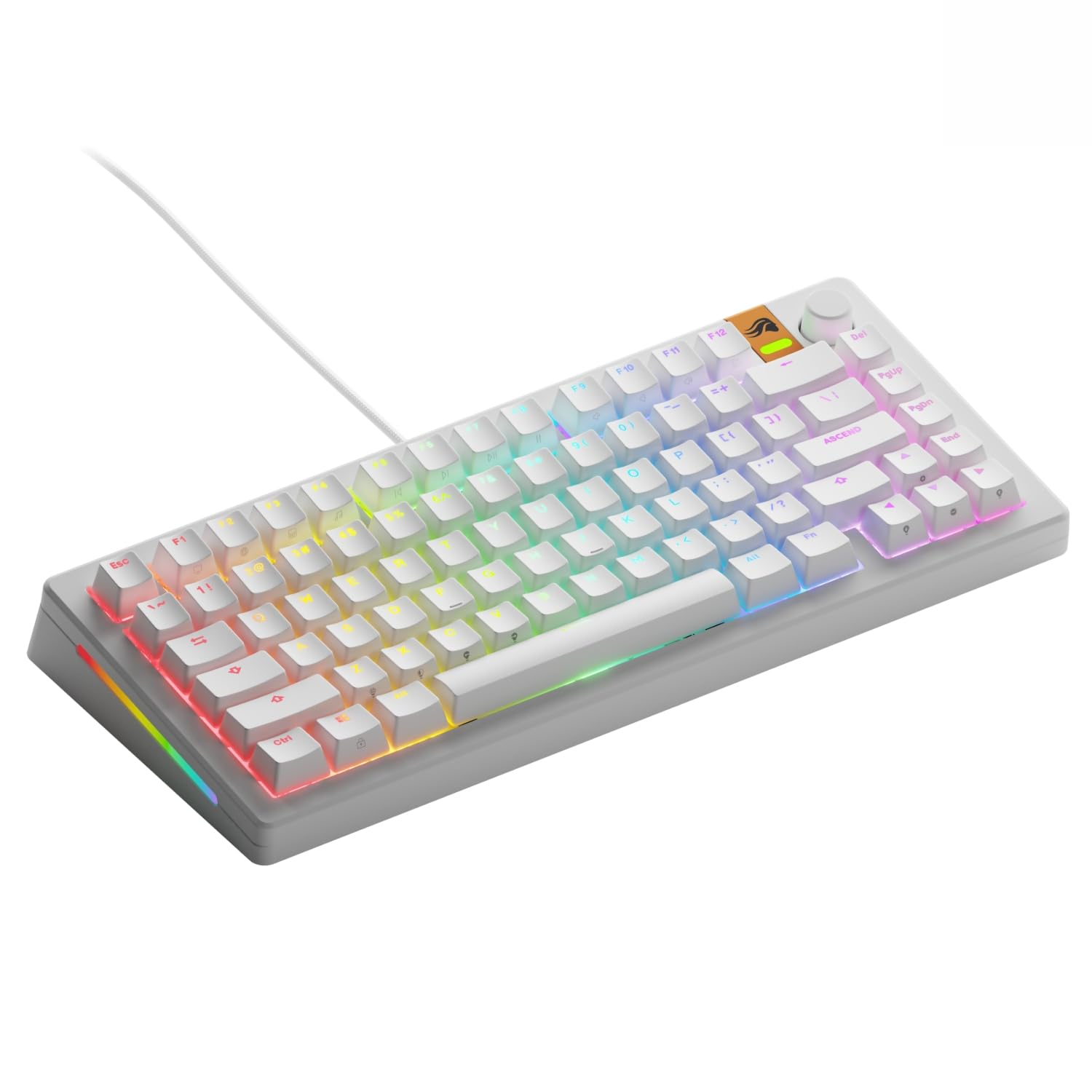
GMMK 3 Prebuilt Mechanical Keyboard Black / 75% / English (US)
The world’s most customizable gaming keyboard capable of over 1 billion possible configurations, offering gamers complete control over every aspect of their experience: Gaming performance, typing experience and aesthetics.
The world’s most customizable gaming keyboard capable of over 1 billion possible configurations, offering gamers complete control over every aspect of their experience: Gaming performance, typing experience and aesthetics.
The world’s most customizable gaming keyboard capable of over 1 billion possible configurations, offering gamers complete control over every aspect of their experience: Gaming performance, typing experience and aesthetics.
The world’s most customizable gaming keyboard capable of over 1 billion possible configurations, offering gamers complete control over every aspect of their experience: Gaming performance, typing experience and aesthetics.
in 5 offers
The lowest price for GMMK 3 Prebuilt Mechanical Keyboard Black / 75% / English (US) right now is $99.00 at Scorptec, compared across 5 retailers.
The all-time low was $31.00 on 27 June 2025 — today's price is 219% above the lowest ever. It has been notably cheaper before — worth setting a price alert.
Prices last updated 11 Oct 2026.
Last updated at 11/10/2026 10:03:31
Glorious Gaming - GMMK 3 Custom Mechanical Gaming Keyboard with Knob, 75% Tenkeyless Keyboard, Modular Gasket System, Doubleshot PBT Keycaps, Aluminum
Affiliate Disclosure: We may receive a small commission for purchases made through this link at no extra cost to you. This helps support our site. Thank you!
Glorious GMMK 3 75 RGB Black Prebuilt Mechanical Keyboard, Fox SW
Delivery $17
Glorious GMMK 3 75% Prebuilt Wired Gaming Keyboard (Black)
Delivery $12.99
Glorious GMMK 3 75% Pre-Built Wired Fox Switch Gaming Keyboard - Black
Delivery between Tue – Fri $15.90
Glorious Gmmk 3 75% Prebuilt Keyboard - Black
Free delivery
Affiliate Disclosure: We may receive a small commission for purchases made through this link at no extra cost to you. This helps support our site. Thank you!
originally posted on bestbuy.com
Which mechanical keyboard is the right mechanical keyboard is something that varies from person to person. Finding the right balance between ergonomics, noise level, and just general feel can take a lot of trial and error. So it's not too surprising that some have decided to build their own rather than buy something off the shelf. Glorious is one of many companies that came about trying to cater to that subset of the market. And while the GMMK 3 doesn't require you to assemble it yourself, you can still see that same mindset being applied everywhere in the product. At its core this remains a kit keyboard, with all the positives (and negatives) that come with that.So the first question many will likely have is how good a keyboard is it. To that I have to say that ... MoreWhich mechanical keyboard is the right mechanical keyboard is something that varies from person to person. Finding the right balance between ergonomics, noise level, and just general feel can take a lot of trial and error. So it's not too surprising that some have decided to build their own rather than buy something off the shelf. Glorious is one of many companies that came about trying to cater to that subset of the market. And while the GMMK 3 doesn't require you to assemble it yourself, you can still see that same mindset being applied everywhere in the product. At its core this remains a kit keyboard, with all the positives (and negatives) that come with that.So the first question many will likely have is how good a keyboard is it. To that I have to say that it is a good keyboard. Not a great keyboard. The default lighting profile has nothing that can indicate if any of the lock keys are on or not, requiring you to go in and program one for yourself if you want that. It's got a fairly basic (if stylish) ABS case that's got some flex to it. The ABS doubleshot keycaps are very sturdy and pleasantly textured, but feel somewhat generic. And the RGB customization has some very neat preset effects showing that the hardware is capable of some very impressive light shows, but is overall fairly poorly designed and less feature rich than competing products (though it will likely end up being compatible with them, so I don't feel it's something to hold against it.) You also get a set of keycaps that can be used to quickly convert it to the Apple keyboard layout, and a toggle switch that lets you switch between Windows and MacOS modes. If the out of the box experience was all it offered, I'd say it was a solid 4 stars.The thing is of course that what you get out of the box is not so much the full product as it is the base for whatever you want to build. The two accessory boxes contain a small toolkit, some spare parts, and some samples of different switches offered by Glorious that you can use to swap out the included lubed linear switches. If none of them fit your fancy though that's not a problem at all, as it's likely any of the various Cherry MX switches and clones will work in this chassis since they all share the same basic case design and pin layout. And actually working on the keyboard is a delight. It's held together with 8 screws hidden behind friction fit rubber feet, and comes apart very neatly. Said screws are also all threaded into metal inserts rather than plastic studs as is standard with many cheaper keyboards, meaning you should be able to disassemble it regularly without risk of breaking anything. Swapping a single switch can be accomplished in just a few minutes, with a full swap probably not requiring more than a few hours (most of which will likely be spent pulling and organizing the keycaps. Even the USB-C port is modular, and capable of being swapped out with a new one should something go wrong with the original part. It's practically begging for someone to 3D print or mill some new bespoke components for it and turn it into hands down the best keyboard that the owner has ever had.So, in summary, it's not a keyboard for everybody but, with a little effort, can become the keyboard for anybody. If you feel like you're the kind of person to put in that effort, it's an easy recommendation.
originally posted on bestbuy.com
TLDR:The Glorious brand GMMK 3 is a new full-size, wired mechanical keyboard with hot-swappable switches that are easily customizable. It has linear switches with great feeling keystrokes, full adjustable RGB lighting, a plug-in USB-C to USB-A wire, and is great for both gaming & typing. Windows 10+ & Mac OS 10.11+ installs it instantly. It has an aluminum chassis, supplied with tools to swap keys, extra switches, & other hardware. It has a fast-acting rotary volume/ mute/ video control/ scrolling knob. It is stable on a desk surface with durable silicon feet throughout. It works great!Glorious has available CORE software to control the RGB lighting functions per the supplied written documentation packed in the beautiful yellow fully recyclable cardboard box. ... MoreTLDR:The Glorious brand GMMK 3 is a new full-size, wired mechanical keyboard with hot-swappable switches that are easily customizable. It has linear switches with great feeling keystrokes, full adjustable RGB lighting, a plug-in USB-C to USB-A wire, and is great for both gaming & typing. Windows 10+ & Mac OS 10.11+ installs it instantly. It has an aluminum chassis, supplied with tools to swap keys, extra switches, & other hardware. It has a fast-acting rotary volume/ mute/ video control/ scrolling knob. It is stable on a desk surface with durable silicon feet throughout. It works great!Glorious has available CORE software to control the RGB lighting functions per the supplied written documentation packed in the beautiful yellow fully recyclable cardboard box. BTW, I kept the box!Full RGB backlighting for a customizable lighting experience. Even with no CORE software download, there are several Fn (Function) keys that invoke preset RGB color selections and activities of motion. One can choose to select a single color or multi color or moving multi color patterns. Brightness can also be adjusted using other FN and the cursor control keys. Very nice.I chose to keep it a full yellow illumination to coordinate with the yellow keyboard color I chose for my gaming laptop I am using it with.Durable build with a 100% aluminum body. Using the GMMK 3 never feels flimsy or lightweight. The whole device rests securely with 8 silicon feet at the bottom as well as silicon on the 2 elevator tabs on the back that raise the keyboard per preference. Each keycap is GPBT double hot molded so that they will never fade or become shiny while letting the RGB colors shine through, per the Glorious box description. They look and feel great in use.N-Key Rollover (NKRO) for accurate key presses. The feel and use during gaming is secure and rock steady. No action is misinterpreted or missed while involved in gaming frenzy.The keyboard uses mechanical switches that are 3 or 5 pin MX compatible; it includes Fox red; keys are Macro-programmable for personalized shortcuts. Keys are programmable for whatever shortcuts one can imagine for both gaming or general computer use while word processing, spreadsheet use or web surfing. Go at it.It has a 2 year warranty, this is detailed in the tiny owner’s booklet with extremely small fonts. gloriousgaming.com/quickstart is where the booklet says more information should be found online. In addition, the booklet informs that the Glorious web site also contains many troubleshooting tips.A QR card is supplied to gain access to a registration page for the 2-year warranty.Included extras: Another included larger double-sided card has pictorial instructions on how to Swap the Switches if so desired and the other color-coded versions of Glorious brand switches available online. The keyboard has 3 extra Raptor, Panda, and Fox color coded switches as well as 4 extra keycaps packed in a small orange switch box with 2 removal tools for Apple Mac users top add Mac shortcut keys to the GMMK 3 to get Mac users included in the fun and for non-gaming tasks. By the way, more and more switches are available online at the firm’s web site and on online sites for a reasonable price for sets of 18 and other quantities. Another orange box has 1 small Phillips screwdriver, screws and other parts for facilitating the changes.Buying this GMMK 3 keyboard is the glorious start of either using it as is upon plugging it in or a seemingly endless opportunity to customize it to individual preference.Highly recommended.
originally posted on bestbuy.com
I was introduced to the company Glorious when I was searching for a keyboard wrist wrest. Most ended up being too thick but Glorious comes along and shows up with the perfectly svelte yet cushioned wrist west and I've been a fan ever since. Queue the new keyboard and I'm again surprised by just how this company seems to cater to the idea of trying to make the perfect item that they no doubt wanted themselves.First, hot swappable switches. I've always just purchased a keyboard on the initial basis of what switches it had. Ducky being one of my favorites, I'm not particular inclined to buy four of them though based on what type of switches I want to utilize for my most used application at any given time (or more so as my needs evolve, I'd have purchased two more if ... MoreI was introduced to the company Glorious when I was searching for a keyboard wrist wrest. Most ended up being too thick but Glorious comes along and shows up with the perfectly svelte yet cushioned wrist west and I've been a fan ever since. Queue the new keyboard and I'm again surprised by just how this company seems to cater to the idea of trying to make the perfect item that they no doubt wanted themselves.First, hot swappable switches. I've always just purchased a keyboard on the initial basis of what switches it had. Ducky being one of my favorites, I'm not particular inclined to buy four of them though based on what type of switches I want to utilize for my most used application at any given time (or more so as my needs evolve, I'd have purchased two more if I'd kept up with my switch preferences.) That said making them hot swappable is PHENOMENAL.In reference to the overall usability of the underlying software to control keybinds and lighting, it's super easy to learn and I was quickly able to run through a lot of options to figure out where I wanted to land. The keybinds were super helpful as I was able to setup some useful binds for both productivity and gaming.In the end, this is an absolute joy a keyboard and the care and development they've put into it shows. I'm going to be quite happy with this as my main keyboard going forward and knowing that if I want to swap out switches as my needs change, it can pivot right along with me.
| Brand | Glorious |
| Model Name | GMMK 3 |
| Series | GMMK 3 |
| Form Factor | Gaming |
| Keyboard Subtype | Gaming keyboard |

Glorious Gaming - GMMK 3 Custom Mechanical Gaming Keyboard with Knob, 75% Tenkeyless Keyboard, Modular Gasket System, Doubleshot PBT Keycaps, Aluminum
Affiliate Disclosure: We may receive a small commission for purchases made through this link at no extra cost to you. This helps support our site. Thank you!
Glorious GMMK 3 75 RGB Black Prebuilt Mechanical Keyboard, Fox SW
Delivery $17
Glorious GMMK 3 75% Prebuilt Wired Gaming Keyboard (Black)
Delivery $12.99
Glorious GMMK 3 75% Pre-Built Wired Fox Switch Gaming Keyboard - Black
Delivery between Tue – Fri $15.90
Glorious Gmmk 3 75% Prebuilt Keyboard - Black
Free delivery
Affiliate Disclosure: We may receive a small commission for purchases made through this link at no extra cost to you. This helps support our site. Thank you!
Which mechanical keyboard is the right mechanical keyboard is something that varies from person to person. Finding the right balance between ergonomics, noise level, and just general feel can take a lot of trial and error. So it's not too surprising that some have decided to build their own rather than buy something off the shelf. Glorious is one of many companies that came about trying to cater to that subset of the market. And while the GMMK 3 doesn't require you to assemble it yourself, you can still see that same mindset being applied everywhere in the product. At its core this remains a kit keyboard, with all the positives (and negatives) that come with that.So the first question many will likely have is how good a keyboard is it. To that I have to say that ... MoreWhich mechanical keyboard is the right mechanical keyboard is something that varies from person to person. Finding the right balance between ergonomics, noise level, and just general feel can take a lot of trial and error. So it's not too surprising that some have decided to build their own rather than buy something off the shelf. Glorious is one of many companies that came about trying to cater to that subset of the market. And while the GMMK 3 doesn't require you to assemble it yourself, you can still see that same mindset being applied everywhere in the product. At its core this remains a kit keyboard, with all the positives (and negatives) that come with that.So the first question many will likely have is how good a keyboard is it. To that I have to say that it is a good keyboard. Not a great keyboard. The default lighting profile has nothing that can indicate if any of the lock keys are on or not, requiring you to go in and program one for yourself if you want that. It's got a fairly basic (if stylish) ABS case that's got some flex to it. The ABS doubleshot keycaps are very sturdy and pleasantly textured, but feel somewhat generic. And the RGB customization has some very neat preset effects showing that the hardware is capable of some very impressive light shows, but is overall fairly poorly designed and less feature rich than competing products (though it will likely end up being compatible with them, so I don't feel it's something to hold against it.) You also get a set of keycaps that can be used to quickly convert it to the Apple keyboard layout, and a toggle switch that lets you switch between Windows and MacOS modes. If the out of the box experience was all it offered, I'd say it was a solid 4 stars.The thing is of course that what you get out of the box is not so much the full product as it is the base for whatever you want to build. The two accessory boxes contain a small toolkit, some spare parts, and some samples of different switches offered by Glorious that you can use to swap out the included lubed linear switches. If none of them fit your fancy though that's not a problem at all, as it's likely any of the various Cherry MX switches and clones will work in this chassis since they all share the same basic case design and pin layout. And actually working on the keyboard is a delight. It's held together with 8 screws hidden behind friction fit rubber feet, and comes apart very neatly. Said screws are also all threaded into metal inserts rather than plastic studs as is standard with many cheaper keyboards, meaning you should be able to disassemble it regularly without risk of breaking anything. Swapping a single switch can be accomplished in just a few minutes, with a full swap probably not requiring more than a few hours (most of which will likely be spent pulling and organizing the keycaps. Even the USB-C port is modular, and capable of being swapped out with a new one should something go wrong with the original part. It's practically begging for someone to 3D print or mill some new bespoke components for it and turn it into hands down the best keyboard that the owner has ever had.So, in summary, it's not a keyboard for everybody but, with a little effort, can become the keyboard for anybody. If you feel like you're the kind of person to put in that effort, it's an easy recommendation.
TLDR:The Glorious brand GMMK 3 is a new full-size, wired mechanical keyboard with hot-swappable switches that are easily customizable. It has linear switches with great feeling keystrokes, full adjustable RGB lighting, a plug-in USB-C to USB-A wire, and is great for both gaming & typing. Windows 10+ & Mac OS 10.11+ installs it instantly. It has an aluminum chassis, supplied with tools to swap keys, extra switches, & other hardware. It has a fast-acting rotary volume/ mute/ video control/ scrolling knob. It is stable on a desk surface with durable silicon feet throughout. It works great!Glorious has available CORE software to control the RGB lighting functions per the supplied written documentation packed in the beautiful yellow fully recyclable cardboard box. ... MoreTLDR:The Glorious brand GMMK 3 is a new full-size, wired mechanical keyboard with hot-swappable switches that are easily customizable. It has linear switches with great feeling keystrokes, full adjustable RGB lighting, a plug-in USB-C to USB-A wire, and is great for both gaming & typing. Windows 10+ & Mac OS 10.11+ installs it instantly. It has an aluminum chassis, supplied with tools to swap keys, extra switches, & other hardware. It has a fast-acting rotary volume/ mute/ video control/ scrolling knob. It is stable on a desk surface with durable silicon feet throughout. It works great!Glorious has available CORE software to control the RGB lighting functions per the supplied written documentation packed in the beautiful yellow fully recyclable cardboard box. BTW, I kept the box!Full RGB backlighting for a customizable lighting experience. Even with no CORE software download, there are several Fn (Function) keys that invoke preset RGB color selections and activities of motion. One can choose to select a single color or multi color or moving multi color patterns. Brightness can also be adjusted using other FN and the cursor control keys. Very nice.I chose to keep it a full yellow illumination to coordinate with the yellow keyboard color I chose for my gaming laptop I am using it with.Durable build with a 100% aluminum body. Using the GMMK 3 never feels flimsy or lightweight. The whole device rests securely with 8 silicon feet at the bottom as well as silicon on the 2 elevator tabs on the back that raise the keyboard per preference. Each keycap is GPBT double hot molded so that they will never fade or become shiny while letting the RGB colors shine through, per the Glorious box description. They look and feel great in use.N-Key Rollover (NKRO) for accurate key presses. The feel and use during gaming is secure and rock steady. No action is misinterpreted or missed while involved in gaming frenzy.The keyboard uses mechanical switches that are 3 or 5 pin MX compatible; it includes Fox red; keys are Macro-programmable for personalized shortcuts. Keys are programmable for whatever shortcuts one can imagine for both gaming or general computer use while word processing, spreadsheet use or web surfing. Go at it.It has a 2 year warranty, this is detailed in the tiny owner’s booklet with extremely small fonts. gloriousgaming.com/quickstart is where the booklet says more information should be found online. In addition, the booklet informs that the Glorious web site also contains many troubleshooting tips.A QR card is supplied to gain access to a registration page for the 2-year warranty.Included extras: Another included larger double-sided card has pictorial instructions on how to Swap the Switches if so desired and the other color-coded versions of Glorious brand switches available online. The keyboard has 3 extra Raptor, Panda, and Fox color coded switches as well as 4 extra keycaps packed in a small orange switch box with 2 removal tools for Apple Mac users top add Mac shortcut keys to the GMMK 3 to get Mac users included in the fun and for non-gaming tasks. By the way, more and more switches are available online at the firm’s web site and on online sites for a reasonable price for sets of 18 and other quantities. Another orange box has 1 small Phillips screwdriver, screws and other parts for facilitating the changes.Buying this GMMK 3 keyboard is the glorious start of either using it as is upon plugging it in or a seemingly endless opportunity to customize it to individual preference.Highly recommended.
I was introduced to the company Glorious when I was searching for a keyboard wrist wrest. Most ended up being too thick but Glorious comes along and shows up with the perfectly svelte yet cushioned wrist west and I've been a fan ever since. Queue the new keyboard and I'm again surprised by just how this company seems to cater to the idea of trying to make the perfect item that they no doubt wanted themselves.First, hot swappable switches. I've always just purchased a keyboard on the initial basis of what switches it had. Ducky being one of my favorites, I'm not particular inclined to buy four of them though based on what type of switches I want to utilize for my most used application at any given time (or more so as my needs evolve, I'd have purchased two more if ... MoreI was introduced to the company Glorious when I was searching for a keyboard wrist wrest. Most ended up being too thick but Glorious comes along and shows up with the perfectly svelte yet cushioned wrist west and I've been a fan ever since. Queue the new keyboard and I'm again surprised by just how this company seems to cater to the idea of trying to make the perfect item that they no doubt wanted themselves.First, hot swappable switches. I've always just purchased a keyboard on the initial basis of what switches it had. Ducky being one of my favorites, I'm not particular inclined to buy four of them though based on what type of switches I want to utilize for my most used application at any given time (or more so as my needs evolve, I'd have purchased two more if I'd kept up with my switch preferences.) That said making them hot swappable is PHENOMENAL.In reference to the overall usability of the underlying software to control keybinds and lighting, it's super easy to learn and I was quickly able to run through a lot of options to figure out where I wanted to land. The keybinds were super helpful as I was able to setup some useful binds for both productivity and gaming.In the end, this is an absolute joy a keyboard and the care and development they've put into it shows. I'm going to be quite happy with this as my main keyboard going forward and knowing that if I want to swap out switches as my needs change, it can pivot right along with me.
I have tried all the different kinds of gaming keyboards, wired versus wireless, compact versus full sized, and everything in between. I find that the Glorious GMMK 3 features and key stroke customization combined with the full size footprint is a perfect fit for my gaming and everyday typing preferences.In the box is the keyboard, detachable charging cable (USB-A to USB-C), 4 macOS alternative keycaps, 3 sample switches, extra screws, extra bumpers, screw driver, key puller, switch puller, and instructions. You will also want to get the companion software, Glorious CORE with GLED Sync. Setup was plug and play, but make sure you check to ensure the latest drivers are installed through the software. You can also register your profile through the software so you can ... MoreI have tried all the different kinds of gaming keyboards, wired versus wireless, compact versus full sized, and everything in between. I find that the Glorious GMMK 3 features and key stroke customization combined with the full size footprint is a perfect fit for my gaming and everyday typing preferences.In the box is the keyboard, detachable charging cable (USB-A to USB-C), 4 macOS alternative keycaps, 3 sample switches, extra screws, extra bumpers, screw driver, key puller, switch puller, and instructions. You will also want to get the companion software, Glorious CORE with GLED Sync. Setup was plug and play, but make sure you check to ensure the latest drivers are installed through the software. You can also register your profile through the software so you can pull down any custom lighting / key assignment profiles when swapping computers.Taking apart the keyboard is easy, there are eight screws on the bottom and then you can get to each layer for complete user customization. Going bottom up is a gasket system where placement of the blue gaskets can be customized, this changes how cushioned the keystrokes feel or how much flex you feel, default is around the perimeter for a uniform feel but up to user preference. Next is the dampening foam that removes the resonance (key echo) created inside the case if it weren't there. Then the key signal interface that allows you to hot swap the switches (versus hard wired to the board via solder). Take note this layout is compatible for both 3 and 5 pin mechanical switches so you have options to plug and play different switch styles. Last is the aluminum switch plate, lubricated Fox switches, and PBT keycaps, all combined in a polymer case. This build feels substantial, because it is at 2.5 lbs, the key caps are slightly concave, with a sturdy yet smooth feel that attaches snugly to the switch. I find that out of the box, this build style offers optimal switch response while feeling uniform travel throughout the stroke.The next feature to note is the RGB lighting, it is BRIGHT due to clear switch bodies, and controlled through the Glorious CORE software. The software allows for customization of RGB profiles, with up to three layers available to stack for unique profiles or customized color by key. Other settings include key binding, allowing for keys to be repositioned or take on different functions based on user preference. I've had some fun with key lighting and binding combinations to see how I can improve my response timing by changing trigger keys and making them a contrasting color. There is also a scroll knob in the upper right corner, this can be programmed for lighting, volume, scrolling, or whatever else you can think to assign to it. Another gamer friendly feature is that the software offers polling rates from 125Hz up to 1000Hz, pending what your machine can support. Second is the input latency ranging from 2ms up to 16ms. Both of these settings will impact how quick the machine recognizes the key stroke and responds, again your mileage may vary based on your build, but I find that the key to response feels instantaneous for all game types.The last thing to note, which I think is a great marking tactic is that the extra switches included are the Panda switch which is more of an older style, round movement "thocky" sounding switch, and the Raptor switch which I find to be a bit stiff with a crisp feel and "clicky" sound. There is also another Fox switch, which is great to have a backup. Otherwise there is a switch guide for those who really want to experiment with tactile feel, sound, and force of the different switch styles that Glorious offers.Bottom line is that this build, out of the box, will appeal to most gamers. If you have a well defined sense of how you want your keys to feel, the sensitivity, latency, and sound, this keyboard will allow for you to customize to your liking, without spending a fortune, and the plug and play switches means that customization takes seconds not hours.
While I realize most mechanical keyboards are marketed to gamers, I am a touch typist who grew up with mechanical keyboards and still do my best typing on a mechanical keyboard. One of the things I find frustrating, however, is the lack of mechanical keyboards that support a Mac layout while also providing other fun or desired features (such as LED backlighting, a full 108-key layout, or "clicky" switches). This keyboard delivers on all fronts, in my opinion.To begin, the keyboard is well constructed. It has a little heft, without being too heavy (although, I always wondered why someone would care how heavy a keyboard is because it just sits on your desk and doesn't move). The rubber feet prevent the keyboard from sliding around on the desk and the rear kickstands ... MoreWhile I realize most mechanical keyboards are marketed to gamers, I am a touch typist who grew up with mechanical keyboards and still do my best typing on a mechanical keyboard. One of the things I find frustrating, however, is the lack of mechanical keyboards that support a Mac layout while also providing other fun or desired features (such as LED backlighting, a full 108-key layout, or "clicky" switches). This keyboard delivers on all fronts, in my opinion.To begin, the keyboard is well constructed. It has a little heft, without being too heavy (although, I always wondered why someone would care how heavy a keyboard is because it just sits on your desk and doesn't move). The rubber feet prevent the keyboard from sliding around on the desk and the rear kickstands help elevate the back of the keyboard to a comfortable typing angle. The keyboard is not a low profile keyboard; rather, it is what I would consider to be a typical thickness. It is also a full 108-key, full sized layout, which I love. True, it takes up a little more space on the desk, but as a touch typist, I am used to a full-sized layout, including the arrow keys and the numeric keypad. Everything is where it should be.I really like the lighting effects in that each key has its own individual LED lighting and the lighting effects can be switched using the firmware (and keystroke combinations) on the keyboard itself without having to use Glorious's proprietary application for programming the keyboard. Unfortunately, documentation is a little sparse, but it appears as though the keyboard contains three different memory slots/positions that are toggled by a switch on the back of the keyboard and allow the user to rapidly switch between three pre-determined/pre-programed custom lighting layouts. (The switch is a little "subtle," which can make it difficult to "land" on the middle selection. I would recommend having your preferred settings in memory slot 1 or 3, which is a simple swipe over to the left or the right, without having to try to feel for that subtle stop in between.)There is a volume dial on the keyboard that is very easy and intuitive to use (without having to install any special software). The dial also has a satisfying click with each increment in the rotation that correlates well with the volume control on my computer. Give the dial a click, and the volume mutes (and unmutes with another push). Nice!One nice inclusion with the keyboard was a few extra switches of different types in the box. That gave me an opportunity to actually try some of the key switches that Glorious makes to see how they feel. (Which is much better than listening to an audio recording online or having to guess from a written description how the key will feel when typing.) It took me all of about two seconds to realize that I needed to change the key switches in my unit from the Fox linear switches that came installed in the keyboard to the Raptor for a tactile key that gives that little "clicky" sound that I have come to know and love. (They also have a Panda switch that provides tactile feel, but without the clicky sound.) There was a card included with the keyboard that listed eight different switches that Glorious makes. Unfortunately, they only included samples of three of the switches (one of which was already installed in the keyboard). It would have been nice to have one of each. Then again, this is the first time I receive a mechanical keyboard that provided any samples of other switches at all, so I am not complaining. Another interesting thing I found out accidentally is that, when purchasing replacement switches, they are packaged in boxes of 36 switches. When ordering the switches online, however, I did not see anything in the product description (or clearly denoted anywhere else) that the box I was ordering only had a third of the switches I actually needed for a 108-key layout. If you find yourself wanting to replace all the switches on the keyboard, be mindful that you will need to order several boxes.The process of removing the keycaps, pulling out the switches, installing the new switches, and replacing the keycaps was a piece of cake (and actually a little fun). I especially like the fact that, if a switch goes bad, I can replace that single switch without having to toss the entire keyboard. Score! The baseplate of the keyboard itself even had a legend on it to indicate which character or key function is associated with each spot. Given the standard keyboard layout, that is not anything I would have considered critical, but it was still nice to see.Lastly, this keyboard accommodates both Macs and Windows PCs, which is awesome. They also included replaceable keycaps for the Mac-centric Command and Option buttons (to replace the Windows and function keys from a standard Windows keyboard layout).Now, for the minor annoyances...If I was solely a PC user, I would be hard pressed to find anything wrong with this keyboard. Now that I have my new Raptor switches installed, it is a joy to use and type on. Because I am a Mac user, however, there were a few things that I would suggest for improvement.First, while Command and Option keys were included, It would have been nice if they included the little Mac-centric icons associated with those keys. Also, Macs have a different layout for their function keys and it would have been nice to have replaceable keycaps for those keys included with the keyboard. Then again, even though switching over to a Mac layout was as easy as flipping a switch on the back of the keyboard, the function keys do not function as one would expect for a Mac. F1 and F2 do not control screen brightness, F7 to F9 do not control media, F10 through F12 do not control the audio (which is not as critical given the volume dial on the keyboard). Additionally, the customization software that is available for the keyboard is a Windows PC-only option. I would really love to see a Mac equivalent program that allows me to customize the keyboard for my Mac (and maybe even change the coding for the function keys so they work as one would expect for a Mac).The second challenge I had was that documentation was pretty scarce. While this is a keyboard, meaning it is pretty straightforward, it took me a while to figure out the memory toggle switch on the back, as well as the switch between PC and Mac mode as the little icons they have on the back are almost impossible to see (the blend into the finish on the keyboard shell).Lastly, the keyboard included a USB-C to USB-A cable. A lot of computers (and laptops, in particular) do not have USB-A ports anymore. Why would they not include a USB-C to USB-C cable (either along with the C to A cable or instead of the C to A cable)? That decision was a little odd to me.Ultimately, though, despite these minor Mac-centric hiccups, I am hard pressed to find anything I do not like about the keyboard. At the end of the day, it is a keyboard, which means I should be able to type on it to my heart's content and find the experience to be comfortable (especially considering that I have a desk job and can type for hours on end). The customizability of the keyboard given the ability to replace switches and keycaps, along with its full-size layout and individual key LEDs, really makes this keyboard a winner for me. Maybe I would have given 4.5 stars if half-stars were allowed, but they are not and there are not enough negatives for me to round down to 4 stars versus rounding up to 5 stars. Additionally, if I was not a Mac user, most of my complaints would go away entirely. So, with that being said... This is an awesome keyboard that I would happily recommend to anyone!
Glorious markets their gaming keyboards as being highly customizable and after using it for a few days, I would strongly agree with this claim. I am very favorably impressed by the build quality and customization potential of this keyboard. I find it useful for gaming and non gaming applications.The first thing I noticed was the weight of the box when it arrived. It felt much heavier than your standard keyboard, which is a good sign for a mechanical keyboard. This is due to the partial aluminum construction. The box was low profile and just large enough to contain and protect its contents. As I suspected the keyboard is much heavier than your standard plastic keyboard and feels like it is capable of absorbing vigorous key manipulations. This model is full size ... MoreGlorious markets their gaming keyboards as being highly customizable and after using it for a few days, I would strongly agree with this claim. I am very favorably impressed by the build quality and customization potential of this keyboard. I find it useful for gaming and non gaming applications.The first thing I noticed was the weight of the box when it arrived. It felt much heavier than your standard keyboard, which is a good sign for a mechanical keyboard. This is due to the partial aluminum construction. The box was low profile and just large enough to contain and protect its contents. As I suspected the keyboard is much heavier than your standard plastic keyboard and feels like it is capable of absorbing vigorous key manipulations. This model is full size with a ten key pad. I prefer this layout due to the functionality it provides as compared to a compact keyboard.This version of the GMM 3 uses liner switches which Glorious labels as Fox. I found the key presses to be fast, smooth, and precise. If you have never used a high end gaming keyboard you will find the key presses to be substantially superior to a basic keyboard. I would describe the key travel as medium. I am using the keyboard to write this review and intend to use it as my primary keyboard.A software download is required to fully activate and control the keyboard. Until I installed the Glorious Core App the keyboard was functional but not illuminated. Once the Glorious Core App was installed, the keyboard became illuminated and I had full access to the nearly infinite level of customization. Each key is customizable by illumination and function. The knob controls the volume level by default but can be changed to control video playback or scrolling. Using the software is very intuitive and I had no problem making changes to the default settings.The LED illumination is excellent. The light is bright by default but can be adjusted up and down to suit taste and gaming environment. The illumination colors are the full gamut of the color wheel. I enjoyed the default random pattern and plan to leave it that way for the time being. There is a yellow 3 position switch on the rear of the keyboard which selects different illumination presets.Included in the box is a nice selection of accessories to include a USB-C to USb-C cable, macOS keycaps, 3 extra switches, and key changing tools. The USB cable is braided and feels very high quality. The macOS keycaps make the keyboard compatible with Windows and Mac products. There is one extra Fox switch and the other two mechanical switches are samples of Panda and Raptor. There is a yellow 2 position switch on the rear of the keyboard that seems to toggle between Mac and Windows mood, but I was not able to confirm this at the time of this writing.I used the keyboard to play some of my favorite games on BattleNet and Steam. I found it to be excellently suited to its primary purpose of gaming. As long as I didn't miss the keys by fault of my own, each keystroke was swiftly and authoritatively registered without fail. The reliability and function of the gaming keyboard is off the charts good! As I stated earlier I love this keyboard so much that it is now my primary keyboard for gaming and non gaming, it is that good.
I have been using the Glorious GMMK 3 for a few days now, and it is absolutle spectacular! Even though it is aimed at gamers and gaming, I am "forced" to also use it for my work in finance & accounting through my workday. This thing is incredible! The keystrokes are precise, pretty silent (for a full size keycap mechanical keyboard), comfortable, and amazingly customizable! Glorious even includes three addition switches of different varieties to try out, the Mac Options and Command keycaps, key puller, and switch puller in the box. Their software is very intuitive and take almost no time to figure out where everything is to customize your keyboard to your liking, including a link to their website to pick up other key caps and switches, decks, chassis, lighting, ... MoreI have been using the Glorious GMMK 3 for a few days now, and it is absolutle spectacular! Even though it is aimed at gamers and gaming, I am "forced" to also use it for my work in finance & accounting through my workday. This thing is incredible! The keystrokes are precise, pretty silent (for a full size keycap mechanical keyboard), comfortable, and amazingly customizable! Glorious even includes three addition switches of different varieties to try out, the Mac Options and Command keycaps, key puller, and switch puller in the box. Their software is very intuitive and take almost no time to figure out where everything is to customize your keyboard to your liking, including a link to their website to pick up other key caps and switches, decks, chassis, lighting, cables, you name it! The GMMK 3 is clearly meant to be YOUR keyboard for whatever you need it to do and have the ability to adapt to your changing lifestyle and preferences. This will be you keyboard for as long as you'll have it, and Glorious will provide all of the options you want to make it yours!I would DEFINITELY recommend this for anyone looking for an amazing mechanical keyboard that you can use right out of the box, but also customize and adapt later on if you'd like to. Excellent typing experience, great quality construction (still plastic, but sturdy!), excellent lighting, and nice software to get it running as you'd like it to. Amazing value and the perfect choice for work and play at this price point!
I’m really liking what I’ve seen from this keyboard. Being full-size, it’s great to use for everything from gaming to writing, and I always love having that number pad for extra key binds. The build quality is pretty good, and it feels nice to use. It *sounds* nice to use, honestly. Both the switches and key caps are good quality. I also appreciate that it has a Mac and Windows mode, with the included key caps to convert it to a Mac keyboard.I honestly don’t have any complaints about the physical product. It does everything I could really want it to. However, I’m less keen on the software. For one, there’s no Windows Dynamic Lighting support. I’d really prefer it if there was, since syncing up all my RGB devices is a real pain. The software also feels a little ... MoreI’m really liking what I’ve seen from this keyboard. Being full-size, it’s great to use for everything from gaming to writing, and I always love having that number pad for extra key binds. The build quality is pretty good, and it feels nice to use. It *sounds* nice to use, honestly. Both the switches and key caps are good quality. I also appreciate that it has a Mac and Windows mode, with the included key caps to convert it to a Mac keyboard.I honestly don’t have any complaints about the physical product. It does everything I could really want it to. However, I’m less keen on the software. For one, there’s no Windows Dynamic Lighting support. I’d really prefer it if there was, since syncing up all my RGB devices is a real pain. The software also feels a little obtuse to use - I struggled a bit trying to get settings to stick the first time I changed the lighting. I do like that there’s options to save profiles and change the polling rate and things like that, but it honestly feels a little barebones.I do think that with improvements to the control software, this would be an amazing keyboard. Again, the fact that it’s modular is just so *nice*. I enjoy mixing and matching switches to make different types of keys feel different, and I love that you can actually do that with this keyboard. I’ve already changed some of the switches for some of my most important keys or the keys I tend to hit by accident.Overall, I really like this keyboard. It feels good, it makes for a good gaming experience even on games with ridiculous numbers of keybinds that need assigning, and while I’m not in love with the control software it’s at least functional. I’d absolutely recommend this, unless Dynamic Lighting is non negotiable for you.
First of all, this is an absolutely gorgeous keyboard; it doesn't hurt your confidence to have this beauty in front of you as you pummel an adversary. I did go from a much louder keyboard to this Glorious GMMK3, although the feel of this one is similar to my previous favorite except the keystrokes seem a little softer. I definitely like the sound level, perfect to know you hit the key but not distracting. Note this is a wired keyboard which I happen to prefer for gaming situations. Also, I like the keyboard flatter so I do not use it with the flip out feet deployed. But this is personal preference.You get a full-size keyboard with knob and lights. You also get something else that is very important – you get several sample keys (and tools to remove & insert). This ... MoreFirst of all, this is an absolutely gorgeous keyboard; it doesn't hurt your confidence to have this beauty in front of you as you pummel an adversary. I did go from a much louder keyboard to this Glorious GMMK3, although the feel of this one is similar to my previous favorite except the keystrokes seem a little softer. I definitely like the sound level, perfect to know you hit the key but not distracting. Note this is a wired keyboard which I happen to prefer for gaming situations. Also, I like the keyboard flatter so I do not use it with the flip out feet deployed. But this is personal preference.You get a full-size keyboard with knob and lights. You also get something else that is very important – you get several sample keys (and tools to remove & insert). This way you can test which factors you want in the key response: smooth linear, crisp clicky sound, tactile feel etc. I noticed a card was included that mapped out additional key styles that you might consider – smart of the engineers to include these sample keys and info – tip of my cap to them. On the back of this card are insert/remove directions.You can unlock an extra year of warranty if you register this product, so don’t forget to do that. There is a QR code card for you to scan to do the registration easily – another tip of the cap.The Quick Start Guide is short and sweet. You just plug and play. All the required drivers will install automatically. You will need to go to a link for more details on lighting and performance stuff. I installed the Glorious Core control code to change lighting effects, set up macros, change polling rate, change latency, set up desired ‘keybinding’ and link you to the detailed user guide. Everything is laid out logically.I am very impressed and pleased with this keyboard. Design and functionality is top rate. The CNC designed aluminum top frame can handle a lot of hard strokes, it is super rugged. I would highly recommend getting this excellent keyboard.
I have owned a LOT of keyboards. From membrane, lo pro chiclet style and mechanical switches but never a customizable keyboard. My usual preference came from the likes of Logitech, Corsair, Razer and even Microsoft to name a few. I come to discover that people make their own full custom keyboards. That seems a bit much for me. But the idea of being able to customize some aspects to the keys was interesting to me. I don't care much for RGB lighting in my keyboard. I find it too distracting when the keys are pulsating different colors when I am typing or working on something. I prefer a static easy to read color while working, but I do appreciate being able to designate certain keys a different color when I play a game. The Glorious CORE software is easy to navigate ... MoreI have owned a LOT of keyboards. From membrane, lo pro chiclet style and mechanical switches but never a customizable keyboard. My usual preference came from the likes of Logitech, Corsair, Razer and even Microsoft to name a few. I come to discover that people make their own full custom keyboards. That seems a bit much for me. But the idea of being able to customize some aspects to the keys was interesting to me. I don't care much for RGB lighting in my keyboard. I find it too distracting when the keys are pulsating different colors when I am typing or working on something. I prefer a static easy to read color while working, but I do appreciate being able to designate certain keys a different color when I play a game. The Glorious CORE software is easy to navigate and can support 3 layers of profiles at any given time. One thing I found missing was the omission of NumLock/Caps/Scroll Lock LEDs. Even without dedicated LEDs, it would've been nice if those keys themselves got brighter when they are activated.The build quality is adequate for a deck that is mainly plastic. No creaks and minimal flex. There switch up next to the USB C port that will toggle between a Windows or Mac set up. Glorious was thoughtful enough to include both Windows and Mac specific keys. Speaking of a USB C port, a good length (~4-5'_ braided USB C to A cable is included and you can always place it with a shorter, longer or even coiled cable. On the bottom of the keyboard you will find risers with just one taller angle of adjustment. I am surprised that angle was not greater with more granular control.The GMMK 3 comes with double shot PBT keycaps which feel nice. I am curious to see how long they will last before they develop smooth spots. I have smoothed out other PBT caps in roughly a year of daily work week usage.The keyboard I got was the the Fox Smooth Linear lubed switches, which feel great, have nice smooth actuation to them and have nice satisfying bounce to them. Not unlike Cherry MX Red switches. I liked that Glorious included several samples of other key switches to give a taste of different available switches. Different sets of switches are about $35 on Glorious's website. With the included switch pulling tools it is easy to get them off and replaced with a new set OR even mix and match certain switches for different areas of the keyboard. I like the idea of making my NUM pad clicky while leaving the letters smooth. I also see that I can further tear down the keyboard and change the switch plates ranging from polycarbonate or brass which is supposed to change how the keys will sound while typing.As with many other keyboards I have come to prefer to over the years is the inclusion of a volume knob over buttons to control volume level. The Gloriousone ups the knob by making it mode button which will allow you to change profiles. The LED to the left of the knob will change colors depending on the profile you are current set to. the led has a magnetic plate so I guess something can be 3D printed and replace it with something else? The volume knob itself can also be pull right off and a knurled knob can also be purchased.Pretty much every aspect of the keyboard can be customized which could be fun. Glorious does make it a bit easier to dip your feet into the world of full custom keyboards. I am interested in seeing how long the PBT key caps will last me and how I will mod my first customizable keyboard.
| Brand | Glorious |
| Model Name | GMMK 3 |
| Series | GMMK 3 |
| Form Factor | Gaming |
| Keyboard Subtype | Gaming keyboard |