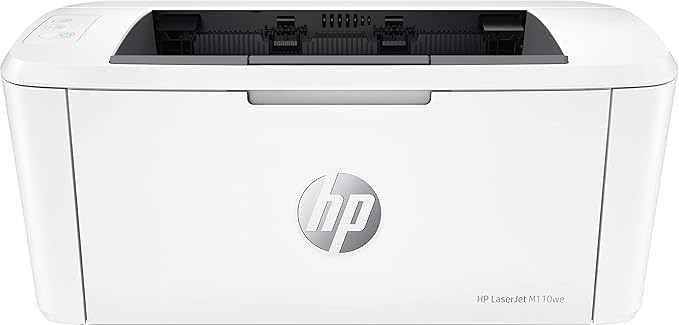
HP LaserJet M110we 20ppm A4 Wireless Mono Laser Printer
An efficient, high-quality laser printer that fits your space and budget. Get high-quality scanning, and share to Dropbox, Google Drive or the Cloud, from your phone with HP Smart app. Count on professional quality laser printing and seamless setup.
An efficient, high-quality laser printer that fits your space and budget. Get high-quality scanning, and share to Dropbox, Google Drive or the Cloud, from your phone with HP Smart app. Count on professional quality laser printing and seamless setup.
An efficient, high-quality laser printer that fits your space and budget. Get high-quality scanning, and share to Dropbox, Google Drive or the Cloud, from your phone with HP Smart app. Count on professional quality laser printing and seamless setup.
An efficient, high-quality laser printer that fits your space and budget. Get high-quality scanning, and share to Dropbox, Google Drive or the Cloud, from your phone with HP Smart app. Count on professional quality laser printing and seamless setup.
in 12 offers
The lowest price for HP LaserJet M110we 20ppm A4 Wireless Mono Laser Printer right now is $101.88 at eBay.com.au, compared across 9 retailers.
The all-time low was $98.00 on 8 July 2026 — today's price is 4% above the lowest ever. This is at or near its all-time low — a good time to buy.
Prices last updated 29 Sept 2026.
Last updated at 29/09/2026 06:09:41
HP LaserJet M110we Wireless Black & White Laser Printer, 21 ppm, HP+ Eligible, Energy Star Certified, Compact Design, USB & Wi-Fi Connectivity, 7MD66E
Affiliate Disclosure: We may receive a small commission for purchases made through this link at no extra cost to you. This helps support our site. Thank you!
HP LaserJet M110we Wireless Black & White Laser Printer, 21 ppm, HP+ Eligible, Energy Star Certified, Compact Design, USB & Wi-Fi Connectivity, 7MD66E
Delivery $29.90
Affiliate Disclosure: We may receive a small commission for purchases made through this link at no extra cost to you. This helps support our site. Thank you!
HP LaserJet M110we Printer with 6 Months of Instant Toner Included with HP +
Affiliate Disclosure: We may receive a small commission for purchases made through this link at no extra cost to you. This helps support our site. Thank you!
Hp Laserjet M110we Wireless Monochrome Laser Printer Used Excellent
Delivery $46.99
Affiliate Disclosure: We may receive a small commission for purchases made through this link at no extra cost to you. This helps support our site. Thank you!
Hp Laserjet M110we A4 Mono Laser Printer+wi-fi 20ppm 7md66e World
Delivery $29.95
Affiliate Disclosure: We may receive a small commission for purchases made through this link at no extra cost to you. This helps support our site. Thank you!
HP LaserJet M110we Mono Laser Printer
Delivery between 2–7 Oct $20.05
HP Laserjet M110WE A4 Mono Laser Printer+Wi-Fi 20PPM 7MD66E #141A W1410A Toner
Delivery between 2–8 Oct $22.65
HP LaserJet M110WE, A4 Mono Laser Printer
30-day returns
Hewlett Packard HP LaserJet M110we Loyal EMU2 Wireless Monochrome Laser Printer [7MD66E]
Delivery $29.95
HP LaserJet M110we 20ppm A4 Wireless Mono Laser Printer 7MD66E
Free delivery between 1–7 Oct
originally posted on walmart.com
This printer literally came out of the box ready to use. The setup guide that comes in the box is super easy to read and understand. All I had to do was literally take the printer out of the box, plug it in, remove some protective tape and download the HP Smart software on my phone by taking a picture of the QR code in the Setup Guide. It was that simple! It even took only a minute to get the HP Smart Software loaded on my computer as well. The printer itself is very fast and quiet and being so small doesn’t take up much real estate on my desk at all. It works seamlessly from a phone print job to a computer one. The second I press print on any device, this printer starts working and spits out the sheet in record time. The only thing I was not happy about was the ... MoreThis printer literally came out of the box ready to use. The setup guide that comes in the box is super easy to read and understand. All I had to do was literally take the printer out of the box, plug it in, remove some protective tape and download the HP Smart software on my phone by taking a picture of the QR code in the Setup Guide. It was that simple! It even took only a minute to get the HP Smart Software loaded on my computer as well. The printer itself is very fast and quiet and being so small doesn’t take up much real estate on my desk at all. It works seamlessly from a phone print job to a computer one. The second I press print on any device, this printer starts working and spits out the sheet in record time. The only thing I was not happy about was the lack of a paper drawer as the paper needs to sit freely on my desk in the paper feed. Other than that, I couldn’t find anything I didn’t like about this printer. The buttons are also very self-explanatory including the quick copy button which was seamless! Moving to the software, the HP Smart software is a very simple platform which makes it simple to scan and print documents right from the software itself, yet the only limitation is it only supports PDF documents directly from the software. It automatically adds the printer to your list of computers, though, so that you can print any type of document from your computer directly from other platforms such as Word and Excel to name a few. I would recommend the HP LaserJet M139we Wireless Black
originally posted on bestbuy.com
Do not buy this printer if you can't/won't/don't want to link it to an HP internet account and aren't able to connect it to a wireless network. This printer must be connected to the internet and linked to an HP account, otherwise it will stop printing within a week. While it has a USB port, this is simply there for setup purposes to get it connected to your wireless network, so that it can communicate with HP over the internet. If you simply use WPS push button connect to get this printer connected to your wireless network, then use basic drivers to install, without using the HP Smart app or HP Easy Start, to avoid linking it to an HP account, the printer will brick itself within a week. I had recommended and set this printer up for some elderly folks that I help ... MoreDo not buy this printer if you can't/won't/don't want to link it to an HP internet account and aren't able to connect it to a wireless network. This printer must be connected to the internet and linked to an HP account, otherwise it will stop printing within a week. While it has a USB port, this is simply there for setup purposes to get it connected to your wireless network, so that it can communicate with HP over the internet. If you simply use WPS push button connect to get this printer connected to your wireless network, then use basic drivers to install, without using the HP Smart app or HP Easy Start, to avoid linking it to an HP account, the printer will brick itself within a week. I had recommended and set this printer up for some elderly folks that I help that only needed basic printing and were tired of dealing with clogged inkjet printheads because they don't print enough. They didn't care to have another account to keep track of. I got calls within a week from all these people that their printer stopped working. The printer printed out a page stating they had surpassed the printing time without the printer being setup on an HP account. One of these clients had an older iMac, for whatever reason I couldn't get the HP Smart app working on it (I could download and install the App, however it never was fully able to setup the printer, it would just spin and spin). They didn't have a smart phone to install the HP smart app, so the printer was returned. Shame on HP for requiring an internet account to use a printer. This should be an optional feature for those that want to take advantage of the benefits of the account.
originally posted on bestbuy.com
I purchased this printer two weeks ago to replace an old, but very reliable, HP P1109w. Overall, I am satisfied with the printing itself, but I am equally disappointed in the wi-fi networking features, or lack thereof, of the printer. There are also unanswered questions re: the sleep settings. Thus, the mid-range rating of the printer. I'll start by mentioning something that I missed in reading the tech specs prior to purchase. This printer's wireless adapter only operates in the 2.5GHz range. I would have much preferred a printer that could operate in the 5GHz range in order to work in a less congested band. Setting up the printer for wi-fi connectivity should be a breeze, and, generally, it is. However, the end result for me did NOT leave a functioning printer! I ... MoreI purchased this printer two weeks ago to replace an old, but very reliable, HP P1109w. Overall, I am satisfied with the printing itself, but I am equally disappointed in the wi-fi networking features, or lack thereof, of the printer. There are also unanswered questions re: the sleep settings. Thus, the mid-range rating of the printer. I'll start by mentioning something that I missed in reading the tech specs prior to purchase. This printer's wireless adapter only operates in the 2.5GHz range. I would have much preferred a printer that could operate in the 5GHz range in order to work in a less congested band. Setting up the printer for wi-fi connectivity should be a breeze, and, generally, it is. However, the end result for me did NOT leave a functioning printer! I have a hidden wi-fi network and, naturally, used its DHCP server to provide the wireless network settings to the printer. However, after the printer was set up it would ONLY print a SINGLE job, including a test page. Any subsequent print job would fail with the following error: "Printing error Stopped - 'Filter' failed" and then the print queue would go into Offline status. After researching said error message and trying a variety of suggested resolutions, nothing would change this behavior. I should mention that this behavior was consistent both in Windows 10 and macOS 13.0.1 (Ventura). I did find a source that suggested, as a last resort, manual IP configuration. I resorted to this and it works. However, this should NOT be necessary! I also despise being forced to have the printer constantly connected to the Internet just to get the HP+ "features", virtually of which I could care less about, including the toner cartridge service. This constant connection creates a larger and unnecessary attack surface.
| Print Speed | 20-29ppm |
| Max. Media Size | A4 |
| Wireless | Yes |

HP LaserJet M110we Wireless Black & White Laser Printer, 21 ppm, HP+ Eligible, Energy Star Certified, Compact Design, USB & Wi-Fi Connectivity, 7MD66E
Affiliate Disclosure: We may receive a small commission for purchases made through this link at no extra cost to you. This helps support our site. Thank you!
HP LaserJet M110we Wireless Black & White Laser Printer, 21 ppm, HP+ Eligible, Energy Star Certified, Compact Design, USB & Wi-Fi Connectivity, 7MD66E
Delivery $29.90
Affiliate Disclosure: We may receive a small commission for purchases made through this link at no extra cost to you. This helps support our site. Thank you!
HP LaserJet M110we Printer with 6 Months of Instant Toner Included with HP +
Affiliate Disclosure: We may receive a small commission for purchases made through this link at no extra cost to you. This helps support our site. Thank you!
Hp Laserjet M110we Wireless Monochrome Laser Printer Used Excellent
Delivery $46.99
Affiliate Disclosure: We may receive a small commission for purchases made through this link at no extra cost to you. This helps support our site. Thank you!
Hp Laserjet M110we A4 Mono Laser Printer+wi-fi 20ppm 7md66e World
Delivery $29.95
Affiliate Disclosure: We may receive a small commission for purchases made through this link at no extra cost to you. This helps support our site. Thank you!
This printer literally came out of the box ready to use. The setup guide that comes in the box is super easy to read and understand. All I had to do was literally take the printer out of the box, plug it in, remove some protective tape and download the HP Smart software on my phone by taking a picture of the QR code in the Setup Guide. It was that simple! It even took only a minute to get the HP Smart Software loaded on my computer as well. The printer itself is very fast and quiet and being so small doesn’t take up much real estate on my desk at all. It works seamlessly from a phone print job to a computer one. The second I press print on any device, this printer starts working and spits out the sheet in record time. The only thing I was not happy about was the ... MoreThis printer literally came out of the box ready to use. The setup guide that comes in the box is super easy to read and understand. All I had to do was literally take the printer out of the box, plug it in, remove some protective tape and download the HP Smart software on my phone by taking a picture of the QR code in the Setup Guide. It was that simple! It even took only a minute to get the HP Smart Software loaded on my computer as well. The printer itself is very fast and quiet and being so small doesn’t take up much real estate on my desk at all. It works seamlessly from a phone print job to a computer one. The second I press print on any device, this printer starts working and spits out the sheet in record time. The only thing I was not happy about was the lack of a paper drawer as the paper needs to sit freely on my desk in the paper feed. Other than that, I couldn’t find anything I didn’t like about this printer. The buttons are also very self-explanatory including the quick copy button which was seamless! Moving to the software, the HP Smart software is a very simple platform which makes it simple to scan and print documents right from the software itself, yet the only limitation is it only supports PDF documents directly from the software. It automatically adds the printer to your list of computers, though, so that you can print any type of document from your computer directly from other platforms such as Word and Excel to name a few. I would recommend the HP LaserJet M139we Wireless Black
Do not buy this printer if you can't/won't/don't want to link it to an HP internet account and aren't able to connect it to a wireless network. This printer must be connected to the internet and linked to an HP account, otherwise it will stop printing within a week. While it has a USB port, this is simply there for setup purposes to get it connected to your wireless network, so that it can communicate with HP over the internet. If you simply use WPS push button connect to get this printer connected to your wireless network, then use basic drivers to install, without using the HP Smart app or HP Easy Start, to avoid linking it to an HP account, the printer will brick itself within a week. I had recommended and set this printer up for some elderly folks that I help ... MoreDo not buy this printer if you can't/won't/don't want to link it to an HP internet account and aren't able to connect it to a wireless network. This printer must be connected to the internet and linked to an HP account, otherwise it will stop printing within a week. While it has a USB port, this is simply there for setup purposes to get it connected to your wireless network, so that it can communicate with HP over the internet. If you simply use WPS push button connect to get this printer connected to your wireless network, then use basic drivers to install, without using the HP Smart app or HP Easy Start, to avoid linking it to an HP account, the printer will brick itself within a week. I had recommended and set this printer up for some elderly folks that I help that only needed basic printing and were tired of dealing with clogged inkjet printheads because they don't print enough. They didn't care to have another account to keep track of. I got calls within a week from all these people that their printer stopped working. The printer printed out a page stating they had surpassed the printing time without the printer being setup on an HP account. One of these clients had an older iMac, for whatever reason I couldn't get the HP Smart app working on it (I could download and install the App, however it never was fully able to setup the printer, it would just spin and spin). They didn't have a smart phone to install the HP smart app, so the printer was returned. Shame on HP for requiring an internet account to use a printer. This should be an optional feature for those that want to take advantage of the benefits of the account.
I purchased this printer two weeks ago to replace an old, but very reliable, HP P1109w. Overall, I am satisfied with the printing itself, but I am equally disappointed in the wi-fi networking features, or lack thereof, of the printer. There are also unanswered questions re: the sleep settings. Thus, the mid-range rating of the printer. I'll start by mentioning something that I missed in reading the tech specs prior to purchase. This printer's wireless adapter only operates in the 2.5GHz range. I would have much preferred a printer that could operate in the 5GHz range in order to work in a less congested band. Setting up the printer for wi-fi connectivity should be a breeze, and, generally, it is. However, the end result for me did NOT leave a functioning printer! I ... MoreI purchased this printer two weeks ago to replace an old, but very reliable, HP P1109w. Overall, I am satisfied with the printing itself, but I am equally disappointed in the wi-fi networking features, or lack thereof, of the printer. There are also unanswered questions re: the sleep settings. Thus, the mid-range rating of the printer. I'll start by mentioning something that I missed in reading the tech specs prior to purchase. This printer's wireless adapter only operates in the 2.5GHz range. I would have much preferred a printer that could operate in the 5GHz range in order to work in a less congested band. Setting up the printer for wi-fi connectivity should be a breeze, and, generally, it is. However, the end result for me did NOT leave a functioning printer! I have a hidden wi-fi network and, naturally, used its DHCP server to provide the wireless network settings to the printer. However, after the printer was set up it would ONLY print a SINGLE job, including a test page. Any subsequent print job would fail with the following error: "Printing error Stopped - 'Filter' failed" and then the print queue would go into Offline status. After researching said error message and trying a variety of suggested resolutions, nothing would change this behavior. I should mention that this behavior was consistent both in Windows 10 and macOS 13.0.1 (Ventura). I did find a source that suggested, as a last resort, manual IP configuration. I resorted to this and it works. However, this should NOT be necessary! I also despise being forced to have the printer constantly connected to the Internet just to get the HP+ "features", virtually of which I could care less about, including the toner cartridge service. This constant connection creates a larger and unnecessary attack surface.
HP Laserjet M139we is an amazing product and I would highly recommend to all the ones who uses printer, scanner and copier. HP has taken an intelligent step to club all of these 3 capabilities in one which has provided a customer an efficient way to use it effectively. Salient features: 1. Laser printer - I have used it extensively as i just recently got it. Laser printer is great and really helps you to complete your job in a timely manner. The tray has been placed at a right place and takes a bunch of paper at one time and the wireless functionality makes it really easier to send the command from anywhere without having a hassle of wires n all. 2. Copier: This is the best thing in which HP has embedded the copier with the printer which really helps you to make ... MoreHP Laserjet M139we is an amazing product and I would highly recommend to all the ones who uses printer, scanner and copier. HP has taken an intelligent step to club all of these 3 capabilities in one which has provided a customer an efficient way to use it effectively. Salient features: 1. Laser printer - I have used it extensively as i just recently got it. Laser printer is great and really helps you to complete your job in a timely manner. The tray has been placed at a right place and takes a bunch of paper at one time and the wireless functionality makes it really easier to send the command from anywhere without having a hassle of wires n all. 2. Copier: This is the best thing in which HP has embedded the copier with the printer which really helps you to make copies as much as you can without going anywhere and it works really great 3. Scanner: You need to install HP smart app in your phone to scan as many documents as you scan with ease and get them printed as well at the same time. For me, it's is a time saver machine. I received this product at a discount in exchange for my honest opinion. Once this is added, we will review it again and, if all looks good, we will approve it.
I've purchased this HP model twice and the problems are always the same; Wireless setup ranges from easy to nightmare difficulty depending on your internet setup. Print takes forever to initialize sometimes (due to wifi). Device randomly loses connection at the most annoying times, which leads to troubleshooting attempts that take forever. HP smart app is super inconsistent, works fine sometimes, other times cannot detect printer (says printer offline) so you have to bypass the error by printing via windows print-scan interface instead. HP Smart sometimes causes choppy prints/scans that end up deleting the edges of documents even after trying all possible page settings. Most of the issues would be solvable if you could go wired. However, (1) initial setup CAN ONLY ... MoreI've purchased this HP model twice and the problems are always the same; Wireless setup ranges from easy to nightmare difficulty depending on your internet setup. Print takes forever to initialize sometimes (due to wifi). Device randomly loses connection at the most annoying times, which leads to troubleshooting attempts that take forever. HP smart app is super inconsistent, works fine sometimes, other times cannot detect printer (says printer offline) so you have to bypass the error by printing via windows print-scan interface instead. HP Smart sometimes causes choppy prints/scans that end up deleting the edges of documents even after trying all possible page settings. Most of the issues would be solvable if you could go wired. However, (1) initial setup CAN ONLY be done via wi-fi even though the device has a usb port. (2) Using the usb port for other print tasks after initial setup STILL REQUIRES you to be connected via wi-fi so what even is the point. On the plus side, it's a laserjet printer so you won't have to worry about toner issues and printer breakdown.
This could really be a great printer - the price, features, and footprint are promising for a vacation home from where you need to connect to the office. But HP missed the mark for the tech savvy who just need simple print & scan drivers. You need to run a complete software install and/or use their HP Smart / 123HP online setup, which does not play well in the sandbox on a corporate laptop / vpn. I got the printer to work for a few days after finding some advice on the net that you could install drivers w/o going through all the online headaches. Then one morning the printer driver went offline, although I could still scan from it and access the printer web interface from a browser. Several hours of troubleshooting later, I found this printer allows X number of ... MoreThis could really be a great printer - the price, features, and footprint are promising for a vacation home from where you need to connect to the office. But HP missed the mark for the tech savvy who just need simple print & scan drivers. You need to run a complete software install and/or use their HP Smart / 123HP online setup, which does not play well in the sandbox on a corporate laptop / vpn. I got the printer to work for a few days after finding some advice on the net that you could install drivers w/o going through all the online headaches. Then one morning the printer driver went offline, although I could still scan from it and access the printer web interface from a browser. Several hours of troubleshooting later, I found this printer allows X number of "test / config pages" before it will only work with the online config. I don't know what HP is thinking. Gone are the days of a simple solution in this growing work from home environment. I'm sure it works fine for the home user on personal equipment once you configure everything as HP wants you to. But do your research and save yourself the trouble if you need a small mulitifunction printer for use with corporate equipment over VPN.
The HP Laserjet MFP M140w is a multifunction printer that has many features that make it a good option for office or personal use. It is capable of printing, scanning, and copying documents, and it is compact enough to fit in small spaces. However, one significant issue that arises with this printer is the inconsistent paper recognition when switching between different paper types. The printer has a tendency to display an error message indicating that it is out of paper after switching from an envelope to letter-sized paper, or vice versa. This problem requires a complete restart of both the printer and the computer to resolve. This issue is not only time-consuming but also frustrating. Despite this recurring issue, the printer performs well with high-quality prints ... MoreThe HP Laserjet MFP M140w is a multifunction printer that has many features that make it a good option for office or personal use. It is capable of printing, scanning, and copying documents, and it is compact enough to fit in small spaces. However, one significant issue that arises with this printer is the inconsistent paper recognition when switching between different paper types. The printer has a tendency to display an error message indicating that it is out of paper after switching from an envelope to letter-sized paper, or vice versa. This problem requires a complete restart of both the printer and the computer to resolve. This issue is not only time-consuming but also frustrating. Despite this recurring issue, the printer performs well with high-quality prints and fast printing speeds. The setup process is straightforward, and the printer is easy to use. It also has a range of connectivity options, including Wi-Fi, USB, and Ethernet. Overall, the HP Laserjet MFP M140w is a reliable printer that performs well for basic printing needs. However, the ongoing issue of paper recognition when switching between paper types makes it difficult to recommend without warning others. Until HP resolves the issue with their Windows drivers, users may find themselves experiencing frequent interruptions in their workflow.
I was excited about this printer because of how small it is, but after two weeks I'm extremely disappointed by it and would return it if I was still in the Best Buy return period. Setting up the printer requires connecting it to wifi through the HP mobile app. No problem. It was my understanding however–from an official answer on the HP website itself (screenshot attached)–that opting in to the HP+ program, and consenting to always leave the printer connected to the internet/never use 3rd party cartridges, was optional. This appeared to be true in the first few days I had the printer: I went through the setup steps in the mobile app successfully, then when it prompted me to sign up for HP+ (without a Decline option), I was able to print so I just closed the app and ... MoreI was excited about this printer because of how small it is, but after two weeks I'm extremely disappointed by it and would return it if I was still in the Best Buy return period. Setting up the printer requires connecting it to wifi through the HP mobile app. No problem. It was my understanding however–from an official answer on the HP website itself (screenshot attached)–that opting in to the HP+ program, and consenting to always leave the printer connected to the internet/never use 3rd party cartridges, was optional. This appeared to be true in the first few days I had the printer: I went through the setup steps in the mobile app successfully, then when it prompted me to sign up for HP+ (without a Decline option), I was able to print so I just closed the app and moved on. The printer worked fine for the first 20 pages I printed, then stopped printing with an error stating I needed to complete the setup process. Well it turns out that in reality, completing the setup process is not actually possible without opting in to HP+, and without that opt-in the printer is now a $130 brick on my desk. I have no interest in promising HP I'll always leave this printer connected to the internet and always use their cartridges. My last HP printer lasted me nearly 20 years. Will the web service that this thing connects to for permission to operate even exist at that point? Probably not. Particularly frustratingly, I successfully printed some things right after setting it up, but didn't hit that 20 page threshold where it completely locked up until it was outside of the return window. On top of all of this, the print quality is pretty bad. I wasn't expecting perfection here, I recognized that with this model I was trading DPI for a smaller form factor. That said, I expect a laser printer to produce crisp text. This printer does not produce crisp text. Regardless of the source document, it produces strangely jagged/dithered text that looks significantly worse than a cheap inkjet. So here I am with a printer that produced 20 fuzzy pages before demanding my indefinite loyalty to HP before ever printing again, and I'm left wondering: why would I ever buy another HP product?
As printer manufacturers go there are few who don't put HP (aka Hewlett Packard) in their top choices. With their newest All-In-One black and white model, the LaserJet MFP M140we, they seem to have made their goal to offer the most home office solutions in the smallest footprint possible. That is to say this printer does a lot in a small size. Opening the box you get standard literature about warranty, instructions to download the HP Smart app, an advertisement for automatic ink replenishment service, and a couple pages on what the buttons are and how to troubleshoot common problems. There's also the printer and a power cable enclosed in plastic and Styrofoam. Out of the box on a desk its about 14"x17"x14", this makes it shorter by half and smaller overall than my ... MoreAs printer manufacturers go there are few who don't put HP (aka Hewlett Packard) in their top choices. With their newest All-In-One black and white model, the LaserJet MFP M140we, they seem to have made their goal to offer the most home office solutions in the smallest footprint possible. That is to say this printer does a lot in a small size. Opening the box you get standard literature about warranty, instructions to download the HP Smart app, an advertisement for automatic ink replenishment service, and a couple pages on what the buttons are and how to troubleshoot common problems. There's also the printer and a power cable enclosed in plastic and Styrofoam. Out of the box on a desk its about 14"x17"x14", this makes it shorter by half and smaller overall than my previous HP All-in-One which is awesome since my desk tends to become messy easily. Print quality is great, as expected, and you can change the darkness/lightness or scale of your prints/copies as well as how many copies to output. The scanning is fast and simple, it has a 600x400 dpi resolution and there is a button on the panel specifically for smaller items like Drivers License copying which lets you scan once for front, flip and scan again to copy front and back on one page (a feature I've used before and am always happy to have here). I haven't had it long enough to test the Instant Ink replenishment service however signing up was easy and fast and I noticed this morning they already put a replacement in the mail to keep on hand, which is really handy! Depending how much you print this may be worth the price to sign up (I have a $2.99/month plan for up to 50 pages each month but they go up to 700 pages for $24.99) My printing, scanning, copying experience was great however I'm marking it down for some functionality with how it integrates with HP's smart service. Out of the box it tells you to download the HP Smart app to handle your printing, and setup was as simple as ensuring my phone was on the 2.4G Wi-Fi (it doesn't work on 5G bandwidth Wi-Fi) and the printer was powered on...initial setup was smooth and easy! I used the printer all that day and a part of the 2nd day before someone had to unplug it to charge their phone. When I plugged it back in and tried to use it there was suddenly an issue where HP Smart app on my phone showed the printer as available, ready, and trouble-free but every time I tried to print it said there were no printers detected. I reset my phone, my Wi-Fi, I power cycled the printer, I attempted to reset the printer itself only to find there was no way to delete the printer in the HP Smart app itself. The Smart app has a virtual troubleshooter but it seems to base its help off keywords and links to troubleshooting found on the website (like an interactive help bar). None of the articles or the troubleshooting documents that came with the printer were any help. After over an hour trying various things and getting nowhere I did cave in and contact the help line and they opted to remote into my laptop (a concerning first step, in my opinion, although it was from the HP.com homepage so there was a modicum of security) and install the Smart app there. He assured me once I had it working on my laptop it would work on my phone as well. It took a half hour and we did get my phone printing again however I'm unable to get it working on my wife's phone. I'm pretty tech savvy with most things but for some reason this printer just got the best of me this weekend. Overall this is a productive all-in-one printer that makes black and white prints and copies with a good quality level. It setup easily on the first day but troubleshooting was a chore and required a call into HP Tech Support, so I took some points for that. The Instant Ink seems like a cool idea but its too early to tell yet, again your mileage may vary but $3.00 per month for 50 pages seems about what we'll go through anyway. I'd recommend this to anyone with a small workspace who needs a basic printer/copier/scanner however plan to spend some time dealing with lost connections and Wi-Fi network swapping or other technical snafu headaches.
Unfortunately, this is second HP printer I have bought in the last year that has not lived up to expectations. My first one (an inkjet photo printer) stopped working unexpectedly within 4 months of buying, and after following user guides and YouTube videos for a week, I officially called it a lost cause and ended up trashing it. As a hobby, I print and bind books for myself and others. When I print, I print anywhere between 100-300 pages at a time. I bought this printer because of it's portability, size, price, and I also didn't need any additional features (i.e. - fax, scanner, etc). The machine occasionally overheats. I did not find this anywhere in user reviews for this machine (and I researched for DAYS before deciding to purchase this one). I end up having to ... MoreUnfortunately, this is second HP printer I have bought in the last year that has not lived up to expectations. My first one (an inkjet photo printer) stopped working unexpectedly within 4 months of buying, and after following user guides and YouTube videos for a week, I officially called it a lost cause and ended up trashing it. As a hobby, I print and bind books for myself and others. When I print, I print anywhere between 100-300 pages at a time. I bought this printer because of it's portability, size, price, and I also didn't need any additional features (i.e. - fax, scanner, etc). The machine occasionally overheats. I did not find this anywhere in user reviews for this machine (and I researched for DAYS before deciding to purchase this one). I end up having to wait anywhere between 10-15 minutes for the subunit to cool down before continuing. If I have 20-30 signatures, each containing 10-20 double sided pages, I end up having to wait every 5 of 6 signatures. In addition, because it does not have auto two-sided printing, I have to manually move my signatures and alternate between printing even and odd pages. While this in and of itself is not difficult, this causes the pages to misalign. Therefore I end up with a two-sided page where the margins are different on front and back. I have done all I can to try and fix this, but nothing seems to work. The last straw (and what has made this a 2 star review) is the print quality for text. I am incredibly unhappy with the way my last document just printed. The text is NOT clear and came out choppy. I have two examples, one printed with the laser jet and one with my inkjet photo printer - I think it's most evident in the photos w/o flash. I am printing from a document I created in InDesign, converted to PDF - so it's not an issue with the document. I ended up stopping one signature in and switched to my inkjet for the rest (which is now a canon photo printer that I LOVE), which resulted in using all my blank ink because I had to get this printed one way or another... All in all, if you are printing little to none and don't need all bells and whistles (and also don't mind subpar print quality), this is an OK machine. The black is truly black compared to an inkjet printer which is nice. Setup was straight-forward. Otherwise, PASS and spend the extra $100 for a better quality printer. I am upset I did not get a plan for this because I want to return this machine to purchase a more expensive and overall better printer.
| Print Speed | 20-29ppm |
| Max. Media Size | A4 |
| Wireless | Yes |


