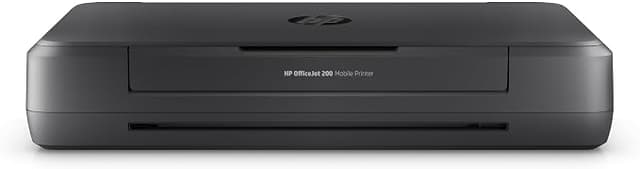
HP - Officejet 250 Mobile All in One Printer
Print, Scan & Copy On the Go – All-in-one functionality in a compact, portable design, complete with a 10‐page Automatic Document Feeder (ADF) for hands‐free multipage jobs Wireless Mobility – Seamless connection via Wi Fi Direct and Bluetooth Low Energy—no network required. Fast, High-Quality Output – Print speed up to 10 ppm (black) / 7 ppm (colour), with draft speeds up to 20 ppm (black) and 19 ppm (colour). Stunning print resolution up to 4800×1200 dpi colour and 1200×1200 dpi black. Portable Power – Rechargeable lithium-ion battery (optional) supports up to 500 pages per full charge; HP Fast Charge delivers a full charge in approx. 90 minutes while powered off. Intuitive Colour Touch Screen – 2.65" colour CGD IR touch display enables easy control, scanning, and copying. Versatile Media Handling – Supports envelopes, labels, cards, photo paper, and standard sizes up to Legal; borderless printing up to 5×7". Efficient Copying & Scanning – Copy up to 50 pages (25–400% scaling), scan at 600 dpi optical resolution. Eco-Enabled & Efficient – ENERGY STAR and EPEAT Silver certified for energy-conscious performance.
Print, Scan & Copy On the Go – All-in-one functionality in a compact, portable design, complete with a 10‐page Automatic Document Feeder (ADF) for hands‐free multipage jobs Wireless Mobility – Seamless connection via Wi Fi Direct and Bluetooth Low Energy—no network required. Fast, High-Quality Output – Print speed up to 10 ppm (black) / 7 ppm (colour), with draft speeds up to 20 ppm (black) and 19 ppm (colour). Stunning print resolution up to 4800×1200 dpi colour and 1200×1200 dpi black. Portable Power – Rechargeable lithium-ion battery (optional) supports up to 500 pages per full charge; HP Fast Charge delivers a full charge in approx. 90 minutes while powered off. Intuitive Colour Touch Screen – 2.65" colour CGD IR touch display enables easy control, scanning, and copying. Versatile Media Handling – Supports envelopes, labels, cards, photo paper, and standard sizes up to Legal; borderless printing up to 5×7". Efficient Copying & Scanning – Copy up to 50 pages (25–400% scaling), scan at 600 dpi optical resolution. Eco-Enabled & Efficient – ENERGY STAR and EPEAT Silver certified for energy-conscious performance.
Print, Scan & Copy On the Go – All-in-one functionality in a compact, portable design, complete with a 10‐page Automatic Document Feeder (ADF) for hands‐free multipage jobs Wireless Mobility – Seamless connection via Wi Fi Direct and Bluetooth Low Energy—no network required. Fast, High-Quality Output – Print speed up to 10 ppm (black) / 7 ppm (colour), with draft speeds up to 20 ppm (black) and 19 ppm (colour). Stunning print resolution up to 4800×1200 dpi colour and 1200×1200 dpi black. Portable Power – Rechargeable lithium-ion battery (optional) supports up to 500 pages per full charge; HP Fast Charge delivers a full charge in approx. 90 minutes while powered off. Intuitive Colour Touch Screen – 2.65" colour CGD IR touch display enables easy control, scanning, and copying. Versatile Media Handling – Supports envelopes, labels, cards, photo paper, and standard sizes up to Legal; borderless printing up to 5×7". Efficient Copying & Scanning – Copy up to 50 pages (25–400% scaling), scan at 600 dpi optical resolution. Eco-Enabled & Efficient – ENERGY STAR and EPEAT Silver certified for energy-conscious performance.
Print, Scan & Copy On the Go – All-in-one functionality in a compact, portable design, complete with a 10‐page Automatic Document Feeder (ADF) for hands‐free multipage jobs Wireless Mobility – Seamless connection via Wi Fi Direct and Bluetooth Low Energy—no network required. Fast, High-Quality Output – Print speed up to 10 ppm (black) / 7 ppm (colour), with draft speeds up to 20 ppm (black) and 19 ppm (colour). Stunning print resolution up to 4800×1200 dpi colour and 1200×1200 dpi black. Portable Power – Rechargeable lithium-ion battery (optional) supports up to 500 pages per full charge; HP Fast Charge delivers a full charge in approx. 90 minutes while powered off. Intuitive Colour Touch Screen – 2.65" colour CGD IR touch display enables easy control, scanning, and copying. Versatile Media Handling – Supports envelopes, labels, cards, photo paper, and standard sizes up to Legal; borderless printing up to 5×7". Efficient Copying & Scanning – Copy up to 50 pages (25–400% scaling), scan at 600 dpi optical resolution. Eco-Enabled & Efficient – ENERGY STAR and EPEAT Silver certified for energy-conscious performance.
in 44 offers
The lowest price for HP - Officejet 250 Mobile All in One Printer right now is $389.00 at BIG W, compared across 38 retailers.
The all-time low was $89.28 on 4 June 2026 — today's price is 336% above the lowest ever. It has been notably cheaper before — worth setting a price alert.
Prices last updated 26 Sept 2026.
Last updated at 26/09/2026 00:58:52
HP Officejet 250 Mobile Multifunction Printer (Printer Scanner, Copier, WLAN, HP ePrint, WiFi Direct, USB, 4800 x 1200 dpi) Black
Delivery $29.95
Affiliate Disclosure: We may receive a small commission for purchases made through this link at no extra cost to you. This helps support our site. Thank you!
HP Officejet 250 Portable Printer [CZ992A]
Free delivery between Tue – Wed
HP Officejet 250 Portable Printer [CZ992A]
Delivery between Tue – Fri $10
HP OfficeJet 250 Mobile All-in-One Colour Printer (CZ992A) - Portable - 1YR WTY
Delivery $16.50
HP OfficeJet 250 Mobile A4 Colour Inkjet Multifunction Printer ADF WiFi Direct (CZ992A)
Delivery $19.90
Hp Officejet 250 Mobile Multifunction Printer Black EU Plug 220V
Delivery $89.99
HP OfficeJet 250 Mobile A4 Wireless Colour Multifunction Inkjet Printer
Free delivery between 29 Sept – 7 Oct
HP OfficeJet 250 Mobile All-in-One Printer WIFI
Free delivery between 30 Sept – 7 Oct
HP OfficeJet 250 A4 Mobile All-in-One Inkjet Printer
Delivery $35
Hp OFFICEJET 250 Mobile AIO PRINTER A4 9PPM BLK 3.6PPM CLR 1YR
Delivery $16.95
originally posted on caribbeanimportationdo.com
I was pleasantly surprised by the compact design of this printer. Despite its small size, it's quite heavy, which gives it a sturdy and durable feel. Setting it up was a breeze, and I appreciated how user-friendly the interface was. It didn't take long to get it up and running, and I was impressed by its performance. This printer does everything I need it to do efficiently and without any fuss. I'm very satisfied with my purchase and would wholeheartedly recommend it to anyone in need of a reliable printer.
originally posted on influenster.com
This printer is compact, easy to use, and easy to set up. Print quality is excellent, mobile fax is convenient and simple to navigate. Scan feature works well. The HP smart app allows for additional features when mobile faxing. Also recommend downloading the HP print and scan doctor which was helpful with troubleshooting. Does not take up much room on a desk and is smaller when closed and not being used. Ink lasted a few months with regular printing. 
originally posted on officeworks.com.au
After struggling to get this working on and off over the past 2 years, I'm giving up. With the difficulty of getting the printer to connect over wifi on setup, then losing it the next time you boot up and having to spend hopurs trying to get it working again, HP now REQUIRE you to log in to an account with them in order to do anything with "HP Smart" the dumbest piece of garbage ever. What if you're not connected to the internet? Sorry, out of luck. I just want to scan without all that hassle. Besides which, it's quite difficult to get this piece of junk to actually pick up a page and scan it. Forget scanning several pages, it's 1 at a time, if it works at all. Just get a Canon mobile printer and photograph any pages you need to scan with your phone. It's cheaper ... MoreAfter struggling to get this working on and off over the past 2 years, I'm giving up. With the difficulty of getting the printer to connect over wifi on setup, then losing it the next time you boot up and having to spend hopurs trying to get it working again, HP now REQUIRE you to log in to an account with them in order to do anything with "HP Smart" the dumbest piece of garbage ever. What if you're not connected to the internet? Sorry, out of luck. I just want to scan without all that hassle. Besides which, it's quite difficult to get this piece of junk to actually pick up a page and scan it. Forget scanning several pages, it's 1 at a time, if it works at all. Just get a Canon mobile printer and photograph any pages you need to scan with your phone. It's cheaper and with save untold hours of your time.
| General | |
| Device Type | Multifunction printer |
| Printing Technology | Ink-jet - color |
| Monthly Duty Cycle (max) | 500 pages |
| Recommended Monthly Volume | 100 - 300 pages |

HP Officejet 250 Mobile Multifunction Printer (Printer Scanner, Copier, WLAN, HP ePrint, WiFi Direct, USB, 4800 x 1200 dpi) Black
Delivery $29.95
Affiliate Disclosure: We may receive a small commission for purchases made through this link at no extra cost to you. This helps support our site. Thank you!
HP Officejet 250 Portable Printer [CZ992A]
Free delivery between Tue – Wed
HP Officejet 250 Portable Printer [CZ992A]
Delivery between Tue – Fri $10
HP OfficeJet 250 Mobile All-in-One Colour Printer (CZ992A) - Portable - 1YR WTY
Delivery $16.50
HP OfficeJet 250 Mobile A4 Colour Inkjet Multifunction Printer ADF WiFi Direct (CZ992A)
Delivery $19.90
I was pleasantly surprised by the compact design of this printer. Despite its small size, it's quite heavy, which gives it a sturdy and durable feel. Setting it up was a breeze, and I appreciated how user-friendly the interface was. It didn't take long to get it up and running, and I was impressed by its performance. This printer does everything I need it to do efficiently and without any fuss. I'm very satisfied with my purchase and would wholeheartedly recommend it to anyone in need of a reliable printer.
This printer is compact, easy to use, and easy to set up. Print quality is excellent, mobile fax is convenient and simple to navigate. Scan feature works well. The HP smart app allows for additional features when mobile faxing. Also recommend downloading the HP print and scan doctor which was helpful with troubleshooting. Does not take up much room on a desk and is smaller when closed and not being used. Ink lasted a few months with regular printing. 
After struggling to get this working on and off over the past 2 years, I'm giving up. With the difficulty of getting the printer to connect over wifi on setup, then losing it the next time you boot up and having to spend hopurs trying to get it working again, HP now REQUIRE you to log in to an account with them in order to do anything with "HP Smart" the dumbest piece of garbage ever. What if you're not connected to the internet? Sorry, out of luck. I just want to scan without all that hassle. Besides which, it's quite difficult to get this piece of junk to actually pick up a page and scan it. Forget scanning several pages, it's 1 at a time, if it works at all. Just get a Canon mobile printer and photograph any pages you need to scan with your phone. It's cheaper ... MoreAfter struggling to get this working on and off over the past 2 years, I'm giving up. With the difficulty of getting the printer to connect over wifi on setup, then losing it the next time you boot up and having to spend hopurs trying to get it working again, HP now REQUIRE you to log in to an account with them in order to do anything with "HP Smart" the dumbest piece of garbage ever. What if you're not connected to the internet? Sorry, out of luck. I just want to scan without all that hassle. Besides which, it's quite difficult to get this piece of junk to actually pick up a page and scan it. Forget scanning several pages, it's 1 at a time, if it works at all. Just get a Canon mobile printer and photograph any pages you need to scan with your phone. It's cheaper and with save untold hours of your time.
The HP Officejet 250 portable printer is fantastic. It was very easy to set up and use straight away. The print quality is great. The printer is compact and easy to transport. I have found it prints documents straight away however if you are printing something from the web it takes a couple of mins for the printer to start printing.The reason I give the printer 4 start rating is due to fact the printer no longer comes with the USB charging cable. This would be very handy to be able to recharge it in the car or from anywhere when away from power for extended periods of time.
I am a fan of HP products because they are reasonably priced, excellent quality and provide excellent support. I also research products including HP before making a purchase. I do realize that there are other reputable brands like EPSON and Brother but I prefer working with a quality supplier that meets my needs. In this case this is the only Portable Wireless All In One available,That said, I wanted to get what in effect would be a portable companion to the HP OfficeJet 9025 All In One printer (Printer and Scanner ). The OfficeJet 250 is the only portable, wireless All In One available. I have the OfficeJet 100 portable wireless printer (no scanner) for eight years and it works fine.As I read the reviews for this OfficeJet 250 I have become concerned with the ... MoreI am a fan of HP products because they are reasonably priced, excellent quality and provide excellent support. I also research products including HP before making a purchase. I do realize that there are other reputable brands like EPSON and Brother but I prefer working with a quality supplier that meets my needs. In this case this is the only Portable Wireless All In One available,That said, I wanted to get what in effect would be a portable companion to the HP OfficeJet 9025 All In One printer (Printer and Scanner ). The OfficeJet 250 is the only portable, wireless All In One available. I have the OfficeJet 100 portable wireless printer (no scanner) for eight years and it works fine.As I read the reviews for this OfficeJet 250 I have become concerned with the wide range of comments ranging fron 0’s to 5’s and wondered if it was too early for this type of single package portable wireless device. I read the literature and my concerns continued. I even watched the video’s. But I bit the bullet and used my faith in HP, went to STAPLES who is good to work with and purchased it. It is an ideal device for the home, remote, virtual meeting market. When I got home, I opened the box and made one more attempt to find the Users Guide on line and found it.I now understand why their are so many comments about what the product did or could not do I appreciated them. All the positive reviews were obvious, but even they failed to make comments that identified other benefits. Before configuring and installed the unit on my home network which contains multiple computers and printers, I took the time to download and read the OfficeJet 250 Users Guide. I was amazes at the features and capabilities of this unit. IT IS complex and you should have some experience with computers and printers but it is amazing how well thought out this device is. The Users Guide goes into great detail identifying all the features and how to use them. Perhaps the best example is the comments that say “Bluetooth does not work”. It does work but the printer needs to be within 5ft. of the computer. A two side print and scan utility / capability is discussed. The devices limits are also clear. If you can take advantage of the packaging and features, the additional $150.00 is worth it.
Okay so the first few months w this printer was great UNTIL I noticed the battery life was GARBAGE you basically have to keep the printer plugged in at all times defeating the purpose of being wireless. It is as if powering the printer on and off requires 98% of its battery. Every time. I do not use the printer more than once a month and it frustrates me so much. AND GET THIS charging it is so hard because THE CHARGER DOES NOT WANT TO STAY PLUGGED IN TO THE PRINTER LOL you need to have 1ft. of the 3 ft. cable propped on a flat surface for this thing to charge (pictured). Other than that it does print well and fast, and finding the ink is easy-that's the only reason I did not put 1star, but yea I wouldn't recommend
I love this printer. I get to take it with me anywhere and get to print on the go. The only problem was the screen. It was hard to read and I couldn’t see any of the settings, it was extremely light. I got a replacement and the replacement was perfect. It was definitely a defect on the first one. I don’t use it everyday but only when I need to. The color on the print looks really good. I’m glad I purchased this printer.
The printer was advertised as coming with installation CD and manual, however neither was in the box from HP. There was only a page referring you to their on-line set-up, which would be a problem if internet is not available. It did not come with a printer cable, although that was indicated on box. After much trouble trying to install the printer via the Wi-Fi options, and downloading the necessary software and instructions, it would not work on the local network where we were staying. Locating the necessary files and information was challenging on the HP support site, which directed you to unrelated help pages if you used the search function. Once installed, any attempt to print a page using the local wi-fi port option crashed my computer completely, requiring a ... MoreThe printer was advertised as coming with installation CD and manual, however neither was in the box from HP. There was only a page referring you to their on-line set-up, which would be a problem if internet is not available. It did not come with a printer cable, although that was indicated on box. After much trouble trying to install the printer via the Wi-Fi options, and downloading the necessary software and instructions, it would not work on the local network where we were staying. Locating the necessary files and information was challenging on the HP support site, which directed you to unrelated help pages if you used the search function. Once installed, any attempt to print a page using the local wi-fi port option crashed my computer completely, requiring a hard shut-down and restart to regain control of the computer (Windows 97) after a page partially prints out. The same result if any attempt to scan a document with it. Only by shutting off all wi-fi functions of the printer and using a separately purchased USB cable could successful printing and scanning be achieved. That said, once the horrors of getting the unit set up were done, the print quality and speed is good, as is the scan operation, if somewhat cumbersome to access via their interface. The printer is compact, and easily portable, and the battery power is likely to be useful, although I have not used it so far, other than having to spend the two hours to charge the battery before being able to set it up. However, be aware that if you are traveling and not on a home or business network, the wireless functions are useless, and operation is only possible using a direct cable connection to the printer. If you don't need the scan and copy functions, I would look to a different manufacturer. I would expect the problems would be the same with the HP print-only version as the set-up software appears to be the same for both the OJ-200 (printer only) and OJ-250 (all in one) versions. If you do purchase it, get the extended Staples warranttee on it, as based on my other experience with HP printers, they fail after a year or so, and it is expensive compared to non-portable units.
I have two issues that keep this printer from being the perfect mobile printer 1: my laptop and phone can not connect to it after it has gone into sleep mode to conserve battery life. Both devices.no longer see the printer connected to the network. You then have to reboot the printer as well as the PC. 2:The printer will lock up if you do not have the paper perfectly lined up with the feed when copying or scanning . This requires shutting off the printer and removing the battery the restarting the printer. This is our second one of these printers. The first lasted 2 years before the scanner feed would no longer feed paper into the printer. The problems have been the same with both machines. The first was used daily for our business so it saw a lot more use than many ... MoreI have two issues that keep this printer from being the perfect mobile printer 1: my laptop and phone can not connect to it after it has gone into sleep mode to conserve battery life. Both devices.no longer see the printer connected to the network. You then have to reboot the printer as well as the PC. 2:The printer will lock up if you do not have the paper perfectly lined up with the feed when copying or scanning . This requires shutting off the printer and removing the battery the restarting the printer. This is our second one of these printers. The first lasted 2 years before the scanner feed would no longer feed paper into the printer. The problems have been the same with both machines. The first was used daily for our business so it saw a lot more use than many people would put it through. We have used two other brands of mobile printers and the HP 250 has lasted longer and printed and copied documents better.
We have purchased three of these. They are very compact (good for a small dorm space), portable, and print well. They also last a long time and are sturdy units that can take abuse. Even better, you do not need to sign up for HP's automatic ink program.However, I have to remove two stars because one of the printers we just purchased has a faulty battery. (We even sent pictures of the faulty battery notice on the computer screen that didn't change regardless of reboots, factory resets, and repeated reinstallations.) Unfortunately, getting HP to simply send a new battery has become a nightmare because we are juggling the schedules of a college student with their impossible phone tree that doesn't allow a customer to contact support without an HP specific account, ... MoreWe have purchased three of these. They are very compact (good for a small dorm space), portable, and print well. They also last a long time and are sturdy units that can take abuse. Even better, you do not need to sign up for HP's automatic ink program.However, I have to remove two stars because one of the printers we just purchased has a faulty battery. (We even sent pictures of the faulty battery notice on the computer screen that didn't change regardless of reboots, factory resets, and repeated reinstallations.) Unfortunately, getting HP to simply send a new battery has become a nightmare because we are juggling the schedules of a college student with their impossible phone tree that doesn't allow a customer to contact support without an HP specific account, even when there is an affiliated case number. (The warranty is under the purchaser's name, not the printer user's name.)We also contacted Geek Squad, because we have coverage, and that is also proving to be extremely difficult due to the location of the printer (college).This printer should have been fully functional upon arrival. The battery is faulty (minus one star). We have purchased 3 of these rather expensive units, so we know when it works and when it doesn't. HP should simply send a new battery, but we are getting the run around. Luckily, the printer works when plugged in, but I am highly disappointed in HP and in the ability to get through to a human being for help on something that should be a simple matter with new product that is under warranty (minus the second star).
| General | |
| Device Type | Multifunction printer |
| Printing Technology | Ink-jet - color |
| Monthly Duty Cycle (max) | 500 pages |
| Recommended Monthly Volume | 100 - 300 pages |