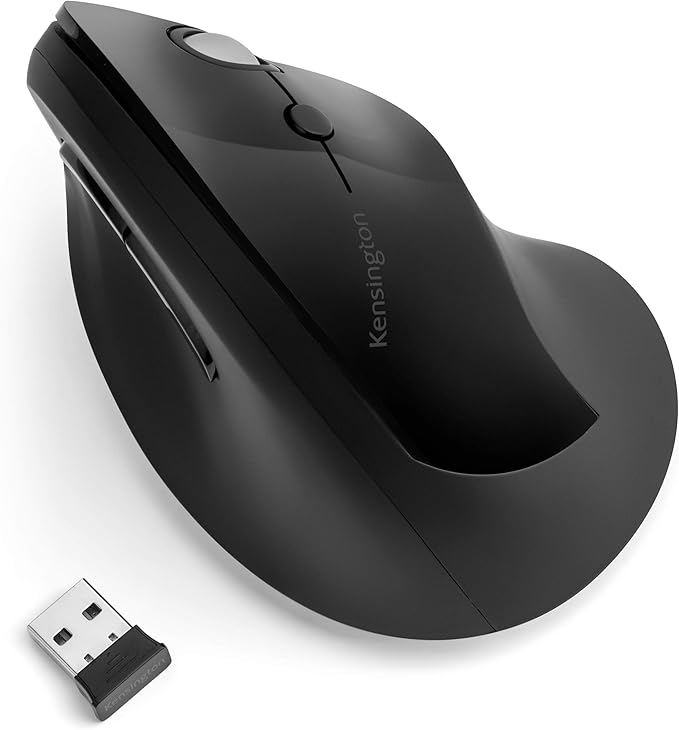
Kensington Pro Fit Ergo Vertical Wireless Mouse (Black)
The mouse is the second most important way of communicating with a computer. Please be careful to choose the right type of connection when buying a mouse, there are three different types: – USB is the most modern. You can recognize it by the rectangular connector. – PS/2 connectors are round. This type of connection is fairly commonly used in PCs. – Bluetooth is another modern (wireless) connection method.
The mouse is the second most important way of communicating with a computer. Please be careful to choose the right type of connection when buying a mouse, there are three different types: – USB is the most modern. You can recognize it by the rectangular connector. – PS/2 connectors are round. This type of connection is fairly commonly used in PCs. – Bluetooth is another modern (wireless) connection method.
The mouse is the second most important way of communicating with a computer. Please be careful to choose the right type of connection when buying a mouse, there are three different types: – USB is the most modern. You can recognize it by the rectangular connector. – PS/2 connectors are round. This type of connection is fairly commonly used in PCs. – Bluetooth is another modern (wireless) connection method.
The mouse is the second most important way of communicating with a computer. Please be careful to choose the right type of connection when buying a mouse, there are three different types: – USB is the most modern. You can recognize it by the rectangular connector. – PS/2 connectors are round. This type of connection is fairly commonly used in PCs. – Bluetooth is another modern (wireless) connection method.
in 54 offers
The lowest price for Kensington Pro Fit Ergo Vertical Wireless Mouse (Black) right now is $52.46 at Fishpond.com.au, compared across 40 retailers.
The all-time low was $10.00 on 29 May 2024 — today's price is 425% above the lowest ever. It has been notably cheaper before — worth setting a price alert.
Prices last updated 14 Oct 2026.
Last updated at 14/10/2026 07:31:11
Kensington Pro Fit Ergo Vertical Wireless Mouse Black
Free delivery
Affiliate Disclosure: We may receive a small commission for purchases made through this link at no extra cost to you. This helps support our site. Thank you!
Kensington Pro Fit K75501WW Ergo Vertical Wireless Mouse, Black | Computers & Accessories
Delivery $8.95
Kensington Pro Fit K75501ww Ergo Vertical Wireless Mouse - Black
Delivery $11
Affiliate Disclosure: We may receive a small commission for purchases made through this link at no extra cost to you. This helps support our site. Thank you!
Kensington K75501WW mouse Office Right-hand Bluetooth 1600 DPI
Kensington Pro Fit Ergo Vertical Wireless Mouse Black 6 Buttons Wireless 2.4GHz USB Receiver K75501WW
Free delivery between 17–24 Oct
Kensington Pro Fit Ergo Vertical Wireless Mouse Back K75501WW
Delivery $11.99
Kensington Pro Fit Vertical Ergonomic Wireless Mouse Black Ergo
Delivery between 15–22 Oct $9.95
Kensington Pro Fit Ergo Vertical Wireless Mouse - Black Black
Kensington Pro Fit K75501WW Black 6 Buttons 1 x Wheel USB RF Wireless Ergo Vertical Mouse
Delivery $93.24
Pro Fit Ergo Vertical Wireless Mouse Blk
Delivery $25
originally posted on pbtech.co.nz
The shape has been really good to relieving RSI symptoms I was experiencing, using the mouse for long periods each day. Probably the only problem I've had is the scroll wheel is pretty slow to use without slightly releasing the hand to scroll easily and quickly, then place the hand back in the centre of the mouse.
originally posted on pbtech.co.nz
Really like it BUT you get what you pay for. 6 months in, and the scroll wheel has worn smooth, becoming annoying to use.Wouldn't recommend for an office worker using it all day, but just fine if you're not a heavy scroll wheel user, or only use the mouse for an hour or two a day.
originally posted on pbtech.co.nz
I was looking for an ergonomic mouse that meets a few criteria: more ergonomic than my current (traditional) mouse, within my budget and is programmable (similar to Logi Option that I’m familiar with when using MX Master 3).After reading reviews and understanding the mice designed by Kensington, I decided to give this a try.I would say it’s so software may not be as sophisticated and aesthetically pleasing as Logitech’s Logi Option. However, it’s price point would definitely make it worth the while unless you’re a serious programmer or CAD designer than need programmable mouse gestures that can be used by specific software.It comfortable as you adapt to it. For me the learning curve was not a steep one. I was able to use it effectively within 30mins with no ... MoreI was looking for an ergonomic mouse that meets a few criteria: more ergonomic than my current (traditional) mouse, within my budget and is programmable (similar to Logi Option that I’m familiar with when using MX Master 3).After reading reviews and understanding the mice designed by Kensington, I decided to give this a try.I would say it’s so software may not be as sophisticated and aesthetically pleasing as Logitech’s Logi Option. However, it’s price point would definitely make it worth the while unless you’re a serious programmer or CAD designer than need programmable mouse gestures that can be used by specific software.It comfortable as you adapt to it. For me the learning curve was not a steep one. I was able to use it effectively within 30mins with no prior experience of using a vertical mouse.I would recommend this for someone who would like to avoid having RSI and/or wanting to try out a vertical mouse that has programmable features/shortcuts (e.g. software like Excel, Team, etc) this would be a good starting point.
| Sensitivity | 1600 DPI |
| Top Use Cases | Office |
| Typical Users | Users with average to larger sized hands |
| Sensor Type | Optical |
| Switches | Pressed buttons |

Kensington Pro Fit Ergo Vertical Wireless Mouse Black
Free delivery
Affiliate Disclosure: We may receive a small commission for purchases made through this link at no extra cost to you. This helps support our site. Thank you!
Kensington Pro Fit K75501WW Ergo Vertical Wireless Mouse, Black | Computers & Accessories
Delivery $8.95
Kensington Pro Fit K75501ww Ergo Vertical Wireless Mouse - Black
Delivery $11
Affiliate Disclosure: We may receive a small commission for purchases made through this link at no extra cost to you. This helps support our site. Thank you!
Kensington K75501WW mouse Office Right-hand Bluetooth 1600 DPI
Kensington Pro Fit Ergo Vertical Wireless Mouse Black 6 Buttons Wireless 2.4GHz USB Receiver K75501WW
Free delivery between 17–24 Oct
The shape has been really good to relieving RSI symptoms I was experiencing, using the mouse for long periods each day. Probably the only problem I've had is the scroll wheel is pretty slow to use without slightly releasing the hand to scroll easily and quickly, then place the hand back in the centre of the mouse.
Really like it BUT you get what you pay for. 6 months in, and the scroll wheel has worn smooth, becoming annoying to use.Wouldn't recommend for an office worker using it all day, but just fine if you're not a heavy scroll wheel user, or only use the mouse for an hour or two a day.
I was looking for an ergonomic mouse that meets a few criteria: more ergonomic than my current (traditional) mouse, within my budget and is programmable (similar to Logi Option that I’m familiar with when using MX Master 3).After reading reviews and understanding the mice designed by Kensington, I decided to give this a try.I would say it’s so software may not be as sophisticated and aesthetically pleasing as Logitech’s Logi Option. However, it’s price point would definitely make it worth the while unless you’re a serious programmer or CAD designer than need programmable mouse gestures that can be used by specific software.It comfortable as you adapt to it. For me the learning curve was not a steep one. I was able to use it effectively within 30mins with no ... MoreI was looking for an ergonomic mouse that meets a few criteria: more ergonomic than my current (traditional) mouse, within my budget and is programmable (similar to Logi Option that I’m familiar with when using MX Master 3).After reading reviews and understanding the mice designed by Kensington, I decided to give this a try.I would say it’s so software may not be as sophisticated and aesthetically pleasing as Logitech’s Logi Option. However, it’s price point would definitely make it worth the while unless you’re a serious programmer or CAD designer than need programmable mouse gestures that can be used by specific software.It comfortable as you adapt to it. For me the learning curve was not a steep one. I was able to use it effectively within 30mins with no prior experience of using a vertical mouse.I would recommend this for someone who would like to avoid having RSI and/or wanting to try out a vertical mouse that has programmable features/shortcuts (e.g. software like Excel, Team, etc) this would be a good starting point.
This mouse is very ergonomic and satisfying to use. Your hand sits in a very natural position while using this mouse, which reduces the possibility of getting hand strains. My hand feels more relaxed after switching to this mouse, so I highly recommend this mouse.
I've been using this for 9 months. I can't use the buttons if I fit my hand over it the way it is designed. My fingers are too long. So I have been shifting it around with thumb and pinky. It is better on my wrist than my previous standard mouse, do at least that is nice. But now, 9 months later the scroll button has quit moving in the direction I'm directing it. I put in a new battery in case that was the problem. It's not. The scrolling motion either moves opposite to my commands, or jumps up and down, or just ignores me.
I have had this mouse for around 6 months now. Worked Great initially, but for the last couple of months it has become beyond frustrating with the way the scroll wheel skips, jumps, doesn’t move at all, scrolls backwards when it should go forwards. Very frustrating. I got my husband to buy one as well early on and his is the same. Do not recommend.
I bought this mouse a while ago due to my wrist pain. I have been using it daily for work and it is fantastic! It does take sometime to adjust using it but it feels good as if you are holding on to something rather than regular tiny mouse. I have recommended this mouse to my friends, coworkers and family. My coworkers are getting it. Really make a big different and help a lot for my wrist pain.
Fits the hand like a glove and has all the features you would want for almost half the price of others. Good quality and function. Very soft touch buttons and it automatically shuts off power to save batteries when not in use. One click powers it back on instantly. Slightly relaxed upright position.
I have small hands and short fingers and I have found this product difficult to use and get comfortable with. I can't reach the forward button with my thumb without pressing the back button, and can't find a comfortable resting place for my ring finger. Works well, but not for me.
Used it for 6 months until Oct 2022 when the right click stopped working. Offiiceworks replaced it for me with a new one and now again after 6 months, it became faulty as the scroll wheel is playing up and doesn’t move or skip. So annoying for what I do everyday.
| Sensitivity | 1600 DPI |
| Top Use Cases | Office |
| Typical Users | Users with average to larger sized hands |
| Sensor Type | Optical |
| Switches | Pressed buttons |