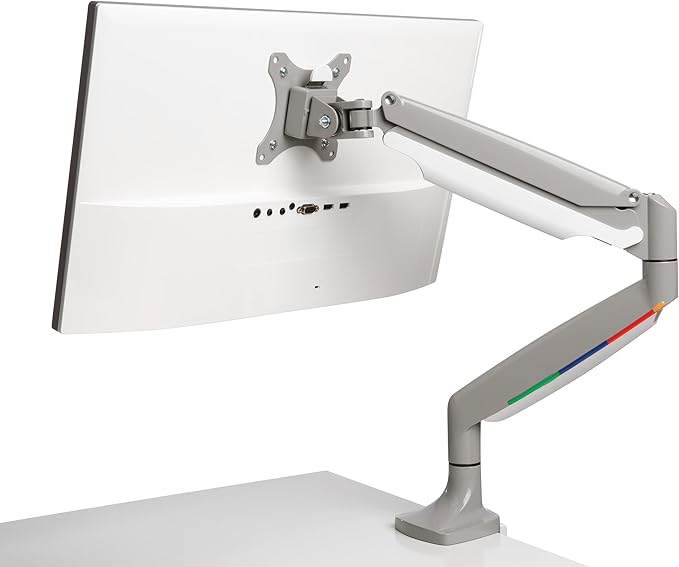
Kensington SmartFit One Touch Dual Monitor Arm
The Kensington SmartFit Monitor Arm will help to improve posture, promote eye alignment, support your neck and relieve shoulder discomfort while you work. It's been ergonomically designed and allows the user to adjust the height, depth or angle of their monitor to find a comfortable position. Features: It can be used to mount two monitors. You can adjust the depth, height and angle of your monitors once installed. It is VESA compatible and suited to the 75 mm and 100 mm mounts. The cable management system will keep your cords out of the way.
The Kensington SmartFit Monitor Arm will help to improve posture, promote eye alignment, support your neck and relieve shoulder discomfort while you work. It's been ergonomically designed and allows the user to adjust the height, depth or angle of their monitor to find a comfortable position. Features: It can be used to mount two monitors. You can adjust the depth, height and angle of your monitors once installed. It is VESA compatible and suited to the 75 mm and 100 mm mounts. The cable management system will keep your cords out of the way.
The Kensington SmartFit Monitor Arm will help to improve posture, promote eye alignment, support your neck and relieve shoulder discomfort while you work. It's been ergonomically designed and allows the user to adjust the height, depth or angle of their monitor to find a comfortable position. Features: It can be used to mount two monitors. You can adjust the depth, height and angle of your monitors once installed. It is VESA compatible and suited to the 75 mm and 100 mm mounts. The cable management system will keep your cords out of the way.
The Kensington SmartFit Monitor Arm will help to improve posture, promote eye alignment, support your neck and relieve shoulder discomfort while you work. It's been ergonomically designed and allows the user to adjust the height, depth or angle of their monitor to find a comfortable position. Features: It can be used to mount two monitors. You can adjust the depth, height and angle of your monitors once installed. It is VESA compatible and suited to the 75 mm and 100 mm mounts. The cable management system will keep your cords out of the way.
in 53 offers
The lowest price for Kensington SmartFit One Touch Dual Monitor Arm right now is $149.00 at eBay.com.au, compared across 39 retailers.
The all-time low was $89.00 on 24 Aug 2024 — today's price is 67% above the lowest ever. It has been notably cheaper before — worth setting a price alert.
Prices last updated 11 Oct 2026.
Last updated at 11/10/2026 09:43:48
Kensington Smartfit One Touch Adjust Dual Monitor Arm Grey
Affiliate Disclosure: We may receive a small commission for purchases made through this link at no extra cost to you. This helps support our site. Thank you!
Kensington One Touch Adjustable Dual Screen Monitor Arm Mount
Delivery $20
Affiliate Disclosure: We may receive a small commission for purchases made through this link at no extra cost to you. This helps support our site. Thank you!
Kensington SmartFit One-Touch Height Adjustable Dual Monitor Arm
Kensington SmartFit One-Touch Height Adjustable Dual Monitor Arm
Kensington SMARTFIT DUAL Monitor arm
Delivery $11.99
KENSINGTON PREMIUM DUAL MONITOR ARM UP TO 32 inch & 9KG H/ADJ VESA 75x7
Delivery $16.95
Kensington SmartFit One-Touch Height-Adjustable Dual Monitor Arm - Up to 32" & 9KG Height Adjustable VESA 75x75 100x100 - GREY
Delivery $16.50
Kensington SmartFit Mounting Arm for Monitor - Grey - Landscape/Portrait
Delivery between 21–23 Oct $15.99
Kensington K55471WW SmartFit Dual Monitor Arm
Delivery between 14–19 Oct $18.85
Kensington SmartFit One-Touch Height Adjustable Dual Monitor Arm [K55471WW]
originally posted on dell.com
This was fairly simple to install and did provide significantly more desk space than my previous monitor set up. I appreciate ho easy it is to tilt my monitors with this set up making it an easier transition from a sitting to standing desk. The negatives are that full range of motion requires your desk to be at least one foot from a wall-- that in itself is pretty impractical for a home office or cubical set up. Because we don't have full range the only way we could fit the second monitor was vertical and the range of motion is fairly limited. It is okay, but not the ideal set up. For writing it works decently, but for editing movies and images I would prefer a set up that allowed for two landscape screens.
originally posted on dell.com
I have purchased a few monitor mounts in my life and have always tried to find the most affordable gas-spring arm that would fit my needs. I now know that this was a mistake. After using the Kensington smart fit I see the value of investing in a better quality product.The smart fit is easier to install, way more robust, and has better performance and more details that improve the user experience.
originally posted on officeworks.com.au
I bought this for my home office/gaming room and it DOES NOT at all support 9kg per arm, no matter how much it is adjusted. I just about injured myself tightening it. My monitor is now resting flat on my desk because of this floppy arm. It is horrendous and I will never buy anything from Kensington ever again.
| General | |
| Package Content | Installation tool |
| AV Furniture | |
| Type | Mounting kit |
| Design | Adjustable arm |

Kensington Smartfit One Touch Adjust Dual Monitor Arm Grey
Affiliate Disclosure: We may receive a small commission for purchases made through this link at no extra cost to you. This helps support our site. Thank you!
Kensington One Touch Adjustable Dual Screen Monitor Arm Mount
Delivery $20
Affiliate Disclosure: We may receive a small commission for purchases made through this link at no extra cost to you. This helps support our site. Thank you!
Kensington SmartFit One-Touch Height Adjustable Dual Monitor Arm
Kensington SmartFit One-Touch Height Adjustable Dual Monitor Arm
Kensington SMARTFIT DUAL Monitor arm
Delivery $11.99
This was fairly simple to install and did provide significantly more desk space than my previous monitor set up. I appreciate ho easy it is to tilt my monitors with this set up making it an easier transition from a sitting to standing desk. The negatives are that full range of motion requires your desk to be at least one foot from a wall-- that in itself is pretty impractical for a home office or cubical set up. Because we don't have full range the only way we could fit the second monitor was vertical and the range of motion is fairly limited. It is okay, but not the ideal set up. For writing it works decently, but for editing movies and images I would prefer a set up that allowed for two landscape screens.
I have purchased a few monitor mounts in my life and have always tried to find the most affordable gas-spring arm that would fit my needs. I now know that this was a mistake. After using the Kensington smart fit I see the value of investing in a better quality product.The smart fit is easier to install, way more robust, and has better performance and more details that improve the user experience.
I bought this for my home office/gaming room and it DOES NOT at all support 9kg per arm, no matter how much it is adjusted. I just about injured myself tightening it. My monitor is now resting flat on my desk because of this floppy arm. It is horrendous and I will never buy anything from Kensington ever again.
It only works in 2 positions all the up and all the way down. I have really thin light Dell 24 in monitors and it cant stay in any position in between, it slowly just collapses. Doesn't seem to be a way to adjust the up/down gas shock either. Also the instructions are terrible.
Like everyone else that has been transitioning to a work from home situation, my wife needed a cleaner setup that allowed for more desk space and better ergonomics. This was easy to install and adjust to an ideal viewing position and has all the functionality that you would look for in a monitor arm setup. Do yourself a favor, free up some space on your desk and gain the ergonomic customization that comes with installing some monitor arms.
I am working from home 100% due to covid and was looking for a better set up for my double monitors. The instructions are merely pictorial and aren’t a ton of help when trying to get it set up. And there is one VERY important piece that should have been clarified in the instructions. Once I had everything set up, it wouldn’t hold my monitors. They just kept falling down and I questioned whether they were too heavy. Come to find out, you have to turn the bolt on the arms counterclockwise to tighten them. This is opposite of what one would think and not something I would have ever considered! Once we got that figured out, it was smooth sailing. The monitor arms adjust side to side, up and down, and also tilt, so you can easily accomplish about any dual monitor ... MoreI am working from home 100% due to covid and was looking for a better set up for my double monitors. The instructions are merely pictorial and aren’t a ton of help when trying to get it set up. And there is one VERY important piece that should have been clarified in the instructions. Once I had everything set up, it wouldn’t hold my monitors. They just kept falling down and I questioned whether they were too heavy. Come to find out, you have to turn the bolt on the arms counterclockwise to tighten them. This is opposite of what one would think and not something I would have ever considered! Once we got that figured out, it was smooth sailing. The monitor arms adjust side to side, up and down, and also tilt, so you can easily accomplish about any dual monitor position that you want to. My only other con is that the clamp that screws into the bottom of the desk is not protected with anything. I worried that it would scratch up my desk, so I put some shelf liner between the clamp and the desk. I am happy with my set up now, and it takes up much less desk space than the monitor stands did!
Great product I had issues because my monitor was 0.3 overweight although the size fit the description.But I bought two nice monitors on sale so it worked out
A great high quality product, helps align the eyeline making long hours working with the monitors easy. Easy install and helps mount dual montiors , the arms stay in place no dropping tilting helping you clear out a lot of desk space. Can swivel the montinors to make those perfect viewing angles. All in all a great product
I bought this mounting bracket about a month ago to hold 2 32 inch Asus monitors. It hold the weight of both easily and is very adjustable.I have 2 of these monitors mounted side by side https://www.officeworks.com.au/shop/officeworks/p/asus-32-tuf-wqhd-curved-gaming-monitor-black-vg32vq-acvg32vq
Like a lot of folks, I've been working from home for 6+ months now. I've been incrementally trying to improve my office and desk to help the ergonomics and comfort. The Dual Monitor Arm was just what I needed to top it off. It is helping me save a ton of desk space, which is important when you use an employer laptop, client laptop and gaming battlestation all in one day. Assembly was a breeze. I did it while I was in a virtual meeting. I'm using the c-clamp to attach it to my desk. Solid as a rock. No concerns with tilting or falling down. I'm extremely happy with the product and the results here.
| General | |
| Package Content | Installation tool |
| AV Furniture | |
| Type | Mounting kit |
| Design | Adjustable arm |