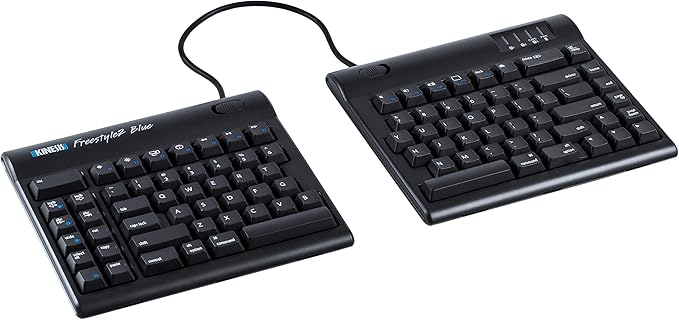
Kinesis Advantage2 Ergonomic Keyboard (KB600)
A Kinesis product- the Advantage2 Keyboard is a US Layout black USB connected contoured keyboard based on a unique- patented design that minimises the pain and strain typists experience from heavy use of conventional computer keyboards.
A Kinesis product- the Advantage2 Keyboard is a US Layout black USB connected contoured keyboard based on a unique- patented design that minimises the pain and strain typists experience from heavy use of conventional computer keyboards.
A Kinesis product- the Advantage2 Keyboard is a US Layout black USB connected contoured keyboard based on a unique- patented design that minimises the pain and strain typists experience from heavy use of conventional computer keyboards.
A Kinesis product- the Advantage2 Keyboard is a US Layout black USB connected contoured keyboard based on a unique- patented design that minimises the pain and strain typists experience from heavy use of conventional computer keyboards.
in 14 offers
The lowest price for Kinesis Advantage2 Ergonomic Keyboard (KB600) right now is $653.25 at Amazon.com.au, compared across 9 retailers.
The all-time low was $71.50 on 17 July 2026 — today's price is 814% above the lowest ever. It has been notably cheaper before — worth setting a price alert.
Prices last updated 6 Oct 2026.
Last updated at 06/10/2026 05:26:26
Kinesis Advantage2 Ergonomic Keyboard (KB600)
Free delivery
Affiliate Disclosure: We may receive a small commission for purchases made through this link at no extra cost to you. This helps support our site. Thank you!
Kinesis Advantage2 Ergonomic Keyboard KB600, Black top case, Cherry MX Brown Switches,
Delivery $59.04
Kinesis Advantage 2 Keyboard
Delivery $13.25
Kinesis Advantage2 Ergonomic Keyboard (KB600), Black top case, Cherry MX Brown Switches, QWERTY keycaps
Free delivery between 14–20 Oct
Kinesis Advantage2 Ergonomic Keyboard (KB600), Black top case, Cherry MX Brown Switches, QWERTY keycaps
Delivery between 12–15 Oct $29
Kinesis Advantage 2 Contoured Ergonomic Mechanical Keyboard
Free delivery between 8–13 Oct
Kinesis Advantage2 Keyboard for PC and MAC - Quiet Linear Red
Delivery $13.25
Kinesis Advantage 2
Delivery between 9–20 Oct $16.50
Kinesis Advantage 2 Keyboard
Delivery between 14–15 Oct $45
originally posted on ergowerken.nl
A real ergonomic keyboard. I had a bad pain in my wrist and knuckles, and all are gone now. Definitely a good investment for my health.No software required.Fully programmable in hardware level.Remap any key is possible.Switch between Mac/PC/Dvorak/Qwerty layouts.Define/customize a new layout easily.Wrist pad is awesome.Very light weight.It took two weeks for me to learn how to type with same speed again on this new layout and now I'm even slightly faster than before (Avg: 90wpm) especially with keyboard shortcuts (thanks to thumb cluster keys)If you are not a touch typist (10 fingers), it might take longer because you must learn. First hours are very hard even for a pro typist.
originally posted on neweggbusiness.com
I have been using mine for about 4 months now and love it. I know it is expensive, but I, like most of you, sit at a computer and type for 6-10 hours a day. I think this pays dividends. When I have to type at another computer, I now immediately notice how cramped and twisted my hands and arms have to be to fit standard keyboards. I wish there was an extended version that had a built in 10 key (I am in accounting and enter a lot of numbers) but am getting used to a separate add on. The default layout was not satisfying. I swapped the arrow keys to be in the conventional inverted t pattern and moved my punctuation to the right to make room. I ended up shifting the [ and ] keys to the left hand. If arrow keys being clustered was not so important to me, I could have ... MoreI have been using mine for about 4 months now and love it. I know it is expensive, but I, like most of you, sit at a computer and type for 6-10 hours a day. I think this pays dividends. When I have to type at another computer, I now immediately notice how cramped and twisted my hands and arms have to be to fit standard keyboards. I wish there was an extended version that had a built in 10 key (I am in accounting and enter a lot of numbers) but am getting used to a separate add on. The default layout was not satisfying. I swapped the arrow keys to be in the conventional inverted t pattern and moved my punctuation to the right to make room. I ended up shifting the [ and ] keys to the left hand. If arrow keys being clustered was not so important to me, I could have used the default. Making the changes was very easy. 5 eggs, highly satisfied, only test left is to see if it is still working in another 5 years.
originally posted on newegg.com
I've been hooked on the Kinesis Advantage keyboards for a very, very long time. They are strange looking, but if you take the time to acclimate to the differences, it really is easier to type with these things -- the concave "keywells" mean you don't have to move your fingers far to go from key to key, and the "thumb clusters" mean that your thumbs can do actual work while typing, rather than just sitting idly on the spacebar. These advantages also become relevant when gaming, if you are into that sort of thing. Completely configurable, you can customize the keys for use with Windows, MacOS, Linux, or really any device that can support a USB keyboard. Or customize the entire keyboard for individual applications, if you want. These keyboards are very expensive, no ... MoreI've been hooked on the Kinesis Advantage keyboards for a very, very long time. They are strange looking, but if you take the time to acclimate to the differences, it really is easier to type with these things -- the concave "keywells" mean you don't have to move your fingers far to go from key to key, and the "thumb clusters" mean that your thumbs can do actual work while typing, rather than just sitting idly on the spacebar. These advantages also become relevant when gaming, if you are into that sort of thing. Completely configurable, you can customize the keys for use with Windows, MacOS, Linux, or really any device that can support a USB keyboard. Or customize the entire keyboard for individual applications, if you want. These keyboards are very expensive, no doubt about that. However, take into consideration that they use the Cherry MX Brown mechanical key switches; not only are the keys comfortable to use, they are amazingly durable. I just purchased a new Advantage keyboard this week (I added a photo of it to this review) to replace one that has finally started to act strangely on occasion (although that one still types just fine most of the time). I can't even remember when I bought the older one, but it has the date "2002" stamped on the bottom. I know it was one of the first USB keyboards I ever owned, and that I've used the heck out of it. Given that I am writing this in 2021, I can state with certainty that these keyboards can last you a very, very long time!
| Brand | Kinesis |
| Model Name | Advantage2 |
| Series | Advantage2 |
| Form Factor | Ergonomic |
| Keyboard Subtype | Ergonomic Keyboards |

Kinesis Advantage2 Ergonomic Keyboard (KB600)
Free delivery
Affiliate Disclosure: We may receive a small commission for purchases made through this link at no extra cost to you. This helps support our site. Thank you!
Kinesis Advantage2 Ergonomic Keyboard KB600, Black top case, Cherry MX Brown Switches,
Delivery $59.04
Kinesis Advantage 2 Keyboard
Delivery $13.25
Kinesis Advantage2 Ergonomic Keyboard (KB600), Black top case, Cherry MX Brown Switches, QWERTY keycaps
Free delivery between 14–20 Oct
Kinesis Advantage2 Ergonomic Keyboard (KB600), Black top case, Cherry MX Brown Switches, QWERTY keycaps
Delivery between 12–15 Oct $29
A real ergonomic keyboard. I had a bad pain in my wrist and knuckles, and all are gone now. Definitely a good investment for my health.No software required.Fully programmable in hardware level.Remap any key is possible.Switch between Mac/PC/Dvorak/Qwerty layouts.Define/customize a new layout easily.Wrist pad is awesome.Very light weight.It took two weeks for me to learn how to type with same speed again on this new layout and now I'm even slightly faster than before (Avg: 90wpm) especially with keyboard shortcuts (thanks to thumb cluster keys)If you are not a touch typist (10 fingers), it might take longer because you must learn. First hours are very hard even for a pro typist.
I have been using mine for about 4 months now and love it. I know it is expensive, but I, like most of you, sit at a computer and type for 6-10 hours a day. I think this pays dividends. When I have to type at another computer, I now immediately notice how cramped and twisted my hands and arms have to be to fit standard keyboards. I wish there was an extended version that had a built in 10 key (I am in accounting and enter a lot of numbers) but am getting used to a separate add on. The default layout was not satisfying. I swapped the arrow keys to be in the conventional inverted t pattern and moved my punctuation to the right to make room. I ended up shifting the [ and ] keys to the left hand. If arrow keys being clustered was not so important to me, I could have ... MoreI have been using mine for about 4 months now and love it. I know it is expensive, but I, like most of you, sit at a computer and type for 6-10 hours a day. I think this pays dividends. When I have to type at another computer, I now immediately notice how cramped and twisted my hands and arms have to be to fit standard keyboards. I wish there was an extended version that had a built in 10 key (I am in accounting and enter a lot of numbers) but am getting used to a separate add on. The default layout was not satisfying. I swapped the arrow keys to be in the conventional inverted t pattern and moved my punctuation to the right to make room. I ended up shifting the [ and ] keys to the left hand. If arrow keys being clustered was not so important to me, I could have used the default. Making the changes was very easy. 5 eggs, highly satisfied, only test left is to see if it is still working in another 5 years.
I've been hooked on the Kinesis Advantage keyboards for a very, very long time. They are strange looking, but if you take the time to acclimate to the differences, it really is easier to type with these things -- the concave "keywells" mean you don't have to move your fingers far to go from key to key, and the "thumb clusters" mean that your thumbs can do actual work while typing, rather than just sitting idly on the spacebar. These advantages also become relevant when gaming, if you are into that sort of thing. Completely configurable, you can customize the keys for use with Windows, MacOS, Linux, or really any device that can support a USB keyboard. Or customize the entire keyboard for individual applications, if you want. These keyboards are very expensive, no ... MoreI've been hooked on the Kinesis Advantage keyboards for a very, very long time. They are strange looking, but if you take the time to acclimate to the differences, it really is easier to type with these things -- the concave "keywells" mean you don't have to move your fingers far to go from key to key, and the "thumb clusters" mean that your thumbs can do actual work while typing, rather than just sitting idly on the spacebar. These advantages also become relevant when gaming, if you are into that sort of thing. Completely configurable, you can customize the keys for use with Windows, MacOS, Linux, or really any device that can support a USB keyboard. Or customize the entire keyboard for individual applications, if you want. These keyboards are very expensive, no doubt about that. However, take into consideration that they use the Cherry MX Brown mechanical key switches; not only are the keys comfortable to use, they are amazingly durable. I just purchased a new Advantage keyboard this week (I added a photo of it to this review) to replace one that has finally started to act strangely on occasion (although that one still types just fine most of the time). I can't even remember when I bought the older one, but it has the date "2002" stamped on the bottom. I know it was one of the first USB keyboards I ever owned, and that I've used the heck out of it. Given that I am writing this in 2021, I can state with certainty that these keyboards can last you a very, very long time!
Have been using the old Classic model for years. Wife loves them. The Advantage model is easier to hook up.
The keyboard is a wobbly when on a flat surface. I recieved keyboard with foam pads already placed/glued on. So i would assume that the keyboard was already used. The keyboard is great to use. The adaptation to typing was quick for me since I am a touch typist. My wrists and shoulder blades are relaxed and the pain went away.
This keyboard is amazing in which I really believe it is much than split keyboard since it is gives you something firm to lay your hands on. The key wells are much better than those keyboards that are flat since the area you want to move your hand across would be much smaller.
The keyboard arrived in an ideal condition. Everything provided by the manufacturer was included into the package: keyboard itself, palm pads, extra four Mac & PC specific keycaps, keycap removal tool, quick start guide. It was a nice surprise to see the cover is not just boring plain black, but more like a very dark graphite with some nice looking and feeling finish, the close photo of which I'm attaching. Though, in comparison with my previous version gray Advantage Pro, on this cover, fat from the fingers is unexpectedly clearly visible within 5-10 minutes of usage. Though not big deal, I might be considering to put some nice colored custom finish on it with time. Overall impression in comparison with the previous Kinesis Advantage generation is good, mostly ... MoreThe keyboard arrived in an ideal condition. Everything provided by the manufacturer was included into the package: keyboard itself, palm pads, extra four Mac & PC specific keycaps, keycap removal tool, quick start guide. It was a nice surprise to see the cover is not just boring plain black, but more like a very dark graphite with some nice looking and feeling finish, the close photo of which I'm attaching. Though, in comparison with my previous version gray Advantage Pro, on this cover, fat from the fingers is unexpectedly clearly visible within 5-10 minutes of usage. Though not big deal, I might be considering to put some nice colored custom finish on it with time. Overall impression in comparison with the previous Kinesis Advantage generation is good, mostly thanks to an improved keys and macros programming approach. The cable quality, unfortunately, has worsen. The highest row keys are now a good quality Cherry ML with an added tactile strip on each even key, which makes them usable with blind typing. I've been missing it a lot on the previous version! In conclusion, in my opinion, this is a great and unique truly ergonomic keyboard, advisable for buying, especially if you're typing a lot.
I have been using this keyboard for a bit over a week. The Kinesis Advantage2 has a steep learning curve and looks cheaper than what I expected at this price. On the other hand, it's well made and is more comfortable that my previous Microsoft Sculpt Ergonomic Desktop kit. I took me about a week to get comfortable typing on it, but I still cannot match the speed that I was able to reach on my previous keyboard. Additionally, I'm still not accustomed to the location of the arrow keys and some key combinations, such as WIN+Space and WIN+ArrowKey for window snapping, feel less accessible in this layout. Keep in mind that the keys can remapped to potentially resolve this. If you're aiming for typing comfort above all else, I recommend you take a look at this keyboard.
This keyboard is something you love or hate. It gives unique experience. Keep in mind that it was designed for typing text and not something else. You should be able to touch type to fully utilize it, you will find it inconvenient in other case. And still it to It takes some time to get accustomed to. At first I even panicked a little. It took about one week for me to get used to it and now I can't imagine how I was able to use standard keyboards. It so comfortable I can't believe in it. It was huge amount of money for me and still I think it worth every penny.
in comparison with more modern split keyboard, kinesis advantage still has an edge in the overall design - if you look carefully at all newer design: they are essentially the same layout as this one, with added newer mechanical key-switches etc (such as ergodox, moonlander etc.) The only things I hope kinesis can improve: 1. modern keyswitches, such as gateron optical yellow 2. more customizable software with additional meta keys/layers to be like the "planck" keyboard with many layers to configure. 3. Add-on modules such as a trackball at the empty space between the thumb clusters (like keymouse). With such a size/space, it really asks for improvement/additional functionality for kinesis keyboard!
| Brand | Kinesis |
| Model Name | Advantage2 |
| Series | Advantage2 |
| Form Factor | Ergonomic |
| Keyboard Subtype | Ergonomic Keyboards |