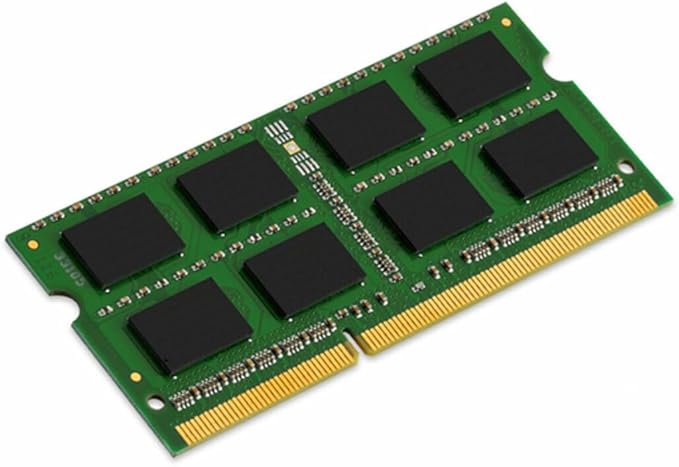
The Kingston 8GB DDR3L SDRAM Memory Module is the perfect upgrade for your notebook. With its 8GB memory size and 1600 MHz speed it provides a significant boost to your system's performance. The low voltage of 1.35V ensures energy efficiency without compromising on speed. This memory module is designed to be compatible with a wide range of notebooks making it a versatile choice for any user. Its non-ECC error checking feature ensures data integrity while the 204-pin form factor allows for easy installation. Upgrade your notebook's memory with the Kingston 8GB DDR3L SDRAM Memory Module and experience faster multitasking smoother performance and improved overall responsiveness.
The Kingston 8GB DDR3L SDRAM Memory Module is the perfect upgrade for your notebook. With its 8GB memory size and 1600 MHz speed it provides a significant boost to your system's performance. The low voltage of 1.35V ensures energy efficiency without compromising on speed. This memory module is designed to be compatible with a wide range of notebooks making it a versatile choice for any user. Its non-ECC error checking feature ensures data integrity while the 204-pin form factor allows for easy installation. Upgrade your notebook's memory with the Kingston 8GB DDR3L SDRAM Memory Module and experience faster multitasking smoother performance and improved overall responsiveness.
in 1 offers
The lowest price for Kingston 8GB DDR3L 1600MHz SODIMM Memory Module right now is $85.80.
Prices last updated 4 July 2025.
Kingston 8GB DDR3L 1600MHz SODIMM Memory Module
The Kingston 8GB DDR3L SDRAM Memory Module is the perfect upgrade for your notebook. With its 8GB memory size and 1600 MHz speed it provides a significant boost to your system's performance. The low voltage of 1.35V ensures energy efficiency without compromising on speed. This memory module is designed to be compatible with a wide range of notebooks making it a versatile choice for any user. Its non-ECC error checking feature ensures data integrity while the 204-pin form factor allows for easy installation. Upgrade your notebook's memory with the Kingston 8GB DDR3L SDRAM Memory Module and experience faster multitasking smoother performance and improved overall responsiveness.
The Kingston 8GB DDR3L SDRAM Memory Module is the perfect upgrade for your notebook. With its 8GB memory size and 1600 MHz speed it provides a significant boost to your system's performance. The low voltage of 1.35V ensures energy efficiency without compromising on speed. This memory module is designed to be compatible with a wide range of notebooks making it a versatile choice for any user. Its non-ECC error checking feature ensures data integrity while the 204-pin form factor allows for easy installation. Upgrade your notebook's memory with the Kingston 8GB DDR3L SDRAM Memory Module and experience faster multitasking smoother performance and improved overall responsiveness.
Last updated at 04/07/2025 01:10:59
originally posted on lazada.com.ph
**Seller is responsive sa mga questions/inquiries. Package arrived earlier. Nag-expect na may box itself yung item pero wala pala but at least it is well wrapped. **My Laptop is Asus K555LB. Compatible naman sya. And it is working as you can see after ko iinsert yung 8gb RAM. Total ram ko 12gb na yaz!! 🙌Hopefully this quality will last longer. Will come back on my review after 3months. thanks seller! p.s it has warranty 🔥
originally posted on ebay.com
There are many brands of RAM on the market, but if you just need RAM that gets the job done cheap, without the bells and whistles - you really can't put a foot wrong with Kingston ValueRAM. I'm a guy that goes through hundreds of RAM sticks a year. Personal machines, work machines, family machines - you name it. Kingston has been my go-to brand where price is a major concern for many years, with only one faulty out-of-the-box ValueRAM stick I can remember. Granted this isn't high-performance memory, and the timings are never the greatest - but for struggling machines hitting the page file time and time again, basic sticks like this are a godsend. If your machine is in need of RAM - and please double-check this yourself before you buy, as many machines are ... MoreThere are many brands of RAM on the market, but if you just need RAM that gets the job done cheap, without the bells and whistles - you really can't put a foot wrong with Kingston ValueRAM. I'm a guy that goes through hundreds of RAM sticks a year. Personal machines, work machines, family machines - you name it. Kingston has been my go-to brand where price is a major concern for many years, with only one faulty out-of-the-box ValueRAM stick I can remember. Granted this isn't high-performance memory, and the timings are never the greatest - but for struggling machines hitting the page file time and time again, basic sticks like this are a godsend. If your machine is in need of RAM - and please double-check this yourself before you buy, as many machines are mis-diagnosed as needing more RAM when in fact other issues are causing headaches - and you just need it basic and working - ValueRAM should be in your shortlist. It's available in all DDR flavours, at many clocks. Make sure you match your DDR type and clockspeed - your RAM will only work at the speed of the slowest stick installed. If you have three sticks of 1600MHz and one stick of 1333MHz - all your RAM runs at 1333. Good luck!
originally posted on homeessentialsdirect.com
Comment; I have not measured this Memory module impact on battery life (duration of charge), since I didn't measure how it was with the lesser size RAM and different brand module that it replaced, but at least it hasn't shortened battery life, so 5 starts there. This memory went into my wife's entry level, Office and Google Classroom dedicated entry-level laptop, which it doesn't have touch screen, so I'll give it 5 starts to avoid giving wrong negative impression. Installation is as easy as your device allows. Meaning, in my case I needed to remove the whole bottom cover, which is 15 small screws with a small Phillips screwdriver, the removing the installed memory module and inserting this one, taking care of preventing static discharge on your memory module and ... MoreComment; I have not measured this Memory module impact on battery life (duration of charge), since I didn't measure how it was with the lesser size RAM and different brand module that it replaced, but at least it hasn't shortened battery life, so 5 starts there. This memory went into my wife's entry level, Office and Google Classroom dedicated entry-level laptop, which it doesn't have touch screen, so I'll give it 5 starts to avoid giving wrong negative impression. Installation is as easy as your device allows. Meaning, in my case I needed to remove the whole bottom cover, which is 15 small screws with a small Phillips screwdriver, the removing the installed memory module and inserting this one, taking care of preventing static discharge on your memory module and rest of computer parts, is really easy. in my case just pushing the side holders to free the first one, pulling it out carefully, inserting the new module (it only goes in one position) carefully, until the side holders click in place, and finally placing back and screwing the bottom cover with its screws. Some laptops have only a small cover to remove and reach for the memory location. The module was immediately recognized by the BIOS, and by Windows 10 (64 bits) and I'm attaching a picture of the received memory module as well as a couple of screen pictures to show you.
| General | |
| Capacity | 8 GB |
| Upgrade Type | Generic |
| OEM Manufacturer Equivalent Part Number | HP H6Y77AA, DELL A7022339, HP H6Y77UT, HP 693374-001, Toshiba PA5104U-1M8G, Lenovo 0B47381, HP 693374-005, HP H6Y77ET, Panasonic CF-KBAS08GM, Apple MF495G/A (1/2) |
| Memory |
**Seller is responsive sa mga questions/inquiries. Package arrived earlier. Nag-expect na may box itself yung item pero wala pala but at least it is well wrapped. **My Laptop is Asus K555LB. Compatible naman sya. And it is working as you can see after ko iinsert yung 8gb RAM. Total ram ko 12gb na yaz!! 🙌Hopefully this quality will last longer. Will come back on my review after 3months. thanks seller! p.s it has warranty 🔥
There are many brands of RAM on the market, but if you just need RAM that gets the job done cheap, without the bells and whistles - you really can't put a foot wrong with Kingston ValueRAM. I'm a guy that goes through hundreds of RAM sticks a year. Personal machines, work machines, family machines - you name it. Kingston has been my go-to brand where price is a major concern for many years, with only one faulty out-of-the-box ValueRAM stick I can remember. Granted this isn't high-performance memory, and the timings are never the greatest - but for struggling machines hitting the page file time and time again, basic sticks like this are a godsend. If your machine is in need of RAM - and please double-check this yourself before you buy, as many machines are ... MoreThere are many brands of RAM on the market, but if you just need RAM that gets the job done cheap, without the bells and whistles - you really can't put a foot wrong with Kingston ValueRAM. I'm a guy that goes through hundreds of RAM sticks a year. Personal machines, work machines, family machines - you name it. Kingston has been my go-to brand where price is a major concern for many years, with only one faulty out-of-the-box ValueRAM stick I can remember. Granted this isn't high-performance memory, and the timings are never the greatest - but for struggling machines hitting the page file time and time again, basic sticks like this are a godsend. If your machine is in need of RAM - and please double-check this yourself before you buy, as many machines are mis-diagnosed as needing more RAM when in fact other issues are causing headaches - and you just need it basic and working - ValueRAM should be in your shortlist. It's available in all DDR flavours, at many clocks. Make sure you match your DDR type and clockspeed - your RAM will only work at the speed of the slowest stick installed. If you have three sticks of 1600MHz and one stick of 1333MHz - all your RAM runs at 1333. Good luck!
Comment; I have not measured this Memory module impact on battery life (duration of charge), since I didn't measure how it was with the lesser size RAM and different brand module that it replaced, but at least it hasn't shortened battery life, so 5 starts there. This memory went into my wife's entry level, Office and Google Classroom dedicated entry-level laptop, which it doesn't have touch screen, so I'll give it 5 starts to avoid giving wrong negative impression. Installation is as easy as your device allows. Meaning, in my case I needed to remove the whole bottom cover, which is 15 small screws with a small Phillips screwdriver, the removing the installed memory module and inserting this one, taking care of preventing static discharge on your memory module and ... MoreComment; I have not measured this Memory module impact on battery life (duration of charge), since I didn't measure how it was with the lesser size RAM and different brand module that it replaced, but at least it hasn't shortened battery life, so 5 starts there. This memory went into my wife's entry level, Office and Google Classroom dedicated entry-level laptop, which it doesn't have touch screen, so I'll give it 5 starts to avoid giving wrong negative impression. Installation is as easy as your device allows. Meaning, in my case I needed to remove the whole bottom cover, which is 15 small screws with a small Phillips screwdriver, the removing the installed memory module and inserting this one, taking care of preventing static discharge on your memory module and rest of computer parts, is really easy. in my case just pushing the side holders to free the first one, pulling it out carefully, inserting the new module (it only goes in one position) carefully, until the side holders click in place, and finally placing back and screwing the bottom cover with its screws. Some laptops have only a small cover to remove and reach for the memory location. The module was immediately recognized by the BIOS, and by Windows 10 (64 bits) and I'm attaching a picture of the received memory module as well as a couple of screen pictures to show you.
I used this to upgrade my ram from 8 to 16gb in a HP Probook 6330b i5 2330m, SSD. I use this laptop to DJ with in club settings over extended periods of intensive use and I doubled my ram, to help take the strain and Im pleased with performance. I have not noticed any real increase in speed however, I anticipated this, I upgraded mainly to have the maximum spec for my device. I purchased Kingston as theyre a recognised brand of ram, so reliability shouldnt be an issue and Ive had kingston fitted to other devices without issue. If you want a substantial increase in performance, install a solid state drive in conjunction with a ram upgrade and watch your device fly. Its important to fit these sticks in matched pairs to take advantage of dual channel features on most ... MoreI used this to upgrade my ram from 8 to 16gb in a HP Probook 6330b i5 2330m, SSD. I use this laptop to DJ with in club settings over extended periods of intensive use and I doubled my ram, to help take the strain and Im pleased with performance. I have not noticed any real increase in speed however, I anticipated this, I upgraded mainly to have the maximum spec for my device. I purchased Kingston as theyre a recognised brand of ram, so reliability shouldnt be an issue and Ive had kingston fitted to other devices without issue. If you want a substantial increase in performance, install a solid state drive in conjunction with a ram upgrade and watch your device fly. Its important to fit these sticks in matched pairs to take advantage of dual channel features on most modern laptops and get the best performance gains. Note some newer laptops will require 0.35v low voltage ram, older laptops such as mine can use either 0.35v or 0.5v as I purchased. Also check if your device requires ddr3 or 4 ram
| General | |
| Capacity | 8 GB |
| Upgrade Type | Generic |
| OEM Manufacturer Equivalent Part Number | HP H6Y77AA, DELL A7022339, HP H6Y77UT, HP 693374-001, Toshiba PA5104U-1M8G, Lenovo 0B47381, HP 693374-005, HP H6Y77ET, Panasonic CF-KBAS08GM, Apple MF495G/A (1/2) |
| Memory |