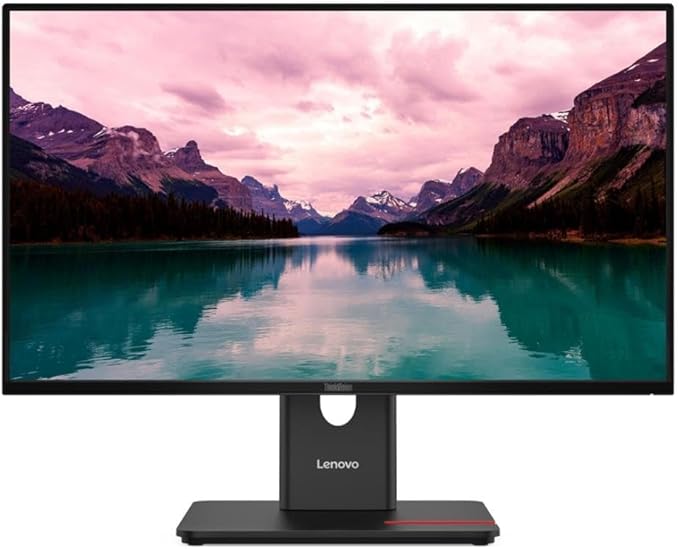
Lenovo ThinkVision T24i-20 FHD Monitor, 23.8 Inch
Power through your day on the ThinkVision T24i-20. Its FHD In-Plane Switching bezels help you enhance efficiency. The TÜV Rheinland Eye Comfort certified ThinkVision T24i-20 is ideal for professionals as it minimises eye fatigue and strain. Transfer or receive data with ease using varied options to connect other peripherals. This monitor is thoughtfully designed to keep your desk space organised and provide ergonomic benefits to users who spend long hours at work.
Power through your day on the ThinkVision T24i-20. Its FHD In-Plane Switching bezels help you enhance efficiency. The TÜV Rheinland Eye Comfort certified ThinkVision T24i-20 is ideal for professionals as it minimises eye fatigue and strain. Transfer or receive data with ease using varied options to connect other peripherals. This monitor is thoughtfully designed to keep your desk space organised and provide ergonomic benefits to users who spend long hours at work.
Power through your day on the ThinkVision T24i-20. Its FHD In-Plane Switching bezels help you enhance efficiency. The TÜV Rheinland Eye Comfort certified ThinkVision T24i-20 is ideal for professionals as it minimises eye fatigue and strain. Transfer or receive data with ease using varied options to connect other peripherals. This monitor is thoughtfully designed to keep your desk space organised and provide ergonomic benefits to users who spend long hours at work.
Power through your day on the ThinkVision T24i-20. Its FHD In-Plane Switching bezels help you enhance efficiency. The TÜV Rheinland Eye Comfort certified ThinkVision T24i-20 is ideal for professionals as it minimises eye fatigue and strain. Transfer or receive data with ease using varied options to connect other peripherals. This monitor is thoughtfully designed to keep your desk space organised and provide ergonomic benefits to users who spend long hours at work.
in 20 offers
The lowest price for Lenovo ThinkVision T24i-20 FHD Monitor, 23.8 Inch right now is $99.00 at Reboot IT Refurbished Computers, compared across 15 retailers.
The all-time low was $70.64 on 6 June 2026 — today's price is 40% above the lowest ever. It has been notably cheaper before — worth setting a price alert.
Prices last updated 17 Aug 2026.
Last updated at 17/08/2026 11:34:53
Good
30-day returns
Lenovo T24i-20 23.8in 1920x1080 IPS USB HDMI DP | Reboot IT
30-day returns
Lenovo ThinkVision T24i-20 23.8 inch IPS FHD LED HDMI DP Monitor
Free delivery between 21–31 Aug
Lenovo ThinkVision T24I-20 24" FHD Monitor (B-Grade Refurbished) IPS Display - 4ms Response Time - DisplayPort - HDMI - VGA - Cables - 18-Month Warran
Delivery between 22–27 Aug $9
Lenovo ThinkVision T24I-20 24" FHD IPS Monitor (A-Grade Refurbished) Inputs: DisplayPort - HDMI - VGA - Cables-Supplied with HDMI & Power Cable - 4ms
Delivery between 22–27 Aug $9
Lenovo ThinkVision T24i-20 23.8" 1920x1080 IPS LED Monitor - Lightly Used
Affiliate Disclosure: We may receive a small commission for purchases made through this link at no extra cost to you. This helps support our site. Thank you!
Lenovo ThinkVision T24i-20 (61F7MAR1US) 23.8'' FHD IPS LCD Monitor - Black
Affiliate Disclosure: We may receive a small commission for purchases made through this link at no extra cost to you. This helps support our site. Thank you!
Lenovo Thinkvision T24i-20 23.8" Ips Fhd Anti-glare Vga, Dp, Hdmi,
Free delivery
Affiliate Disclosure: We may receive a small commission for purchases made through this link at no extra cost to you. This helps support our site. Thank you!
Lenovo ThinkVision T24I-20 24" FHD IPS Monitor (A-Grade Refurbished) Inputs:
Delivery $10
Lenovo ThinkVision T24I-20 24" FHD IPS Monitor (A-Grade Refurbished) Inputs:
Delivery $10
originally posted on lenovo.com
Excellent monitor with all features needed for modern operating systems. There are 2 things that are the most important to me: 1) illumination - I prefer monitors with proper brilliance - no struggle to see what is on the screen, and 2) resolution - I prefer seeing a document with properly shaped fonts - no boxes or raster squares. Size - it is a big monitor. I am struggling how to arrange it on the desk as I have multiple monitors and multiple laptops. Unlike cheaper monitors, this one can adjust height - excellent, so it can be a bit above my laptop screen. However, it results in not natural neck position. Something to take care of. Currently is connected to Lenovo Yoga 370 and as a curiosity - Lenovo Display Control Centre application is not recognizing ... MoreExcellent monitor with all features needed for modern operating systems. There are 2 things that are the most important to me: 1) illumination - I prefer monitors with proper brilliance - no struggle to see what is on the screen, and 2) resolution - I prefer seeing a document with properly shaped fonts - no boxes or raster squares. Size - it is a big monitor. I am struggling how to arrange it on the desk as I have multiple monitors and multiple laptops. Unlike cheaper monitors, this one can adjust height - excellent, so it can be a bit above my laptop screen. However, it results in not natural neck position. Something to take care of. Currently is connected to Lenovo Yoga 370 and as a curiosity - Lenovo Display Control Centre application is not recognizing monitor... kind of strange, as everything is matching: Lenovo Yoga, Lenovo USB-C cable, Lenovo ThinkVision, Lenovo control centre....
originally posted on lenovo.com
This IPS 4k monitor replaces an aging 2k IPS 27", mainly used for photo editing, browsing and office-oriented document creation. The image quality is very good out-of-the-box, even better after calibration. The image is also very uniform, I don't see bleeding when displaying a black surface in a dark room. The stand is sturdy and provides the adjustments I need (height and tilt). The surface increase from 27" to 31,5" is a real improvement. For photographs browsing and editing it's outstanding, it has never been easier to explore a picture at different levels while keeping the whole view by moving back a little. For other activities it's easier to work with many documents open, like on a non-virtual desktop. The unique problem I had was a compatility one with my ... MoreThis IPS 4k monitor replaces an aging 2k IPS 27", mainly used for photo editing, browsing and office-oriented document creation. The image quality is very good out-of-the-box, even better after calibration. The image is also very uniform, I don't see bleeding when displaying a black surface in a dark room. The stand is sturdy and provides the adjustments I need (height and tilt). The surface increase from 27" to 31,5" is a real improvement. For photographs browsing and editing it's outstanding, it has never been easier to explore a picture at different levels while keeping the whole view by moving back a little. For other activities it's easier to work with many documents open, like on a non-virtual desktop. The unique problem I had was a compatility one with my desktop environment, Linux Mint 21.3 with Xorg graphics and a passive Nvidia Geforce GT 710 card. When calibrating the monitor the software (dispcal) detected clipping. Also the mouse was quite laggy. The card is only able to drive a 4k monitor at 30hz (which is OK for me, I don't play games), but the monitor was driven at 60hz. Setting manually the frequency at 30hz solved the clipping and the mouse lag. Overall this monitor is a great buy.
originally posted on lenovo.com
I love this monitor! Good size and graphics, but what makes it stand apart is the thoughtfulness of the design. The loop for cord management makes it so easy to plug in my laptop when I need to. The slot on the base is the perfect size for my phone (even in its protective case). The whole things feels solid and stable. Repositioning the monitor is as easy as pushing it where I need it, but it doesn't feel loose or wobbly. And the range of positioning is fantastic. This is my first time buying something from Lenovo and I'm very impressed.
| Backlight type | W-LED |
| Audio input | N |
| Pixel density | 93 ppi |
| AC input frequency | 50/60 Hz |
| Cable lock slot type | Kensington |
Good
30-day returns
Lenovo T24i-20 23.8in 1920x1080 IPS USB HDMI DP | Reboot IT
30-day returns
Lenovo ThinkVision T24i-20 23.8 inch IPS FHD LED HDMI DP Monitor
Free delivery between 21–31 Aug
Lenovo ThinkVision T24I-20 24" FHD Monitor (B-Grade Refurbished) IPS Display - 4ms Response Time - DisplayPort - HDMI - VGA - Cables - 18-Month Warran
Delivery between 22–27 Aug $9
Lenovo ThinkVision T24I-20 24" FHD IPS Monitor (A-Grade Refurbished) Inputs: DisplayPort - HDMI - VGA - Cables-Supplied with HDMI & Power Cable - 4ms
Delivery between 22–27 Aug $9
Excellent monitor with all features needed for modern operating systems. There are 2 things that are the most important to me: 1) illumination - I prefer monitors with proper brilliance - no struggle to see what is on the screen, and 2) resolution - I prefer seeing a document with properly shaped fonts - no boxes or raster squares. Size - it is a big monitor. I am struggling how to arrange it on the desk as I have multiple monitors and multiple laptops. Unlike cheaper monitors, this one can adjust height - excellent, so it can be a bit above my laptop screen. However, it results in not natural neck position. Something to take care of. Currently is connected to Lenovo Yoga 370 and as a curiosity - Lenovo Display Control Centre application is not recognizing ... MoreExcellent monitor with all features needed for modern operating systems. There are 2 things that are the most important to me: 1) illumination - I prefer monitors with proper brilliance - no struggle to see what is on the screen, and 2) resolution - I prefer seeing a document with properly shaped fonts - no boxes or raster squares. Size - it is a big monitor. I am struggling how to arrange it on the desk as I have multiple monitors and multiple laptops. Unlike cheaper monitors, this one can adjust height - excellent, so it can be a bit above my laptop screen. However, it results in not natural neck position. Something to take care of. Currently is connected to Lenovo Yoga 370 and as a curiosity - Lenovo Display Control Centre application is not recognizing monitor... kind of strange, as everything is matching: Lenovo Yoga, Lenovo USB-C cable, Lenovo ThinkVision, Lenovo control centre....
This IPS 4k monitor replaces an aging 2k IPS 27", mainly used for photo editing, browsing and office-oriented document creation. The image quality is very good out-of-the-box, even better after calibration. The image is also very uniform, I don't see bleeding when displaying a black surface in a dark room. The stand is sturdy and provides the adjustments I need (height and tilt). The surface increase from 27" to 31,5" is a real improvement. For photographs browsing and editing it's outstanding, it has never been easier to explore a picture at different levels while keeping the whole view by moving back a little. For other activities it's easier to work with many documents open, like on a non-virtual desktop. The unique problem I had was a compatility one with my ... MoreThis IPS 4k monitor replaces an aging 2k IPS 27", mainly used for photo editing, browsing and office-oriented document creation. The image quality is very good out-of-the-box, even better after calibration. The image is also very uniform, I don't see bleeding when displaying a black surface in a dark room. The stand is sturdy and provides the adjustments I need (height and tilt). The surface increase from 27" to 31,5" is a real improvement. For photographs browsing and editing it's outstanding, it has never been easier to explore a picture at different levels while keeping the whole view by moving back a little. For other activities it's easier to work with many documents open, like on a non-virtual desktop. The unique problem I had was a compatility one with my desktop environment, Linux Mint 21.3 with Xorg graphics and a passive Nvidia Geforce GT 710 card. When calibrating the monitor the software (dispcal) detected clipping. Also the mouse was quite laggy. The card is only able to drive a 4k monitor at 30hz (which is OK for me, I don't play games), but the monitor was driven at 60hz. Setting manually the frequency at 30hz solved the clipping and the mouse lag. Overall this monitor is a great buy.
I love this monitor! Good size and graphics, but what makes it stand apart is the thoughtfulness of the design. The loop for cord management makes it so easy to plug in my laptop when I need to. The slot on the base is the perfect size for my phone (even in its protective case). The whole things feels solid and stable. Repositioning the monitor is as easy as pushing it where I need it, but it doesn't feel loose or wobbly. And the range of positioning is fantastic. This is my first time buying something from Lenovo and I'm very impressed.
i really enjoyed having this monitor i highly recommend it to anyone who rather not mess with the settings and want a monitor that works right out the box with the playstation and the box. minor configurations need to be made on the xbox in order to make it register as a pc monitor instead of a tv. once thats made youll have an amazing picture running fluidly smooth 120 fps on games like halo and gears. the reason why i returned it is because it left me wanting more out of the monitor. 0nce i witnessed the possbilities of a good monitor i had to get something that let me play with the settings a little more. for that reason i exchanged it for a different one. Pros: screen size was nice i wish more monitors made off sizes like this 25 inch. it was the biggest i could ... Morei really enjoyed having this monitor i highly recommend it to anyone who rather not mess with the settings and want a monitor that works right out the box with the playstation and the box. minor configurations need to be made on the xbox in order to make it register as a pc monitor instead of a tv. once thats made youll have an amazing picture running fluidly smooth 120 fps on games like halo and gears. the reason why i returned it is because it left me wanting more out of the monitor. 0nce i witnessed the possbilities of a good monitor i had to get something that let me play with the settings a little more. for that reason i exchanged it for a different one. Pros: screen size was nice i wish more monitors made off sizes like this 25 inch. it was the biggest i could find that stayed within 24 inches and most 24 are actually around 23.8 inches rounded up. the picture quality was so good; i couldnt tell much difference between 1080 and 4k on my tv unless i stared at the bushes enough time. cons: when i type the screen wobbled on my desk. i dont type when i play so it wasnt an issue. the settings show HDR but the HDMI is 1.4 so i cant use it on the xbox. besides that i think it was worth every penny and if i got it as a gift i wouldnt complain. since i can choose my own screen and im buying it for myself i opted for a different one. hope this helps!
Great monitor! 24.5" is great dor wanting more tjan 22-24 but not 27. HOWEVER the downsides.. 1. No usb a or c ports. 2.The screen is BRIGHT!! 3. It was quite difficult to get it to match in color to my current 27" Dell gsync monitor due to the brightness even ticked down to 30. Best i could do was an 80% match which im happy enough with. 4. monitor color/brightness settings stay the same regardless of dp or hdmi. They share the same setting so you cant have individual adjustments for hdmi and individual adjusment setting for DP. Upsides Also No read pixels or any horrible lightbleedong/flashlighting so im quite pleased! If you can get on sale do it, id consider other options before buying at full price
I think this monitor is a good deal (I got in on slight sale) versus equivalent LG or Dell monitors (UHD 32"), and physically much more attractive (professional, and none of that disgusting "Apple-white/silver" that others seem to favor, pretending to be Apple). Picture quality and feature set are good. The stand is pretty slick, with perfect spring mounting so it moves up and down effortlessly. The hub functionality is decent, and would cost maybe $100 more with other leading manufacturers. I am a little disappointed in two things, and unfortunately had to take off one star. 1. The USB drives are really 2.0 rather than 3.1, as the listing claims. As seen in Lenovo's response to another complaint in these comments, you are able to achieve 3.0 if you reduce the ... MoreI think this monitor is a good deal (I got in on slight sale) versus equivalent LG or Dell monitors (UHD 32"), and physically much more attractive (professional, and none of that disgusting "Apple-white/silver" that others seem to favor, pretending to be Apple). Picture quality and feature set are good. The stand is pretty slick, with perfect spring mounting so it moves up and down effortlessly. The hub functionality is decent, and would cost maybe $100 more with other leading manufacturers. I am a little disappointed in two things, and unfortunately had to take off one star. 1. The USB drives are really 2.0 rather than 3.1, as the listing claims. As seen in Lenovo's response to another complaint in these comments, you are able to achieve 3.0 if you reduce the refresh to 30Hz, and otherwise the usb-c (3.0) doesn't have the bandwith to carry both signals. That was a big disappointment, and means you cannot connect a USB 3.0 drive, for example, to the hub. It's not terrible though, and now I just use it for webcam, mic, kb, mouse, and speakers (yes, I also use a splitter). I think at minimum this shouldve been clarified in the description, and better yet the usb-c shouldve been improved to 3.2 to give it the bandwith for all this. 2. The phone holder doesnt fit my phone!!! I have a OnePlus 8 pro that simply doesn't fit. What an oversight, that makes this otherwise slick innovation completely useless for me. Again, what are we coming to, are we assuming everyone only has a tiny iphone??? Bigger phones are much better, and they're only going to get bigger from here. There was no reason to make the phone holder limited in length, it should go across the entire base instead of just 60%. If you have to think of it this way, give me an "ipad holder" instead . And BTW, I thought of this ahead of time and searched hard for the holder size, but couldn't find it anywhere. Another mark against the marketing materials.
Honestly, not worst monitor ever, but probably could get another 144hz for a bit more and probably be better off with that, but this monitor is not half bad at all. Even though it doesnt say, this Monitor is FreeSync as well as G-sync compatible. Only problem is to enable G-sync, you need to use a display cable, but you can find one easily for $10. Works good for PC as well as Xbox Series X. To enable 120hz on XSX, you need to make sure you edit the display options to where you run the video output on HDMI instead of auto selecting it, select 36 bit rate color as well as PC RGB, which looks fine on it. From there, where ever you change the resolution, youll have the option to have 1080p & Refresh Rate selection for either 60 or 120hz. 1440p isnt supported, but 1080p ... MoreHonestly, not worst monitor ever, but probably could get another 144hz for a bit more and probably be better off with that, but this monitor is not half bad at all. Even though it doesnt say, this Monitor is FreeSync as well as G-sync compatible. Only problem is to enable G-sync, you need to use a display cable, but you can find one easily for $10. Works good for PC as well as Xbox Series X. To enable 120hz on XSX, you need to make sure you edit the display options to where you run the video output on HDMI instead of auto selecting it, select 36 bit rate color as well as PC RGB, which looks fine on it. From there, where ever you change the resolution, youll have the option to have 1080p & Refresh Rate selection for either 60 or 120hz. 1440p isnt supported, but 1080p is and can run at 120hz. Using the game mode options, the colors appear better but not by a lot. I edited the saturation than selected a game mode, but it dont make much difference it seems. The games run amazing on it and honestly once you switch, you dont want to ever go back.The brightness is either a bit too dim or too bright, and the colors dont pop as much as it could, but they still look pretty decent on screen. If you want something thatll get you by, this is the one, but dont expect the colors to be super crisp. I mainly purchased for the 144hz and Im not disappointed. Prob wouldve been a 5 star if it werent for how unsaturated things look at times, but you get used to it shortly.
It's been almost 6 months since I purchase this Lenovo gaming monitor and I have really nothing bad to say besides I wish this monitor had more setting options to make the screen look a bit better. For example having the option to set the sharpness just a bit better. And messing around with the brightness on the different gaming settings. This monitor is bright at first but after a few rounds you get used to it. I got this for my PS4 and watching YouTube and Vudu. Playing PS4 is smooth, fluid, and pops in color. Movies and YouTube looks great and detail. I highly recommend this monitor if you are looking for a decent gaming monitor without paying to much money's, it's a simple design that blends in well with your home decor.
I am satisfied with this monitor. And I hate to refer to it as such since it's so much more. I love that it connects to my Slim 7i notebook with a single USB-C cable. So, it's a monitor, USB-C hub and power supply in one. Works great! On the downside, it sometimes takes multiple keystrokes to wake up the laptop. And, I did not realize how dependent I was on a back-lit keyboard, but that's not a monitor issue. It will seem expensive until you realize all it offers.
Really pleased with these monitors. Upgraded from an old Dell. I had used these in an Office so decided to get 2 of my Own. Really pleased witht he result. I have them mounted on a dual monitor arm. I use USB-C to connect to my laptop (provides LAN connectivity, display and charging). then from that monitor i have a DP-OUT to the second monitor so they are daisy chained together. Took a bit of tinkering to get the daisy chain working but got there in the end. Been using them for a few weeks now and so far everything has been great. My laptop is now tucked under the desk out the way and i can use the USB hub of the monitor for my peripherals. Its helped tidy by desk by reducing the number of cables a lot.
| Backlight type | W-LED |
| Audio input | N |
| Pixel density | 93 ppi |
| AC input frequency | 50/60 Hz |
| Cable lock slot type | Kensington |