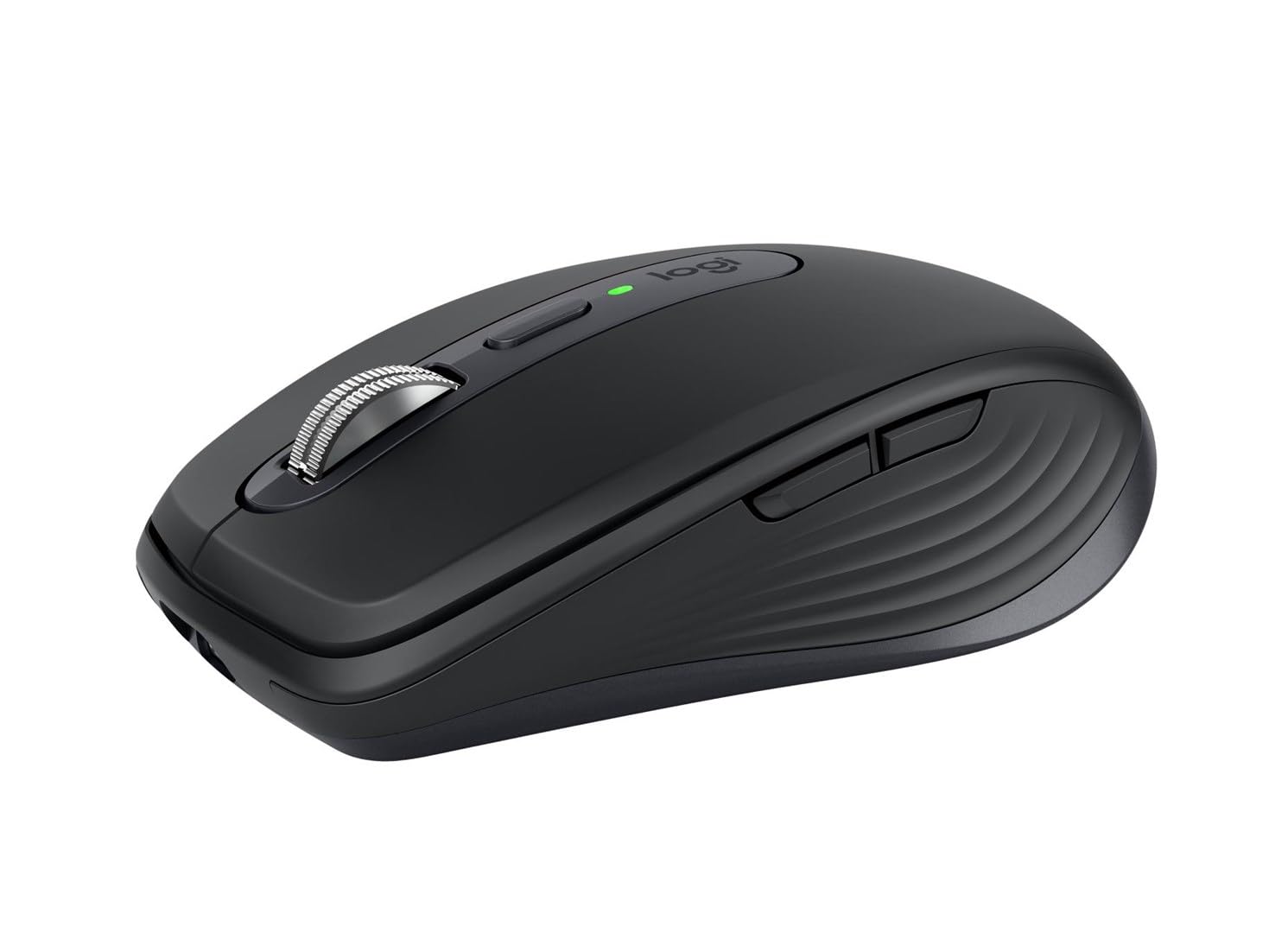
Logitech 910-006934 MX Anywhere 3S Rose Wireless Mouse
Master your flow. Anywhere. Introducing Logitech MX Anywhere 3S – a beloved compact wireless mouse with next-level precision and control. Now with Quiet Click buttons that deliver a satisfying tactile feel with less click noise (than MX Anywhere 3). MX Anywhere 3S also now comes with an 8K DPI optical sensor for next- gen responsiveness on any surface – even glass. (1) and fast, precise Magspeed scrolling. Key Features Tracks anywhere, goes everywhere Work on any surface, even glass1, now with an 8K DPI sensor so you can cover more ground with subtle movement Deeper flow with quiet clicks The same satisfying feel but with less click noise (than MX Anywhere 3) for less distraction and more focus Scroll 1000 lines per second With MagSpeed, Logitech’s fastest5 and most precise scroll wheel4 Multi-device, multi-OS Connect with up to 3 devices via Bluetooth on Windows, macOS, Chrome OS or Linux. Compatible with Logi Bolt USB receiver only (receiver not included)6 Seamless connectivity Engineered for Intel Evo which verifes it meets technical specifcations for optimal Bluetooth connection: no dongles, no wires, no hassle Made with recycled Plastic Plastic parts in MX Anywhere 3S include certified post-consumer recycled plastic – 78% for Graphite*, 61% for Pale Grey and Rose* Paper Packaging: FSC-certified Certified carbon neutral *Excludes plastic in printed wiring assembly (PWA), receiver, wire, FFC cable, and packaging. (1) 4 mm minimum glass thickness. (2) Compared to a regular Logitech mouse with default DPI setting. (4) Compared to Logitech Master 2S mouse with Logitech Options installed and Smooth scrolling enabled (5) Compared to regular Logitech mouse without an electromagnetic scroll wheel (6) The mouse is not compatible with other Logitech USB receivers. What's in the box Mouse USB-C charging cable (USB-A to USB-C) User documentation System requirements What you need: Bluetooth Low Energy Requires Bluetooth Low Energy technology Windows 10, 11 or later macOS 10.15 or later Linux (9) Chrome OS (9) iPadOS 14 or later (9) AndroidTM 8.0 or later (9) Compatible with Logi Bolt USB receiver (not included) Not compatible with with other Logitech USB receivers. (9) Device basic functions will be supported without software for operating systems other than Windows and macOS
Master your flow. Anywhere. Introducing Logitech MX Anywhere 3S – a beloved compact wireless mouse with next-level precision and control. Now with Quiet Click buttons that deliver a satisfying tactile feel with less click noise (than MX Anywhere 3). MX Anywhere 3S also now comes with an 8K DPI optical sensor for next- gen responsiveness on any surface – even glass. (1) and fast, precise Magspeed scrolling. Key Features Tracks anywhere, goes everywhere Work on any surface, even glass1, now with an 8K DPI sensor so you can cover more ground with subtle movement Deeper flow with quiet clicks The same satisfying feel but with less click noise (than MX Anywhere 3) for less distraction and more focus Scroll 1000 lines per second With MagSpeed, Logitech’s fastest5 and most precise scroll wheel4 Multi-device, multi-OS Connect with up to 3 devices via Bluetooth on Windows, macOS, Chrome OS or Linux. Compatible with Logi Bolt USB receiver only (receiver not included)6 Seamless connectivity Engineered for Intel Evo which verifes it meets technical specifcations for optimal Bluetooth connection: no dongles, no wires, no hassle Made with recycled Plastic Plastic parts in MX Anywhere 3S include certified post-consumer recycled plastic – 78% for Graphite*, 61% for Pale Grey and Rose* Paper Packaging: FSC-certified Certified carbon neutral *Excludes plastic in printed wiring assembly (PWA), receiver, wire, FFC cable, and packaging. (1) 4 mm minimum glass thickness. (2) Compared to a regular Logitech mouse with default DPI setting. (4) Compared to Logitech Master 2S mouse with Logitech Options installed and Smooth scrolling enabled (5) Compared to regular Logitech mouse without an electromagnetic scroll wheel (6) The mouse is not compatible with other Logitech USB receivers. What's in the box Mouse USB-C charging cable (USB-A to USB-C) User documentation System requirements What you need: Bluetooth Low Energy Requires Bluetooth Low Energy technology Windows 10, 11 or later macOS 10.15 or later Linux (9) Chrome OS (9) iPadOS 14 or later (9) AndroidTM 8.0 or later (9) Compatible with Logi Bolt USB receiver (not included) Not compatible with with other Logitech USB receivers. (9) Device basic functions will be supported without software for operating systems other than Windows and macOS
Master your flow. Anywhere. Introducing Logitech MX Anywhere 3S – a beloved compact wireless mouse with next-level precision and control. Now with Quiet Click buttons that deliver a satisfying tactile feel with less click noise (than MX Anywhere 3). MX Anywhere 3S also now comes with an 8K DPI optical sensor for next- gen responsiveness on any surface – even glass. (1) and fast, precise Magspeed scrolling. Key Features Tracks anywhere, goes everywhere Work on any surface, even glass1, now with an 8K DPI sensor so you can cover more ground with subtle movement Deeper flow with quiet clicks The same satisfying feel but with less click noise (than MX Anywhere 3) for less distraction and more focus Scroll 1000 lines per second With MagSpeed, Logitech’s fastest5 and most precise scroll wheel4 Multi-device, multi-OS Connect with up to 3 devices via Bluetooth on Windows, macOS, Chrome OS or Linux. Compatible with Logi Bolt USB receiver only (receiver not included)6 Seamless connectivity Engineered for Intel Evo which verifes it meets technical specifcations for optimal Bluetooth connection: no dongles, no wires, no hassle Made with recycled Plastic Plastic parts in MX Anywhere 3S include certified post-consumer recycled plastic – 78% for Graphite*, 61% for Pale Grey and Rose* Paper Packaging: FSC-certified Certified carbon neutral *Excludes plastic in printed wiring assembly (PWA), receiver, wire, FFC cable, and packaging. (1) 4 mm minimum glass thickness. (2) Compared to a regular Logitech mouse with default DPI setting. (4) Compared to Logitech Master 2S mouse with Logitech Options installed and Smooth scrolling enabled (5) Compared to regular Logitech mouse without an electromagnetic scroll wheel (6) The mouse is not compatible with other Logitech USB receivers. What's in the box Mouse USB-C charging cable (USB-A to USB-C) User documentation System requirements What you need: Bluetooth Low Energy Requires Bluetooth Low Energy technology Windows 10, 11 or later macOS 10.15 or later Linux (9) Chrome OS (9) iPadOS 14 or later (9) AndroidTM 8.0 or later (9) Compatible with Logi Bolt USB receiver (not included) Not compatible with with other Logitech USB receivers. (9) Device basic functions will be supported without software for operating systems other than Windows and macOS
Master your flow. Anywhere. Introducing Logitech MX Anywhere 3S – a beloved compact wireless mouse with next-level precision and control. Now with Quiet Click buttons that deliver a satisfying tactile feel with less click noise (than MX Anywhere 3). MX Anywhere 3S also now comes with an 8K DPI optical sensor for next- gen responsiveness on any surface – even glass. (1) and fast, precise Magspeed scrolling. Key Features Tracks anywhere, goes everywhere Work on any surface, even glass1, now with an 8K DPI sensor so you can cover more ground with subtle movement Deeper flow with quiet clicks The same satisfying feel but with less click noise (than MX Anywhere 3) for less distraction and more focus Scroll 1000 lines per second With MagSpeed, Logitech’s fastest5 and most precise scroll wheel4 Multi-device, multi-OS Connect with up to 3 devices via Bluetooth on Windows, macOS, Chrome OS or Linux. Compatible with Logi Bolt USB receiver only (receiver not included)6 Seamless connectivity Engineered for Intel Evo which verifes it meets technical specifcations for optimal Bluetooth connection: no dongles, no wires, no hassle Made with recycled Plastic Plastic parts in MX Anywhere 3S include certified post-consumer recycled plastic – 78% for Graphite*, 61% for Pale Grey and Rose* Paper Packaging: FSC-certified Certified carbon neutral *Excludes plastic in printed wiring assembly (PWA), receiver, wire, FFC cable, and packaging. (1) 4 mm minimum glass thickness. (2) Compared to a regular Logitech mouse with default DPI setting. (4) Compared to Logitech Master 2S mouse with Logitech Options installed and Smooth scrolling enabled (5) Compared to regular Logitech mouse without an electromagnetic scroll wheel (6) The mouse is not compatible with other Logitech USB receivers. What's in the box Mouse USB-C charging cable (USB-A to USB-C) User documentation System requirements What you need: Bluetooth Low Energy Requires Bluetooth Low Energy technology Windows 10, 11 or later macOS 10.15 or later Linux (9) Chrome OS (9) iPadOS 14 or later (9) AndroidTM 8.0 or later (9) Compatible with Logi Bolt USB receiver (not included) Not compatible with with other Logitech USB receivers. (9) Device basic functions will be supported without software for operating systems other than Windows and macOS
in 25 offers
The lowest price for Logitech 910-006934 MX Anywhere 3S Rose Wireless Mouse right now is $53.39 at AliExpress.com - AliExpress-226247430, compared across 22 retailers.
The all-time low was $18.99 on 2 Aug 2026 — today's price is 181% above the lowest ever. It has been notably cheaper before — worth setting a price alert.
Prices last updated 23 Oct 2026.
Last updated at 23/10/2026 07:10:31
Logitech MX Anywhere 3S Compact Wireless Mouse, Rose
Free delivery
Affiliate Disclosure: We may receive a small commission for purchases made through this link at no extra cost to you. This helps support our site. Thank you!
Logitech MX Anywhere 3S Creator Mouse - 8000 DPI Glass Tracking, MagSpeed Wheel, 3-Device Bluetooth,
Free delivery
Logitech MX Anywhere 3S Wireless Mouse - Rose
Delivery between 28–30 Oct $13.25
Mastercard $100 OFF | Logitech MX Anywhere 3S Wireless Mouse Rose 910-006937
Delivery $18.20
Logitech MX Anywhere 3S Wireless Mouse (Rose)
Free delivery
Logitech MX Anywhere 3S Wireless Mouse (Rose)
Free delivery
Logitech MX Anywhere 3S Wireless Compact Optical Mouse (Rose)
Free delivery between Tue – Wed
Logitech MX Anywhere 3S Wireless Compact Optical Mouse (Rose)
Free delivery between 27 Oct – 3 Nov
Logitech MX Anywhere 3S Wireless Compact Optical Mouse (Rose)
Delivery $9.95
Logitech MX Anywhere 3S Wireless Mouse (Rose)
Free delivery
originally posted on logitech.com
For the past three months (at least), this mouse has been marketed as coming with a free travel case. After luring unsuspecting customers into buying the mouse expecting a case to come with it, Logitech cancels the case several days after placing your order because it is "low in stock." At this point, I asked Logitech to cancel my entire order instead, but they told me it was "too late" to do so and that my mouse would be shipped in a couple of days. Now, two months after placing my order, I asked support again if the case would be delivered. They told me it was still “low in stock” and, additionally, I would need approval!Logitech has a “subject to availability” footnote to legally cover themselves, but this is absolutely a scam. The case has been out of stock for ... MoreFor the past three months (at least), this mouse has been marketed as coming with a free travel case. After luring unsuspecting customers into buying the mouse expecting a case to come with it, Logitech cancels the case several days after placing your order because it is "low in stock." At this point, I asked Logitech to cancel my entire order instead, but they told me it was "too late" to do so and that my mouse would be shipped in a couple of days. Now, two months after placing my order, I asked support again if the case would be delivered. They told me it was still “low in stock” and, additionally, I would need approval!Logitech has a “subject to availability” footnote to legally cover themselves, but this is absolutely a scam. The case has been out of stock for months and they have no intention of actually sending a free one as marketed. If they were an honest company they wouldn't have a banner on their website telling you a free case comes with this mouse when it is out of stock.Logitech support has been horrendous throughout this process. I have waited entire months for responses. One support agent didn’t know the MX Anywhere 3 was a product they sold. I had to send him a link to the product page.Suspiciously, recent (03/2023) bad reviews of this product are hidden from the first page of reviews and can be found on page 16+ mixed in with old reviews from 2022.In regards to the actual mouse, the exterior build quality is good and the magnetic scroll wheel is really nice. The scroll wheel gestures are great for Mac users that use several desktops. But... they absolutely cheaped out on some of the electronics. This mouse constantly disconnects from my MacBook over both Bluetooth and the provided receiver. It cannot be relied on for casual gaming, or for anything creative that requires long clicks and dragging the mouse (3D modeling, Photoshop, drawing, etc.) because the mouse will disconnect in the middle of dragging and mess up your work. This issue is so bad and persistent, Logitech has an entire support page and feedback area of their app dedicated to it.
originally posted on bestbuy.com
Logitech’s MX series is my go-to favorite for both keyboards and mice. I use the MX Keys keyboard and the MX Master mouse on my desktop every day. I also have the MX Anywhere 3 that I use with my laptops. With this in mind, I was interested in finding out what might have improved with the just-released MX Anywhere 3S. The answer is that the only real change is the improved 8K DPI sensor which has about double the resolution of its predecessor. That said, this is one great mouse made a bit better.The Anywhere 3S mouse is compact with excellent build quality. It’s dark grey rather than black like the previous version. As with the rest of the MX line, it’s wireless and can either connect by Bluetooth or by using a Logitech Unifying Receiver. Battery life is super ... MoreLogitech’s MX series is my go-to favorite for both keyboards and mice. I use the MX Keys keyboard and the MX Master mouse on my desktop every day. I also have the MX Anywhere 3 that I use with my laptops. With this in mind, I was interested in finding out what might have improved with the just-released MX Anywhere 3S. The answer is that the only real change is the improved 8K DPI sensor which has about double the resolution of its predecessor. That said, this is one great mouse made a bit better.The Anywhere 3S mouse is compact with excellent build quality. It’s dark grey rather than black like the previous version. As with the rest of the MX line, it’s wireless and can either connect by Bluetooth or by using a Logitech Unifying Receiver. Battery life is super with up to 70 days on a charge, and it charges using a standard USB-C connection. As with many products, there is no charging block included, but there is a short USB-A to C cable. Interestingly, there was no Unifying Receiver included, but I find that with laptops I prefer a Bluetooth connection.What sets this mouse apart is that it can pair with 3 different computers and switch between them using the button on the bottom. This combined with the Logitech Options software provides a flexibility that’s unique. You can program the middle button, the scroll wheel, and the additional three buttons to do just about anything you wish. Even better is that the programable functions can be set differently for different programs. When a program is launched, the mouse automatically shifts to the settings specific to that program. But wait, there’s more! The Options software also has a function called Flow. When enabled, you can be connected to two or three devices, and the cursor flows from one to the next just like an extended desktop setup with multiple monitors. You can even drag and drop between devices. The one restriction is that they must all be connected to the same WIFI network.As said, this is a great mouse with a bunch of extra features. I highly recommend it to anyone wanting a first-class pointer. It’s solid, with a very long-lasting battery, and can work on any surface … even glass.
originally posted on bestbuy.com
Logitech MX Anywhere 3SWhile being on the small side (since it is designed as a mobile mouse) it has a great feel. I like the ability to switch between click and smooth scrolling like some of the other Logitech products by clicking the small button just behind the scroll wheel, on top of the mouse. This mouse has the familiar Logitech satin finish, side buttons for moving back and forth in a webpage and has a nice contrast with the weighted, metal scroll wheel.I am using this mouse to replace my daily driver - an older MX Master mouse - that is getting kind of worn out. The movement is very smooth and the buttons have a very positive “click” to them without being hard to press. The laser reads on every surface I have tried it on. The button on the bottom allows ... MoreLogitech MX Anywhere 3SWhile being on the small side (since it is designed as a mobile mouse) it has a great feel. I like the ability to switch between click and smooth scrolling like some of the other Logitech products by clicking the small button just behind the scroll wheel, on top of the mouse. This mouse has the familiar Logitech satin finish, side buttons for moving back and forth in a webpage and has a nice contrast with the weighted, metal scroll wheel.I am using this mouse to replace my daily driver - an older MX Master mouse - that is getting kind of worn out. The movement is very smooth and the buttons have a very positive “click” to them without being hard to press. The laser reads on every surface I have tried it on. The button on the bottom allows it to b e configured for three different devices and can switch between them with a simple press of the button. It uses either Bluetooth or the new Bolt receiver. I do not have one of the receivers (non is supplied in the box) so I cannot say how well it works, but the new sensors work very well to give the user a solid, precise feel to every movement.Because of the size, it actually fits my space better than the very comfortable mouse it is replacing. I might miss the shape that fit my hand so well, but the precision of the new mouse is so great that I am happy with my swap! I can once again select multiple items with a simple swipe instead of losing the first few as it reset itself halfway through the motion.Logitech has proven itself with quality products for decades. This new version in their Anywhere line is a fitting example of the continual evolution of their designs. I look forward to many years of use for this mouse, as I have had from so many other Logitech mice, since the 90’s.
| Sensor Type | Optical sensor |
| Polling Rate | 88,133 Hz |
| Switches | Quiet Click buttons |
| Connectivity Type | Wireless |
| Interface | USB-C (for charging) |

Logitech MX Anywhere 3S Compact Wireless Mouse, Rose
Free delivery
Affiliate Disclosure: We may receive a small commission for purchases made through this link at no extra cost to you. This helps support our site. Thank you!
Logitech MX Anywhere 3S Creator Mouse - 8000 DPI Glass Tracking, MagSpeed Wheel, 3-Device Bluetooth,
Free delivery
Logitech MX Anywhere 3S Wireless Mouse - Rose
Delivery between 28–30 Oct $13.25
Mastercard $100 OFF | Logitech MX Anywhere 3S Wireless Mouse Rose 910-006937
Delivery $18.20
Logitech MX Anywhere 3S Wireless Mouse (Rose)
Free delivery
For the past three months (at least), this mouse has been marketed as coming with a free travel case. After luring unsuspecting customers into buying the mouse expecting a case to come with it, Logitech cancels the case several days after placing your order because it is "low in stock." At this point, I asked Logitech to cancel my entire order instead, but they told me it was "too late" to do so and that my mouse would be shipped in a couple of days. Now, two months after placing my order, I asked support again if the case would be delivered. They told me it was still “low in stock” and, additionally, I would need approval!Logitech has a “subject to availability” footnote to legally cover themselves, but this is absolutely a scam. The case has been out of stock for ... MoreFor the past three months (at least), this mouse has been marketed as coming with a free travel case. After luring unsuspecting customers into buying the mouse expecting a case to come with it, Logitech cancels the case several days after placing your order because it is "low in stock." At this point, I asked Logitech to cancel my entire order instead, but they told me it was "too late" to do so and that my mouse would be shipped in a couple of days. Now, two months after placing my order, I asked support again if the case would be delivered. They told me it was still “low in stock” and, additionally, I would need approval!Logitech has a “subject to availability” footnote to legally cover themselves, but this is absolutely a scam. The case has been out of stock for months and they have no intention of actually sending a free one as marketed. If they were an honest company they wouldn't have a banner on their website telling you a free case comes with this mouse when it is out of stock.Logitech support has been horrendous throughout this process. I have waited entire months for responses. One support agent didn’t know the MX Anywhere 3 was a product they sold. I had to send him a link to the product page.Suspiciously, recent (03/2023) bad reviews of this product are hidden from the first page of reviews and can be found on page 16+ mixed in with old reviews from 2022.In regards to the actual mouse, the exterior build quality is good and the magnetic scroll wheel is really nice. The scroll wheel gestures are great for Mac users that use several desktops. But... they absolutely cheaped out on some of the electronics. This mouse constantly disconnects from my MacBook over both Bluetooth and the provided receiver. It cannot be relied on for casual gaming, or for anything creative that requires long clicks and dragging the mouse (3D modeling, Photoshop, drawing, etc.) because the mouse will disconnect in the middle of dragging and mess up your work. This issue is so bad and persistent, Logitech has an entire support page and feedback area of their app dedicated to it.
Logitech’s MX series is my go-to favorite for both keyboards and mice. I use the MX Keys keyboard and the MX Master mouse on my desktop every day. I also have the MX Anywhere 3 that I use with my laptops. With this in mind, I was interested in finding out what might have improved with the just-released MX Anywhere 3S. The answer is that the only real change is the improved 8K DPI sensor which has about double the resolution of its predecessor. That said, this is one great mouse made a bit better.The Anywhere 3S mouse is compact with excellent build quality. It’s dark grey rather than black like the previous version. As with the rest of the MX line, it’s wireless and can either connect by Bluetooth or by using a Logitech Unifying Receiver. Battery life is super ... MoreLogitech’s MX series is my go-to favorite for both keyboards and mice. I use the MX Keys keyboard and the MX Master mouse on my desktop every day. I also have the MX Anywhere 3 that I use with my laptops. With this in mind, I was interested in finding out what might have improved with the just-released MX Anywhere 3S. The answer is that the only real change is the improved 8K DPI sensor which has about double the resolution of its predecessor. That said, this is one great mouse made a bit better.The Anywhere 3S mouse is compact with excellent build quality. It’s dark grey rather than black like the previous version. As with the rest of the MX line, it’s wireless and can either connect by Bluetooth or by using a Logitech Unifying Receiver. Battery life is super with up to 70 days on a charge, and it charges using a standard USB-C connection. As with many products, there is no charging block included, but there is a short USB-A to C cable. Interestingly, there was no Unifying Receiver included, but I find that with laptops I prefer a Bluetooth connection.What sets this mouse apart is that it can pair with 3 different computers and switch between them using the button on the bottom. This combined with the Logitech Options software provides a flexibility that’s unique. You can program the middle button, the scroll wheel, and the additional three buttons to do just about anything you wish. Even better is that the programable functions can be set differently for different programs. When a program is launched, the mouse automatically shifts to the settings specific to that program. But wait, there’s more! The Options software also has a function called Flow. When enabled, you can be connected to two or three devices, and the cursor flows from one to the next just like an extended desktop setup with multiple monitors. You can even drag and drop between devices. The one restriction is that they must all be connected to the same WIFI network.As said, this is a great mouse with a bunch of extra features. I highly recommend it to anyone wanting a first-class pointer. It’s solid, with a very long-lasting battery, and can work on any surface … even glass.
Logitech MX Anywhere 3SWhile being on the small side (since it is designed as a mobile mouse) it has a great feel. I like the ability to switch between click and smooth scrolling like some of the other Logitech products by clicking the small button just behind the scroll wheel, on top of the mouse. This mouse has the familiar Logitech satin finish, side buttons for moving back and forth in a webpage and has a nice contrast with the weighted, metal scroll wheel.I am using this mouse to replace my daily driver - an older MX Master mouse - that is getting kind of worn out. The movement is very smooth and the buttons have a very positive “click” to them without being hard to press. The laser reads on every surface I have tried it on. The button on the bottom allows ... MoreLogitech MX Anywhere 3SWhile being on the small side (since it is designed as a mobile mouse) it has a great feel. I like the ability to switch between click and smooth scrolling like some of the other Logitech products by clicking the small button just behind the scroll wheel, on top of the mouse. This mouse has the familiar Logitech satin finish, side buttons for moving back and forth in a webpage and has a nice contrast with the weighted, metal scroll wheel.I am using this mouse to replace my daily driver - an older MX Master mouse - that is getting kind of worn out. The movement is very smooth and the buttons have a very positive “click” to them without being hard to press. The laser reads on every surface I have tried it on. The button on the bottom allows it to b e configured for three different devices and can switch between them with a simple press of the button. It uses either Bluetooth or the new Bolt receiver. I do not have one of the receivers (non is supplied in the box) so I cannot say how well it works, but the new sensors work very well to give the user a solid, precise feel to every movement.Because of the size, it actually fits my space better than the very comfortable mouse it is replacing. I might miss the shape that fit my hand so well, but the precision of the new mouse is so great that I am happy with my swap! I can once again select multiple items with a simple swipe instead of losing the first few as it reset itself halfway through the motion.Logitech has proven itself with quality products for decades. This new version in their Anywhere line is a fitting example of the continual evolution of their designs. I look forward to many years of use for this mouse, as I have had from so many other Logitech mice, since the 90’s.
The Logitech MX Anywhere 3S is a compact mouse that features accurate, precise tracking, good battery life, and can be connected to up to three devices. As someone who travels with both my work and personal computers, this is a great addition to my bag.I will note right up front that the MX Anywhere 3S is small. I find it comfortable to use with my “fingertip” mouse grip, but those with larger hands, or who prefer a “palm” grip might find it less comfortable.The next thing I’ll mention is the precise tracking. I like being able to move the cursor quite a bit with relatively small movements of the mouse, and the MX Anywhere 3S works great for that.I also want to comment on the scroll wheel. Like many others, there’s a haptic “clicky” feeling to give you ... MoreThe Logitech MX Anywhere 3S is a compact mouse that features accurate, precise tracking, good battery life, and can be connected to up to three devices. As someone who travels with both my work and personal computers, this is a great addition to my bag.I will note right up front that the MX Anywhere 3S is small. I find it comfortable to use with my “fingertip” mouse grip, but those with larger hands, or who prefer a “palm” grip might find it less comfortable.The next thing I’ll mention is the precise tracking. I like being able to move the cursor quite a bit with relatively small movements of the mouse, and the MX Anywhere 3S works great for that.I also want to comment on the scroll wheel. Like many others, there’s a haptic “clicky” feeling to give you feedback as you scroll with the wheel. However, instead of a mechanical implementation, the MX Anywhere 3S takes some sort of electromagnetic approach. That means the clicky feedback can be turned on or off quickly using the button on top of the mouse, it can be made more or less intense using the Options+ software, and it automatically disappears once you begin to scroll quickly, allowing for smoother, faster movement along many pages. It’s very intuitive to use.As far as connectivity goes, I was able to get the MX Anywhere 3S working with both computers right away, out of the box. There’s a small button on the bottom to toggle between paired devices. Also, I’ve only had it a few days, but the battery life seems great, and charging via USB-C port right up front seems very convenient.Overall, I like the MX Anywhere 3S, and would recommend it to anyone who doesn’t mind a fairly compact form factor in their mouse.
I purchased my MX anywhere mouse on 7/26/2021. A few weeks back the battery completely stopped holding any charge at all. It only works when it's plugged in. On 7/23/2022 I contacted Logitech Support through an online chat to report the issue with my mouse. I completed the troubleshooting but it did not make any difference and I uploaded my purchase receipt in the chat. The Logitech Support Person in the chat with me confirmed my mouse is covered under the manufacturer's warranty and would be replaced. However, the next day I received an email asking for the same information and my purchase receipt that I had already provided in the chat the day before. The email referenced the same ticket number that I was provided by the Logitech Support Person in the chat the day ... MoreI purchased my MX anywhere mouse on 7/26/2021. A few weeks back the battery completely stopped holding any charge at all. It only works when it's plugged in. On 7/23/2022 I contacted Logitech Support through an online chat to report the issue with my mouse. I completed the troubleshooting but it did not make any difference and I uploaded my purchase receipt in the chat. The Logitech Support Person in the chat with me confirmed my mouse is covered under the manufacturer's warranty and would be replaced. However, the next day I received an email asking for the same information and my purchase receipt that I had already provided in the chat the day before. The email referenced the same ticket number that I was provided by the Logitech Support Person in the chat the day before. I answered the questions again and attached my purchase receipt to my reply and sent it to Logitech. I didn't receive any further communication from Logitech for a few days so I sent a follow up email asking for confirmation that they received my prior email, in addition to requesting they provide info on the next steps for replacing my mouse under warranty. On 7/31 I receive a reply from Logitech that stated my mouse would not be replaced because it was no longer under warranty. So to recap... When I reported the issue and opened the ticket with Logitech Support on 7/23/2022 my mouse was still under warranty and I was told in that chat session it would be replaced. However, the warranty expired on 7/26/2022 while I was waiting on a response from Logitech. When Logitech finally did respond on 7/31 the warranty had expired and the decision was made not to replace my mouse even though the warranty was still valid when I reported the issue and opened the ticket and even though I had been waiting on a response from Logitech since 7/23/2022. I have been a loyal Logitech fan for decades (Harmony remotes, keyboard, MX Mouses etc...) but that ends now. Any company that places so little value on my business and is looking for any excuse not to stand behind their products simply does not deserve my business.
I wanted to love this mouse; I really did. It's clearly very well made in terms of build quality and engineering - especially of the control surfaces.The satin finish and rubberized plastics feel really nice to the touch, like a high-end luxury car from 15-20 years ago.It (and by extension the screen cursor) moves smoothly and cleanly, with excellent precision, on all my obvious test surfaces of desk veneer; mousepad; palm; pant leg; even the computer monitor itself - though with some minor difficulty on the "palm" and "leg" test cases owing to their uneven contours. (I kid, but those surfaces genuinely do offer topographic challenges.) I did not attempt to test it on glass as in their marketing literature claims, as I lack a suitable flat glass surface within ... MoreI wanted to love this mouse; I really did. It's clearly very well made in terms of build quality and engineering - especially of the control surfaces.The satin finish and rubberized plastics feel really nice to the touch, like a high-end luxury car from 15-20 years ago.It (and by extension the screen cursor) moves smoothly and cleanly, with excellent precision, on all my obvious test surfaces of desk veneer; mousepad; palm; pant leg; even the computer monitor itself - though with some minor difficulty on the "palm" and "leg" test cases owing to their uneven contours. (I kid, but those surfaces genuinely do offer topographic challenges.) I did not attempt to test it on glass as in their marketing literature claims, as I lack a suitable flat glass surface within practical range of the computer.Clicks are crisp, and are as quiet as the manufacturer's marketing literature claims - which seems a really odd thing specifically to point out (no pun intended), but is actually surprisingly noticeable once you're listening for it. The scroll wheel is *buttery* smooth and a genuine joy to use.It's relatively straightforward to pair via Bluetooth, with only a minor hiccup of pairing with multiple devices requiring an extra non-intuitive step (which also comes up if you need to *re*pair it with a device with which it already has been paired, but that device has forgotten it for whatever reason).The manufacturer claims the battery is good for something like 70 days of use (whatever a "day of use" means, specifically) off a single full charge that took somewhere between 1-3 hours (I wasn't watching it closely) on my 1 amp charger, and something like 2-3 hours off only a couple of minutes of charge (which I didn't test). I've only had it now for a little over 8 full days, so I haven't been (and likely won't be) able to probe the depths of its battery life during this review horizon. For whatever it's worth, I've deliberately not turned it off since my initial pairing tests, so it's technically been "on" for basically that entire time regardless of my actual usage patterns.But dang if it isn't just too blasted small for me, personally, to be comfortable using it as an "everyday" mouse.At a hair over 6" stem-to-stern (from heel of palm to tip of middle finger) and basically only 2" of thumb, I have *extremely* small hands for an adult of either gender (male and female averages respectively are 7.6" and 6.8" for hands, and 2.74" and 2.49" for thumbs). Flagship smartphones for the last 5 or so years have been too large for me to comfortably use one-handed without having to juggle them around awkwardly to reach the far side (let alone top corner) with my thumb. I'm generally perfectly comfortable with "short" watch straps, and actually have to worry about certain things larger than a "regular" length falling off over my hand. All that being said, I still feel like this mouse is uncomfortably small for me. The entire mouse is only about an inch longer than my fingers, leading to some form of awkward discomfort no matter how I hold it. If I "choke up" so that my palm rests on its "body," then I can't use the buttons or scroll wheel without sharply curling my fingers like I'm desperately trying to hold onto the rail of a helicopter in an '80s action movie. If I "choke down" so that I can easily use the buttons and wheel, then my wrist (along with something like ¾ of my palm) is resting on the desk surface in open invitation to carpal tunnel. The other Logitech mouse I've used literally every day for the last 5+ years before I started testing this one is quite literally twice the size of this one by volume (with an ergonomic design contoured to the natural asymmetrical shape of the human hand at rest, to boot), and I personally strongly prefer that larger ergonomic form factor for comfort.Bottom line? For me, personally, this is a 3-star product at best for the issues I have with its size, but I'm rounding up to the extra star out of the benefit of the doubt for its obvious quality; it's not the mouse's fault that I personally find it too small. Heck, a lot of people clearly love teensy little mice given how prevalent these compact models are on the market, and I suppose this would be roughly comparable to complaining that a Mini Cooper doesn't have the cargo space to haul a sofa or some such. The fact of the matter is, for someone who spends well over 8 hours per day using a computer as I do, the extra comfort and ergonomics afforded by a larger product is an absolute necessity, and the lack thereof in this model is a deal-breaker. I'm willing to concede that it would make a fine "emergency" replacement, or be useful for travel where space is at an extreme premium, but I simply cannot use it as a regular everyday mouse.
Logitech’s latest premium offering, the MX Anywhere 3S sets a new bar for mobile productivity. The design and build continue the direction set by their MX Master 3 and 3S. The new sensor allows for precision control wherever you are working. While compact, it’s still comfortable and has a nicer feel than the MX Anywhere 2 mouse that I’m upgrading from.The MX Anywhere 3S has 2 quiet click buttons and a nearly silent Scroll wheel.The scroll wheel defaults to ratcheting one line at a time but if you give it a good push it will autoswitch to a flywheel which allows you to scroll hundreds of lines at a time. Horizontal scrolling is achieved by holding one of the side buttons while scrolling with the main flywheel, a trick borrowed from it’s predecessor. The standard ... MoreLogitech’s latest premium offering, the MX Anywhere 3S sets a new bar for mobile productivity. The design and build continue the direction set by their MX Master 3 and 3S. The new sensor allows for precision control wherever you are working. While compact, it’s still comfortable and has a nicer feel than the MX Anywhere 2 mouse that I’m upgrading from.The MX Anywhere 3S has 2 quiet click buttons and a nearly silent Scroll wheel.The scroll wheel defaults to ratcheting one line at a time but if you give it a good push it will autoswitch to a flywheel which allows you to scroll hundreds of lines at a time. Horizontal scrolling is achieved by holding one of the side buttons while scrolling with the main flywheel, a trick borrowed from it’s predecessor. The standard forward and back buttons sit on the left side for easy access by right handers.Logitech has upgraded their mouse control software to Options+, which is a nice visual redesign from what’s been used up until now. Options + is, unfortunately, not compatible with some of Logitech's earlier mice in the MX Master family. Fear not, the original Options software will still work with the MX Anywhere 3S.The mouse comes with a USB-A to USB-C cable for charging. However, you can use any USB-C charger. I used the charger for my laptop. The specs indicate it will hold a charge for 70 days of usage. While I wasn’t able to verify that, a full day’s standard office work barely drained the battery at all. Logitech has abandoned their unifying receiver with this mouse. It’s designed to work with Bluetooth and the Bolt receiver only. The Bolt receiver is designed for offices which have many Bluetooth devices that could otherwise interfere with each other.Adding the mouse in Logitech Options+ was straightforward. Once added, I was able to customize the buttons for shortcuts I often use for closing windows and opening commonly used programs. The high resolution made it a cinch to use, even on large screens. It worked equally well on my Ipad as it did on my laptop. I would recommend this in a wholeheartedly to anyone looking to improve their productivity on the go and at a desk, too!
If you are looking for a mouse that works flawlessly on any surface, especially woody surfaces (which most mice have problems with), and is fully responsive, quiet, and easy to move, the Logi MX Anywhere 3S Wireless Bluetooth mouse might just be one of the best. You can use the light and compact mouse on up to three different computers/laptops, Windows and MacOS, and once it is paired on all of them, easily switch among them using the "Easy-Switch" button on the bottom side of the mouse.Though this mouse is designed for mobile use, and is, as such, compact, I have used this mouse extensively with my desktop and laptop systems as my main mouse for three weeks, and am as excited as on day-1. And the battery level shows an 80% charge, wow, and, it is using a USB-C ... MoreIf you are looking for a mouse that works flawlessly on any surface, especially woody surfaces (which most mice have problems with), and is fully responsive, quiet, and easy to move, the Logi MX Anywhere 3S Wireless Bluetooth mouse might just be one of the best. You can use the light and compact mouse on up to three different computers/laptops, Windows and MacOS, and once it is paired on all of them, easily switch among them using the "Easy-Switch" button on the bottom side of the mouse.Though this mouse is designed for mobile use, and is, as such, compact, I have used this mouse extensively with my desktop and laptop systems as my main mouse for three weeks, and am as excited as on day-1. And the battery level shows an 80% charge, wow, and, it is using a USB-C port for charging (cable is provided) and you can use the mouse while charging! It will fit nicely in the palm of smaller hands.Connecting the mouse via Bluetooth is quite easy as you have two options:- Use the Windows 10/11 Bluetooth settings menu to pair the mouse with your system (which is what I chose to do; [press [Windows-key and x] - select "Settings" from the pull-up menu - select Bluetooth & devices from the left navigation menu - select "Add device"]- Use the downloadable "Logi Options+" software from the Logitech website and go through the "Add Device" stepsThe "Logi Options+" software also enables you to "fine-tune" your mouse's behavior, such as pointer speed, extend sensor range to 8K DPI, the wheel's scrolling and direction (highly recommend turning "smooth scrolling" to "on" to enjoy a better website experience when you scroll through content), what the middle, forward, and back button do, etc. Getting to know and fine-tune your mouse is so enjoyable when using the "Launch Feature Tour" feature from the Settings menu.The most intriguing feature, which I didn't get to test, is the "Logi Flow" option in Logi Options+, which is to enable easy computer switching by moving the mouse cursor to the edge of the screen, and even transferring text, files, and images between them, how cool is that?! Only pre-requisite for this to work: The computers need to be on the same network.In summary, I am giving this mouse an overall, 5 stars out of 5, even though I experienced a few Logi Options+ software issues, which may have already been fixed by the time you read this review. I would definitely recommend the mouse to my friends and family for sure.
I’ve been using Logitech mice and keyboards for as long as I can remember, as far back as the Logitech C7 3 button DB9 serial mouse. They simply make great peripherals that have been helping me game, then college, then earn a living ever since my first PC XT. I’ve owned a little bit of everything Logitech has made over the years and they’ve (almost) never let me down.The Logitech MX Anywhere 3S then is the next entry for me in what has been a long pedigree of Logitech products. There have been a few Logitech missteps along the way, few and far between, but the Logitech MX Anywhere 3S isn’t one of them. I love this mouse, it’s a very natural ergonomic and functional step in the MX Anywhere series of mice of which I have owned at least one of each step of the ... MoreI’ve been using Logitech mice and keyboards for as long as I can remember, as far back as the Logitech C7 3 button DB9 serial mouse. They simply make great peripherals that have been helping me game, then college, then earn a living ever since my first PC XT. I’ve owned a little bit of everything Logitech has made over the years and they’ve (almost) never let me down.The Logitech MX Anywhere 3S then is the next entry for me in what has been a long pedigree of Logitech products. There have been a few Logitech missteps along the way, few and far between, but the Logitech MX Anywhere 3S isn’t one of them. I love this mouse, it’s a very natural ergonomic and functional step in the MX Anywhere series of mice of which I have owned at least one of each step of the way.The fit in the hand is a minor update of the classic MX Anywhere mouse, which is a good thing. The most notable changes to me are 1) that the 3S is subtly more rounded, 2) the texture on the side of the mouse is more grip-y, and 3) that the 2 main buttons meet in the middle instead of being separated by a small non-clickable strip. This adds up to a more natural, slightly less angular overall look and feel.Another minor change is the distinct middle button (not the wheel button). In the 3S this distinct middle button serves as a toggle for the roller to be click-y or smooth, whereas on the 2 and 2S you do that by clicking the wheel itself. Alternately, the 3S also dynamically senses if you spin the wheel and will, all on its own, switch from click to smooth if you flick it. This is a small but excellent feature evolution because it’s exactly the kind of thing you’d do, and want to do, on the fly without thinking about it while scanning through a large web page or document. Also changed is that the 3S wheel doesn’t have side-to-side clicks for horizontal scrolling, though you can easily depress the wheel and lock the mouse into pan/scroll mode for panning around images and documents in all available directions.Technologically the 3S continues to use “Darkfield” technology which means it works on glass and other shiny surfaces that used to be the bane of optical mice. Also nice is to see the charging port updated to USB-C, one step closer to having one USB port for everything. It also supports pairing to 3 different devices, and switching between them as simply as cycling through the 1-3 selector on the bottom of the mouse, clearly helpful when want to use the same mouse for personal and work laptops, or even pair to your phone or tablet. The 3S also supports Logitech’s BOLT USB receiver though this model doesn’t come with one.All-in-all it’s an excellent next step and natural evolution of the MX Anywhere line of mice.
I have partnered with Best Buy to promote this Logitech MX Anywhere 3S mouse.I've used numerous mice throughout my days, even as far back as the good 'ol mice with the rubber ball inside it. Technology has advanced considerably since then and the newer optical mice are the way to go. However, for this Logitech MX Anywhere mouse, this is clearly the gold standard when it comes to mice.I've used, and still own, the 2S and 3 versions of the mouse and they have all performed brilliantly. Both of them are still ticking so there's no question on durability when it comes to these mice. In terms of features, the 3S mirrors the same set of features as its predecessors do. Quick charging and long lasting battery, bluetooth or wired connection, slim and ergonomic ... MoreI have partnered with Best Buy to promote this Logitech MX Anywhere 3S mouse.I've used numerous mice throughout my days, even as far back as the good 'ol mice with the rubber ball inside it. Technology has advanced considerably since then and the newer optical mice are the way to go. However, for this Logitech MX Anywhere mouse, this is clearly the gold standard when it comes to mice.I've used, and still own, the 2S and 3 versions of the mouse and they have all performed brilliantly. Both of them are still ticking so there's no question on durability when it comes to these mice. In terms of features, the 3S mirrors the same set of features as its predecessors do. Quick charging and long lasting battery, bluetooth or wired connection, slim and ergonomic shape/design, as well as multiple pairing of devices.The 3S seems a tad sleeker compared to the 3. Seems to sit a bit lower than the other mice do but not by much. Depending on your mouse grip, I feel that either claw or fingertip users will like this mouse the best. As it's a very low profile mouse, palm users might have a hard time with this mouse. I have large sized hands and the claw method works best for me.For desktops, this may not be the type of mouse you'll want however, for laptops, I think there is no better mouse on the market than this one. All the features in this mouse just work better with portability and a on-the-go type of user. Still a great mouse for desktop use however, personally, I think larger mice work better there.
| Sensor Type | Optical sensor |
| Polling Rate | 88,133 Hz |
| Switches | Quiet Click buttons |
| Connectivity Type | Wireless |
| Interface | USB-C (for charging) |