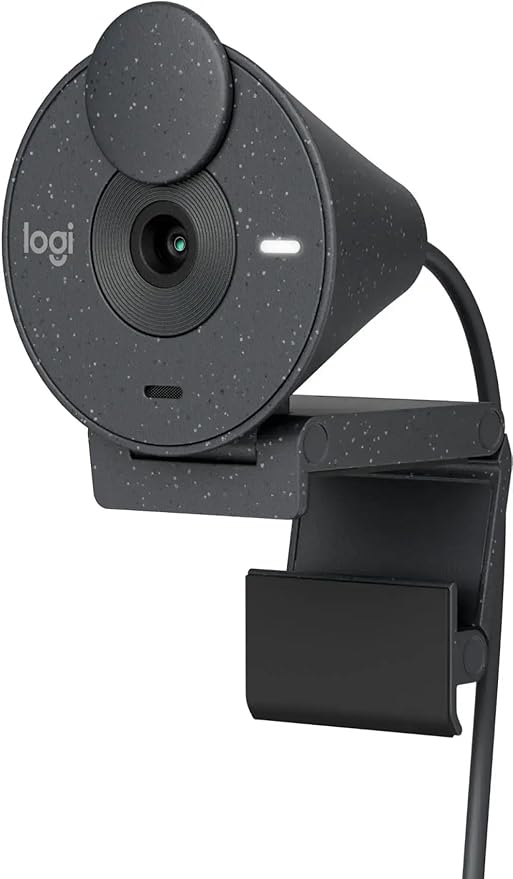
Logitech BRIO 500 Webcam (Graphite)
Logitech Brio 500 Webcam - Graphite Look and feel like your authentic self in every meeting with Brio 500. Whether the lighting in your space is too dim or too bright, Brio 500 auto-corrects so others can see you clearly. Auto-framing(1)(4) centers the camera on you, allowing you to stand and move during meetings. Noise-reducing mics make your voice sound natural. Show Mode(1) lets you include physical items in video calls by tilting the camera down to present work in progress or other objects. Enjoy a more authentic meeting experience and put your best self forward.
Logitech Brio 500 Webcam - Graphite Look and feel like your authentic self in every meeting with Brio 500. Whether the lighting in your space is too dim or too bright, Brio 500 auto-corrects so others can see you clearly. Auto-framing(1)(4) centers the camera on you, allowing you to stand and move during meetings. Noise-reducing mics make your voice sound natural. Show Mode(1) lets you include physical items in video calls by tilting the camera down to present work in progress or other objects. Enjoy a more authentic meeting experience and put your best self forward.
Logitech Brio 500 Webcam - Graphite Look and feel like your authentic self in every meeting with Brio 500. Whether the lighting in your space is too dim or too bright, Brio 500 auto-corrects so others can see you clearly. Auto-framing(1)(4) centers the camera on you, allowing you to stand and move during meetings. Noise-reducing mics make your voice sound natural. Show Mode(1) lets you include physical items in video calls by tilting the camera down to present work in progress or other objects. Enjoy a more authentic meeting experience and put your best self forward.
Logitech Brio 500 Webcam - Graphite Look and feel like your authentic self in every meeting with Brio 500. Whether the lighting in your space is too dim or too bright, Brio 500 auto-corrects so others can see you clearly. Auto-framing(1)(4) centers the camera on you, allowing you to stand and move during meetings. Noise-reducing mics make your voice sound natural. Show Mode(1) lets you include physical items in video calls by tilting the camera down to present work in progress or other objects. Enjoy a more authentic meeting experience and put your best self forward.
in 49 offers
The lowest price for Logitech BRIO 500 Webcam (Graphite) right now is $119.00 at eBay.com.au, compared across 37 retailers.
The all-time low was $59.00 on 16 Jan 2025 — today's price is 102% above the lowest ever. It has been notably cheaper before — worth setting a price alert.
Prices last updated 6 Oct 2026.
Last updated at 06/10/2026 00:00:40
Logitech Brio 500 Full HD Webcam Auto Light Correction, Auto-Framing, Show Mode, Dual Noise Reduction Mics, Webcam Privacy Cover, Works with Microsoft
Free delivery
Affiliate Disclosure: We may receive a small commission for purchases made through this link at no extra cost to you. This helps support our site. Thank you!
Logitech Brio 500 Webcam - Graphite (960-001423)
Affiliate Disclosure: We may receive a small commission for purchases made through this link at no extra cost to you. This helps support our site. Thank you!
Logitech Brio 500 FHD 1080p USB C Webcam Graphite 960 001423 - Web Cams
Delivery $13.20
Logitech Brio 500 FHD 1080p USB C Webcam Graphite 960 001423 - Web Cams
Delivery $12
Logitech Brio 500 Webcam, Graphite
Delivery $10
Logitech Brio 500 - 1080p60 Full HD Webcam (Graphite)
Delivery between 7–16 Oct $11.60
Logitech Brio 500 USB-C FHD Webcam Graphite
Delivery between Wed – Fri $15
Logitech Brio 500 FHD 1080p USB-C Webcam - Graphite (960-001423)
Delivery between Thu – Mon $10
Logitech Brio 500 1080p HDR Webcam with Show Mode - Graphite
Delivery between Wed – Mon $11.60
Logitech Brio 500 USB-C FHD Webcam - Graphite [960-001423]
originally posted on bestbuy.com
There is an endless number of webcams available these days with all sorts of features, resolutions, connectivity options, etc. Making another webcam in the sea of existing webcams makes one wonder what can let it stand out. For Logitech, it goes without saying that it's a manufacturer people will look to first before exploring other options, so when making a webcam, they have the opportunity to find that audience first.The Brio 500 is really a business/meeting focused webcam. There's nothing that makes it particularly stand out for the gaming/streaming crowd as even the framerate isn't particularly high, topping out at 30 fps at 1080p. So why choose it?It is designed as a no fuss business oriented webcam to work with meeting software like Zoom and give you an ... MoreThere is an endless number of webcams available these days with all sorts of features, resolutions, connectivity options, etc. Making another webcam in the sea of existing webcams makes one wonder what can let it stand out. For Logitech, it goes without saying that it's a manufacturer people will look to first before exploring other options, so when making a webcam, they have the opportunity to find that audience first.The Brio 500 is really a business/meeting focused webcam. There's nothing that makes it particularly stand out for the gaming/streaming crowd as even the framerate isn't particularly high, topping out at 30 fps at 1080p. So why choose it?It is designed as a no fuss business oriented webcam to work with meeting software like Zoom and give you an excellent image without having to mess around with a bunch of settings to get it right.Out of the box, plugged in and running was seconds for me. I didn't need to spend an excessive amount of time messing with exposure or anything along those lines to make the image look right. The built in light balancing functionality of the camera made the image look excellent right away.On the note of the box, it's a small rectangle unassuming box. Logitech has been leaning towards sustainable practices with their recent packaging and this is one example. It's mostly recyclable and takes up very little space. Nothing excessive here.The webcam itself comes with a 5ft permanently attached USB-C cable which I will argue is far too short for anyone using anything besides a laptop. Anyone with a desktop or PC tower is usually going to be much further away from the monitor where you would want to mount this camera than the included 5ft cable, which leaves you in a place of hunting for an extension cable of some sort. Add on the fact that it is USB-C and you're limiting your audience further unless you purchase an adapter for USB-A to USB-C. But again, this is business oriented, and most business laptops in the last 4-ish or so years tend to include at least 1 USB-C port.Other features include a flip to close lens cover, activated by rotating the circular dial on the right side of the camera itself. A 'show mode' which is essentially just a hinge under the camera to allow you to flip the camera downward to show your desk (useful if you take classes online and need to show your work to your teacher/professor/proctor), a 'micro suction' camera attachment to prevent it from falling off the monitor, and the ability to attach to a tripod by removing the attached monitor mount.All in all it's a very worthy meeting-oriented webcam. It will do for things beyond that if you understand the limitations, but if you need it for streaming services, there are better and more customizable options in the same or similar price range.I would recommend it provided you understand and use it for what it is designed for.
originally posted on logitechg.com
So I work from home multiple times per week and my job entails a lot of important meetings with consultants and managers etc and my camera on my laptop was just grainy and not suffice for reliable so had to source and alternative. Well where do I start with this amazing web cam it’s extremely easy to set up and get going even for people that may not be so tech savvy. It’s not huge but big enough to know it’s of great quality, its well built and easy for me to pop into my laptop bag wherever I go, the webcam is easy to clip onto my device using the clip and works just as well on my laptop as my PC. The lead is hard wired into the bag of the camera and then usb into your computer/laptop which is great as some have a usb into the back of the device and over time can ... MoreSo I work from home multiple times per week and my job entails a lot of important meetings with consultants and managers etc and my camera on my laptop was just grainy and not suffice for reliable so had to source and alternative. Well where do I start with this amazing web cam it’s extremely easy to set up and get going even for people that may not be so tech savvy. It’s not huge but big enough to know it’s of great quality, its well built and easy for me to pop into my laptop bag wherever I go, the webcam is easy to clip onto my device using the clip and works just as well on my laptop as my PC. The lead is hard wired into the bag of the camera and then usb into your computer/laptop which is great as some have a usb into the back of the device and over time can because worn and not great. I love that no matter what light or setting I am using the webcam in it always adjusts to ensure that I am visible and clear to my audience. I use this a lot on Microsoft reams for my virtual meetings and I’ve been very impressed with the quality of the picture, I have important documents I need to show which come up crystal clear but also can tilt the camera to the surface I want to show. The microphone is clear and never cuts out or goes off so another positive. If you need to be away from you camera, or would like some privacy for any reason there is also a shutter that comes over the camera easy to apply you just the side of the device and this pops a shutter over so you are still on the meeting and can hear and see but the audience cannot see you just a blank screen. The coverage of the camera is great, so rather than just my head/face in view I am fully in view and able to show documents in my hand and they are fully visible and clear to my audience. I can’t really state any faults with this as it’s absolutely perfect for all my needs and have had some colleagues ask the brand and type of webcam which I have happily shown. Over all would highly recommend this webcam it’s not like your standard webcams and has so much more to offer.
originally posted on bestbuy.com
The logitech, Brio, 500 is by far the best WebCam I have owned. For years we have used logitech WebCams first with WebEx, and most recently primarily with Zoom and Microsoft Teams. The image quality and automatic adjustments to light and color are the best I have seen. WebCams are quite important in business as they will make some individuals poorly present themselves during important meetings. This camera seems to quickly adjust and require little changes in back lighting and front lining to get good normal appearing skin tones and a clear picture.The microphones also work very well and these are quite important also in meetings, especially if there is more than one person on your side or you are a competing with background noise.The amount is excellent and ... MoreThe logitech, Brio, 500 is by far the best WebCam I have owned. For years we have used logitech WebCams first with WebEx, and most recently primarily with Zoom and Microsoft Teams. The image quality and automatic adjustments to light and color are the best I have seen. WebCams are quite important in business as they will make some individuals poorly present themselves during important meetings. This camera seems to quickly adjust and require little changes in back lighting and front lining to get good normal appearing skin tones and a clear picture.The microphones also work very well and these are quite important also in meetings, especially if there is more than one person on your side or you are a competing with background noise.The amount is excellent and well thought of. No matter how well design the mount having something sitting on top of your monitor or laptop screen is often quite awkward. The system provides for an attachment cradle which allows the actual WebCam to be placed and rotated as needed for the function of showing your desktop or a graph, or perhaps a printed paper more quickly then taking over the zoom meeting to share your screen.The WebCam was instantly recognized by my already installed G hub software, which I use for gaming mice. And essential feature in my opinion is a physical camera barrier for privacy.Please keep in mind that this unit requires a USB-C interface on the computer you’re using it with. Several even newer computers may only have one of these ports. If it is technically possible, it would’ve been useful for a logitech to include a USB a adapter.
| Optical Zoom | 4x |
| Frame Rate | 60fps (720p) |
| Photo Resolution | 1920 x 1080 |
| Resolution | 1080p |
| HD Format | 1080p |

Logitech Brio 500 Full HD Webcam Auto Light Correction, Auto-Framing, Show Mode, Dual Noise Reduction Mics, Webcam Privacy Cover, Works with Microsoft
Free delivery
Affiliate Disclosure: We may receive a small commission for purchases made through this link at no extra cost to you. This helps support our site. Thank you!
Logitech Brio 500 Webcam - Graphite (960-001423)
Affiliate Disclosure: We may receive a small commission for purchases made through this link at no extra cost to you. This helps support our site. Thank you!
Logitech Brio 500 FHD 1080p USB C Webcam Graphite 960 001423 - Web Cams
Delivery $13.20
Logitech Brio 500 FHD 1080p USB C Webcam Graphite 960 001423 - Web Cams
Delivery $12
Logitech Brio 500 Webcam, Graphite
Delivery $10
There is an endless number of webcams available these days with all sorts of features, resolutions, connectivity options, etc. Making another webcam in the sea of existing webcams makes one wonder what can let it stand out. For Logitech, it goes without saying that it's a manufacturer people will look to first before exploring other options, so when making a webcam, they have the opportunity to find that audience first.The Brio 500 is really a business/meeting focused webcam. There's nothing that makes it particularly stand out for the gaming/streaming crowd as even the framerate isn't particularly high, topping out at 30 fps at 1080p. So why choose it?It is designed as a no fuss business oriented webcam to work with meeting software like Zoom and give you an ... MoreThere is an endless number of webcams available these days with all sorts of features, resolutions, connectivity options, etc. Making another webcam in the sea of existing webcams makes one wonder what can let it stand out. For Logitech, it goes without saying that it's a manufacturer people will look to first before exploring other options, so when making a webcam, they have the opportunity to find that audience first.The Brio 500 is really a business/meeting focused webcam. There's nothing that makes it particularly stand out for the gaming/streaming crowd as even the framerate isn't particularly high, topping out at 30 fps at 1080p. So why choose it?It is designed as a no fuss business oriented webcam to work with meeting software like Zoom and give you an excellent image without having to mess around with a bunch of settings to get it right.Out of the box, plugged in and running was seconds for me. I didn't need to spend an excessive amount of time messing with exposure or anything along those lines to make the image look right. The built in light balancing functionality of the camera made the image look excellent right away.On the note of the box, it's a small rectangle unassuming box. Logitech has been leaning towards sustainable practices with their recent packaging and this is one example. It's mostly recyclable and takes up very little space. Nothing excessive here.The webcam itself comes with a 5ft permanently attached USB-C cable which I will argue is far too short for anyone using anything besides a laptop. Anyone with a desktop or PC tower is usually going to be much further away from the monitor where you would want to mount this camera than the included 5ft cable, which leaves you in a place of hunting for an extension cable of some sort. Add on the fact that it is USB-C and you're limiting your audience further unless you purchase an adapter for USB-A to USB-C. But again, this is business oriented, and most business laptops in the last 4-ish or so years tend to include at least 1 USB-C port.Other features include a flip to close lens cover, activated by rotating the circular dial on the right side of the camera itself. A 'show mode' which is essentially just a hinge under the camera to allow you to flip the camera downward to show your desk (useful if you take classes online and need to show your work to your teacher/professor/proctor), a 'micro suction' camera attachment to prevent it from falling off the monitor, and the ability to attach to a tripod by removing the attached monitor mount.All in all it's a very worthy meeting-oriented webcam. It will do for things beyond that if you understand the limitations, but if you need it for streaming services, there are better and more customizable options in the same or similar price range.I would recommend it provided you understand and use it for what it is designed for.
So I work from home multiple times per week and my job entails a lot of important meetings with consultants and managers etc and my camera on my laptop was just grainy and not suffice for reliable so had to source and alternative. Well where do I start with this amazing web cam it’s extremely easy to set up and get going even for people that may not be so tech savvy. It’s not huge but big enough to know it’s of great quality, its well built and easy for me to pop into my laptop bag wherever I go, the webcam is easy to clip onto my device using the clip and works just as well on my laptop as my PC. The lead is hard wired into the bag of the camera and then usb into your computer/laptop which is great as some have a usb into the back of the device and over time can ... MoreSo I work from home multiple times per week and my job entails a lot of important meetings with consultants and managers etc and my camera on my laptop was just grainy and not suffice for reliable so had to source and alternative. Well where do I start with this amazing web cam it’s extremely easy to set up and get going even for people that may not be so tech savvy. It’s not huge but big enough to know it’s of great quality, its well built and easy for me to pop into my laptop bag wherever I go, the webcam is easy to clip onto my device using the clip and works just as well on my laptop as my PC. The lead is hard wired into the bag of the camera and then usb into your computer/laptop which is great as some have a usb into the back of the device and over time can because worn and not great. I love that no matter what light or setting I am using the webcam in it always adjusts to ensure that I am visible and clear to my audience. I use this a lot on Microsoft reams for my virtual meetings and I’ve been very impressed with the quality of the picture, I have important documents I need to show which come up crystal clear but also can tilt the camera to the surface I want to show. The microphone is clear and never cuts out or goes off so another positive. If you need to be away from you camera, or would like some privacy for any reason there is also a shutter that comes over the camera easy to apply you just the side of the device and this pops a shutter over so you are still on the meeting and can hear and see but the audience cannot see you just a blank screen. The coverage of the camera is great, so rather than just my head/face in view I am fully in view and able to show documents in my hand and they are fully visible and clear to my audience. I can’t really state any faults with this as it’s absolutely perfect for all my needs and have had some colleagues ask the brand and type of webcam which I have happily shown. Over all would highly recommend this webcam it’s not like your standard webcams and has so much more to offer.
The logitech, Brio, 500 is by far the best WebCam I have owned. For years we have used logitech WebCams first with WebEx, and most recently primarily with Zoom and Microsoft Teams. The image quality and automatic adjustments to light and color are the best I have seen. WebCams are quite important in business as they will make some individuals poorly present themselves during important meetings. This camera seems to quickly adjust and require little changes in back lighting and front lining to get good normal appearing skin tones and a clear picture.The microphones also work very well and these are quite important also in meetings, especially if there is more than one person on your side or you are a competing with background noise.The amount is excellent and ... MoreThe logitech, Brio, 500 is by far the best WebCam I have owned. For years we have used logitech WebCams first with WebEx, and most recently primarily with Zoom and Microsoft Teams. The image quality and automatic adjustments to light and color are the best I have seen. WebCams are quite important in business as they will make some individuals poorly present themselves during important meetings. This camera seems to quickly adjust and require little changes in back lighting and front lining to get good normal appearing skin tones and a clear picture.The microphones also work very well and these are quite important also in meetings, especially if there is more than one person on your side or you are a competing with background noise.The amount is excellent and well thought of. No matter how well design the mount having something sitting on top of your monitor or laptop screen is often quite awkward. The system provides for an attachment cradle which allows the actual WebCam to be placed and rotated as needed for the function of showing your desktop or a graph, or perhaps a printed paper more quickly then taking over the zoom meeting to share your screen.The WebCam was instantly recognized by my already installed G hub software, which I use for gaming mice. And essential feature in my opinion is a physical camera barrier for privacy.Please keep in mind that this unit requires a USB-C interface on the computer you’re using it with. Several even newer computers may only have one of these ports. If it is technically possible, it would’ve been useful for a logitech to include a USB a adapter.
Webcams haven’t advanced much in the last few years, so I was glad to see Logitech release a new Brio with updated specs. The Brio 500 promises 1080p/30fps and 720p/60fps with enhanced video and picture quality. So, let’s review this webcam!The Logitech Brio 500 is a good webcam, but not great. The omission of a USB-C to USB-A adapter is sad, but I understand that more PCs and laptops are coming with USB-C ports. The privacy cover is intuitive and easy to use, the mount is secure and the camera is compatible with a tripod if you prefer that setup. Logitech software is a little resource-heavy but works as expected to provide you with the options you’ll need for streaming and meetings.The Brio 500 performs decently in low light but shines when the lighting is good ... MoreWebcams haven’t advanced much in the last few years, so I was glad to see Logitech release a new Brio with updated specs. The Brio 500 promises 1080p/30fps and 720p/60fps with enhanced video and picture quality. So, let’s review this webcam!The Logitech Brio 500 is a good webcam, but not great. The omission of a USB-C to USB-A adapter is sad, but I understand that more PCs and laptops are coming with USB-C ports. The privacy cover is intuitive and easy to use, the mount is secure and the camera is compatible with a tripod if you prefer that setup. Logitech software is a little resource-heavy but works as expected to provide you with the options you’ll need for streaming and meetings.The Brio 500 performs decently in low light but shines when the lighting is good and when the camera is set to 720p/60fps. The 1080p setting is a little clearer, but after streaming at 60fps, going back to 30fps is very difficult. The smoothness that 60fps brings to your stream is great and I’m glad both options are included, unlike some of Logitech’s other cameras.Most people will be happy with the build quality and overall video quality of the Brio 500 for the price paid. This camera should be enough for any entry-level streaming and more than adequate for business purposes with its wide-angle lens and being able to tilt the camera down to show people your desk and what you’re working on. Logitech software adds the ability to customize just about any color settings, be aware that the performance and color suffer when this camera is in a low-light environment. Logitech tries to correct this with its RightLight 4 technology, but the frame rate seems to suffer when compensating for the low light.If you’re looking for an affordable and decent-performing webcam for everyday streaming or business meetings, then the Brio 500 will fit the bill. If you’re a semi-pro or a professional streamer, you’ll want to spend a little more and look elsewhere for better visual quality and performance.
## SetupIt’s important to note that the built-in cord for the Brio 500 webcam is USB-C. If your computer has a standard USB-A (rectangular) port, you’ll need to use a USB-C to USB-A adapter (not included). And if you’re purchasing an adapter, make sure it supports both power and video (data), as some adapters only support power.The Logitech Brio 500 comes with a monitor mount that’s meant for thin laptop or LCD monitors. The mount has a reusable microsuction pad that can be made sticky again with a little mild soap and water.The webcam itself attaches magnetically to the mount, making it easy to mount and unmount quickly. The dial on the side of the webcam can be turned to engage the privacy cover for times when you want to be sure the webcam is off.If your ... More## SetupIt’s important to note that the built-in cord for the Brio 500 webcam is USB-C. If your computer has a standard USB-A (rectangular) port, you’ll need to use a USB-C to USB-A adapter (not included). And if you’re purchasing an adapter, make sure it supports both power and video (data), as some adapters only support power.The Logitech Brio 500 comes with a monitor mount that’s meant for thin laptop or LCD monitors. The mount has a reusable microsuction pad that can be made sticky again with a little mild soap and water.The webcam itself attaches magnetically to the mount, making it easy to mount and unmount quickly. The dial on the side of the webcam can be turned to engage the privacy cover for times when you want to be sure the webcam is off.If your work computer is locked down like mine, you probably won’t be able to install the Logi Tune software. The Tune software allows for some advanced features, such as “RightSight” which can track your face and frame you in the center of the picture. It also aggregates your meeting links into the software. However, the webcam can still perform its basic functions without admin rights.The one thing that bugs me is that the webcam has a speckled design that keeps making me think it is dusty.## PerformanceThe issue with many web cams I’ve used is that they do not have a wide-angled lens, so my face appears zoomed in, focused on my nostrils. Thankfully, the Logitech Brio 500 is more zoomed out, so even if the webcam is within a few feet of me, I still appear to be sitting back from it and I don’t appear so close.The webcam performs well for calls and seems to keep my face well lit and focused in situations where my laptop’s built-in camera fails. I also like the physical privacy cover that is easy to flip up when I’m done and it’s a light gray color and is easy to see when it is engaged.## OverallThe Logitech Brio 500 has a wide-angled lens and does a very good job keeping my face focused, handling varying lighting conditions well. It’s important to note that the attached cable is USB-C and an “regular” USB-A adapter is not included with the unit. The physical privacy cover is easy to use and easily visible when engaged.
Since so many people started working from home, webcams have become borderline essential equipment again. Unfortunately, webcam designs haven’t really kept up with changing designs in tech. All through the pandemic I’ve been using a venerable C920 from Logitech. And it worked… mostly. The visuals it produced were still good but it leaned over a bit too far into my display area and had trouble gripping to my curved monitor, leading to it frequently falling forward onto my desk if my dog bumped into something and made it shake. I’d been thinking about possible upgrades for a few months when the Brio 500 caught my eye, and I decided to give it a shot.And oh my, what a difference ten years can make.The brio is a bit chunkier than a lot of the previous webcam designs ... MoreSince so many people started working from home, webcams have become borderline essential equipment again. Unfortunately, webcam designs haven’t really kept up with changing designs in tech. All through the pandemic I’ve been using a venerable C920 from Logitech. And it worked… mostly. The visuals it produced were still good but it leaned over a bit too far into my display area and had trouble gripping to my curved monitor, leading to it frequently falling forward onto my desk if my dog bumped into something and made it shake. I’d been thinking about possible upgrades for a few months when the Brio 500 caught my eye, and I decided to give it a shot.And oh my, what a difference ten years can make.The brio is a bit chunkier than a lot of the previous webcam designs you might be used to. The cylindrical body adds a lot of volume, and there are significantly more moving parts than any webcam I’d previously had experience with. But with that comes a lot of much needed flexibility. The stand feels almost infinitely adjustable compared to what I got with the C920, and can affix to a monitor either via friction or an adhesive pad that does an admirable job of holding it to the back of my curved monitor. The mounting point to the camera itself can flip 180 degrees if needed, intended to allow you to quickly switch to showing documents on your desktop during a video conference, and when you don’t need it you can just fold the whole thing back behind your screen to keep it out of the way. There’s also built in strain relief since the camera itself is held by a magnet rather than permanently affixed, so you don’t need to worry about a cable snag pulling it off your monitor (or pulling the monitor off the desk.) Which is all to say that the thing finally stays in place and out of the way on my curved monitor, something I imagine a lot of people with similar hardware can appreciate.The stand isn’t all the camera has going for it though. Image quality on this thing is great by webcam standards too. The HD image it produces is crisp and has surprisingly good color accuracy (though, it must be pointed out, still inferior to a proper handheld camera.) It comes equipped with a wide angle lens with a ninety degree field of view, which means it can easily capture three to four adult in the frame. This makes it ideal for home use where you’re likely to have people crowding around the camera or office conference rooms. Of course if you’re like me and only plan to use it for solo calls there are options to change that. Using either the Logitech Tune or GHub apps you can restrict the FOV to something a little tighter via digital zoom, as well as manually configuring the image to match your preferences. Audio is provided by an array mic which offers decent noise isolation, though I suspect most will prefer to stick to headsets if they have the option. And the rotating privacy screen does a good job of blocking visuals – though it doesn’t completely cut the hardware connection.There are a few downsides to the Brio 500 I should mention though. First up is that unlike some of the other cameras in the Brio line it does not come with the IR camera needed for it to work for Windows Hello facial recognition. I also found that the magnetic coupler on the camera, which doubles as the plug for the integrated threaded mount, tends to unscrew at the drop of a hat. If I need to turn the camera to the side at all it tends to start to unscrew, making it easier to just pull the whole thing off the magnet and clip it back on at the right angle. Also it should be noted that this particular model only works with a USB-C connection, which still tend to be a bit sparce on most desktops.Overall I’d recommend the Brio 500 for anyone working from home with an unusually shaped monitor, hosting video calls with the whole family, or looking for a good video conferencing solution for smaller conference rooms.
The Logitech Brio 500 is good web camera with some unique features that can up your game when it comes to your next Teams meeting or video chat. The physical camera and boxing come in a carbon neutral packaging if you care about that sort of thing and the camera itself appears to be made of recycled plastic, since it has little imperfection flakes in it. Resolution on the camera is 1080P at 30 FPS, but if you lower it down to 720P, you can get 60 FPS and it has a 4 MP camera sensor. The camera connects to the pc via a USB Type C connector and the cable is a bit short in my opinion at about 4 feet or so.Installation was very easy and if you install the Logitech Tune software, you can change the settings on the device and explore the multiple features it offers. The ... MoreThe Logitech Brio 500 is good web camera with some unique features that can up your game when it comes to your next Teams meeting or video chat. The physical camera and boxing come in a carbon neutral packaging if you care about that sort of thing and the camera itself appears to be made of recycled plastic, since it has little imperfection flakes in it. Resolution on the camera is 1080P at 30 FPS, but if you lower it down to 720P, you can get 60 FPS and it has a 4 MP camera sensor. The camera connects to the pc via a USB Type C connector and the cable is a bit short in my opinion at about 4 feet or so.Installation was very easy and if you install the Logitech Tune software, you can change the settings on the device and explore the multiple features it offers. The main feature is what Logitech calls Rightsight and it currently is in Beta mode and can track your movements around the room and the camera will keep you focused. I found this to be a neat feature and it works pretty well, but you do notice some digital artifacts when it moves at times, and I look forward to the full version being even better. Show mode, is another big feature, this mode allows you to flip the camera straight down (assuming its mounts on the top of your monitor) and focus on something you want to present on your desktop. It will auto adjust the image so that it is oriented correctly for your audience. The software also includes settings to adjust your lighting, zoom, field of view (90/78/65), a wide range of preset filters such as Bright, blossom, film, etc. There are also the expected settings for color balance, tone, etc. that is in there. However, I found that the camera was able to self-adjust the light to be just about perfect no matter what situation I was in thanks to the RightLight 4 technology that this camera has.Video and sound are very good on this camera. The dual microphones that are built in have noise reduction properties that can help drown out the background noise. I did test this out with my two young kids in the background and it was able to suppress them a great deal, but the other party could still hear them, not perfect, but really good in my opinion.Using this camera during your video meetings will definitely give you the professional look and sound and make your fellow attendees jealous as you confidently walk around the room while being framed in the shot and sound great!
This mounted camera is definitely an upgrade for my work space. Working for a global company with facilities across the world has made video calls an every day thing, so having a good webcam is an absolute must for me, I just hadn't gotten around to trying anything different. I've gravitated towards Logitech for a variety of things including keyboards, mice, and speakers in the past and always loved the quality of the products.Right out of the box, this comes already put together with an adhesive strip to mount to the screen. The privacy screen is closed, turn the knob on the side to open and reveal the lens. Plug the webcam USB C cord into your computer then download the software and you are ready for your next meeting!I would have to say that the best feature ... MoreThis mounted camera is definitely an upgrade for my work space. Working for a global company with facilities across the world has made video calls an every day thing, so having a good webcam is an absolute must for me, I just hadn't gotten around to trying anything different. I've gravitated towards Logitech for a variety of things including keyboards, mice, and speakers in the past and always loved the quality of the products.Right out of the box, this comes already put together with an adhesive strip to mount to the screen. The privacy screen is closed, turn the knob on the side to open and reveal the lens. Plug the webcam USB C cord into your computer then download the software and you are ready for your next meeting!I would have to say that the best feature of this is the RightSight auto-framing. Toggle this option in the software and the webcam will focus on you even if you are moving around. This feature is amazingly accurate! It struggled a little in really low lighting, but that is to be expected. There are several other features and filters to apply to provide the desired lighting, color, sharpness, etc.When I'm not working in the finance world, you can find me at home with my hobbies in various arts and crafts. With the Show Mode on and having the webcam tilted downward to the desk, the camera will flip the camera to present the items on your desk like a sketch or blueprint. Tilt back up and the camera flips back upright to return to you. Though I'll use this option more for my personal hobbies, this was helpful for my co-workers to see a reference sheet that I had on hand that related to our discussion without having to run to a scanner to email to everyone in the meeting.High quality resolution that promotes a professional image and makes virtual conversation feel iterative and lifelike (or so one of my co-workers said when asking what new camera I was using). Sound and mic are decent, none of my co-workers seemed to be able to hear things going on around me like they usually would if I wasn't wearing a headset. The sound never cut out while another was talking over me or me talking over them as if I was wearing a headset.Overall I am very satisfied with the quality of this product and would recommend it.
Logitech keeps making better and better peripherals - though they do take some mis-steps with software (more on that in a minute). I've been a fan of their peripherals for my computers for well over 20 years and this is easily the best webcam from Logitech I've ever used - and possibly from any company.This webcam is pretty much ready to use out of the box (provided you have a computer with a USB-C port, as that's how it connects - you can get a USB-C to USB-A converter and it will work fine (I've tried that too) but you have to buy it separately. Once connected, the camera can be used with any normal software - built in camera functions, Zoom/Webex/Teams/etc. - or you can install the Logitech software for it to fiddle with options/advanced features. I found it ... MoreLogitech keeps making better and better peripherals - though they do take some mis-steps with software (more on that in a minute). I've been a fan of their peripherals for my computers for well over 20 years and this is easily the best webcam from Logitech I've ever used - and possibly from any company.This webcam is pretty much ready to use out of the box (provided you have a computer with a USB-C port, as that's how it connects - you can get a USB-C to USB-A converter and it will work fine (I've tried that too) but you have to buy it separately. Once connected, the camera can be used with any normal software - built in camera functions, Zoom/Webex/Teams/etc. - or you can install the Logitech software for it to fiddle with options/advanced features. I found it worked well and produced a good picture right out of the box. It was especially impressive at how it deals with low light and backlit subjects - my desk is near a window and I'm often dim/backlit on other cameras, even high end ones, but this one compensated automatically which is wonderful. Clarity and overall picture is good with a crisp and clear video feed. The built in privacy screen is a nice value add and better than the little cheap flip up covers. The microphone is good and picks up clear sound though it's nothing super special or out of the ordinary. The only qualm I have about this otherwise wonderful device is that Logitech has added yet ANOTHER software package (Logitech Tune) to configure the camera. Couldn't you just have added it to Logitech Options? I already have that for my other peripherals - fewer software packages is better...While it's not the cheapest webcam on the market, it's also FAR from the most expensive you can get (even from Logitech) and the feature set here really does justify the price. To that end, I can highly recommend this webcam - particularly if you're working from home or otherwise need to spend A LOT of time on a camera and looking your best. Keep at it Logitech (but can you streamline the software a bit!)
I was looking to upgrade my older Logitech C920 camera, but the Logitech Brio 4k webcam seemed like it was overkill for what I was looking for, so I was happy to see Logitech made the Brio 500. Out of the box, it's your basic plug and play webcam situation.Something to be aware of is this webcam requires a USB-C port. My monitor has a built in USB hub that I plug all my accessories into so I can swap my personal and work laptop at my desk. So I resorted to using a USB-C to USB-A adapter because the monitor doesn't have a USB-C input port. It worked without a hitch and I was up and running in a few minutes.The Brio 500 works for both Windows and Mac devices plug-&-play out of the box, but if you want some additional customization, you can download the Logi Tune ... MoreI was looking to upgrade my older Logitech C920 camera, but the Logitech Brio 4k webcam seemed like it was overkill for what I was looking for, so I was happy to see Logitech made the Brio 500. Out of the box, it's your basic plug and play webcam situation.Something to be aware of is this webcam requires a USB-C port. My monitor has a built in USB hub that I plug all my accessories into so I can swap my personal and work laptop at my desk. So I resorted to using a USB-C to USB-A adapter because the monitor doesn't have a USB-C input port. It worked without a hitch and I was up and running in a few minutes.The Brio 500 works for both Windows and Mac devices plug-&-play out of the box, but if you want some additional customization, you can download the Logi Tune software. This is how you manage firmware updates for the camera, in fact, there was one required out of the box as soon as I set it up. The Logi Tune software also allows you to customize color temperatures, zoom, etc. It did not allow me to adjust the frame rate. The camera is supposed to support 1080p at 30 FPS and 720p at 60 FPS, but there was no way to toggle that in the Tune app.The Brio has 2 cool new hardware features that set it apart from my older C920. First, it has a built-in privacy shutter that you can open and close, which is a nice privacy / security feature. Also, the camera attaches to the base with a magnetic connection, so you can pivot the camera down to the desk. It plays a bit like what Apple described for their new Continuity Camera feature, so you can pivot the camera down to the desk, and the camera automatically rotates the image so you can share what's on your desk without it looking upside down to anyone you're sharing / broadcasting to.There's also a built-in microphone, but I have a dedicated USB microphone that I use, so I can't speak to that. All in all, I really like the camera, the video quality is great for a webcam and is great for work Zoom calls as well as recording / streaming. Since most internet video is compressed in order to stream, the quality of 1080p video still looks great.
| Optical Zoom | 4x |
| Frame Rate | 60fps (720p) |
| Photo Resolution | 1920 x 1080 |
| Resolution | 1080p |
| HD Format | 1080p |